



A construction contracting business with no in-house development team built FieldWeek. The company runs multiple active jobsites, and the manager was spending hours each week coordinating assignments over calls and texts while crew members had no single place to check where they needed to be next. Off-the-shelf project management tools did not fit the way crews actually work, and custom development was out of budget.
Using Emergent's construction scheduling app builder, the team built FieldWeek, a two-view planner that gives the manager a weekly dispatch grid and gives each crew member a personal daily schedule they can update from the field. The entire product went from concept to a live, deployed application in under an hour.
Challenges
Dispatch runs on group texts and phone calls
Most small to mid-size construction contractors dispatch their crew the same way they have for years: a group text the night before, a phone call in the morning, or a whiteboard in the office. The manager knows who needs to be where, but the crew often does not, at least not until someone asks. When a job runs long or a priority changes mid-week, the update has to be communicated manually, one person at a time. The information exists in the manager's head, and getting it out to four or five crew members in real time is a daily friction point that burns time without producing anything.
Crew has nowhere to check their schedule
From the crew's perspective, the problem is the inverse. A crew member finishing a job at one location does not have a quick way to confirm what comes next, where it is, or what time to arrive. They call the manager, the manager may be on another call, and twenty minutes disappear. Multiply that across a full crew with two to three jobsite transitions per day, and the downtime is significant. What the crew needs is a personal schedule view, stripped down to only the jobs assigned to them, visible on any device, with the address and time right there.
Generic project tools do not fit crew workflows
Construction contractors have tried Trello, Asana, Google Calendar, and every shared spreadsheet in between. The problem is not a lack of tools. It is that none of them are built for how crews actually work. A crew member on a jobsite does not want to navigate a project board with swimlanes, labels, and notification settings. They want to open a page, see the job title, the start time, the location, and a button to mark it done. The manager, meanwhile, needs a single weekly view of every crew member and every job, not a list of tasks sorted by due date.
No feedback loop from the field to the office
When a crew member finishes a job, the manager finds out through a phone call, a text, or by noticing the crew has moved on. There is no structured way for the person on site to mark a job as in progress or complete and have that status reflected instantly in the manager's schedule view. The result is that the manager's picture of the week is always slightly out of date, and re-planning around delays or early completions requires a manual check-in with each person.
Solution
Weekly dispatch board for the full crew
The manager console is a single weekly grid. Crew down the left, days across the top.

Every job dispatched that week is visible in one view, so the manager can spot open capacity, double-bookings, and high-priority work without switching between tabs or tools.
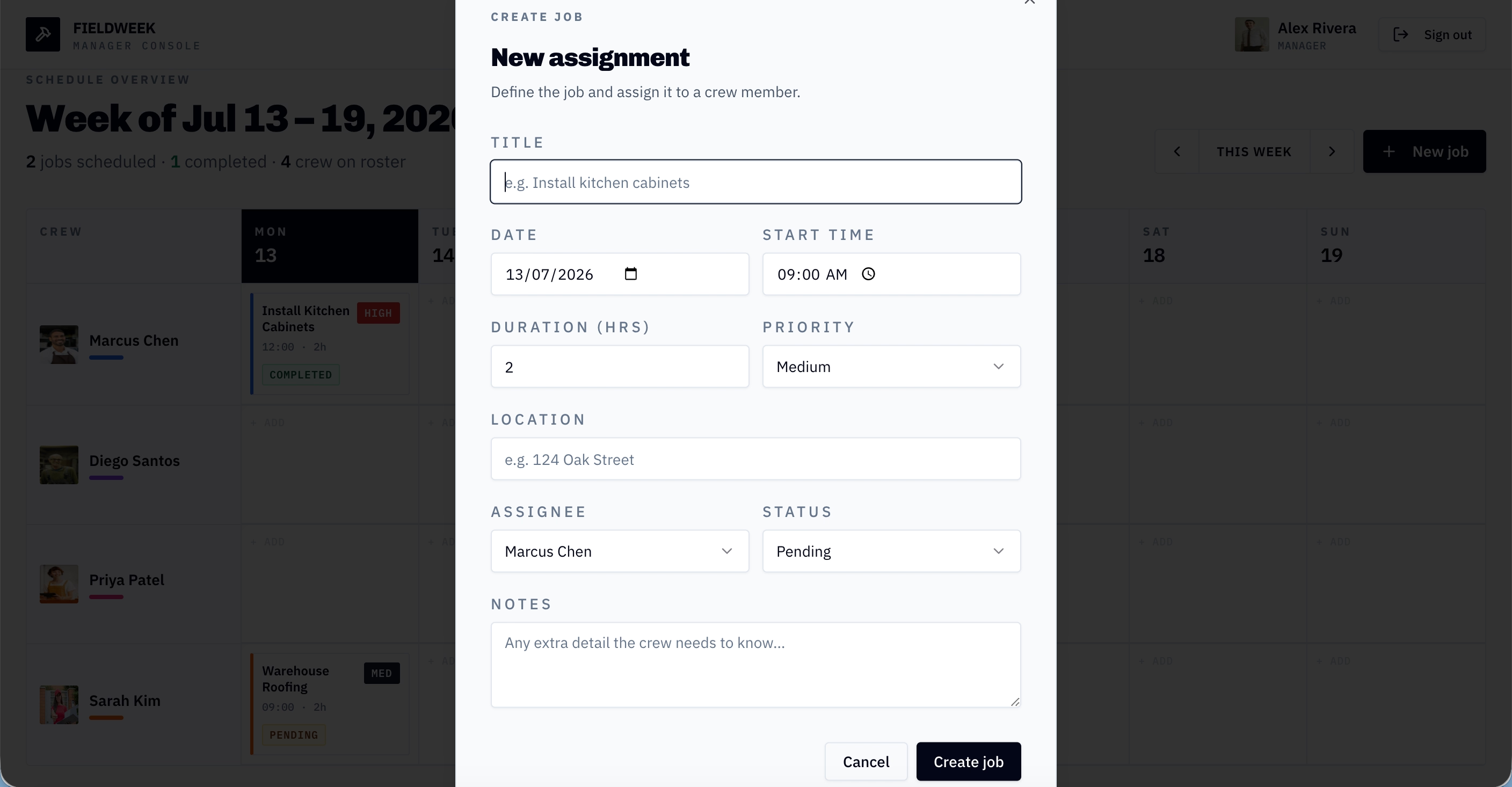
Dispatching a new job takes one form. The manager enters the job title, picks a date and start time, sets duration and priority, enters the jobsite address, and assigns it to a crew member from the roster. What matters is that every detail the crew needs to show up prepared, the address, the time window, and any special notes, is captured at the point of dispatch rather than passed along in a follow-up call.
Personal daily schedule for each crew member
Crew members log in and see only their own assignments, broken out day by day. The manager's full grid, other people's jobs, and the ability to create or reassign work are all hidden.
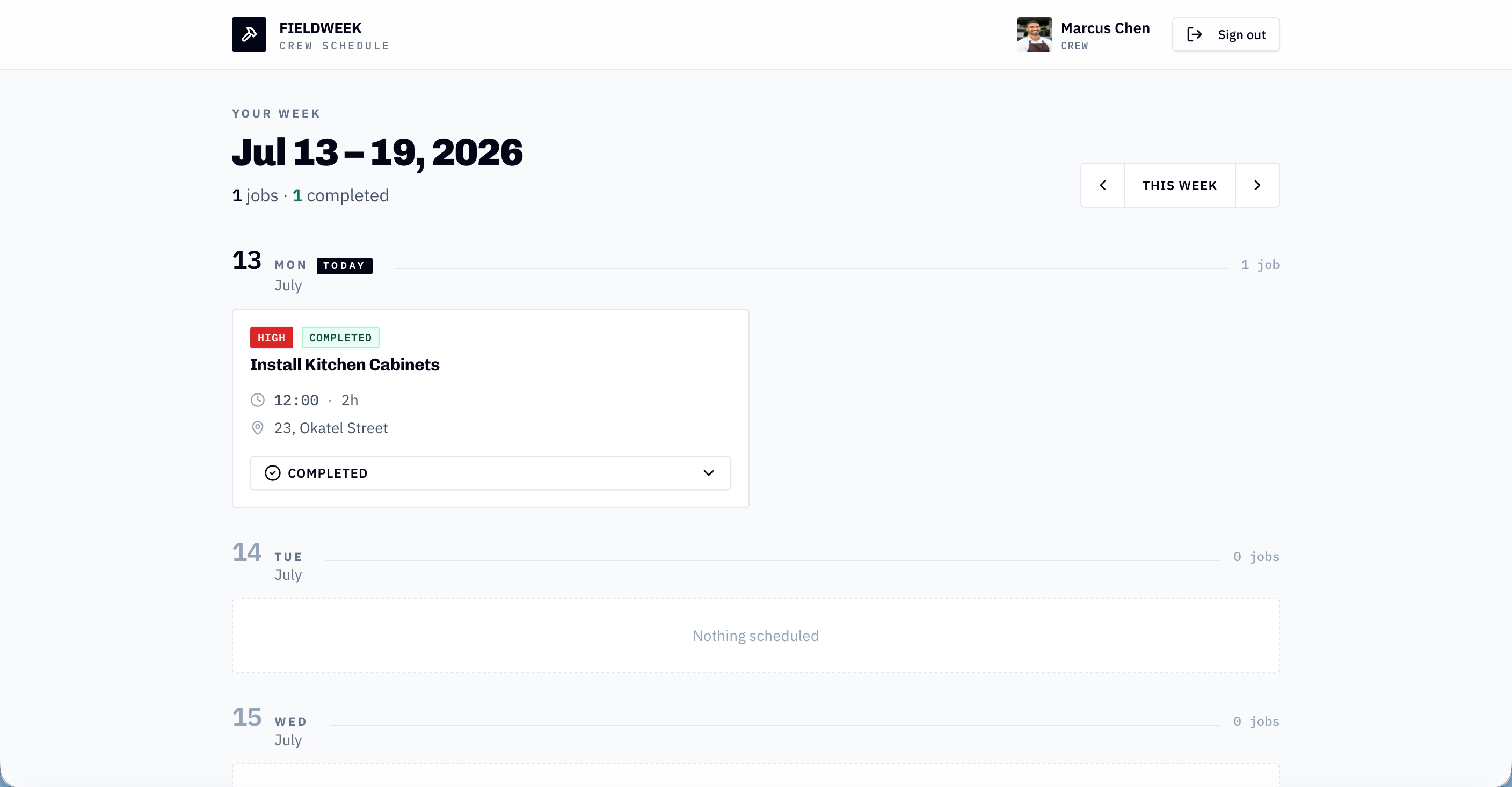
This is intentional. A crew member between jobsites needs to answer one question: where do I go next? FieldWeek puts the job title, start time, duration, and address on a single card, and nothing else.
Field-to-office status updates
The other half of the dispatch problem is knowing when work is done. Each crew member can update their job status directly from the jobsite, moving it from Pending to In progress to Completed.
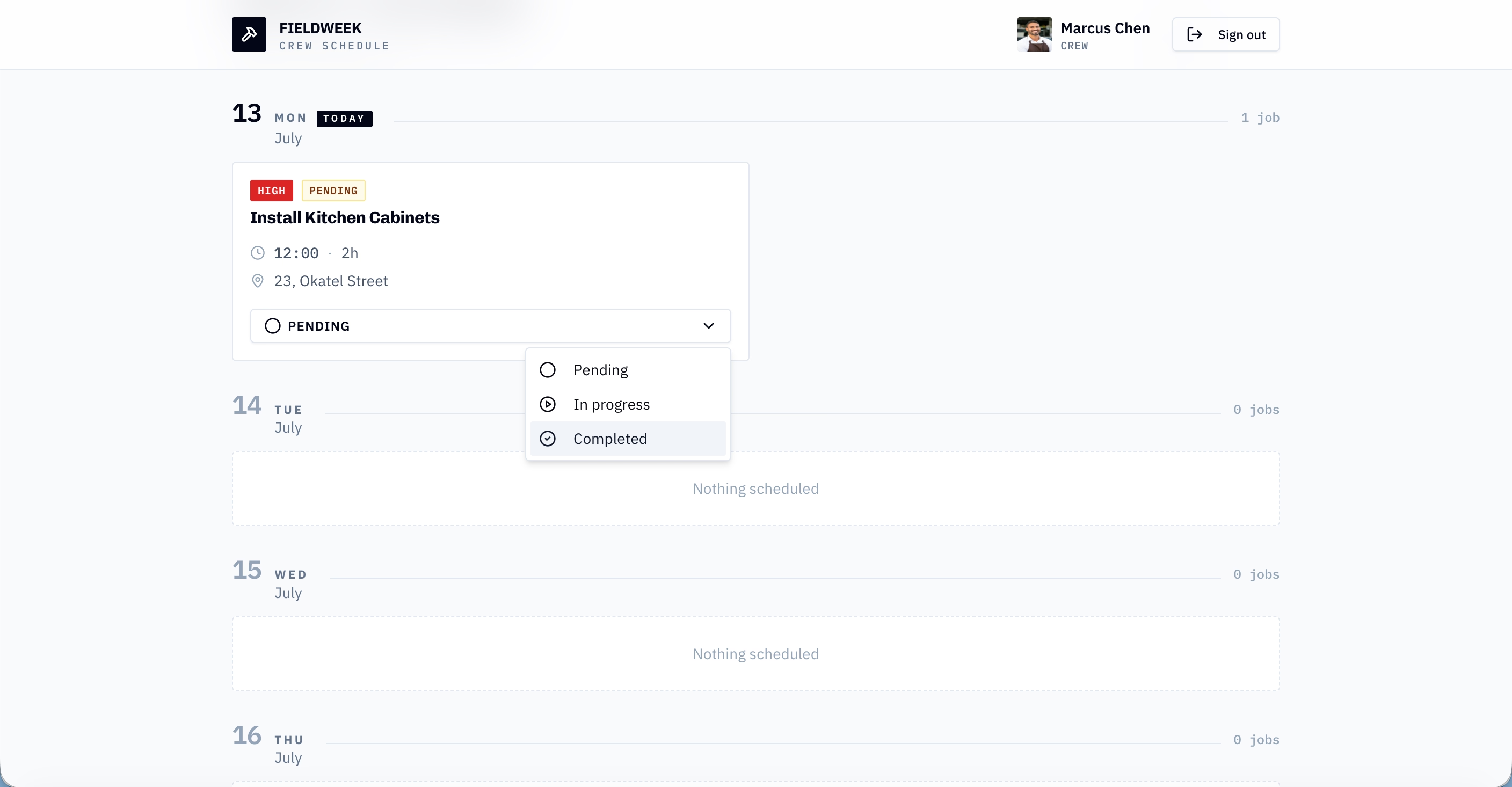
That change shows up immediately in the manager's weekly grid. The manager no longer needs to call each crew member to find out whether a job is finished before re-planning the rest of the day. The crew controls the progress, and the office sees it in real time.
Outcomes
- 60% reduction in daily scheduling calls between the manager and crew, freeing up 3 hours per week previously spent on morning check-ins and mid-day coordination
- 40% fewer missed or late jobsite arrivals per week, with crew members accessing their start times, durations, and addresses directly from FieldWeek instead of relying on verbal instructions
- 15 minutes saved per crew member per day in jobsite transition downtime, previously spent calling or texting the manager for next-job details
Conclusion
Before FieldWeek, this contractor's weekly dispatch ran on group texts, morning phone calls, and a manager who kept the whole schedule in their head. That cost the business 3 hours a week in coordination overhead, led to late jobsite arrivals, and meant no one knew a job was done until someone called in. FieldWeek closed that gap in under an hour. The manager now plans the week in a single grid, dispatches jobs with every detail attached, and watches status updates come back from the field in real time. The tool was not built by a software team. It was built by the people who run the jobs, because they understood the problem well enough to describe exactly what they needed.
Every contracting business has a version of this problem, a scheduling gap, a quoting bottleneck, a client communication workflow that runs on too many phone calls. The difference between living with it and solving it is whether you can turn what you already know into a working tool. Emergent lets you do that in a single session, no developers, no months of back-and-forth, no six-figure software budget. Describe the tool your business needs, and deploy it the same day.
Emergent turns your idea into a full-stack web or mobile app, no coding required.
 No coding required
- Web & mobile apps
- Deploys instantly

on Emergent today




