



I run a high-volume content operation, and over the past year I've leaned on a different AI personal assistant for business every time my inbox, calendar, or research piled up. These are the five I actually keep paying for.
5 Best AI Personal Assistants for Business: Quick Comparison
Here's how the five stack up before I get into how I use each one.
| Tool | Best For | Standout Strength | Starting Price | Free Option |
|---|---|---|---|---|
| Lindy | Running your inbox and schedule by text | Texts you proactively, acts across your apps | From $49.99/month | 7-day trial |
| Wingman (Emergent) | Autonomous tasks inside your messaging apps | Lives in WhatsApp, Telegram, and iMessage | From $20/month | Free tier (10 credits) |
| Superhuman | Inbox management | Fastest email client, keyboard-first | $33/month (annual)* | Limited (Mail needs Business) |
| ChatGPT | Best overall AI personal assistant | Widest toolset for everyday work | $8/month (Go) | Yes (ads in US) |
| Notion AI | Managing your docs and knowledge | Answers grounded in your own workspace | $20/user/month (annual)* | Limited AI trial |
*Superhuman and Notion prices reflect the cheapest plan that includes the assistant features reviewed here, since their lower tiers leave those features out.
How I Researched and Tested These AI Assistants
I picked these five from the dozen or so assistants I’ve paid for or tested over the past year across client work. I judged them based on the things that decide whether a tool becomes part of my workflow or just gets forgotten after the first trial.
Here’s what I looked for before putting any tool on the list:
- Daily delegation: Does it take work off my plate, or does it become another tool I have to manage?
- Setup friction: How long does it take before it becomes useful, and how much hand-holding does it need after that?
- Integrations: Does it connect well with the email, calendar, CRM, and messaging apps I already use every day?
- Proactivity: Whether it comes to me when something matters, or sits there waiting to be asked.
- Pricing and value: What the paid plans cost against the hours they hand back.
After using them in real client work, it became pretty clear which assistants could handle the load and which ones only looked good in a demo.
1. Lindy: Best for Running Your Inbox and Schedule by Text

What it does: Lindy is an AI executive assistant you can text like a human virtual assistant (VA). It connects to your inbox, calendar, meetings, CRM, and work apps, then helps with the admin work around them.
Best for: Founders, operators, and small teams who spend too much of their day in email, scheduling, follow-ups, meeting prep, and CRM updates.
Most assistants still feel like another app I have to open. Lindy is different because it meets me where I already am: my phone and my inbox.
I can text it in plain English with tasks like “triage my inbox,” “prep me for my 2 pm,” or “follow up with anyone who went quiet on the draft thread,” and it can pull context from the tools I’ve connected instead of making me gather everything myself.
The most useful part for client work is the meeting prep. Before a call, it can surface the past thread, open action items, and the context I would normally scramble to find five minutes before joining.
Its email drafting follows the tone and examples you give it, so I was editing replies instead of rewriting them from scratch.
Key Features
- Text-first interface: You run everything from iMessage or SMS, so there's no new app to learn.
- Acts across your stack: Lindy reads and drafts email, books and reschedules meetings, and updates your CRM after a call, all from one instruction.
- Proactive nudges: It texts you before meetings and flags threads that need a reply, instead of waiting to be asked.
- Voice matching: Drafts follow the tone and phrasing you give it, so replies need less rewriting.
- Hundreds of integrations: Gmail, Outlook, Google Calendar, Slack, Notion, HubSpot, Salesforce, and more.
Pros and Cons
Pros:
- Acts on tasks end to end instead of stopping at a draft you still have to send.
- Proactive texts mean prep and follow-ups happen without me remembering to ask.
- Strong security posture for a tool with inbox access (SOC 2 Type II and GDPR compliance, with HIPAA and a signed BAA available on Enterprise).
Cons:
- Credit-based pricing makes monthly cost hard to predict once usage climbs.
- Several users report surprise charges after the trial and a cancellation flow that isn't fully self-serve.
What Users Say
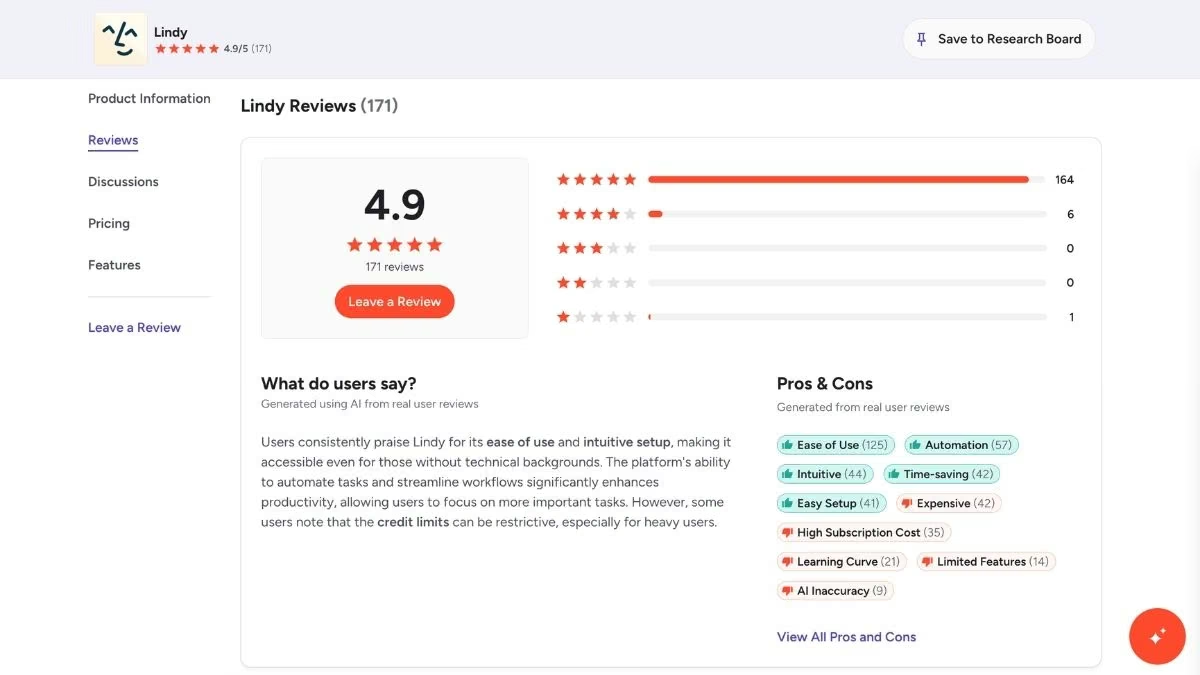
On G2, the praise clusters around how fast it is to get a workflow running and how little babysitting it needs day to day.
On Trustpilot, the complaints center on billing rather than the product. Reviewers flag credits burning faster than expected and unexpected charges after the free trial ends.
Pricing
Lindy runs on credit-based, usage-tiered plans with a seven-day free trial and no permanent free tier. Paid plans start at $49.99/month for Plus, $99.99/month for Pro, and $199.99/month for Max, with Enterprise priced on request. Check the official pricing page before you commit, since plan limits change.
Bottom Line
I’d point most busy operators to Lindy first because it comes closest to feeling like an assistant that runs the admin for you, rather than one more tool you operate.
The only thing I’d watch is usage. If your workflows are messy, frequent, or hard to predict, keep an eye on credit consumption during the trial so the pricing does not catch you off guard.
2. Wingman (Emergent): Best for Autonomous Tasks Across Your Messaging Apps

What it does: Wingman is a messaging-first AI assistant built by Emergent, the AI app-building platform. It lives inside WhatsApp, Telegram, and iMessage, then works across the tools you connect.
Best for: People who spend most of their day in WhatsApp, Telegram, or iMessage and want an assistant that handles recurring work in the background.
I delegate to Wingman from the same threads where I already message everyone else. I tell it what I need in plain English, and it manages my schedule, organizes my to-do list, books travel, and runs routines I set once.
Because it activates on a schedule and on incoming messages, a lot of it happens before I even open my laptop. I'll wake up to a triaged inbox and a short summary of what came in overnight.
It keeps memory across sessions, so it remembers my preferences and routines, and I'm not re-explaining myself every time. For bigger moves like sending a message to a large group or changing important data, it pauses and asks before acting, which is the guardrail I want on anything autonomous.
The other half of Emergent is the part it's known for. You describe the app or internal tool you want, and the platform builds a working version you can publish when you're ready, which is handy when I need a small tool for the business and don't want to wait on a developer.
Key Features
- Messaging-app native: Wingman runs inside WhatsApp, Telegram, and iMessage, so there's no separate dashboard to check.
- Background automation: It activates on schedules and incoming messages to handle scheduling, to-do catch-ups, bookings, and pre-meeting briefings.
- Trust boundaries: Routine tasks run on their own, while consequential actions pause for your approval.
- Persistent memory: It saves your preferences and routines and recalls them across sessions.
- Built-in app building: Describe a tool in plain English and Emergent builds a working app, database and all, that you can deploy.
Pros and Cons
Pros:
- Meets you inside the chat apps you already use, so adoption takes no behavior change.
- Approval gates on high-stakes actions keep you in control of an autonomous agent.
- Doubles as a way to build small business tools without hiring a developer.
Cons:
- Wingman is new (launched April 2026), so it hasn't built up the long-term track record the other assistants here have.
- Leaning on messaging platforms like WhatsApp means the experience depends on those channels staying open.
What Users Say
Because Wingman is still new, there is not a deep pool of long-term user feedback yet. Most early coverage, including TechCrunch's launch report, focuses on the messaging-first approach, the connected work apps, and the trust boundaries that make it feel safer than a fully open-ended agent.
On the app-building side, feedback is more mixed. Reviewers on Trustpilot like how quickly Emergent can turn a plain-English idea into a working app, especially if they are not technical, while some flag credits burning faster than expected on heavier builds.
Pricing
Wingman runs on credit-based plans. Starter is $0 with 10 credits, Growth is $20/month with 100 credits, and Pro is $50/month with 275 credits, with a discounted first month on the paid tiers. Emergent's app-building platform is billed separately.
Check the official pricing page before publishing, since credit allocations change.
Bottom Line
I’d recommend Emergent to anyone whose work already happens inside chat apps and wants an assistant that can operate from there too. If your main problem is email admin, meeting prep, and follow-ups across your inbox and calendar, Lindy is still the better first pick.
3. Superhuman: Best for Inbox Management

What it does: Superhuman is a fast, keyboard-first email client that sits on top of Gmail or Outlook and uses AI to triage, summarize, and draft so you clear your inbox in a fraction of the time.
Best for: High-volume email users whose main bottleneck is the inbox itself, especially anyone processing 100-plus messages a day.
When my inbox is the thing slowing me down, this is what I open. The whole tool is built around speed, with shortcuts for every action and a Split Inbox that separates client threads from newsletters and notifications so I see what matters first.
The AI features earn their keep here. Ask AI lets me search my inbox in plain English instead of guessing keywords, Auto Summarize drops a one-line recap above long threads, and Instant Reply drafts context-aware responses in my voice.
Where it earns its place is the pure act of processing email, which it makes feel almost frictionless. It won't run my calendar or chase people the way Lindy does, but on a heavy email day that's exactly the help I want.
Key Features
- Keyboard-first speed: Over 100 shortcuts mean you move through email without touching the mouse.
- Split Inbox: Incoming mail sorts into streams like VIPs, newsletters, and team updates so priorities surface first.
- Ask AI and Auto Summarize: Search your inbox conversationally and get one-line recaps on long threads.
- AI drafting in your voice: Instant Reply and Auto Drafts learn your tone so replies need minimal editing.
- CRM integrations: View and update HubSpot, Salesforce, and Pipedrive from inside your inbox.
Pros and Cons
Pros:
- The fastest email experience I've used, and the speed compounds over a heavy inbox day.
- AI summaries and search cut the time I spend hunting through old threads.
- One-on-one onboarding gets you fluent in the shortcuts from day one.
Cons:
- It's a premium layer on top of Gmail or Outlook, so you're paying extra for an inbox you already have.
- After the Grammarly acquisition, the email client now requires the higher Business tier, which raised the entry cost for new users.
What Users Say

Long-time users describe it as a tool they can't imagine working without, citing the speed and design as the reasons they stay. The most common criticism is the price, since underneath it's still Gmail or Outlook. That complaint grew louder after the acquisition bundled the email client with other products.
Pricing
Superhuman Mail now lives in the Superhuman suite. The email client sits on the Business plan at $40/month month-to-month, or $33/month billed annually, bundled with Grammarly, Coda, and the Go assistant. A free tier covers the writing and docs tools, but the inbox experience requires Business. See the plans page for the current breakdown.
Bottom Line
I'd recommend Superhuman to anyone whose inbox is the job on top of the job, where shaving minutes off every email adds up fast. If email is a side channel for you, the price is hard to justify.
4. ChatGPT: Best Overall AI Personal Assistant

What it does: ChatGPT is a general-purpose AI assistant that drafts, researches, brainstorms, and now handles multi-step tasks, with memory that carries context across your conversations.
Best for: Anyone who wants one flexible assistant for the widest range of everyday work, from a quick rewrite to a deep research report.
This is the one I open most, because it does a little of everything. I use it to brainstorm article angles, outline pieces, pressure-test an argument, and run quick research before I commit to a direction. Memory means it remembers how I like things structured, so I'm not re-briefing it every session.
Tasks let me set recurring or one-off reminders and actions, Advanced Voice lets me think out loud while I'm away from the desk, and Deep Research pulls together a sourced rundown when I need to get up to speed fast.
As the everyday generalist that handles the widest spread of tasks, nothing else here matches it. The catch is that it isn't wired into my calendar and inbox, so I drive it rather than it running my admin for me.
Key Features
- Memory: It carries context and preferences across chats, so it gets more useful over time.
- Tasks: Schedule reminders and recurring actions that ChatGPT runs for you.
- Deep Research and Agent Mode: Run multi-step research and let it work through tasks across the web.
- Advanced Voice: Talk to it hands-free, which is how I use it on a walk between calls.
- Custom GPTs: Build a version tuned to your style and reuse it.
Pros and Cons
Pros:
- The most versatile assistant on this list for day-to-day knowledge work.
- A capable free tier means anyone can start without paying.
- Memory and custom GPTs make it feel tailored to how you work.
Cons:
- It doesn't natively manage your email or calendar, so you stay the one directing it rather than handing work off.
- The free tier now shows ads in the US, and the strongest features sit behind the paid tiers.
What Users Say
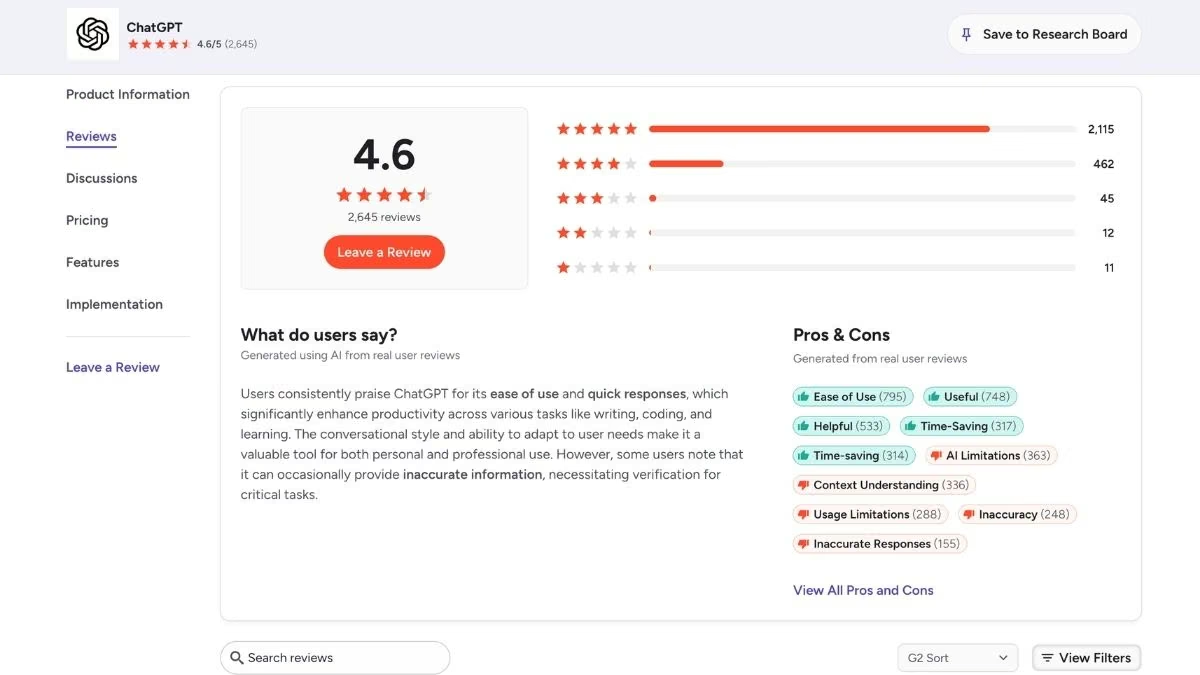
Reviewers point to its breadth as the reason it's their default, with the voice and research tools singled out as standouts. The critiques tend to focus on usage limits on lower tiers, the steep jump to higher pricing for power users, and the recent arrival of ads on the free plan.
Pricing
ChatGPT has a free tier at $0 (now ad-supported in the US), with Go at $8/month and Plus at $20/month covering most individual use. Pro is $100/month, with a higher-usage $200/month tier, and Business and Enterprise plans add team controls. Current details are on the official pricing page.
Bottom Line
I'd hand ChatGPT to anyone who wants a single, flexible assistant and is fine directing it themselves. If what you want is something that runs your inbox and calendar without being asked, pair it with one of the dedicated assistants above.
5. Notion AI: Best for Managing Your Docs and Knowledge

What it does: Notion AI is the AI layer inside Notion's workspace, and it answers questions, drafts documents, takes meeting notes, and runs multi-step tasks grounded in your own pages and connected apps.
Best for: Teams and solo operators who already keep their docs, notes, and projects in Notion and want an assistant that knows what's in there.
This is the assistant that lives where my work already does. My briefs, research, and project notes sit in Notion, so its answers come from my actual workspace instead of the open web. I ask it things like "what did we decide on the pricing section," and it pulls the answer from the right page.
AI Meeting Notes transcribes a call and hands back a summary with action items, the Notion Agent builds a tracker or drafts a doc from a single prompt, and Enterprise Search reaches across connected apps like Slack and Google Drive.
The trade-off is that it only knows what's in your workspace and connected tools. It won't run your inbox or calendar like a dedicated assistant, and the full AI features sit on a paid tier.
Key Features
- Workspace-grounded answers: Ask in plain English and get answers from your own pages, not the open web.
- AI Meeting Notes: It transcribes calls and returns summaries with action items.
- Notion Agent: Completes multi-step tasks like building databases or drafting docs from one prompt.
- Enterprise Search: Searches across connected apps such as Slack, Google Drive, and GitHub.
- Model choice: Pick the underlying model for a task, or let it choose automatically.
Pros and Cons
Pros:
- Answers are grounded in your own workspace, which makes them far more useful than a generic chatbot for internal questions.
- Meeting notes and the agent remove a lot of manual writing and setup.
- If your team already runs on Notion, the AI sits exactly where you work.
Cons:
- It only knows what's in your workspace and connected apps, so it won't run your email or calendar.
- Full AI now requires the Business plan, and the per-seat cost adds up across a team.
What Users Say

Teams that already live in Notion praise how much time the agent and meeting notes save once the workspace has real depth to draw on. The common pushback is the pricing change that moved full AI into the Business tier, which pushed solo users who only wanted the AI onto a more expensive plan.
Pricing
Notion AI is bundled into Notion's paid plans. Free is $0 with a limited AI trial, Plus is $10/user/month, and Business at $20/user/month (billed annually) is the first tier with full Notion AI, including the agent and meeting notes. Enterprise is custom. The pricing page has the live numbers.
Bottom Line
I'd recommend Notion AI to any team that already runs on Notion and wants its assistant to know the company's own context. If your docs live somewhere else, you'll get less out of it than a tool built to reach into your inbox and calendar.
Which AI Personal Assistant Should You Choose?
The right AI personal assistant depends on which part of your day is slowing you down.
Choose Lindy if you:
- Want an assistant you can text that works across your inbox, calendar, and CRM.
- Need proactive meeting prep, reminders, and follow-ups without remembering to ask.
Choose Wingman (Emergent) if you:
- Run most of your work through WhatsApp, Telegram, or iMessage.
- Want an assistant that handles recurring tasks in the background, with the option to build small business tools too.
Choose Superhuman if you:
- Process a heavy email volume and want the fastest possible inbox.
Choose ChatGPT if you:
- Want one flexible assistant for the widest range of everyday work and are fine directing it yourself.
Choose Notion AI if you:
- Already keep your docs, notes, and projects in Notion and want answers grounded in them.
Skip this category entirely if:
- Your work is simple enough that your phone's built-in assistant and a free chatbot already cover it.
Final Thoughts
If I could keep only one traditional AI assistant for business admin, it would be Lindy, because it comes closest to taking the work off my plate instead of just helping me move through it faster.
Wingman (Emergent) is the other one I'd pay close attention to, but for a different reason. It brings the assistant into the messaging apps where a lot of work already happens, and the Emergent platform behind it also lets you turn tool ideas into working software without starting from scratch.
Superhuman is the best pick if the inbox itself is your bottleneck. ChatGPT is the most versatile assistant for everyday work, even if you have to steer it. Notion AI wins when the answers you need are buried inside your docs, notes, and projects.
After a year of running these across back-to-back client deadlines, the lesson is simple. The best AI personal assistant for business is the one that hands back the most time for the least effort, whatever sits under the hood.
Ready to Put an Assistant Inside Your Messaging Apps?
If reading this made you want an assistant that does the work instead of one more app to manage, here's what makes Wingman worth trying:
- Delegate without opening another app: Wingman lives inside WhatsApp, Telegram, and iMessage, so you hand off work from the threads you already check all day.
- Wake up to work already done: It runs on schedules and incoming messages, so inbox triage, to-do catch-ups, and pre-meeting briefings happen in the background.
- Stay in control of the big stuff: Routine tasks run on their own, while consequential actions pause for your approval.
- Skip the re-explaining: It keeps your preferences and routines across sessions, so your instructions stick.
- Grow into building your own tools: When a workflow outgrows an assistant, the same platform turns a plain-English description into a working app.
Start with Wingman: open the chat app you already use and tell it what to take off your plate.
And if you want to build tools of your own down the line, Emergent, the platform behind Wingman, turns a plain-English description into a working app.

Most AI app builders stop at prototypes. Emergent creates production-ready apps you can actually launch.
- Production-ready apps
- Web & mobile apps
- Deploy in minutes







