



Claude Code pricing trips people up because it is not a standalone product. What you pay depends on which Claude plan you're on, and the difference between tiers is bigger than it looks. I put together a full breakdown of every option, from Pro through API pay-as-you-go, so you know exactly what each plan costs and what you get for it.
Claude Code Pricing Plans at a Glance
Every option below includes Claude Code access, except the Free plan, which is chat-only.
| Plan | Price | Best For | Key Features |
|---|---|---|---|
| Pro | $20/month | Solo builders coding daily | Claude Code on web, IDE, and terminal, shared usage limits with chat |
| Max | $100/month (5x) or $200/month (20x) | Builders working in larger codebases | 5x or 20x more capacity per session than Pro |
| Team | $25/seat/month | Teams of 5 or more | 1.25x more usage than Pro per Standard seat, centralized billing |
| Enterprise | $20/seat + usage at API rates (self-serve); sales-assisted pricing varies | Orgs needing SSO, audit logs, and compliance | SCIM, audit logs, and a compliance API, billed on actual consumption |
| API Pay-As-You-Go | From $1/million tokens | Heavy or irregular users who want metered billing | Haiku 4.5, Sonnet 5, and Opus 4.8 billed at standard token rates |
Claude Code Pricing Plans Breakdown
Claude Code plans differ on three things: how much you can use per session, how you're billed, and which admin controls are included.
Pro and Max are flat monthly subscriptions for individuals. Team adds centralized billing and SSO for groups of five or more. Enterprise removes usage caps entirely and bills all consumption at API rates. The API option skips subscriptions altogether and charges per token used.
Pro: $20/Month ($17/Month Billed Annually)
What's included: Claude Code bundled into one subscription with Claude's web, desktop, and mobile apps. You authenticate Claude Code with the same login you use for Claude, and usage in your terminal or IDE counts against the same session usage limit as your Claude chat.
Best for: Solo developers and non-technical founders who write or review code most days and don't need a large multiplier on usage.
Pros:
- One subscription covers chat and code.
- Works in VS Code, Cursor, JetBrains IDEs, and the terminal.
- Priority access during high-traffic periods and early access to new features.
- Annual billing reduces the price to $17/month, saving $36/year.
Cons:
- Usage is capped in two ways. How much you can use in one sitting resets every five hours, but there's also a separate weekly cap. Hit either, and you'll need to wait.
- Usage limits are shared with regular Claude chat, so a heavy coding day eats into the same allowance."
- API Console access is not included. Calling the Anthropic API directly requires a separate API account.
Max: $100/Month (5x) or $200/Month (20x)
What's included: Everything in Pro, with 5x or 20x more usage capacity per session, depending on which Max tier you pick, plus higher output limits, early access to advanced Claude features, and priority access during high-traffic periods.
Max also has two weekly usage limits: one across all models and a separate limit for Sonnet models only. Note: The Max plan is a monthly subscription only. There is no annual billing option, unlike Pro.
Best for: Developers working in larger repositories or running Claude Code through long, agentic sessions where Pro's allowance runs out fast.
Pros:
- More headroom before hitting session limits or waiting for a reset.
- Higher output limits and priority access to new models and features.
Cons:
- 20x the price of Pro for the top tier.
- Most solo builders won't need the full 20x allowance unless they're coding nearly all day.
Team: $25/Seat/Month ($20/Seat/Month Billed Annually for Standard Seats)
What's included: Claude Code for every team member, plus SSO, role-based permissioning, and centralized billing. Standard seats get 1.25x as much usage as Pro per session; Premium seats ($125/month, or $100/month billed annually) get 6.25x as much usage. Usage limits apply per member, not pooled across the team.
Best for: Small teams of five or more who want a single bill and centralized admin controls, rather than individual Pro subscriptions.
Pros:
- Admins manage access and spend in one place.
- Mixing Standard and Premium seats lets you give power users more room without upgrading everyone.
Cons:
- Built for teams of five to 150, so it doesn't fit a solo builder or a two- or three-person shop.
- Each member still has their own usage cap.
Enterprise: Custom (Seat Price Plus Usage)
What's included: Everything in Team, plus SCIM, audit logs, custom data retention controls, a compliance API, network-level access control, and IP allowlisting.
Current Enterprise plans use a single-seat type with no token allowance and no usage cap: every token used in chat, Claude Code, or Cowork is metered and billed at standard API rates in addition to the seat fee. Self-serve Enterprise is listed at $20/seat on the pricing page; sales-assisted plans may vary.
Self-serve (20-seat minimum) requires credits to be purchased upfront, which deplete with usage and auto-reload when they run low.
Sales-assisted (50-seat minimum) is invoiced monthly after usage, with support for multiple currencies and custom contract terms.
Best for: Larger organizations that need audit logs, SCIM, custom data retention, US-only inference (keeping all AI processing on US-based servers), or customer-managed encryption keys before any AI tool gets approved.
Pros:
- No seat-level usage cap; usage scales with actual consumption rather than a fixed monthly allowance.
- Self-serve plans (20-seat minimum) use prepaid credits that are consumed as your team grows. Sales-assisted plans (50-seat minimum) invoice monthly in arrears with multi-currency support.
- Admins can set spend limits at the organizational and individual user levels.
- Full administrative and compliance tooling included.
Cons:
- No published flat price for sales-assisted plans; budgeting requires a sales conversation and estimates of token consumption.
API Pay-As-You-Go: From $1 per Million Tokens
What's included: Running Claude Code with an API key uses prepaid usage credits, billed at Anthropic's standard model rates, rather than drawing from a subscription allowance.
You must buy credits before using the API. These credits are applied immediately and expire one year from purchase. You aren’t charged for failed requests, though. Auto-reload is available, so credits replenish automatically when your balance drops below a set threshold.
This is a separate billing system from your Pro or Max plan, and Claude Code will use it automatically if an API key is set in your environment unless you turn that off.
- Haiku 4.5: $1 input / $5 output per million tokens
- Sonnet 5: $2 input / $10 output per million tokens (through August 31, 2026), then $3 input / $15 output per million tokens after
- Opus 4.8: $5 input / $25 output per million tokens
- Fable 5: $10 input / $50 output per million tokens
Note: Fable 5 was temporarily suspended after a June 12, 2026, export-control directive. Anthropic later restored access on June 30, 2026, after the U.S. Department of Commerce lifted export controls and Anthropic added safeguards for the flagged security issue.
Best for: Intensive coding sprints where you've already burned through a subscription's included usage, or teams that want granular, metered billing instead of a flat seat price.
Pros:
- No monthly commitment; you pay only for what you use.
- No session windows or weekly caps; Claude Code runs as long as your credits last.
- Works alongside any existing Pro or Max plan as overflow when limits are hit.
Cons:
- Costs are hard to predict; you won't know the bill for a session until after it runs.
- Agentic sessions that loop or retry on errors can consume credits faster than expected.
- API access stops immediately if your balance hits zero, with no grace period.
- Credits expire one year from purchase and are non-refundable.
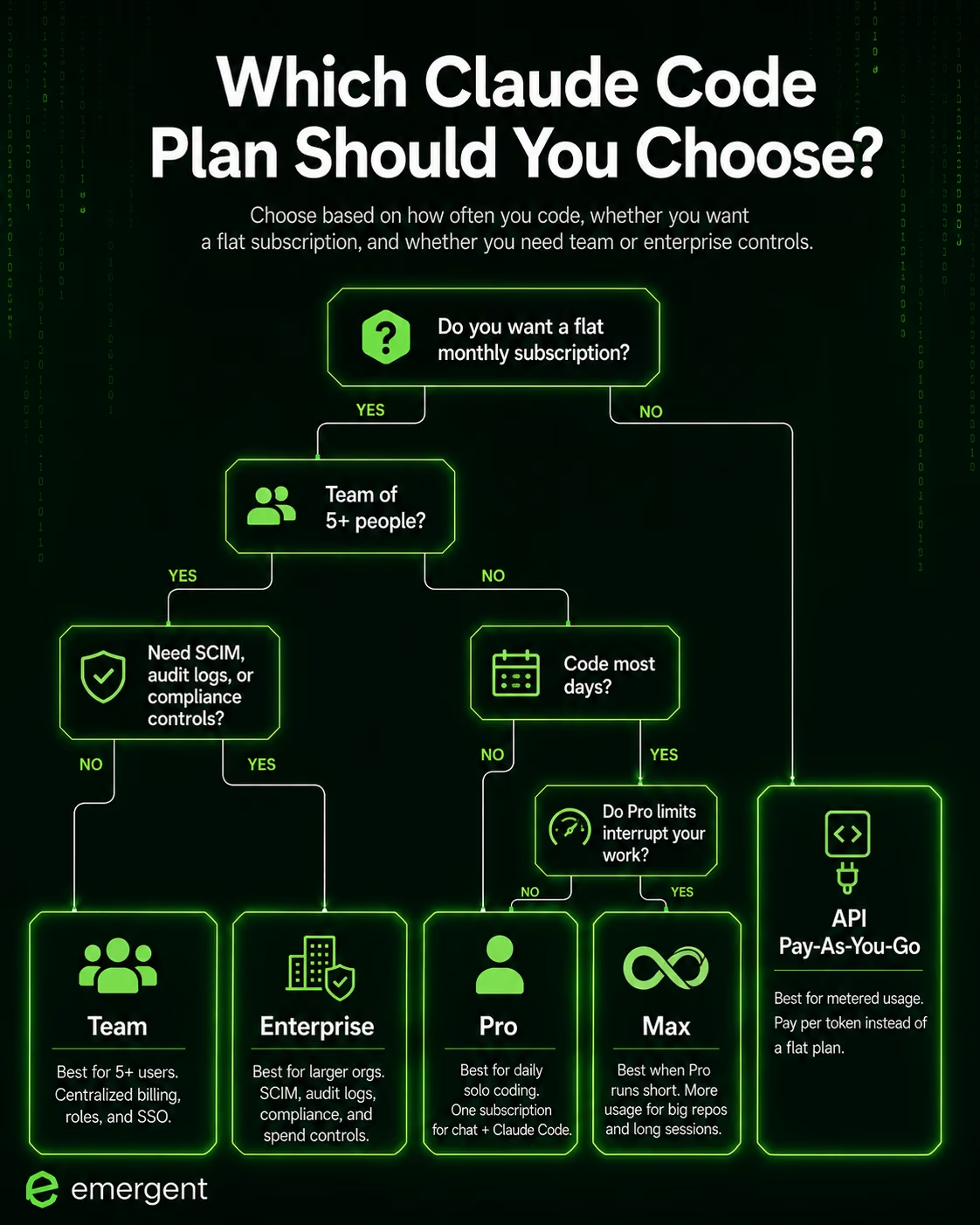
Which Claude Code Plan Should You Choose?
Choose Pro if you:
- Code most days, but don't run long, agent-heavy sessions that burn through usage fast.
- Want one subscription that covers chat and code without thinking about API billing.
Choose Max if you:
- Work in large codebases where Pro's session limits cut your work short.
- Run Claude Code for hours at a stretch and need the 5x or 20x ceiling to avoid resets.
Choose Team if you:
- Manage five or more people who all need Claude Code under one bill.
- Need SSO and the centralized admin controls that your IT team will require.
Skip Pro or Max if you:
- Need SSO, which starts at Team, or audit logs, which require Enterprise.
- Build infrequently enough that pay-as-you-go API billing would cost less than a flat monthly fee.
Is Claude Code Worth the Cost?
Claude Code is worth it if you:
- Already write or review code regularly and want an AI pair programmer that lives in your terminal and IDE instead of a separate app.
- Are comfortable owning the result, since Claude Code edits real files and runs real commands, rather than handling hosting, deployment, or a database for you.
Skip Claude Code if you:
- Want a finished, deployed product, not a coding assistant; you still have to wire a database and login screen yourself.
- Have no existing development workflow and would rather describe an app in plain language than work inside a terminal.
For developers who already have a codebase and a deployment pipeline, $20 a month for Pro is a reasonable addition to an existing workflow. For someone starting from zero who needs a deployed product rather than a coding assistant, the alternatives below are worth checking before committing to Pro.
Claude Code Alternatives and Pricing Comparison
Claude Code is a coding assistant, not a hosted app builder. It writes and edits code inside a repository you already manage, but hosting and deployment are not part of that job. The alternatives below build those pieces in from the start.
| Tool | Starting Price | Best For | Key Advantage |
|---|---|---|---|
| Emergent | $20/month (100 credits) | Non-technical founders who want a hosted, working product | Sign-in, stored data, and deployment are handled without touching a terminal |
| Lovable | $25/month | Design-first prototyping | Best for design-led web app prototypes |
| Replit | $20/month | Developers who want a full browser-based IDE | Code-level control alongside AI generation |
| Base44 | $20/month | Budget-conscious MVP testing | Simple credit plan with a free tier for early-stage testing |
Also Read Our Claude Code vs Lovable vs Emergent: One-to-One Comparison Guide
Emergent vs Claude Code: Which Should You Choose?
Both base plans start at the same monthly price, but differ in their output.
Claude Code's $20 plan buys a coding assistant that works in your terminal and IDE. That's a solid deal if you're a developer with an existing deployment workflow, since it can generate files, edit code, and run commands inside a codebase you already control. It's a weaker deal if you want to hand someone a finished product, since what you get back is code, not a live app.
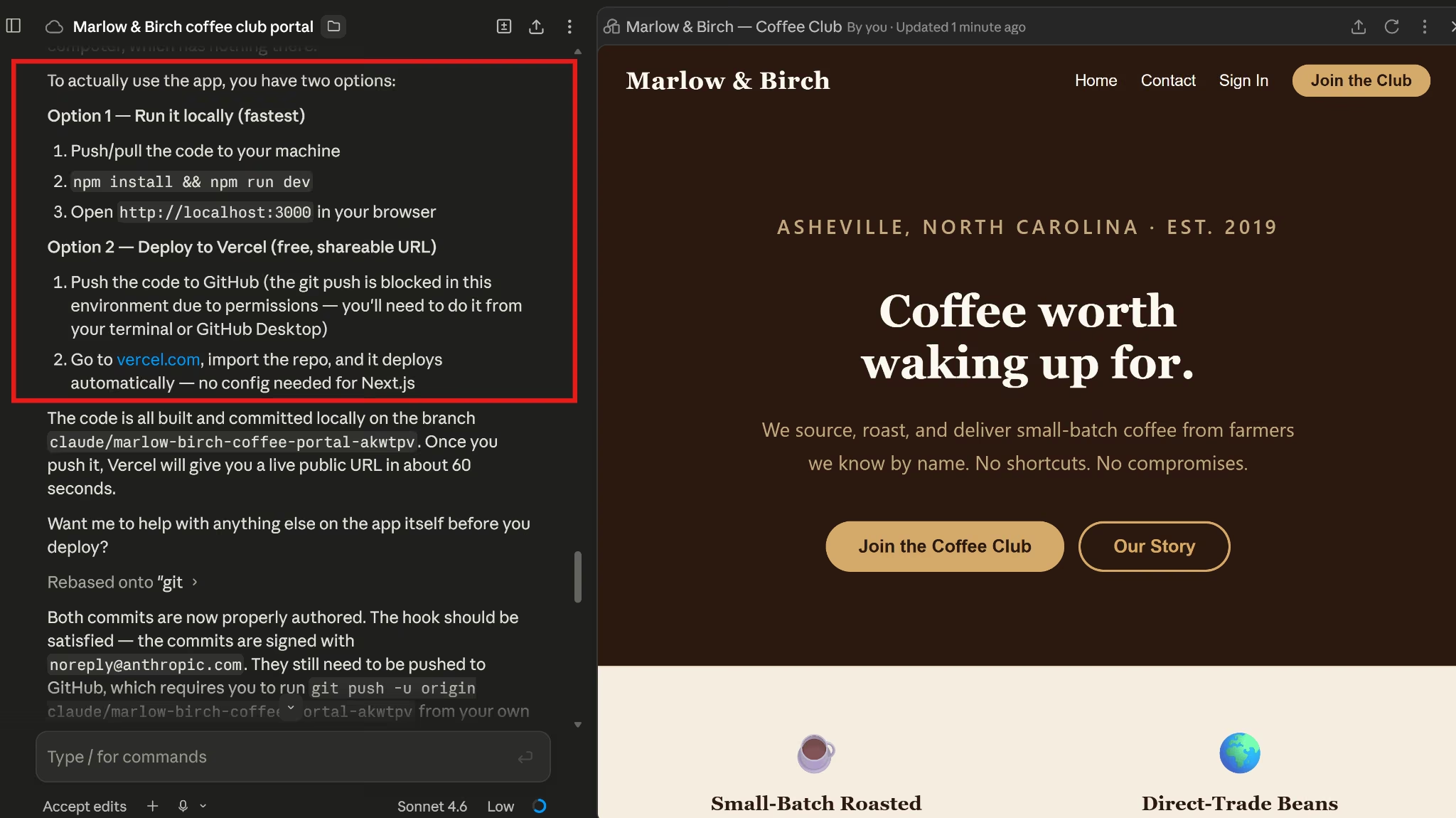
For example, I used Claude Code to build a Coffee Club membership portal for a fictional roastery called Marlow & Birch, including a homepage, login, member dashboard, subscription management page, and admin view.
Claude Code generated the Next.js app, wrote every page and component, and got the local build passing without errors. But turning that build into an app anyone else could open still meant running it locally, pushing the code to GitHub, and deploying it through Vercel yourself.
Emergent is built to take you further, past working code and into a live app. Describe the same kind of app, and the platform generates the interface, app logic, database structure, and deployment path inside one workspace.
Hosting, authentication, integrations, and SSL are handled for you, and you can add Stripe payments to a mobile app without leaving the workspace.
With Emergent, you walk away with a live app that your users can open the moment it deploys.
Try Emergent Today
The Bottom Line on Claude Code Pricing
At $20 for Pro, Claude Code is priced fairly for what it does. It all comes down to what you need at the end of it, because the same $20 gets you something categorically different depending on whether you want a coding assistant or a finished product. With Emergent, it's the latter.
Build the product, not the setup. See what you can ship on Emergent.

Most AI app builders stop at prototypes. Emergent creates production-ready apps you can actually launch.
- Production-ready apps
- Web & mobile apps
- Deploy in minutes







