



I realized I was going through most days without drinking enough water, so I came up with Streak, a habit tracker that would ask me to drink at least one cup every hour. Each check-in would extend my streak, while missing the window would reset it to zero.
The app needed to live on my phone because that is where I was most likely to notice the reminder. I also wanted a push notification when I’d missed the window and lost my streak.
I did not want to code the mobile app myself, not in the age of vibe coding. So, I searched for AI mobile app builders that could create it from a prompt.
I narrowed my options to Thunkable, Emergent, FlutterFlow, Rork, and Bubble, then spent one day asking each tool to build the same version of Streak.
I tested the check-in, countdown, reset, notification, purchase flow, code access, and submission options so you can see which builder suits your project and how much work each one leaves for you.
5 Best AI Mobile App Builders: TL;DR
- Thunkable: Best for visual builders who want a functional mobile flow and access to device features.
- Emergent: Best for founders who want the mobile interface, stored data, payments, and backend logic handled in one project.
- FlutterFlow: Best for developers and technical founders who want exportable Flutter code and detailed visual control.
- Rork: Best for prompt-first mobile development, with different options for cross-platform and Apple-focused projects.
- Bubble: Best for teams already using Bubble and are willing to test its native mobile builder.
How I Tested These AI Mobile App Builders
I asked each mobile app builder to create Streak, a mobile habit tracker with a check-in button, visible streak counter, countdown, and reset notification.
And just for fun, I added a page for premium themes, where I could pay a one-time fee to purchase all of them. I could make money off this, who knows?
Every platform received the same core brief:
Build a mobile habit tracker called Streak. It should have a check-in button, a visible streak counter, and a countdown that restarts after each check-in. Missing the countdown should reset the streak and trigger a notification. Add four visual themes, with three locked behind a one-time purchase. Do not add login or unrelated screens.
I tested five parts of each build:
- Whether the check-in control responded.
- Whether the countdown started and expired correctly.
- Whether an expired countdown resets the streak.
- Whether the reset notification appeared.
- Whether the purchase control protected and opened the premium themes correctly.
I also recorded generation time, credits or AI tokens when the platform exposed them, required corrections, code-access options, and the available submission workflow.
Depending on the builder, I used a browser preview, a companion app, or an Expo testing workflow. I did not submit any of the projects for Apple or Google review, so references to publishing below describe package generation or submission preparation rather than public availability.
Honorable Mentions
Glide creates mobile-friendly Progressive Web Apps, but direct publication to the Apple App Store and Google Play is not supported. It also deprecated push notifications after finding them unreliable across PWA devices and browsers, so it could not provide the hourly phone alerts Streak required.
Base44 can generate files for Apple and Google submission, but its mobile package runs the published web app inside a native wrapper. Push notifications are not currently supported, so it had the same core mismatch with Streak even though it offers an app-store route.
Best AI Mobile App Builder Comparison
| Tool | Best For | Core Strength |
|---|---|---|
| Thunkable | Visual builders who need device features | Component-level mobile app editing with drag-and-drop screens and block-based logic |
| Emergent | Products that need mobile and backend logic | End-to-end app development from the first prompt to developer handoff |
| FlutterFlow | Developers who want exportable Flutter code | Detailed visual control and portable source code |
| Rork | Prompt-first cross-platform or Apple-focused apps | Fast generation with different platform paths |
| Bubble | Existing Bubble teams testing native mobile | Can share data and workflows across web and mobile |
1. Thunkable: Best for a Working Visual Build With Device Features
Thunkable combines AI generation with a visual component editor and block-based logic. The AI Builder creates the first version, while the resulting screens and actions remain available inside Thunkable’s component and block environment.
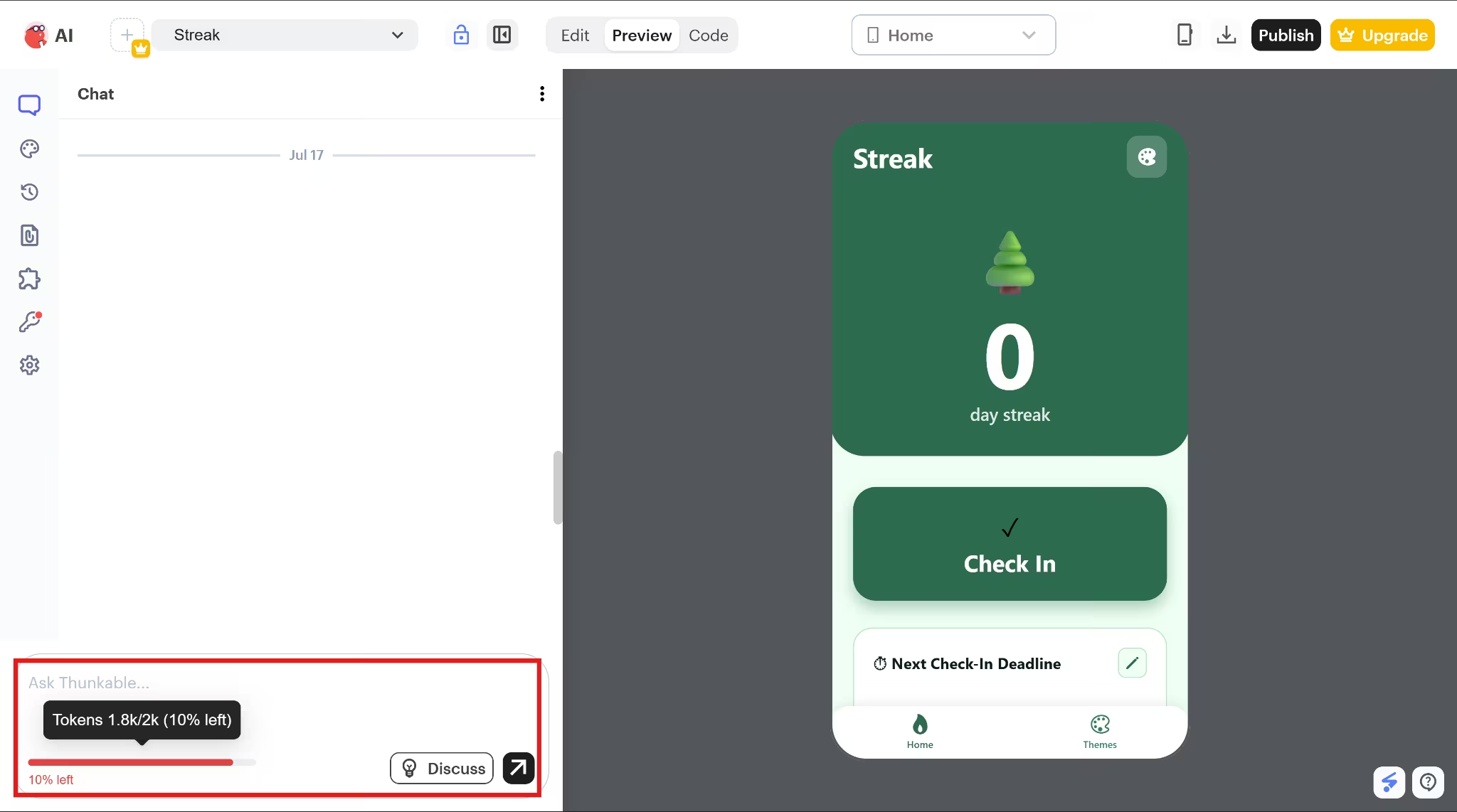
Building Streak took about 11 minutes. The Free account comes with approximately 2,000 AI tokens, and I had roughly 200 tokens left after the test.
Test Snapshot
- Build time: About 11 minutes
- Estimated AI-token use: About 1,800
- Core flows completed: 5 of 5
- Follow-up questions: 2
- Raw source-code export: Not available
The generation process included two useful rounds of clarification. Thunkable first asked how I wanted to handle notifications, then asked whether the project should connect to production services or use demonstration versions of the notification and purchase flows.
Its suggested production services included OneSignal for notifications and RevenueCat for purchases. I selected the demo route.
The first test went better than I expected. Tapping the check-in button raised the streak count and started the countdown. Letting the timer expire returned the streak to zero and displayed a notification.
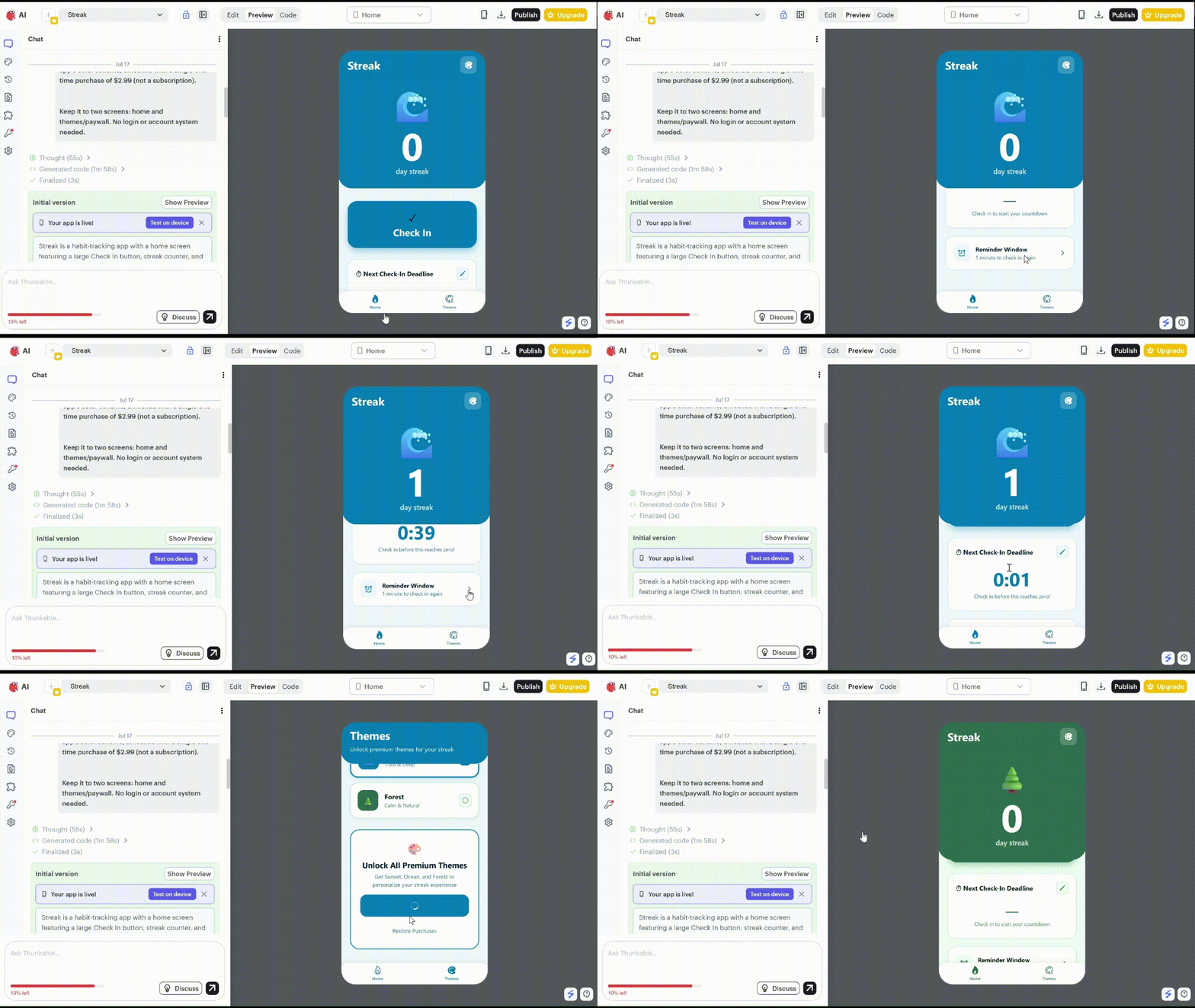
The purchase flow for the theme page also worked. The theme screen kept three options behind the purchase action, and I got a system notification after payment. I could also apply each set theme and change the build’s appearance.
After generation, I could see how the buttons and screens were connected in Thunkable’s visual editor. That made it easier to fix individual actions, manually or through the chat box, without rebuilding the app.
You can then test those changes in the browser or on your phone through the Thunkable Live app.
One thing to note is that I could test the notification in the preview, but I could not download or publish the app on the Free plan because it included push notifications. Thunkable allows all users to add and test notifications, but only Builder and Advanced subscribers can download or publish apps that use them.
Thunkable does not let you download the app’s source code. You can download a compiled Android or iOS version when your plan allows it, or share an editable copy of the project with another Thunkable user.
Key Features
- Visual logic editing: Generated actions remain editable through Thunkable’s block-based environment.
- Device components: Thunkable supports mobile features such as camera access, Bluetooth, location, notifications, and sensors.
- Live testing: You can test your mobile app through Thunkable Live or the browser workflow.
- External services: Thunkable provides integrations with services such as Airtable, Firebase, Google Sheets, OneSignal, and RevenueCat.
Thunkable Pros
- All five central interactions worked during testing.
- The demonstration purchase was labeled accurately.
- The generated logic remained visible and editable.
- The clarification questions separated demonstration behavior from production services.
- The platform supports a broad range of mobile device components.
Thunkable Cons
- The test used about 1,800 of the 2,000 Free-plan AI tokens.
- Complex changes may require editing visual logic blocks.
- Push notifications require Builder or Advanced.
- In-app purchases also require Builder or Advanced.
- Thunkable does not export project source code.
- Publishing, downloads, and private projects vary by plan.
- The cheapest paid tier, Accelerator, does not include the notification or purchase access Streak needed for release.
Also read our best Thunkable alternatives guide for what else is worth trying when you need source code export or a developer handoff path.
Thunkable Pricing
Thunkable’s Free plan is enough to test the builder, but Streak would need Builder or Advanced to be released with push notifications.
| Plan | Price | Best For |
|---|---|---|
| Free | $0 | Testing the builder |
| Accelerator | $19/month | Private test projects |
| Builder | $59/month | Publishing one app with notifications |
| Advanced | $189/month | Publishing multiple apps |
| Enterprise | Custom | Larger teams |
- Free: About 2,000 AI tokens, three public projects, and five screens per project.
- Accelerator: 20,000 AI tokens, one private project, and ten screens per project.
- Builder: 50,000 AI tokens, ten private projects, unlimited screens, and one live published app.
- Advanced: 100,000 AI tokens, unlimited private projects, and unlimited live apps.
Builder is the first tier that lets you download or publish an app containing push notifications.
My Take on Thunkable
Thunkable handled the Streak flow well, including the countdown, reset notification, and demo purchase. Its main advantage is the visual block editor, which makes it easier to inspect and adjust the app without having to work directly in code.
It suits you if you want a visual mobile builder and do not mind keeping the project inside Thunkable. However, if you want your app, access to the source code, an easier developer handoff, and the backend and deployment handled in the same project, then Emergent is the best alternative.
2. Emergent: Best for Mobile Apps That Need Backend Logic
Emergent approaches tasks as broader software projects rather than screen-generation exercises. Its AI app builder supports mobile and web projects, and the same workspace can cover application logic, data storage, testing, and deployment.
Emergent asked five questions before it started building, covering notifications, the purchase flow, countdown length, backend accounts, and visual direction. The first version of Streak was ready in about 13 minutes, and the full test used 8.5 credits.
Test Snapshot
- Build time: About 13 minutes
- Credits used: 8.5
- Clarification questions: 5
- Core flows completed: 5 of 5, with one follow-up to make the reset visible inside the preview
- Deployment time: About 5 to 7 minutes
Most of the app worked on the first try. I could check in, start the countdown, reset the streak, switch themes, and complete the demo purchase. I could also receive the reset notification on Expo Go.
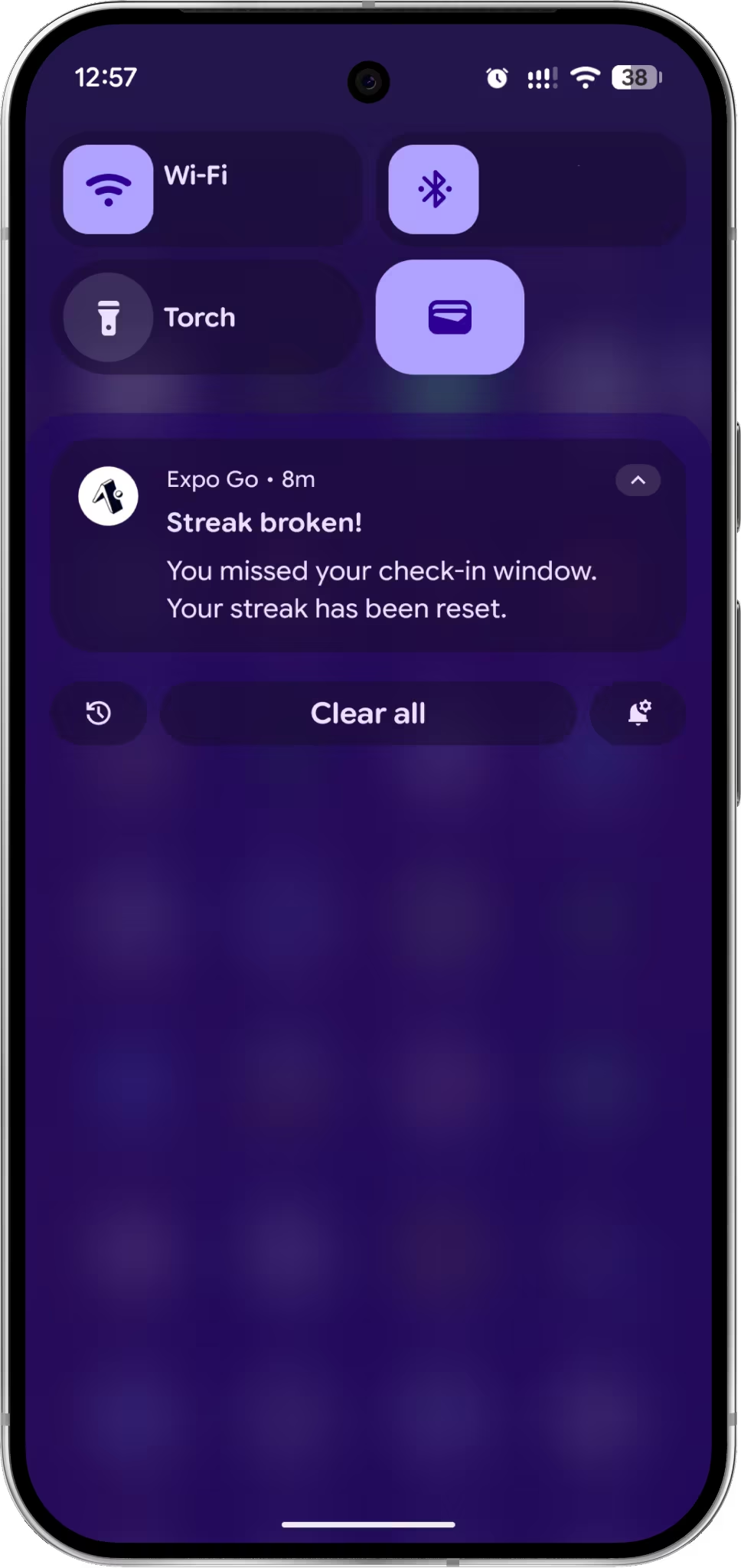
I later asked Emergent to make the result more visible inside the app. It added a “Streak broken” modal when the countdown expired and a separate celebration after a successful check-in. After payment, I could also unlock Sunset, Ocean, and Forest—three preset visual styles that changed the app’s colors, background, and overall appearance.
The correction produced a clearer distinction between success and failure states. The app displayed its celebration after check-in and handled the missed-window alert separately.
Emergent covered more of the surrounding product than the other builders. The build included the backend work and mobile submission steps needed to move Streak closer to launch.
The Code tab opened an editable VS Code environment behind a password-protected link. GitHub sync provided another route for moving the repository into a separate developer-controlled account, while the database panel exposed the project’s connection details.
Those options made the application less dependent on a single visual interface. A developer could inspect the files or continue the work through the connected repository rather than relying only on additional prompts.
I also opened the Android preparation flow to see how Emergent handled the path to Google Play. It asked for the app icon, version number, and package name. The next step would be to download the Expo project and use EAS to prepare the Android build.
Key Features
- Mobile and web output: One project can support cross-platform mobile and web interfaces.
- Code access: Builders can inspect files in the code workspace and connect the repository to GitHub.
- Database access: Project database connection details are available.
- Project workflow: Testing, analytics, deployment, and mobile preparation remain connected to the same build.
- MCP connector: Emergent also offers an MCP Connector for starting and managing projects through ChatGPT or Claude.
Emergent Pros
- All five core interactions worked in the first build, including the reset notification in Expo Go.
- The follow-up added clearer in-app feedback, including the reset and celebration modals.
- The project included editable source files, GitHub sync, and database access.
- The five setup questions clarified how the notifications, purchase flow, countdown, backend, and design should work.
- Emergent also provided an Android preparation flow for moving the project toward Google Play.
Emergent Cons
- GitHub integration requires the Standard plan or higher.
- Private project hosting and the option to buy extra credits also start on Standard.
- The Mobile Agent is unavailable on the Free plan and requires a paid subscription.
Emergent Pricing
- Free: $0, with 10 credits per month.
- Standard: $20/month, with 100 credits, private hosting, and GitHub integration.
- Pro: $200/month, with 750 credits.
- Enterprise: Custom pricing.
Since Emergent uses credits, your total cost will depend on the size and complexity of what you build. Check Emergent’s current pricing before starting your build.
My Take on Emergent
Emergent works well for simple app ideas and projects that may become more ambitious over time. In my test, it handled the Streak interface, countdown, notifications, purchase flow, database, and editable project files in one place. I could continue making changes with prompts, open the files directly, or move the project into GitHub.
Emergent gave me more room to take the project beyond the builder. I could inspect the source files, connect the repository to GitHub, and hand the project to a developer later. Thunkable’s advantage is its visual block editor, which makes individual actions easier to inspect without writing code, but it does not provide a source code export. Choose Emergent when code access and developer handoff matter more than visual logic editing.
3. FlutterFlow: Best for Developers Who Want Exportable Flutter Code
FlutterFlow combines AI-assisted generation with a detailed visual development environment. Its projects use Flutter, and source code download begins with the Basic plan.
FlutterFlow generated Streak in about a minute, but the first build still had unfinished logic and configuration issues.
Test Snapshot
- Build time: About one minute
- Core flows completed: 0 of 5
- Free-plan project limit: 2
- Problems identified: 2
- Code download on Free: Not included
The app’s streak value remained in a placeholder state, and the countdown area displayed unfinished text.
The check-in button did nothing in Preview. It did not update the streak or start the countdown, so I could not test the reset or notification. The theme purchase page also failed to open its intended flow.
The issue panel was more helpful than the preview because it showed me what had gone wrong. It flagged the unfinished state update on the check-in button and pointed out that the project was trying to use Firestore without a connected Firebase project.
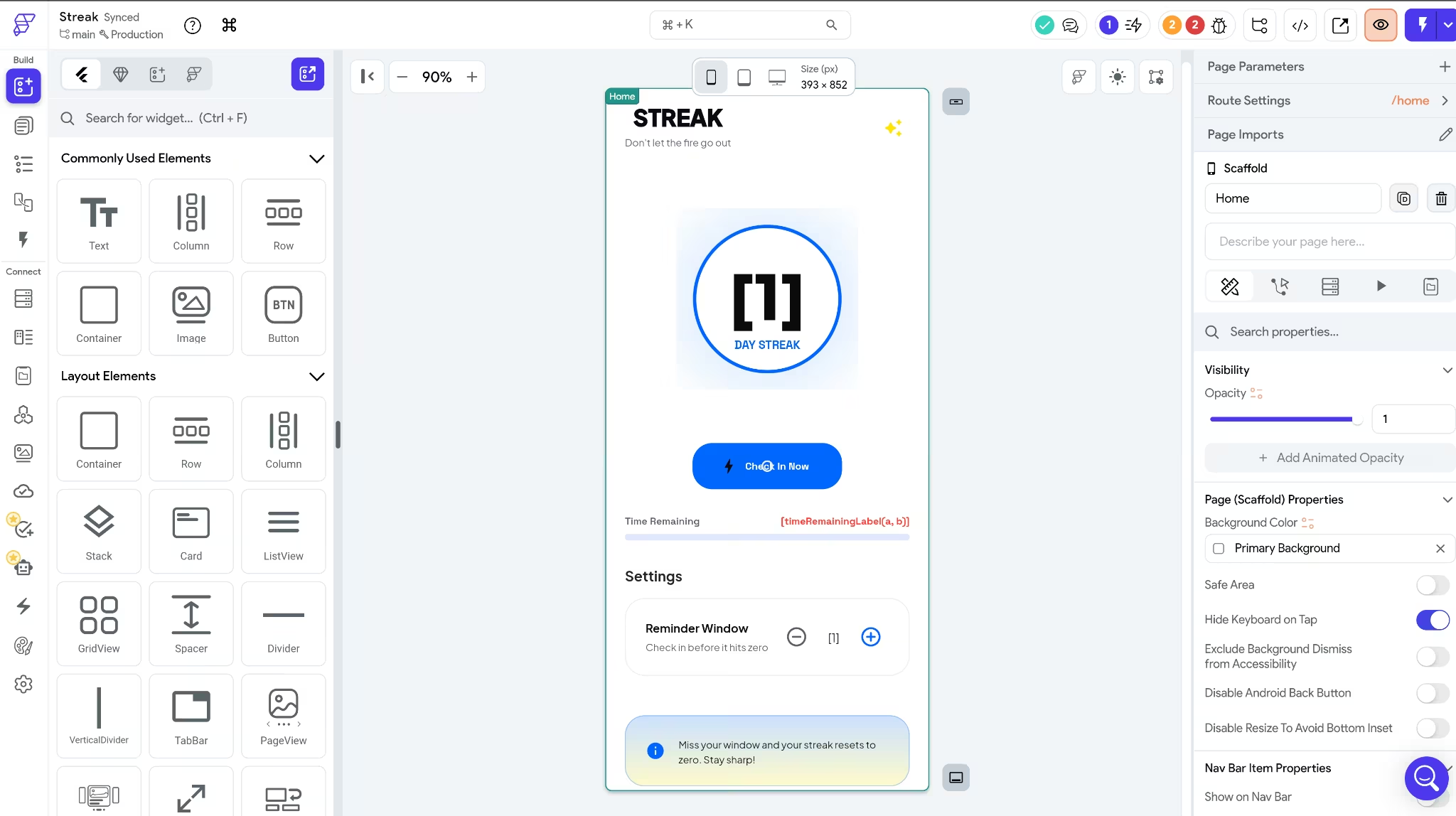
The first build was not usable, but FlutterFlow deserves credit for making the problems easy to find. The editor gave me a clear starting point for fixing them, rather than leaving me to guess.
I hit another limit after creating two projects on the Free plan. To make a third, I would have needed to delete one of the existing projects or upgrade, which matches FlutterFlow’s two-project limit on its Free plan.
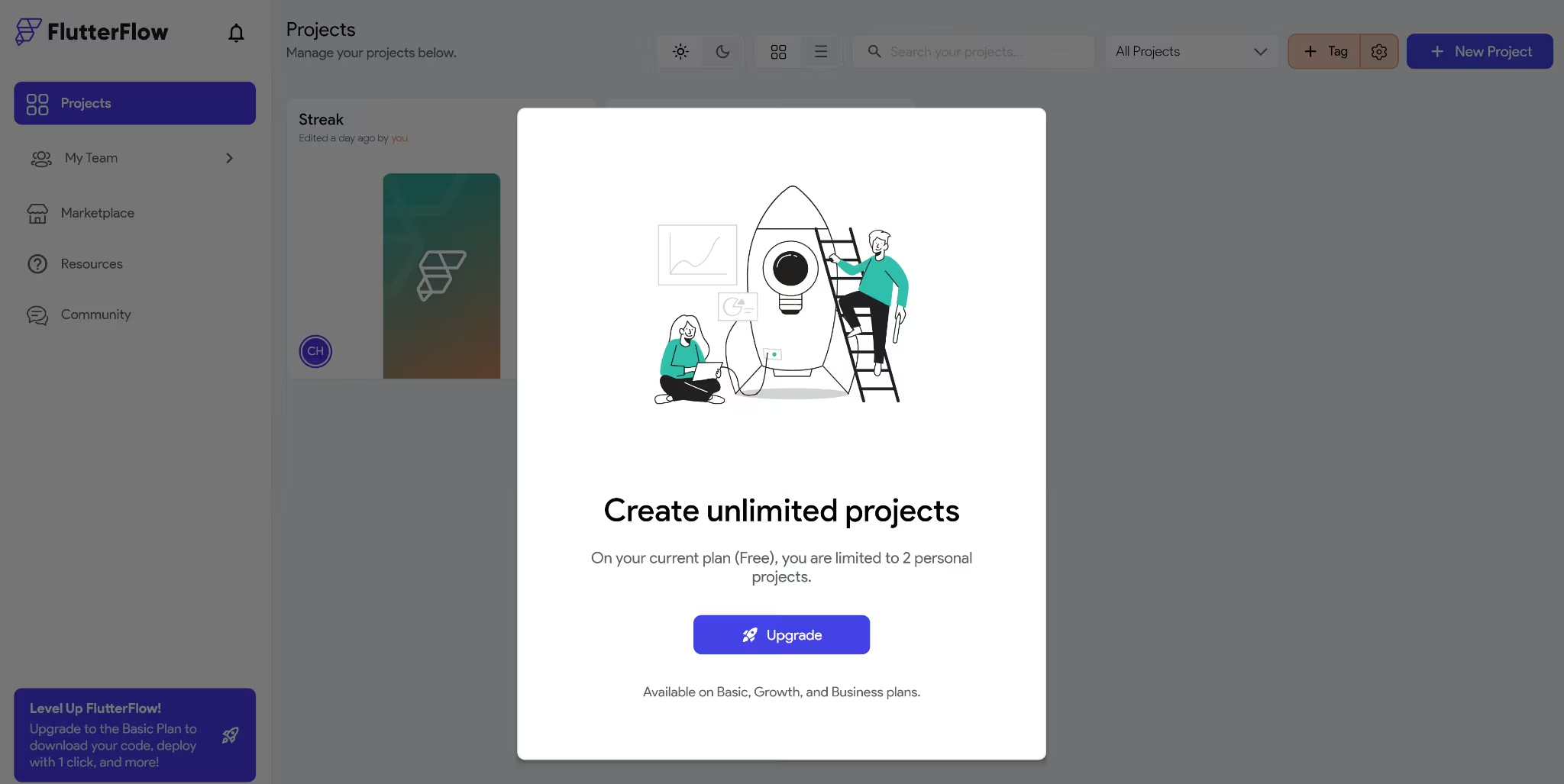
FlutterFlow lets you build, edit, test, and add custom code on the Free plan, but you cannot export the project at that level. Code download, APK download, and one-click app-store deployment start with Basic.
GitHub push and the VS Code extension start with Growth. Basic is enough for a single developer who wants to download the project, while Growth makes more sense for teams working with a shared repository.
Key Features
- Flutter projects: Applications use the Flutter framework.
- Visual development: Builders can inspect state, actions, variables, integrations, and project settings.
- Issue routing: Configuration warnings can link directly to the relevant settings.
- Paid code download: Basic and higher plans can download project source code.
FlutterFlow Pros
- The first project generated in about one minute.
- The issue panel identified meaningful configuration failures.
- Paid plans provide downloadable Flutter source code.
- The editor exposes application state and actions in detail.
- Firebase and Supabase connections are available on every FlutterFlow plan.
FlutterFlow Cons
- None of the Streak interactions worked during testing.
- The generated state-update action was incomplete.
- Firestore was referenced without a connected Firebase project.
- The Free plan allows two projects.
- Code download, APK download, and direct store deployment are not included on Free.
- GitHub push requires Growth or a higher plan.
FlutterFlow Pricing
FlutterFlow currently offers Free, Basic, Growth, Business, and Enterprise plans.
- Free: $0, with up to two projects and 10 Lite credits.
- Basic: $39 per month, or $29.25 when billed annually. Adds unlimited projects, code, and APK downloads, and app-store deployment.
- Growth: $80 per month for the first seat and $55 per month for the second seat. With annual billing, the rates drop to $60 and $41.25 per month. Adds GitHub integration, two-user collaboration, and the VS Code extension.
- Business: $150 per month for the first seat and $85 per month for seats two through five. With annual billing, the rates drop to $112.50 and $63.75 per month. Best suited to teams that need more collaboration, branches, and testing capacity.
- Enterprise: Custom pricing for larger organizations with more advanced security, support, and administration needs.
My Take on FlutterFlow
FlutterFlow gave me the fastest first draft, but it also needed the most hands-on fixing before Streak could work as intended. The editor deserves credit for making those problems easy to find, and the visual controls give you a clear way to work through them instead of starting over.
Choose FlutterFlow when you want a visual builder and expect to keep refining the app yourself, especially if you plan to export Flutter code later. By comparison, Thunkable, though it does not offer code export on the two cheapest plan tiers, is easier to work with.
Also read our best FlutterFlow alternatives guide for what else is worth trying when the visual builder needs too much fixing before the app works.
4. Rork: Best for Prompt-First Cross-Platform and Apple-Native Builds
Rork offers two ways to build a mobile app. Rork Pro creates cross-platform projects for iOS, Android, and web, while Rork Max creates SwiftUI apps for Apple devices such as the iPhone, iPad, Apple Watch, and Vision Pro. That Apple-native route is what sets Rork apart from the other builders in this comparison.
Rork built Streak in about nine minutes and handled the main habit flow. The Themes screen was the only part that stopped the full experience from working.
Test Snapshot
- Build time: About 9 minutes
- Credits used: 4
- Core flows completed: 4 of 5
- Preview disconnections: 1
- Code export on Free: No
When I opened the app, Rork first asked for permission to send notifications, which was a good sign because reminders were central to Streak. I checked in, watched the streak increase, and saw the countdown begin. Once the timer ran out, the streak reset to zero and the notification arrived, so the entire habit-tracking sequence worked as intended.
The experience broke down when I opened the Themes screen. The page loaded, but I could not scroll far enough to reach the one-time purchase control for the themes.
The browser preview was buggy, but Rork’s browser preview is intended for quick checks and that some native features may behave differently there. Rork Pro apps can also be tested on a phone through Expo Go.
Code export on Rork is limited to paid subscriptions and works through GitHub. The connection supports two-way sync, so a developer can make changes outside Rork and bring them back into the project.
Key Features
- Cross-platform development: Rork Pro creates projects for iOS, Android, and web using React Native and Expo.
- Apple-native development: Rork Max creates SwiftUI apps for iPhone, iPad, Apple Watch, and Vision Pro.
- Phone testing: Rork Pro projects can be opened through Expo Go.
- GitHub handoff: Paid users can export and resync the generated code through GitHub.
Rork Pros
- Rork Pro can create one project for iOS, Android, and the web.
- Rork Max offers a separate SwiftUI route for Apple devices, including iPhone, iPad, Apple Watch, and Vision Pro.
- The Free plan includes 35 monthly credits.
Rork Cons
- Code export is unavailable on the Free plan.
- Private projects, the code editor, and GitHub integration require a paid subscription.
- Rork Max, the Apple-native option, starts at $200 per month.
- Rork Pro uses React Native and Expo, while Apple-native SwiftUI development is reserved for the more expensive Max product.
- The Free plan’s daily 5-credit limit can restrict how much you can build in a single session.
Rork Pricing
- Free: $0, with up to 35 monthly credits and public web projects.
- Rork Pro: From $20/month.
- $20: 100 credits
- $100: 500 credits
- Rork Max: From $200/month.
- $200: 1,000 credits
- $500: 2,500 credits
- $900: 5,000 credits
- $1,800: 10,000 credits
Pro adds private projects and mobile builds. Max adds SwiftUI and support for more Apple platforms.
My Take on Rork
Rork is most compelling for people who specifically want Apple-native apps through Rork Max. The Streak build handled the core habit flow well, but the Themes screen still blocked the purchase experience.
Rork is a better fit when Apple-native development matters. However, if you need a cross-platform app, Emergent is stronger for end-to-end development, while Thunkable gives you more direct control over individual components and their logic.
5. Bubble: Best for Adding Native Mobile to an Existing Bubble App
Bubble is most useful when you already have a web app on the platform and want to add a mobile version without rebuilding the backend. Its web and mobile interfaces can share the same database, workflows, authentication, and API connections inside one project.
Its web and mobile interfaces can use a shared backend for the database, workflows, authentication, and API connections.
I tested Bubble differently. I created Streak as a new mobile project, so this section focuses on how it performed from scratch rather than on its advantage for existing Bubble apps.
Test Snapshot
- Build time: About 4 minutes
- Core flows validated: 0 of 5
- Unrequested login-related flows: 1
- Corrections attempted: 1
- Source-code export: Not available
Bubble generated Streak in about four minutes, but the check-in button did nothing when I opened the preview.
Once the preview opened, I tested the Check In button first, but it did not respond. And because that first action failed, the streak stayed unchanged, and the countdown never began. I could not reach the reset or notification, and the purchase control did not respond either. None of the four central flows could be validated.
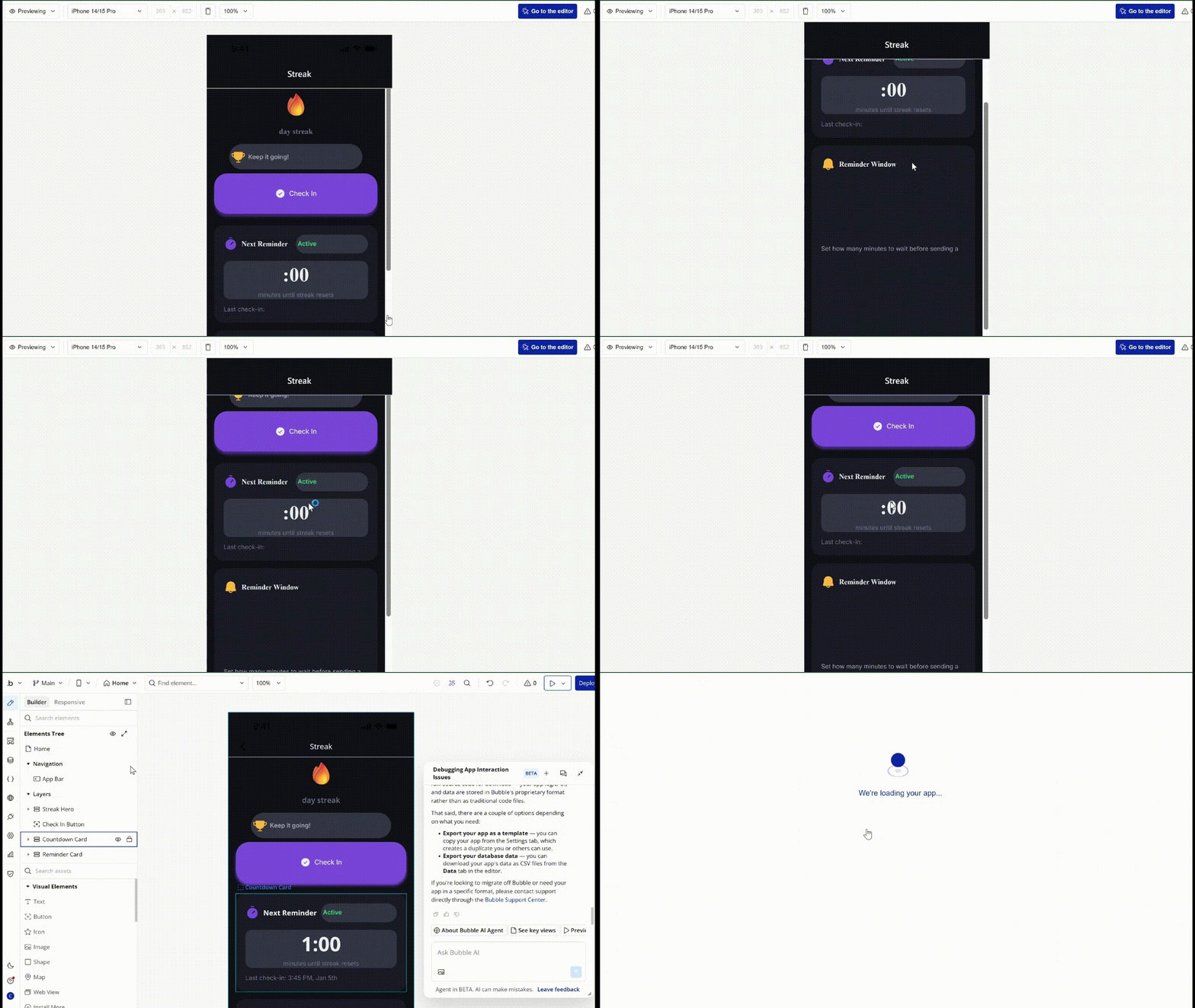
When I asked Bubble’s assistant why the build failed, it found that it had inserted a password-reset workflow that my prompt had explicitly excluded. I wasn’t sure that was the problem, and so I deleted the unwanted workflow. The controls still did nothing.
This test makes Bubble difficult to recommend for a new mobile-first project. It added logic the brief did not ask for, and the main controls remained unresponsive after the correction.
Bubble lets Free users build and test native mobile apps, including on-device testing through BubbleGo. Live mobile builds start on a paid mobile-capable plan, with build allowances and concurrent live versions increasing by tier.
Code portability is another limitation I faced. Bubble lets you export user-created data, but the application itself cannot be exported as source code. Moving away from Bubble would require rebuilding the app logic elsewhere.
Key Features
- Shared backend: Web and mobile interfaces can use the same database, workflows, authentication, and integrations.
- Native mobile editor: Bubble supports mobile-specific views, navigation, gestures, and device features.
- Visual debugging: The mobile debugger can trace workflows and surface runtime problems.
- On-device testing: BubbleGo supports testing on iOS and Android devices.
- Store publishing: Paid mobile plans support builds for the Apple App Store and Google Play.
Bubble Pros
- Existing Bubble projects can add a mobile interface without creating a second backend.
- Web and mobile development stay inside the same project.
- The Free plan includes mobile building and testing.
- Bubble provides visual workflow editing and debugging tools.
- Paid plans include mobile builds and store-publishing support.
Bubble Cons
- The native mobile editor is still in beta.
- Source-code export is unavailable on every plan.
- Web and mobile activity draw from the same project workload when they share a backend.
- The Free plan does not include live mobile builds.
- Publishing still requires Apple and Google developer accounts and store approval.
Bubble Pricing
Bubble offers Web-only, Mobile-only, and combined Web + Mobile subscriptions. Since the main advantage here is using both interfaces in one project, these are the combined plan prices.
- Free: $0, with development and testing but no live mobile builds.
- Starter: $69 monthly or $59 per month when billed annually.
- 5 mobile builds per month
- 3 concurrent live versions
- Growth: $249 monthly or $209 per month when billed annually.
- 10 mobile builds per month
- 5 concurrent live versions
- Team: $649 monthly or $549 per month when billed annually.
- 20 mobile builds per month
- 8 concurrent live versions
- Enterprise: Custom pricing and allowances.
My Take on Bubble
Bubble struggled with the new Streak project. The main controls stayed unresponsive even after I removed the unwanted login flow, so I could not validate any of the core interactions.
Its value is clearer for teams that already have a Bubble web app and want to add mobile without rebuilding the backend. For a new project, the other tools in this comparison gave me stronger first results.
Also read our best Bubble alternatives guide for what else handles native mobile builds without leaving core interactions unresponsive on the first pass.
Which AI Mobile App Builder Should You Choose?
Thunkable and Emergent gave me the strongest results, but for different reasons. Both completed the main Streak flow, including the check-in, countdown, reset, notification, and purchase experience.
Thunkable is the better fit when you want to inspect and adjust the app through a visual block editor. Emergent is more suitable when you also want the app’s code, data, backend logic, and GitHub handoff kept together in the same project.
The other tools suit more specific priorities.
FlutterFlow is worth considering when you want a detailed visual editor and plan to export Flutter code, although its first Streak build still needed several fixes.
Rork stands out for its Apple-native option through Rork Max, although it didn’t do too well with the themes page.
Bubble is most relevant when you already have a Bubble web app and want the mobile interface to share its existing backend.
A marketing site, directory, or simple form-based service may not need a mobile builder at all. A website will often cost less to release and require less ongoing maintenance.
Final Verdict
Thunkable and Emergent were the only tools that completed the full Streak flow. Thunkable is easier to inspect via visual logic blocks, but it does not offer source code export.
FlutterFlow had the strongest debugging environment, although its first build needed more work. Rork handled most of the habit flow but failed on the Themes screen, and Bubble didn’t do so well.
Emergent delivered the most complete overall package. It built the app and gave me access to the code, backend, database, and GitHub sync in a single project. I could keep iterating in the same place, hand the project to a developer later, or move it into GitHub without starting over.
For someone trying to turn an idea into a real app, that means fewer handoffs and less risk of rebuilding the project later. The first version can stay simple, then grow as you add users, data, payments, or new features. And it all starts with your first prompt.

Most AI app builders stop at prototypes. Emergent creates production-ready apps you can actually launch.
- Production-ready apps
- Web & mobile apps
- Deploy in minutes







