




TL;DR
Build in this order. First, write one sentence naming what your site has to do, then pick a route that can do it: a website builder like Wix or Squarespace for brochure sites and portfolios, WordPress for content-heavy sites, an AI app-building platform like Emergent for sites that book, sell, or sign people in, or hand-coding if you're learning.
Every guide on how to build a website from scratch walks you through the same handful of tasks. Pick a template, buy a domain, write your copy, hit publish. That advice holds right up until your site has to do something, like take a booking, collect a deposit, log a returning customer in, or show you who's on the schedule tomorrow.
That's where most first-time builders get stuck, and it's the part the top-ranking guides skip. I read the ones currently ranking for this search, and they all end in the same place, with a set of pages that looks good and does nothing. Most are published by companies that sell the template.
So this guide asks a different question. What does your site have to do, and which route gets it there without stranding you in six months? To answer it, I built one of the harder cases end to end, a service business whose site had to hold a schedule and take a deposit.
How to Build a Website From Scratch, Step by Step
Building a website from scratch works best in one order. Decide what the site must do, choose a route that can do it, then design and write. Skipping ahead to the design step is the single most expensive habit in this whole process, because a layout built around a vague copy has to be rebuilt around the finished copy later.
Step 1: Write One Sentence That Defines the Site's Job
Before you open a single tool, finish this sentence: "This site exists so that [audience] can [action]." One line, written down, no hedging.
That sentence is your filter for every decision that follows. "This site exists so that Denver homeowners can book a window cleaning without calling us" points at a calendar and a deposit. "This site exists so that hiring managers can see my design work and email me" points at a portfolio grid and a contact form. Two very different builds.
The action verb in your sentence is the part that matters. Read, browse, and learn all point to a content site any builder can handle. Book, buy, apply, subscribe, and log in all point to something with moving parts, which changes your route in Step 2.
Write the sentence somewhere you'll see it. When you're 40 minutes deep in a font decision, it's the thing that pulls you back out.
Step 2: Pick Your Build Route
There are four honest routes to a website, and the right one depends entirely on the verb you just wrote down. You need no coding skills for any of them except the last, and Emergent's breakdown of how long a website takes by build method is worth a look before you promise anyone a launch date.
The four routes at a glance:
| Route | Best for | Typical time to live | Where it runs out |
|---|---|---|---|
| Website builder | Brochure sites, portfolios | A weekend | Custom logic, member accounts |
| CMS like WordPress | Blogs, content-heavy sites | One to two weeks | Plugin upkeep, security patching |
| AI app-building platform | Sites that book, sell, or sign people in | A day or two | Heavy PDF reports, games |
| Hand-coding | Learning, unusual requirements | Weeks to months | Your available time |
Website builders like Wix and Squarespace give you a visual editor, hosting, and a template library in one subscription. They're the fastest path to a good-looking site with pages, and the right answer for a large share of readers. If a portfolio or a five-page business site is all you need, stop reading comparison articles and go pick a template.
Emergent's roundup of the best online website builders covers the field, and its Wix and Squarespace pricing breakdowns show what they cost once the first-year promotion ends.
A content management system like WordPress trades speed for control. You choose hosting, install the software, pick a theme, and extend it with plugins. It's still the most flexible option for a site that lives or dies on published content, and the one that asks the most of you after launch, since every plugin is something to update.
AI app-building platforms are the newest route and the one that changes the math for the verb list above. You describe the site in plain language, and the platform builds it, including the parts a template can't fake: a booking calendar that knows what's already taken, a checkout that moves money, a customer account that remembers someone.
This approach is often called vibe coding, and Emergent's roundup of AI website builders covers how the tools differ.
Hand-coding means writing the site yourself, and for a lot of people searching "from scratch," this is the version they mean.
The path itself is simpler than it sounds. You write one HTML file per page, which holds the words and the structure, and one CSS stylesheet shared across all of them, which holds the colors, fonts, and layout. A few lines of JavaScript get added later if something needs to move or respond.
Those files sit in a folder on your computer, and you publish them free through GitHub Pages, which serves them at a public web address without a hosting bill.
Codecademy's Build a Website with HTML, CSS, and GitHub Pages path covers exactly that route in about 14 hours and assumes no prior experience. Expect a plain page live within a day or two of starting, and something you'd put a business name on after a few weeks.
Hand-coding is the right call in two cases: you want to learn how the web works, or you have a requirement no platform supports. It's the wrong call when you have a launch date, because everything a builder gives you free, from mobile layouts to contact forms, becomes yours to write.
Step 3: Lock Your Domain and Decide Where the Site Will Live
Your domain is the address people type; hosting is the space the site occupies. Buy the domain first, because good ones disappear.
Keep the name short, easy to say out loud, and free of hyphens or creative spellings. If the .com is gone, a longer phrase usually beats an odd extension for a local business.
Registration is cheap and stays cheap at an at-cost registrar, where you pay the registry's wholesale price plus ICANN's $0.20 per-year transaction fee with no markup added on renewal.
Hosting depends on the route you picked in Step 2. Builders and AI platforms include it, so there's nothing to set up. WordPress needs a separate hosting account. Hand-coded sites need somewhere to publish the files.
One warning worth taking seriously: watch renewal pricing, not the first-year promotion. A $2 introductory month becomes a normal one at month 13.
Step 4: Map the Pages Before You Design Anything
Sketch the whole site on one page before you build a single screen. A pen and a napkin work.
List every page, then cut half of them. Most first sites need five or fewer: home, about, services or work, contact, and maybe one more. Every extra page is another thing to write, another thing to keep current, and another place for a visitor to get lost.
Then draw the path. Where does someone land, what do you want them to click next, and what's the one action you're steering them toward? A visitor should reach that action in two clicks or fewer from anywhere on the site. If your map doesn't allow it, the map is wrong, and it's far cheaper to fix now than after the design exists.
Step 5: Write the Words First
Write your copy before you build. Designing around placeholder text produces a layout that breaks the moment your real sentences land in it, and everyone learns this the hard way exactly once.
Start with the homepage headline, which is the most valuable line on the site. It answers "what is this and who is it for" in plain language. "Window and gutter cleaning for Denver homeowners, booked online in two minutes" does the job. A clever tagline doesn't.
Then write one call to action per page, and make it a verb the visitor recognizes: Book an estimate. See the work. Get a quote. One clear action per page beats three competing ones. Use the words your customers use, too. If people call it "gutter cleaning," don't put "exterior maintenance solutions" on the page.
Step 6: Build the First Version
Now you build. Open your chosen platform, work page by page starting with the homepage, and drop in the copy you wrote in Step 5.
If you're on a builder or a CMS, pick the template closest to your page map and adjust it instead of opening a blank canvas. Get one page fully right, then move to the next. Resist perfecting anything on the first pass, because half of it changes once you see the whole site together.
If your Step 1 sentence had a verb like book, buy, or log in, this is where a template starts costing you more than it saves. So I ran the same build on Emergent, an AI app-building platform built for vibe coding, which turns a plain-English description into a complete, working site with the screens, the data, the sign-in, and the payments already handled.
Getting the Prompt Right With Emmy
I didn't write the prompt for it, and that's the part worth copying.
Emergent ships a chat assistant called Emmy, whose chat icon sits in the bottom right corner of every page. She's free, and talking to her costs no credits, which matters more than it sounds: the blank prompt box is where most first builds stall, usually because you can't tell how much detail the agent needs and don't want a bad first attempt eating credits you can't get back.
So the first move was to open the chat and describe the business badly, on purpose:
I run a window and gutter cleaning company in Denver. I want a website where homeowners can book us and pay a deposit so they don't just no-show.
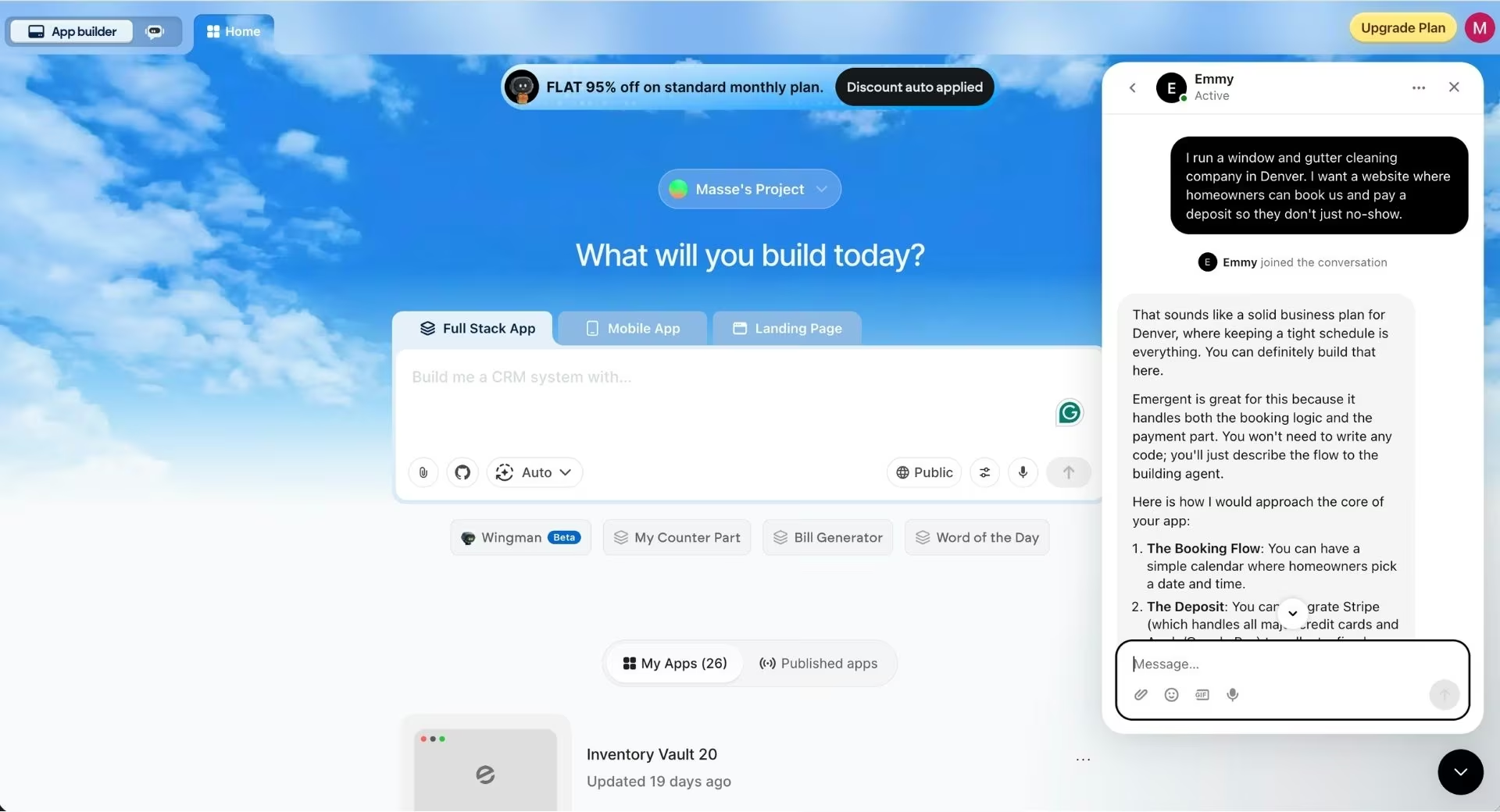
Emmy didn't hand back a prompt. She sketched the shape of the thing first, splitting it into the booking calendar, the Stripe deposit, and the notifications that tell the owner when money has landed. Then came advice I wasn't expecting:
A quick tip for your prompt: Instead of asking for a "full management system," start by asking the agent to build a "one-page booking site for a cleaning business that takes a $50 deposit via Stripe." Keeping it simple at first ensures the core payment and booking logic works perfectly before you add more features.
She's right. The instinct is to front-load everything into the first prompt, and that just gives you more surface area to be disappointed by. Then she asked the question that earned her a place in this article:
What's the typical deposit amount you're thinking of charging, and do you want customers to be able to choose specific services like "Gutters Only" or "Full Window Wash" during the booking?
I'd have gone straight into prompting without ever considering per-service selection. I told her $50 flat across all services, a decision I'd otherwise have hit halfway through a build with a half-finished checkout in the way.
I asked her to turn the conversation into a one-paragraph, build-ready prompt covering the booking flow, the deposit, the confirmation emails, and an owner dashboard.
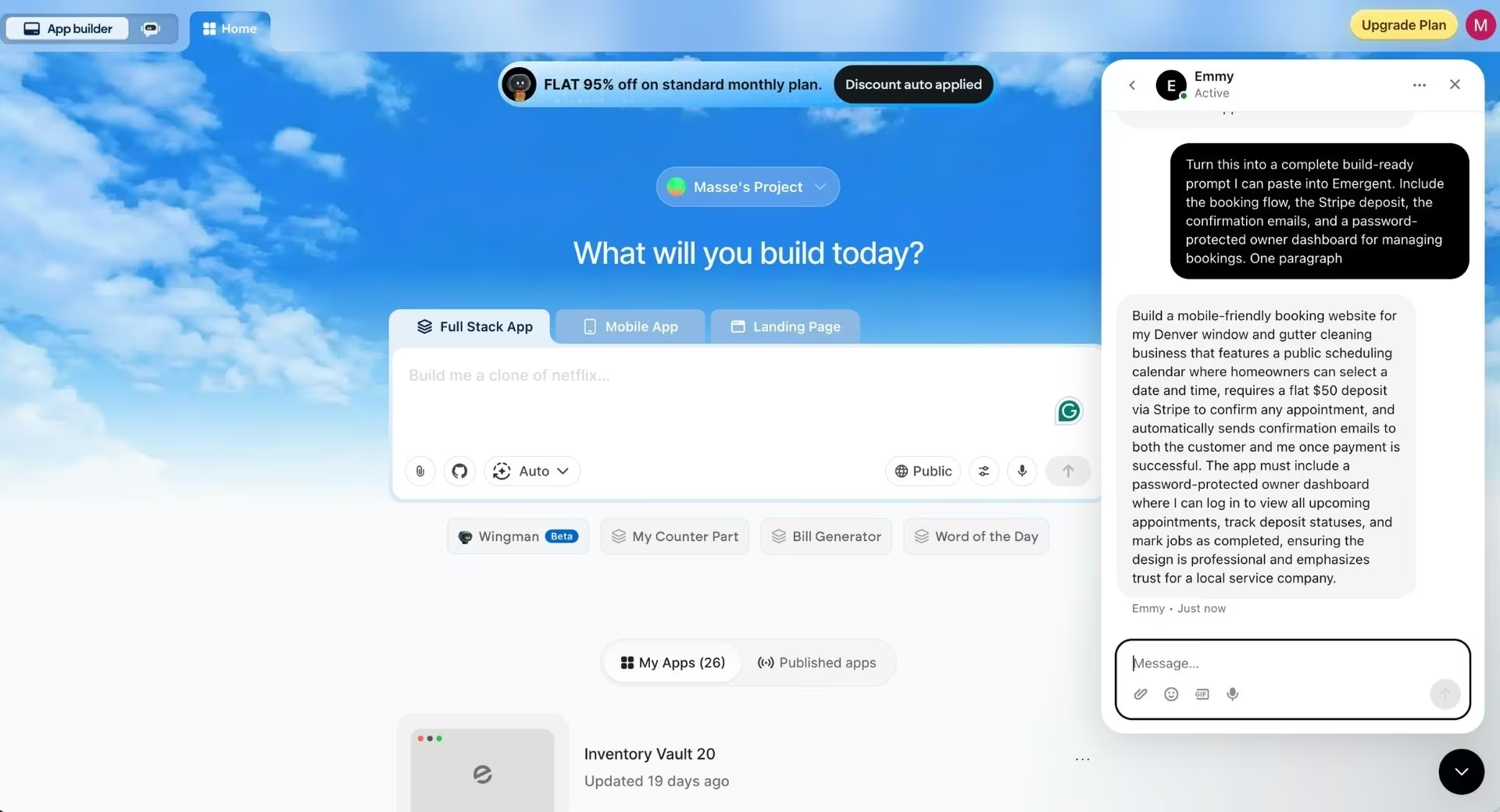
This is what came back, unedited:
Build a mobile-friendly booking website for my Denver window and gutter cleaning business that features a public scheduling calendar where homeowners can select a date and time, requires a flat $50 deposit via Stripe to confirm any appointment, and automatically sends confirmation emails to both the customer and me once payment is successful. The app must include a password-protected owner dashboard where I can log in to view all upcoming appointments, track deposit statuses, and mark jobs as completed, ensuring the design is professional and emphasizes trust for a local service company.
Notice how much of that prompt is specific instead of long. It names the deposit, the payment tool, who gets emailed, and what the owner can do after logging in, and most of those specifics came out of me because she asked.
You can also ask her which agent should run the build, a choice you won't have opinions about yet. She lays out the tradeoff: E-1 is predictable but expects step-by-step direction, E-2 is built for reliability and complex integrations, and E-3 maps the whole app first, writes a build plan, then builds it in one pass.
Running the Build
I pasted that straight into Emergent's prompt box, set the model picker to auto, and left every other setting at its default. I was on the free plan, and its monthly credits covered this whole build, sign-in and payments included.
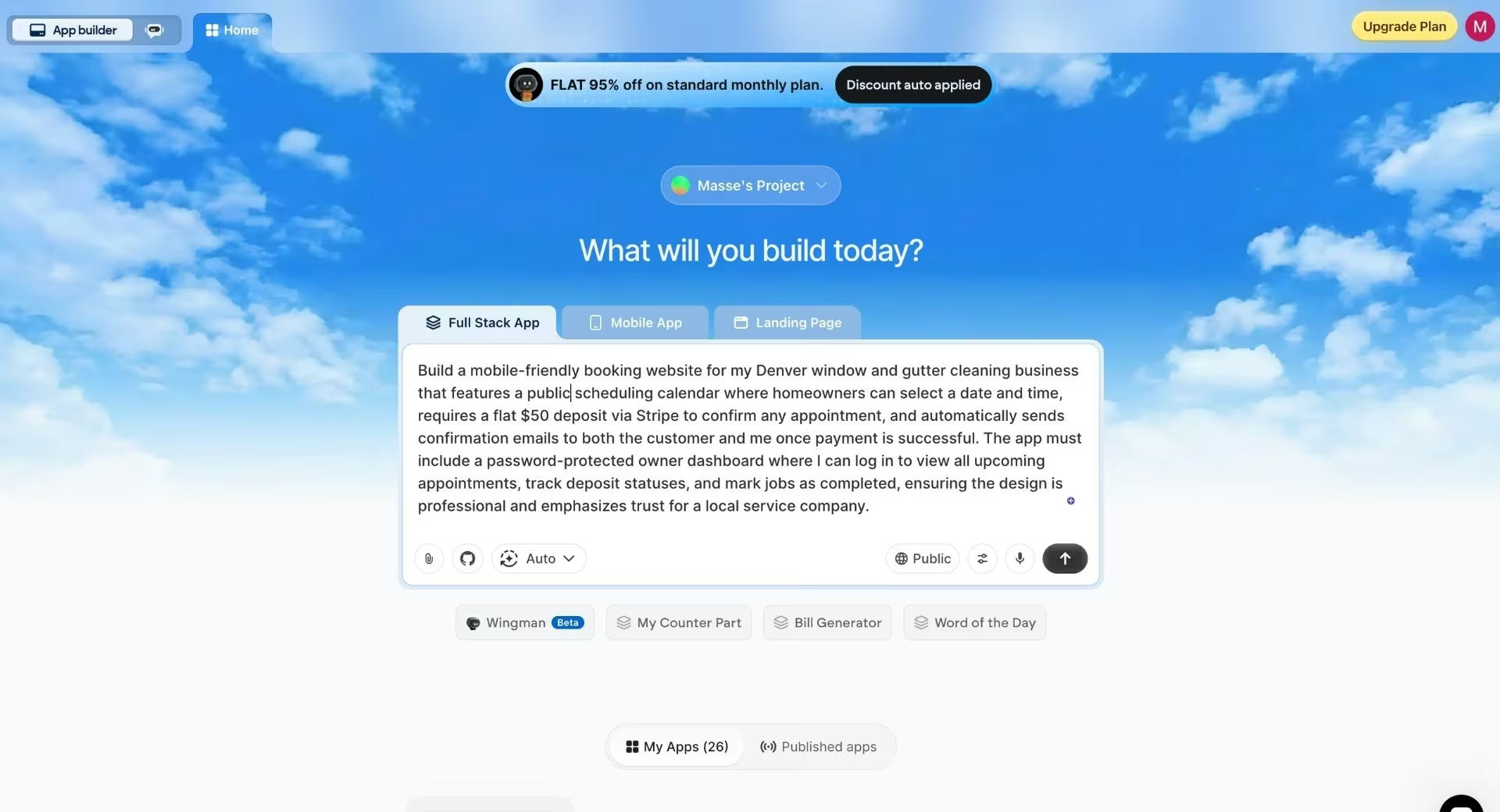
Then the questions started again, which surprised me. Emergent doesn't take a prompt and disappear into a build. It opened with five of its own, sharper than I expected:
- Payment provider: Stripe, and the useful part is that it needed no account and no access keys to start. You can test the checkout immediately and claim a real account when you're ready to take live money.
- Confirmation emails: handled by Emergent directly, so there was no email tool to connect or configure. A placeholder address for owner notifications was fine for now.
- Owner dashboard login: Google sign-in, so no password to invent or store.
- Services and pricing: window cleaning and gutter cleaning, flat $50 deposit on both.
- Brand colors and logo: none, so I asked it to design a clean, professional look for a Denver local-service business.
Answering those took about a minute, and each one is a decision that would otherwise have surfaced as a rebuild later. The build itself took roughly 15 minutes.
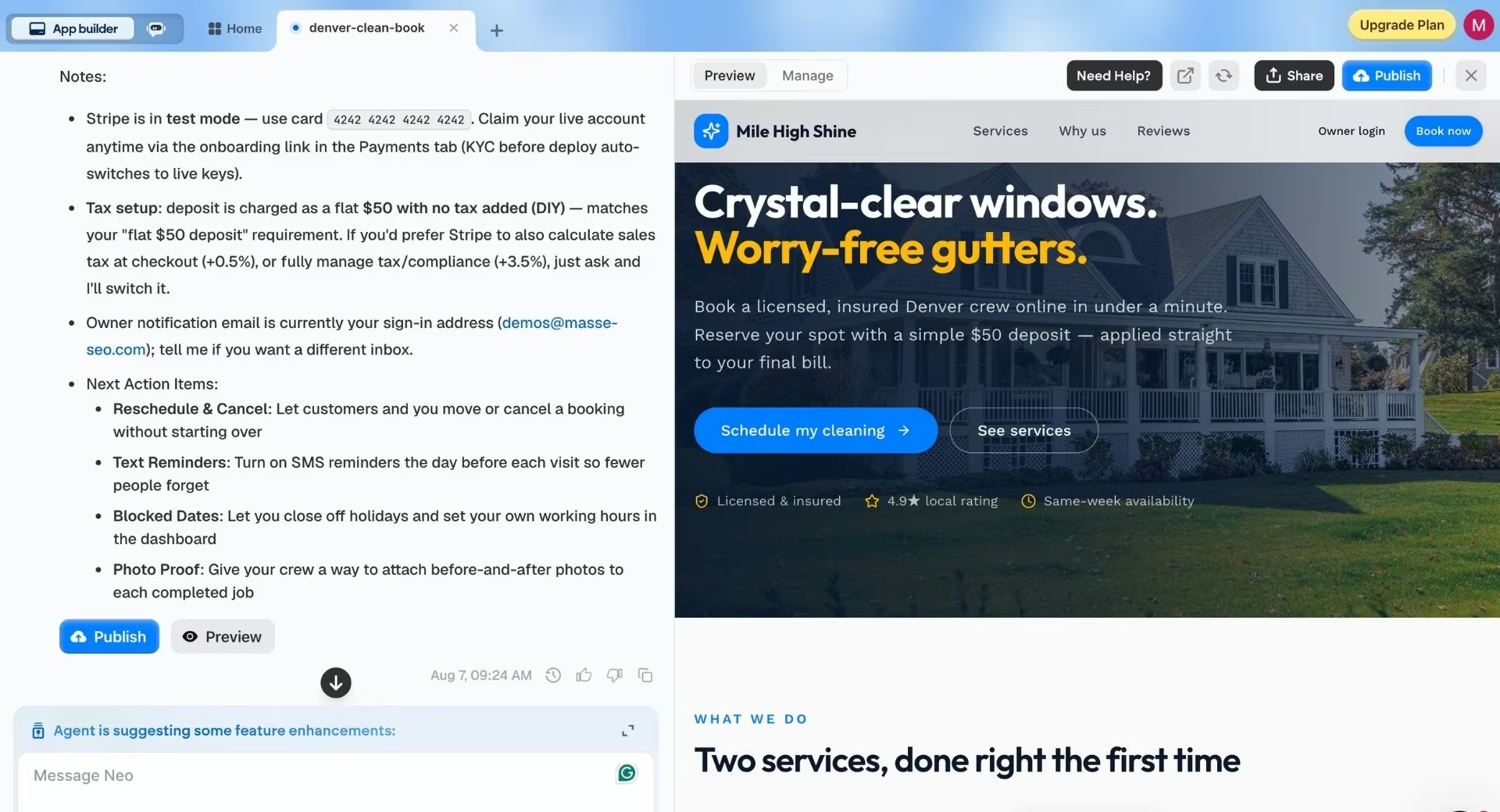
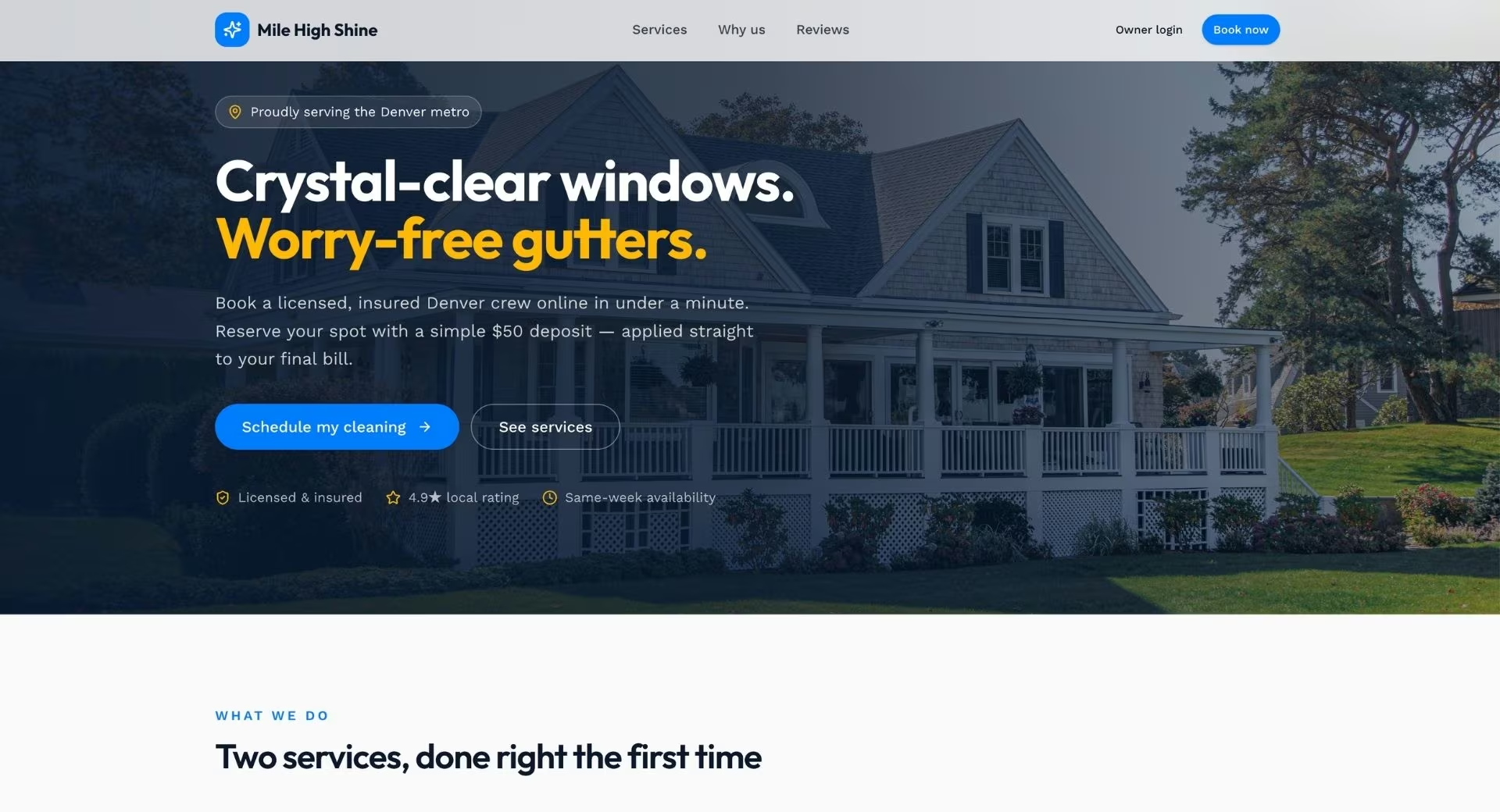
The landing page came back with a hero built around a photograph of a house, the right instinct for a home-services business, followed by sections laying out the two services. It doesn't look like a template 400 other cleaning companies are also running.
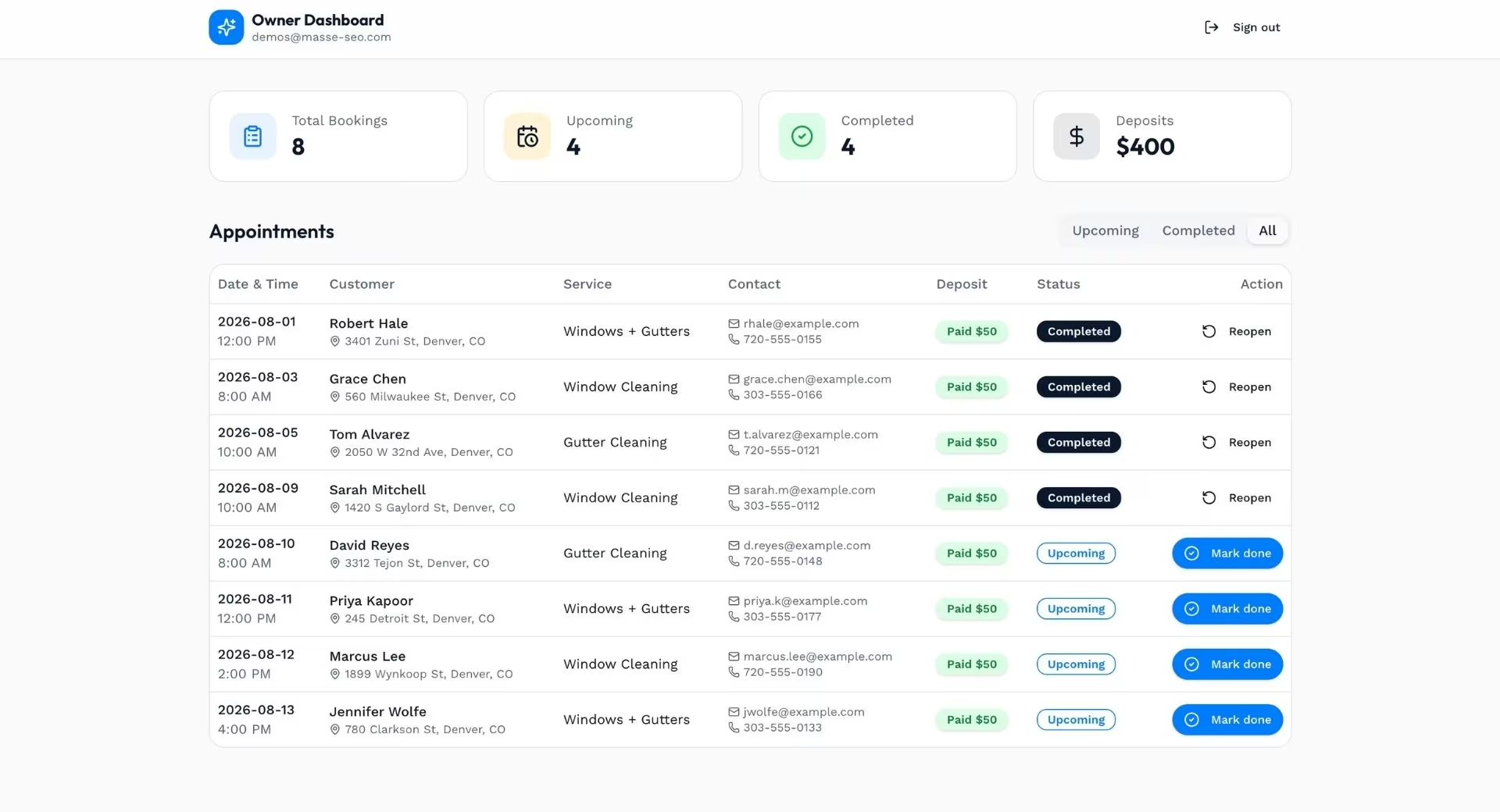
The owner side sits behind an Owner Login button and opens with Google sign-in. Inside is the schedule view, where on a fresh build every counter reads zero: total bookings, upcoming, completed, deposits. That's the correct and slightly deflating result, and the moment it stops being a demo and starts being an empty business tool waiting for its first customer.
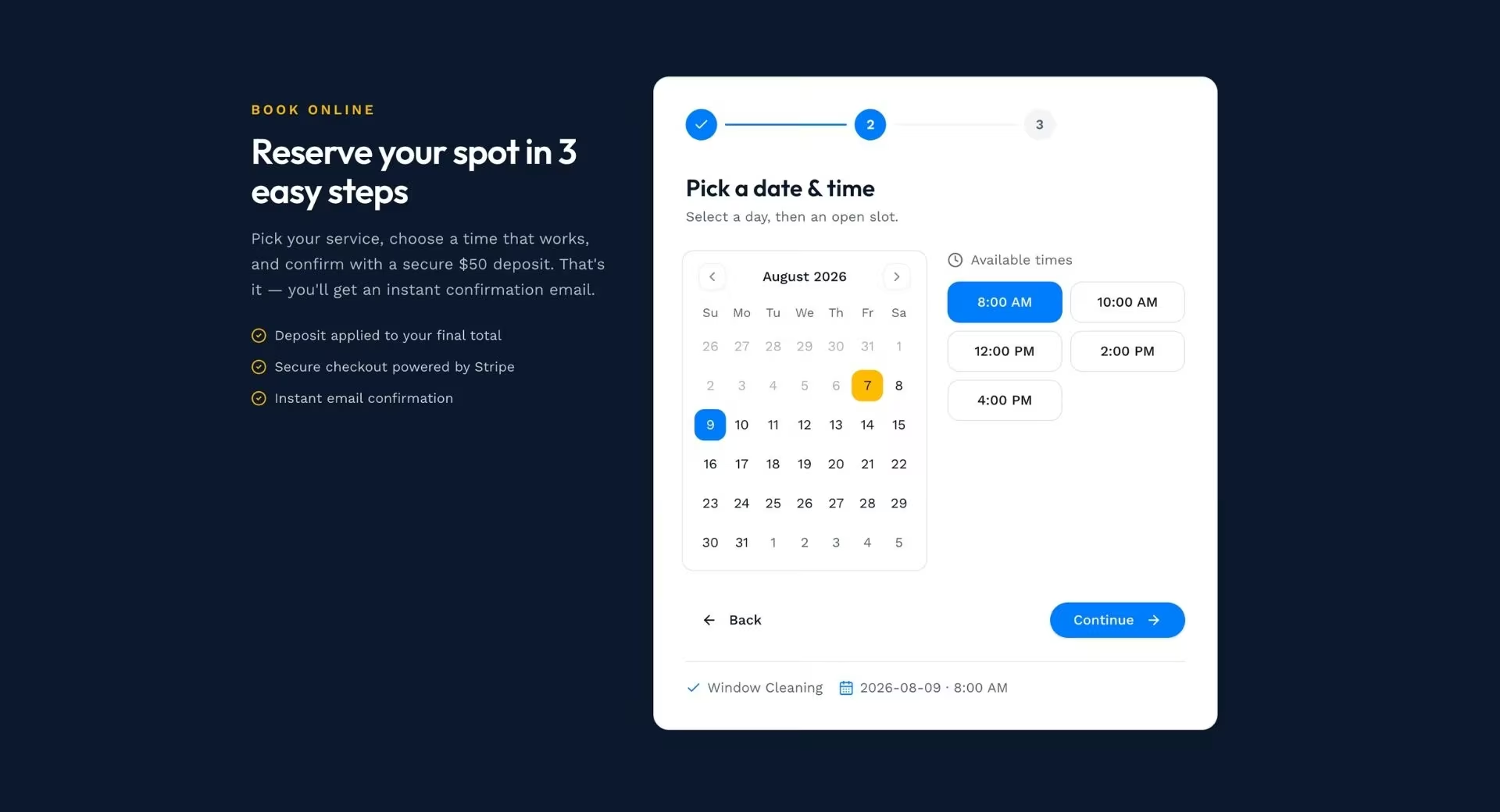
The booking flow is the part I'd judge it on. It sits at the bottom of the landing page under "Reserve your spot in 3 easy steps," and runs as advertised: pick the service, choose a date and time, enter your details, and pay.
Once bookings land, they appear in the owner view, where each can be marked complete. That's the whole loop a service business needs on day one: a stranger finds the site, picks a slot, pays enough to make them show up, and the owner sees it without a phone call.
View the live app: denver-clean-book.emergent.host
This is the part of the workflow I'd steal even if I never touched the rest of the platform. Prompt quality is the biggest lever on what any of these tools give back, and most of the category still hands you a blank box and leaves you to it.
A free assistant in front of that box inverts the risk, because the beginner who doesn't know what to ask stops being the person most likely to waste money.
She also talked me down rather than up. A tool with a credit meter had every reason to push a bigger first prompt, and the advice was to build less and confirm the money worked first.
Two limits before you lean on her. Emmy doesn't read your code or dig through your account history, so she works from project context rather than a line-by-line audit, and she's web-only right now.
Notice how much of that prompt is specific rather than long. It names the deposit, the payment tool, who gets emailed, and what the owner can do after logging in. Those specifics are the difference between a build you can use and one you have to argue with, and most of them came out of me because she asked.
Also read our guide on how to create a booking app with AI to see how a specific, well-structured prompt translates into a working product.
Step 7: Add Only the Functionality Your Site Needs
Functionality is anything on the site that does something beyond displaying words: contact forms, booking calendars, payments, email signups, member logins. Add only what your Step 1 sentence demands.
One caveat on the order. If the functionality is the site, as it was for the booking build above, this step comes first, and the pages come after. Get the money and the calendar working, confirm a test booking lands in your inbox, then write the About page.
On a builder or CMS, most of this arrives through add-ons you connect and pay for separately. That stack works, and it's how a large share of small business sites run today. The tradeoff is that none of the pieces know about each other, so a booking in one tool doesn't automatically become a paid deposit in another.
On an AI app-building platform, these pieces get built into the site itself. Emergent connects Stripe and Razorpay for payments, offers Google sign-in for customer accounts, and sends confirmation and notification emails without a separate tool, or connects SendGrid if you'd rather send through your own provider, all inside the one project.
Every feature you add is something you have to keep working. If it doesn't serve the action in your Step 1 sentence, leave it out of version one. You can always add it later, and you'll add it better once visitors have told you what's missing.
Step 8: Check It on a Phone, Then Fix What Search Engines Read
Open the site on your own phone before you do anything else. A browser window dragged narrow doesn't count, because it won't show you the thumb-reach problems.
This isn't a nice-to-have. Google crawls and indexes the mobile version of your site rather than the desktop one, which means the phone view is the version that determines how you rank. Tap every button, fill in every form, and read a full paragraph at arm's length.
Then handle the search basics on each page: a descriptive page title, a meta description that reads like a sentence, one H1, headings that describe what's underneath them, and alt text that says what's in each picture.
Speed matters too, and images are almost always the culprit. Compress them before uploading and run the live URL through PageSpeed Insights for a specific list of fixes.
Step 9: Test, Publish, and Point Your Domain at It
Run one careful pass before you publish. Click every link, submit every form, and confirm the notification lands in the inbox you expected.
Read the whole site out loud once, because typos hide from your eyes and surface in your mouth. Then check it in a second browser.
Publishing depends on your route. Builders and CMSs have a publish button and a domain connection screen. On Emergent, you click the Deploy button, and the site goes live on an .emergent.host address in about 15 minutes, the same ballpark as the build itself rather than 15 minutes on top of it.
For your own address, you can either buy a new domain inside Emergent through its IONOS integration or connect one you already own, and the custom domain guide walks through both paths.
Emergent verifies the record in about 5 to 15 minutes, and full global propagation can occasionally take up to 24 hours. Don't panic during that window, and don't change the settings again while you wait.
Common Mistakes to Avoid
Four habits that sink first sites:
- Building for yourself: You're not the visitor. The clever navigation label that makes sense to you costs a stranger three seconds of confusion, and they don't have three seconds.
- Adding pages you'll let go stale: A stale blog with three posts from two years ago actively damages trust. Fewer pages, kept current, win.
- Registering everything in someone else's name: If a friend or a freelancer buys the domain on their account, they own your address. Register it yourself and add them as a user.
- Treating launch as the finish line: The first version is a hypothesis. Connect analytics, watch where people drop off, and fix that page first.
What a Website From Scratch Really Costs to Run
The subscription is rarely what hurts. The add-ons are. A builder plan looks cheap until you bolt on a scheduling tool, a payment tool, and an email tool, each billing separately and none of them aware of the others. The Wix and Squarespace breakdowns show what those plans run once the first-year promotion ends.
AI app-building platforms bill by credits instead of a flat seat price, which trades predictability for flexibility. Emergent's free plan comes with 10 monthly credits, enough to put a first build through its paces before you pay anything.
The Standard plan runs $20/month ($17/month billed annually) with 100 monthly credits, private hosting, and the option to connect a GitHub account so you keep a copy of the code.
Credits stretch further on a simple page than on a full booking flow, so budget for the first build, when you'll be iterating most. If you're weighing custom development instead, Emergent's breakdown of what it costs to create an app compares the routes with figures.
When an AI App-Building Platform Is the Wrong Choice
An AI app-building platform is the wrong choice when your site is only ever going to be pages. If the Step 1 verb is read or browse, a builder does that job faster and cheaper, and there's no reason to reach for anything heavier.
Here's the honest routing. Developers who want a faster way to write code are better served by AI coding tools, and Emergent's own Claude Code vs Cursor comparison covers the two most common picks.
A marketing site and nothing more belongs on Webflow or a mainstream builder. A demo that only has to survive one pitch meeting doesn't need a platform designed to run software after the meeting ends.
A few specifics are worth knowing before you spend credits. Reports that render charts into PDFs can break across page boundaries, video games aren't a fit, and Apple Watch and iPad apps can be written but not yet published through Emergent.
Where the platform earns its place is the opposite case: a site that takes bookings, moves real money, and remembers who came back. Scheduling, client portals, inventory, and simple stores are its home turf, and because you own and can export the code, a site built this way moves with you if your needs change.
If you eventually want a phone version, Emergent's guide to turning a website into an app covers that path.
Final Thoughts
When you build a website from scratch, the verb in your Step 1 sentence is what should pick your route. People pick a platform first, discover in month three that it can't take a deposit, and start over with a year of momentum gone.
What surprised me building this one was how much of the work happened before the build. Two conversations, one with an assistant and one with the builder itself, settled a dozen decisions before a single screen existed. The 15 minutes of building was the easy part.
Your first version will be wrong in ways no planning document can predict. Publish it anyway. A live site that's 80% right teaches you more in two weeks than another month of tweaking a draft nobody has seen.
Build a Site That Books, Sells, and Signs People In
If your Step 1 sentence ended in a verb a template can't handle, that's the case Emergent is built for. Its free plan includes 10 monthly credits, enough to put a build in front of you before you spend anything.
What the free plan gets you:
- Get the prompt written for you: Emmy asks what the site has to do and who it's for, then turns your answers into a build-ready prompt, so you're not guessing at how much detail the agent needs.
- Ship the whole booking flow: Describe the calendar rules, the deposit, and the confirmation emails in one prompt, and the scheduling gets built into the site instead of bolted on through a third subscription.
- Take money on day one: Stripe and Razorpay checkout are wired in during the build, so a deposit works before you've written a line of code.
- Keep the site yours: You own the code, and connecting a GitHub account on the Standard plan lets you export it, so a site built today can move to your own hosting or your own developer tomorrow.
- Point your own address at it: Buy a domain through the built-in IONOS integration or connect one you already own.

Describe what you want and Emergent builds it. A real, production-ready app you can launch the same day.
- One prompt to build
- Zero code required
- Deploy in minutes







