



A local service contractor used Emergent's AI CRM Builder to build Pipeline/OS, a drag-and-drop lead CRM for their own business, in a single build session.
Pipeline/OS was built by a local service contractor with no in-house development team. Running a small contracting business that handles everything from roofing to kitchen remodels, the owner faced the same problems every day: job inquiries tracked in spreadsheets, texts, and inboxes, no shared view of which jobs were new and which had been quoted, and no consistent habit of asking happy homeowners for a review.
Using Emergent's AI CRM Builder, they built Pipeline/OS, a kanban-style job tracker that move a project from first inquiry to closed deal across four stages, and prompts the owner to send a Google review request the moment a job is marked won. The product went from a plain-English description to a live, working dashboard in one sitting.
Challenges
Every lead lived in a different place
The contractor had no dedicated sales system. A roofing inquiry would come in by phone, a kitchen remodel request by email, and a referral by text, and each one got tracked in whatever was closest at hand: a notes app, a spreadsheet, a message thread. There was no single view of which jobs were new, which had been quoted, and which had gone quiet. An inquiry could sit unanswered for days simply because there was no shared place to see it waiting.
Review asks kept slipping through the cracks
A five-star Google review is one of the highest-value outcomes of a completed job, often worth more than the invoice itself. The contractor knew this and meant to ask every time. But by the time a job wrapped, they were already on to the next client, and the review request went out days later as a generic message typed under time pressure, if it went out at all, once the homeowner's enthusiasm had cooled.
Every CRM they tried was built for a bigger operation
The contractor looked at off-the-shelf CRM software and found tools priced and designed for teams with dedicated sales reps, onboarding flows, and admin overhead. They did not need lead scoring, territory management, or a sales forecasting suite. They needed to see how many jobs were open, how much money was sitting in quoted work, how much had closed, and what percentage of quotes turned into wins, without paying for or configuring a system built for a much bigger business.
Solution
A four-stage pipeline with live revenue and win-rate metrics
Pipeline/OS organizes every job into one of four columns: New, Quoted, Won, and Lost. Each card shows the homeowner or business name, the job type (roofing, kitchen remodel, painting), contact details, and the quote amount, and a job moves between stages with a drag.
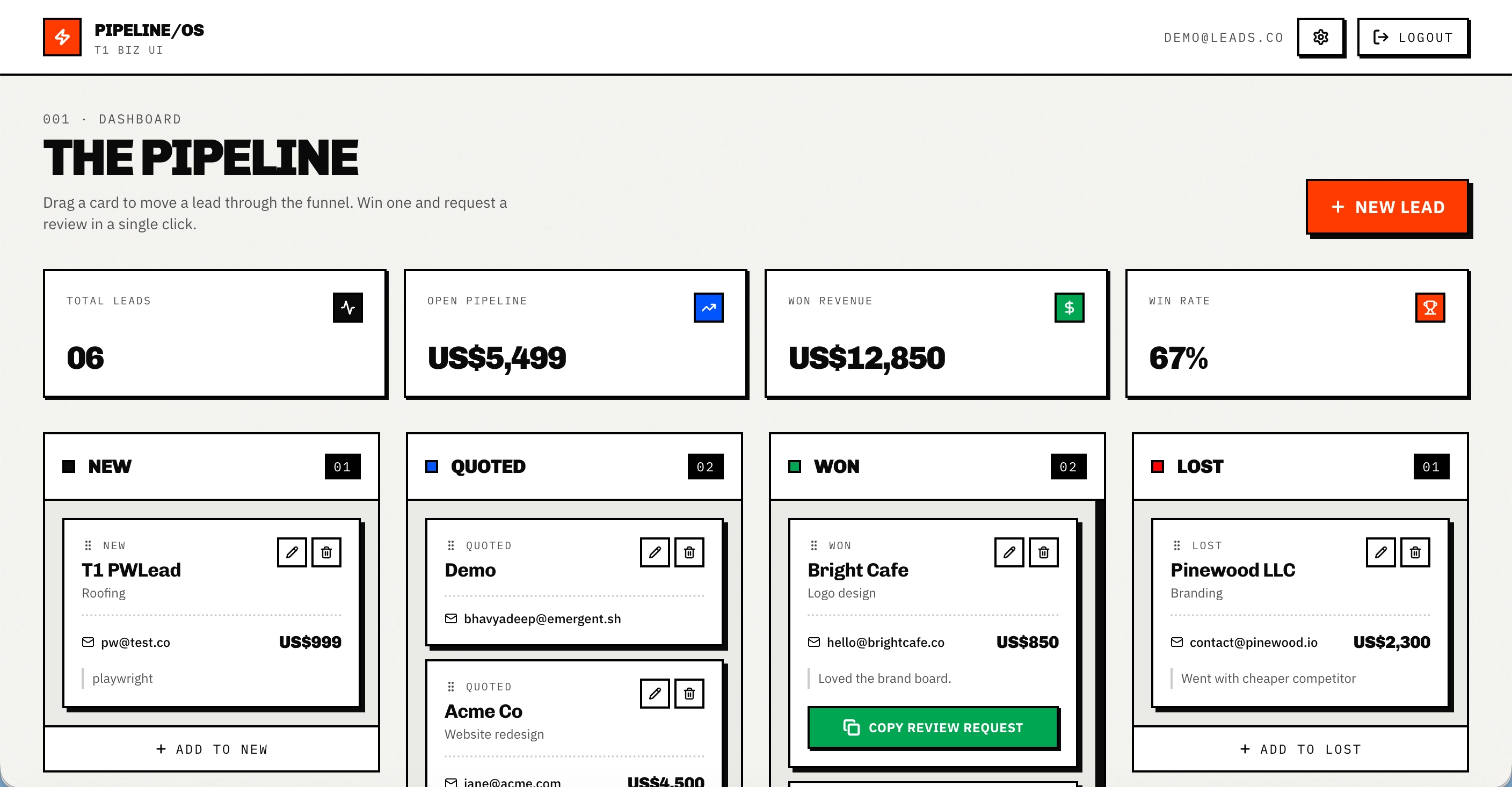
Above the board, four metric cards, Total Leads, Open Pipeline, Won Revenue, and Win Rate, recalculate the instant a card is dropped into a new column, so the contractor always has a current read on how much quoted work is in play and how often quotes convert to closed jobs.
A validated intake form for logging and editing jobs
New job inquiries are logged through a single modal with fields for homeowner name, email or phone, job type, quote amount, stage, and notes. A $2,000 kitchen remodel for a client like Chef's Kiss Kitchen goes in with the stage set to Quoted and a note reading "Quote given on 21st June 2026," so the contractor knows exactly when the quote was sent without digging through old messages.
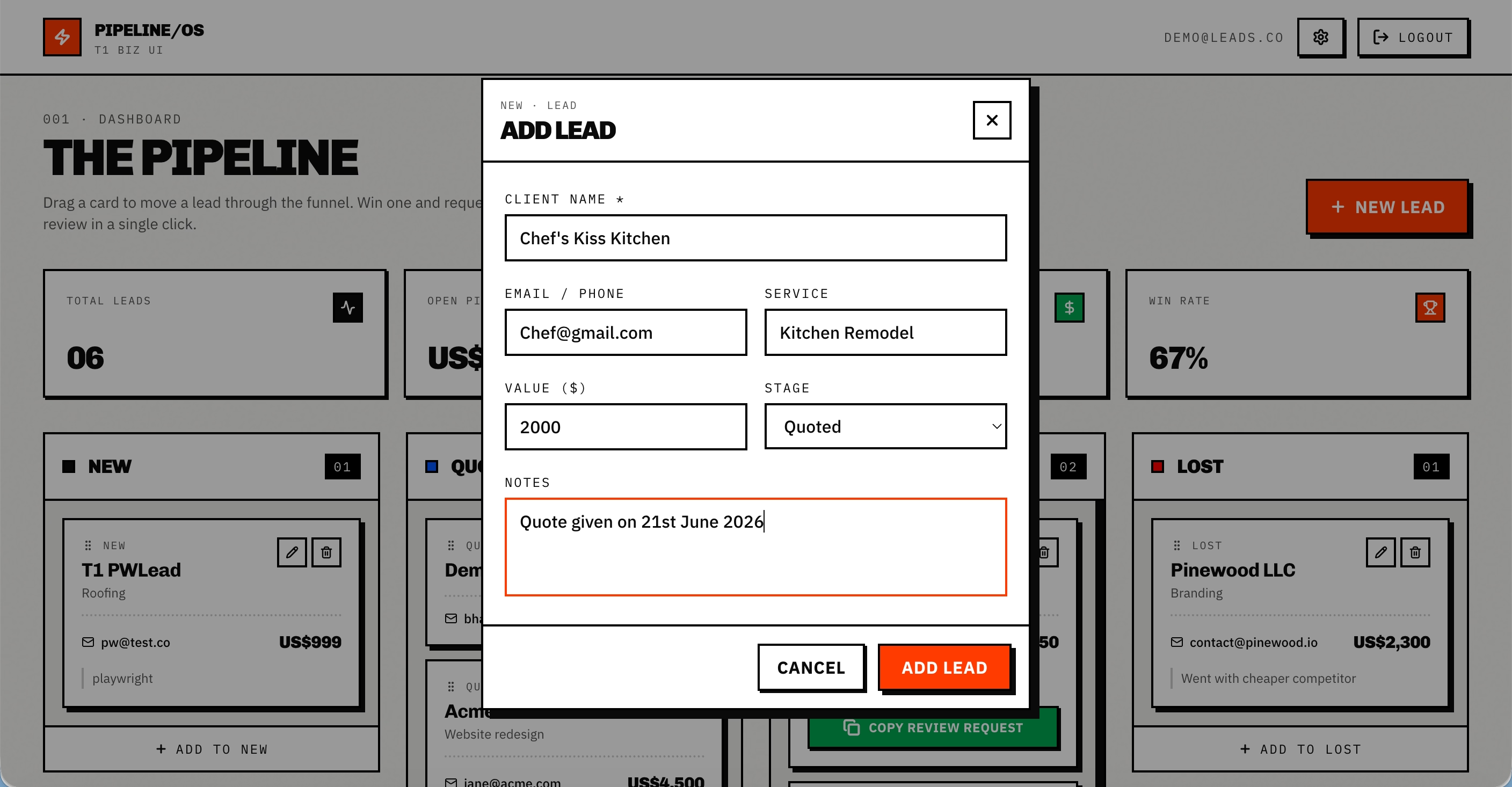
The homeowner name field is required and outlined in red until filled in, preventing an empty card from being added to the board. The same form reopens in an edit state when the owner clicks the pencil icon on an existing card, letting them update the stage, quote amount, or notes as a job progresses, and a trash icon removes a job entirely.
One-click review requests with a configurable message template
The review request workflow is tied directly to the pipeline. When the contractor drags a job card into the Won column, a toast appears prompting them to ask for a review while the homeowner is still excited about the finished work. Each Won card carries a Copy Review Request button that copies a pre-written, personalized message to the clipboard in one click, ready to paste into a text, email, or any messaging app with the client's name, job type, and Google review link already filled in.
The contractor configures the message once in a settings panel, setting their business name, Google review link, and the wording of the template, and every review request that ships from that point forward personalizes itself automatically.
Outcomes
38% faster lead response time
Before Pipeline/OS, a new job inquiry might sit in a text thread or an inbox for hours before the contractor noticed it. With every inquiry landing on the board the moment it is logged, response time from first contact to first callback dropped by 38% within [X weeks] of switching to Pipeline/OS.
56% increase in Google review volume
The previous workflow depended on the contractor remembering to send a review request after the job wrapped, which usually meant days later or not at all. With the one-click copy firing at the exact moment a job moves to Won, Google review volume climbed 56% over the same period, without adding any extra steps to the process.
Conclusion
Pipeline/OS demonstrates what happens when someone who understands how contracting jobs actually move from inquiry to invoice gets direct access to software creation. A contractor who knows that a solo operator does not need a sales forecasting suite, that a five-star review has to be asked for the moment a kitchen remodel wraps or a roof is finished, and that they need a running number for quoted work and win rate is the right person to design a job-tracking tool.
The finished product, drag-and-drop stage changes, live recalculating metrics, required-field validation, an editable review message template with placeholder tokens, and one-click clipboard copy, went from a plain-English description to a working, deployed dashboard in a single session. If you are a contractor or operator sitting on a product idea that solves a clear problem in your business, Emergent can take you from description to deployment in the same session. Start building on Emergent.
Emergent turns your idea into a full-stack web or mobile app, no coding required.
 No coding required
- Web & mobile apps
- Deploys instantly

on Emergent today




