



TL;DR
- Lovable: best if you want the first build to cover more of the requested workflow and you want clearer access to the database, security rules, project files, and GitHub.
- Base44: best if you want a more managed setup and would rather keep the database, authentication, hosting, and most technical work inside one platform.
A friend sent me a Loom last week of an app he had built on Base44. It was a booking system for his barbershop, with time-slot selection, customer profiles, and a dashboard for tracking walk-ins. From the video, it looked finished.
But he wasn’t so sure. He told me that people in his Discord were saying Lovable would give him more control over the code later. Had he chosen the wrong builder? He didn’t know what “more control” would mean for the app he had already made.
To answer him properly, I built the same moving company app in Base44 and Lovable. I also compared their pricing, code access, backend setup, integrations, publishing, security, mobile options, and the limits you’re likely to run into as the app grows.
You’ll come away knowing which builder fits your budget, technical confidence, and plans for the app after launch.
The Main Difference Between Lovable vs Base44
The main difference comes down to control. Base44 hides the database, logins, and hosting so there’s less to set up, while Lovable puts the project files, data rules, and GitHub workflow in front of you.
Base44 is an AI app builder that keeps the database, authentication, functions, integrations, and hosting connected inside its managed platform. You can access and edit the code on eligible plans, but the default experience is designed to keep most of that technical work in the background.
Lovable also provides a managed backend through Lovable Cloud, but it gives you clearer access to the project files, database rules, security settings, and GitHub workflow. You can use Lovable Cloud or connect the project to your own Supabase account, depending on how much control you want over the app’s data and infrastructure.
How I Tested Them
I gave both builders the same prompt for BlueRoute Movers, a small moving company app.
What I asked Base44 and Lovable to build:
Build an app for a small moving company called BlueRoute Movers. It needs a customer intake form that captures move date, addresses, and job size; a job-status dashboard for the team; a basic client portal where a customer can log in and see only their own move; and a tracker for upcoming moves.
Provide two separate demo logins: one for the moving team and one for a client. Prefill the login details on each login screen.
I checked whether each build completed five parts of the brief.
These five parts were:
- A public customer intake form
- A team dashboard
- A client-only portal
- An upcoming moves tracker
- Separate working logins for the team and client
I also recorded how long each build took, how many credits it used, whether the data saved correctly, and how many correction prompts I needed before the app worked as requested.
Base44 ran on its free Auto mode. Lovable ran on its free Build mode. I tested both published apps rather than judging them solely from the preview, then checked their databases, code access, security tools, publishing options, and mobile output separately.
Base44 and Lovable: At a Glance
| Category | Base44 | Lovable |
|---|---|---|
| Plans | Free; paid plans start at $20 monthly or $16/month billed annually | Free; paid plans start at $25 monthly or $21/month billed annually |
| Free credits | 25 message credits and 100 integration credits per month | 5 build credits per day, capped at 30 per month |
| Backend | Built-in database, authentication, backend functions, integrations, and hosting | Lovable Cloud or Supabase |
| GitHub and export | GitHub sync and local development are available on eligible paid plans | Two-way GitHub sync on all plans; full ZIP export is paid-only |
| Custom domains | Available from Builder | Available from Pro |
| Mobile output | Responsive web app and PWA; no generated React Native or Expo app | Responsive web app; no built-in PWA or app-store packaging, and no generated React Native or Expo project |
| Analytics and SEO | Built-in traffic and event analytics | Analytics for published apps and SEO audits |
| Security | Database access and field-level security rules | Security checks for database rules, app code, configuration, and dependencies |
Base44 vs Lovable: Feature Comparison
Base44 and Lovable both turn written prompts into web apps, but they organize the technical work differently. Base44 keeps more of the database, authentication, hosting, and integrations managed inside one platform. Lovable makes the project files, data rules, and GitHub workflow more visible while letting you use Lovable Cloud or Supabase for the backend.
The sections below compare how each platform handles the build process, customization, publishing, integrations, security, and cost.
App Building
I gave Base44 and Lovable the same prompt for a moving-company app, then tested the five flows from the methodology: a public intake form, a team dashboard, a client portal, an upcoming-moves tracker, and working logins for both roles.
Base44 produced its first preview in four minutes.
Base44 test results:
- Build time: 4 minutes
- Usage: 3 of the 5 daily Free-plan credits
- Flows completed: 2 of 5
- Correction prompts: 2
- Reverts: 1
- Mode: Auto
The first preview made the app look complete. Base44 had created the main dashboard, intake page, client portal, upcoming moves tracker, and separate team and client login screens.
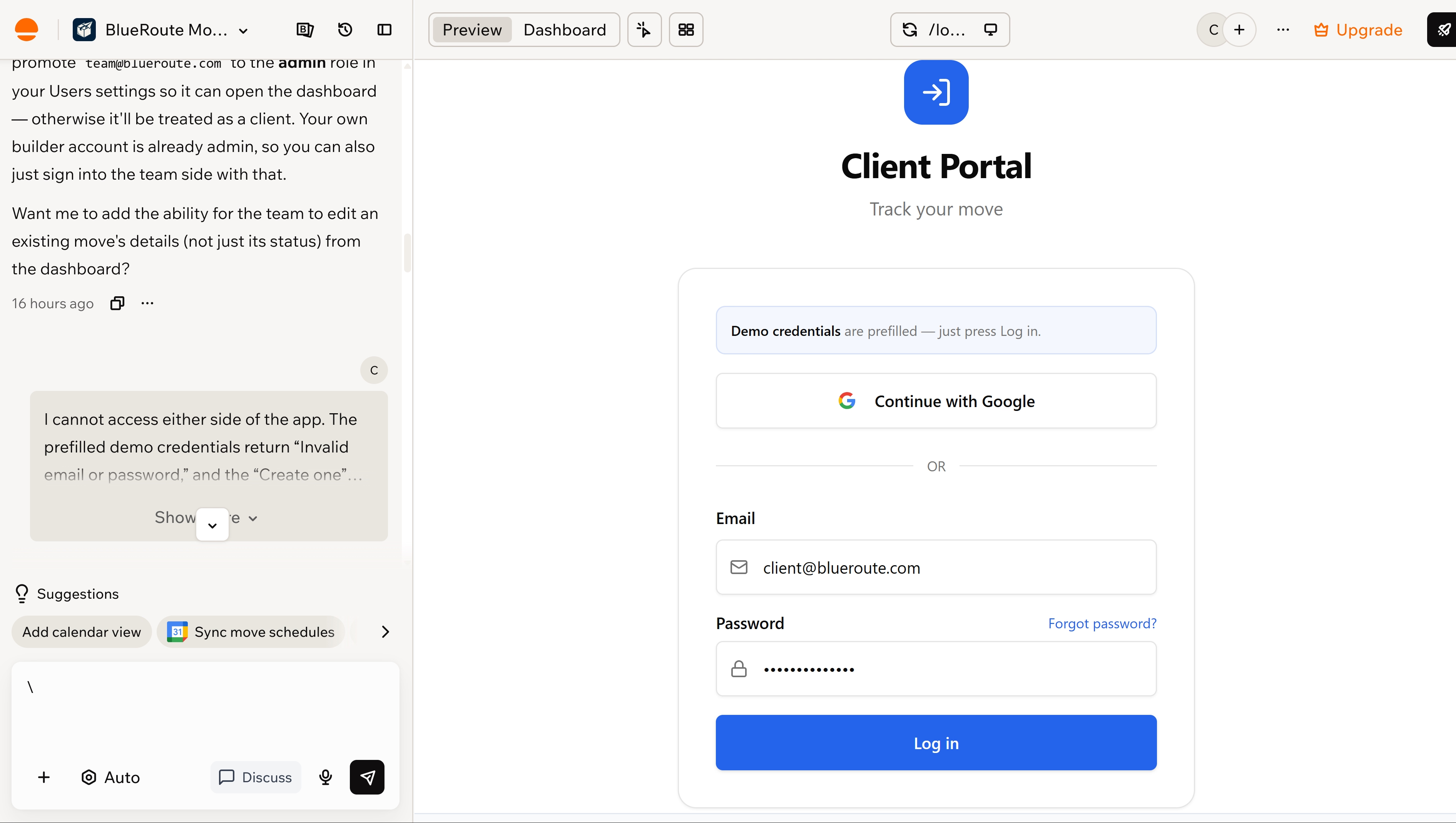
I started where a new customer would. Instead of finding a public form on the homepage, I found the intake page inside the team area. A customer would have had to enter the app before requesting a move.
I tested the demo logins next. Neither set of demo credentials worked, and my first correction changed the login screen without solving the problem. I reverted the change and eventually used two of my own Google accounts to continue testing the team and client sides.
Once I reached the team dashboard, Base44 handled the internal work better. I could create a move, change its status, and watch the stored data and dashboard totals update.
Base44 had produced all the right-looking screens, but only two of the five tested flows worked without further repair. Most of my extra effort went into reaching the different user areas rather than testing what happened inside them.
Lovable produced its first build one minute later.
Lovable’s test results:
- Build time: 5 minutes
- Usage: 5.90 credits used out of 10 available (including 5 daily credits and 5 promotional credits)
- Flows completed: 5 of 5
- Correction prompts: 0
- Reverts: 0
- Mode: Build
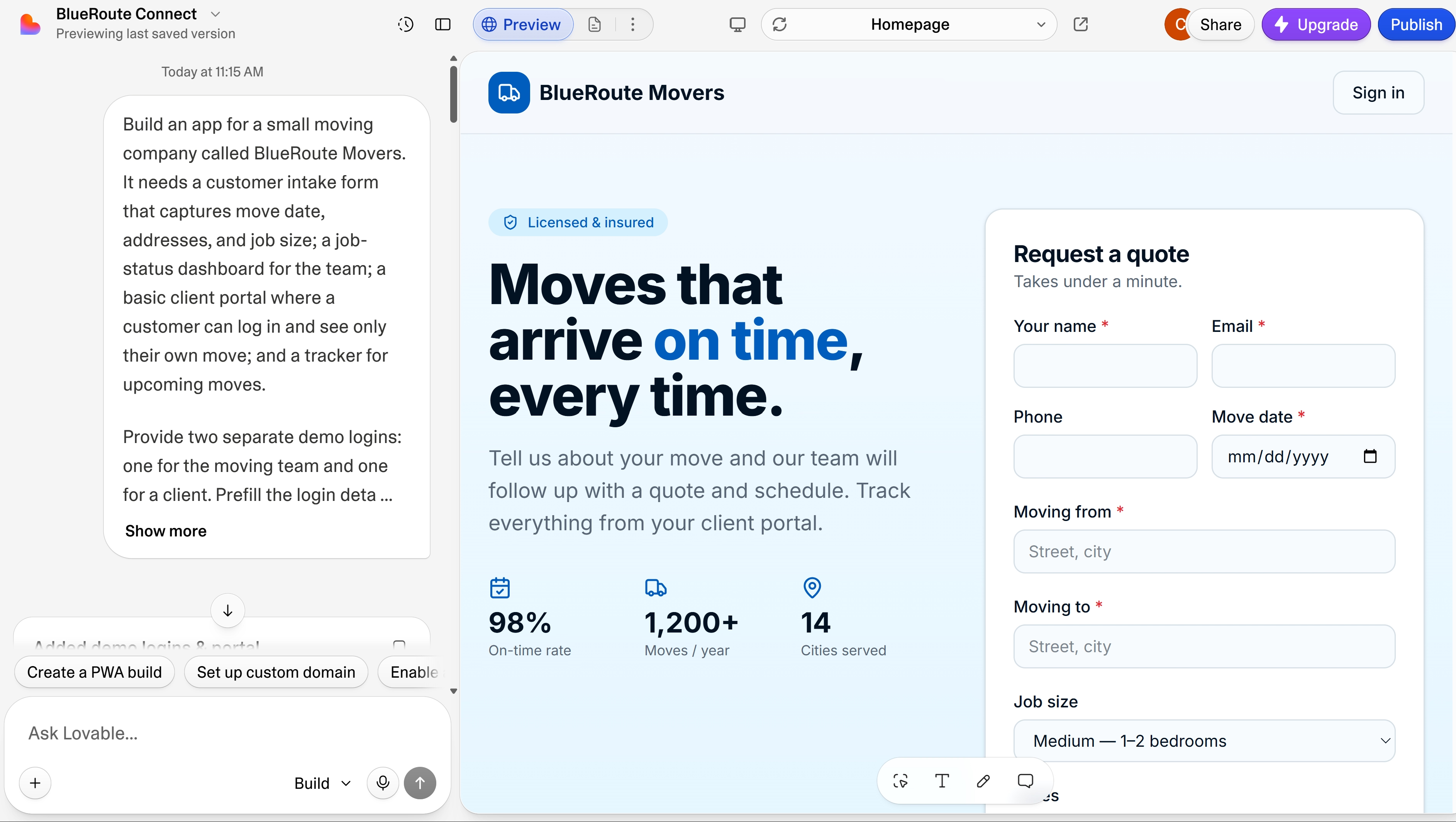
I again began as a new customer. Lovable opened on a public homepage with the moving-request form, service details, and a sign-in option for customers who already had an account.
I submitted a move request and received a confirmation. The new job appeared in the project database and on the team dashboard, so the customer’s action carried into the part of the app that the moving team would use.
I tested the two demo accounts next. Both prefilled logins worked without another prompt. The team account opened the full dashboard, while the client account showed only the move assigned to that customer.
I then returned to the team dashboard and changed the client’s move from Scheduled to In progress. When I signed back in as the client, the same move showed the updated status, and none of the other jobs were visible.
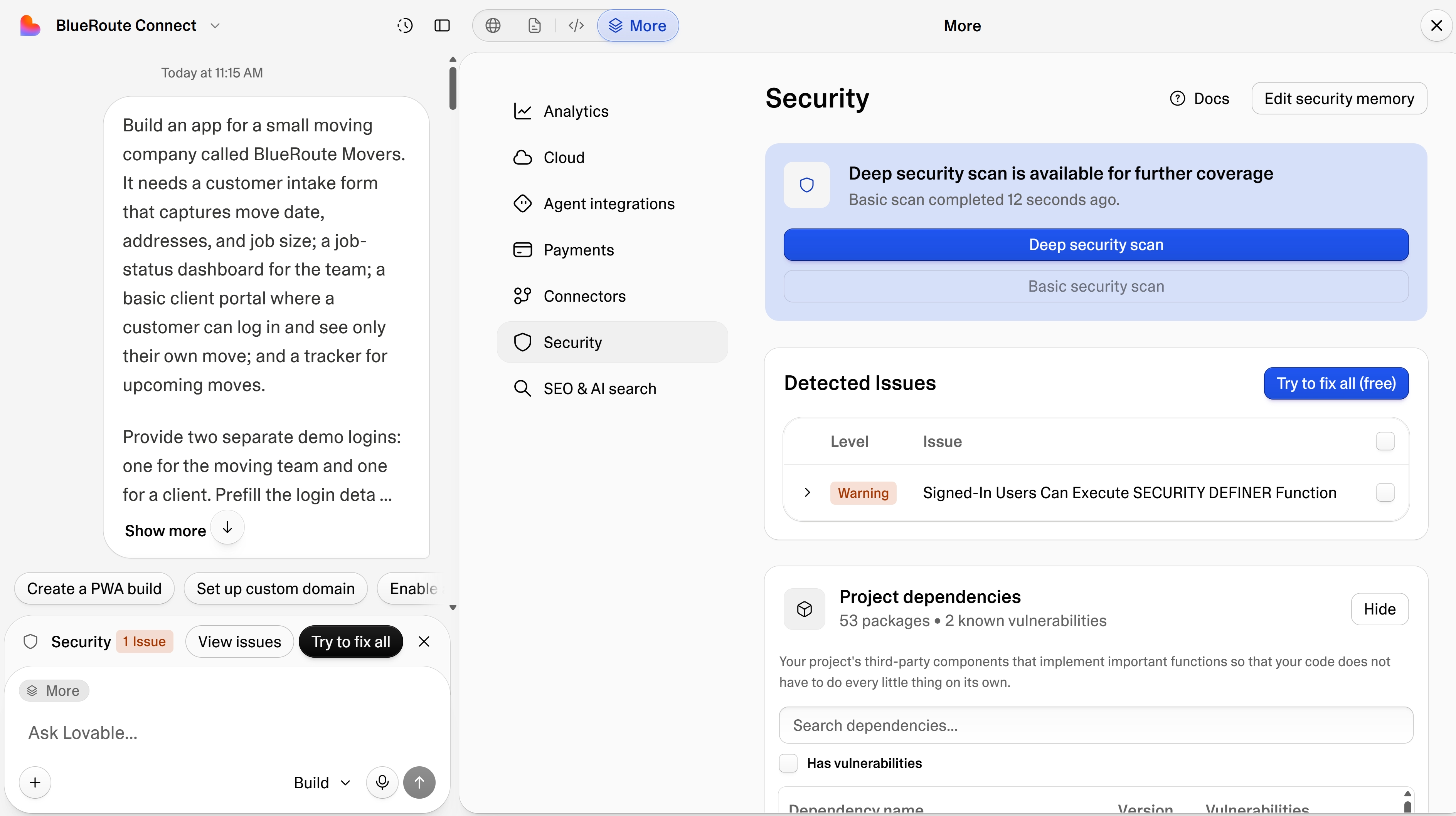
After the build test, Lovable’s security scan flagged a weakness in the public intake rule that could have allowed someone to submit another client’s ID. The automated repair changed the policy without breaking the form or either login.
Winner: Lovable. Base44 built the first preview faster and used fewer credits, but Lovable completed all five flows without a correction prompt or revert.
Backend and Integrations
Neither Base44 nor Lovable asked me to configure a database before BlueRoute appeared. Both created the data and login setup needed to run the app.
Base44 kept most of that work in the background. Its Data area let me view the move records, search them, apply filters, and check permissions from one screen. When I changed a job in the team dashboard, the stored record and dashboard totals updated together.
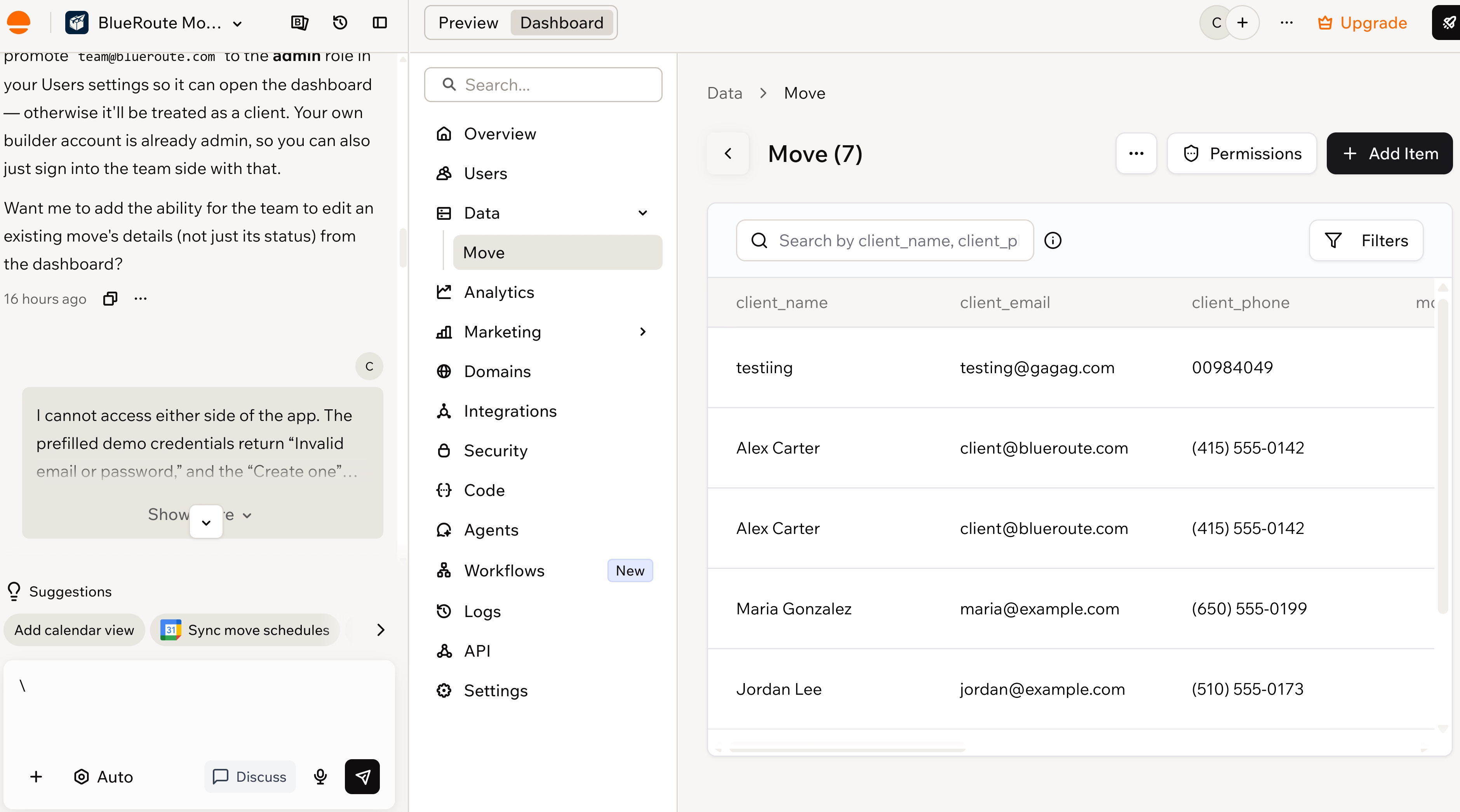
Base44’s managed backend combines a database, authentication, real-time updates, backend functions, integrations, and hosting. You can start testing an app without choosing and connecting separate services first.
You can also:
- Control who can view or edit specific data
- Add server-side logic through backend functions
- Connect outside APIs without exposing credentials in the browser
- Use Base44 as the backend for another frontend
The trade-off is that you work within Base44’s own data model, SDK, functions, and access rules.
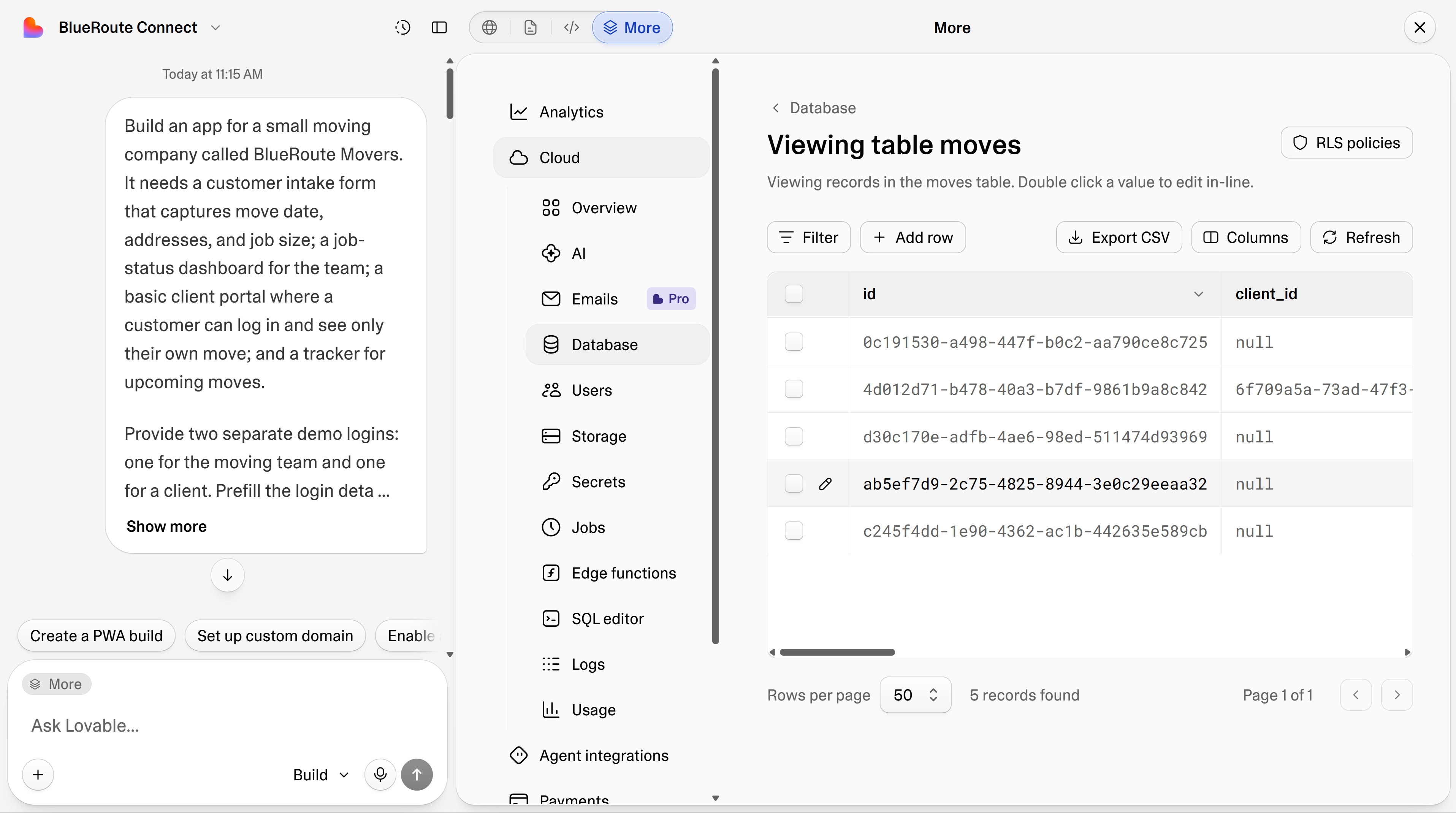
Lovable also built the backend for BlueRoute, which gave me more visibility into how the app used its data. I could inspect and edit records, filter them, export data, review access policies, and trace a customer request from the public form into the team and client views.
Lovable Cloud includes the database, authentication, storage, server-side functions, logs, and hosting. You can also connect Lovable to Supabase when you want to manage the backend through a separate Supabase account.
Since BlueRoute didn’t need an outside service, I compared the integration options based on what you could add later.
Base44 handles more common actions inside its own system, while Lovable gives you clearer access to the code and server-side logic behind each connection.
Base44 supports:
- Built-in integrations for email, file uploads, media generation, document extraction, and AI calls
- OAuth connectors for services such as Google Workspace, Slack, Notion, and Salesforce
- Custom OpenAPI integrations and backend functions for services without a ready-made connector
- Protected API calls that keep credentials out of the app’s frontend
You can add common features without opening several provider accounts or managing every API key yourself. A booking app could send an email, add an event to a calendar, update a CRM, or post a message to Slack from the same Base44 project.
Lovable supports:
- App connectors that add outside services to the published app
- Chat connectors that give Lovable access to outside information while you build
- Public APIs called through the project code
- Authenticated APIs using secrets and server-side functions
- Logs and project files you can inspect when a connection fails
Lovable asks you to work more closely with the integration logic, but it also gives you greater visibility when you need to understand or repair a connection.
Winner: Lovable. Base44 reduces the setup required for common connections, but Lovable made BlueRoute’s backend easier to follow and investigate.
Code and Ownership
Base44 let me open BlueRoute’s code on the Free plan. I could browse the files and see how the app was built, but they were read-only.
Base44’s code access depends on your plan:
- Free: View the generated files
- Starter: Edit code inside Base44
- Builder and higher: Connect the project to GitHub for local work and collaboration
- Data export: Download database records separately as CSV files
Taking the frontend elsewhere doesn’t make the app independent of Base44. It may still use Base44 for its database, authentication, integrations, and backend functions until you replace those services.
Lovable’s code access was clearer during the test. I could open the project tree, copy or download files, and add a file or specific line of code to the chat.
Pointing Lovable to a particular line made targeted changes easier. I didn’t have to ask it to search the whole project for the login logic.
Lovable’s code tools let you:
- View and search project files
- Copy or download individual files
- Reference files or code in chat
- Export the project as a ZIP
- Edit code directly on paid plans
- Connect the project to GitHub for local editing and collaboration
Lovable cannot create a new project by importing an existing GitHub repository. You start in Lovable, then connect the generated project to GitHub.
Moving the frontend elsewhere may still leave the app dependent on Lovable Cloud for its database, authentication, storage, and server-side functions until you migrate them.
Winner: Lovable. Base44 gives you a clear upgrade path to code editing and GitHub, but Lovable made the files easier to inspect, reference, and export during my test.
Design Editing
Base44 and Lovable both let you adjust the interface without relying on a fresh prompt for every small change.
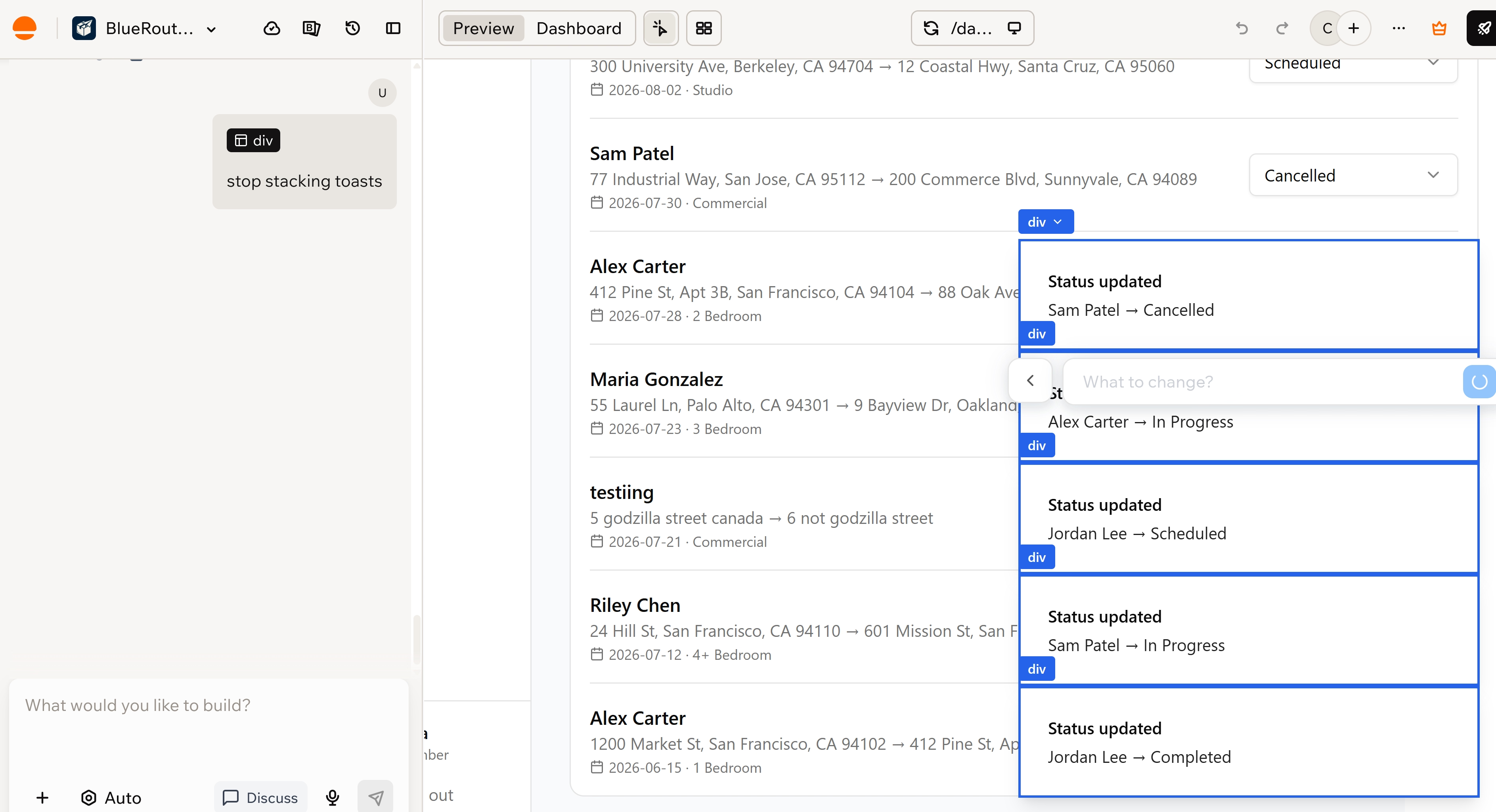
Base44’s Canvas places your app pages on one visual board, where you can arrange screens, add notes or drawings, include reference images, and send feedback to the builder chat. Edit mode lets you click an element directly in the preview and tell Base44 what to change.
That came in handy when the status messages refused to disappear and kept stacking over the dashboard like a losing game of Tetris. I selected the affected area, typed “stop stacking toasts,” and Base44 fixed it.
Lovable ran a similar point-and-edit workflow. I could select an element in the preview and change the copy, spacing, colors, images, borders, or layout without digging through the code. Its visual editor supports direct changes from the preview.
I didn’t need it to repair a comparable visual bug. The first build had already placed the moving-request form on the public homepage and given returning customers a separate sign-in route.
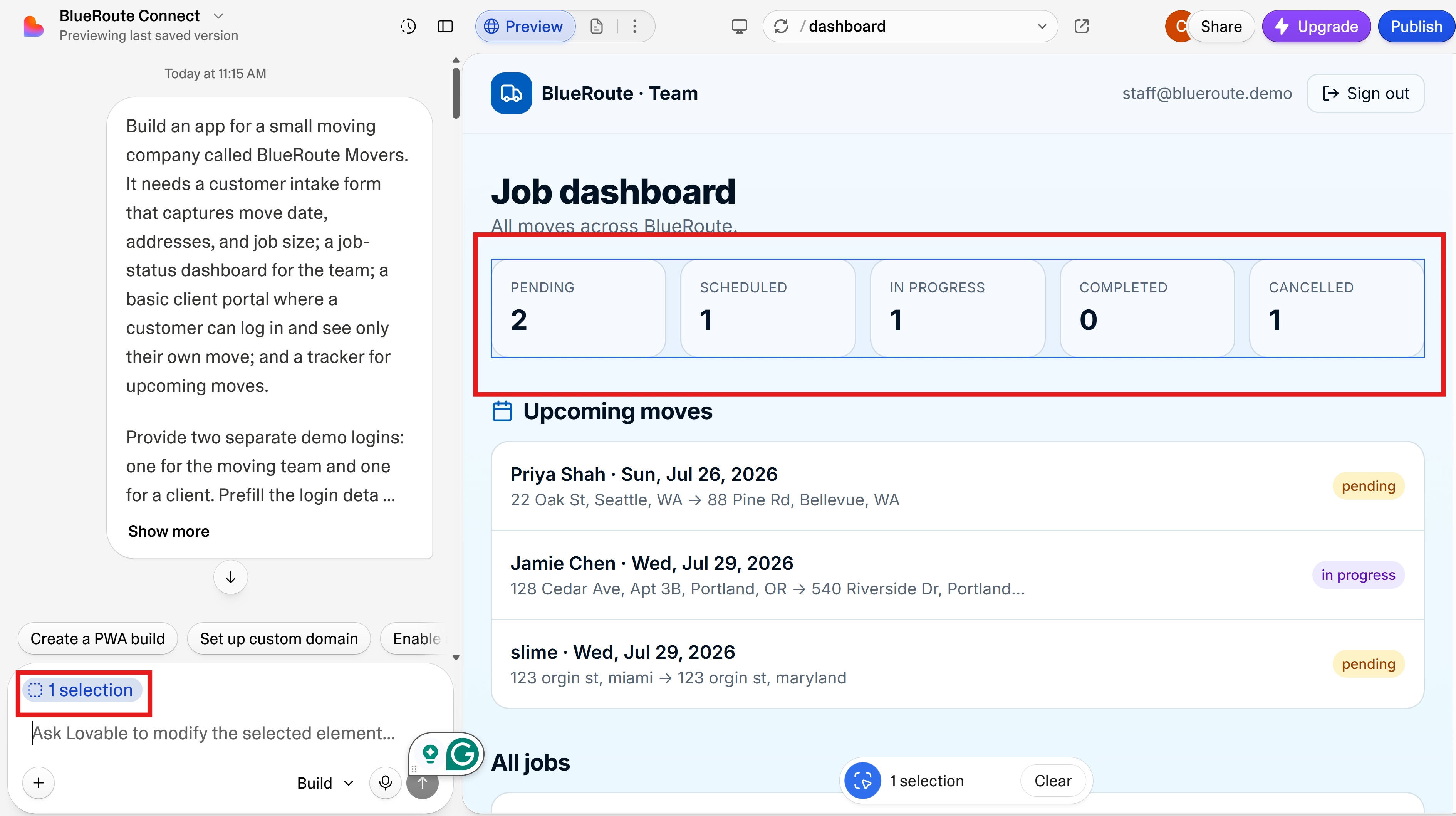
Winner: Tie. Base44’s click-to-edit workflow fixed the visual problem directly. Lovable offered similar point-and-edit controls, but its first build didn’t need a comparable design repair.
Publishing and Growth
Both platforms published BlueRoute without asking me to configure hosting.
Publishing, analytics, and SEO answer different questions, so I compared them separately rather than forcing one result across the whole section. Each category gets its own verdict, followed by an overall winner.
Publishing
- Base44: Publishes the latest version of your app to a shareable URL. You can also connect a custom domain and control who can access the app through its publishing settings.
- Lovable: Publishes a snapshot to a lovable.app URL. Later changes stay in the editor until you publish an update, and paid plans can use a custom domain through Lovable’s publishing controls.
Winner: Tie. Both published BlueRoute for free. Lovable’s publishing controls were easier to find, while Base44 gave no sign its published app would expire.
Analytics
- Base44: Tracks visits, unique visitors, visit duration, pages, traffic sources, devices, locations, and custom events after the app is published and receives traffic. The Free plan keeps seven days of analytics history.
- Lovable: Tracks visitors, page views, visit duration, bounce rate, traffic sources, devices, and pages viewed for published apps.
Winner: Tie. Both provide built-in traffic reporting for published apps.
SEO
- Base44: Lets you review and improve search settings for a published app, including titles, descriptions, indexing, and crawler files through its SEO tools.
- Lovable: Audits metadata, headings, structured data, crawler files, indexing, accessibility, mobile usability, and performance. You can send individual findings or the full list back to the builder for repair through its SEO and AI-search review.
Lovable’s review found specific issues in BlueRoute, including weak headings, missing crawler files, absent structured data, and an incomplete social preview.
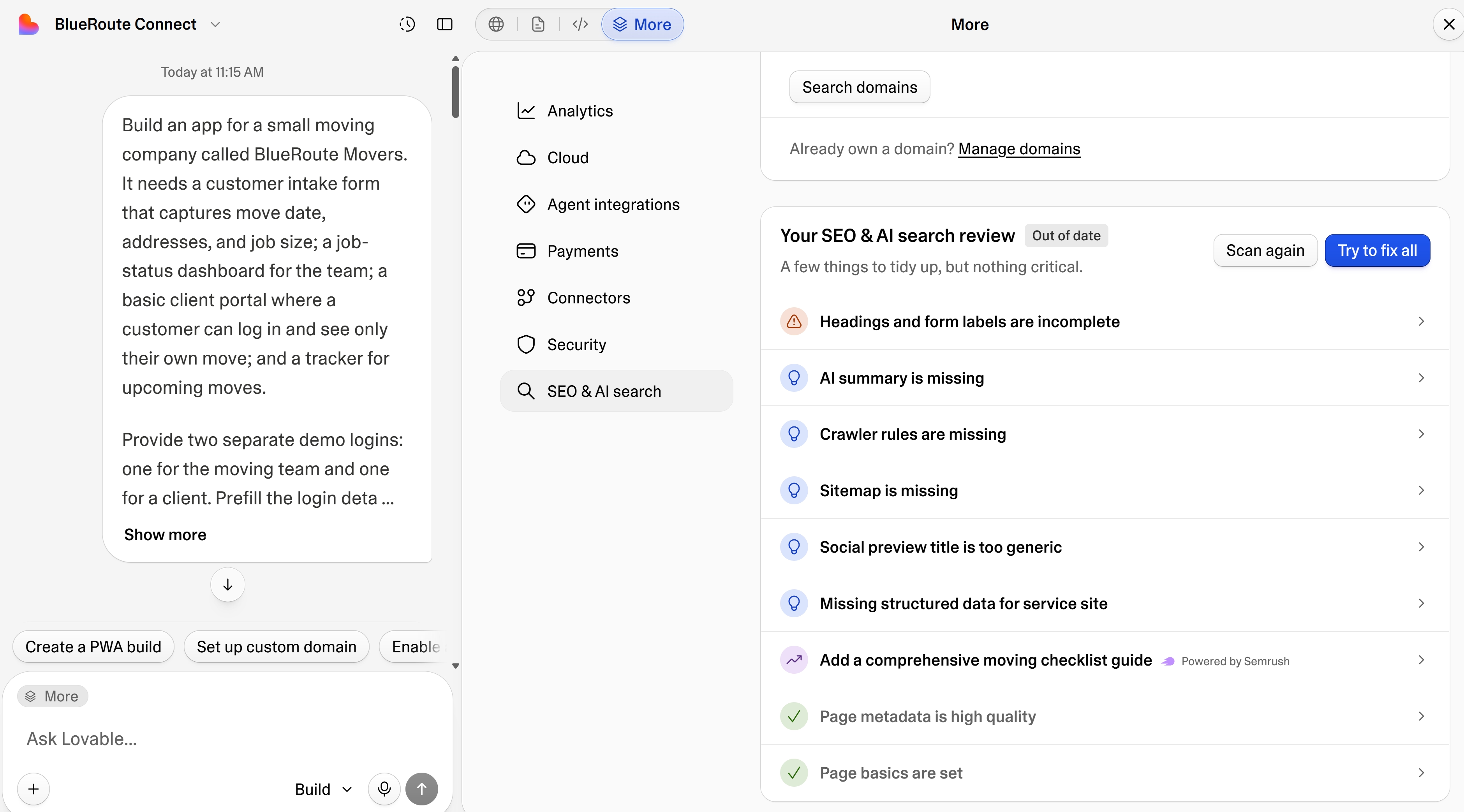
Winner for SEO review: Lovable. Both offer search tools, but Lovable produced a more detailed, actionable audit during the test.
Overall winner: Lovable. Publishing and analytics were a wash, but Lovable’s actionable SEO audit tips the scales its way.
Web and Mobile Apps
Base44 and Lovable both create web apps that work on phone screens. Base44 gives you more ways to install and distribute the app on mobile, but neither platform converts the same build into a separate React Native, Swift, Kotlin, or Flutter project.
Base44 supports:
- Automatic PWA features, so people can add the published app to their home screen
- App-store preparation inside the editor, including checks against Apple and Google requirements
- IPA and AAB file generation on eligible plans
- A native wrapper that loads the published web app inside a web view
You can use the wrapper to list the app in the App Store or Google Play without rebuilding it in a native framework. The result remains a packaged web app, so features such as push notifications and full offline use are limited.
You can also connect a separate React Native project built with Expo to a Base44 backend. Base44 doesn’t convert an existing web build into React Native.
Lovable supports:
- Responsive web apps designed for phone screens
- Mobile previews inside the builder
- iOS and Android apps for building and reviewing Lovable projects from your phone
Lovable focuses on web applications rather than native mobile development. It doesn’t generate React Native, Swift, Kotlin, or Flutter code from your project, and it doesn’t list built-in PWA or app-store packaging support.
Winner: Base44. Both handle mobile-friendly web apps, but Base44 adds PWA installation and a built-in route to Apple and Google store files. Neither turns the web build into a separate native codebase.
Pricing and Credits
Base44 is cheaper at every comparable paid tier, but the credit systems are not directly interchangeable. Base44 separates building from app activity, while Lovable now uses one flexible balance across building, hosting, and AI features.
| Plan | Base44 | Lovable |
|---|---|---|
| Free | $0 | $0 |
| First paid plan | $20 monthly or $16/month billed annually | $25/month |
| Included build usage | 100 message credits on Starter | 100 monthly credits on Pro, plus 5 daily build credits |
| Team pricing | Shared workspace credits | Shared workspace credits with unlimited members |
Base44’s Starter plan costs $20 monthly or $16 per month with annual billing. Its older plan structure then rises through Builder, Pro, and Elite, with higher message and integration allowances at each level.
Base44 keeps two credit pools:
- Message credits cover prompts that build, change, or repair the app.
- Integration credits cover database queries, backend functions, file handling, email, AI calls, and other actions triggered by the running app.
The Free plan provides five message credits per day, capped at 25 each month, plus 100 monthly integration credits. Unused credits don’t roll over. A new workspace and credit model is still rolling out, so some accounts may show different plan names or let you choose the plan features and monthly credit level separately.
Lovable Pro starts at $25 per month. The Free plan includes five daily build credits, capped at 30 per month, plus monthly grants for Cloud usage and AI features inside published apps.
Paid Lovable credits can be used across:
- Building and editing
- Lovable Cloud hosting and backend usage
- AI features inside the apps you publish
Lovable also keeps the five daily build credits on paid plans. Default Mode (the regular building mode) charges based on task complexity, while Plan Mode costs 1 credit per message. Monthly plan credits can remain available for two months, while daily grants expire at the end of the day.
The two systems reward different spending habits. Base44 makes it easier to see whether the builder or the running app used your allowance. Lovable gives you more freedom to use paid credits wherever the project needs them, but hosting and in-app AI can draw from the same balance as future build work.
Winner: Base44. Its first paid plan costs less, and the separate message and integration pools make ongoing usage easier to budget. Lovable’s shared balance is more flexible, but it also makes your eventual cost depend on how much you build, host, and run through AI features.
Security and Privacy
Base44 found four exposed credentials in BlueRoute’s generated login interface. The warning was valid, but Base44 had also created the credentials it flagged, and I could continue toward publishing without fixing them.
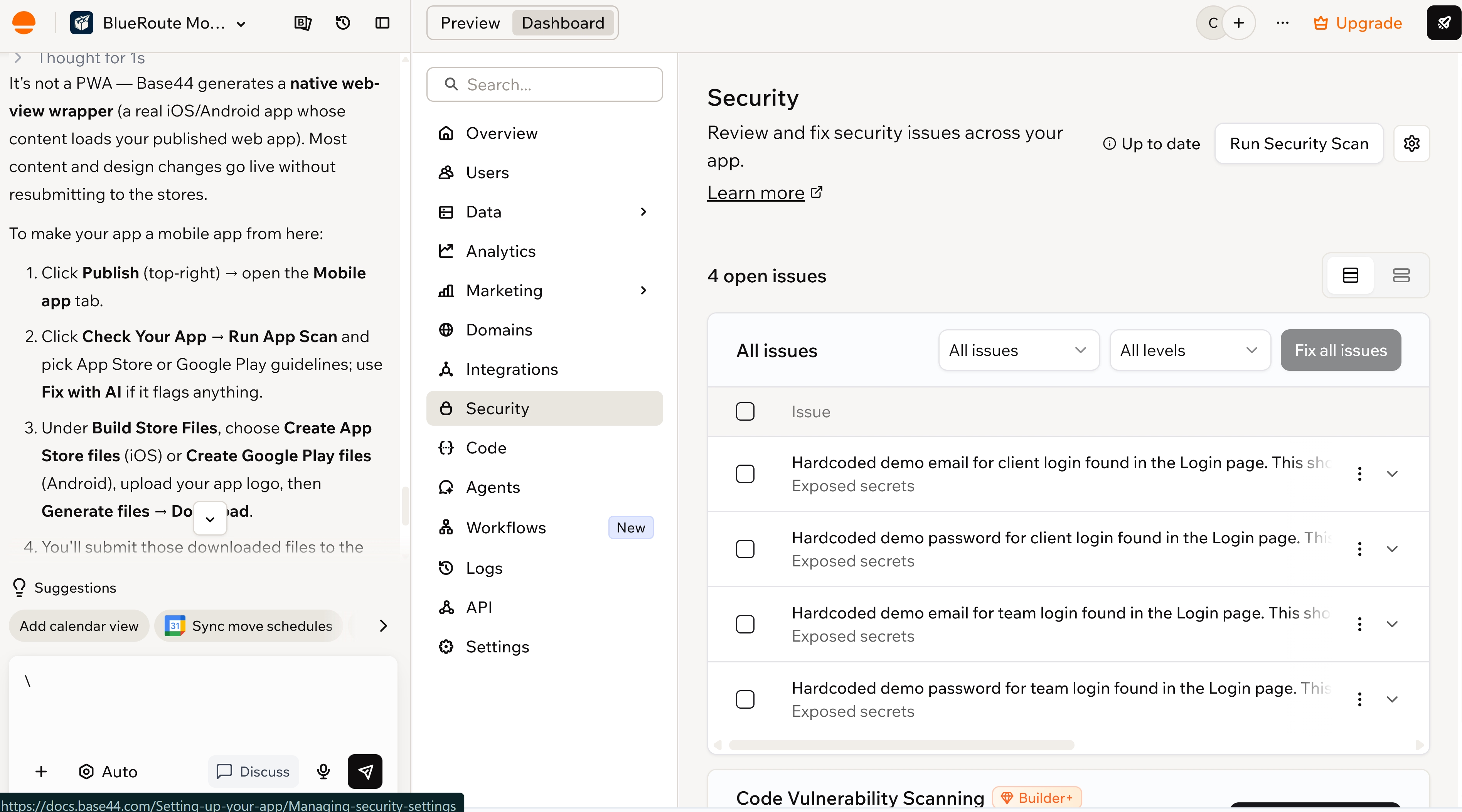
Its access controls still worked once the accounts were set up. The client account could not see another customer’s move.
Lovable found five security issues across the intake flow, database access, and authentication settings. I selected Try to fix all, and it cleared the full set without using credits.
I retested the form, both accounts, and the status-update flow afterward. Everything still worked, and the client remained limited to its own move.
A later scan found one new issue, though, and Lovable still offered to fix it for free.
Beyond my test, Base44 and Lovable offer different controls for protecting your app, managing team access, and deciding where your data is stored.
The main security and privacy differences:
| Area | Base44 | Lovable |
|---|---|---|
| Compliance | SOC 2 Type II, ISO 27001, and GDPR support | SOC 2 Type II, ISO 27001:2022, and GDPR support |
| Data protection | Encryption in transit and at rest, with secrets kept out of the frontend | Encryption for stored data and secrets, with role-based access |
| Data location | US, UK, or EU storage on eligible plans | US, EU, or Australia cloud regions |
| Team controls | SSO, SCIM, IP allowlists, and audit logs | SSO, SCIM, role permissions, and publishing approvals |
| App security | Permission rules, dependency checks, and automated scans | Row-level security, dependency checks, and automated scans |
| AI training | Privacy terms allow data use to operate and improve the service | Customer prompts, code, and workspace data are not used for model training |
Winner: Lovable. Its platform controls are close to Base44’s, but it performed better in the BlueRoute security test.
What Users Say About Base44 and Lovable
The reviews line up with the trade-offs I saw while building BlueRoute: Base44 can produce a working app quickly, but corrections and credit use can become frustrating. Lovable tends to connect more of the app on the first attempt, though later refinements still need careful prompting.
The two scores below come from different sites — Trustpilot skews toward complaints, G2 toward verified business users — so read the gap as a rough signal, not a like-for-like score.
Base44: 2.9/5From 820 Trustpilot Reviews
One reviewer called Base44 “extremely slow” and said credits “disappeared far too quickly.” My test was not as severe, but the failed login correction showed how extra prompts can consume credits without solving the underlying problem.
Lovable: 4.6/5 From 326 G2 Reviews
One reviewer praised how Lovable connects “GitHub, databases, and authentication providers,” while another warned that fine-grained edits can overwrite details you previously asked it to change.
Base44 vs Lovable: Which One Fits You Better?
Base44 suits simpler apps where speed and managed setup matter most, while Lovable fits projects that need more connected workflows and greater access to the code. I cover the best use cases for each below.
Base44 fits smaller, simpler apps where speed, lower starting cost, and keeping the builder, backend, authentication, hosting, and integrations in one place matter most.
Choose Base44 if you:
- Want the cheaper first paid plan
- Prefer automatic PWA support and an app-store packaging route
- Don’t need deep code control or a separate native mobile codebase
- Can tolerate more correction prompts when the first build misses part of the brief
Lovable fits apps with more connected workflows, stricter access rules, and a greater need for code visibility.
Choose Lovable if you:
- Want forms, databases, dashboards, and account permissions connected from the first build
- Need stronger security guidance and clearer automated fixes
- Want easier access to project files and GitHub
- Expect to refine the app beyond a simple internal tool or customer portal
Where Base44 and Lovable Fall Short
Base44’s main limitation in my test was the repair work. Its first preview looked complete, but only two of the five tested flows worked. The login problem also remained after two correction prompts and a revert.
Lovable avoided those problems, but its main limitation appears when you want to move beyond the browser. Lovable focuses on web applications, so it doesn’t turn the web app you already built into a separate iPhone and Android app.
Base44 gets slightly closer. It can package the web app for the App Store and Google Play, which means customers can find and download it like an app. However, the downloaded product still displays the same website inside an app-store shell. Developers call this a wrapper.
A wrapper can help with distribution, but it doesn’t give you the same phone access as an app designed specifically for iPhone and Android.
What phone users may miss:
- Push notifications: Move reminders and status alerts may require extra setup or offer fewer options.
- Camera and photos: Uploading inventory or damage photos may feel less direct.
- Location: Live driver or mover tracking may need more custom work.
- Offline use: The app may become less useful when the customer has a weak connection.
Exporting the web app doesn’t fix that. You’d still need someone to build the mobile version and reconnect its database, customer logins, hosting, and integrations.
The result is a second project, another bill, and a later mobile launch.
For businesses that need both a web app and a mobile one, Emergent lets you plan the browser dashboard and mobile app as one product from the start.
When Emergent Is the Better Route
Emergent is the better route when you know the product will need both a web app and an installed mobile app. You can plan both from the start, instead of finishing the web version, then paying someone to rebuild the same product for phones.
It also had the cleanest build process of the three. Before it started, Emergent asked how the intake form, logins, job statuses, and design should work. Once I answered, it built the full workflow without the login and layout problems I ran into with Base44.
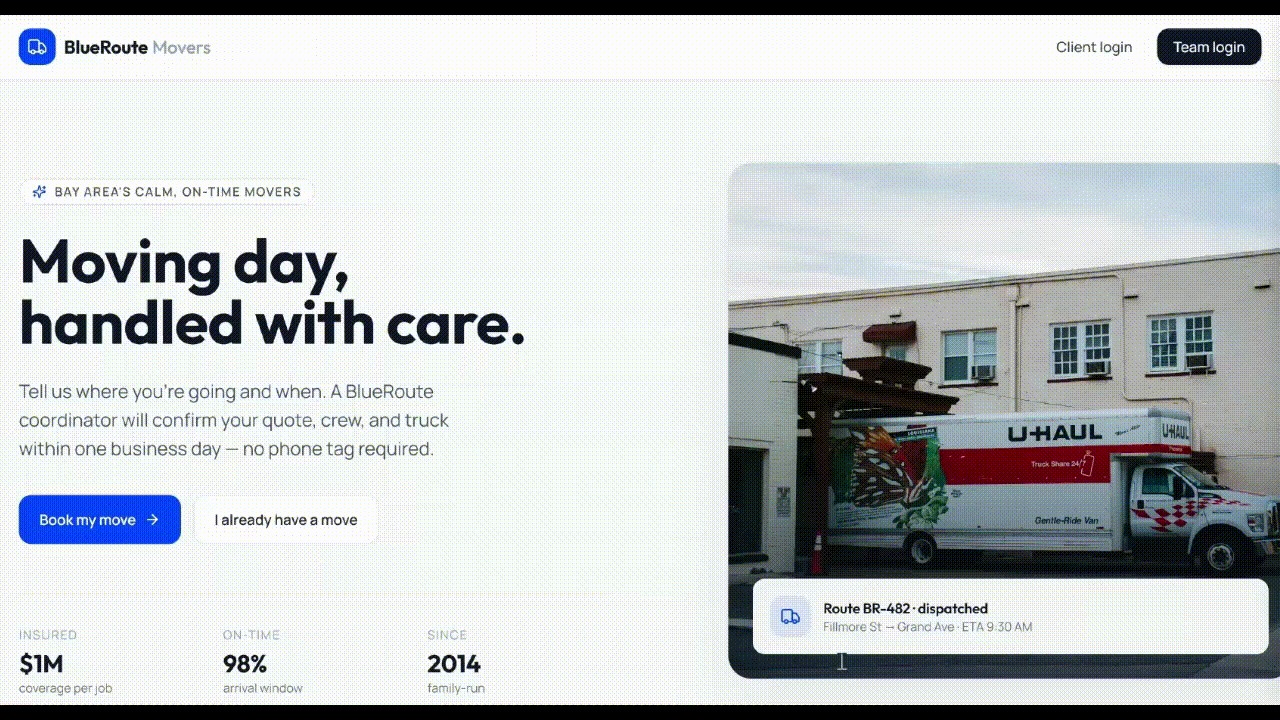
My Emergent test results:
- Build time: 12 minutes
- Credits used: 11.04
- Flows completed: 5 of 5
- Correction prompts: None
- Technical effort: Low
The 12-minute build covered all five parts of the brief. I could update a job from the team dashboard, sign in as the client, and see the same change in the client portal without fixing or reconnecting anything.
The bigger advantage goes beyond my test. Many businesses need staff to work from a browser dashboard while customers, drivers, technicians, or field teams use an app on their phones.
Emergent’s Mobile Agent creates a separate Expo and React Native project for iOS and Android. In simpler terms, it builds a mobile app instead of placing your website inside an app-store wrapper.
Customers get an app that can work more closely with the features already on their phones.
What you can build into the mobile app:
- Send push notifications: Alert users about bookings, deliveries, approvals, messages, or status changes.
- Use the camera: Let users take and upload photos without leaving the app.
- Access location: Add maps, driver tracking, field visits, or location-based updates.
- Work with phone files: Let users upload documents, images, and other files from their devices.
- Prepare for app stores: Create the files needed for submission to the App Store and Google Play.
You can keep the browser dashboard for the people managing the business and give customers or field teams an installed mobile app. Both versions can use the same accounts, records, and workflows, so an update made on one side appears on the other.
Emergent also gives you room to add more as the product grows.
What you can add later:
- Add payments with Stripe: Accept deposits, one-time payments, or subscriptions inside the app.
- Manage your code with GitHub: Keep a copy of the project, collaborate with developers, and make changes outside Emergent.
- Run builds from other AI tools with the MCP connector: Start and manage Emergent projects from ChatGPT, Claude, Claude Code, or Codex.
You still have direct access to the app’s interface, data and logic, settings, and mobile project files.
Emergent makes the stronger case when mobile is part of the plan. You can build the web and phone experiences around the same product from the beginning instead of starting another project after launch.
The Verdict on Lovable vs Base44
Lovable is my pick for most web app builds. It handled all five BlueRoute workflows without a correction prompt, showed me a clearer view of the code and security setup, and produced a better-looking app.
Base44 still has its strengths. It is cheaper to start with, quicker to get something on screen, and gives you PWA support, plus a route into the App Store and Google Play. But the first build missed key parts of the brief, and the fixes did not always fix the problem.
Emergent is my pick when the product needs both web and mobile. It completed every flow in my test without a correction prompt and handed me a dedicated React Native and Expo mobile project rather than a web app placed inside a wrapper.
That one-product setup is why Emergent is my pick when mobile is non-negotiable, not an afterthought.
Ready to build your web and mobile apps in one place? Try Emergent today.

Most AI app builders stop at prototypes. Emergent creates production-ready apps you can actually launch.
- Production-ready apps
- Web & mobile apps
- Deploy in minutes







