



Every one of these tools looks good in the first 10 minutes. So I pushed nine of the best vibe coding tools through real builds with logins, Stripe, and multi-file refactors to see which survived.
9 Best Vibe Coding Tools: Quick Comparison
The first six are app builders that ship a finished app for you. The last three are coding agents that work inside real code you edit yourself.
How I Researched and Tested These Vibe Coding Tools
Over a few weeks, I put all nine tools through the same two real jobs: building a booking app with login, a database, and Stripe payments, and running a multi-file refactor plus a bug fix on an existing codebase. I judged each one on the things that decide whether you keep using it.
- Build quality: Whether the tool turned a plain prompt into working software, and how it held up once the logic got harder than a demo.
- Usability: Whether it felt fast and intuitive for its target user, or fought me at every step.
- Integrations: How cleanly it connected the parts a real app needs, like a database, login, payments, GitHub, and hosting.
- Pricing and credits: What the free tier lets you finish, and how fast paid credits are burned during normal building and debugging.
- Use cases: How each tool performed on my two tests, since an app builder and a coding agent do different jobs.
This hands-on approach showed me which tools hold up in daily use and which only shine in the first few minutes of tinkering.
AI App Builders (No Coding Needed)
These six tools build and host the app for you. Most bill by credits, small units of usage that every edit and fix spends, so heavy tinkering often costs more than the monthly price suggests. Keep that in mind as you read.
1. Lovable: Best for Non-Technical MVPs
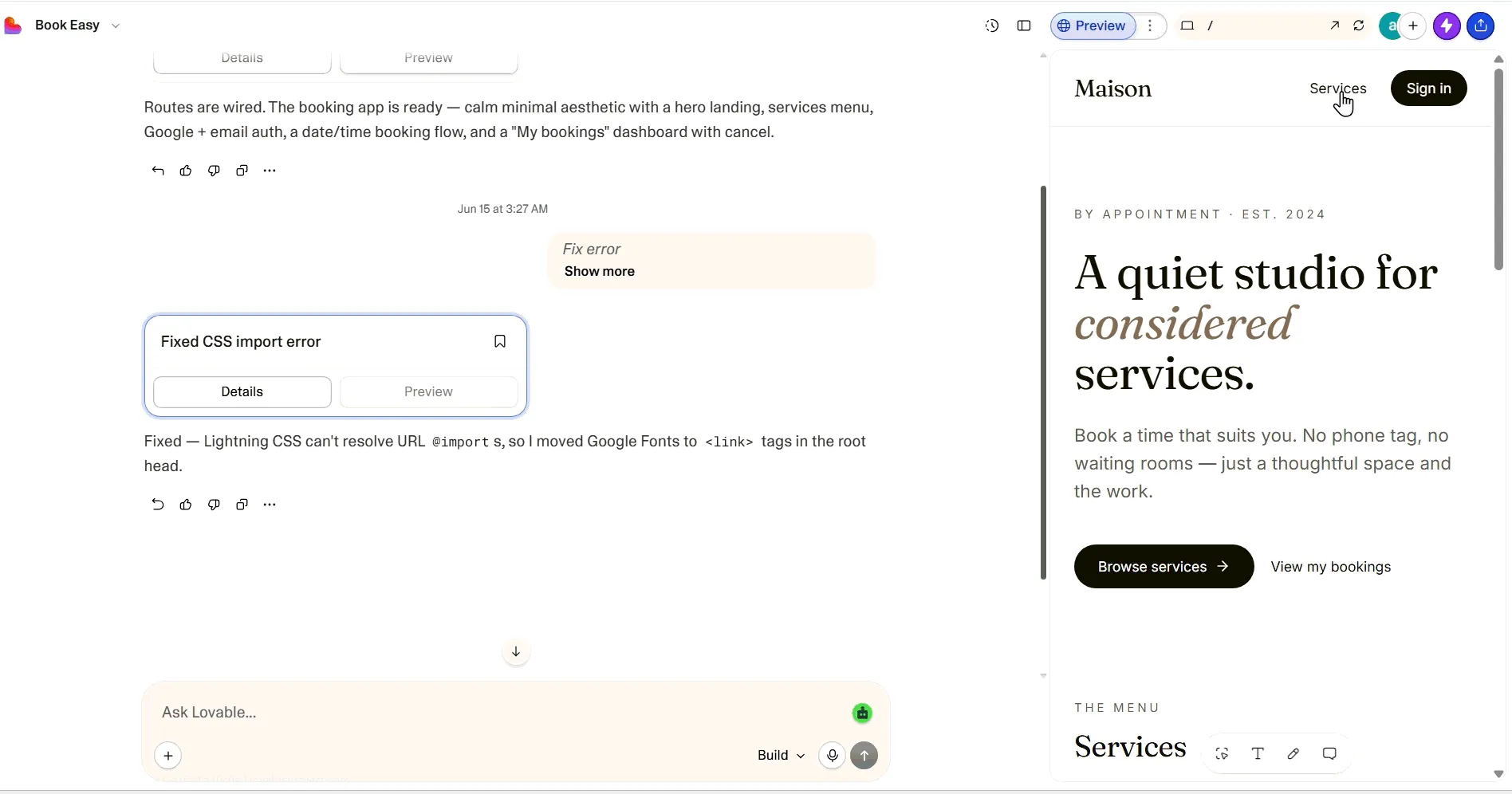
What it does: Lovable turns a plain-English prompt into a working, hosted web app with a clean front end.
Best for: Non-technical founders, designers, and solo builders who want a polished MVP or landing page fast.
Lovable was the quickest way I found to go from idea to a good-looking, live app. I described my booking app and had a clean login screen and calendar in the first session, with no setup. The friction came later, when adding Stripe payments and booking rules sent it into loops that drained credits.
Key Features
- Select and Edit: Click any element and describe the change, so small UI fixes don't cost a full prompt.
- Supabase backend: Login and a database connect inside the chat, giving a non-coder real data storage.
- GitHub sync: Export the code to your own repo, so you can leave Lovable if you outgrow it.
Pros and Cons
Pros:
- Fastest path to a polished, hosted app. My booking UI looked client-ready in one session.
- Real backend through Supabase, so auth and data worked without a second tool.
Cons:
- Cost climbs quickly once you iterate, especially during debugging.
- The agent loops on complex logic instead of solving it.
What Users Say
Public Lovable reviews backed up the pattern I saw in testing: users loved the speed, polish, and low setup friction at the start. Most complaints came after the demo stage, when deeper logic, credit burn, or reliability started to matter.

“I love your Lovable. It was very easy to build my App” (Trustpilot review)
“What I like best about Lovable is how easy it makes modern app development.” (G2 review)
“Credits can disappear pretty quickly.” (G2 review)
Pricing
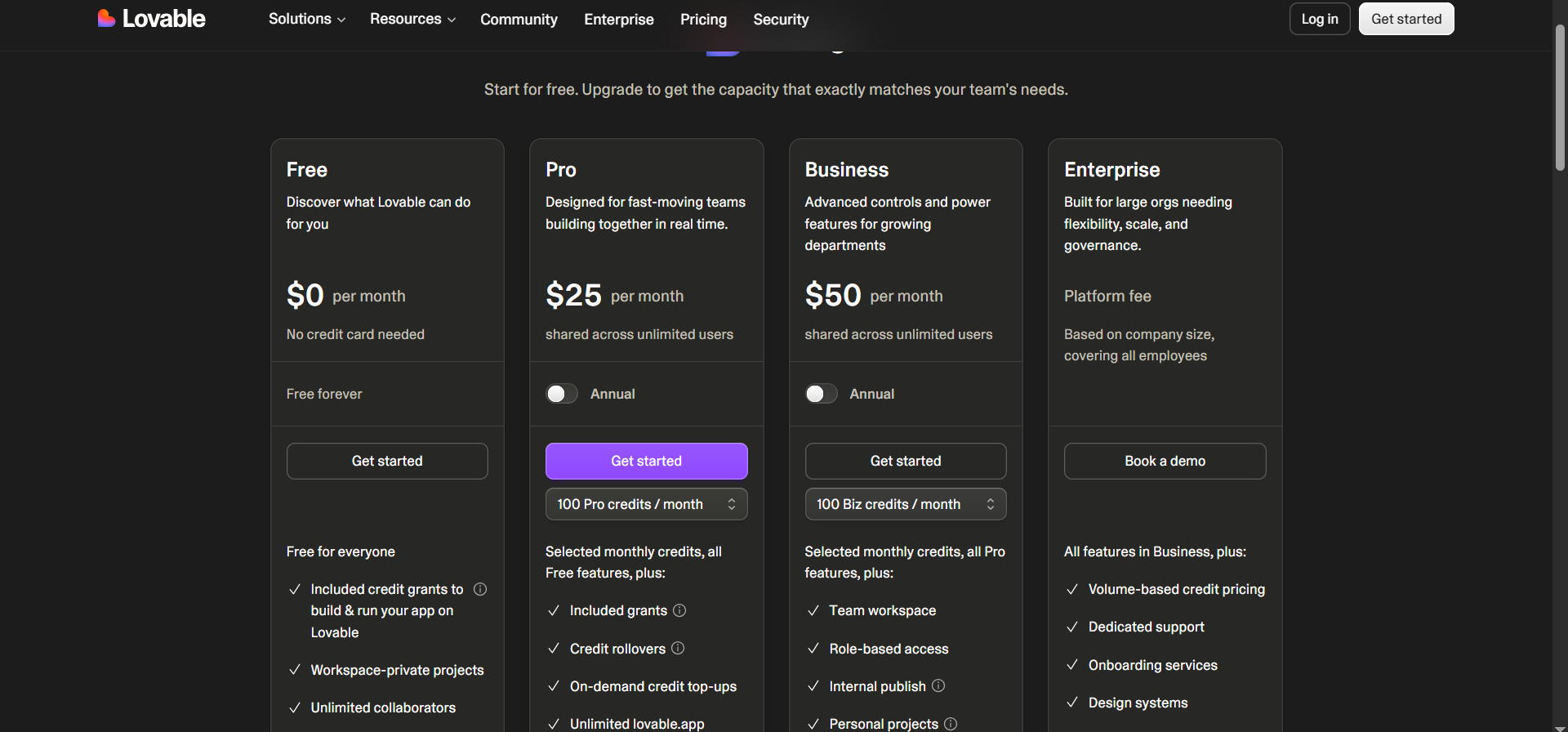
Free plan with five daily credits. Pro from $25/month ($21/month billed annually), Business $50/month ($42/month billed annually), Enterprise custom.
Want the full breakdown of what each plan actually covers? Our Lovable pricing guide goes deeper on what you're really paying for.
Bottom Line
I'd recommend Lovable to non-technical founders who want a polished MVP live in a day, because nothing here gets you there faster. If you need heavy backend logic or predictable costs, look elsewhere.
Not sure Lovable is the right fit for what you're building? Our best Lovable alternatives breakdown covers the closest options worth trying.
2. Replit: Best for Building and Hosting in One Place
What it does: Replit pairs an AI agent with a full cloud editor, database, and hosting, so you build and ship in one browser tab.
Best for: Beginners who want to learn while building, and solo developers who want everything in one place.
Replit scaffolded my booking app quickly and handed me a live URL without juggling separate services. Because you can read and edit the code it writes, it doubles as a way to learn. Quality slipped as my booking logic grew, which is the common gripe.

Key Features
- Replit Agent: Describe a feature and it writes, runs, and tests the code, so you see working output.
- Built-in database and hosting: Auth, data, and deployment live together, skipping extra setup.
- Spend tracking: It shows the cost per step, so you can stop the agent before it loops through credits.
Pros and Cons
Pros:
- One tab for editor, AI, database, and hosting. I reached a live URL without opening anything else.
- Strong for learning, since the code stays readable and editable.
Cons:
- The agent gets shakier as the app grows complex.
- A 2025 incident where its AI wiped a live database shows why backups matter.
What Users Say
Replit reviews paint a split picture: builders love how fast it turns ideas into working interfaces, but that enthusiasm cools as projects grow more complex.
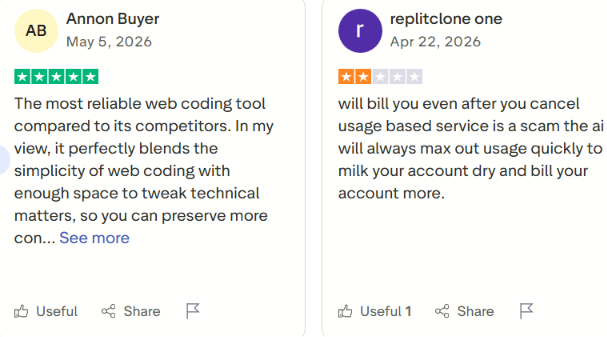
"Incredible at very quickly developing UI and ideas" (Reddit user)
"The more complex it gets, the worse the agents get" (Trustpilot review)
Want the full picture of what users are saying? Read our Replit Reviews for a closer look at what builders actually ran into long term.
Pricing
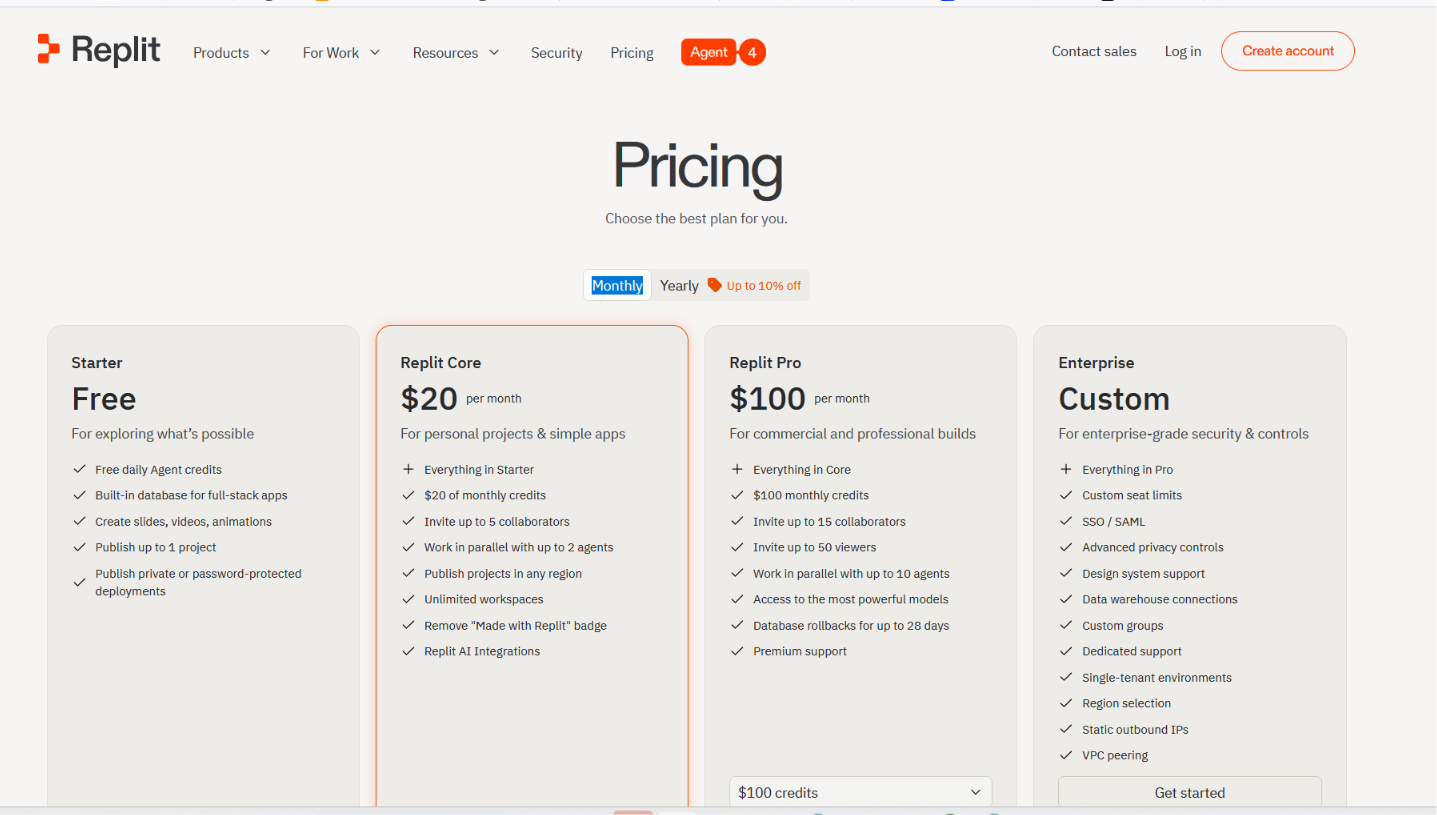
Free Starter plan. Core from $20/month ($18/month billed annually), Pro at $100/month ($90/month billed annually) for up to 15 builders, Enterprise custom.
Bottom Line
Replit suits beginners who want to build and learn in one environment. For a complex production app, add backups and spending limits before you trust it.
Already hitting Replit's limits or planning for production? Our best Replit alternatives breakdown covers what else is worth trying.
3. Bolt: Best for Fast Prototypes
What it does: Bolt runs in the browser and generates a full-stack app from a prompt, with no local setup.
Best for: Builders who want a quick prototype to test an idea before committing.
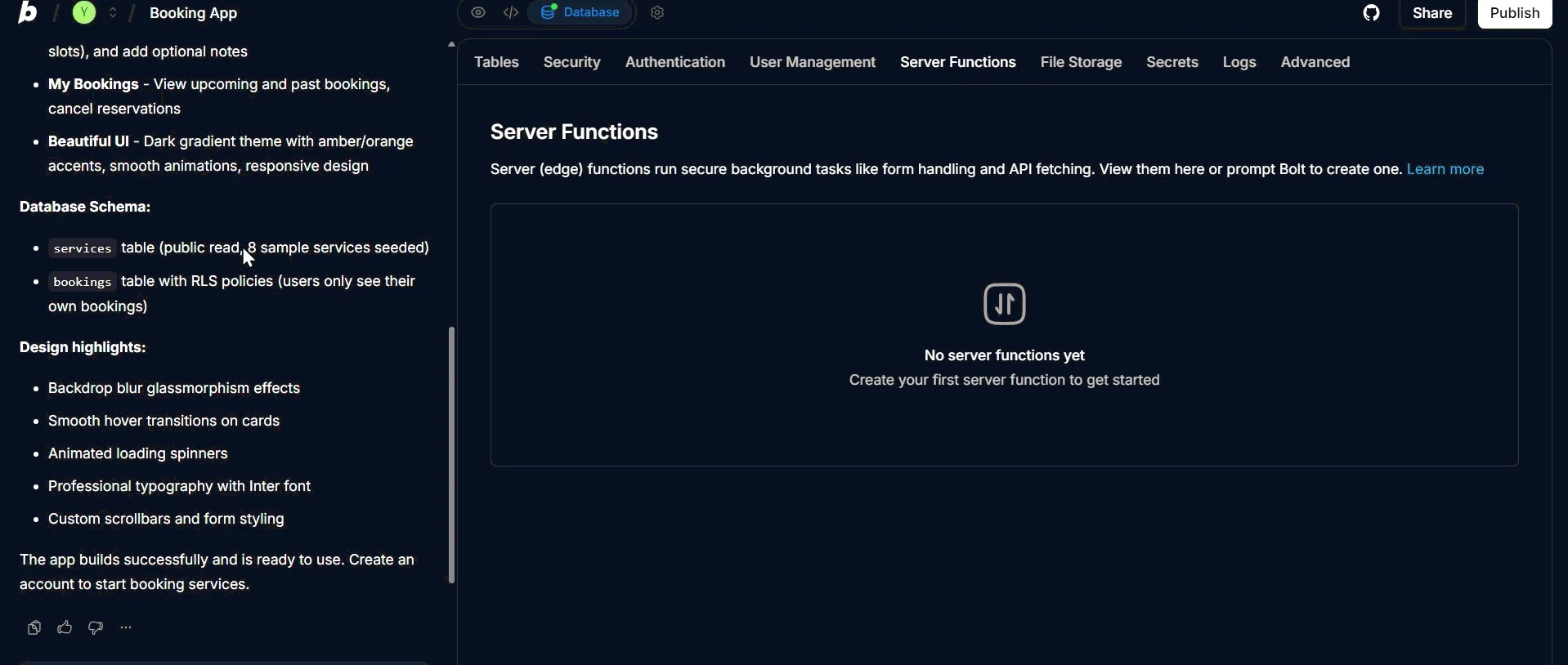
Bolt reached a clean first screen faster than anything else, spinning up a working scaffold in minutes. The catch is in how it edits: it rewrites whole files for small changes, so tokens vanish quickly once you iterate.
Key Features
- In-browser generation: Frontend, backend, and database come from one prompt, giving you a working scaffold.
- One-click deploy: Push straight to hosting, so a prototype goes live fast.
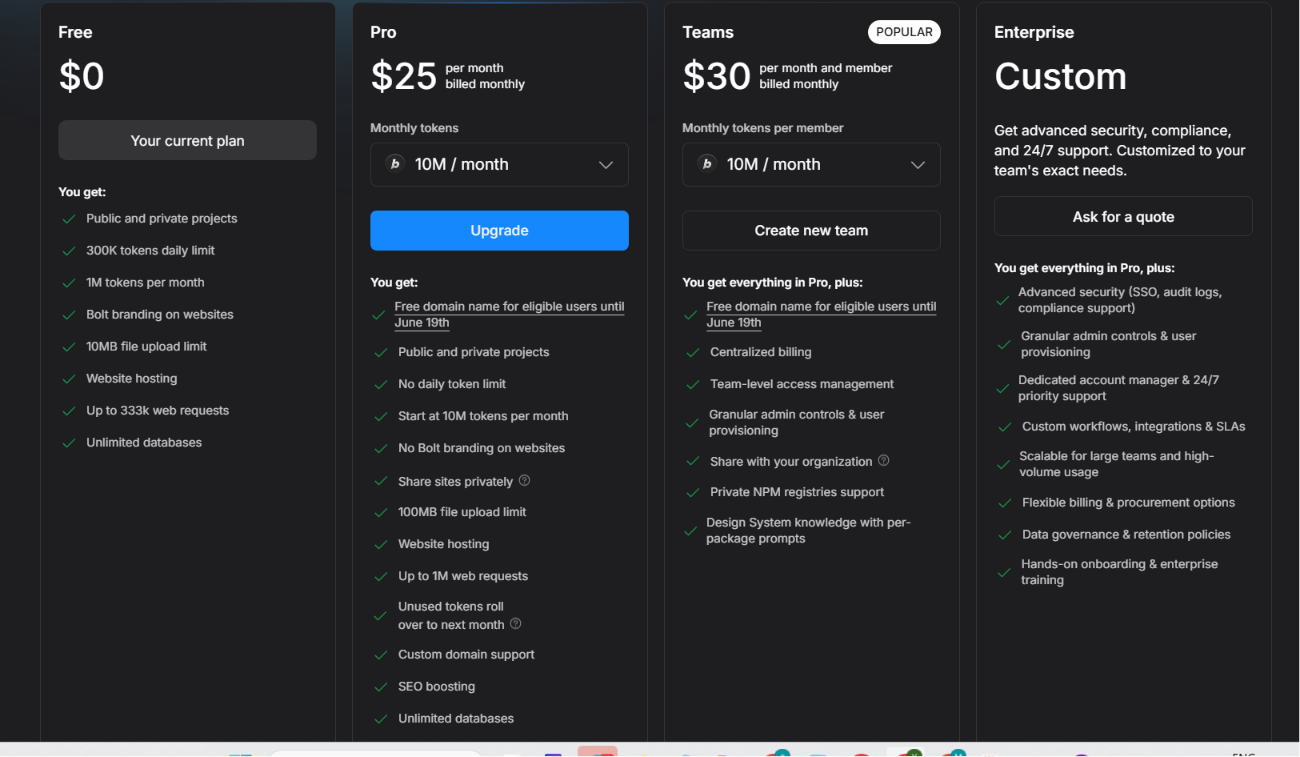
- Token rollover: Unused paid tokens carry one month, softening a heavy build week.
Pros and Cons
Pros:
- Very fast to a clean prototype. My first working screen took minutes.
- Tidy generated structure for early front-end work.
Cons:
- Full-file rewrites on small edits burn tokens quickly.
- Reliability drops once the project grows past a prototype.
What Users Say
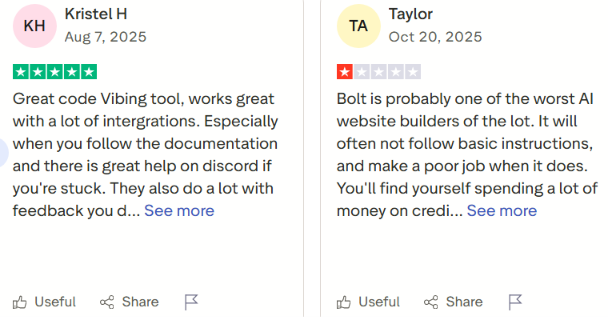
"Lovable and Bolt are great for speed" (Reddit user)
"The AI works well for projects of roughly 1,000 lines of code or less" (Trustpilot review)
Already hitting Bolt's limits or need something more durable? Our best Bolt.new alternatives breakdown covers what else is worth trying.
Pricing
Free tier (300K tokens/day, 1M tokens/month). Pro from $25/month ($18/month billed annually), Teams $30 per member/month ($27 per member/month billed annually), Enterprise custom.
Bottom Line
Bolt is the one to grab for a fast, throwaway prototype. For a durable app with real logic, expect to export the code and finish elsewhere.
Ready to build something more durable? Read our How to Create a Business App in an Afternoon guide to get started.
4. Emergent: Best for One-Shot Full-Stack Apps
What it does: Emergent uses several AI agents to turn one prompt into a working app with payments, login, data, and deployment.
Best for: Founders who want a working app with payments and logins, generated end-to-end.
Emergent tries to build more of the app at once than the lighter builders. When I handed it the booking app, it returned with more of the stack already wired, and its built-in Stripe and login support handled the payment step that tripped up other tools. That ambition costs credits, and fixing the agent's mistakes spends more of them.

Key Features
- Multi-agent build: Specialized agents split the work across the build: some shape the interface, others handle backend logic and integrations, and testing agents check the work before it ships, so one prompt returns a fuller app.
- Stripe and auth built in: Payments and login work closer to out of the box for SaaS prototypes.
- Fork before changes: Save a working version before a risky edit, so you keep a fallback.
Pros and Cons
Pros:
- Generates fuller full-stack apps than the lighter builders. Mine came back with backend and database in place.
- Real Stripe and auth support, which carried the payment step others stumbled on.
Cons:
- Credits drain fast, and deploying an app alone costs about 50 credits.
- Stability wobbles, so a single bug can take several paid attempts to fix.
What Users Say
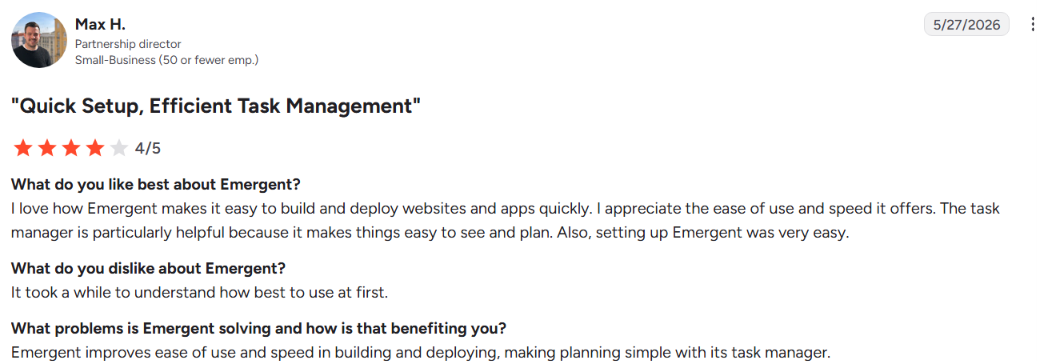
"Emergent helped me set up a website, landing page" (Trustpilot review)
"Credits burn way too fast" (Reddit user)
Pricing
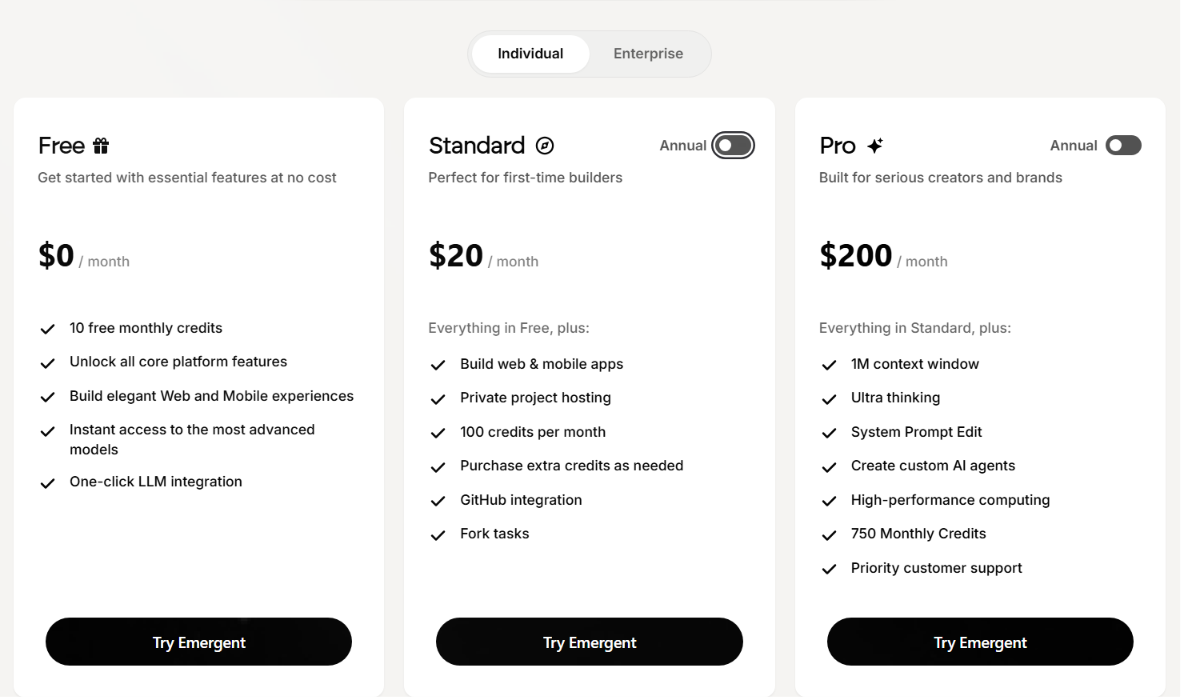
Free plan with 10 credits. Standard from $20/month ($17/month billed annually), Pro from $200/month ($167/month billed annually). Unused credits expire monthly.
Bottom Line
Emergent fits founders who want a working app with payments and login from one prompt, and can manage a credit budget. For simple projects or predictable costs, a lighter tool serves better.
5. Base44: Best for Simple Internal Tools
What it does: Base44 is an all-in-one builder for simple tools that turns a prompt into a full-stack app.
Best for: Non-technical builders making internal dashboards and early MVPs.
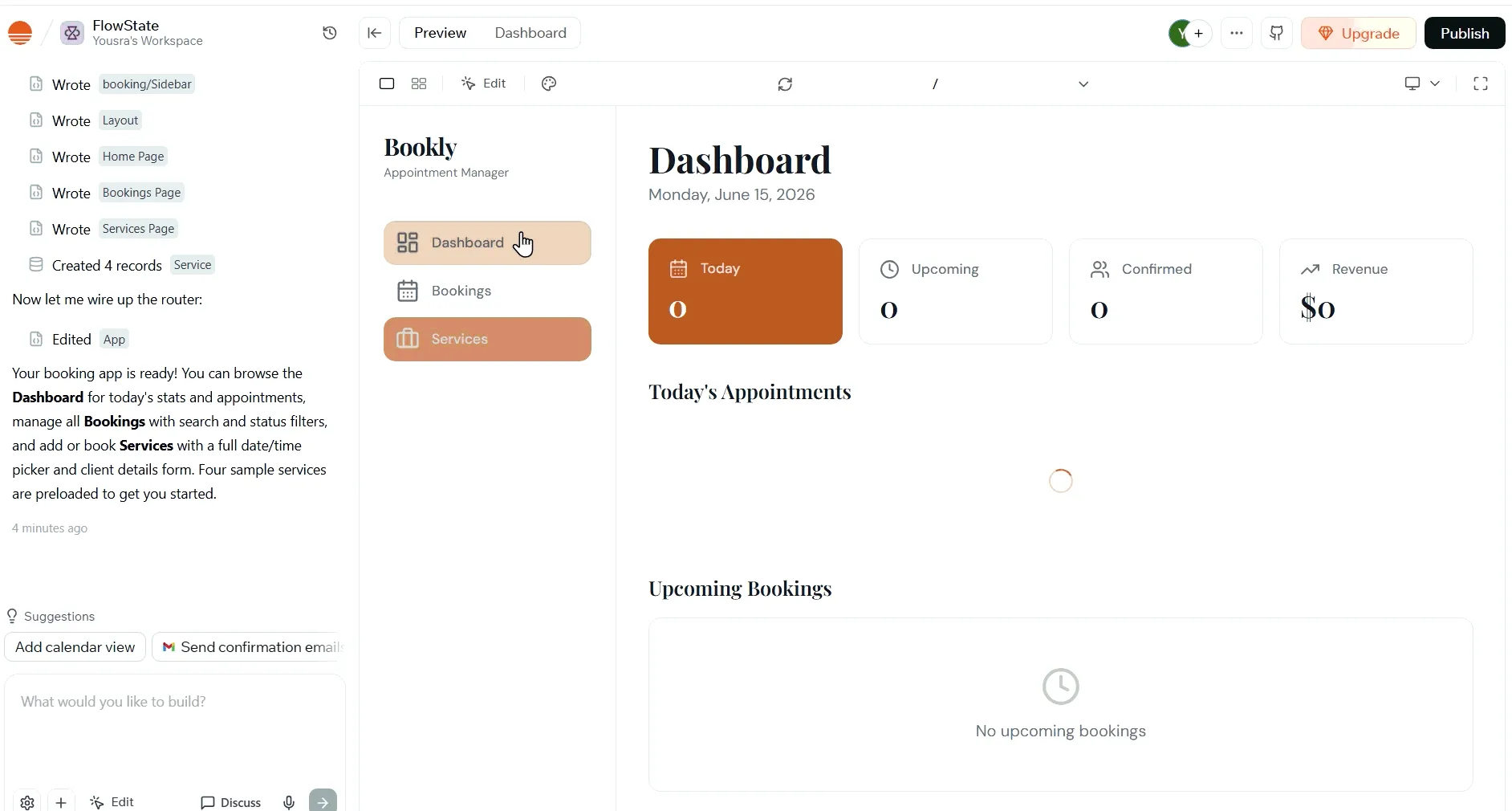
Base44 put together a usable shell for my booking app fast and felt approachable, with auth and ready-made integrations. It held up on the basic screens, then stalled on payment logic, repeating mistakes and spending credits on fixes that didn't stick.
Key Features
- All-in-one builder: Auth, database, and integrations are built in, so a non-coder gets a working app.
- Discuss mode: Planning chats costs a fraction of a credit, so you think before you spend.
- Visual Edit: Point at an element to change it, cutting wasted credits on UI tweaks.
Pros and Cons
Pros:
- Fast setup for simple and moderate apps. My basic screens came together quickly.
- Friendly for first-timers, with a clean interface and ready integrations.
Cons:
- Hits a hard ceiling on complex logic, where it loops and breaks its own code.
- Slow support is a frequent complaint.
What Users Say
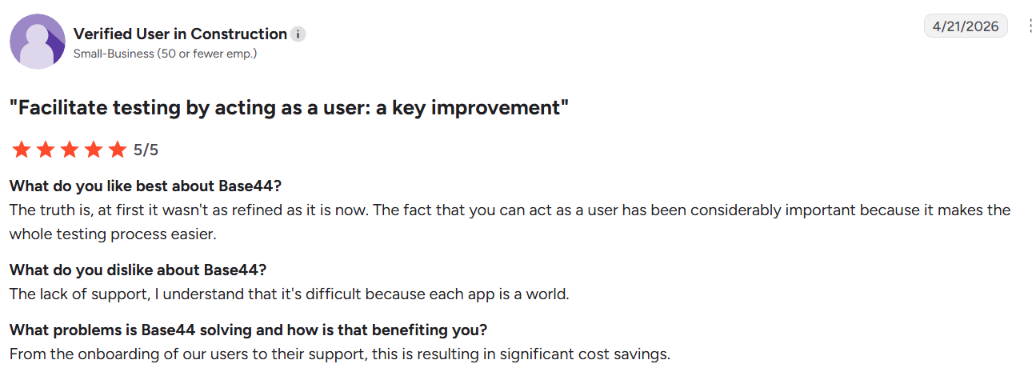
"Base44 is best for very fast development of simple to moderately complex apps" (Reddit user)
"I was so impressed, but then I tried to do simple things like uploading or linking files - and it's just don't know how to do it." (Reddit user)
Want the full picture of what users are saying? Read our Base44 Reviews for a closer look at what builders actually ran into.
Pricing
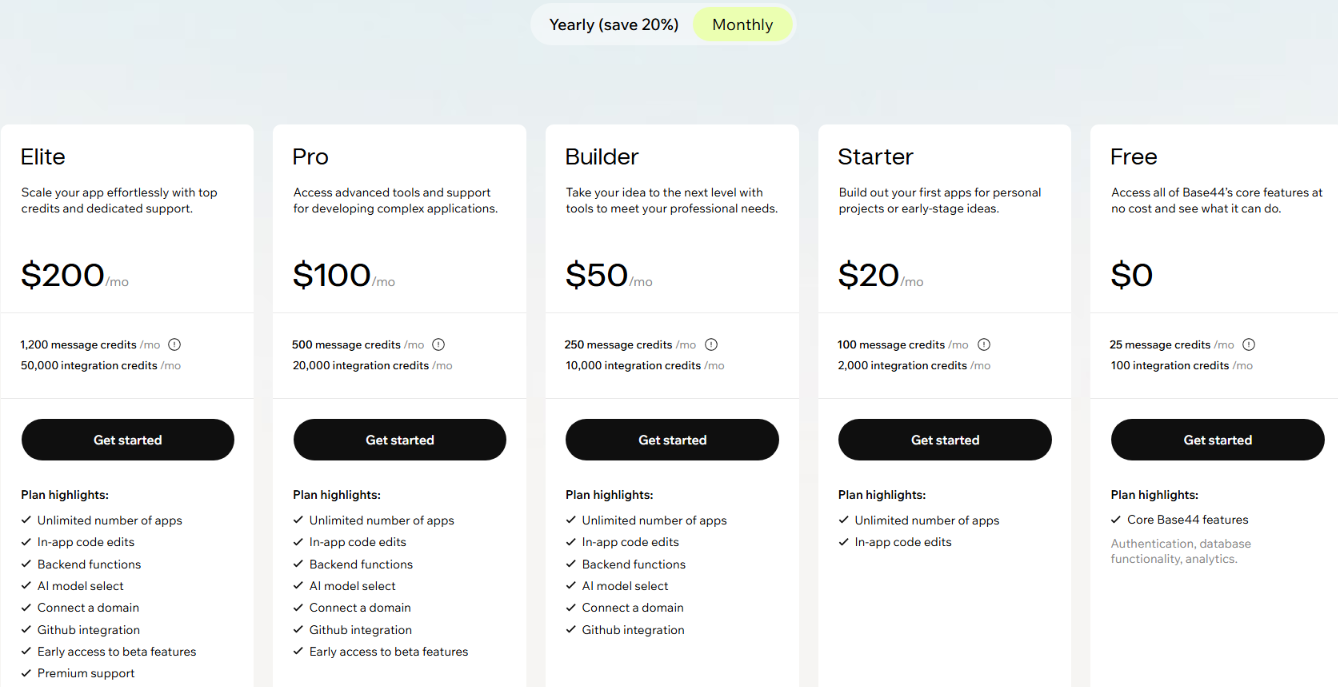
Free tier ($0/month, 25 message credits/mo, 100 integration credits/mo). Starter from $20/month ($16/month billed annually), Builder $50/month ($40/month billed annually), Pro $100/month ($80/month billed annually), Elite $200/month ($160/month billed annually).
Want the full breakdown of what each plan actually covers? Our Base44 pricing guide goes deeper on what you're really paying for.
Bottom Line
Base44 works for simple internal tools you want up fast. Anything complex or customer-facing runs into its complex logic limits and credit costs.
Want more hands-on takes before you decide? Read our Base44 Reviews for a closer look at what real users actually ran into.
6. v0: Best for UI and Components
What it does: v0 by Vercel generates clean React and Next.js interface code from a prompt, with a live preview.
Best for: Designers and front-end developers who want a polished UI fast, especially in React or Next.js.
v0 focuses on interface code, and that narrower scope is its strength. The booking interface produced was close to ready to drop into a real project. It leans toward front-end work, so a complex backend, login, or billing pushes you to a fuller tool.
Key Features
- Generative UI: Produces clean React components with a live preview, so you start from usable code.
- Design Mode: Adjust spacing, colors, and layout visually while v0 keeps the code intact.
- Security scanning: Generations pass vulnerability checks for teams wary of risky AI code.
Pros and Cons
Pros:
- Best front-end output in this group. My UI came out clean and nearly production-ready.
- One-click deploy to Vercel and a tight Next.js fit.
Cons:
- Frontend-focused, so it can't handle a full app with backend and billing alone.
- Some users report instability on longer sessions.
What Users Say
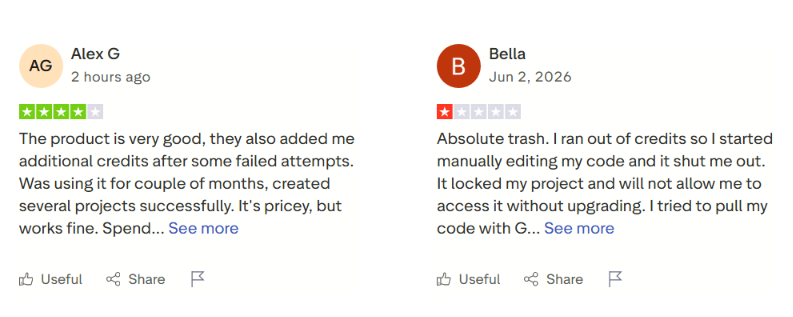
"Sometimes it wows me" (Trustpilot review)
"very unstable, as the AI used to bug out" (AWS Marketplace review)
Pricing
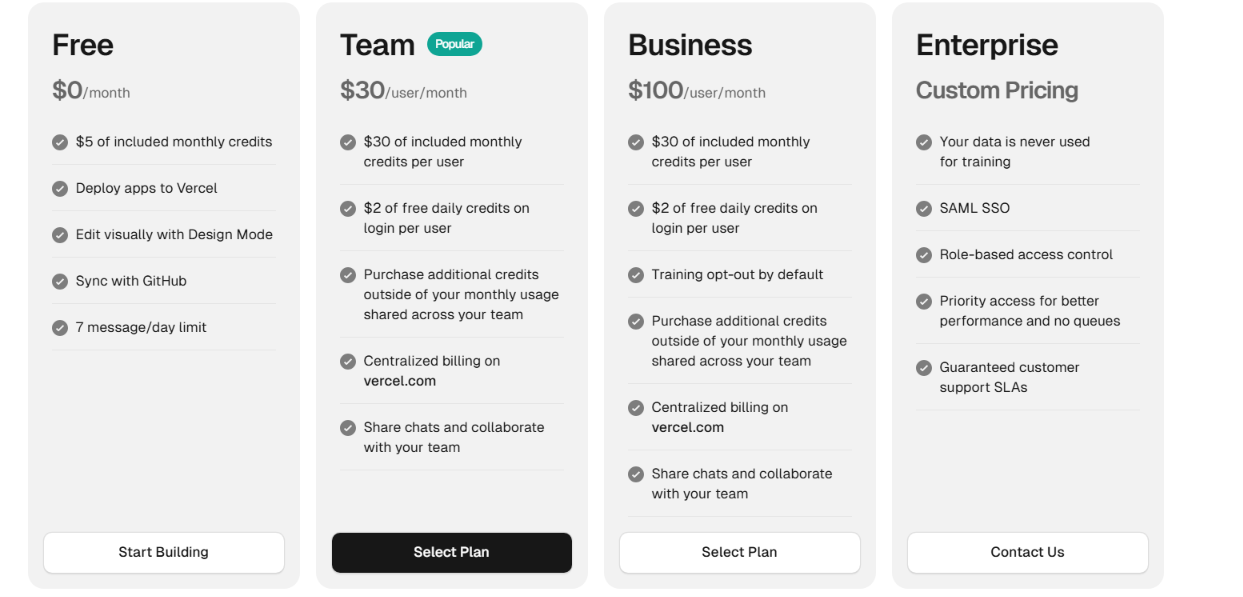
Free tier ($0/month, $5 included monthly credits, seven messages/day limit). Team from $30/user/month, Business $100/user/month, Enterprise custom.
Bottom Line
v0 is the pick when you need clean front-end code fast. For a full app with backend and billing, pair it with another tool.
Need more than frontend code? Our v0 by Vercel alternatives breakdown covers what else is worth trying.
AI Coding Agents (For People Who Write Code)
These three tools are coding agents for people who can read and edit real code. They work inside real code, so they suit anyone who can read and edit what the AI produces. I tested them by pointing each at an existing codebase and asking for a change across several files, plus a bug fix.
7. Cursor: Best for Owning a Real Codebase
What it does: Cursor is an AI code editor that reads your whole project, so it makes sensible edits across many files at once.
Best for: Developers who want to refactor, maintain, and own a real codebase.
On my refactor, Cursor understood the file structure, proposed clean edits, and let me review each one before applying. That review step mattered because I meant to keep the code. It occasionally lagged while indexing a large repo.
Key Features
- Project-wide context: Reads across files, so refactors stay in sync instead of breaking imports.
- Cursor Rules: Set project instructions the agent follows, so output matches your conventions.
- Auto mode: Routes each request to a cost-efficient model without draining your credits.
Pros and Cons
Pros:
- Real control over a live codebase. My refactor stayed reviewable, and I caught a bad edit before it shipped.
- Strong completions and fast iteration for working developers.
Cons:
- Too much for non-coders without code fundamentals.
- Can lag while indexing very large repos.
What Users Say

"Cursor is where the real work and iterating happens" (Reddit user)
"Performance is absolutely abysmal" (Trustpilot review)
Want the full picture of what users are saying? Read our Cursor Reviews for a closer look at what developers actually ran into.
Pricing
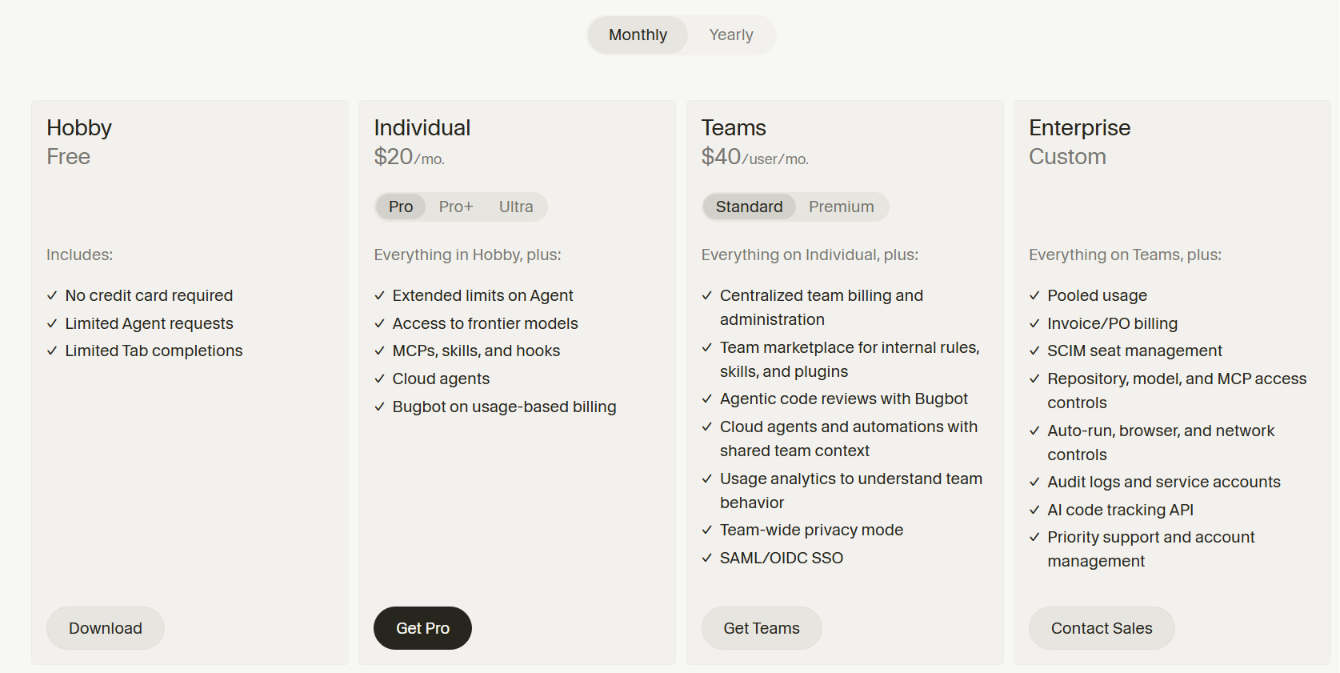
Free Hobby plan. Individual from $20/month ($16/month billed annually), Teams $40/user/month ($32/user/month billed annually), Enterprise custom.
Bottom Line
Cursor is the strongest pick for developers taking a prototype seriously and keeping ownership of the code. If you've never written code, start with an app builder.
Prefer to skip the code editor entirely? Our best Cursor alternatives breakdown covers the prompt-first options worth trying.
8. Claude Code: Best for Terminal and Repo Work
What it does: Claude Code is a terminal agent that works inside your own repo, editing files and running commands where you already work.
Best for: Experienced developers who live in the command line and want an agent driving their stack.
Claude Code needed the least hand-holding on my refactor. It read the repo, made coordinated changes across several files, and fixed the bug in one clean session. There's no visual interface.
Key Features
- Terminal-native: Runs where your scripts and Git already live, with no new editor to adopt.
- Multi-file coordination: Reads a whole directory and makes linked changes, ideal for refactors.
- IDE and CI hooks: Connects to VS Code, JetBrains, and CI flows, fitting existing pipelines.
Pros and Cons
Pros:
- Strong on real repo work. My multi-file refactor came together in one session.
- No editor lock-in, since it works inside your current setup.
Cons:
- No visual feedback, which makes debugging harder when it misreads something.
- Token usage and session limits can interrupt longer work.
What Users Say
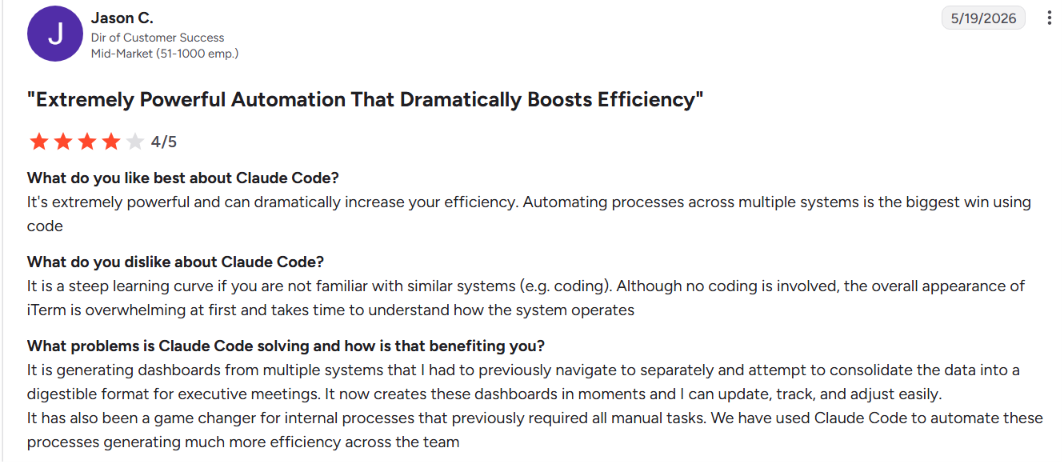
"The terminal interface feels natural" (G2 review)
"running on Opus adds up quickly" (G2 review)
Pricing
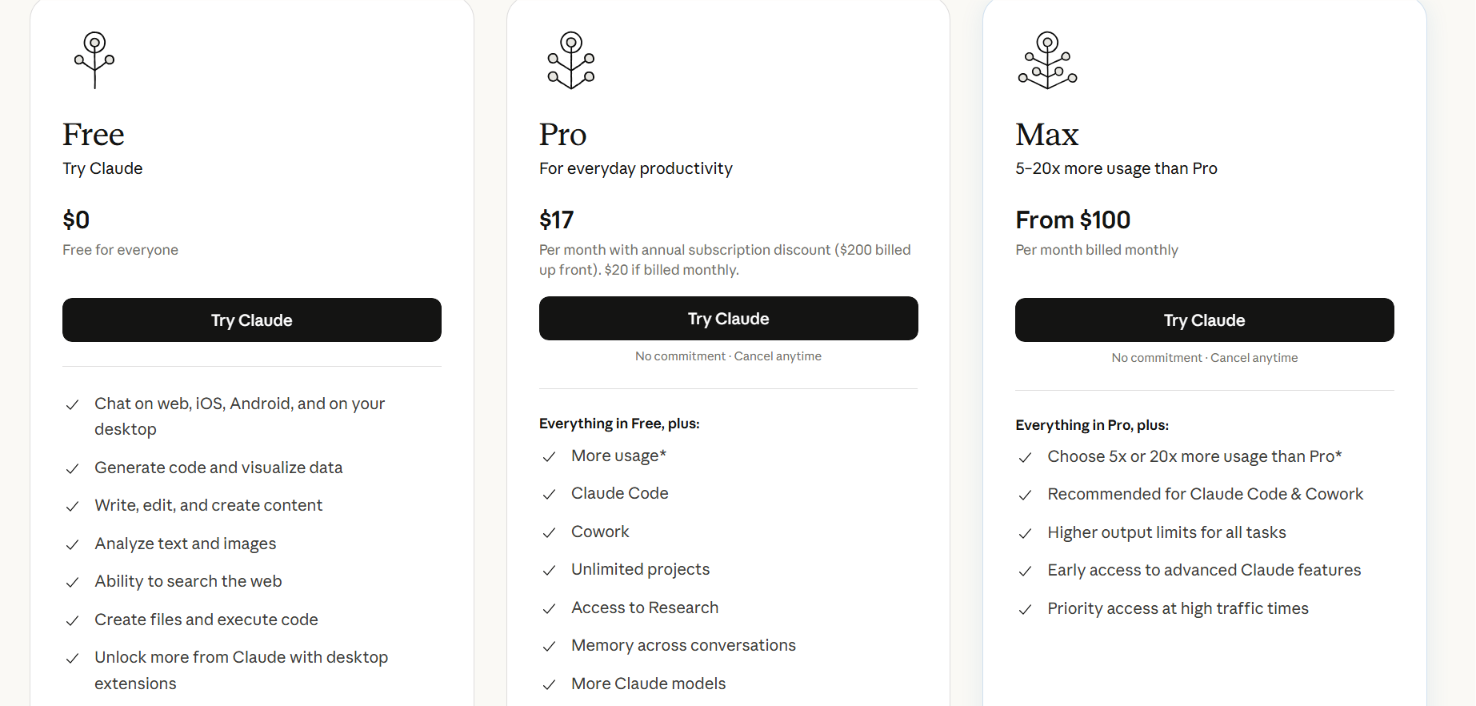
Free tier ($0/month). Pro from $20/month ($17/month billed annually), Max from $100/month (5x) up to $200/month (20x).
Bottom Line
Claude Code is the one for advanced developers who want an agent inside their own repo and terminal. For a visual or no-code experience, it's the wrong fit.
Still deciding between the two? Our Claude Code vs Cursor breakdown covers the real difference before you commit.
9. Devin Desktop: Best Cursor Alternative
What it does: Devin Desktop is an AI coding IDE that applies multi-file edits directly through a clean interface.
Best for: Developers who want a Cursor-style workflow with a slightly friendlier UI.
You may know this tool by its old name. Cognition acquired Windsurf in July 2025 and introduced Devin Desktop as the next generation of Windsurf in June 2026.
Key Features
- Cascade agent: Handles multi-file edits with direct application and gives fast feedback.
- Unlimited autocomplete: Inline completions run on every plan without touching your quota.
- Cloud agents: Background sessions handle longer tasks while you keep working.
Pros and Cons
Pros:
- Clean, friendly interface for agentic editing, with little setup.
- Unlimited autocomplete on all tiers, including free.
Cons:
- The Windsurf-to-Devin handover adds uncertainty about direction.
What Users Say

"[It] really helps you speed up your process” (Reddit review).
Pricing
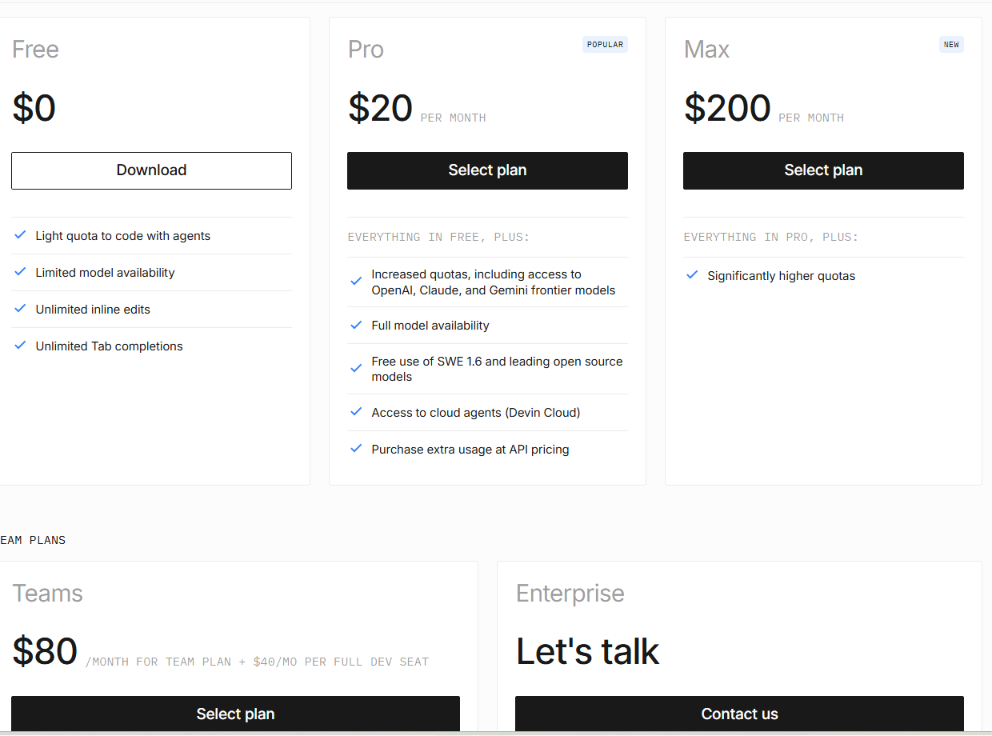
Free tier $0/month. Pro $20/month, Max $200/month, Teams from $80/month + $40/month per full dev seat, Enterprise custom.
Bottom Line
Devin Desktop suits developers who want a Cursor-style IDE with a cleaner feel. If you want a settled product with a long track record, give the rebrand a few months.
Trying to decide between the two? Our Devin vs Cursor breakdown shows exactly where each one fits best.
Which Vibe Coding Tool Should You Choose?
The right pick comes down to one question: Do you want to ship an app without coding, or work inside real code you plan to maintain?
Choose an app builder (Lovable, Replit, Bolt, Emergent, Base44, or v0) if you:
- Can't code and want a working app, MVP, or internal tool from a prompt
- Care most about speed and a polished result over long-term control
Choose a coding agent (Cursor, Claude Code, or Devin Desktop) if you:
- Already write code and want to refactor, maintain, and own what you ship
- Need project-wide context and the ability to review every change
Skip this category entirely if:
- You need a complex, production-grade app with real users and payments from day one. Use these tools to prototype, then move to a proper engineering workflow
- You can't absorb credit-based billing swings, or your app handles sensitive data that can't go live without expert review
Final Verdict
Match the tool to the job in front of you. If you can't code and want a polished app fast, start with Lovable, or Replit if you'd like to learn as you build. If you write code and want to own what you ship, Cursor and Claude Code are the real workhorses.
Whatever you pick, the demo is the easy part. Every tool here shines in a sandbox but strains once payments, real users, and edge cases arrive. Use them to prototype, then move serious work into a proper development setup before launch. Watch your credits, because the monthly price rarely reflects what a heavy build costs.
If you want to skip the stitching and get a working app with payments and logins from one prompt, Emergent is built for exactly that. Start free with 10 credits.
Emergent turns your idea into a full-stack web or mobile app, no coding required.
 No coding required
- Web & mobile apps
- Deploys instantly
Frequently Asked Questions
Your Questions, Answered
Emergent is widely considered the best vibe coding tool for building scalable, production-ready systems in 2026.

on emergent today

Lorem ipsum dolor sit amet, consectetur adipiscing elit. Suspendisse varius enim in eros elementum tristique. Duis cursus, mi quis viverra ornare, eros dolor interdum nulla, ut commodo diam libero vitae erat. Aenean faucibus nibh et justo cursus id rutrum lorem imperdiet. Nunc ut sem vitae risus tristique posuere.


