



After testing a dozen-plus Adalo alternatives, these five are the ones worth your time in 2026. Each one solves a different reason to leave Adalo, whether that is the logic ceiling, the lock-in, or the cost of scaling.
5 Best Adalo Alternatives at a Glance
This table compares the best Adalo alternatives by use case, starting price, and the type of app each builder is best suited for.
| Platform | Best for | Starting price |
|---|---|---|
| Emergent | AI-built web and mobile apps, no drag-and-drop | $20/monthly |
| Bubble | Complex web apps with deep logic | $32/monthly (Web) |
| FlutterFlow | Native mobile with code export | $39/monthly |
| Glide | Spreadsheet-powered internal tools | $25/monthly |
| Softr | Client portals built on Airtable or Google Sheets | $59/monthly |
Note: Pricing correct as of June 2026. Verify with each vendor before purchasing.
Why Look for Adalo Alternatives?
Adalo has come a long way since its drag-and-drop origins. The current version lets you prompt your way to a multi-screen app, with an AI that stays in the conversation through the build, including color changes and screen edits in the canvas.
For founders who need native iOS and Android publishing at an accessible price point, it is a more capable tool than most older reviews suggest.
The problem is what happens after the MVP:
- Vendor lock-in with no exit route. Adalo does not let you export source code. There is no clean React Native or Flutter file to take elsewhere. Outgrow the ecosystem, and you rebuild from scratch. For any app you plan to grow or hand off to a development team later, that is a serious risk.
- Logic hits the ceiling fast. Adalo handles basic if/then conditions well. Conditional chains, loops, multi-step automations, and complex data relationships are a different story. Adalo's own documentation notes that lists of 5,000+ records cause load time issues serious enough to require progressive loading and query optimization to resolve.
- The design output is generic. From what I have seen, components are clean but not distinctive. Deep UI customization requires workarounds, and achieving anything that looks unique means fighting the component system rather than working with it.
- Each app and each editor costs extra. Adalo's Starter plan is $45/month (or $36/month with annual billing) for one published app. Additional published apps cost $25/month each, and editors cost $15/month each. That structure adds up quickly for anyone building more than one product.
To be fair to Adalo, the 3.0 infrastructure overhaul in late 2025 addressed most of the performance complaints, and the platform now handles far more scale than older reviews suggest. For founders who specifically need native iOS and Android publishing at an affordable price point, it is still a solid choice. The alternatives below serve a different set of exit reasons.
TL;DR
- Choose Emergent if you want to describe your app and have AI build it, including the logic, data, and hosting, without touching a drag-and-drop builder. It supports App Store and Google Play publishing, but it is not suited for video games or apps that rely on complex graphics.
- Pick Bubble if your app has complex workflows, multiple user roles, or SaaS-level data logic that no visual drag-and-drop builder will handle cleanly. Expect a real learning curve and usage-based costs that grow with traffic.
- Go with FlutterFlow if you or someone on your team has technical experience, you specifically need downloadable mobile app code you can own and export, and you are comfortable managing a separate database setup.
- Glide works if your app idea lives in a spreadsheet and your audience is internal: a team tool, a staff directory, an operations dashboard. Glide does not support native App Store or Google Play publishing and does not suit consumer-facing or data-heavy builds.
- Softr makes sense if you are building a client portal, a member hub, or an internal app on top of data you already have in Airtable or Google Sheets. Strong for that narrow use case; limited outside of it.
- Stick with Adalo if you need the lowest-cost path to native iOS and Android app store publishing and your app does not need complex logic or code portability.
The 5 Best Adalo Alternatives
I tested each tool against the same criteria to see how fast you can go from an idea to something usable, how much logic you can build before hitting a wall, and whether you own what you build when you’re done.
1. Emergent
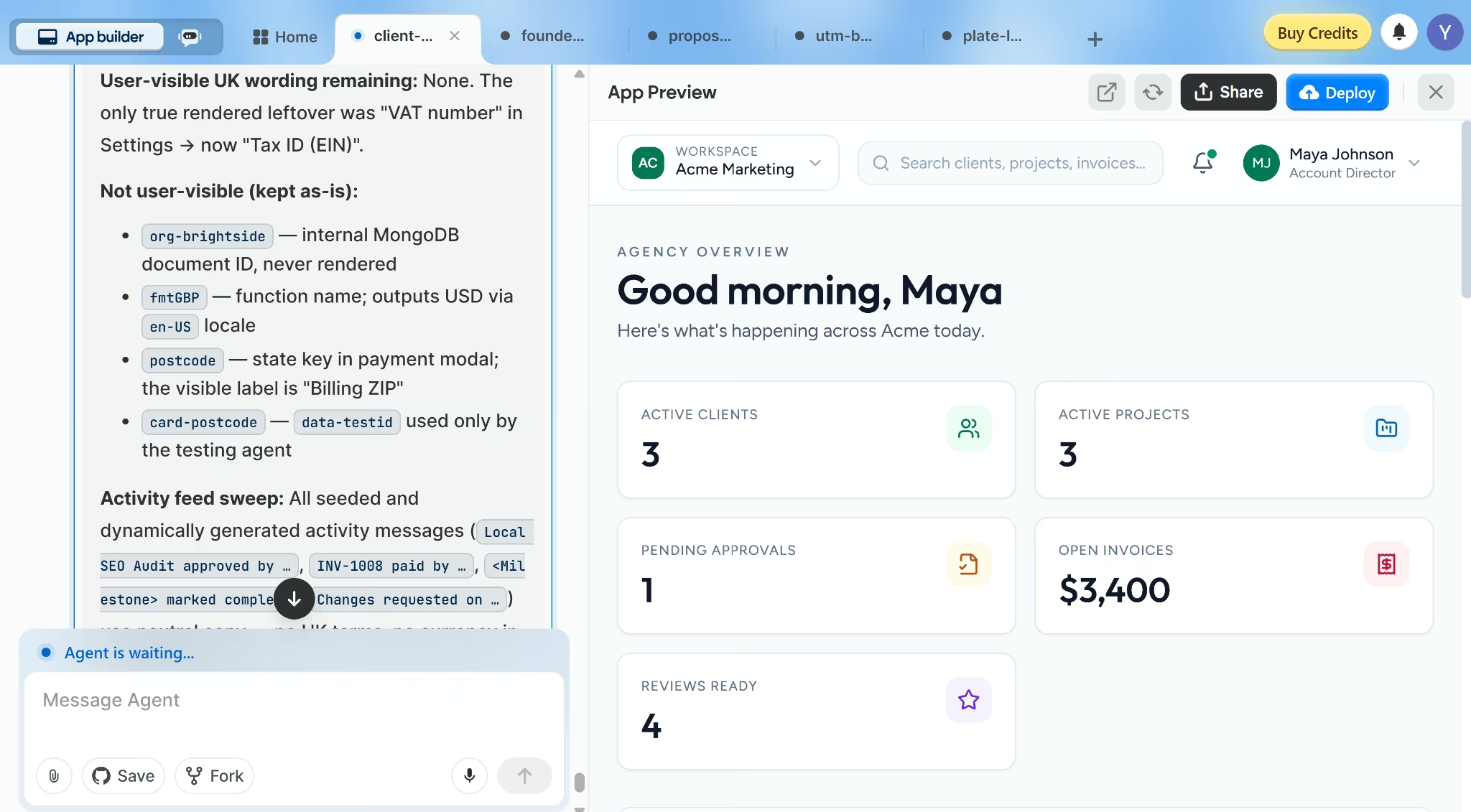
Emergent works more like a build conversation than a visual editor. You describe the app, refine it through prompts, and keep going until the interface, logic, data, and hosting are ready. That prompt-led workflow is what people call “vibe coding.”
Key Features
- Conversational building: Describe your app, iterate through chat, and watch the build happen in real time. No canvas to configure or elements to drag.
- Multi-agent architecture: Specialized agents split the work across the build, handling everything from interface design to integrations, testing, and deployment, among other roles.
- Managed hosting: Apps deploy automatically to Emergent's infrastructure. Sign-in, stored data, and SSL on custom domains are handled without any additional setup.
- GitHub integration: Available on Standard tier and up. The code is exportable, so you are not locked in the same way you are with Adalo.
- Stripe integration: Stripe is supported for apps that take payments. Around 30-40% of apps built on Emergent use payment processing.
- Mobile apps: Builds React Native apps publishable to the App Store and Google Play.
Pros
- Exports code through the GitHub integration, so technical teams can take over later.
- Supports AI app features through one-click LLM integration without asking every founder to bring their own API keys.
- Connects payment, data, and workflow tools like Stripe, Supabase, Airtable, and Gmail.
- Fork tasks let you test a risky product direction without losing the version that already works.
- Managed hosting means your app can go live without setting up a separate hosting infrastructure.
Cons
- Prompt quality matters; vague prompts produce vague results, especially past the early build stages.
- App Store publishing is supported, but not the primary focus; Adalo or FlutterFlow are stronger for native mobile-first builds.
- PDF generation is weak; not the right tool for heavy report-building use cases.
- Not suited for video games or complex graphics.
Best For
- Non-technical founders who want to ship a web app or SaaS product without learning a visual builder.
- Consultants and agency owners building client-facing tools, portals, or booking systems.
- Real estate agents or service business owners who need a working product fast.
- Founders who want code ownership without needing to write code.
Pricing
Visit Emergent's pricing page for current pricing. Plans are credit-based and start at $20/month ($17/month with annual billing).
2. Bubble
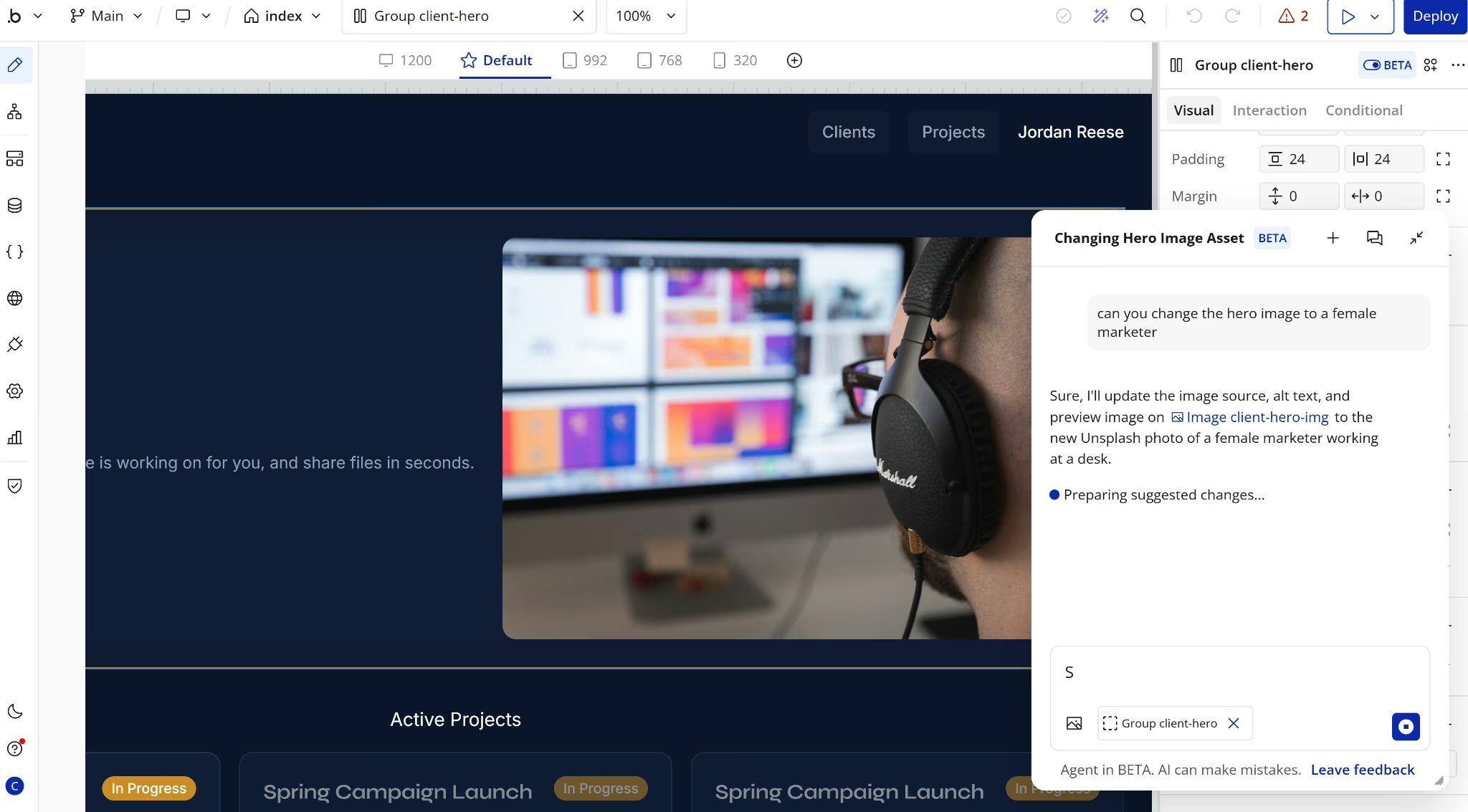
Bubble is one of the most capable no-code web app builders, but it also has one of the steeper learning curves on this list. Where Adalo fits the simpler end of app building, Bubble gives you more room to build complex products with custom workflows, built-in data, conditional logic, user roles, payments, API connections, and multi-step user flows.
It is not a prompt-to-app tool in the way AI-native builders are, either. Bubble scaffolds the initial build from an AI blueprint, then hands you a manual visual editor. There is a Bubble AI Agent in the editor (currently in beta) for element-level changes, but most of the work is still manual.
That depth makes Bubble a stronger fit for marketplaces, SaaS products, internal tools, and apps where each user type needs a different experience. Bubble’s customer library also includes examples like marketplaces, AI SaaS products, internal tools, and mobile apps.
Bubble is still web-first in practice. Its native mobile builder is available in beta for iOS and Android apps.
Key Features
- Bubble AI Agent (beta): An in-editor AI agent that proposes and executes element-level changes on request. You approve each change before it applies.
- Deep workflow editor: Bubble supports workflows, conditional logic, API workflows, scheduled server-side workflows, and step-by-step debugging.
- API connector: Bubble’s API Connector lets apps connect to external APIs as data sources or workflow actions.
- Plugin marketplace: Bubble has a large plugin marketplace for adding payments, maps, analytics, messaging, AI features, and other app functions.
- Workload-based pricing: Bubble uses a usage-based pricing model, with app usage measured in workload units and paid workload add-ons available when apps scale.
- Native mobile: Bubble launched iOS and Android publishing in 2025, supported on paid mobile plans.
Pros
- Handles complex app logic better than simpler visual builders like Adalo.
- Strong for SaaS products, marketplaces, internal tools, and apps with multiple user roles.
- Has a large community, template library, plugin marketplace, and expert network.
- Gives builders granular control over data types, privacy rules, and API connections.
Cons
- The learning curve is steep for non-technical founders.
- Workload-based pricing can be harder to forecast as usage grows.
- Native mobile is newer than Bubble’s web builder and still in public beta.
- Complex apps still need careful data structure, privacy rules, and performance work.
Best For
- Technical founders or teams working with a Bubble developer or agency.
- SaaS products, marketplaces, internal tools, and apps with role-based access.
- Founders who need deeper logic control and can tolerate the learning curve.
Pricing
Bubble’s Web and Mobile Starter plan starts at $69/month ($59/month billed annually), while web-only plans start at $32/month ($29/month billed annually).
3. FlutterFlow
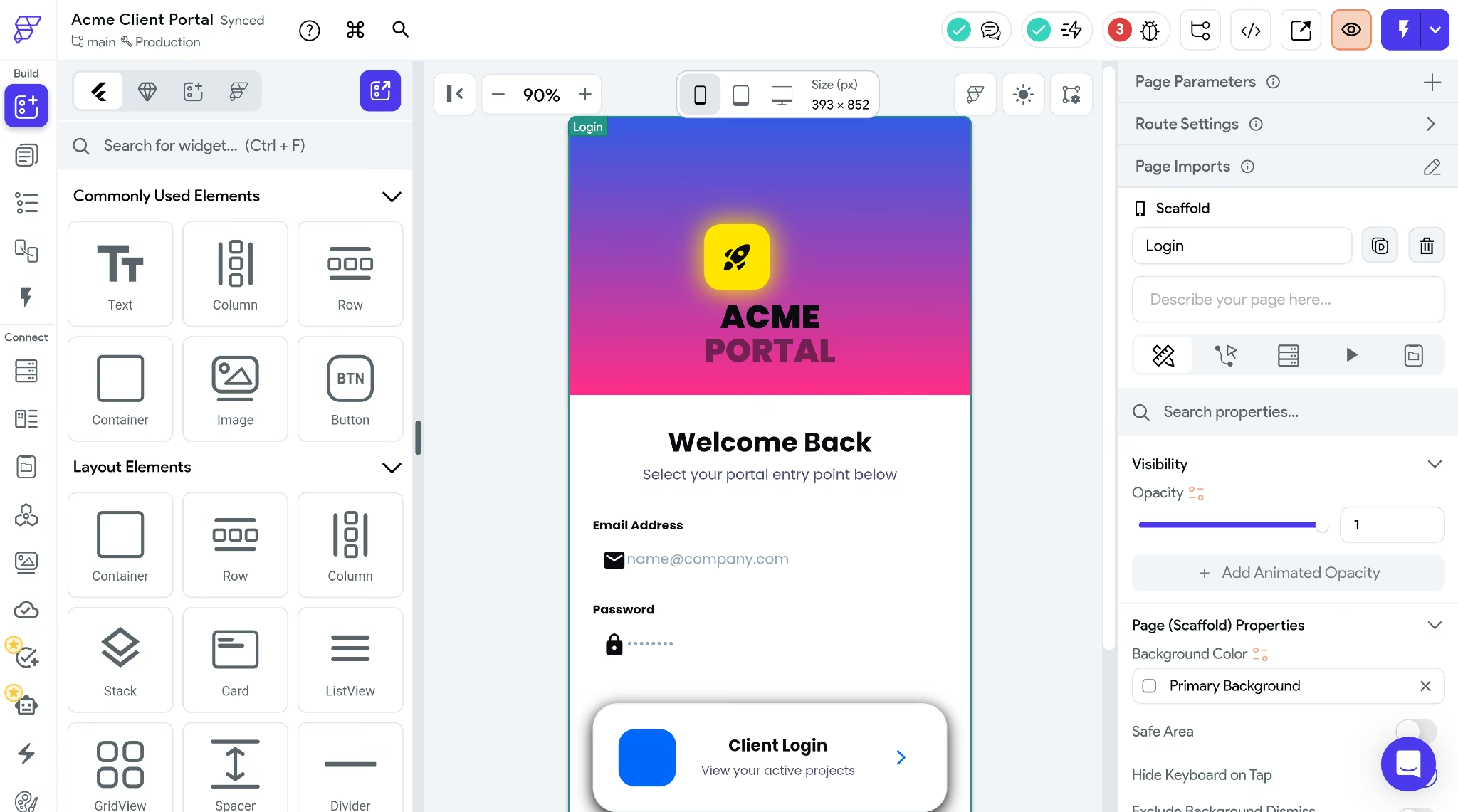
FlutterFlow sits between no-code app builders and code-first mobile development. It can generate an app from a prompt and lets you refine it in a visual editor, or export it entirely and hand it to a developer.
FlutterFlow builds with Google’s Flutter framework, so mobile apps are packaged like native apps and compile to machine code for release, while web apps compile to JavaScript.
This gives FlutterFlow a stronger handoff path than Adalo. You can download Flutter/Dart source code on the Basic plan, and the Growth plan adds GitHub integration for teams that want a developer-controlled workflow later.
The trade-off is complexity. FlutterFlow is better for builders who understand data relationships, app state, conditional logic, and how mobile apps fit together. Non-technical founders can use it, but they should expect a longer ramp-up than with Adalo or Emergent.
Note: One thing I noticed while testing FlutterFlow was that when I added specific color requirements to the prompt, the generation started introducing errors I had to chase down manually in the editor. But prompts without specific color requirements did just fine.
Key Features
- Flutter/Dart code export: FlutterFlow’s Basic plan includes code download and APK download.
- GitHub workflow: The GitHub integration lets teams push FlutterFlow code to a repository and manage custom code in a separate branch.
- Mobile app output: Flutter apps are packaged like native apps and compiled to machine code for mobile release.
- App store publishing: FlutterFlow lists one-click store deployment on Basic and higher plans.
- External backend setup: FlutterFlow supports Firebase and Supabase, but you still manage that backend setup outside FlutterFlow.
Pros
- Stronger code handoff than Adalo because FlutterFlow supports code download.
- Better fit for mobile-first apps that need Flutter’s compiled app model.
- Supports developer workflows through GitHub integration, custom code branches, and code download.
- Works with popular backend options like Firebase and Supabase.
- Has a large builder ecosystem, with community resources, templates, developer groups, and certified partner options.
Cons
- Less beginner-friendly than Adalo because FlutterFlow exposes app concepts like state management, Firebase setup, Supabase setup, API endpoints, visual logic, and custom code options.
- No built-in app database like Adalo’s hosted Postgres database.
- Backend costs can change with usage because Firebase has no-cost limits and a pay-as-you-go Blaze plan.
- Team costs rise once you move past one editor because FlutterFlow’s Growth and Business plans price extra seats separately.
- Code export helps with portability, but taking over the code still requires Flutter knowledge.
Best For
- Technical founders or teams with mobile development experience.
- Apps where mobile performance, code ownership, and developer handoff matter more than beginner simplicity.
- Founders who want visual building now and a path to custom Flutter development later.
Pricing
FlutterFlow’s Basic plan starts at $39/month ($29.25/month when billed annually). It includes code download, APK download, custom domain web publishing, testing on local devices, and one-click app store deployment.
Growth starts at $80/month ($60/month with annual billing) for the first seat and adds GitHub integration, real-time collaboration for two users, branches, Swagger/OpenAPI imports, and the VS Code extension.
4. Glide
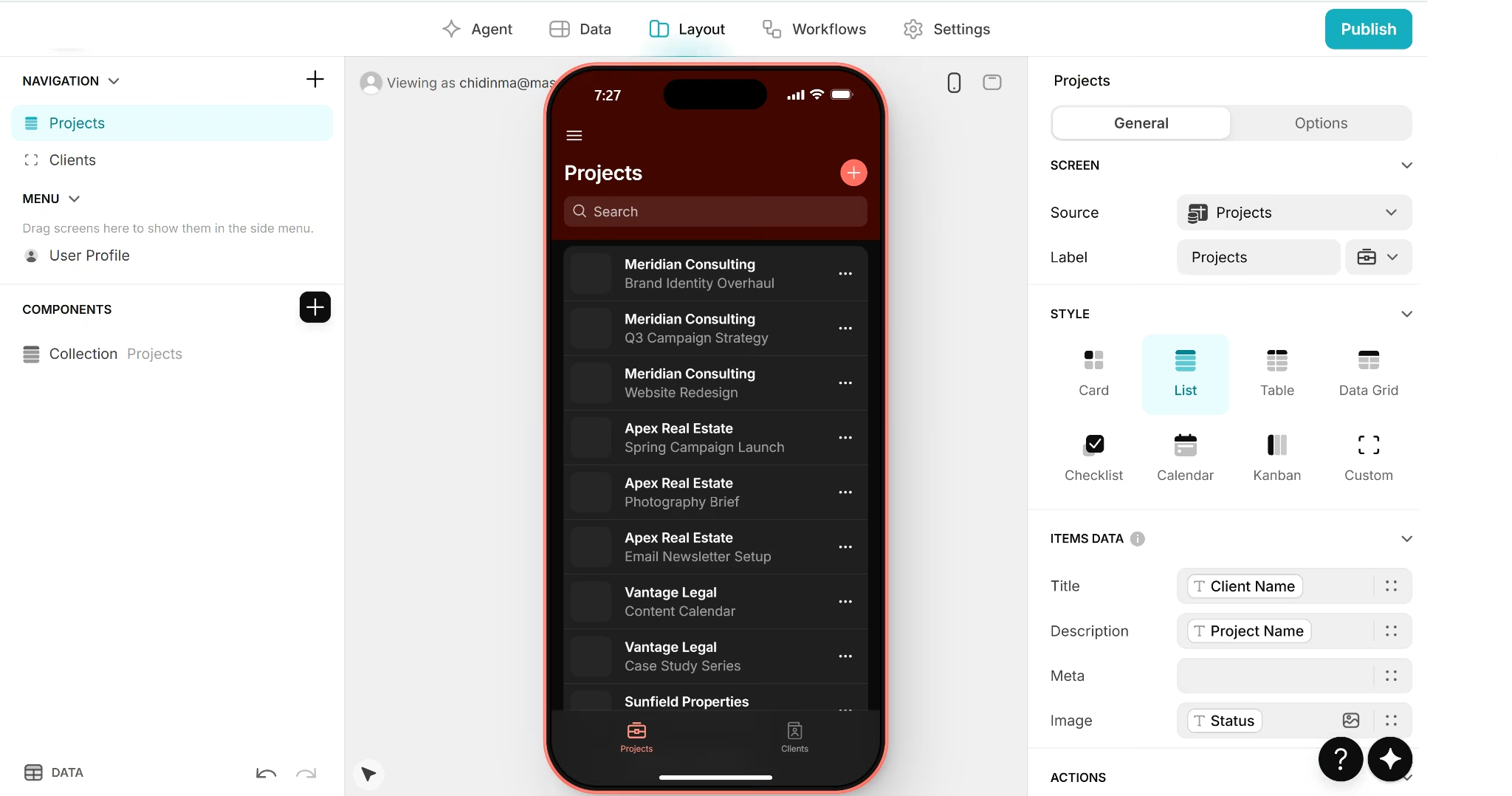
Glide takes a different approach compared to traditional no-code app builders. Your app starts with a data source such as Google Sheets, Airtable, Excel, CSV, Glide Tables, or a connected database, and Glide builds the interface on top of that data.
This method makes it a fast option for internal tools, especially team dashboards, portals, CRMs, inventory apps, project trackers, and other operations tools that already live in structured business data.
Glide works best when your app is built around structured data, like a spreadsheet, directory, dashboard, or internal workflow. It becomes limiting when you need custom logic, flexible layouts, or a product that does more than display and update records.
When I tested it with a simple spreadsheet and the prompt I used for other tools, Glide gave me no creative interpretation of the brief, no designed layout, and no inferred logic. It read my spreadsheet and displayed it. The app I got looked exactly like my data, nothing more.
It is also less suited to native consumer mobile apps because Glide apps are Progressive Web Apps, and direct App Store or Google Play publishing is not supported.
Key Features
- Spreadsheet-to-app: Connect Google Sheets, Airtable, or Glide's own database and build on top of existing data without restructuring anything.
- AI columns: Glide includes AI-powered columns for text generation, image recognition, and data classification directly in the data editor.
- No code required: The builder is accessible for non-technical users. Arguably simpler than Adalo for the use cases it covers.
Pros
- Fastest setup for internal tools built on existing spreadsheet data.
- Clean mobile-first UI output without configuration effort.
- AI columns add useful functionality with no technical setup.
- Simple enough for any team member to build and maintain.
Cons
- Heavily template-constrained; creative app designs require workarounds.
- Not suited for consumer-facing apps or complex user flows.
- Free plan limits are strict; useful publishing requires a paid tier.
- No native App Store or Google Play publishing.
Best For
- Internal tools for small and mid-size teams.
- Ops dashboards, staff directories, and project trackers.
- Business owners who want to automate a spreadsheet workflow without rebuilding their data.
Pricing
Glide has a Free plan for both individuals and businesses. For individuals, paid plans start at $25/month ($19/month billed annually), while paid business plans start at $249/month ($199/month billed annually).
5. Softr
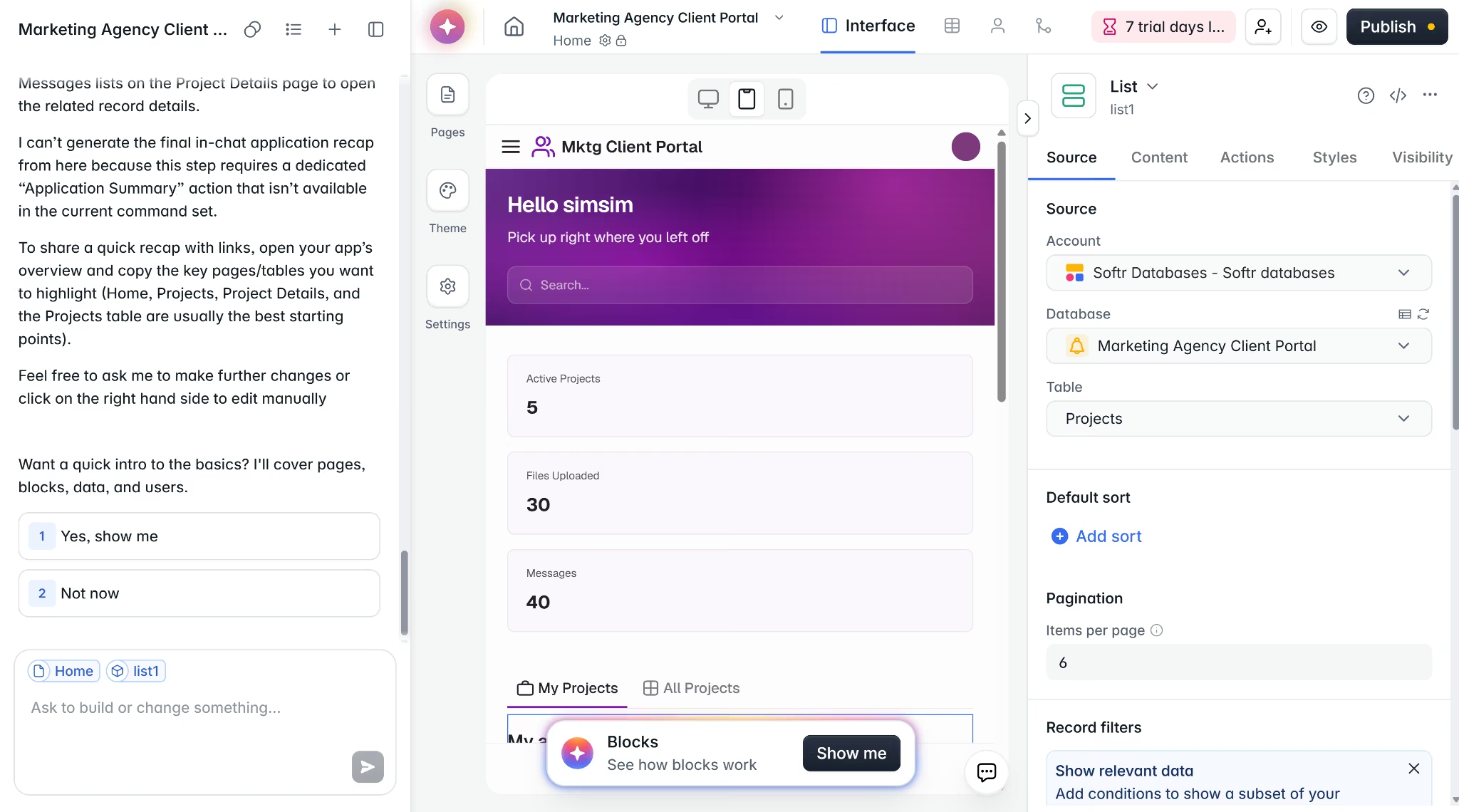
Softr is best known for turning existing business data into client portals, internal tools, dashboards, directories, and project trackers. You can connect Airtable, Google Sheets, Notion, SmartSuite, Xano, Coda, and other sources, depending on the plan.
This setup makes Softr a strong fit for agencies, consultants, and operations teams that want a polished web app on top of data they already manage. Its templates cover client portals, CRMs, directories, dashboards, and other business apps.
Softr is prompt-to-app: it reads your brief, asks follow-up questions, and builds from there. The one constraint is the theme system. Color customization is limited to presets, so you cannot pass specific brand colors through the prompt.
Outside of portals and dashboards, Softr has limits too. Custom logic, complex workflows, and distinctive design are all areas where Softr runs out of room quickly.
Key Features
- Data source connectors: Softr supports Airtable, Google Sheets, Notion, SmartSuite, Xano, Coda, and other data sources by plan.
- Softr Database: Softr Database is available on all plans.
- Templates for business apps: Softr has templates for client portals, inventory tools, company intranets, and project trackers.
- User access controls: Softr supports user groups, sign-in options, filtered user sync, logic, and permissions, with limits that vary by plan.
Pros
- Fast to set up for common business apps.
- Strong fit for agencies and consultants building client-facing views.
- Softr Database gives teams a built-in data option without needing to connect to an external source.
- Softr supports mobile PWA installs on Professional and above, so users can add the app to a home screen through a browser.
Cons
- Softr is less flexible for custom product logic because advanced visibility, global data restrictions, API actions, and Softr API access vary by plan.
- HubSpot, BigQuery, PostgreSQL, SQL Server, MariaDB, MySQL, and REST API sources are tied to Business and Enterprise.
- Color customization is limited to preset themes; you cannot pass specific colors through the prompt.
- Pricing jumps sharply between tiers.
- Softr’s mobile option is a PWA, so it is not the same as publishing a native iOS or Android app through the app stores.
Best For
- Agencies building client portals and reporting dashboards.
- Consultants who want to give clients a branded view of project data.
- Operations teams building internal tools around Airtable, Google Sheets, Softr Database, or similar structured data sources.
Pricing
Softr’s Basic plan is listed at $59/month ($49/month when billed yearly). Professional is listed at $167/month ($139/month annual billing), Business at $323/month ($269/month annual billing), and Enterprise uses custom pricing.
How to Evaluate Adalo Alternatives
The right tool depends on what you are building, who will use it, and how much control you need after launch. Get clear on these four things before you commit.
1. Do You Need Native App Store Publishing?
Native iOS and Android publishing narrows your list quickly. Emergent supports mobile app output, and its React Native and Expo workflow is designed for App Store and Google Play publishing once the right developer account is connected.
FlutterFlow supports app-store deployment, while Adalo supports publishing to the Apple App Store and Google Play Store.
Bubble supports native mobile apps, but its mobile builder is newer than its web builder.
Glide apps are Progressive Web Apps, and direct App Store or Google Play publishing is not supported. Softr supports web publishing and mobile PWA installs, not native app-store publishing.
2. How Much Logic Does Your App Need?
Simple apps, such as booking forms, staff directories, client portals, and basic data capture, fit data-led builders like Glide and Softr.
Apps with conditional branching, multi-step automations, API chains, or role-specific workflows need deeper logic control. Bubble supports workflows, scheduled server-side workflows, and API connections through its API Connector.
Emergent is stronger when you want the logic built through a conversation instead of wiring every rule yourself. You describe the app in natural language, and its AI helps handle coding, design, and deployment.
FlutterFlow gives technical builders more control through code export, GitHub integration, branches, and API integrations.
3. Do You Want to Own Your Code?
Adalo does not let you export source code. You are locked in for as long as the platform exists. FlutterFlow supports code export, and its GitHub integration lets teams push code to GitHub.
Emergent also supports GitHub export. You own your generated code on Emergent and can download, modify, or host applications wherever you choose.
Long-term portability matters especially if you plan to hand off to a development team eventually. Verify the export terms before you build.
4. What Is the Real Monthly Cost at Your Expected Usage?
Monthly cost can vary widely across these Adalo alternatives. Bubble is a good example because each plan includes a workload limit, and heavier workflows, traffic, or backend activity can require workload add-ons.
FlutterFlow can also bring separate backend costs. The subscription covers the builder, but your app may still depend on Firebase or Supabase for things like storage, authentication, database reads, and server resources.
Emergent uses credits, so your real cost depends on how much building, testing, and iteration your app needs.
Softr and Glide can get more expensive as the app grows because usage limits matter. Glide’s Business plan includes 30 users and 5,000 updates, then charges for additional users and extra updates. Softr’s Basic plan includes 20 people who can log in to the portal or app you build, so a larger client portal, member hub, or internal tool may need a higher tier.
Run your expected usage numbers before committing to any one.
Before you commit to any plan, read our guide on how to build a website without code in 2026 to understand what each approach actually costs in practice.
Final Take: Match the Tool to the Problem
The tools on this list solve different Adalo limits.
FlutterFlow is the better fit if you need code you can export and hand to a developer. Bubble makes more sense for logic-heavy SaaS products, marketplaces, and internal tools.
Softr and Glide work well when you already have structured data and want to turn it into a portal, dashboard, or internal app.
The bigger question is how much of the build you want to handle yourself.
Some tools still ask you to configure screens, add components, and deploy your app manually. Emergent is different. You describe the app, refine it with prompts, and iterate until the interface, logic, data, and hosting are ready.
This makes Emergent a strong pick for non-technical founders who want a working web or mobile app without having to learn a visual builder or hire a developer.
Build your first app with Emergent.

Describe what you want and Emergent builds it. A real, production-ready app you can launch the same day.
- One prompt to build
- Zero code required
- Deploy in minutes







