



6 Best Appy Pie Alternatives: TL;DR
These tools are ranked by how well each platform handled the Streak brief, followed by what it offers beyond the generated first draft. They are:
- Emergent: Best for founders who want the app's interface, logic, and data generated together from a prompt.
- Thunkable: Best for visual builders who want editable block logic and access to device features.
- FlutterFlow: Best for teams that want detailed visual control and exportable Flutter code.
- Bubble: Best for existing Bubble users who want to add native mobile while keeping the same backend.
- BuildFire: Best for agencies and resellers managing client apps under their own brand.
- Adalo: Best for visual builders who want to publish one project to web, iOS, and Android.
A habit tracker has to do real work: a countdown that expires on time, a notification when a streak breaks, and paid themes that stay locked until purchase. I built exactly that on six platforms to see which ones delivered, screen by screen.
I used that brief to test six Appy Pie alternatives: Emergent, Thunkable, FlutterFlow, Bubble, BuildFire, and Adalo.
I ranked the six based on what each one actually returned, which parts of the brief worked, and how much rebuilding was still needed.
How I Tested These Appy Pie Alternatives
I used the same brief for all six platforms:
“Build a mobile habit tracker called Streak. It should have a check-in button, a visible streak counter, and a countdown that restarts after each check-in. Missing the countdown should reset the streak and trigger a notification. Add four visual themes, with three locked behind a one-time purchase. Do not add login or unrelated screens.”
Emergent, Thunkable, FlutterFlow, Bubble, and Adalo accepted the prompt directly. BuildFire’s AI builder accepted the same brief after a color and font picker step that appeared before it generated any screens.
I checked the same five things in every build:
- The check-in control responded
- The countdown started and expired correctly
- An expired countdown reset the streak
- The reset notification appeared
- The purchase control kept the premium themes locked and unlocked them after purchase
Each tool’s section covers exactly what came back, including any parts of the brief the build missed entirely.
Why Look for Appy Pie Alternatives?
You start needing an Appy Pie alternative when you want multiple apps, custom logic, or ownership of the underlying code. Appy Pie handles speed well: its AI takes 30 to 90 seconds to generate the first preview, though customization and polish can take from a few hours to a couple of days.
The cost increases with every app. Appy Pie’s Basic runs at $32 per app per month, Gold $72, and Platinum $120 (each drops to $16/$36/$60, respectively, if you pay annually). Basic and Gold support Android publishing, while Platinum is required for both Android and iOS.
Appy Pie also states that although one account can contain unlimited apps, each app needs its own subscription. A business publishing several apps therefore pays the selected plan price again for each one.
Custom server-side logic is limited. Appy Pie AI doesn’t write arbitrary backend code, so apps that need novel server logic may need a developer. Its pre-built modules can cover common app patterns, but a project with unusual workflows or custom backend behavior may need a platform that exposes more of the logic.
There’s no source-code export. Generated apps stay on Appy Pie's hosted infrastructure, and users don't receive a Git repository. You can continue editing and publishing through Appy Pie, but you can’t transfer the existing codebase to another development platform.
If you’re considering moving away from Appy Pie, our Appy Pie review takes a closer look at what the platform does well and where it may fall short.
6 Best Appy Pie Alternatives: At a Glance
| Platform | Best for | Relevant starting price |
|---|---|---|
| Emergent | Generating the mobile interface, logic, and data in one project | Standard: $20/month, or $17/month billed annually |
| Thunkable | Visual buildingwith editable blocks and device features | Builder: $59/month or $37/month billed annually |
| FlutterFlow | Detailed visual control and exportable Flutter code | Basic: $39/month or about $29.25/month billed annually |
| Bubble | Adding native mobileto an existing Bubble project with a shared backend | Web & Mobile Starter: $69/month or $59/month billed annually |
| BuildFire | Agencies and resellersmanaging client apps under their own brand | White-label resellerpricing is custom; standard app plans start at $209/month |
| Adalo | Publishing one visual project to web, iOS, and Android | Starter: $45/month or $36/month billed annually |
Pricing checked on July 31, 2026. The prices shown are the lowest plans tied to the use case listed, rather than each platform’s cheapest available subscription.
The 6 Best Appy Pie Alternatives
Emergent: Best for Apps With the Logic and Data Built In

Emergent treats the brief as a software project rather than a set of screens to generate, an approach known as vibe coding. Its mobile app workflow keeps the screens, logic, and data together in one project.
Emergent asked five clarifying questions before building, covering notifications, the purchase flow, countdown length, user sign-in, and visual direction. The first version of Streak was ready in about 13 minutes, using 8.5 credits.
All five required interactions worked in the first build: the check-in, countdown, reset, notification through Expo Go, and purchase control that unlocked the premium themes.
A follow-up prompt asking Emergent to make the results more visible added a “Streak broken” modal and a separate celebration state after a successful check-in. Both appeared correctly in the app.
The Code tab let me open and edit the app's actual source files, while GitHub sync provided a route to a developer-controlled repository. The database panel also exposed the project’s connection details directly.
Opening the Android preparation flow showed the icon, version number, and package name steps required before packaging the app for the app stores.
Key Features
- Conversational building: Describe the app and revise it through prompts, with no visual canvas or screens to drag into place.
- Code and database access: The code workspace is editable, and the database connection details are visible inside the project.
- GitHub integration: Standard and higher plans include GitHub integration, providing a route for version control and developer handoff.
- Cross-platform mobile development: The Mobile Agent uses Expo and React Native to create apps for iOS and Android.
- Build from your existing AI chat: The Emergent MCP Connector lets you start and manage builds in ChatGPT or Claude, and returns a live preview link when the app is ready for review.
Pros
- The project included editable source files, database access, and a GitHub connection option.
- The five clarifying questions covered notifications, purchases, countdown behavior, user sign-in, and design before the build started.
- The GitHub integration supports pushing and pulling code, selecting branches, and connecting existing repositories, rather than providing a one-time code download.
- Publishing an update keeps your existing data intact.
- You can launch on your own domain, with automatic setup when you buy it through Emergent.
Cons
- GitHub integration and private project hosting require Standard or a higher plan.
- The Mobile Agent requires a paid subscription and is unavailable on the Free plan.
Best For
- Founders who want the interface, data, and logic generated in one project.
- Teams that want developers to inspect or continue the project through GitHub.
- Non-technical builders who prefer describing an app to configuring screens on a visual canvas.
Pricing
Emergent uses a credit-based model, and subscriptions start at $20/month. Check its current plans, credit allowances, and included features before starting, though.
Thunkable: Best for Visual Builders Who Want Device Features
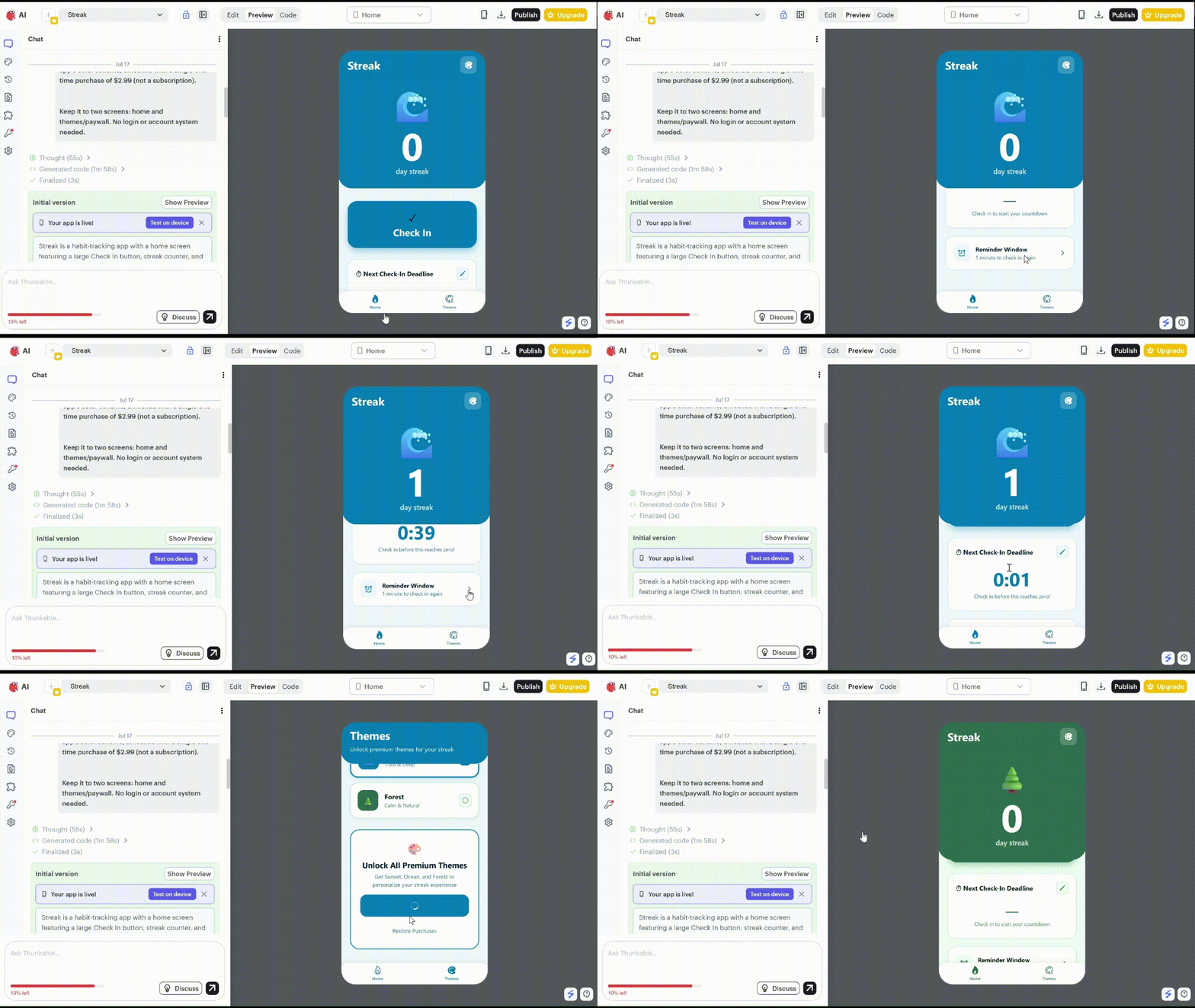
Thunkable gave me a successful first build. It was the best build after Emergent’s. Its AI Builder produced the initial screens and logic, then left everything available inside the Design and Blocks editors for me to inspect and change.
Streak took about 11 minutes to build and used roughly 1,800 of the Free plan’s 2,000 monthly AI tokens.
Before it started, Thunkable asked how I wanted notifications to work and whether I wanted production services or demo versions of the notification and purchase flows. I chose the demo route. Thunkable also suggested OneSignal for production push notifications and RevenueCat for in-app purchases.
The completed build handled all five parts of the brief. Tapping the check-in button increased the streak and started the countdown. Letting the timer expire returned the streak to zero and showed the demo notification. The themes page also kept three designs locked until I completed the demo purchase action.
What I liked most came after the build. I could open the Blocks tab and follow the connections between each button, screen, and action. A broken interaction could be edited on its own, rather than forcing me to rebuild the entire app.
The tradeoff is that the project stays tied to Thunkable. The platform lets you download compiled mobile builds and share editable project copies, but it doesn't provide a source-code export.
That limitation is one of the main reasons to compare Thunkable alternatives before committing to the platform.
Key Features
- Visual logic editing: The Design tab controls the interface while the Blocks tab exposes the app’s logic.
- Device components: Thunkable provides blocks for device capabilities, along with components for features such as Bluetooth Low Energy and location.
- Live testing: Projects can be previewed in a browser or tested on a phone through Thunkable Live. Some device features require testing on a phone rather than in the browser.
- Data and app services: Thunkable supports Google Sheets, Airtable, and local tables as data sources, plus OneSignal notifications and RevenueCat purchases.
Pros
- A single Thunkable project can be published to both the Apple App Store and Google Play.
- Editable share links copy the project’s interface components and blocks, which makes it possible to hand the project to another Thunkable user.
- The AI editor can generate new blocks from natural-language instructions, so later logic changes don’t always have to be assembled block by block.
Cons
- Source code cannot be exported, even on a paid plan.
- Push notifications and in-app purchases require Builder or Advanced when you move from a demonstration to a published app.
- Published apps on current plans require an active paid subscription to remain available to users.
Best For
- Builders who want to inspect and adjust generated logic through a visual editor.
- Mobile apps that rely on device features such as location, camera access, sensors, or Bluetooth.
- Teams that are comfortable keeping the project inside Thunkable and handing it off through an editable project copy.
Pricing
Thunkable’s Free plan includes 2,000 AI tokens, three public projects, and five screens per project, which was enough to run the Streak test.
Accelerator costs $19 per month or $18 per month with annual billing. It adds more AI tokens and one private project, but it doesn't include a live published app.
Builder costs $59 per month or $37 per month with annual billing. It includes one live published app and is the first current plan that supports publishing with push notifications and in-app purchases.
Advanced costs $189 per month or $99 per month with annual billing and includes unlimited live published apps.
Want the full breakdown of what each plan actually covers? Read our Thunkable pricing guide before you commit.
FlutterFlow: Best for Developers Who Want Exportable Flutter Code
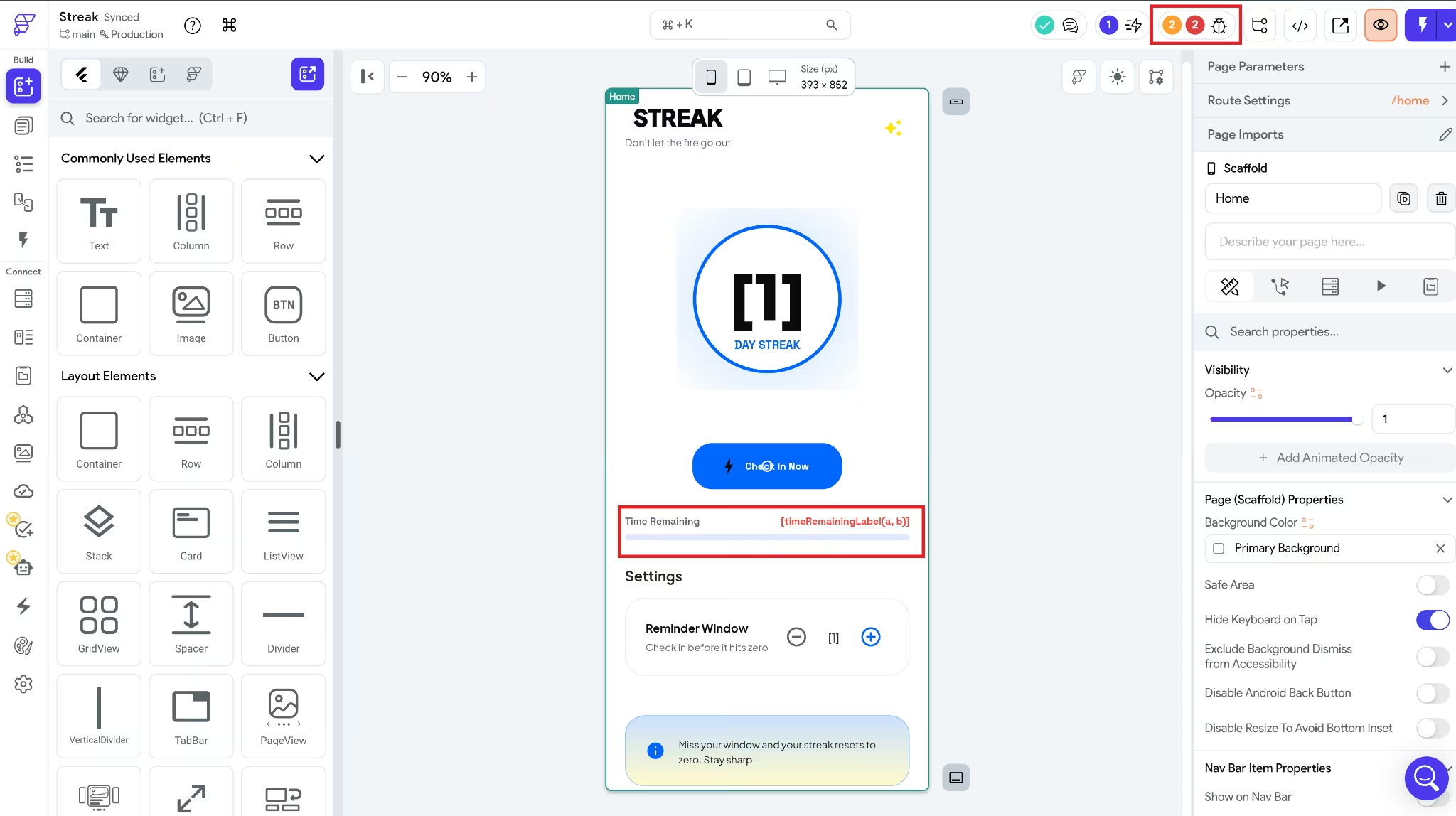
FlutterFlow looked promising at first. It generated Streak in about one minute, making it the quickest first draft in my test, and the visual editor made the project look much further along than it was.
The problems became clear once I opened the preview, though. The streak counter still showed placeholder content, the countdown contained unfinished text, and the check-in button did nothing. Since that first action didn't work, I couldn't test the countdown reset or notification. The theme purchase page also failed to open.
FlutterFlow’s Project Issues panel was more useful than the generated app. This panel lists errors and warnings and links each one to the relevant part of the project. It pointed me to an incomplete state-update action on the check-in button and showed that the project referenced Firestore without a connected Firebase project. The Project Issues panel doesn't automatically fix issues, so I tried to solve them myself. I wasn't successful.
Each FlutterFlow project is a complete Flutter application, and paid users can download the generated code to continue working outside FlutterFlow. But if your team doesn't need that level of technical control, you may prefer other FlutterFlow alternatives with simpler visual or prompt-led workflows.
Key Features
- Flutter code export: Basic and higher plans include source code and APK downloads.
- Project issue routing: Build errors and warnings link to the area that needs attention.
- GitHub and VS Code workflow: Growth and higher plans include GitHub integration and the VS Code extension.
- Backend connections: Firebase and Supabase integrations are available on every plan.
Pros
- Exported projects run as standard Flutter applications without requiring FlutterFlow.
- Manual project commits are included on every plan, while automatic snapshot history covers up to one hour on Free and one day on Basic.
- Basic includes local device testing and one-click deployment to the Apple App Store and Google Play.
Cons
- None of the five Streak interactions worked in the first generated build.
- The Free plan is limited to two projects and five lifetime AI-generation requests.
- Source-code download, APK download, and direct app-store deployment require Basic or higher.
- GitHub integration and the VS Code extension require Growth or higher.
Best For
- Developers and technical founders who want Flutter code they can continue using outside FlutterFlow.
- Builders who want visual control over application state, actions, variables, and data connections.
- Teams that want to connect Firebase or Supabase and use GitHub as the project becomes more technical.
Also read our FlutterFlow Review for a closer look at how the pros and cons play out in real testing.
Pricing
Flutterflow’s Free plan includes two projects, five lifetime AI-generation requests, and ten Lite credits. It supports building and testing, but not source code download, APK download, or direct app store deployment.
Basic costs $39 per month or $29.25 per month with annual billing. It adds unlimited projects, source code and APK downloads, local device testing, and one-click app store deployment.
Growth starts at $80 per month for the first seat and $55 for the second. Annual billing saves about 25%. Growth adds GitHub integration, the VS Code extension, two-user collaboration, and additional project branches.
Want the full breakdown of what each plan actually covers? Read our FlutterFlow pricing guide before you commit.
Bubble: Best for Existing Bubble Users Adding Native Mobile
Bubble makes the most sense when you already have a web app on the platform. You can add native mobile views to the same project and keep using its database and backend workflows rather than setting up a second backend.
The mobile interface still needs to be designed separately, though. Bubble recommends rebuilding web pages as mobile views so you can use native navigation, gestures, and device features properly.
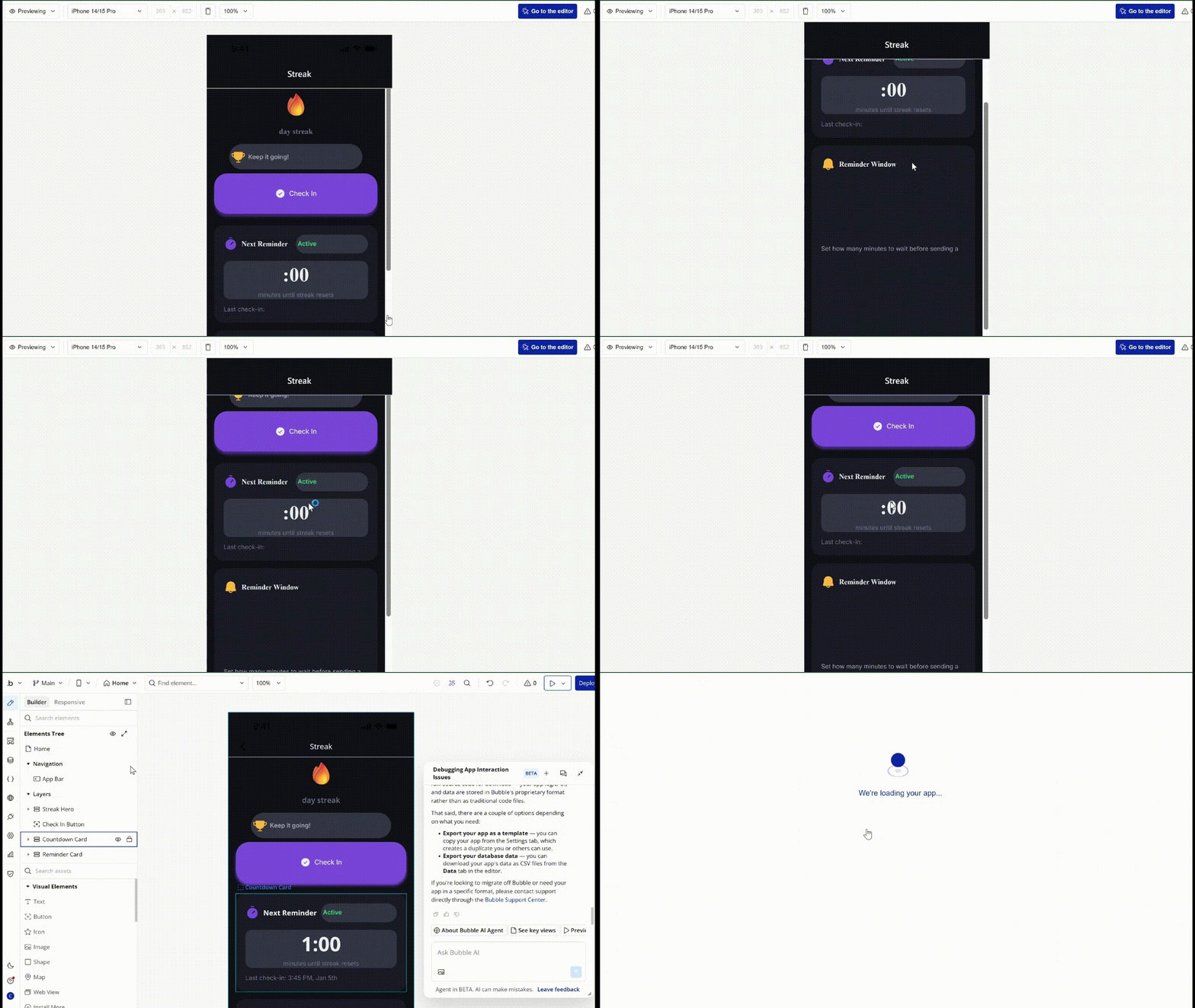
In my test, Bubble finished building the app in about 4 minutes, but the check-in button did nothing when I opened the preview.
Without that first action, the rest of the app couldn't get going. The streak stayed unchanged, the countdown never started, and I couldn't reach the reset notification. The purchase control didn't respond either, so none of the five interactions could be validated.
At first, I thought the check-in workflow might be incomplete. When I asked Bubble’s assistant what had gone wrong, it pointed to a password-reset workflow that the prompt had not requested. I removed it and tested the app again, but the controls still did nothing.
My build didn't make a convincing case for starting a new mobile-first project in Bubble. Its advantage is clearer for an existing Bubble team that already has the data, users, APIs, and backend workflows in place and only needs to build the mobile side.
Bubble also keeps projects on its own platform. You can export user-created data, but not the application as source code. Moving the project elsewhere would mean rebuilding its logic in another system. If your team is starting a new mobile project rather than extending an existing web app, there are other Bubble alternatives with simpler prompt-led or visual workflows worth considering.
Key Features
- Shared backend: Web and mobile views can use the same database and backend workflows.
- Mobile-specific frontend: The native editor provides mobile views, navigation patterns, gestures, and device-focused components.
- Separate mobile workflows: Bubble supports frontend actions designed specifically for mobile while keeping shared processes in backend workflows.
- App-store publishing: Paid mobile plans support publishing native apps to the Apple App Store and Google Play.
Pros
- BubbleGo lets you test the app on physical iOS and Android devices without publishing it first.
- The native mobile debugger can trace workflows step by step, pause at breakpoints, inspect element values, and show runtime errors.
- Mobile apps can reuse an existing web login page for email, OAuth, and two-factor authentication instead of creating a second authentication screen.
Cons
- None of the five Streak interactions worked in my test, even after I removed the unrequested password-reset workflow.
- Bubble applications cannot be exported as source code. Only project data and parts of the design can be taken elsewhere.
- The native mobile editor is still in beta, so features may change and some issues may still appear during building or testing.
Also read our Bubble Review for a closer look at how the pros and cons play out in real testing.
Best For
- Existing Bubble users who want to add native mobile while keeping the same backend.
- Products that need web and mobile interfaces to share data, users, and backend workflows.
- Teams prepared to design a mobile-specific frontend rather than reuse their web pages unchanged.
Pricing
Bubble’s Free plan includes mobile building, debugging, and on-device testing, so you can try the native editor before choosing a paid plan.
For the use case covered in this section, adding native mobile to an existing Bubble web app in the same project, the first paid option is Web + Mobile Starter. It costs $69 per month or $59 per month with annual billing.
You only need to upgrade when you are ready to deploy a live mobile build or publish the app to the Apple App Store or Google Play.
Want the full breakdown of what each plan actually covers? Read our Bubble pricing guide before you commit.
BuildFire: Best for Agencies and Resellers Managing Client Apps
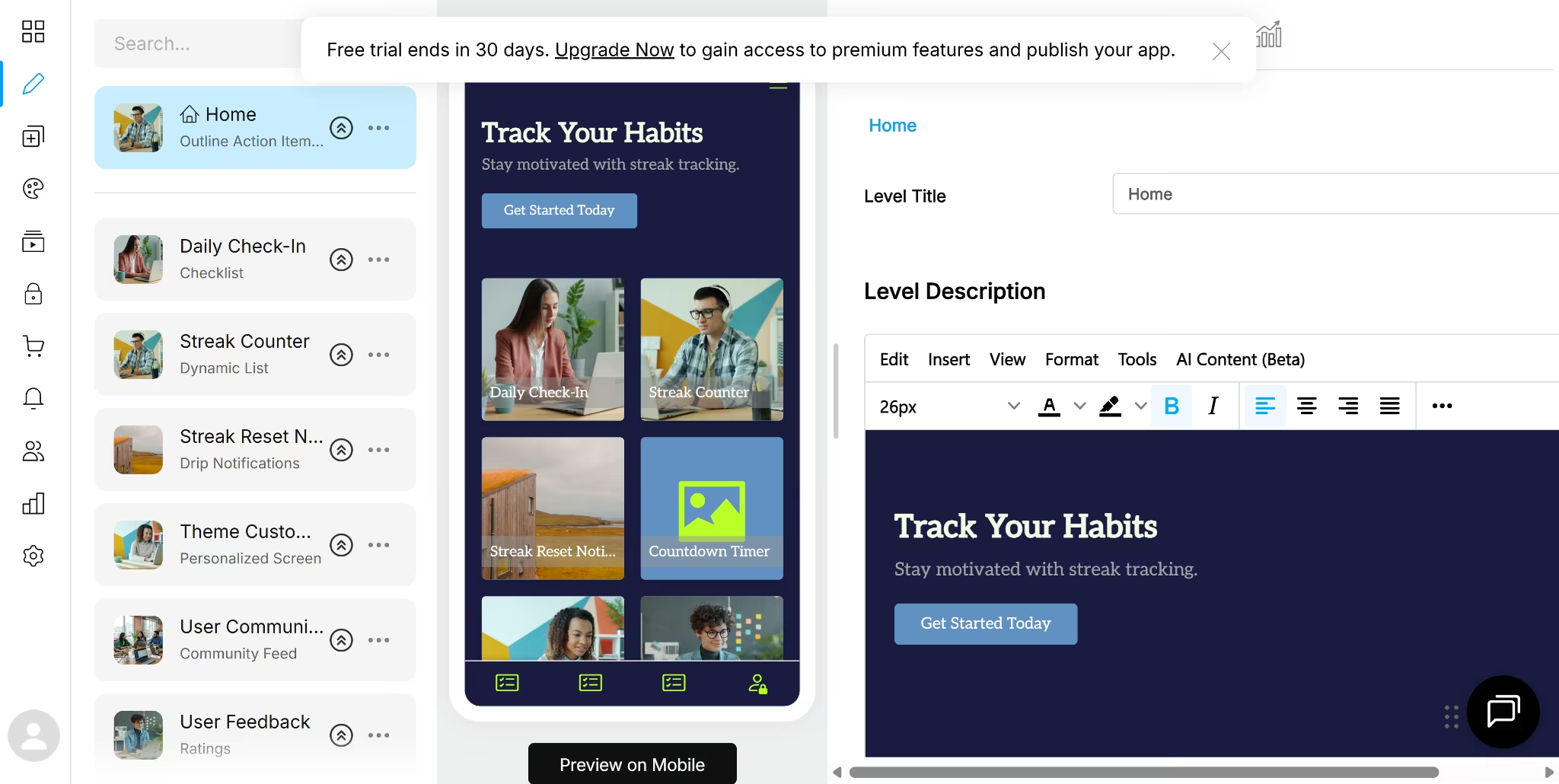
BuildFire is easier to understand once you separate its different offers. Its white-label reseller program is for agencies that want to sell apps under their own brand, while Professional Services is a separate option for companies that want BuildFire’s team to handle design and custom development.
I tested BuildFire’s self-serve AI builder on a trial using the same Streak brief.
After entering the brief, BuildFire asked me to choose a color palette and font before showing any screens.
About five minutes later, I had an app, though it didn't match the brief I gave.
A Daily Check-In checklist and a screen called Streak Counter were both present. The counter, however, was a public dynamic list connected to something called Social Wall. It didn't increase after a check-in, and there was no countdown or reset logic behind it.
The theme purchase flow was missing, too. BuildFire added a User Community feed and a User Feedback ratings page, even though the prompt had specifically excluded unrelated screens.
I ended up with a different app than the one I described: a community check-in board that reused a few labels from the habit-tracker brief.
The stronger case for BuildFire sits outside its AI generation. Agencies can brand the platform as their own, manage client apps, and control pricing from one dashboard. They can also start new client projects from scratch, copy an existing app, or reuse their own templates.
Key Features
- AI starting point: The self-serve builder accepts a written brief, then generates an initial set of screens after the color and font setup.
- Plugin marketplace: Ready-made plugins can add features such as chat, Shopify, image galleries, locations, and content feeds.
- Developer SDK: Developers can create custom plugins using HTML, CSS, and JavaScript, and integrate them with native capabilities such as the camera, location, files, and notifications.
- Publishing workflow: Once the required developer accounts and permissions are ready, BuildFire’s publishing team submits the app to the App Store and Google Play.
Pros
- White-label resellers can set their own prices and choose which features their clients can access.
- Agencies can copy existing apps and create reusable templates, which can reduce setup work across similar client projects.
- The publishing team handles the store-submission process after the agency or app owner provides the required Apple and Google accounts.
Cons
- The generated Streak build missed the central habit-tracking mechanic and added two screens the prompt had excluded.
- Self-serve plans start at $209 per month, while the white-label reseller product doesn't have publicly listed pricing.
- Building features beyond the plugin marketplace requires development skills because the SDK uses HTML, CSS, and JavaScript.
Best For
- Agencies and resellers building and managing client apps under their own brand.
- Teams that want to clone apps or reuse templates across several client projects.
- Agencies that want help submitting completed apps to Apple and Google.
Pricing
I tested a trial of BuildFire’s self-serve builder, not its White Label Reseller or Professional Services packages.
BuildFire's Standard plan costs $209 monthly ($165/month annually) and includes one admin seat, 5 GB of storage, publishing support, and eligibility for iOS, Android, tablet, and progressive web app publishing.
Growth costs $389 monthly ($315/month annually) and adds more storage, additional admin seats, an account manager, and one in-app purchase.
Scale costs $549 monthly ($440/month annually) and adds unlimited in-app purchases, 50 GB of storage, and premium support.
White Label Reseller and Professional Services both use custom pricing. The reseller option is the most relevant for agencies that sell and manage multiple client apps. Professional Services is for businesses that want BuildFire’s team to design or develop their app.
Adalo: Best for Visual Builders Publishing to Web, iOS, and Android
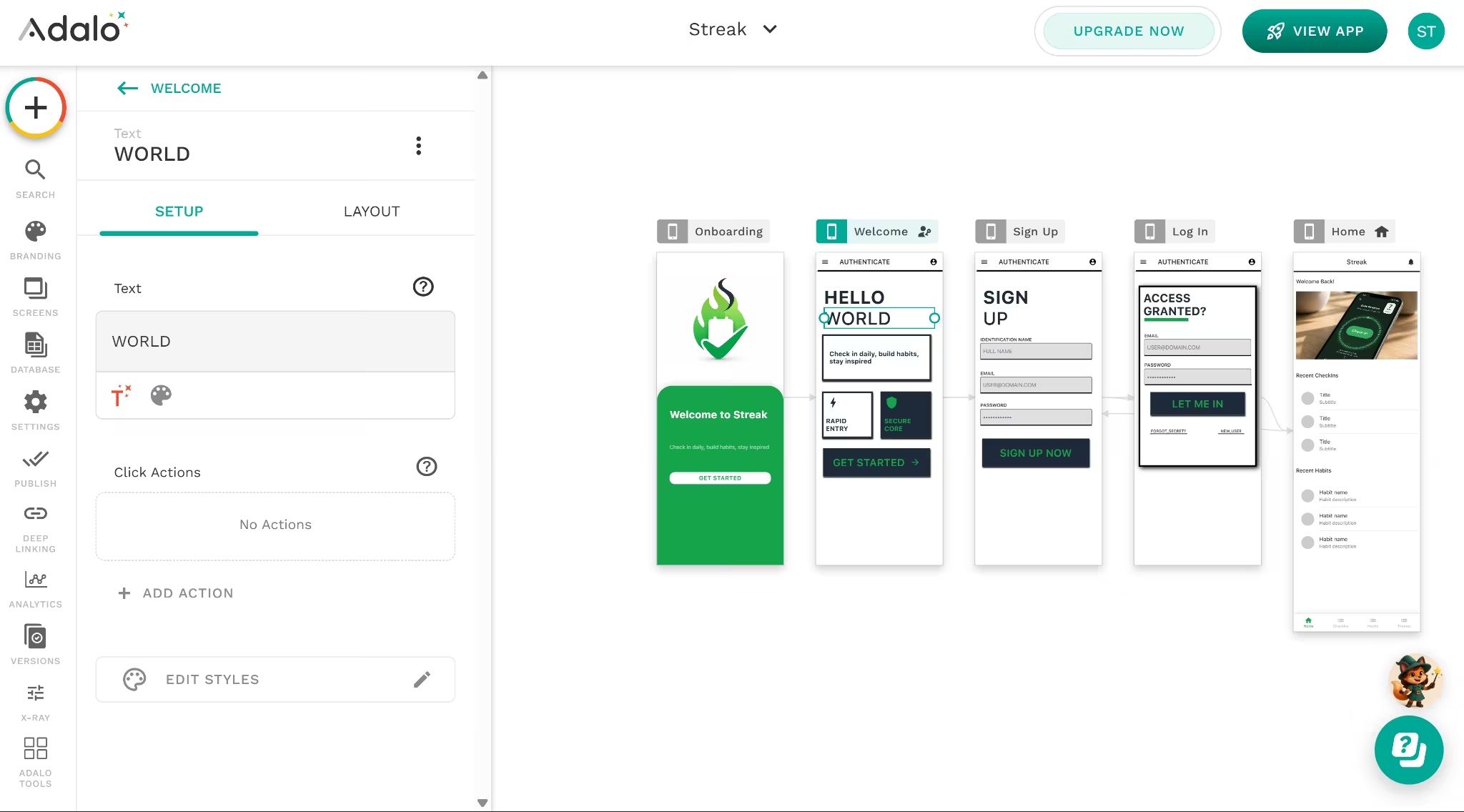
Adalo’s appeal is that the AI-generated draft is only the starting point. Ada can generate screens, database collections, and navigation from a prompt, then leave the project open on Adalo’s visual canvas for further editing.
During my test, Ada asked whether I wanted it to generate basic screens for adding, editing, and deleting data. I selected no, and the first build arrived in about four minutes.
The result didn't follow the brief. Adalo added Onboarding, Welcome, Sign Up, and Log In screens even though I had asked for no login. It left out the countdown, the theme purchase page, and the check-in flow.
The Home screen looked populated at a glance, but the Recent Check-ins and Recent Habits sections contained only “Title” and “Subtitle” placeholders. What looked like a check-in button was just a static phone image rather than something I could tap.
I opened the live version through the QR code to check whether the editor preview was the problem. It wasn't. The controls were greyed out there, too, and none of the five Streak interactions worked.
There was no single action I could reconnect to rescue the app. The generated structure itself needed to be rebuilt on the canvas using Adalo’s screens, components, database collections, and actions.
Adalo still has a clear fit beyond this test. A single project can be published as a web app, an iOS app, and an Android app, while the visual canvas keeps its screens and components available for manual editing.
Key Features
- Prompt and canvas building: Ada generates the initial app, while screens and components remain editable through the drag-and-drop canvas.
- Multi-platform publishing: Mobile and responsive projects can be published to the Apple App Store, Google Play, and the web.
- Built-in database: Adalo includes collections, properties, records, and relationships for storing and connecting app data.
- Component marketplace: The marketplace adds components for features such as maps, charts, payments, ratings, calendars, and media.
Pros
- One published project can use a custom domain, the Apple App Store, and Google Play while counting as one published app.
- The built-in relational database can handle collections and relationships without requiring a separate database for a basic project.
- The Free plan includes unlimited test apps, unlimited screens, mobile previews, and Ada, so you can explore the builder before paying to publish.
Cons
- The generated Streak project added an unwanted login flow and failed all five tested interactions.
- Adalo doesn't provide an editable source-code export, which is one of the main reasons to compare Adalo alternatives before committing to the platform.
- Push notifications aren't included with Starter. They begin on the Professional plan.
Best For
- Visual builders who want to publish one project to web, iOS, and Android.
- Non-technical founders who want to see and edit every screen on a visual canvas.
- Straightforward database-driven apps that use collections, relationships, forms, and standard actions.
Also read our Adalo Review for a closer look at how the visual canvas and multi-platform publishing hold up in real testing.
Pricing
You can build and test Adalo on the Free plan, but app-store publishing requires Starter or higher.
Starter costs $45 per month or $36 per month with annual billing. It includes one published app, one editor, custom-domain publishing, and publishing to the Apple App Store and Google Play.
Starter wouldn't cover the complete Streak brief because it doesn't include push notifications.
The first suitable tier for publishing Streak with notifications is Professional, at $65 per month or $52 per month with annual billing.
Extra published apps cost $25 each month, and extra editors cost $15 each month.
How to Evaluate Appy Pie Alternatives
Start with the requirement you would regret compromising on later.
| Your main priority | Best fit | Why |
|---|---|---|
| Generate the interface, logic, and data through prompts | Emergent | Keeps the code, database, logic, and mobile workflow in one project |
| Inspect and adjust app logic visually | Thunkable | Uses editable screens and block-based logic |
| Download and continue working with Flutter code | FlutterFlow | Exports the project as Flutter and provides detailed visual controls |
| Add mobile to an existing Bubble web app | Bubble | Reuses the existing database and backend workflows |
| Build and manage apps for clients | BuildFire | Provides a white-label reseller platform for agencies |
| Edit visually and publish one project across web and mobile | Adalo | Supports web, iOS, and Android publishing from the same project |
Most projects will match more than one row. Use these questions to break the tie:
- What would be hardest to change later? Moving an existing backend, rebuilding an app on another platform, or giving up access to the source code will usually cost more than learning a different editor.
- Who will make changes after launch? A founder working through prompts needs a different setup from a developer working with Flutter code or a team that prefers visual blocks.
- Will you build one product or several client apps? Agency resale, white-label access, reusable templates, and client management matter less when you are building a single product.
- What will the project cost at its expected size? Include extra apps, editors, publishing features, usage limits, and required integrations rather than comparing only the cheapest monthly plans.
- How much repair can your team handle? A detailed editor is useful only when someone can diagnose and fix the generated logic.
The Streak test provides a final tie-breaker. Emergent and Thunkable completed all five interactions. FlutterFlow and Bubble produced recognizable versions of the app, but their main controls didn't work. BuildFire and Adalo missed larger parts of the brief and would have required broader rebuilding.
Before committing, test the hardest workflow in your own app on the final two platforms. Use something that can expose weak logic, such as a timed reset, a role-based action, a payment restriction, or a device feature. A polished dashboard alone won't tell you how much work the full project needs.
Which Appy Pie Alternative Should You Choose?
- Choose Emergent when: Code ownership and a clean GitHub handoff matter to you as much as the first build does.
- Choose Thunkable when: You’ll want to open the logic and fix a broken interaction yourself instead of rebuilding from scratch.
- Choose FlutterFlow when: Someone on your team can work in Flutter, since the exported code only pays off if you can use it.
- Choose Bubble when: You already run a Bubble web app and only need to add the mobile side on the same backend.
- Choose BuildFire when: You’re reselling apps under your own brand rather than shipping one product of your own.
- Choose Adalo when: You want to hand-edit every screen on a visual canvas and publish one project to web, iOS, and Android.
- Stick with Appy Pie when: One straightforward app fits its per-app plan, and you don’t need code access or heavy custom logic.
The Verdict on Appy Pie Alternatives
The best Appy Pie alternative is the one that leaves you with the least rebuilding after the first draft. Raw generation speed matters far less.
The Streak test made that difference clear. Several platforms produced an app-shaped result within minutes, but empty controls, missing logic, and unrelated screens turned that speed into more work later.
Thunkable completed the five interactions, but the project stayed inside its visual block editor. Emergent went further. It generated the interface, logic, and data together, then gave me access to the project code and GitHub.
For a non-technical founder, that means less manual setup now without giving up control of the project later.
Spend less time reconnecting empty screens. Turn your brief into a mobile app you can test, edit, and keep building with Emergent.

Every alternative has trade-offs. Emergent just builds production-ready apps from one prompt.
- Production-ready apps
- Web & mobile apps
- Deploy in minutes







