



7 Best Glide Alternatives: TL;DR
- Emergent: best for custom apps where customer forms, team dashboards, workflow rules, and integrations need to work together.
- Zite: best for a custom web app or internal tool that doesn't need a native mobile build or exportable code.
- Softr: best for client portals and structured internal tools built around forms, dashboards, and role-based access.
- AppSheet: best for teams using Google Workspace that want to turn existing business data into an internal app.
- Bubble: best for complex web apps that need detailed control over screens, workflows, permissions, and database rules.
- FlutterFlow: best for mobile-first projects that need exportable Flutter code and room for a developer to take over.
- Adalo: best for straightforward apps built around forms, lists, search, and record updates across web and mobile.
Maybe your Glide app started as a form and a table. Then you added approvals, different views, or rules that send each record to the right person. Each change took more setup than the last, and you started wondering whether another platform would handle the same app with less work.
Yes, you have other options, and I went looking for them.
After searching through numerous Glide alternatives, I narrowed my choices down to seven good ones and ran each through the same test. I also checked their pricing, publishing options, plan limits, and the level of control you keep once the app is built.
By the end, you’ll know which platform fits your workflow and budget, what you’d gain or give up by switching, and when staying with Glide still makes sense.
Why Look for Glide Alternatives?
Glide works well when your app is fairly simple. You can connect existing business data, collect information via forms, and give your team a single place to view and update records without writing code.
The problems often start when the process becomes more complicated. Approvals, routing rules, different user views, and exceptions can add more conditions and steps to manage. You may reach a point where every change takes longer because you have to check how it affects the rest of the app.
Glide may also fall short when you want a native mobile app. Glide apps run through the web, and you can’t publish them directly to the Apple App Store or Google Play.
Cost can become another concern as the app grows. Glide’s plans have different limits for users, updates, data sources, and features, so a small app may need a higher plan once more people use it, or more data moves through it.
Glide is still a sensible choice for a web-based internal app built around existing data. An alternative may suit you better when the workflow needs more rules, you want app-store publishing, or you prefer a different way to build and manage the app.
How I Tested the Glide Alternatives
I compared the seven platforms using one job management app for a pressure-washing company. The app had to collect service requests, recommend a crew, track each job, and stop completed work from moving to billing until someone approved it.
Each tool received the same brief. I pasted it directly into platforms with prompt-based builders. For visual builders, I used the brief as the build checklist without adding extra instructions about the database, login system, publishing method, or app structure.
Here is the prompt I used:
Build a job management app for Clearline Exteriors, a pressure-washing company.
Customers should be able to submit their name, email address, service address, property type, property size, preferred service date, and notes.
The team should be able to view and filter job requests, assign crews, and update each job through these stages: New, Scheduled, In Progress, Completed, Pending Approval, and Billable.
Recommend the Residential Crew for residential jobs, the Commercial Crew for commercial jobs up to 5,000 square feet, and the Senior Crew for larger commercial jobs. The team should be able to override the recommendation.
A completed job can’t become Billable until it has been approved.
Add sample jobs.
I checked each platform in six areas. They are:
- First build: How much of the brief it completed before I made any corrections.
- Job workflow: Whether the form, filters, crew assignments, job stages, and approval rule worked as requested.
- Fixes and changes: How much work it took to correct missed requirements or change part of the app.
- Free-plan limits: Whether I could build and test the app without paying, plus any credit, record, or usage restrictions.
- Publishing and control: Whether the finished app could run on the web, reach app stores, connect to GitHub, or provide downloadable code.
- Ongoing use: How manageable the app would be for a non-technical person after the first build.
The test build was only one part of the comparison. I also checked each platform’s current pricing and official product information so the final ranking reflects the cost, limits, publishing options, and level of control you get after building the app.
Which Glide Alternative Should You Choose?
- Choose Emergent if you need forms, dashboards, rules, and approvals in one app. Publishing the app requires a paid plan.
- Choose Zite if you need a custom web app or internal tool and don't need a native mobile build or exportable code.
- Choose Softr if you need a client portal or internal dashboard. Check every public form before launch.
- Choose AppSheet if your team already uses Google Workspace. You may need to finish the app manually.
- Choose Bubble if you want full control over a complex web app. Expect to spend time learning the editor and fixing the first build.
- Choose FlutterFlow if you want a mobile app with downloadable code. You may need a developer to finish the logic.
- Choose Adalo if you need a simple web and mobile app. Complex workflows may take more manual setup.
- Stick with Glide if your current app still handles your data and workflow well. Switching may create more work than it solves.
Glide Alternatives at a Glance
| Platform | Best for | Price |
|---|---|---|
| Emergent | Custom apps with connected workflows | Free plan; Standard from $20/month ($17 billed annually) |
| Zite | Custom web apps or internal tools without native mobile or code export | Free plan; Pro from $19/month ($15 billed annually) |
| Softr | Client portals and structured internal tools | Free plan; Basic from $59/month ($49 billed annually) |
| AppSheet | Google Workspace internal apps | Free for building and testing; Starter from $5/user/month |
| Bubble | Complex web apps with detailed control | Free plan; Starter from $32/month ($29 billed annually) |
| FlutterFlow | Mobile apps with exportable code | Free plan; Basic from $39/month |
| Adalo | Straightforward web and mobile apps | Free plan; Starter from $45/month ($36 billed annually) |
The 7 Best Glide Alternatives
The best Glide alternatives are Emergent, Zite, Softr, AppSheet, Bubble, FlutterFlow, and Adalo. Emergent and Zite both build custom apps with connected workflows; Softr and AppSheet fit internal tools; Bubble gives you deeper control over web apps; and FlutterFlow and Adalo cover mobile projects.
I ranked them by how much they could handle and how much work remained afterward. Each one became a better fit for a different type of app.
1. Emergent: Best for Custom Apps With Connected Workflows
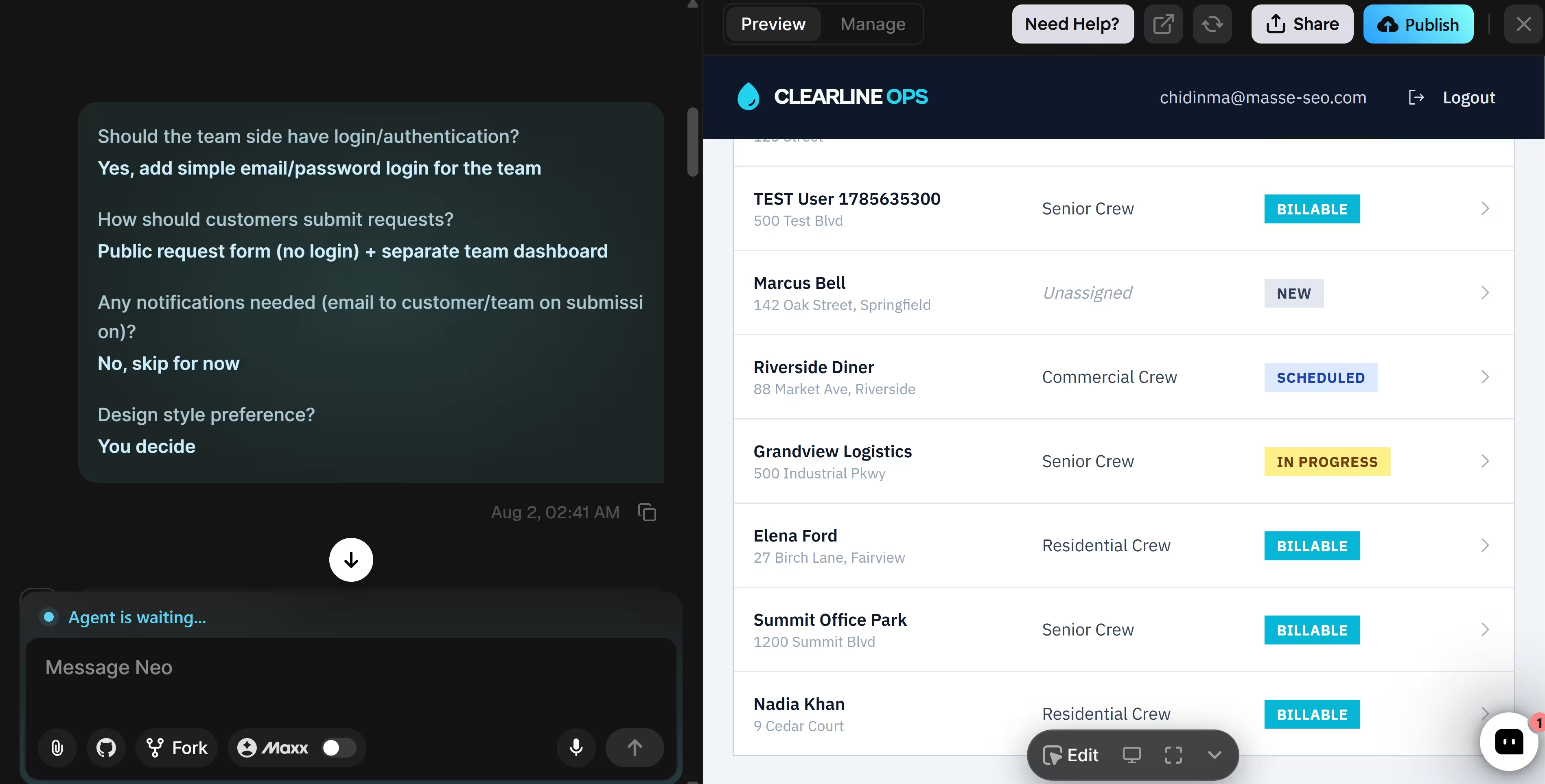
Emergent understood how the customer side and team side needed to work together. In 10 minutes, it built both parts of the app, added the workflow rules, and filled it with sample jobs. I didn’t need a correction prompt.
A customer could submit their details once, and the same record followed the job through assignment, progress, approval, and billing. I didn’t have to reconnect the form to the dashboard or recreate the rules elsewhere.
You could use the same approach to replace scattered forms, spreadsheets, and status boards. Client portals, booking systems, job trackers, and approval workflows can follow the process you already use instead of forcing you into a preset structure.
The Stripe integration can add payments, subscriptions, and invoicing to the same app. You could collect a deposit at booking, request the balance after approval, or keep recurring payments tied to each customer record.
Your app doesn’t have to stop at the first web version. You can connect it to GitHub so a developer can step in, or create iOS and Android versions that share the same data, accounts, and app rules.
Key Features
- Prompt-based building: Emergent builds web and mobile apps from written instructions, including the screens, data, login, and app rules.
- MCP Connector: The MCP Connector lets you start and manage a build from ChatGPT or Claude and receive a preview link in the conversation.
- Built-in data and accounts: The setup handles data storage, sign-in, and app rules without requiring separate tools.
- Built-in deployment: Deployment tools put the app online with hosting, a secure connection, and a custom domain.
- Code access: GitHub integration lets you save the code, track changes, and continue working outside Emergent.
Pros
- Separate preview and production databases let you test changes without touching live customer and job records.
- Redeploys keep the app’s data and public URL, so updates don’t wipe records or move customers to a new link.
- The app can feel like part of your business rather than another third-party tool through a custom domain.
- Owner and member roles let teammates manage the project without changing every setting.
- A developer can take over more complex work later through GitHub access, so the project doesn’t need to start again elsewhere.
Cons
- The Free plan works for building and previewing, but a permanently published app needs a paid plan.
- Emergent uses credits for builds and deployment, so frequent changes can use up your allowance faster.
- Features such as private projects and GitHub access require a paid plan.
Best For
- You manage a process with several handoffs, rules, or approval stages.
- You want customers and your team to use different sides of the same app.
- You want to replace several disconnected tools with one system built around your workflow.
- You expect to add payments, mobile access, or developer support later.
Pricing
The Standard plan starts at $20 per month, or $17 per month billed annually. Check Emergent’s pricing page for current plan details and credit limits.
2. Zite: Best for a Custom Web App or Internal Tool
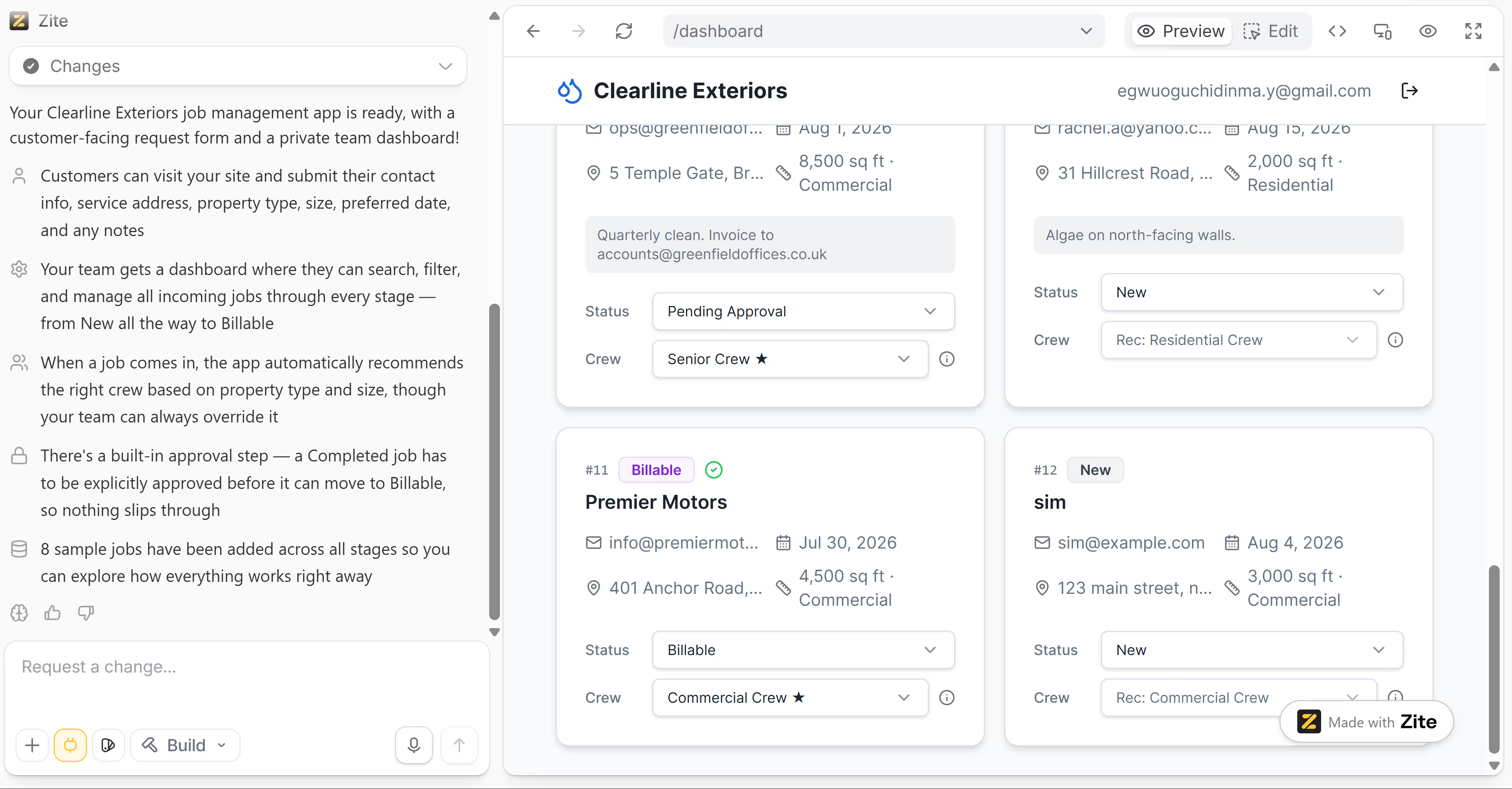
Zite takes the same build-your-own approach as Emergent, generating an app's interface, database, and workflows from a written brief instead of adapting a preset template. That makes it the closest match to Emergent among the tools here, so I held it to the same brief and watched for the same kind of correction-free result.
Six minutes in, it had already returned a working customer request form and a staff dashboard, with crew recommendations and job stages in place, and the logic behind them held up: recommendations lined up correctly across residential, commercial, and larger commercial jobs, and the approval rule did its job too, holding a job back from billing until I approved it myself.
One bug did surface partway through the build. Zite spotted the cause on its own and asked permission before fixing it, so I never had to describe what went wrong. That fix took under two minutes and didn't cost anything extra, so the whole build, correction included, still came in under 5 of the 50 free monthly credits.
Making changes after the build works a little differently from the drag-and-drop canvas you'd get in Bubble or Adalo. You select an element and either adjust it directly, for something like color or spacing, or leave it selected and describe a bigger change through the prompt box instead.
Key Features
- Prompt-based building: Zite's help docs confirm the app builds entirely from a written prompt, with the interface, database, and workflows generated from that brief.
- Self-diagnosing fixes: The "Fix it for me" tool diagnoses common errors on its own and offers a fix at no cost in credits.
- Hybrid editing: Selective edits let you highlight an element and adjust it directly, or keep it selected and describe a bigger change through the prompt instead.
- Access controls: Every app is internal by default, and publishing it to the web makes it reachable by anyone with the link, no Zite account required.
Pros
- No per-user fees; unlimited users and apps are included even on the free plan.
- The "Fix it for me" tool resolves common errors automatically, without using any credits.
- Selective edits, like changing text or colors directly, don't use credits at all.
- Workflow logic renders as a flowchart with a full run history, so you can trace what happened without reading code.
- Passed the brief's crew logic and approval rule cleanly, and caught its own bug before I had to.
Cons
- Hit one workflow bug mid-build that needed a correction, unlike Emergent's one-pass result.
- Structural edits after the build mean writing a prompt rather than dragging elements freely.
- No source-code download; the app stays on Zite's hosting, and while you can copy a project between Zite accounts, the code won't run outside Zite.
- No native iOS or Android app; publishing is limited to the web and installable PWAs.
Best For
- A web app or internal tool that doesn't need a native mobile build or exportable code.
- Teams willing to let the platform diagnose and fix its own workflow bugs.
- Client portals, dashboards, or operations tools that can stay on Zite's own hosting long term.
Pricing
Zite's Free plan costs $0 and includes 50 credits, 5,000 records, 1,000 monthly workflow runs, and one custom domain.
The Pro plan costs $19 monthly, or $15 monthly with annual billing. It includes 100 credits, 100,000 records, and unlimited custom domains.
The Business plan costs $69 monthly, or $55 monthly with annual billing. It includes 200 credits, 250,000 records, and unlimited custom domains.
3. Softr: Best for Client Portals and Structured Internal Tools
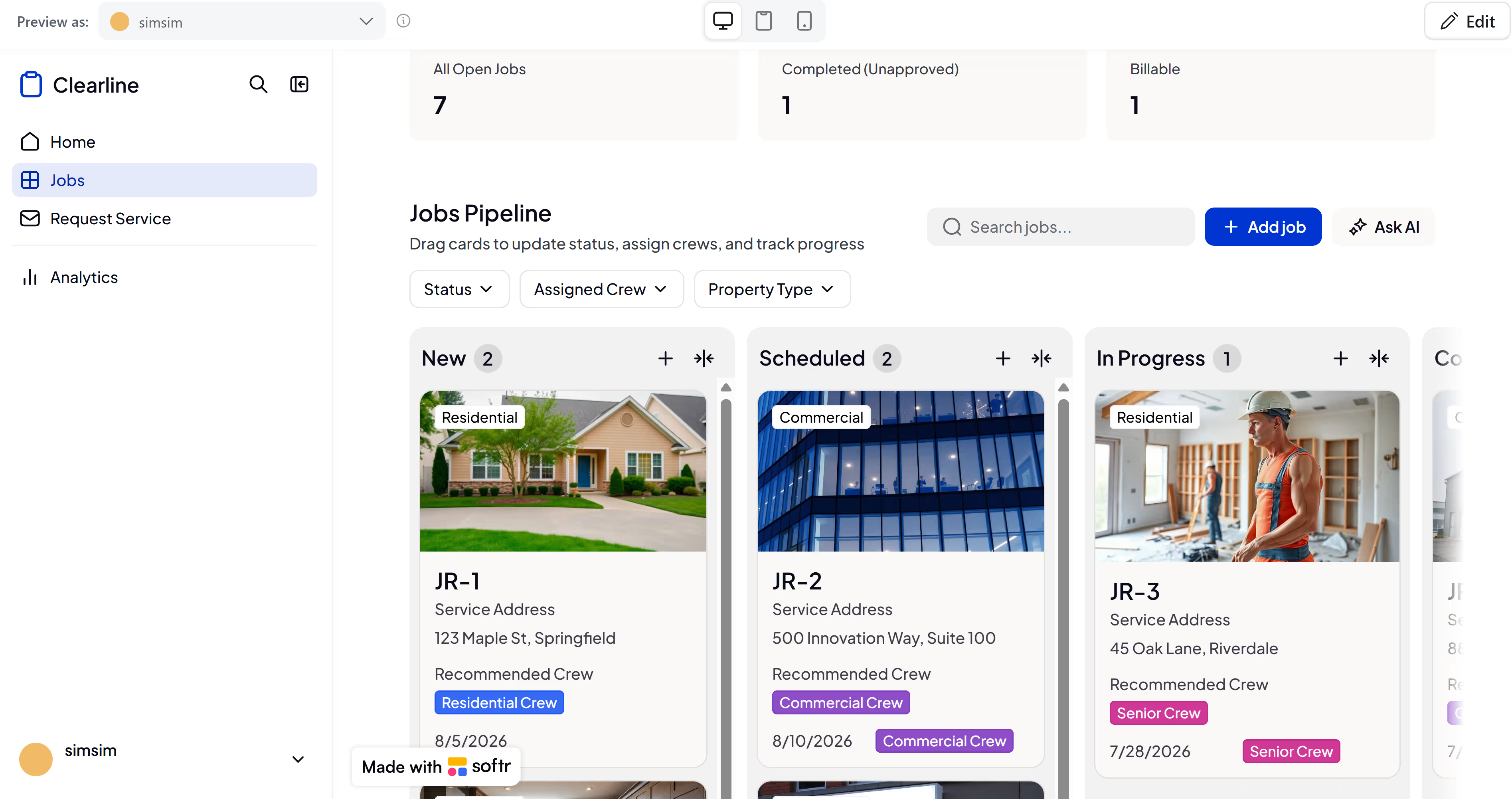
Softr gave me two very different first impressions. Before building the app, its Co-Builder asked how customers should submit requests, who should approve completed jobs, how staff should sign in, and how the app should look. Seven minutes later, I had enough sample jobs to start testing the workflow.
The staff side was the clear success. I dragged jobs between the status columns and watched the dashboard totals change accordingly. Filters removed every job that didn't match the selected status, crew, or property type. Search found records using address words and job numbers.
Opening a job gave me control over its details and crew assignment. Softr also followed the approval rule correctly. A completed job couldn't move to Billable until I approved it. The same workflow remained usable in the mobile preview.
The customer side failed at the first required choice. The property type had no dropdown options, and typing an answer didn't save. Since the field was required, customers couldn't submit a job request. One residential sample job also recommended Senior Crew instead of Residential Crew.
I left both problems untouched. The Free plan has a limited monthly AI credit allowance, so spending more prompts on repairs wouldn't reflect the experience of someone who runs out of credits after the initial build.
Key Features
- AI-assisted setup: AI Co-Builder turns your written description into a first draft with pages, forms, and a database.
- Built-in data storage: Softr Database provides a place to store customer, project, or job information within Softr.
- Connections to existing tools: Data sources let you pull information from Airtable, Google Sheets, Notion, SmartSuite, Xano, and Coda.
- Different access for each user: User groups let you show clients, staff, and managers only the pages and records they need.
- Automatic follow-up tasks: Workflows can send an email, update information, or start another task after someone submits a form or changes a record.
Pros
- The Free plan lets you publish a web app and connect one custom domain.
- Public visitors don’t count as app users when the page doesn’t require login.
- Softr lets you edit the app visually after the AI build, so each change doesn't require another prompt.
- The Kanban board and dashboard stayed in sync during my test.
- The approval rule worked on the first build.
- The mobile preview was easy to use.
Cons
- The required property type field stopped customers from submitting the form.
- One residential job received the wrong crew recommendation.
- The Free plan is limited to 10 app users.
- The installable mobile PWA requires the Professional plan or higher.
- Full source-code export and GitHub sync aren't available.
- Softr can't publish directly to the Apple App Store or Google Play.
Best For
- Managing field-service jobs through set stages while requiring staff approval before billing.
- Replacing a spreadsheet with an internal board that staff can search, filter, and edit from a browser.
- Publishing an internal web app without managing hosting, provided every customer-facing form is tested before use.
Pricing
Softr’s Free plan supports 10 app users. It includes five AI credits each month, 5,000 stored records, and 500 automated actions.
The Basic plan costs $59 per month, or $49 per month with annual billing. It supports 20 app users and raises the limits for stored records and automated actions.
The Professional plan costs $167 per month, or $139 per month with annual billing. It supports 100 app users and lets you create three custom user groups.
The Business plan costs $323 per month, or $269 per month with annual billing. It supports 500 app users and unlimited user groups.
Also read our Softr alternatives guide for a closer look at where portal builders stop and custom app builders start.
4. AppSheet: Best for Internal Apps Tied to Google Workspace Data
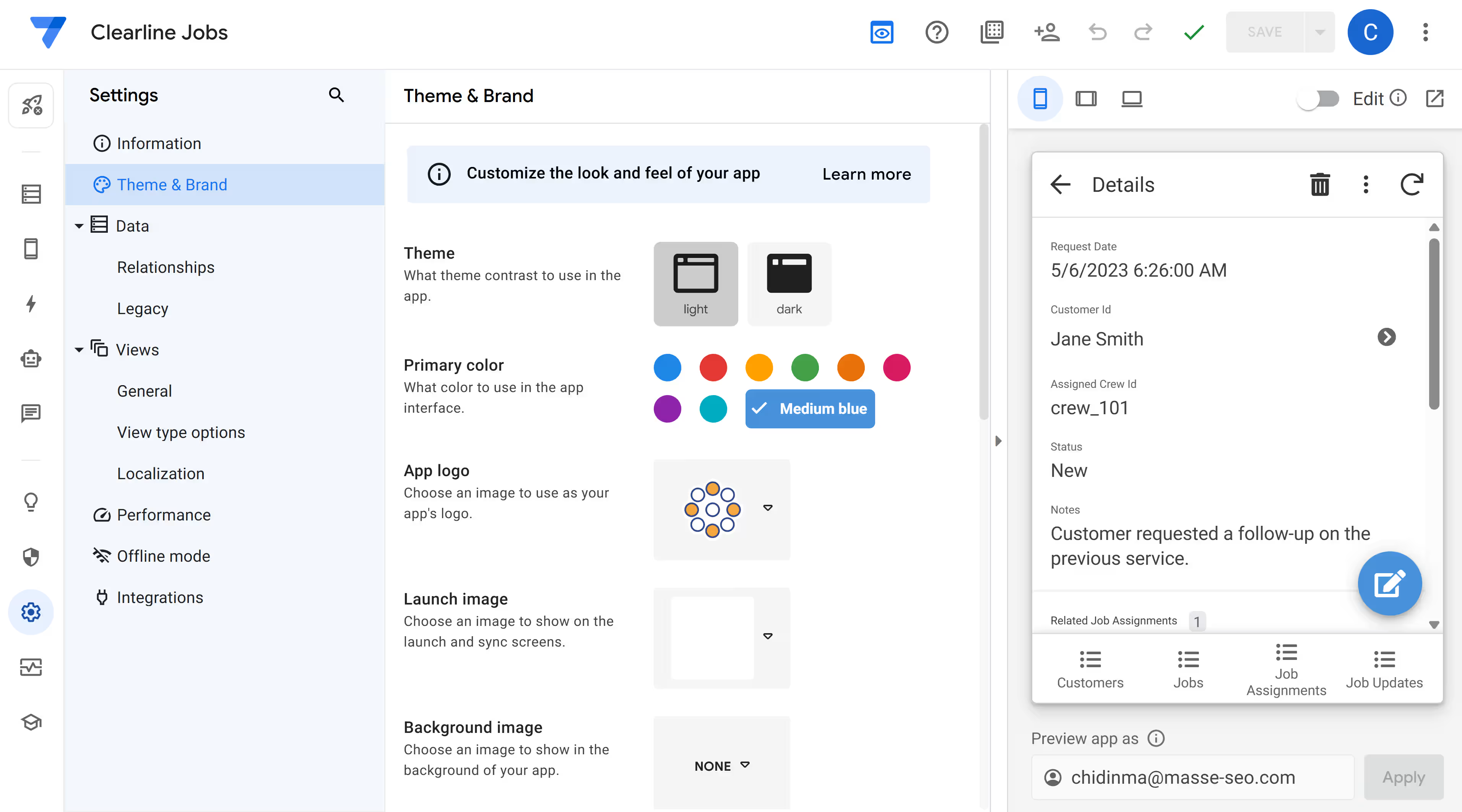
AppSheet worked differently depending on the account I used. Neither personal Gmail account showed Gemini, including the one with Google AI Pro. The prompt builder appeared only in my Google Workspace work account.
Gemini took three minutes to create tables for customers, jobs, crews, assignments, and updates. It also added sample records and several fields from my prompt.
The result felt more like a database starting point than a finished job-management app. Jobs used dates and raw crew IDs as labels; some assignment records contained unrelated priority values, and I couldn’t find a customer form to share.
The crew recommendation and approval rules were missing, too. Statuses appeared as separate update records rather than one clear workflow.
AppSheet’s manual editor gave me more control after the build. I could edit records and change how each field worked without sending another prompt. Still, finding those settings and understanding how the tables connected was confusing.
Key Features
- AI-assisted setup: Gemini suggests the tables, screens, and actions your app may need.
- Data connections: Data sources include Google Sheets, Excel, Airtable, Dropbox, and AppSheet databases.
- Mobile forms: Forms can collect photos, signatures, locations, checklists, and written answers.
- Offline use: Offline mode lets staff use the app without an internet connection.
- Automatic tasks: Automations can send emails, update records, and create files.
- User access: Security controls decide who can sign in and what information they can see.
Pros
- The app created its main tables and sample records in three minutes.
- Records and field types can be changed without using more AI prompts.
- AppSheet lets you test prototypes with up to 10 users before paying.
- Some Google Workspace plans include AppSheet Core.
- The mobile preview worked without extra setup.
Cons
- Gemini didn’t appear on either personal Gmail account I tested.
- The first build didn’t create a customer request form.
- The crew recommendation and approval rules were missing.
- Raw IDs and mismatched sample values made the records confusing.
- Public apps that don’t require sign-in need an eligible paid plan.
- Per-user pricing can become expensive when more staff or customers need access.
Best For
- Google Workspace teams turning existing business data into an internal app.
- Operations teams that are comfortable editing tables, fields, and references manually.
- Companies with someone who already understands AppSheet and can finish the workflow after Gemini creates the structure.
Pricing
The Starter plan costs $5 per user each month. It includes basic app and automation features, spreadsheet connections, cloud file storage, and AppSheet databases.
The Core plan costs $10 per user each month. It adds advanced automation, user roles, security controls, and email support. Most paid Google Workspace plans include Core.
The Enterprise Plus plan costs $20 per user each month. It adds company database connections, machine learning tools, stronger admin controls, and priority support.
Publisher Pro costs $50 per app each month. It is for public apps with unlimited users that don't require sign-in.
If AppSheet is not the right fit, our AppSheet alternatives guide compares 12 options, each built out with the same app and seed data.
5. Bubble: Best for Complex Web Apps With Detailed Visual Control
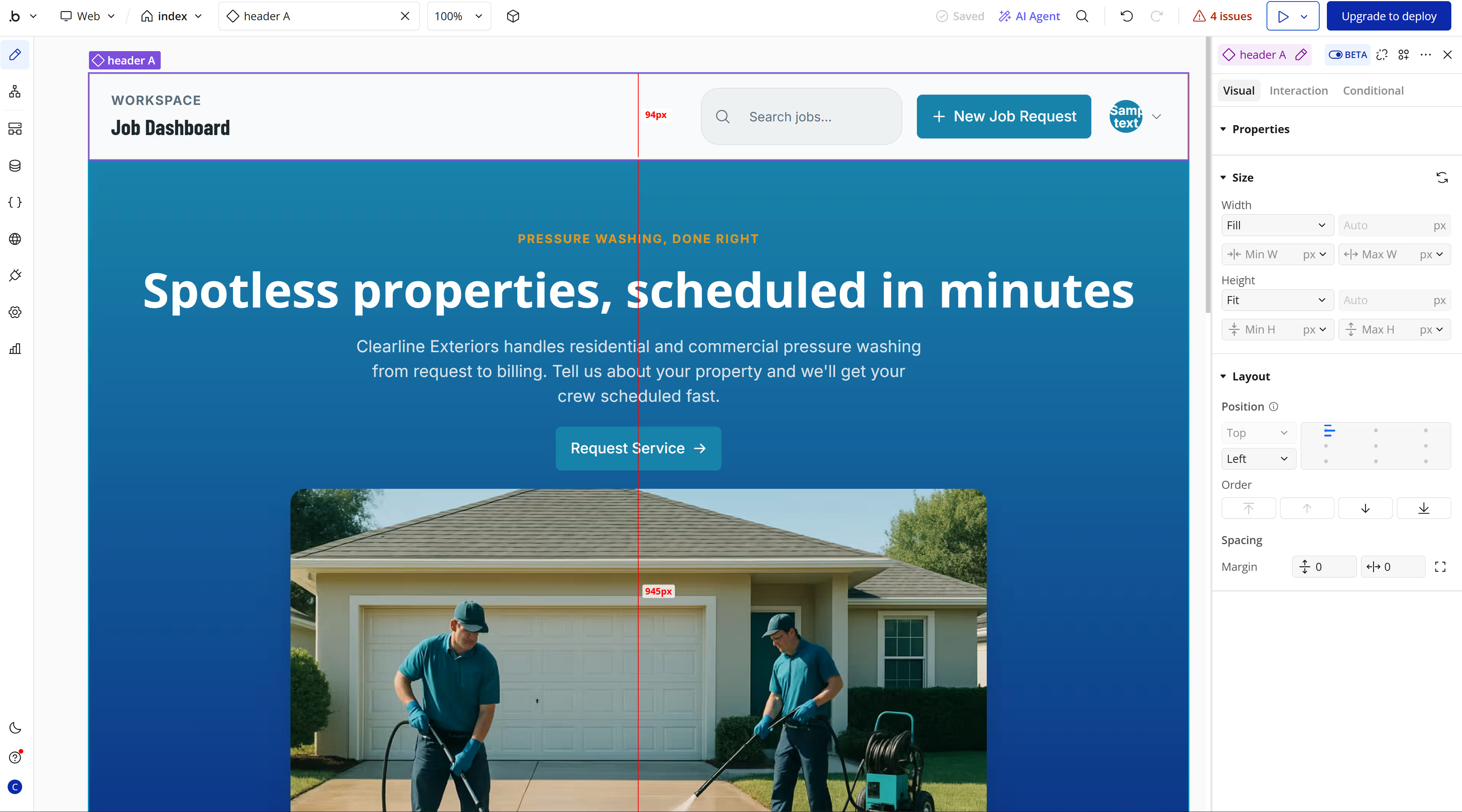
Bubble understood the prompt before it started building. Its blueprint covered the customer form, dashboard, crew rules, approval flow, and sample jobs.
Six minutes later, the app looked promising. The landing page felt polished, although the AI-generated people in the main image had distorted faces.
But when I tried to use the app, everything failed. The Property Type dropdown was empty, the form wouldn’t submit, and private job records appeared on the public homepage.
Bubble had created dashboard and crew pages, but neither page had login protection. I also couldn’t use the internal workflow in preview or the editor, which showed four issues.
Bubble works better when you’re prepared to take over after the AI draft. You get much more control over the app, but you’ll need to configure its workflows, data rules, and access settings yourself.
Bubble makes the most sense when you want to shape every detail and have time to learn the editor. For a fast prompt-to-app build, the earlier picks get you there quicker.
Key Features
- AI app generation: Bubble AI creates a first web app with pages, stored data, app rules, and sample information from your prompt.
- Visual editing: Bubble’s editor lets you change the screens and decide what happens when someone clicks a button or submits a form.
- Shared web and mobile data: Web and mobile apps can use the same stored information and app rules inside one Bubble project.
- Web and app-store publishing: Bubble publishing lets you launch a web app and prepare native iOS and Android apps for Apple and Google review.
Pros
- Bubble’s workflow editor supports multi-step actions and conditions, so you can build detailed processes that go beyond a basic form and database.
- Separate development and live databases let you test changes before they affect customer records.
- Privacy rules control who can view or change data, which helps when customers and staff need different access.
- Web and mobile apps can share the same database and backend workflows, so you don’t have to recreate the business logic twice.
- Paid plans include a live website, a custom domain, and version control tools.
Cons
- A polished AI draft may still leave you with broken inputs, unfinished workflows, and privacy settings to configure.
- Bubble doesn’t export the app as source code, so moving to another platform means rebuilding the application logic.
- A native mobile version can reuse the backend, but its interface must be rebuilt with mobile components.
- The Free plan is limited to development, so launching a live app requires a paid plan.
Best For
- You want detailed control over how the app looks and behaves.
- You’re willing to learn the editor and finish the workflows the AI leaves incomplete.
- Your app needs custom conditions, permissions, or database rules.
- You plan to keep developing inside Bubble rather than export the code later.
Pricing
Bubble prices each plan three separate ways, depending on whether you build for web only, mobile only, or both. Pick one track before comparing tiers, since the same plan name costs a different amount on each.
The Free plan costs $0 and is for building and testing an app before launch.
Starter plan:
- Web: $32 monthly ($29/month billed annually)
- Mobile: $49 monthly ($42/month billed annually)
- Web & Mobile: $69 monthly ($59/month billed annually)
Growth plan:
- Web: $134 monthly ($119/month billed annually)
- Mobile: $199 monthly ($169/month billed annually)
- Web & Mobile: $249 monthly ($209/month billed annually)
Team plan:
- Web: $399 monthly ($349/month billed annually)
- Mobile: $529 monthly ($449/month billed annually)
- Web & Mobile: $649 monthly ($549/month billed annually)
If Bubble's workload pricing or learning curve is slowing you down, our best Bubble alternatives guide compares 10 tools by the kind of app you are building.
6. FlutterFlow: Best for Mobile Apps That Need Exportable Flutter Code
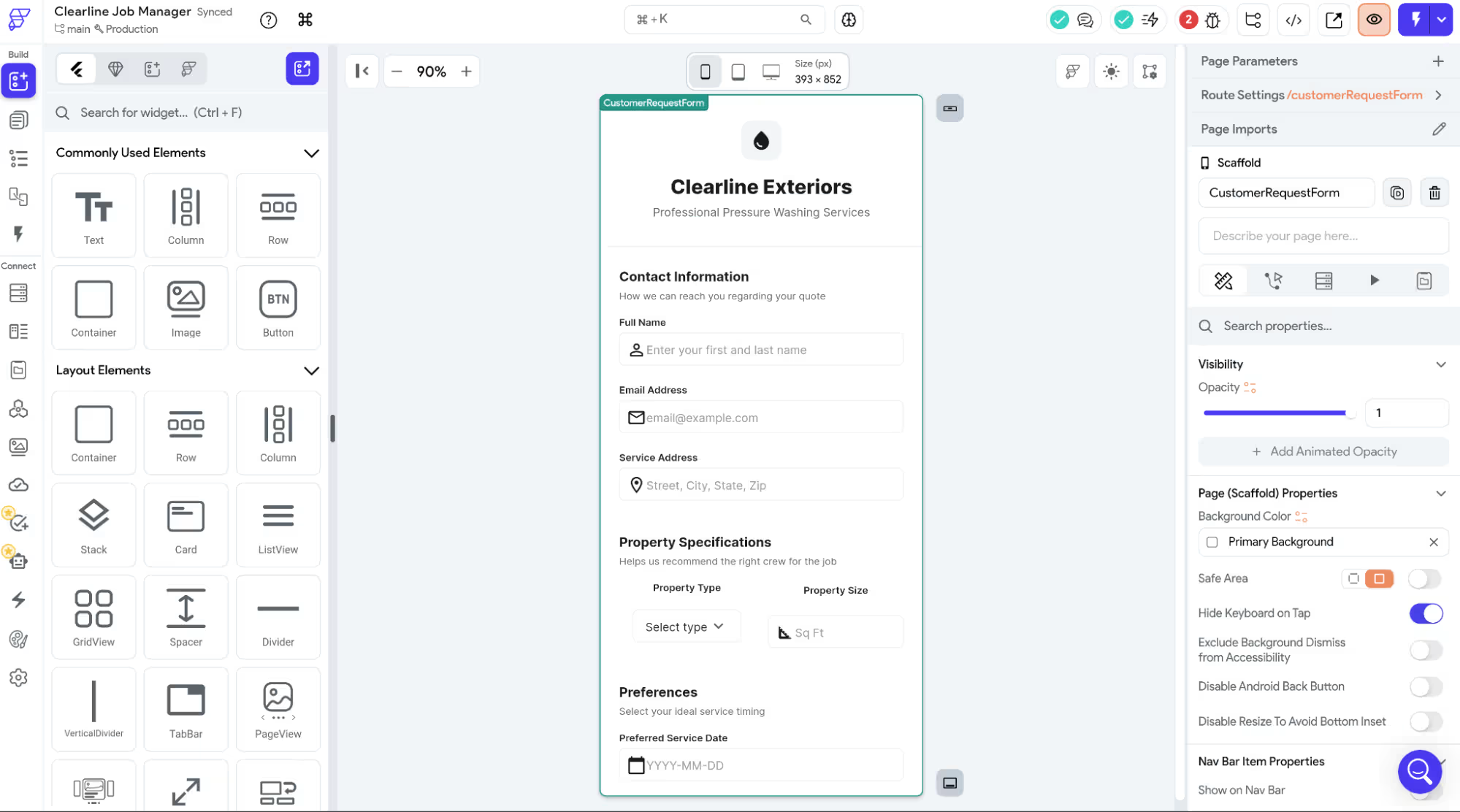
FlutterFlow made a strong visual first impression. After about three minutes and two manual error fixes, I had a customer form and staff dashboard that looked close to the brief.
The problem was underneath the design. The form wouldn’t submit, and the dashboard controls didn’t respond, so I couldn’t move a job through its stages, assign a crew, or test the approval rule.
For someone expecting the prompt to deliver a finished workflow, this was confusing. FlutterFlow makes more sense when the generated interface is the beginning of the build, and there’s someone technical to complete the logic.
FlutterFlow’s much better with code access. The Basic plan includes source-code download, while Growth adds GitHub integration.
Exported mobile apps can run independently of FlutterFlow, and you retain ownership of the output. This means a Flutter developer can continue working on the screens you already built instead of recreating the project elsewhere.
Key Features
- AI app generation: FlutterFlow AI helps create app pages and code from written instructions.
- Visual building: The visual builder lets you arrange screens and control how users move through the app.
- Database connections: Firebase and Supabase connections let the app save user accounts and other information.
- Code access: Code and GitHub options let you download the app’s code or continue working on it outside FlutterFlow.
- App store publishing: Store deployment helps you send mobile apps to the Apple App Store and Google Play.
Pros
- The generated customer and staff screens shared the same design and felt like parts of a single app.
- Free web publishing lets you share an early version before paying.
- Automated snapshots provide a recovery point when changes break the project.
Cons
- The customer form and staff dashboard looked complete but didn’t perform their main tasks.
- Two builder errors needed manual fixes before the preview would run.
- The Free plan works for early testing and web publishing, but it limits you to two projects.
- Code download requires the Basic plan, and GitHub integration requires Growth. The Free plan includes neither.
Best For
- Mobile apps that need editable Flutter code.
- Projects that will move from a visual builder to a Flutter developer.
- App-store releases where someone technical can finish and debug the workflow.
- Teams that want the option to continue building outside the original platform.
Pricing
FlutterFlow pricing starts with a Free plan that includes two projects, web publishing, and limited AI use.
The Basic plan costs $39 per month or $29.25 per month with annual billing. It adds unlimited projects, code downloads, and app-store publishing.
The Growth plan costs $80 per month for the first seat and $55 for the second seat. Annual billing gives a discount of about 25%.
The Business plan costs $150 per month for the first seat and $85 per month for each additional seat, up to five people. Annual billing gives a discount of about 25%.
The Enterprise plan has custom pricing.
If FlutterFlow is not the right long-term fit, our best FlutterFlow alternatives guide compares five platforms by how each one scales.
7. Adalo: Best for Straightforward Apps Across Web and Mobile
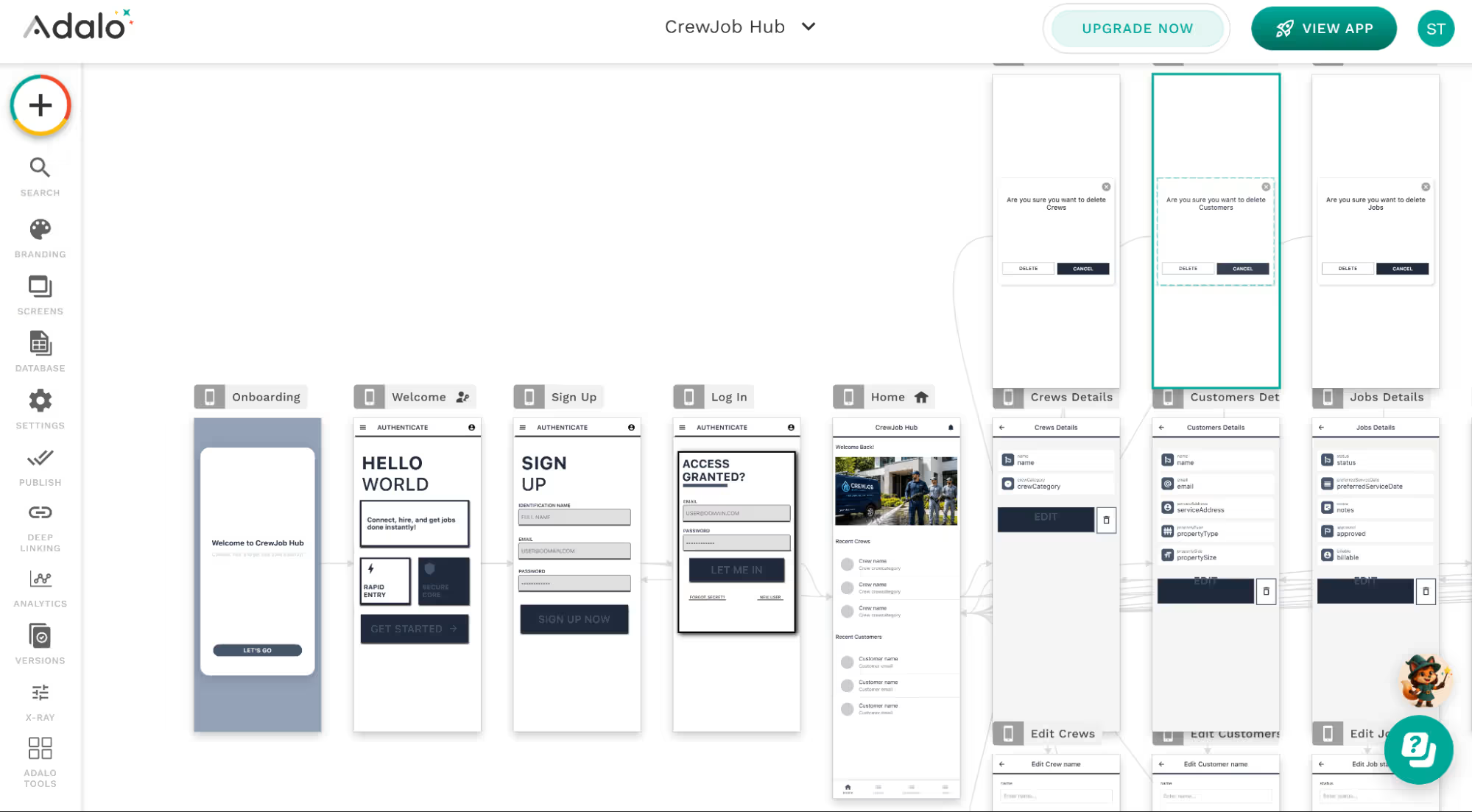
Adalo is a better fit for straightforward record-based apps than workflows with several connected rules. My job-management build certainly tested this.
The app took 10 minutes to generate, and the preview looked usable enough at first. I could log in, move between Home, Crews, Customers, and Jobs, and search the sample records.
A closer look exposed problems with the data. Adalo created plumbing, electrical, HVAC, carpentry, and landscaping crews instead of the requested Residential, Commercial, and Senior crews. The jobs weren’t connected to crew recommendations or assignments.
Adalo also included unsolicited stages such as Cancelled and Pending, while some of the requested stages were missing or incorrectly formatted.
The public request form was in the editor, but customers had no way to access it from the preview. I also couldn’t sign out after entering the admin area because the app became stuck.
Adalo makes more sense for a booking, directory, membership, or basic operations app where people mainly submit, find, and update records.
Key Features
- AI app building: Ada builds and edits app screens from written instructions.
- Visual canvas: Adalo’s canvas lets you arrange screens and buttons by dragging them into place.
- Built-in database: The hosted database stores users, jobs, messages, and other app information.
- Web and mobile publishing: One Adalo app can be published to the web, Apple App Store, and Google Play.
Pros
- Subscription costs are easier to forecast because Adalo doesn’t charge per app action or AI token.
- The Free plan gives you unlimited test apps and up to 500 records per app, so you can test an idea before paying.
- You can download each database collection as a CSV file without upgrading to a paid plan.
Cons
- The generated app needed manual work before customers or staff could rely on it.
- The customer form was unreachable, and the admin sign-out flow became stuck.
- Crew assignments, recommendations, and the requested job stages were missing.
- Standard Adalo apps can’t be exported as editable source code, so switching platforms may require a rebuild.
Best For
- Straightforward operations apps built around forms, lists, search, and record updates.
- One app that needs to reach web, iOS, and Android users.
- Teams that value predictable monthly costs more than editable source-code access.
- Projects where someone can review navigation, relationships, and workflow rules before launch.
Pricing
The Free plan costs $0 and includes unlimited test apps, each with up to 500 stored records.
The Starter plan costs $45 per month or $36 per month with annual billing and lets you publish one app.
The Professional plan costs $65 per month or $52 per month with annual billing and lets you publish two apps with five editors.
The Team plan costs $200 per month or $160 per month with annual billing and lets you publish five apps with 10 editors.
Adalo Blue has custom pricing for larger companies.
Also read our Adalo review for how long the build stayed easy, and what broke first.
How to Evaluate Glide Alternatives
Start with the problem that made you look beyond Glide. The right alternative should remove that problem without creating a new one.
It also helps to decide whether you need a no-code or low-code platform before comparing individual tools.
Ask yourself these questions:
- Do you need mobile publishing? Remove browser-only options when you need an app-store release. Emergent, Bubble, and FlutterFlow can each build a native app for iOS and Android as a separate project from the web version, while Adalo offers a simpler combined web-and-mobile route.
- Does your app depend on existing business data? Check how the platform connects to your current tools. AppSheet fits Google Workspace data, while Softr works well for portals and internal dashboards.
- Do you need control over the code? Check whether you can download the source or connect the project to GitHub. FlutterFlow offers code export, while Emergent supports a developer handoff through GitHub.
- What will it cost at your expected usage? Compare the price for your users, records, automations, credits, and publishing needs. Start with AppSheet or Zite when entry cost is a priority, but calculate the price as your team grows.
- How easy is it to make changes after launch? Add a field or change a rule during the trial. Softr and AppSheet offer visual editing, Zite lets you select an element and describe a change directly, and Emergent is worth testing when a single change affects multiple connected parts of the app.
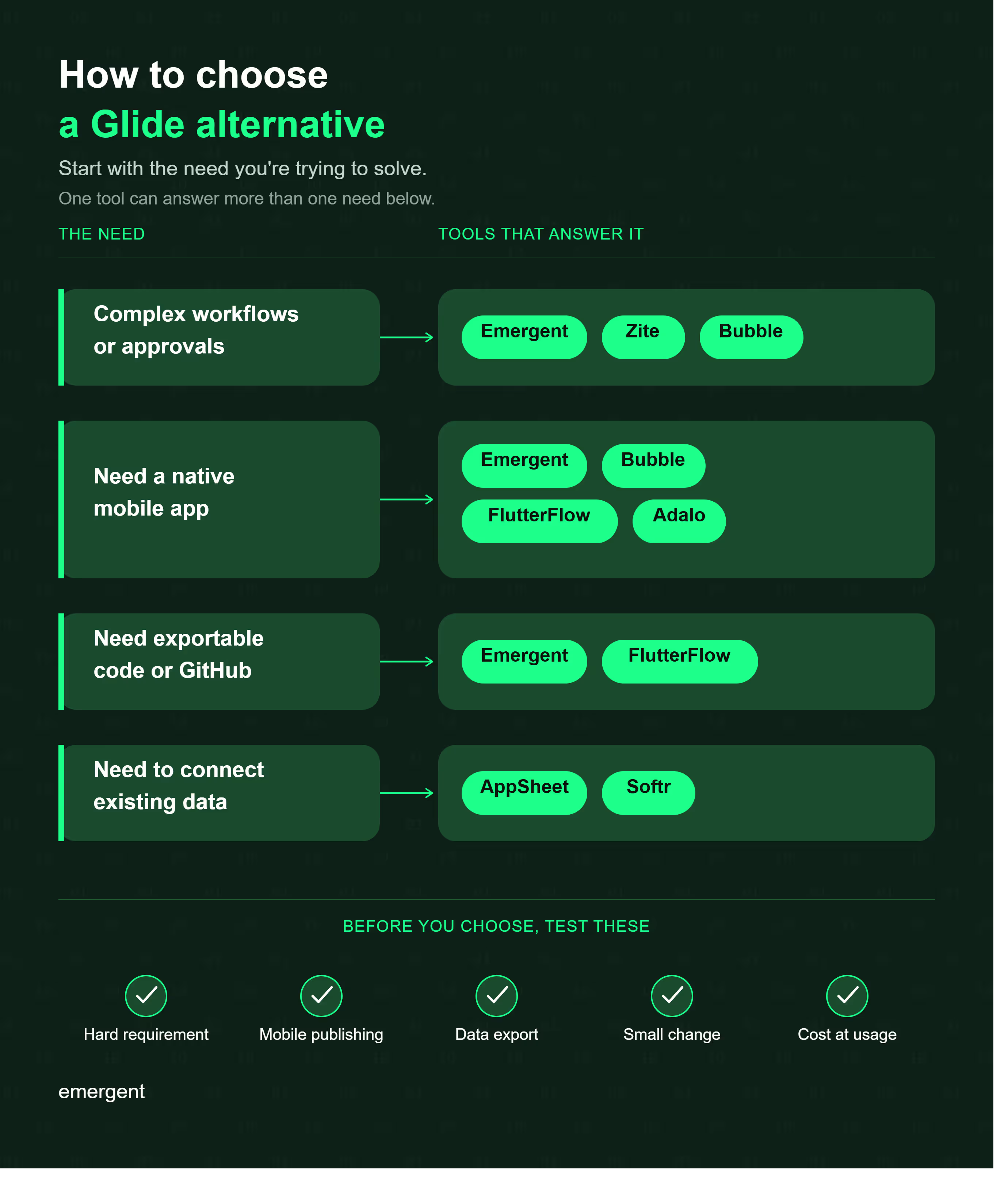
Choose three requirements you won’t compromise on. Remove every tool that misses one, then compare the remaining options on cost and ease of use.
Your Glide Alternative Depends on What You’ve Outgrown
The best Glide alternative depends on what no longer works for you. Softr is a strong option for portals and internal tools, AppSheet fits teams already working in Google Workspace, and FlutterFlow gives you more control over mobile apps and exported code.
Bubble and Adalo work better for narrower use cases.
In my test, Emergent was the strongest fit for building a complete custom workflow without much manual setup. It handled both the customer and team sides of the app, added the core workflow rules, and produced a working result without a correction prompt.
Zite came close behind. It passed the same crew logic and approval rule and ran a genuinely working customer form, though it needed one self-diagnosed fix along the way.
Glide may still be enough if your app is simple and mostly database-driven. But if your workflows, user roles, or app structure have become harder to manage, it may be time to move to Emergent for more customization.
Build your app with Emergent.

Every alternative has trade-offs. Emergent just builds production-ready apps from one prompt.
- Production-ready apps
- Web & mobile apps
- Deploy in minutes







