



TL;DR
- ChatGPT: Best for general versatility and everyday assistant work, with the widest spread of tasks in one window.
- Perplexity AI: Best for real-time web research with citations you can check.
- Claude: Best for long-document analysis and careful, controlled writing.
- Pi AI: Best for casual, supportive conversation with no structure attached.
- Google Gemini: Best for multimodal work and Google-ecosystem reach.
- Meta AI: Best for free image and short video generation inside apps you already have open.
- Qwen AI: Best for media you can direct, down to clip length, resolution, and repeat characters.
- DeepSeek: Best for free, transparent reasoning.
Ask Grok about a story still breaking on X, and it answers before most news sites catch up, wired into the platform in a way no other assistant is. Ask it to hold a careful, controlled tone across a long piece of work, and you notice fast that this isn't the job it was built around.
I spent 11 days testing Grok alternatives, through seven chat assistants and a matching creative brief through two media generators. Six of the seven chat assistants and both media generators earned a place among the eight tools ranked below.
That ranged from the broadly capable ChatGPT to Pi, a conversational tool with none of the structure the others lean on.
I cared less about what each one said and more about what it did. Did it follow the constraints I set? Did it cite what it claimed, or hand me a confident guess?
Two more entries, Meta AI and Qwen AI, answer the media-generation half of Grok. They ran their own dedicated brief built for that job, since a written prompt is the wrong instrument for measuring an image or a clip.
All eight Grok alternatives below get the same treatment. You'll see what each one does better than Grok, where it gives out, and who it suits, so you can decide, for each job you currently use Grok for, whether it has a better home somewhere else.
What Is Grok, and What Is Grok Imagine?
One account, one interface, two different jobs. Mixing them up is the fastest way to pick a replacement that solves the wrong half of your problem.
Grok is the chat assistant. You ask it something, and it answers, backed by live web and X search, voice conversation, file and PDF analysis, and step-by-step reasoning.
For a model-level view of that chat side, the Grok 4.6 benchmarks show where it leads in knowledge work and where its coding scores trail.
Sign in and that same account gives you a second surface: Imagine, which turns a text prompt or a reference photo into a picture or a short clip.
It shares Grok's account entirely, with nothing extra to sign up for or pay separately, and the free tier lets you sample it before a paid SuperGrok tier opens it up fully. That's what decides which replacement you need. The chat's replacement looks nothing like Imagine's.
- If what you'd miss is the answering, the six chat assistants ranked below cover it.
- If what you'd miss is Imagine, two of the tools ranked below, Meta AI and Qwen AI, cover the free end of that job. A short list further down this page names a few more, from camera-directed video to a free, self-hosted model.
Work out which half you'd actually miss before you pick anything below.
Why Look for Grok Alternatives?
Grok's pitch is real-time access to X, formerly Twitter. Ask about something happening right now, and it can pull live posts other assistants can't see. It's also embedded directly inside the X app, alongside Grok's own standalone interface.
That pitch comes with limits worth naming before you switch:
- Live X access: If you don't use X, or the thing you're researching never gets discussed there, there are no live posts to pull from. You're then comparing it to any other assistant on level ground.
- Media ceilings: Grok Imagine caps video at 30 seconds at 720p and image output at 2K resolution on the standard SuperGrok tier, which covers a quick post and runs thin for anything longer.
- Gated capability: The free tier gets you in the door with limited live search and a sample of Imagine. A cheaper SuperGrok Lite tier already lifts those limits and opens up image and video creation, while multi-agent reasoning sits behind SuperGrok at $30/month. You'll need SuperGrok Plus at $100/month to push video to 1080p, and while Grok does offer yearly billing, it doesn't publish the discounted rate up front.
- Content refusals: Grok markets a looser tone than most assistants, and that sets an expectation its safety filters don't always meet. A prompt you assumed would sail through comes back declined, and the sting is finding that out mid-task.
- Ecosystem tie-ins: There's no deep line into your documents, your email, or your search history, the way an assistant built by Google can offer.
- Tone fit: Grok leans harder into personality than a measured, predictable default does, which reads as the whole point to some people and as a liability to others.
Which of those six gaps bothers you decides which tool below is your replacement, because not one of the eight closes all six. Stick with Grok if real-time, X-integrated information is the thing you open it for. None of the eight alternatives here replicate that.
How I Tested These Grok Alternatives
Eleven days, two briefs, and a rule I set before I started: judge what each tool did with the instructions, not how good the prose sounded. Every chat assistant got the identical brief on the same day, on the free tier, with no system prompt and no follow-up until the first reply had landed.
Twelve tools went into this in total: seven chat assistants that each got the written brief, two media generators that got a hands-on creative brief, and three more I ruled out before generating anything.
Four of the 12 didn't make the final eight, each for a specific, nameable reason:
- Shiori AI routes a request through several models behind a single interface. A brief it produced couldn't be traced back to one assistant, which defeats the point of running everyone on identical input.
- FLUX has no chat window and no consumer plan, so reaching it requires a developer key or a third-party host.
- Media.io builds generation into a broader editing and export toolkit, which answers a different question than this one.
- Perchance AI does images and no video, so it covers half of what Grok Imagine does.
Meta AI and Qwen AI fill out the eight. Both ran their own brief, built for images and video, because a written brief tells you nothing about how a tool draws or how long it can hold a clip together.
Here's the prompt, word for word, that all seven chat assistants received:
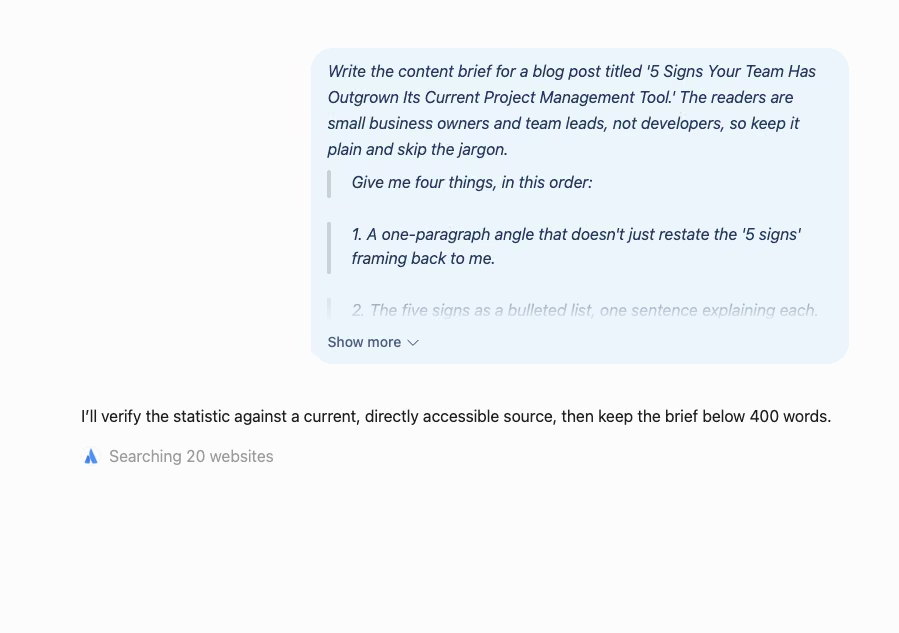
"Write the content brief for a blog post titled '5 Signs Your Team Has Outgrown Its Current Project Management Tool.' The readers are small business owners and team leads, not developers, so keep it plain and skip the jargon.
Give me four things, in this order:
1. A one-paragraph angle that doesn't just restate the '5 signs' framing back to me.
2. The five signs as a bulleted list, one sentence explaining each.
3. One current statistic about remote or hybrid team communication, with the source named and a link I can open.
4. Three FAQ subheadings for the end of the post.
Two hard rules. Keep the whole thing under 400 words. And if you can't verify that statistic against a source you can actually point me to, say so and leave it out. A wrong number is worse than no number."
Shiori came out before scoring, for the reason above. I scored the remaining six against three concrete checks, with overall impressions left out of it.
Citation accuracy meant opening every linked source a tool offered and confirming it supported the number attached to it. A citation that exists and a citation that holds up are different things.
Instruction-following meant measuring each brief against the 400-word cap and all four separate asks in one pass. A padded or dropped request is easy to miss if you're skimming.
Honesty under uncertainty meant watching whether a tool flagged what it didn't know or papered over the gap with an invented number. That failure mode is exactly why leaning on any of the best LLMs for anything you plan to publish carries real risk.
Meta AI and Qwen AI ran a second, separate brief built for the other half of Grok: Imagine, the image and video side neither a word cap nor a citation check can measure. Here's that brief, word for word:
"Create a launch announcement for a fictional independent coffee roaster called Ridgeline Coffee, releasing a single-origin Ethiopian bean called Highland Reserve. I need two pieces from the same idea, and they have to look like they came from the same brand.
First, a vertical still. A dark green bag of coffee on a pale wooden counter, morning light from the left, with the words "Highland Reserve" and "Single Origin Ethiopia" printed legibly on the bag itself. The type has to sit on the surface of the bag and follow its curve, not float on top of the picture.
Second, a 15-second vertical clip that opens on that same bag, pulls back to show a cup being poured beside it, and ends on a held shot of the bag alone with room for a caption. The bag must look like the same bag in both pieces. Give me the clip at 1080p, and tell me where the finished files end up so I can hand them to someone else."
I ran that brief through both tools, the still first and the matching clip second, and judged each against the brief's own requirements. That meant legible text printed onto the surface of the bag itself, the bag reading as the same bag across both pieces, and whatever the closing instruction about file handoff turned up.
How the 8 Grok Alternatives Compare
Each price sits beside what the tool is best for:
| Platform | Best For | Price |
|---|---|---|
| ChatGPT | General versatility and everyday assistant work | $8/month, no annual plan |
| Perplexity AI | Real-time web research with citations | $20/month ($17/month, billed annually) |
| Claude | Long-document analysis and writing quality | $20/month ($17/month, billed annually) |
| Pi AI | Casual, supportive conversation | No paid plan available |
| Google Gemini | Multimodal work and Google-ecosystem reach | $4.99/month, no annual plan |
| Meta AI | Image and short video generation in everyday apps | No public price |
| Qwen AI | Directable video and high-resolution image output | No consumer paid plan |
| DeepSeek | Free, transparent reasoning | No paid consumer plan |
Every price above is that tool's cheapest paid plan. Pi AI, Qwen AI, and DeepSeek don't sell one to consumers, and Meta publishes no figure for its own paid tier.
Pricing correct as of August 2026.
What Each Free Tier Covers
Every tool here has a free tier, and most of them give out somewhere different, which is the part a price column can't show you. Pi AI and DeepSeek are the exceptions, with nothing gated because nothing is sold to individuals. Here's where each free tier stops:
| Tool | Free tier covers | Where it gives out |
|---|---|---|
| ChatGPT | Unlimited text chats, subject to abuse guardrails | Image generation, file uploads, and voice mode stay capped |
| Perplexity AI | Basic search plus a limited number of Pro-level queries | Deeper search and research modes, the reason to be here |
| Claude | Light use across web, iOS, Android, and desktop | Message limits inside a single long session |
| Pi AI | The entire product, with no paid tier above it | Nothing is gated, because nothing is sold |
| Google Gemini | Basic access through the Google AI app | Gemini 3.1 Pro and Deep Research, both on a tight free-tier allowance |
| Meta AI | Everyday image and short video generation | Heavier creation sits in an unpriced subscription tier |
| Qwen AI | Qwen Studio, generation included | Specification-level control lives in the developer console |
| DeepSeek | Full chat access, file uploads, and the DeepThink reasoning mode | Nothing is gated for individual use; heavy sessions can hit peak-hour throttling |
Read the right-hand column before you read the price column above it. Claude's free tier runs out mid-session, which is the opposite of where most people expect the ceiling to be. It's also why a quick trial tells you almost nothing about whether the free plan covers you.
The 8 Best Grok Alternatives
These are ordered by how much of Grok's job each one replaces, not by test score. ChatGPT leads because it covers the widest slice of it; the specialists that beat it on a single check sit below it because they cover less.
1. ChatGPT: Best for General Versatility
ChatGPT wins on width, not on any single category. It moved between writing, research, and light coding in the same thread without asking me to open a second product. That's what makes it the default pick among the six chat assistants I ran the brief through.
The Grok behavior it replaces is the width. Grok answers, searches, reasons, and writes code in a single thread, and ChatGPT is the one tool on this list that covers the same ground without asking you to open a second product for half of it. What that width looks like day to day:
- Writing, research, and light coding, inside one conversation with no specialized mode to switch into.
- The interface itself is the one you've most likely opened before, which counts for more than it sounds like it should when you're leaving a tool you already know.
On the free tier, ChatGPT's draft landed in well under a minute at 380 words, comfortably inside the cap. The angle line reframed the piece around the cost of staying in an outgrown tool, which is a sharper hook than a symptom list. All five signs carried clear one-line explanations, and the three FAQ subheadings tracked that same angle.
On the statistic, ChatGPT hedged the number, said plainly that it had no verified current source for it, and told me to treat the figure as directional. That's a partial pass: the rule was to say so and leave it out, and ChatGPT did the first half only. Two of the six got even that far.
The free tier let me finish two follow-up questions, one to tighten the angle line and one to swap an FAQ subheading, both handled without hitting a cap.
The copy itself leaned competent without leaning distinctive, at least until I gave it more direction, which is the standing cost of ChatGPT's default voice. The free tier carries a first draft and the revision back-and-forth both, with no text-chat limit standing in the way. For anyone who'd rather manage one assistant than six, this is still the starting point.
Also read our best ChatGPT alternatives guide for what else is worth trying when width across tasks isn't enough and you need something more specialized.
Key Features
- Broad task coverage: Moves between writing, research, and coding in one conversation, on OpenAI's current GPT-5.6 model family.
- Custom GPTs: Build or use a community GPT tuned to a workflow, so you're not rebuilding context every session.
- Cross-platform history: The same conversation follows you across web, iOS, and Android.
- Native image generation: Built-in image creation, capped on the free tier and fuller on paid plans, the same job Grok Imagine covers in one thread.
Pros
- The broadest everyday capability of any assistant tested here.
- A large library of custom GPTs and integrations to draw on.
- A familiar interface most people already know how to use.
Cons
- Image generation, file uploads, and voice mode stay capped on the free tier.
- Citations only appear when it searches the web, so a straight answer from the model itself arrives with nothing to open.
Best For
- Solo operators who want one assistant for writing, research, and light coding.
- Teams who'd rather adapt an existing custom GPT than build a process from scratch.
- Non-technical teams who'd rather skip a learning curve than hunt down a specialist tool.
Pricing

Go is the cheapest paid tier, at $8/month, with Plus at $20/month and Pro from $100/month for the heaviest reasoning access.
OpenAI's own plan FAQ lists monthly billing for Go, Plus, and Business, and offers annual billing only on Business and Enterprise. Go carries no annual rate, so there's no discount to factor in across the individual tiers.
Want the full breakdown of what each plan actually covers? Read our ChatGPT pricing guide before you commit.
The ChatGPT Plus vs. Pro comparison becomes relevant if image generation, file uploads, or heavier reasoning access are what push you toward an upgrade.
2. Perplexity AI: Best for Real-Time Research With Citations
Citations are the whole reason Perplexity AI earns a place here, because it treats them as the product itself. Where Grok pulls live posts from X, Perplexity pulls from the open web and attaches openable source links throughout its answers.
That makes it the closest direct swap for Grok's live-research habit among the five assistants I tested. It's also the one I most wanted to catch out.
At 340 words, Perplexity's draft came in tighter than the cap I set, and it was the only one of the six to back its statistic with a citation that held up. The statistic arrived with three inline citations, and I opened all three.
On the third check, it was quieter. Perplexity never flagged anything as uncertain, but it also never needed to; the number it gave came with sources that held.
What that citation check turned up:
- Every one supported the number in the brief.
- None was a dead link, a mismatched claim, or a citation that technically existed without backing what the sentence said.
That sounds like a low bar until you check the alternatives against it. The prompt asked for a statistic "with the source named and a link I can open," and a citation you can click isn't the same as a citation that holds. Perplexity was the one where the claim survived a check.
The writing was the trade. The angle line was solid without being as pointed as ChatGPT's, and the three FAQ subheadings read more like search queries than headers a person would click. That fits a tool built to answer questions all day, with a reader's eye a secondary concern.
That research-versus-writing split is the core of this Perplexity vs. ChatGPT comparison.
The other thing to plan around is the research ceiling. The free tier keeps the deeper search and research modes on a short leash, and those are the modes you came for. If sourcing is the reason you're leaving Grok, budget for a paid plan on day one, because the free tier won't carry the work.
Also read our best Perplexity alternatives guide for what else is worth trying when cited web research is the priority.
Key Features
- Inline citations: Source links appear inside the answer, so you can open and check them.
- Model picker: Switch between the underlying models per task, with no lock-in to one.
- Research modes: Deeper research runs sit alongside plain search, so a quick lookup and a long dig aren't the same request.
- Image generation: Built into Pro and Max plans, routing prompts to models like Nano Banana and GPT Image, though the free tier this test ran on doesn't include it.
Pros
- No tool in this comparison backed its citations as consistently.
- It's consistently fast at surfacing current information.
- It lets you change the underlying model without leaving the app.
Cons
- The free tier limits access to the deeper search and research modes.
- Creative writing reads flatter and more mechanical than a dedicated writing tool.
- Never flagged what it wasn't sure about, the one check it didn't answer.
Best For
- Consultants replacing Grok's live-search habit who need sources a client can open.
- Research-heavy work where an unsourced wrong fact carries a cost.
- Anyone who wants to switch underlying models inside one app.
Pricing
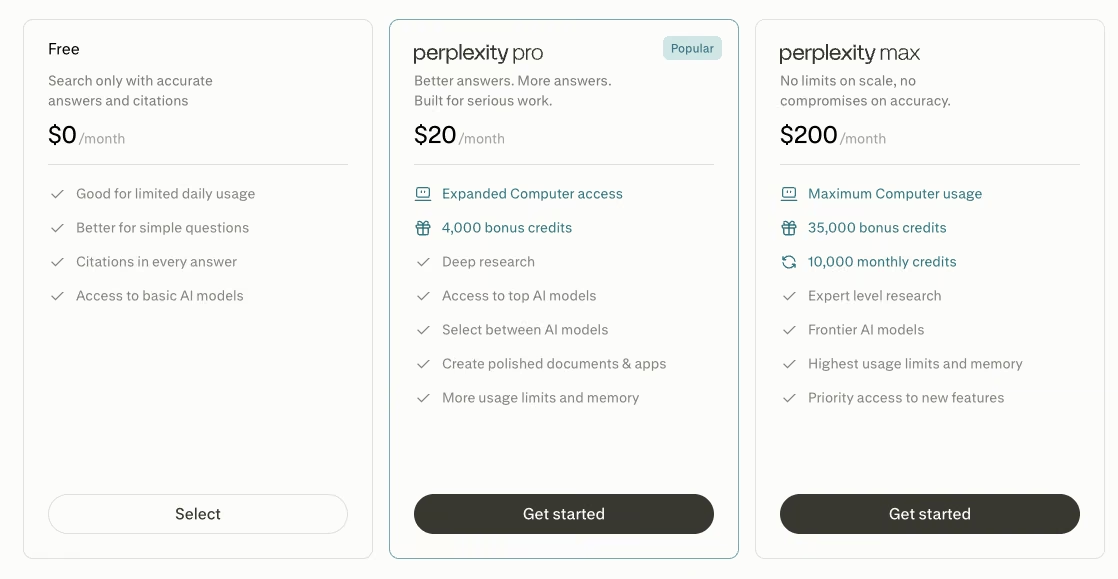
Pro is Perplexity's entry paid tier at $20/month ($17/month, billed annually), with a separate Max tier at $200/month ($167/month, billed annually) for the heaviest research use.
3. Claude: Best for Long-Document Analysis and Writing Quality

Claude was the only assistant of the six that wouldn't put an unverified statistic on the page at all. ChatGPT flagged its number and kept it; Claude refused to produce one.
The brief ran 395 words, the most carefully written of the group, with longer sentences and noticeably more control over tone. Then it reached the statistic request and left a placeholder instead of a number, the only one of the six to do it that way.
The wording ran close to a percentage of teams reporting communication friction after a tool switch, close enough to read as a real citation waiting on a source. It told me directly to swap in a sourced figure before the piece went anywhere.
What that response got right:
- It did all of that in one message, with zero follow-ups needed.
- The prompt spelled out the logic that "a wrong number is worse than no number," and Claude was the only tool that acted on it.
An invented figure is worse than a blank, because a blank is visible on the page and a plausible number hides in plain sight. Claude is the only one here that treats the distinction as the default.
The writing carried too. The angle line and the FAQ subheadings were the strongest of the six, and the draft needed the least editing of anything this test produced.
The same depth-versus-range tradeoff defines Claude vs. ChatGPT beyond this one brief.
The cost shows up in the allowance. Run a test like this repeatedly in one sitting, and you'll burn through the free-tier message limit, because the care behind each answer is exactly what eats into it.
A single considered pass fits comfortably inside the free tier, but a longer, accuracy-focused session is what a paid plan is for. That care, more than the allowance around it, is Claude's case for a spot on this list.
Key Features
- Artifacts: A side panel for editing code or a long document without losing the conversation around it.
- Memory across conversations: Carries context between chats, so a long piece of work doesn't restart cold.
- Extra models on paid tiers: More Claude models become available past the free plan, so a heavier reasoning job isn't stuck on the default.
Pros
- The writing needed the least cleanup of anything the six assistants produced.
- It says plainly when it doesn't know something and marks the gap where a figure belongs.
- Projects keep long chats and documents organized around one piece of work.
Cons
- Free-tier message limits run out quickly inside one long session.
- No native image generation, so it's the wrong fit when visuals are part of the job.
Best For
- Long-document review, summarization, or analysis where tone and accuracy carry the weight.
- Anyone who'd rather get a flagged gap than a confident guess.
- Writing-heavy work where the draft needs minimal editing afterward.
Pricing
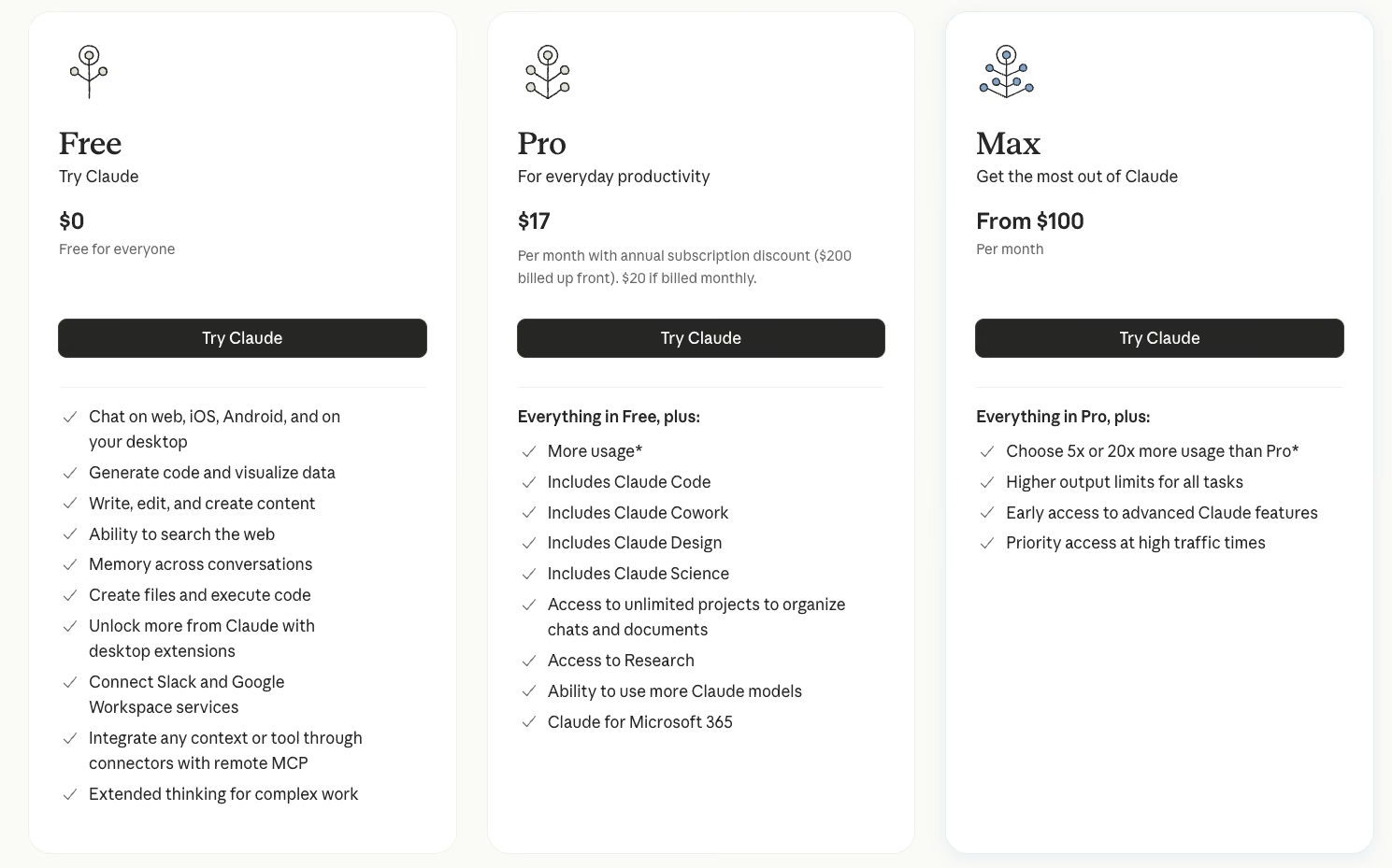
The Pro plan runs $20/month ($17/month, billed annually), and Max starts from $100/month for heavier, longer sessions.
4. Pi AI: Best for Casual, Supportive Conversation

Ask Pi AI for something with a rigid format and the gap shows up inside one message. Pi is built for open-ended conversation, and personality-forward side among the six, it leans hardest into Grok's personality-forward side, minus the edge.
The brief asked for "four things, in this order." Pi's first reply handled two of them cleanly, the angle and a correct decline on the statistic. The five signs and the FAQ subheadings were missing entirely from that first reply.
Two gaps showed up once the brief hit Pi's conversational style:
- The follow-ups: It took two separate follow-up prompts to pull the two missing pieces out of it. I asked directly for the five signs as a bulleted list, then asked again for the FAQ subheadings, and each came back friendly and complete on its own. Pi was the only tool that needed follow-ups just to deliver the four things the first prompt asked for; ChatGPT's two follow-ups were refinements on work it had already handed over.
- The statistic: Pi got this one right immediately. Asked for a figure "with the source named and a link I can open," it said plainly it couldn't verify one and left it out, matching the brief's hardest rule exactly.
Read that as a genuine pass, not a lucky dodge. Pi didn't just avoid inventing a number; it named the exact reason the brief gave for leaving one out.
What Pi does have covers real ground. It handles voice conversation, carries memory between chats, and keeps reminders and a to-do list that tracks the small things you'd otherwise write down somewhere else. I found no way to attach a document or PDF anywhere in the app during testing, so anything living in a file stays outside the conversation.
Skip Pi the second a job calls for structure, a citation, or a file upload. Keep it for thinking out loud, for talking through a decision you're stuck on, or for rehearsing a hard conversation before you have it for real. Those are jobs the other four handle worse, and Pi charges nothing for any of them.
Key Features
- Voice conversation: A natural-sounding spoken mode, so a session doesn't have to be typed.
- Memory between chats: References earlier conversations without you re-explaining context.
- Reminders and to-dos: Keeps track of the small commitments that come up while you're talking.
Pros
- The entire product is free, with no paid tier gating a better version.
- It feels closer to talking to a person than querying a database.
- It's strong for brainstorming aloud or rehearsing a conversation before having it.
Cons
- No document or PDF upload support at all.
- Resists structured, multi-part requests, so a strict format takes several follow-ups.
- Needed a follow-up prompt for three of the four asks the brief made in one message.
Best For
- Casual brainstorming, venting, or thinking out loud with no deliverable at the end.
- Rehearsing a hard call or interview so the real one goes smoother.
- Readers who want a personality-forward tone without the edgier commentary.
Pricing
Pi AI has no paid tier. Every feature is free, so there's no plan to weigh against the paid tiers elsewhere on this list.
5. Google Gemini: Best for Multimodal Tasks and Google-Ecosystem Integration
Gemini's case rests on where it already lives, independent of any single benchmark. Its ties to Docs, Gmail, and Search, plus its range across text and images, give it something Grok cannot match.
I ran the brief on the free tier through the Google AI app, the version most casual users start with, since the paid plan is where Gemini 3.1 Pro and Deep Research come off their free-tier leash. That ceiling is worth remembering before you judge this output against a paid competitor's.
The brief came back at 430 words. The prompt said to "keep the whole thing under 400 words," and Gemini was the only one of the six to blow past it outright. The angle and the five signs were both solid, on par with ChatGPT's.
Gemini also offered a specific-sounding figure about hybrid-team communication with none of the caution ChatGPT and Claude showed. When I went looking for that exact number afterward, I couldn't confirm it anywhere.
The two test results from that run, side by side:
- 430 words, over the cap the prompt set.
- One statistic, unconfirmable after the fact.
A confident, unhedged number that turns out to be unconfirmable is worse than an obviously wrong one, because nothing about it prompts you to check. That's the clearest caution in this whole comparison, and it's why any figure Gemini hands you in a brief needs its own look before it goes public.
To its credit, Gemini leaned toward offering more than I asked for. Two alternate angle lines showed up unprompted, more range than a plain-text task usually pulls out of a tool. The paid plan earns its price by sitting inside Gmail and Docs you already use. Don't publish its numbers unchecked.
If that tradeoff rules Gemini out, the best Gemini alternatives depend on whether you prioritize writing quality, cited research, or ecosystem fit.
Key Features
- Deep Google integration: Pulls context from Docs, Gmail, and Search for anyone already on Google Workspace.
- Multimodal range: Handles text and images in one place, so a mixed request stays in one window.
- Deep Research: Expanded access on the paid plans, alongside Gemini 3.1 Pro.
Pros
- Ecosystem integration goes deeper than anything else on this list.
- It has a strong range on tasks that go past plain text.
- Paid plans add Gemini 3.1 Pro and Deep Research for reasoning and research work.
Cons
- Offered a confident, specific statistic that couldn't be confirmed, with no caveat attached.
- Free-tier access to Gemini 3.1 Pro and Deep Research is limited.
Best For
- Teams already working inside Gmail, Docs, and Google Search daily.
- Mixed image and text requests where a text-only assistant falls short.
- Long-document work on the paid Pro plan.
Pricing
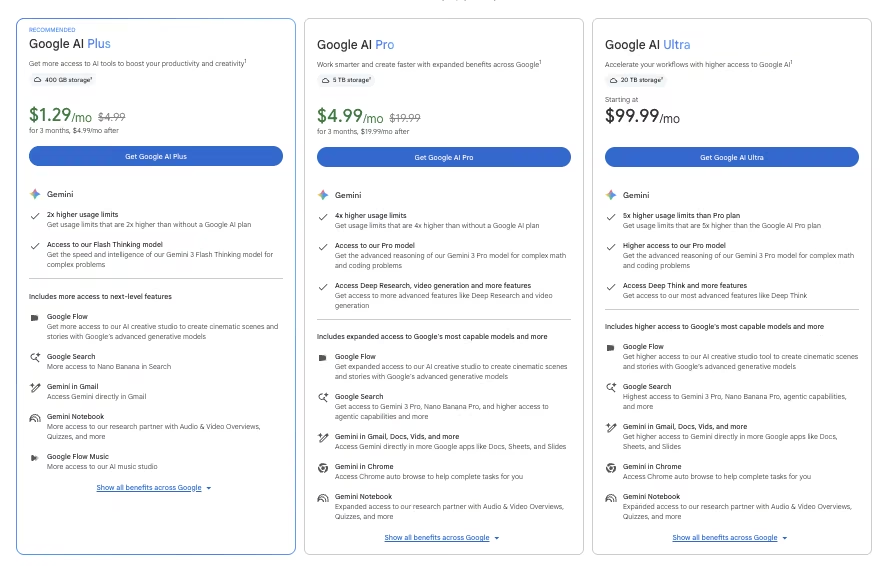
Google AI Plus is the entry paid tier at $4.99/month with 400 GB of storage, stepping up to Google AI Pro at $19.99/month for 5 TB and Google AI Ultra from $99.99/month for 20 TB.
Google publishes no annual rate on any of the three, so the monthly figure is the only one there is, and there's no yearly discount to weigh against the other tools here.
6. Meta AI: Best for Free Image and Short Video Generation

Meta AI got the Ridgeline Coffee brief from the media test above, and the still took three attempts. The first two laid "Highland Reserve" flat across the picture, like a caption dropped on top of a photo. The third finally printed it onto the curve of the bag, meeting the brief's own requirement.
Muse Image, Meta's own model, plans a layout before it draws. That planning step is what shows up in small type most free tools turn to mush.
I fixed the light without writing a new prompt. I tapped the markup icon, circled the shadow on the right side of the bag, and asked for it to be softer, and every earlier turn stayed in context.
I could point at a problem faster than I could describe it in words, and that made this the fastest edit loop either media test produced. The clip ran through Vibes. The finished still became its opening frame, and music and on-screen text got added in the same pass. The bag held together as one campaign, close enough to pass as the same bag in both pieces.
What Meta AI Hands You
The brief's last line got a real answer. Asked "Tell me where the finished files end up," Meta AI returned direct links to both the still and the clip, generated from the same bag asset and traceable back to it in the chat itself.
How much of the result do you get to specify before you press go, and how much do you receive? That single axis separates the two media entries here more than output quality does, and Meta AI sits firmly at the receiving end of it.
That's a design decision, not an oversight. Meta AI is built so you describe the picture, get the picture, and steer the next version by talking to it again. You describe the picture, get the picture, and steer the next version by talking to it again.
The product exposes no clip-length field, resolution picker, or aspect-ratio control to argue with. Meta AI's real pull is comparable output inside apps already open on your phone, for free, across three separate jobs:
- Image generation (Muse Image): Meta's model pulls web context mid-generation and blends several visual references into one composition, with legible text landing inside the image itself. The same model also powers more than 30 one-tap effects inside Instagram Stories.
- Editing: Presets cover the common asks, from restoring an old family photo to redesigning a room using products pulled from the web or Facebook Marketplace, all without leaving the conversation.
- Video (Vibes): Lip-synced dialogue, voiceover, and remixing someone else's clip into your own go past what the still-image test covered.
The Missing Workspace
One limitation still decides whether any of this belongs near your work. None of it counts as a real workspace.
The chat will hand you a direct link to a finished file if you ask for it, but there's still no project folder, version history, or browsable export list, and the link comes from Meta's own CDN rather than a stable location you control. The desktop experience still lists its advanced creation tools as coming.
The finished thing lands somewhere you can't organize or version, though asking for it directly does get you a real, hand-off-ready link. Meta AI makes the thing and then leaves you holding it.
That narrows the decision to two conditions:
- If WhatsApp or Instagram is already open on your phone and the clip goes straight into a feed anyway, this is the easiest exit from Grok Imagine, and it costs nothing.
- If the thing you make has to be found again next week, edited by someone else, or exported at a size someone specified, the free tier still comes up short.
Key Features
- Muse Image: Blends several photos into one image and renders readable text inside it.
- Sketch-to-edit: Draw on a generated image to show what should change, with the conversation's earlier turns still informing the next version.
- Vibes video: Short clips from a prompt or your own photo, with lip-synced dialogue, music, voiceover, and remixes.
Pros
- Image and short video generation cost nothing for everyday creation.
- A follow-up instruction refines the last image in the same conversation.
- The same model powers image and video wherever Meta AI appears.
Cons
- No project workspace, version history, or organized export behind what you generate.
- The desktop experience lists its advanced creation tools as still coming.
Best For
- Casual creators who want Grok Imagine's image generation without a subscription.
- Social-first posts you publish once and move on from.
- Quick visual edits, like restyling a room or restoring an old photo.
Pricing
Meta AI's image and video generation is free for everyday creation across the Meta AI app, meta.ai, and Meta's other apps. Heavier creation sits inside a paid subscription tier, and Meta publishes no price for it. That tier has rolled out market by market, so availability depends on where you are.
7. Qwen AI: Best for Media Generation You Can Direct

Qwen AI's first attempt at the same Ridgeline Coffee clip Meta AI worked from ran the full 15 seconds. It drifted past the held shot the brief specified: the bag alone with room for a caption. Two attempts got it there.
I set a last frame on the second try, and that landed the clip precisely on that held shot. Most free generators don't expose that control at all, and it's the difference between a clip that stops and one that ends exactly where you told it to.
The still went easier. qwen-image-3.0-pro, the flagship image model, printed "Highland Reserve" onto the surface of the bag on the first attempt, no retry needed. Then the brand green drifted. The bag came out a slightly different shade in the clip than in the still, close enough to miss on a phone screen, but wrong once set next to real packaging.
What Qwen Lets You Set, and What It Doesn't
The chat window couldn't lock that color down precisely. Alibaba Cloud's Model Studio documents a hex-value color-palette parameter, but only on the Wan image models, a separate track from qwen-image-3.0-pro, the model that made the still.
The chat window handed over the clip length and the end frame without a fight. The exact shade needed a control I couldn't reach from where I was working.
Alibaba documents controls for clip length, output resolution, ending frame, and character consistency. Most free generators keep these settings out of reach. Grok Imagine gives you a prompt box and makes these decisions for you, while Qwen exposes the settings that fixed the clip's ending during my test.
The model lineup has moved fast, and it splits cleanly into video and image:
- wan3.0-video: The most flexible video model, generating clips from two to 30 seconds at up to 1080p. Set a first and last frame, and a transition lands exactly where you want it. It also takes several reference images, videos, and audio clips at once, and will even read a document or a web link as reference material.
- HappyHorse 1.1: The straight text-to-video model, running three to 15 seconds at up to 1080p with audio produced alongside the frames. A separate reference-to-video model holds a character steady across scenes, and a dedicated editing model rewrites footage you already have, style transfer included.
- qwen-image-3.0-pro: Handling custom sizes from 512x512 to 2048x2048 and rendering text that sits naturally on a surface.
- wan2.7-image-pro: Its sibling, reaching 4096x4096, taking a color palette you define by hex value and ratio, and returning up to 12 story-coherent images from one request.
Together, those models show the assumption Qwen makes about its users:
- Meta AI assumes you want a picture and will accept whichever one arrives.
- Qwen assumes you already know what the clip has to be, down to the second it ends on and the pixel it lands at, and gives you a field for each of those things.
It's the same job on paper, but each one starts from an opposite assumption about who's using it.
The catch is where that control lives: Alibaba Cloud's Model Studio. A setting listed in the developer documentation isn't guaranteed to be a button in the interface you're working in.
That caveat is real, and it changes who the verdict is for without changing the verdict. Pick Qwen when the clip has a spec attached, and you're willing to go find the control wherever it happens to live, including a reference page and a cloud console.
If what you want is to type a sentence and take whatever comes back, you'll spend more of the afternoon reading documentation than generating anything. Meta AI will have finished the same job before you've picked a model.
Key Features
- Long-form video: Generates two-second to 30-second clips at up to 1080p, with a start and end frame you set yourself.
- Character consistency: A reference-to-video model holds the same character steady from one scene to the next.
- High-resolution image output: Custom sizes up to 2048x2048 in Qwen Studio, and up to 4096x4096 through Alibaba Cloud's console.
Pros
- Qwen Studio costs nothing to use, generation included, with no consumer subscription gating it.
- Length, resolution, end frame, and repeat characters are all specifiable per clip.
- Separate models handle text-to-video, image-to-video, reference-to-video, and editing.
Cons
- Precise color matching means leaving Qwen Studio entirely for Alibaba Cloud's own console.
- Nothing here touches the conversational side of Grok, which makes it a single-purpose pick.
Best For
- Free video generation where you set the length and the ending yourself.
- Short sequences where the same character has to appear across more than one clip.
- Image work that has to land at exact pixel dimensions a preset list won't cover.
Pricing
There's no charge to generate inside Qwen Studio, and nothing sold to consumers sits above it. Paid access is developer-side. Alibaba Cloud's Model Studio charges for Qwen and Wan usage as you go, so spend tracks what you generate with no flat monthly fee attached.
8. DeepSeek: Best for Free, Transparent Reasoning
DeepSeek's whole pitch is doing more with less. It's a reasoning-focused model family that undercuts the major labs on price by a wide margin, and the chat app itself costs nothing, with no subscription tier sitting above the free plan the way there is with ChatGPT or Claude.
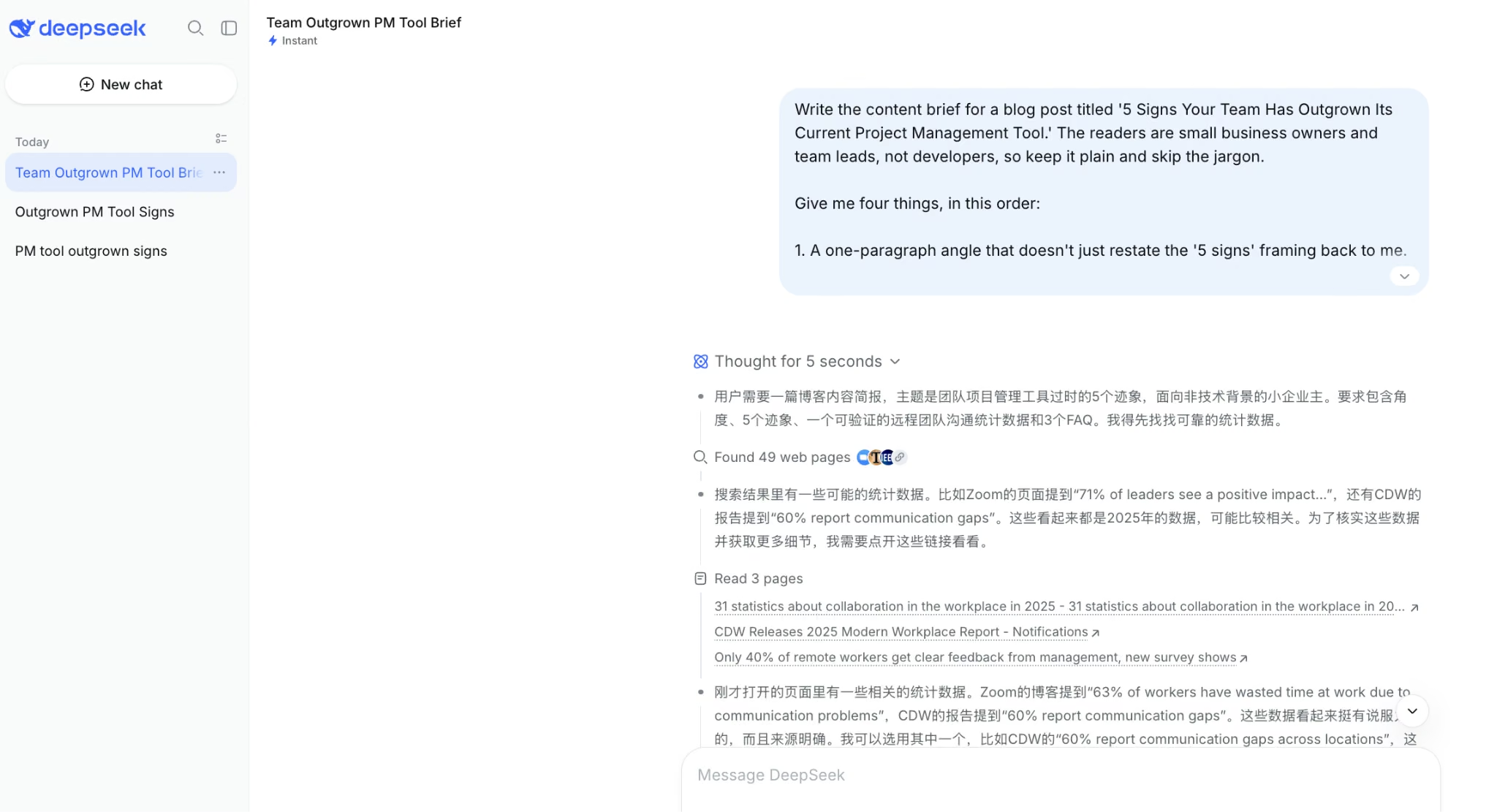
I ran the same content brief through DeepSeek's free chat app twice: once with the DeepThink reasoning toggle left off, matching how a first-time user opens the app, and once with it switched on. DeepThink is the one feature here that none of the other six chat assistants offer for free.
With DeepThink off, the draft landed at 275 words, well inside the cap, and it delivered all four parts of the brief in order. The statistic held up: a real, correctly cited 2025 Founder Reports survey on manager communication, 85% call clear communication essential and 51% think their manager delivers it.
But DeepSeek named the source with no link to open, missing half of the brief's own citation rule outright.
Switching DeepThink on produced a longer draft, 321 words, still under the cap, and this time the statistic came with a working link, pointing to a real CDW workplace research report. The extra reasoning step visibly closed the gap the default run left open.
Also read our best DeepSeek alternatives guide for what else is worth trying when cost efficiency or open reasoning is the priority.
Key Features
- DeepThink reasoning mode: A free toggle that shows the model's reasoning step by step before it answers, instead of hiding the work.
- Open-weight models: The underlying models are released under an open license, so they can be run or fine-tuned outside DeepSeek's own servers.
- No paid consumer tier: The chat app and mobile app are free, with nothing above them to upgrade into.
Pros
- Found a real, correctly cited statistic without inventing one, matching the brief's harder rule.
- Turning on DeepThink fixed the one thing the default run missed, delivering the same accurate statistic with a working link.
- A free reasoning mode that every other tool on this list either paywalls or doesn't offer at all.
Cons
- The default chat, the one most people will actually use, named its source with no link to open it, missing half of the brief's own citation rule.
- Three of the five signs read very close to a single outside article's own list, reworded rather than built independently.
Best For
- Anyone who wants a reasoning-focused assistant without paying anything for it.
- Developers comfortable running the open-weight models themselves instead of trusting a hosted chat app.
- Anyone willing to flip on DeepThink for anything that needs a source you can actually check.
Pricing
DeepSeek's chat app and mobile app are free for individual use, with no subscription tier sold to consumers.
Developers can use the API on a pay-per-token basis through DeepSeek's own platform, priced well below what the paid assistants on this list charge for API access, though that's a developer cost rather than something a personal chat plan pays for. Pricing correct as of August 2026.
A Few Grok Imagine Alternatives Worth a Look
Grok Imagine caps out at 30-second, 720p video and 2K images on the standard SuperGrok tier. If that's the half of Grok you're replacing, a few tools are worth a quick look:
- Kling AI: Lets you set the camera's pans, tilts, and orbit moves directly, instead of leaving the shot to a prompt.
- Runway: One subscription reaches several leading models, including Google's Nano Banana Pro and Veo 3.1, instead of committing to a single model upfront.
- Z-Images: A free, openly released image model from Alibaba's Tongyi-MAI team, run yourself for the cost of a GPU or a few rented seconds.
- Seedance: Builds native audio into the generation itself; the synced sound cue Grok Imagine's video side skips.
Stick with Grok Imagine if staying inside the same account you already use outweighs any single feature above.
How to Evaluate Grok Alternatives
Run any candidate through these five checks before you commit.
Judge the Citations, Ignore the Confidence
Open two or three of the links an answer gives you and see whether the page actually says what the answer claimed. Look for inline sources you can open and check yourself, and treat a vague nod toward available information as no source at all. The real test is whether the page behind a link says the thing the answer attributed to it.
Give It More Than One Instruction at Once
Anything can look capable when you ask it one easy thing. Give an assistant more than one ask in a single message, like a word cap paired with a specific format, then count how many constraints survive. A single simple request makes every tool look equally capable, which is exactly why it tells you nothing.
Ask Something You Already Know
The fastest reliability test is one you can grade yourself. Ask something you already know the answer to and watch whether it flags the gap or fills it with something plausible. A tool that says "I'm not sure" once has told you more about its reliability than a hundred correct answers.
Test the Free Tier With a Real Session
A single prompt won't show you where a free plan cuts off. Test with a full back-and-forth session before you judge whether the free plan covers you, because the limit that catches people shows up partway through a revision, well after the first request.
Weigh Ecosystem Fit Against Raw Capability
One that plugs into your email, your documents, and your search habits saves more time than one living on its own island, even when the standalone tool writes better prose. Count the copying and pasting a week of normal work would need, and let that number decide.
Stop Treating "AI Chatbot" as One Category
Grok, ChatGPT, Claude, Perplexity, Pi, and Gemini get grouped together constantly, and that grouping is exactly what makes choosing a Grok alternative harder, because each one is built around a different core job.
Perplexity centers on live research, Claude on long documents, and Pi on personality-led conversation. There's a fast way through the decision.
Name the specific job first, then pick the tool built around it over the one with the loudest name:
- Live research → Perplexity AI
- Document depth → Claude
- Casual conversation → Pi AI
- Ecosystem reach → Google Gemini
- Media generation → Meta AI or Qwen AI
- Plain versatility → ChatGPT
The same logic works in the other direction, too, for anyone leaving ChatGPT itself. The shortlist changes shape completely, which is what my ChatGPT alternatives comparison works through job by job.
And if the tool you'd be replacing is Claude, particularly on the coding side, the Claude Code alternatives breakdown covers a field that barely overlaps with this one.
How Emergent Turns a Chat Assistant's Answer Into a Working App

Every one of the eight tools above is good at producing an idea, a draft, an image, or an answer. None of them are built to turn that answer into working software you can put in front of real users.
That gap opens right after you've settled on the assistant you like talking to. You have a plan, a brief, or a rough sketch of a product, and what you want next is the working thing. If that plan is still a rough sketch rather than a clear ask, Emmy, Emergent's built-in assistant, turns the conversation into a build-ready prompt before you write anything into the main box.
That's the job Emergent is built for. You describe what you want in a normal sentence: a booking flow, a dashboard, a tool your team uses every day. Emergent builds the working version, complete with:
- Logins and user accounts
- A database that stores what your users create
- Third-party connections like Stripe when you need to take payments
All of it is part of the same build you started with your first prompt. The finished app is ready to handle paying users and the data they create, so nothing gets rebuilt from scratch later.
In my own testing on other Emergent builds, getting to a first version I could click through has cost somewhere in the 5-to-15-credit range, which the free plan's 10 monthly credits covers at the lower end and Standard's 100 covers comfortably. A straightforward idea goes from a written description to something usable in well under an hour.
Emergent isn't another entry on this list or a competitor to any tool above it. It has hard edges too. These are the places it runs out:
- Heavy PDF reporting
- Swift apps for Apple Watch or iPad
If the idea you talked through with ChatGPT, Claude, or any of the others is ready to become software, that's where Emergent picks up. And if you'd rather not leave the assistant you just picked, the MCP connector puts Emergent inside ChatGPT, Claude, or Codex, so the idea you talked through becomes a live preview URL in the same conversation.
You can describe your first app in your own words at Emergent.

Every alternative has trade-offs. Emergent just builds production-ready apps from one prompt.
- Production-ready apps
- Web & mobile apps
- Deploy in minutes





