



I compared Copilot vs ChatGPT across the same five tasks: coding, writing, research, data analysis, and image generation. The answer to which one wins depends almost entirely on where you do your work.
Copilot vs ChatGPT: What’s the Difference?
ChatGPT is a standalone AI workspace. It handles writing, coding, research, and image generation without requiring another software suite. With 900 million weekly active users, it's become the platform most third-party tools are building toward first.
Through OpenAI's App Directory, it connects to a growing library of third-party tools, including Slack, GitHub, Canva, Spotify, and Google Drive.
Microsoft Copilot is an AI layer embedded inside the Microsoft 365 suite. It reads your emails, files, calendar, and Teams chats via Microsoft Graph and acts on that data directly in Word, Excel, PowerPoint, Outlook, and Teams. That internal data access is something no standalone tool can replicate natively.
Choose ChatGPT if: You need a flexible, all-purpose AI and don't rely on Microsoft 365 daily.
Choose Copilot if: Your work runs inside Word, Excel, Outlook, and Teams, and you want AI that already knows your business context.
| Category | ChatGPT | Microsoft Copilot |
|---|---|---|
| Underlying model | GPT-5.5 Instant, Thinking, and Pro | OpenAI models available through Microsoft Copilot, with Microsoft 365 context layered on top |
| Free tier | Yes, limited GPT-5.5 access within a 5-hour window | Copilot Chat with web-grounded responses |
| Coding | Codex agent, code generation, debugging, in-app preview | Functional: GitHub Copilot Pro is a separate $10/month product |
| Agents | Agent mode in chat | In standalone Copilot Studio or on the Microsoft 365 plan |
| Starting price | $8/month | $9.99/month |
| Image generation | GPT Image models, including GPT Image 2 | 4o image generation in Copilot |
| Best for | Flexible AI works across writing, coding, research, files, data, and images | Tasks within the Microsoft 365 apps |
| Strongest fit | Individuals, creators, marketers, founders, researchers, developers, and mixed-tool teams | Microsoft 365 users, office-heavy teams, and enterprises |
| Main strength | Broad task range across many work types | Microsoft 365 context and app integration |
| Main tradeoff | Can feel less integrated with work apps | Less useful outside Microsoft's ecosystem |
| Best business fit | Teams that need one AI workspace across many tasks | Teams already built around Microsoft 365 |
Meet ChatGPT
ChatGPT is OpenAI's general-purpose AI platform, currently powered by the GPT-5.5 model family. It works independently of any other software or ecosystem, making it the default for users who work across tools rather than within one workspace. Beyond chat, it covers writing, coding with Codex, image creation with GPT Image 2, and autonomous web research with Deep Research. Video generation is no longer part of the product; the Sora app was discontinued in April 2026.
ChatGPT pricing:
- Free: limited GPT-5.5 access, basic features, usage caps
- Go: $8/month; 10x more messages than free tier, longer memory and context window
- Plus: $20/month; expanded GPT-5.5 access, GPT Image 2 generation, voice, custom GPTs, memory
- Pro $100/month: 5x more usage than Plus; best for high-intensity Codex sessions
- Pro $200/month: 20x more usage than Plus; highest-capability tier for power users
- Business: $25/user/month (monthly) or $20/user/month (annually); shared workspace, admin controls, two-seat minimum
- Enterprise: custom pricing; for large deployments with advanced security, SSO, and compliance needs
Read More: Claude Code vs Codex (2026): The Most Complete Side-by-Side Comparison
Meet Microsoft Copilot
Microsoft Copilot is built around one core bet: the most useful AI is the one that already knows your work. It sits inside Word, Excel, PowerPoint, Outlook, and Teams, and pulls from your organization's Microsoft Graph data to ground every response in your actual business context.
The free tier, Copilot Chat, is limited to web-based responses. Paid plans turn it into something closer to an AI coworker that has access to your company's full document history.
As of Microsoft's FY26 Q3 earnings, Microsoft 365 Copilot had reached 20 million paid seats, a 33% jump in a single quarter. That's out of 450+ million total Microsoft 365 commercial subscribers, which suggests adoption still has plenty of room to grow within its installed base.
Copilot pricing:
Individuals
- Free: Copilot Chat, web-grounded, no cost
- Microsoft 365 Personal: $9.99/month ($99.99/year)
- Microsoft 365 Family: $12.99/month ($129.99/year); up to six users
- Microsoft 365 Premium: $19.99/month ($199.99/year)
Business
- Copilot Business: $25.20/user/month (monthly), or $18/user/month billed annually (limited-time promo)
- Microsoft 365 Business Standard with Copilot:
- With Teams: $28.20/user/month (monthly), or $23.50/user/month billed annually
- Without Teams: $24.36/user/month (monthly), or $20.30/user/month billed annually
- Microsoft 365 Business Premium with Copilot:
- With Teams: $38.40/user/month (monthly), or $32/user/month billed annually
- Without Teams: $34.56/user/month (monthly), or $28.80/user/month billed annually
Enterprise (annual only)
- Microsoft 365 Copilot: $30/user/month; requires a qualifying Microsoft 365 enterprise plan
Copilot Studio
- Included with Microsoft 365 Copilot for internal agent use
- Pre-purchase plan: $200/pack/month for 25,000 Copilot Credits (prepaid); see Microsoft's Copilot Studio licensing guide
- Pay-as-you-go: Usage-based billing; no upfront commitment; requires an Azure subscription
Developers
- GitHub Copilot: From $10/month
Copilot vs ChatGPT Compared
Knowing the pricing and the headline specs only gets you so far. The real question is how each tool holds up when you put a specific task in front of it.
Writing
I gave both tools the same prompt: write a professional email under 120 words that pushes back on a client's last-minute scope expansion request. Acknowledge the enthusiasm, propose a phased approach, and end with a clear next step. Warm but firm. No bullet points.
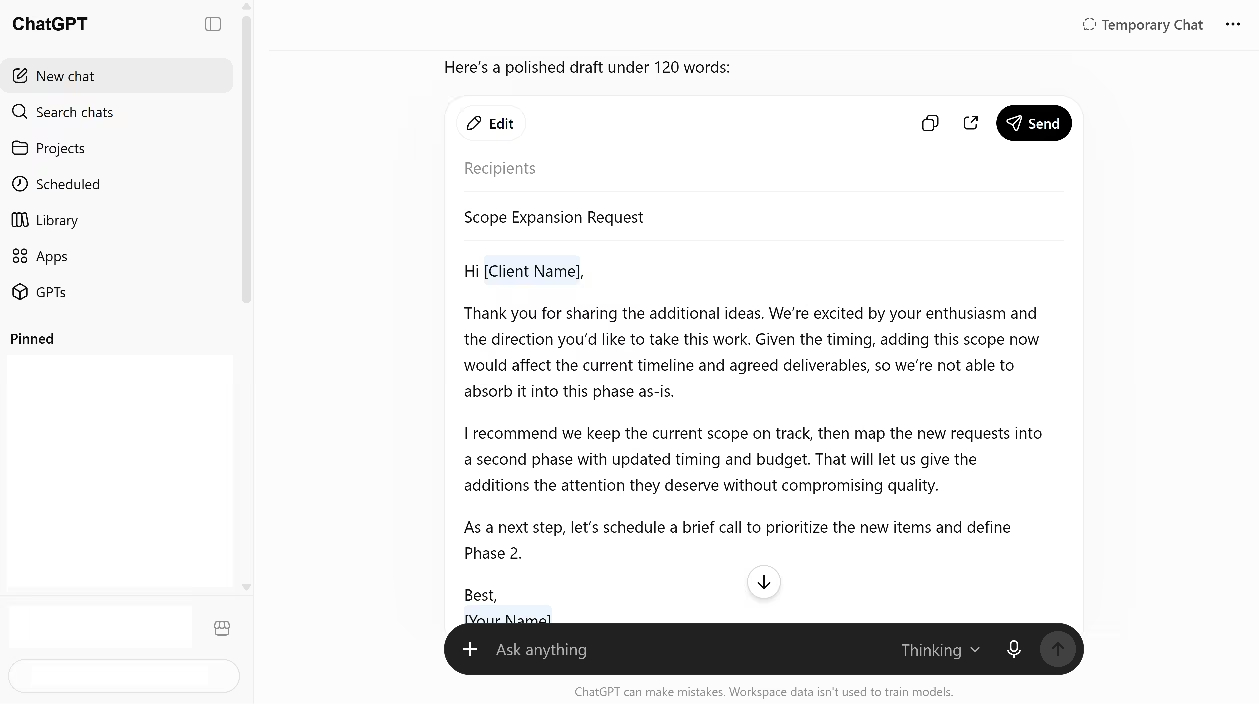
Copilot was more concise and, arguably, more decisive. Where ChatGPT ended with "let's schedule a brief call," Copilot closed with "I'll draft a short Phase 2 proposal for your review," a more concrete next step that moves the work forward rather than adding another meeting.
It also surfaced three follow-up suggestions unprompted, which is a useful feature for anyone who wants to iterate on tone or detail without rewriting the prompt.
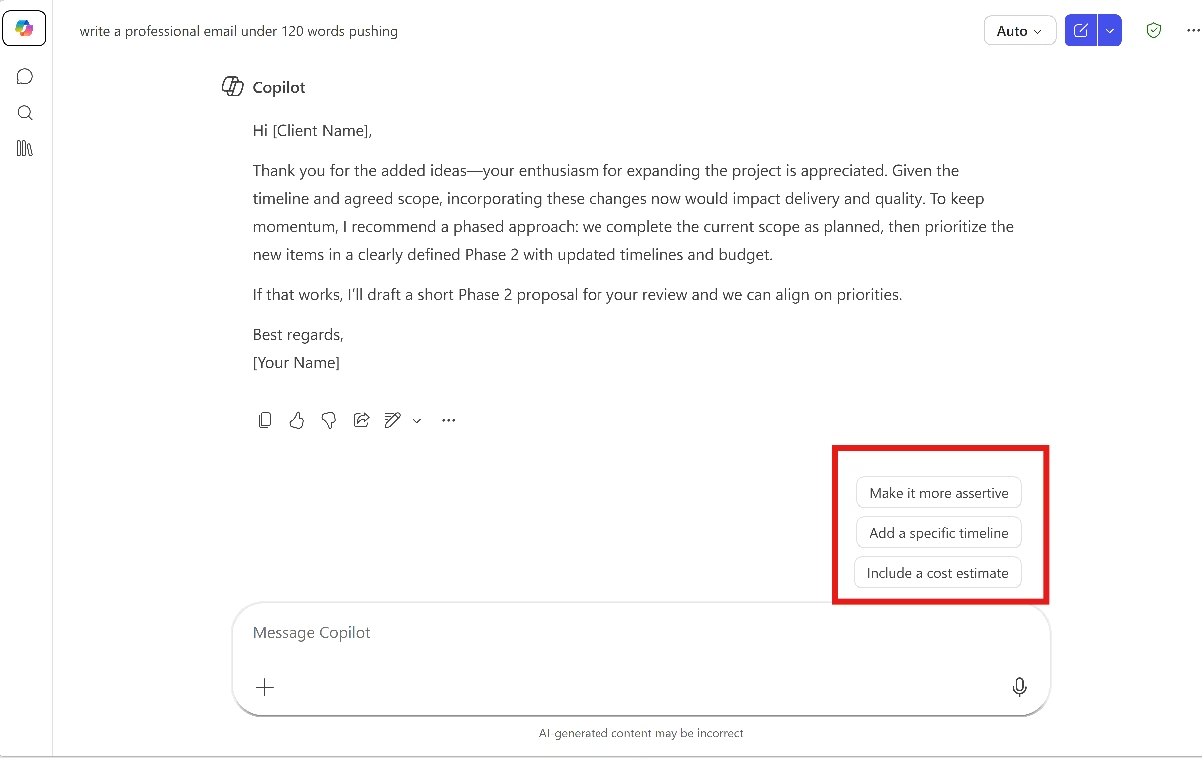
Winner: Tie. ChatGPT's phrasing is tighter and reads more naturally. Copilot's next step is more actionable, and the suggestion feature adds real value for business users who know what they want but aren't sure how to ask for it.
Research
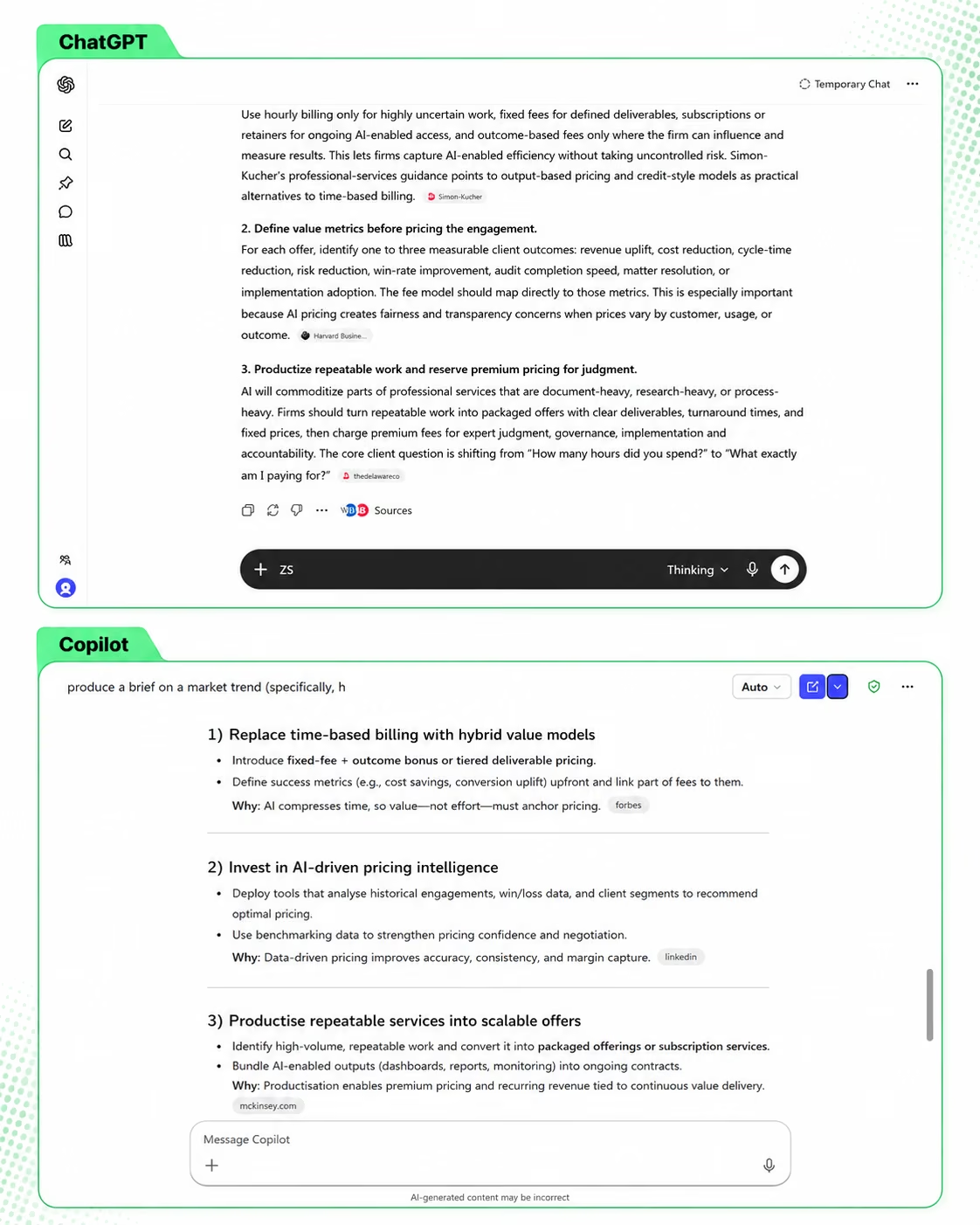
ChatGPT returned a tight, decision-focused brief: a headline, three sourced paragraphs, three numbered takeaways, and numerous high-quality sources, including The Wall Street Journal, Simon-Kucher, and Harvard Business School. The output read like a prepared brief, ready to share with a client or drop into a deck.
Copilot returned a more comprehensive output: four thematic sections, three actionable takeaways, and a bottom-line summary. The sourcing was broader: Forbes, Thomson Reuters, Law Accounting, Clio, BizTechWeekly, and others. It also included specific data points and three follow-up suggestion chips. Generally, I found it easier to read.
Winner: Copilot. ChatGPT's output is tighter and reads better as a document, but it assumes you want a narrative. Copilot assumes you want to find what you need quickly and move on. For a founder or operator who's short on time, that's the more useful format.
Data Analysis
I uploaded a messy agency revenue CSV with inconsistent service-line naming, a malformed row missing cost data, blank hours for flat-fee work, and potential duplicate entries.
Both tools received the same five-part prompt: identify the highest revenue quarter, find the two worst-margin service lines, calculate month-over-month Q1 growth, flag data quality issues, and recommend one specific pricing action.
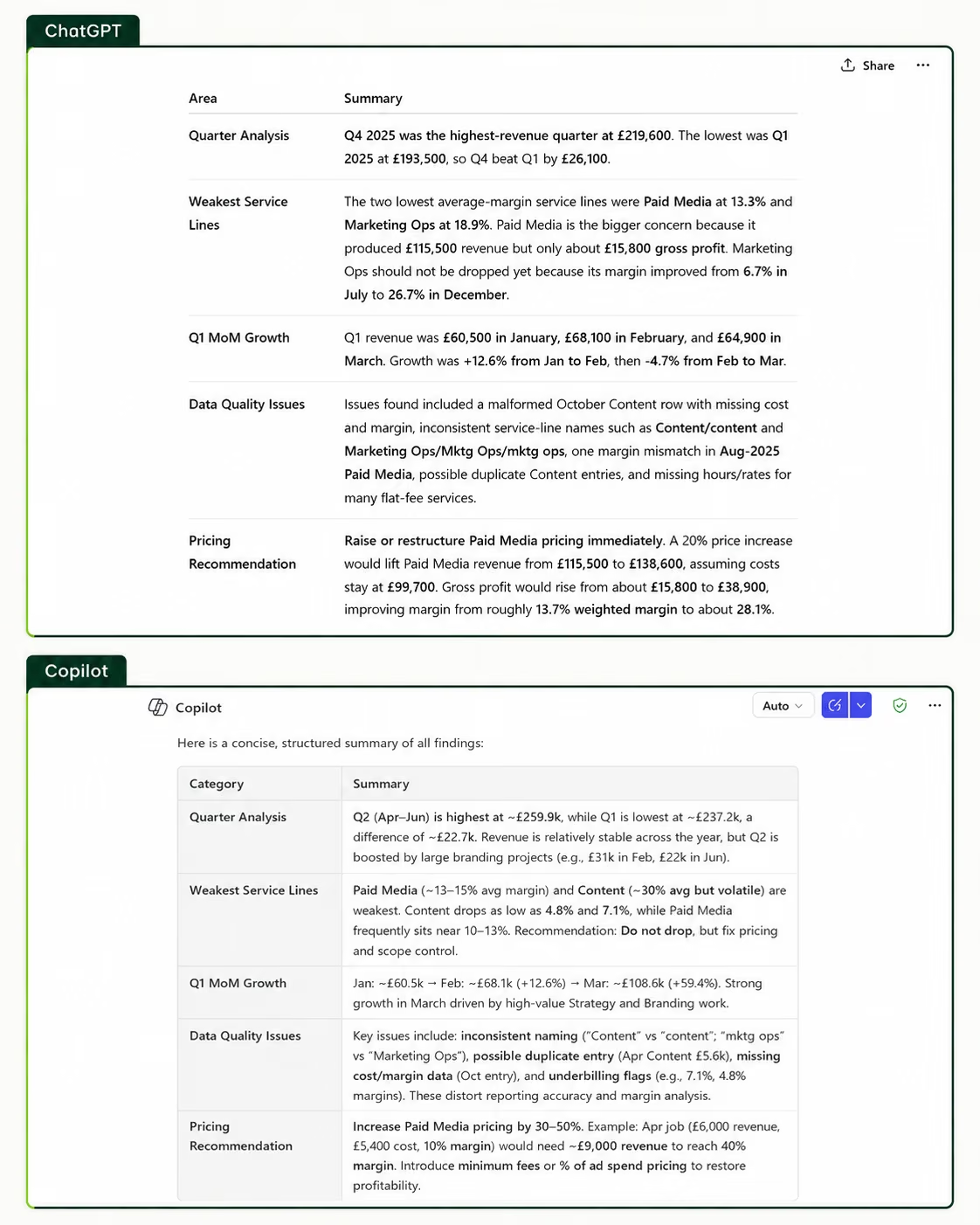
Copilot ran "Coding and executing" twice, then stalled, displaying an upgrade prompt instead of an answer. I needed to add a second prompt to get a response. Even then, the figures were wrong, several questions went unanswered, and the pricing recommendation had no supporting numbers.
Winner: ChatGPT by a wide margin.
Image Generation
Prompt: “A photo-style image of a consultant's hand resting on an open laptop keyboard, screen showing a colorful bar chart. A branded proposal document and coffee cup sit beside it. Clean desk, modern office, natural light from the left.”
ChatGPT followed the brief closely. It invented a consistent brand and applied it across the screen chart, the proposal cover, and the coffee mug. The chart was labeled and readable. The proposal looked like a real bound document with a client name field. Hand rendering was natural with the correct finger count. Keyboard text was garbled.
Copilot produced a clean image but not a particularly photorealistic one. The lighting and hand position were good, and the coffee cup had actual coffee in it. But the overall feel was closer to a stock photo composite. The chart was also unlabeled, and the proposal was a loose printed sheet with a logo rather than a bound document.
Winner: ChatGPT on instruction-following and detail.

Coding
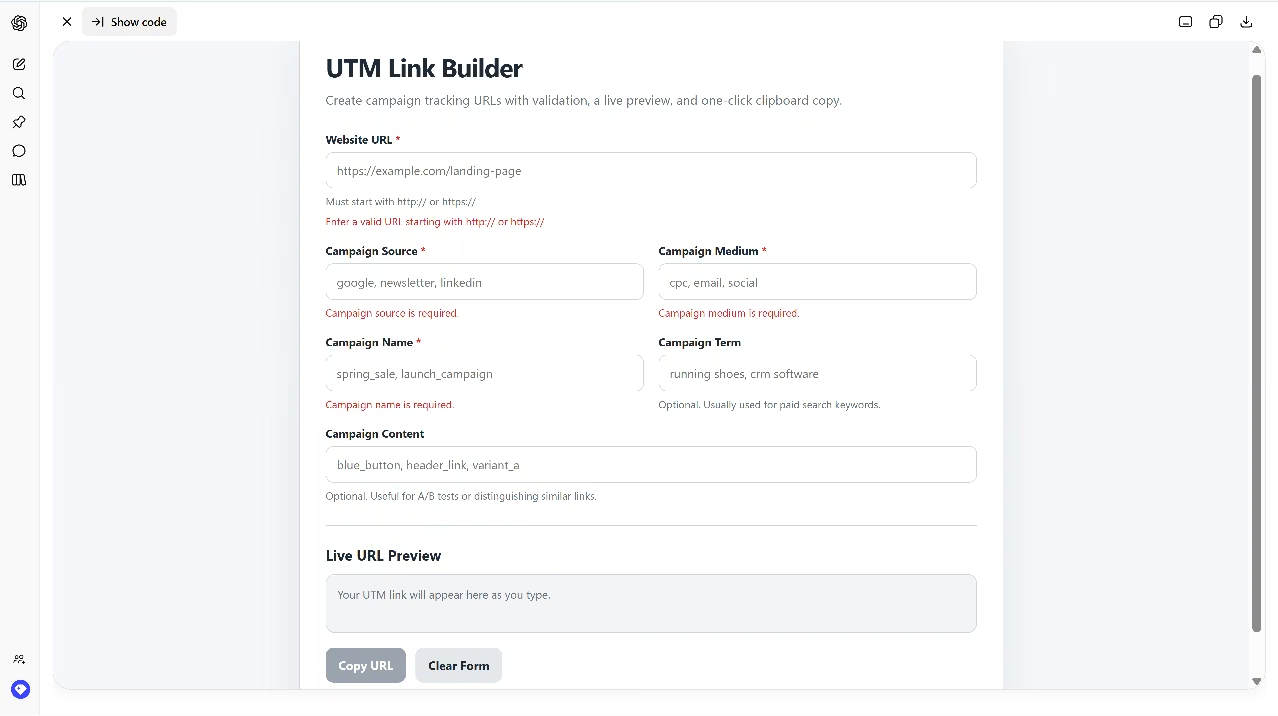
I asked both to build a UTM link builder web app from scratch: single HTML file, input validation, live URL preview, clipboard copy, clean UI, no external libraries.
ChatGPT delivered a fully featured app on the first attempt. The layout is polished, the form validates properly, the Copy button stays disabled until the link is ready, and the in-app preview lets you test everything without leaving the chat.
Copilot also delivered on the first attempt. The app works: validation, live preview, and a Copy Link button are all there. What is missing is depth: no disabled button state, no way to clear the form, and the design is basic enough that Copilot itself followed the output with a list of optional upgrades it could add if asked, including dark mode, presets, and a QR code generator.
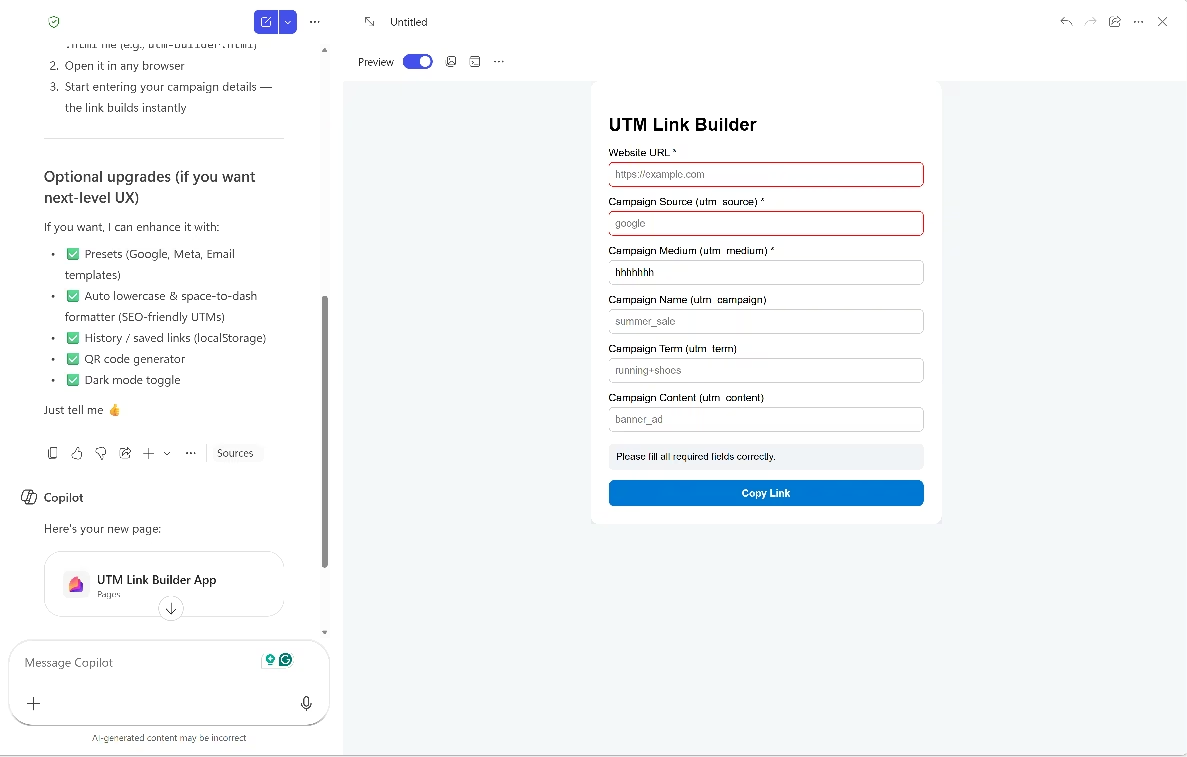
Winner: Tie. Both tools built a working app with an in-app preview on the first attempt. ChatGPT's code is more complete on paper (better form, states, more polish). Copilot follows my instructions on simplicity, and although it did not add nice-to-haves like ChatGPT, it gave me feature suggestions.
Now, for a personal utility, prototype, or small tool you are comfortable saving and testing yourself, that result is enough. Both tools gave me a usable HTML file from a clear prompt and did not exceed the scope.
But a single HTML file only goes so far. What if I wanted a campaign link builder and manager for a team of 3 or more? What if I wanted different logins, shared rules, saved history, and reports? I would need something closer to a deployed web app, with user access, stored data, permissions, and a shared workspace.
Emergent is built for that kind of jump. It does not stop at generating code snippets or a file you have to finish yourself. Emergent turns your prompt into software with the interface, app logic, data layer, user flows, and deployment handled inside the same build process. You can create full-stack apps, landing pages, and even mobile apps with a few words.
I tried the UTM idea on Emergent and changed the ask from a one-person link builder to a team-based campaign link manager for marketers.
Before building, Emergent asked clarifying questions about authentication, export format, link tracking, design direction, and naming-rule enforcement.
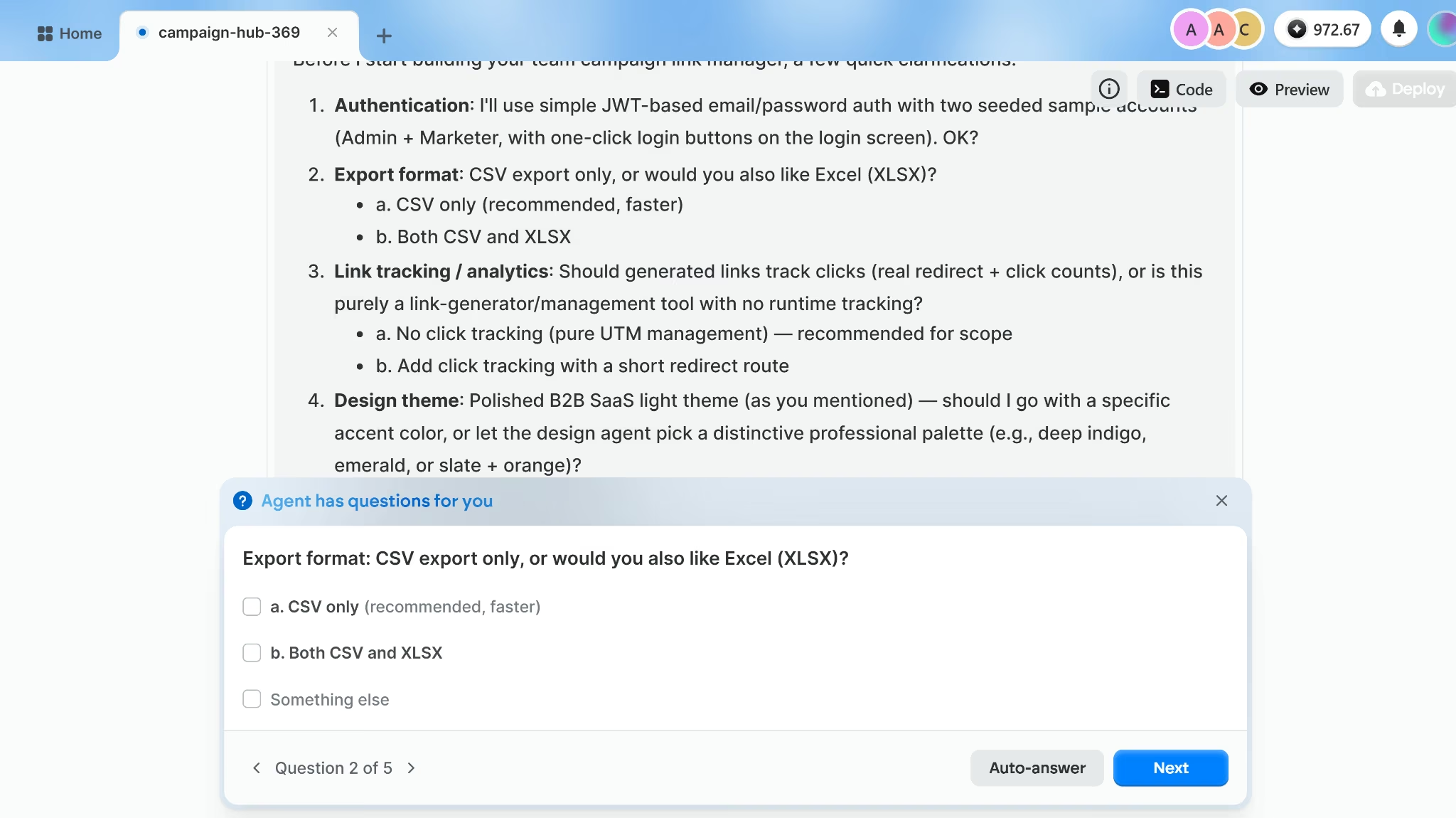
The finished build gave me a working team workspace. I could log in as different user types, create a campaign link from approved UTM values, save it to the team history, review existing links, check campaign reporting, manage user roles, and export link data.
After the build, Emergent suggested practical next-step features like bulk link creation, duplicate-detection warnings, and tags or labels to group links across campaigns.
Benchmark Performance
Both tools run on the same underlying GPT-5.5 models, so direct head-to-head benchmark comparisons largely measure OpenAI's model rather than either product's wrapper.
On GDPval, OpenAI's benchmark testing knowledge work across 44 occupations, including finance, legal research, and product management, GPT-5.5 scores 84.9%, winning or beating industry professionals in most task categories. On GPQA Diamond, a graduate-level science reasoning benchmark, it reaches 93.6%.
On OfficeQA Pro, which tests productivity-style document tasks directly relevant to Copilot use cases, it scores 54.1%.
Winner: Inconclusive. The raw reasoning capability is equivalent in both tools. What differs is how each uses that power. ChatGPT applies it to anything you upload or describe. Copilot applies it to your Microsoft 365 data without you having to manually bring anything into the conversation.
Security and Data Handling
This is where Copilot has the clearest structural advantage for business users.
Microsoft 365 Copilot operates entirely within your Microsoft 365 service boundary. Your prompts, the data it retrieves, and its responses stay inside your tenant. It uses Azure OpenAI for processing, not OpenAI's public infrastructure.
Your prompts, responses, and Graph data are also never used to train the underlying models.
ChatGPT's data-handling depends on your plan. On Business and Enterprise plans, your data is excluded from training by default and encrypted in transit and at rest. On consumer plans (Free, Plus, Go, and Pro), your conversations may be used for training unless you opt out through your privacy settings.
Winner: Copilot for any team handling client data or working in a regulated industry. ChatGPT Business and Enterprise meet most business privacy requirements, but data is routed through OpenAI's infrastructure rather than staying within your own tenant.
What Real Users Are Saying
I checked G2 reviews to see how verified buyers describe both tools in day-to-day use. ChatGPT has a 4.6/5 rating based on 2,600+ reviews, and Microsoft Copilot has a 4.4/5 rating based on 350+ reviews.
ChatGPT (4.6/5)
Pros:
- Users pick it up quickly across writing, coding, and research without a steep learning curve.
- Good at working through multiple documents at once and pulling out what matters.
- Good as a thinking partner when you need to work through a strategy or break a problem into steps.
Cons:
- It gets things wrong sometimes, and it sounds confident when it does. You still need to check anything important.
- Long conversations can go off track: responses drift from the original question and need correcting.
- Information can be out of date on fast-moving topics, though turning on web search usually fixes this.
Microsoft Copilot (4.4/5)
Pros:
- Works inside Word, Excel, Outlook, and Teams. Users don't have to switch apps or copy and paste anything.
- Meeting recaps and email thread summaries are the features people mention most
- If your team is already on Microsoft 365, it fits into how you work without much change.
Cons:
- Responses can be too generic if you don't prompt it well. You often need to refine the output before it's usable.
- The free version is limited enough that you need the full M365 Copilot license to get real value from it.
- It struggles with open-ended or creative tasks.
How to Choose Between Copilot and ChatGPT
These two tools solve different problems. Paying for Copilot without Microsoft 365 means paying for features you'll never use. Using ChatGPT for work that requires pulling from your company's internal files means copy-pasting between windows all day.
In a January 2026 a16z survey of 100 Global 2000 companies, Microsoft 365 Copilot was found to lead enterprise chat, though ChatGPT has closed the gap meaningfully.
Separately, 65% of enterprises said they prefer incumbent solutions when available, citing trust and integration with existing systems as the main reasons. For Microsoft-first organizations, that is exactly why Copilot works.
ChatGPT Is Better For:
- Solo founders, freelancers, and small teams not on Microsoft 365.
- Content creation, coding, research, and complex reasoning tasks.
- Users who want access to the broadest model lineup: GPT-5.5 Instant, GPT-5.5 Thinking, and reasoning models.
- Workflows that span multiple tools and platforms rather than one ecosystem.
- Anyone who needs persistent memory and custom agents for recurring tasks.
Microsoft Copilot Is Better For:
- Teams whose daily work runs inside Word, Excel, Outlook, PowerPoint, and Teams.
- Organizations that need AI grounded in internal company data: emails, files, and chat history through Microsoft Graph.
- Enterprise deployments already on Microsoft 365 licenses, where Copilot is an incremental cost.
- Teams building internal agents on proprietary company data through Copilot Studio.
- Compliance-heavy environments where data security and Microsoft's privacy controls matter.
Can I Use Both Copilot and ChatGPT?
You can run both at the same time, and the two tools are designed for different enough jobs that using both makes sense.
A consultant who runs client work inside Microsoft 365 might use Copilot to summarize a Teams call, draft a follow-up email in Outlook, and pull together talking points from SharePoint before a pitch. Then switch to ChatGPT to research a market trend, generate a visual for the deck, or build a quick internal tool. The split is not about which one is better. It is about what you are trying to do. If the context is within Microsoft 365, Copilot already has it. If the task is open-ended or needs a capability outside the Microsoft stack, ChatGPT is the right window to open.
My Verdict
For most non-technical users and small business operators, ChatGPT is the stronger default. It handles more types of work, requires no existing Microsoft ecosystem, and the Plus plan at $20/month covers writing, research, coding, and image generation in one place.
Copilot earns its place if your team works in Microsoft 365 apps. Its core advantage is direct access to your internal business data without you having to upload a single file.
Set the Microsoft question aside, though, and the two tools do the same thing. Both can research a market, draft the copy, generate an image, and hand you working code for a small tool or prototype. For most one-person jobs, it's enough.
The moment you need multiple users with their own logins, shared data, saved history, and reporting, a single file you run yourself stops being the answer. You need a deployed product, which is a different conversation.
Emergent is built for exactly that gap. Describe what you need, and it handles the build end-to-end and deploys the finished product to a live URL you can share with your team.
Your next tool starts with a prompt. Build it on Emergent.

Most AI app builders stop at prototypes. Emergent creates production-ready apps you can actually launch.
- Production-ready apps
- Web & mobile apps
- Deploy in minutes







