



TL;DR
- TL;DR
- 1. FlutterFlow: Best for a true native iOS and Android app you can hand to a developer as working code.
- 2. Emergent: Best for owning your code and your app data if a developer ever takes over.
- 3. Bubble: Best for custom rules that have to behave exactly right, if you can push through the learning curve.
- 4. Glide: Best for a working screen from whatever source material you already have.
- 5. Softr: Best for turning an existing Airtable, Sheets, or Notion base into a working portal.
- 6. Adalo: Best for a solo builder who'll hunt through the property panel to fix whatever Ada's AI assistant gets wrong.
- Best off-ramp: FlutterFlow and Emergent both hand you code a developer can pick up. Bubble and Adalo hand you an account login and nothing else. Glide hands back your data as a CSV file or a live Postgres connection, but never the app you built around it.
Every "no code" app builder is impressive for about 10 minutes. It draws a clean login screen and a tidy list view, exactly what you asked for. Then you ask it to stop two members from booking the same desk at the same hour, and the confidence disappears.
I've spent years building test apps to see which tools hold up under real conditions, so I ran the same test across 25 no code app builders over 17 days.
Each one built DeskLoop, a booking app for a coworking space with two membership tiers, a conflict check, and a maintenance rule admins can flip on. Six made the final list. I built every one of them the way a non-technical builder would: someone who has never opened a code editor and has no plans to start now.
This page isn't for everyone. If a developer is already on your team, or you're sizing this around seat counts, permission tiers, and the integrations you'll need next year, the best app building platforms for scale and extensibility answers that question better than this list can.
Still deciding whether this category even fits what you're building? The wider app building software roundup starts a step earlier. For everyone else, two questions decide the whole list: how fast you can get from a blank screen to something working, and what happens to that work the moment you outgrow the tool.
Why It's Hard to Pick a No Code App Builder When You Have No Developer
Every tool here claims "no code." Almost none of them agree on what that promise covers once your app needs more than a form and a list.
Feature counts and plugin libraries describe what a tool can theoretically do. The question that decides your build is what happens when you reach a limit with nobody on call:
- A conditional rule that takes three attempts before it holds.
- One feature that turns out not to be exportable.
- A free AI allowance capped once for the life of the account.
Every tool below gets judged on speed to a working screen and on what your off-ramp looks like. Both decide what happens if you outgrow the tool or want to stop paying.
If you're still working out whether this category fits what you're building, what no code app development covers is the fuller explainer. Everything below assumes you've already decided nobody technical is joining you.
How I Tested These Six No Code App Builders
I tested 25 no code app builders over 17 days before narrowing this list to the six here, and each of those six got the identical brief. It called for DeskLoop, a booking app for a small coworking space, with two user types: members who book desks and meeting rooms, and an admin who manages the space.
The resource list was fixed at 10 individual desks and two meeting rooms, Room A seating 4 and Room B seating 8, each carrying a status of available or under maintenance.
Members needed to browse available resources, then pick a date and a time and submit a booking request, governed by two rules. Basic members could book up to 3 days out, Premium members up to 30, with a clear explanation for anyone who hit that wall instead of a silent failure.
Overlapping bookings on the same desk or room had to be rejected automatically, with an explanation, instead of getting saved on top of each other. Admins needed a way to mark a resource under maintenance for a date range, without hand-canceling every booking it might conflict with, plus a same-day list of bookings sorted by start time.
One edge case closed out the brief: a booking that would run past the space's posted closing time, 6 PM on weekdays and 4 PM on weekends, had to be blocked with a reason given to the member.
Four things had to work for a build to count: the booking logic itself, the tier-based advance-booking window, the maintenance block, and the closing-time edge case.
Base44 built fast, then added fields the brief never asked for, and clearing them drew on a second credit meter separate from the build allowance. Figma Make stopped at the maintenance rule, which needed server-side automation it couldn't build.
Appy Pie has no follow-up prompt, so every change after the first generation is a manual, component-by-component edit.
ToolJet targets ops teams comfortable in JavaScript or Python. Momen leans technical and scalability-first in its own marketing. Backendless started as a server-and-database service, and its codeless logic still reads close to real coding.
Microsoft Power Apps calls itself low code on Microsoft's own site and targets IT-adjacent business users. Knack is a database-app builder, and Mendix is an enterprise platform for IT departments.
Google AppSheet, the closest Google equivalent, licenses per app user from $5 per user each month, so every member who signs in to a booking app like DeskLoop adds to the bill.
Thunkable and Kodular are visual mobile builders, a notch behind FlutterFlow and Adalo here.
Clappia builds from pre-coded modules and form submissions, and frames itself around automating internal processes like approvals and field reporting, rather than a member-facing booking flow. Tadabase is a database-app builder for internal portals and workflow tools, the same category as Knack, built for teams who already know their schema going in.
Rocket now positions itself around researching a market and deciding what to build, then tracking competitors after launch, and DeskLoop arrives already specified. Shipper goes wider still, generating marketing, operations, and outreach around the app, so most of what it adds sits outside a single internal booking tool.
Firebase and BuildShip are server and workflow infrastructure. Airtable is a spreadsheet and database tool with app-adjacent extensions.
I judged the remaining six on four things, measured the same way every time:
- On-ramp speed: How long it took, from that exact prompt, to reach a working first screen.
- Learning curve: How much of the build required leaving the prompt for manual, click-by-click configuration.
- Ceiling behavior: What broke, or turned out not to be buildable, once the conditional rules got tested.
- Off-ramp: What happens to the app and its data if you stop paying or hand it to a developer.
6 Best No Code App Builders: Quick Comparison
How the six stack up by job:
| Tool | Best For | Core Strength | Starting Price |
|---|---|---|---|
| FlutterFlow | True native mobile apps | Full Flutter code export | $39/month ($29.25/month, billed annually) |
| Emergent | Owning your code and data long term | Database and login system plus exportable code | $20/month ($17/month, billed annually) |
| Bubble | Custom rules that must behave exactly right | The biggest plugin and template ecosystem tested | $32/month for web only ($29/month, billed annually) |
| Glide | Building from a prompt, PDF, or screenshot | Flexible input beyond spreadsheets | $25/month, with no annual billing offered |
| Softr | Turning existing data into a portal | Fast Airtable, Sheets, and Notion connections | $25/month ($19/month, billed annually) |
| Adalo | Solo builders debugging AI misses by hand | Web plus native iOS and Android from one canvas | $45/month ($36/month, billed annually) |
1. FlutterFlow: Best for True Native Mobile Apps
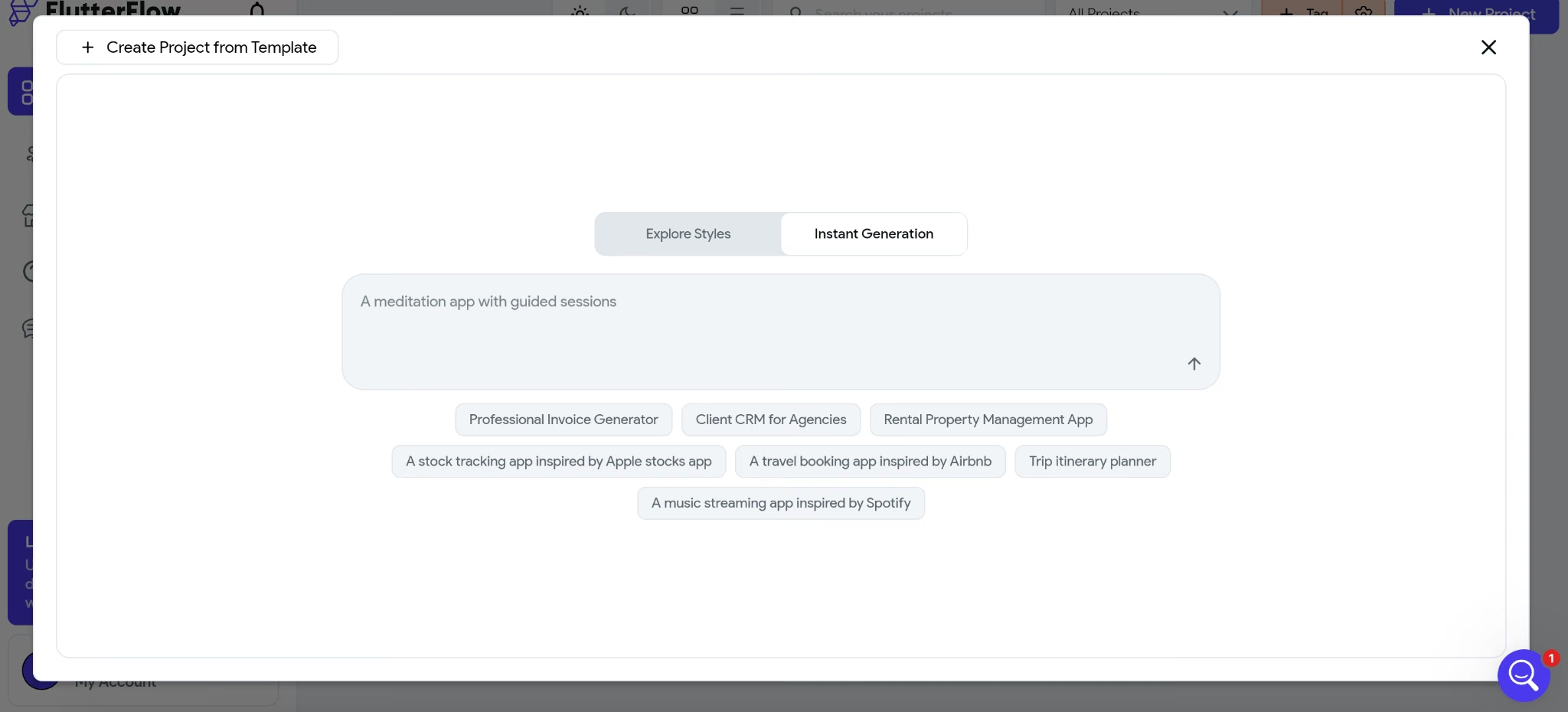
What it does: FlutterFlow generates native iOS and Android apps from a visual builder and AI prompts, backed by Flutter code you can export.
Best for: Someone who wants a true native mobile app on both stores and doesn't mind one extra setup step to get there.
FlutterFlow's AI produced an attractive DeskLoop booking screen fast, with resource cards, a date picker, and a clean layout, before the generation stopped there.
Logins, the two roles, and DeskLoop's data tables all needed a separate Firebase project, set up outside FlutterFlow. The brief's line about "an admin who manages the space" turned out to be the part FlutterFlow couldn't reach on its own.
I burned all 10 of the free plan's Lite credits refining the screen before I'd even started that detour. The whole run came to 70 minutes before a first screen worked end to end.
On the prompt side, asking for a screen and adjusting what came back felt about as approachable as anything else here. The hard part of that hour sat outside the product.
Firebase is configuration work in a second tool, with its own console, its own vocabulary, and a fresh set of error messages to learn. Before either role can sign in, a project has to be:
- Created.
- Connected.
- Pointed at the right collections.
That's also where the risk moves. Permissions in a builder like this live in the second service, and a database left open there stays open no matter how tidy the screens look. Nothing in FlutterFlow warns you about it.
FlutterFlow produced the strongest native output in my test, with smooth animations, platform-standard controls, and screens that didn’t look like web pages stretched onto a phone.
Full Flutter code export makes the app's Flutter code portable, with no platform login attached to it, though the Firebase project remains a separate dependency.
Anyone who came expecting zero extra accounts will hit the Firebase step immediately, and it isn't optional. Treat Firebase as a separate, ongoing cost when comparing FlutterFlow pricing, and the native output on the other side is still worth it.
One cost caveat: three separate lines make up the real bill, and only one appears on FlutterFlow's own pricing page.
- The plan tier itself.
- App store publishing fees.
- The Firebase bill underneath.
Skip FlutterFlow if your app lives in a browser. Everything that makes it strong is aimed at a home screen.
If the Firebase setup or native-first focus is the blocker, these FlutterFlow alternatives compare web and mobile builders by setup, code export, and developer handoff.
Key Features
- True native iOS and Android output: Apps built from the same components a hand-written iOS or Android app uses.
- Full Flutter code export: A developer can take the generated code and keep building.
- Strong Figma import: Maps an existing design file into working screens directly.
Pros and Cons
Pros:
- Platform-standard native components that read like a hand-written iOS or Android app, never a web page in an app shell.
- Full code export if you ever need to hand the build to a developer.
Cons:
- Logins and data live in a separate Firebase project you have to configure by hand.
- The free plan includes 10 Lite credits, and AI generation stops after five requests for the life of the account.
What Users Say
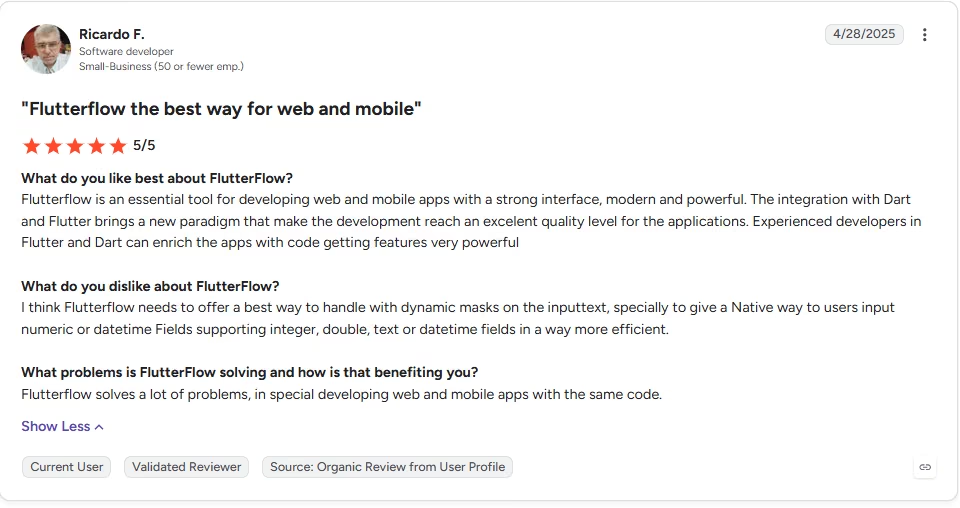
“Flutterflow is an essential tool for developing web and mobile apps with a strong interface, modern and powerful.” - Ricardo F., G2
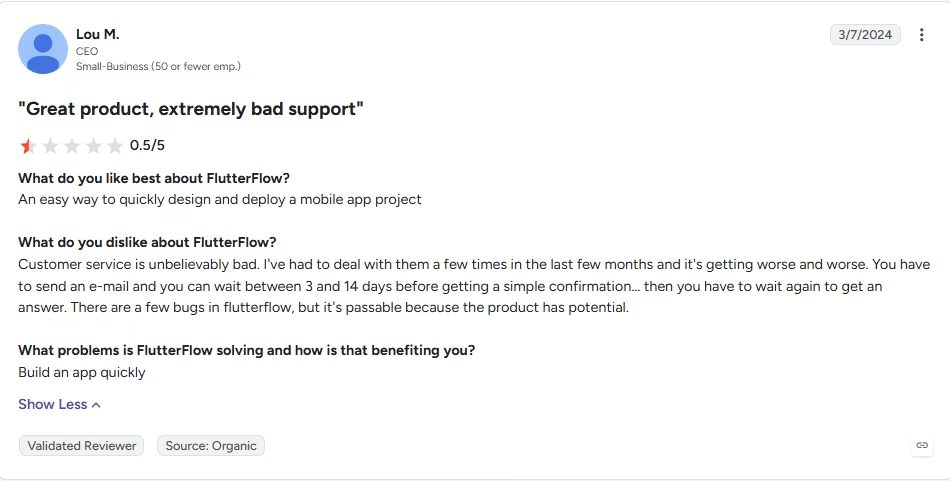
“Customer service is unbelievably bad.” - Lou M., G2
Pricing
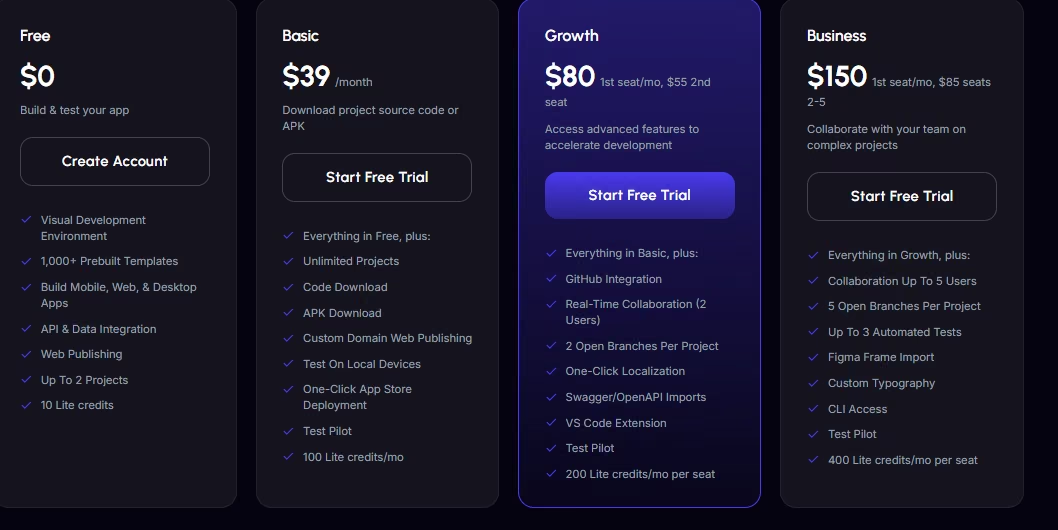
- Free plan: Two projects and 10 Lite credits, with AI generation capped at five requests for the life of the account.
- Cheapest paid plan: Basic, at $39/month ($29.25/month, billed annually), which adds 100 Lite credits a month and source-code download.
- How usage is metered: A flat plan with a Lite-credit allowance on top, plus whatever Firebase costs underneath.
Bottom Line
Plan for a second console before you start, because the Firebase project isn't optional. What you get for that hour is real native output and code you can walk away with.
2. Emergent: Best for Owning Your Code and Your Data
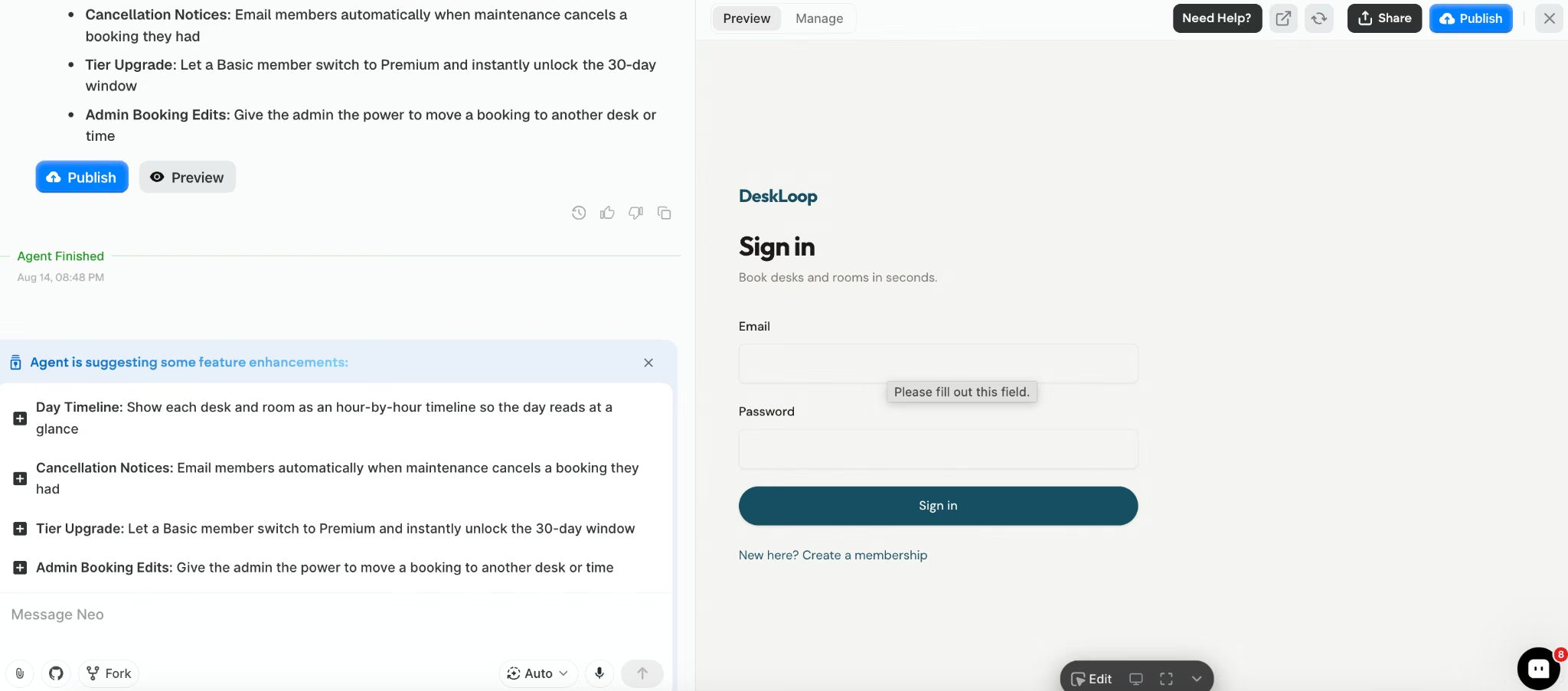
What it does: Emergent turns a written description into a working app, with a database, a login system, and hosting included, and lets you export the code behind it.
Best for: Someone with no coding background who wants a prompt-first build without giving up the option to hand the app to a developer later.
DeskLoop's trickiest requirement was the instruction to "prevent double bookings automatically." Two members aiming at the same desk had to end with one booking and one clear explanation.
Emergent got three things right on the first pass:
- The resource list.
- The tiered advance-booking window.
- The maintenance rule.
The double-booking check is where that first pass slipped.
My first version let two bookings through on adjacent windows that overlapped by a few minutes. One message describing the exact overlap case fixed it.
The maintenance rule is the only requirement in the brief that reaches backward into records the app has already saved:
- Mark Room B unavailable and it drops out of what members can book.
- Existing reservations aren't left stranded behind it.
A missed maintenance conflict can leave a member assigned to a closed room. Emergent handled the maintenance rule on the first pass.
The whole build, from the first screen to a working conflict check, took 24 minutes and 13 credits:
- None of it required leaving the conversation.
- I didn’t have to learn a separate editor during this build.
You describe the rule in the conversation, and Emergent applies it without sending you through a property panel.
What came with that speed counts for more than the speed itself:
- A database and a login system, there from message one, paired with a code export path most prompt-first tools don't offer.
- Managed infrastructure, with SSL and a working sign-in layer included.
DeskLoop came out working end to end, with records that persisted and roles that behaved.
Hand it to a developer later, and they inherit a codebase they can extend from where it stands. That's the difference between a handoff and a rebuild.
Credits are the meter to watch. They draw down by how much work a request takes, so heavy iteration costs more than a first build does.
Key Features
- Database and login system from the first prompt: DeskLoop's records live inside the app itself.
- Exportable code: A developer can pick up the existing build and keep extending it, once you're on the Standard plan or higher.
- Managed hosting included: SSL and a working sign-in layer arrive with the build.
Pros and Cons
Pros:
- Hosting, SSL, and the sign-in layer come from the platform, so there's no infrastructure to set up.
- Exportable code, on the Standard plan or higher, gives a developer a path to continue the build outside Emergent.
Cons:
- The double-booking rule needed one follow-up prompt to get right.
- Credit spend scales with how much iteration a build needs, and back-and-forth fixes add up fast.
What Users Say
“I can simply describe what I want to build and the platform helps generate the structure and code needed.” - Luis F., G2

“The theme that is prompted is not aligned well.” - Gracey D., G2

Pricing
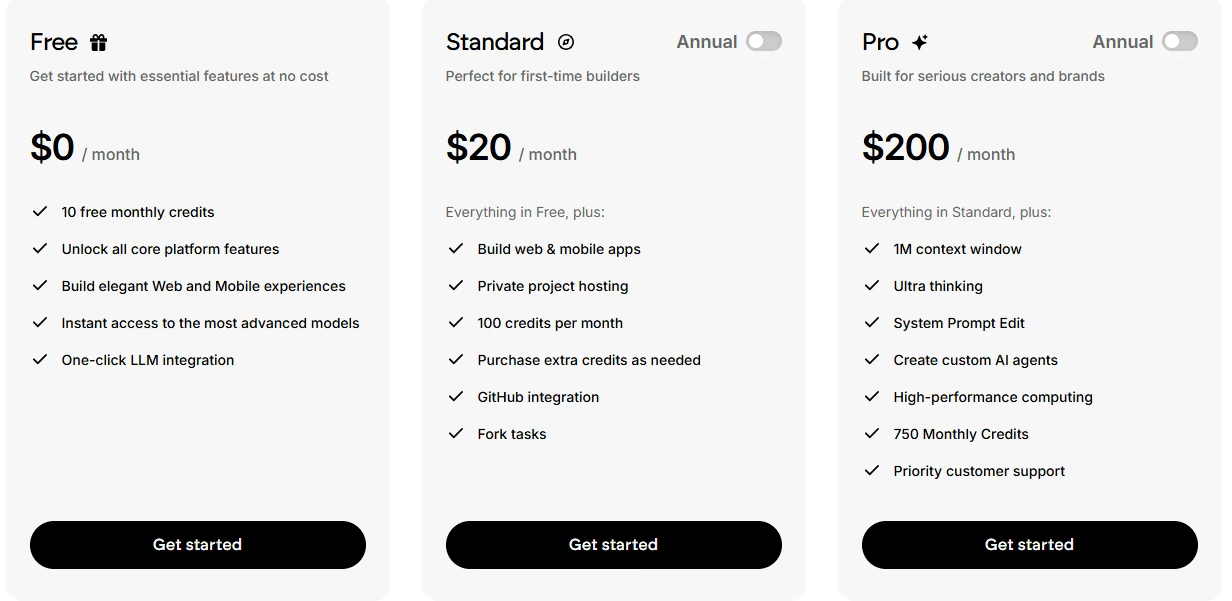
- Free plan: A 10-credit monthly allowance, three credits short of what the working build here took.
- Cheapest paid plan: Standard, at $20/month ($17/month, billed annually), which raises the allowance to 100 credits a month and adds GitHub integration.
- How usage is metered: One credit allowance a month, drawn down by what you build.
Bottom Line
If a developer is never going to touch this app, the export path is worth less to you than raw speed. If you can't rule that out, the 24-minute build gave me a database, a login system, and code I could keep.
3. Bubble: Best for Custom Rules That Have to Behave Exactly Right
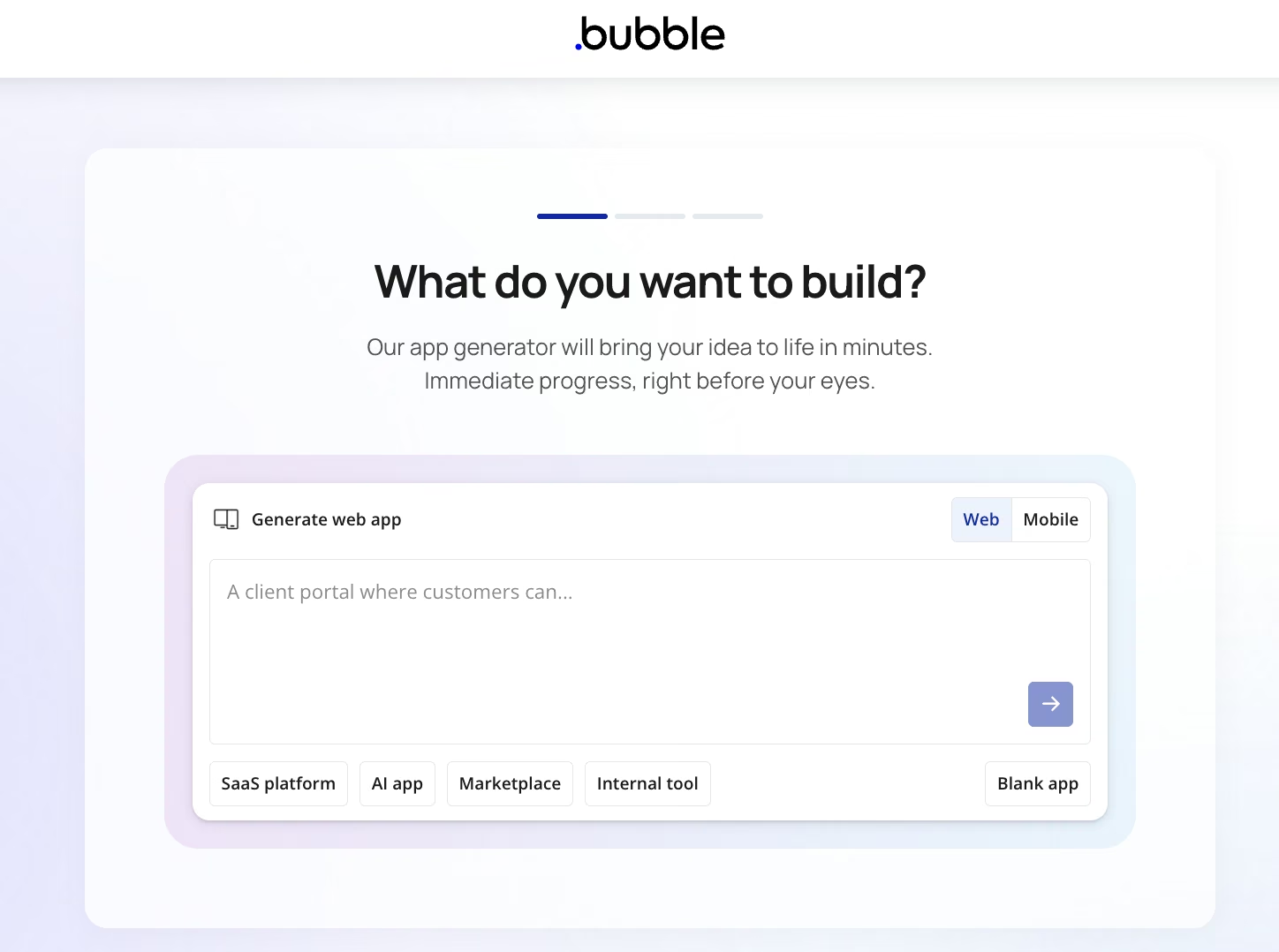
What it does: Bubble is a visual app builder with its own database, workflow engine, and plugin marketplace, built for apps with custom logic.
Best for: Someone willing to learn a visual workflow editor in exchange for control over exactly how every rule and record behaves.
Bubble was the only tool where I set up the data model by hand before touching the visual side. That relational data model took real time to understand up front, and skipping the step would have cost more later.
The booking form came together quickly, but the conflict check took far longer.
I built it as a multi-step conditional workflow and needed three full rebuilds before the overlap logic stopped throwing false positives. Back-to-back bookings that never overlapped kept getting rejected with an explanation the brief had asked for, aimed at the wrong requests.
Total time to a working first screen: 95 minutes, plus 8,700 workload units spent along the way.
Bubble asks you to think in three things before you draw a screen:
- Data types.
- Relationships.
- Multi-step workflows.
That shift from describing an app to configuring data types and workflows gives Bubble its steep learning curve.
It's also why the overlap rule eventually held. The editor made me state exactly what "overlapping" meant, in start times and end times, so nothing rode on a generated version guessing on my behalf.
Bubble's plugin and template library provides prebuilt pieces for many features you might otherwise build by hand.
Bubble pricing is based on workload units, so the cost of running the app shifts with how much it gets used.
Each action the app performs consumes workload units. A booking flow that checks every request for conflicts costs more to run than a stack of static pages.
The trap is a workflow you set up and forget. Two examples that move your bill without changing anything you can see on screen:
- A recurring job left running.
- A search nested inside a repeating group.
None of that depth travels with you. Bubble has no source-code export, so what a developer joining later inherits is an account login.
The branching and premium version control that would make such a handover orderly starts on the Growth plan, one tier above the cheapest paid one.
For DeskLoop, Bubble's workflow editor exposed the false positive and let me define the overlap rule precisely.
Key Features
- Plugin and template marketplace: Prebuilt pieces for most of what you'd otherwise wire together by hand.
- Native mobile builder: App store submission built in alongside the web app.
- Full custom workflow logic: Multi-step conditional rules, beyond simple triggers.
Pros and Cons
Pros:
- A large community and tutorial library for learning the workflow editor.
- Bubble gave me the most control over complex custom logic in this test.
Cons:
- The learning curve here is the steepest of any tool tested, especially for the visual workflow editor.
- Usage-based workload-unit pricing can climb unpredictably as the app gets used.
What Users Say
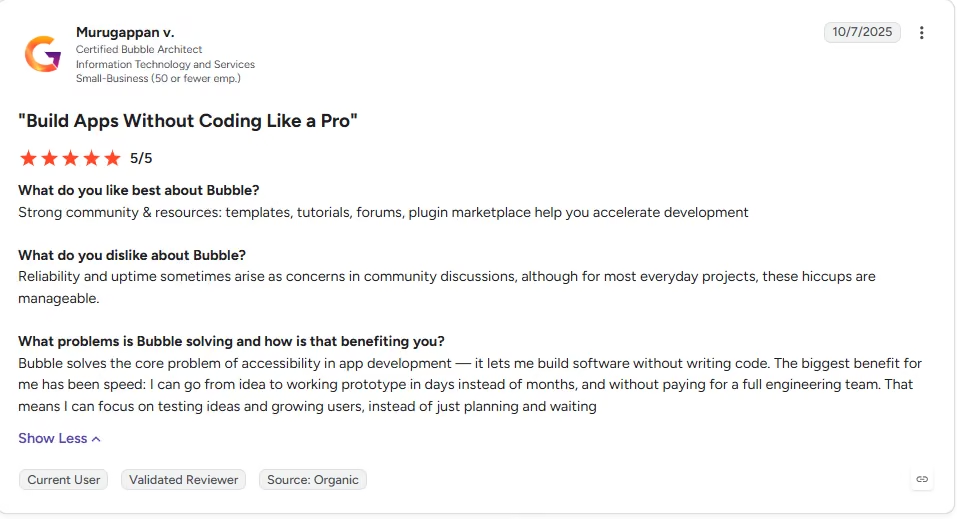
“Strong community & resources: templates, tutorials, forums, plugin marketplace help you accelerate development” - Murugappan v., G2
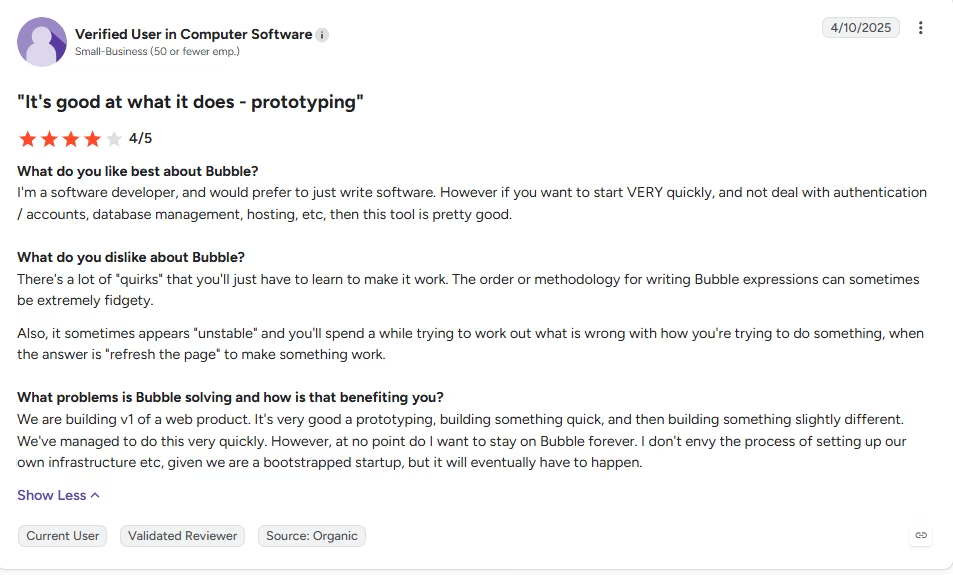
“There's a lot of "quirks" that you'll just have to learn to make it work. The order or methodology for writing Bubble expressions can sometimes be extremely fidgety.” - Anonymous, G2
Pricing
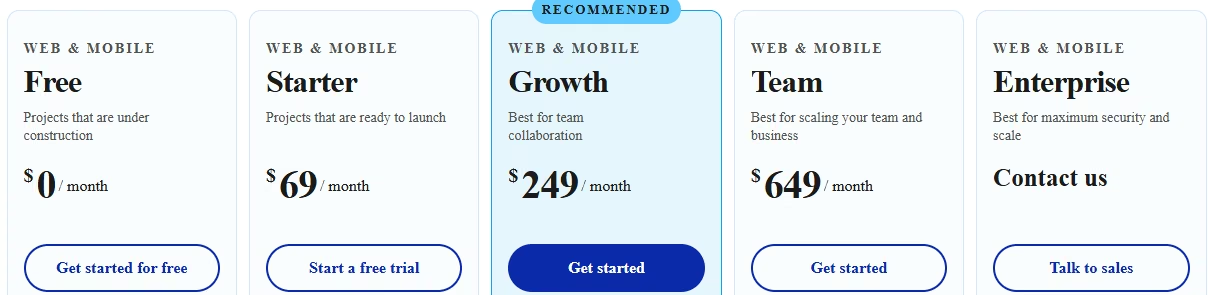
- Free plan: 50,000 workload units a month, on a development version with no live site.
- Cheapest paid plan: Starter, at $32/month ($29/month, billed annually) for web only, or $69/month ($59/month, billed annually) for the Web + Mobile version that adds app store submission.
- How usage is metered: Workload units, consumed by what the app does for the people using it.
Bottom Line
Depth here costs three rebuilds and 95 minutes, more than anything else on this list. Pay it when one rule has to be exactly right, and skip it when your app is mostly forms and lists.
4. Glide: Best for Building From a Prompt, a PDF, or a Screenshot

What it does: Glide builds internal business apps from a prompt, a spreadsheet, a PDF, or a screenshot. Its current builder is GlideOS, which runs alongside the older platform Glide now calls Glide Classic.
Best for: Someone who wants a fast, prompt-first on-ramp and doesn't need to export the app or carry an older Glide Classic project into it.
Glide took the DeskLoop prompt and scaffolded all three tables plus a mobile-style interface in 22 minutes, the fastest first screen of anything I tested. It read 10 individual desks, each auto-labeled by row number, and built the rows without asking me to open a schema editor first.
That run cost 310 credits, which is the number worth sitting with:
- The Solo plan's entry tier carries a third of that.
- One scaffold this size already lands well above the allowance you start on.
The tiers climb from there, and a build like DeskLoop means buying up a tier before you've made a single change to what the prompt produced.
Most of that first pass held up. The mobile-style layout arrives already styled, so there's no design pass sitting between a screen that works and a screen you'd show someone.
Where it thinned out was the conditional side:
- The tier-based booking window worked.
- The maintenance flag set correctly.
- The overlap check needed more coaxing than the speed had led me to expect.
A bigger story turned up when I opened an old Glide Classic account to check whether a prior app would carry over. No prior app does.
Glide pricing splits GlideOS and Glide Classic into separate products with separate plans and subscriptions.
So anything you remember about Glide from a few years back, pricing included, belonged to the other platform. Confirm which one you're signing up for before you commit.
Glide provides two ways to export or access the data:
- Every table exports to CSV.
- A Postgres-compatible connection string gives an outside tool read or write access to the same data, live.
What doesn't come with you is the app itself, the screens, the layout, and the conditional logic that took 22 minutes to get mostly right.
The effect depends on the build. Rebuilding a simple internal tool is easier when the records are already available through a CSV file or live connection.
Build the thing your business schedules itself around, or the thing a developer is meant to inherit in a year, and what they inherit is only the data. You'd still have to rebuild the screens and the rules from scratch.
Key Features
- Builds from more than spreadsheets: A screenshot or a PDF is enough to start an app.
- Prompt-first on-ramp: A working first screen straight from the prompt, with no schema editor to open.
- Mobile-style interface out of the box: No separate styling pass needed for a clean, app-like look.
Pros and Cons
Pros:
- Reads 10 individual desks and two meeting rooms straight from the prompt, with nothing to configure first.
- Doesn't need a spreadsheet or an existing table to start from.
Cons:
- The app itself has no export or self-host route at any tier, even though the data behind it does.
- GlideOS shares nothing with Glide Classic beyond the brand, and older apps can't migrate across.
What Users Say
“I really like the simplicity of GlideOS. It's very easy to do things, and for someone like me, who's got no experience in building applications, it's amazing. I don't even have a clue about coding, and yet I'm able to build apps just by signing up.” - Jamie S., G2

“Wasted an entire day learning what is promoted as EASY! Even then, I needed Gemini AI to coach and walk me through it.” - Zol, Trustpilot

Pricing
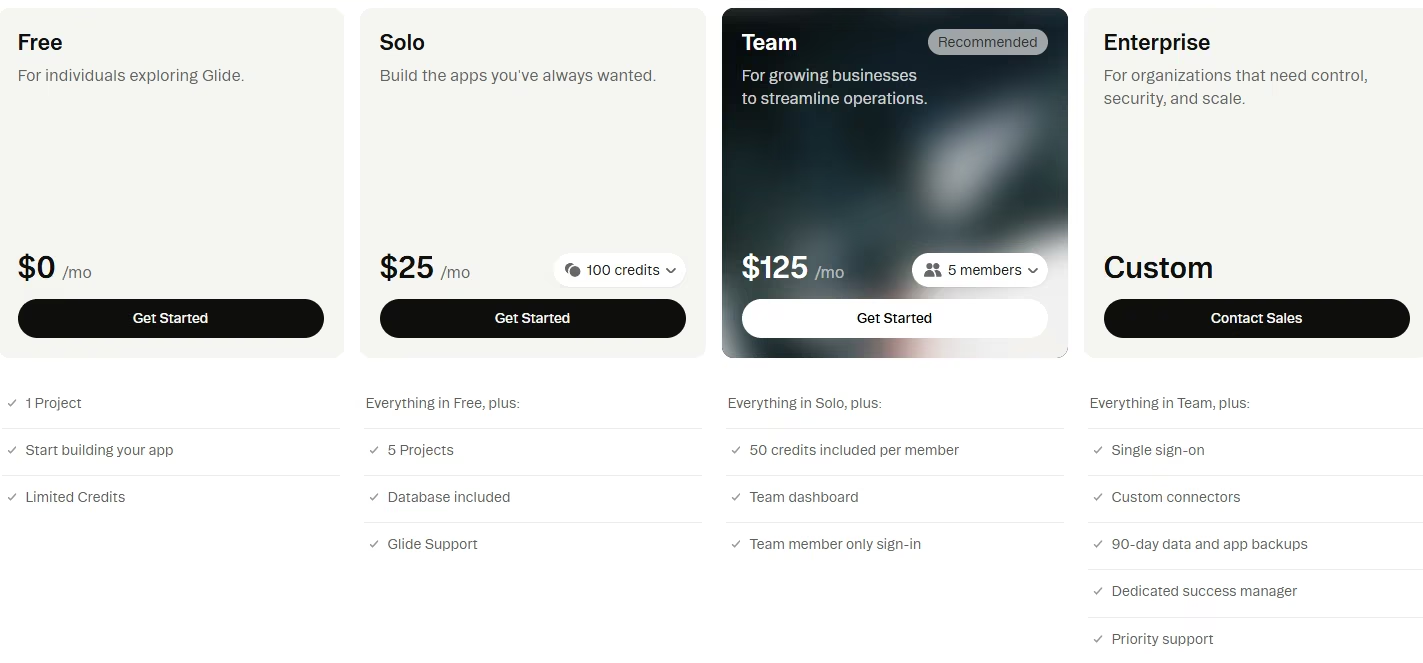
- Free plan: One project with a limited credit allowance.
- Cheapest paid plan: Solo, at $25/month, which covers five projects and opens on the smallest credit tier. Glide offers no annual billing discount, so that monthly figure is the full price.
- How usage is metered: Credits, on monthly tiers that climb as far as 10,000.
Bottom Line
Twenty-two minutes gets you a styled, working screen, provided you know which of the two Glide platforms you're on and which credit tier a build your size needs. If you ever stop paying, the data comes out with you, but the app itself doesn't.
5. Softr: Best for Turning Existing Data Into a Portal

What it does: Softr turns an existing Airtable, Google Sheets, or Notion base, or its own database, into a working web app or client portal.
Best for: Someone who already keeps their data in a spreadsheet or an Airtable base and wants a fast front door onto it.
I connected an Airtable base modeled on DeskLoop's structure and let Softr's AI builder work from there. It scaffolded a portal shell fast, and all five of the free plan's monthly AI credits went into that one generation.
That speed didn't carry into the first draft's layout, which came back as a stack of sections, blocks sitting on top of each other with no sense of hierarchy.
It needed a manual cleanup pass before it was something you'd hand to a member:
- Rearranging layout.
- Fixing spacing.
The brief's instruction to let members "browse available resources" was technically satisfied and visually unusable.
That cleanup, plus the initial generation, came to 50 minutes before I had a working first screen.
Softr's exit works differently from every other tool here, and it's better than the missing code export makes it sound. When the data lives in an Airtable base or a Google Sheet, that base belongs to you already, sitting outside Softr entirely.
Stop paying, and you lose the front door while the records behind it stay yours. Nobody else on this list can say that quite so cleanly, though Glide's own CSV export and live database connection get closer to it than the missing-code-export headline suggests.
Softr now offers its own database, so a separate Airtable base is optional. That setup is easier, but your records then live inside Softr, which reverses the advantage above.
Decide which of the two you're building on before you start, because switching later means rebuilding the data layer.
The first ceiling I met came out of the pricing. Custom code and connectors for outside services start on the Pro plan, a tier above the cheapest paid one.
I met that limit halfway through my build when I needed to connect an outside service. The editor offered no way around it on the Basic plan.
Permissions are the other thing to watch here. Softr's row-level access is a column you have to wire up, and a portal that looks correct can still be serving one member another member's records.
Key Features
- Fast connections to existing data: Airtable, Google Sheets, and Notion all plug in directly.
- A native database option: Softr's own database can replace an external spreadsheet.
- Block-based portal layouts: Sign-in, lists, and detail views assembled without wiring each screen.
Pros and Cons
Pros:
- Connects straight to an Airtable base or Google Sheet you already keep, so the build starts with the data model done.
- No longer requires an external data source to function.
Cons:
- The AI's first draft needs a manual cleanup pass before it looks finished.
- Calling an outside service through a connector requires stepping up to Pro.
What Users Say
“The block-based editor makes it easy to arrange pages, connect data, and create something functional quickly.” - Muzammil M., G2

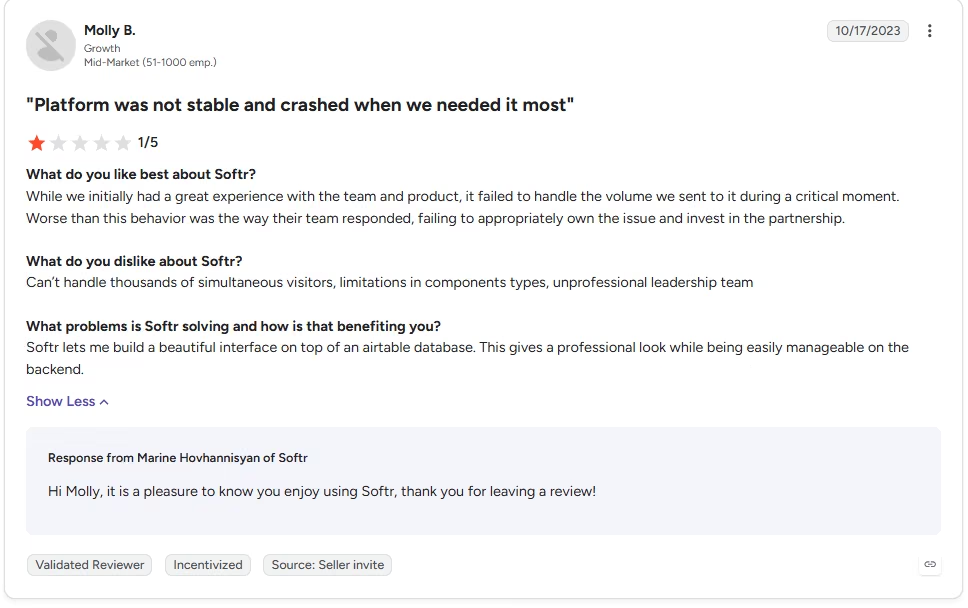
“Can’t handle thousands of simultaneous visitors, limitations in components types, unprofessional leadership team” - Molly B., G2
Pricing
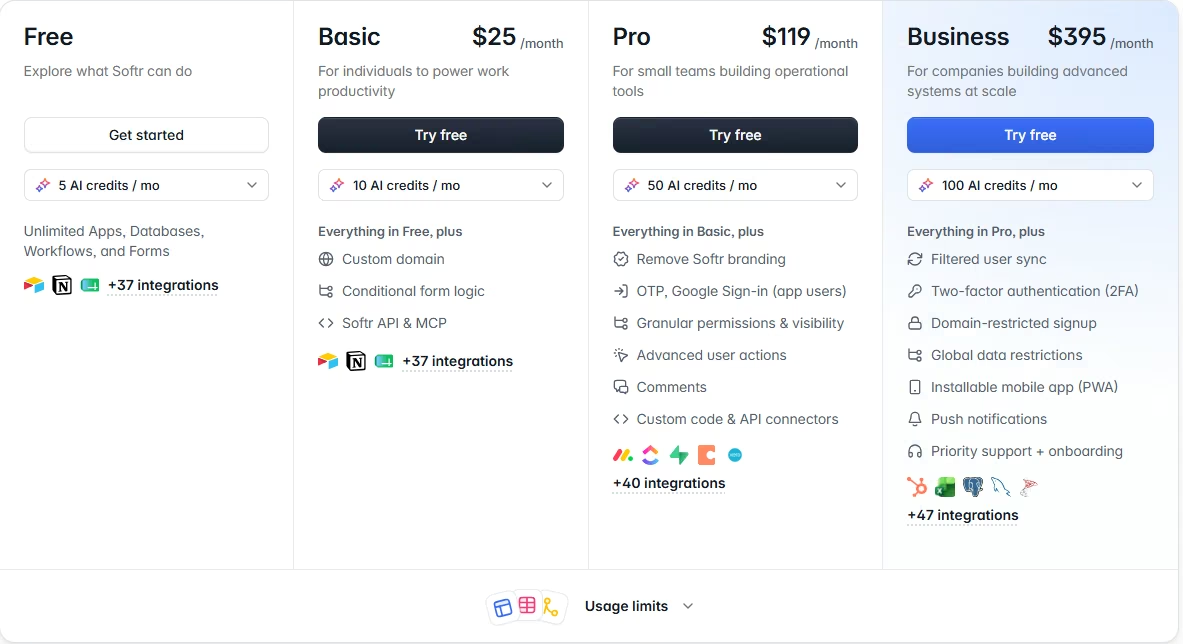
- Free plan: Five AI credits a month, which covers roughly one full generation.
- Cheapest paid plan: Basic, at $25/month ($19/month, billed annually), which raises that to 10 AI credits a month.
- How usage is metered: A flat plan with a monthly AI-credit allowance on top, which is what the AI builder draws from.
Bottom Line
Two things have to be true for Softr to make sense. You need data you already keep somewhere, and time set aside for the polish pass the AI draft arrives needing.
6. Adalo: Best for Solo Builders Who Fix the AI's Misses by Hand

What it does: Adalo builds web apps and native iOS and Android apps from one visual canvas, with an AI assistant called Ada that can prompt-build and prompt-edit screens.
Best for: Someone building alone who's willing to learn where a visual editor keeps its settings, because that's where every correction lands the moment the AI assistant misses.
Adalo's new Ada assistant needed three attempts to build the rule that Basic members can only book up to three days in advance, with Premium members allowed 30:
- The first two versions capped both tiers at the same window.
- That error was easy to miss because the Basic flow still worked as expected.
Once it clicked, the rest moved fast, and I had a working first screen in 62 minutes.
Adalo splits in two once you look under the AI layer, and that shapes how the whole build feels. On top, Ada behaves like the prompt-first tools higher up this list.
Underneath sits the original visual canvas, where property panels wire together three things:
- Screens.
- Lists.
- Actions.
That's exactly where you land every time Ada's version isn't right.
The canvas is more unfamiliar than difficult. To fix a wrong conditional rule, you hunt through settings until you find the one holding it.
For someone without a technical background, finding that setting adds time to each correction. That's also why the three attempts cost me more time than three attempts should.
The next limit came off the plan page:
- Adalo's Starter plan caps you at one published app.
- The free plan publishes none at all.
So there's no room to stand a second version of DeskLoop next to the first and compare a change across both. A solo builder moving fast runs into that mid-project.
What Adalo gets right is the pricing model itself. Flat per-plan limits keep the bill predictable in a way Bubble's workload units don't, and the plan page gives you the number before you start.
Where that predictability stops is on the way out. Adalo has no source-code export at any tier, so nothing here turns into a codebase somebody else could pick up.
The App and Collections API that would let another system read your records sits on the Team plan, two tiers above Starter. Assume the app and everything in it stays inside Adalo for as long as you keep building it.
Key Features
- Native mobile builds: Native iOS and Android apps plus a web app from one canvas.
- Flat, predictable pricing: No usage-based charges that climb as your app grows.
- Ada AI assistant: Prompt-builds and prompt-edits screens on top of the drag-and-drop canvas.
Pros and Cons
Pros:
- Flat billing, with no usage meter creeping upward as the app grows.
- Native iOS and Android output plus a web app from one build.
Cons:
- Starter publishes exactly one app, and the free tier doesn't publish at all.
- Ada is still labeled beta and needed several attempts on complex conditional logic.
What Users Say
“Ease of use. Almost no knowledge of coding is needed.” - Frederick A., G2

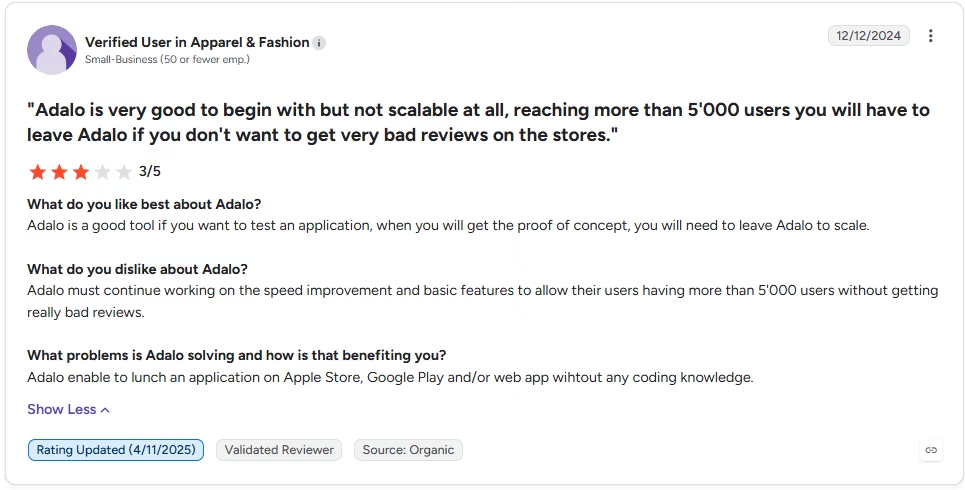
“Adalo must continue working on the speed improvement and basic features to allow their users having more than 5'000 users without getting really bad reviews.” - Anonymous, G2
Pricing
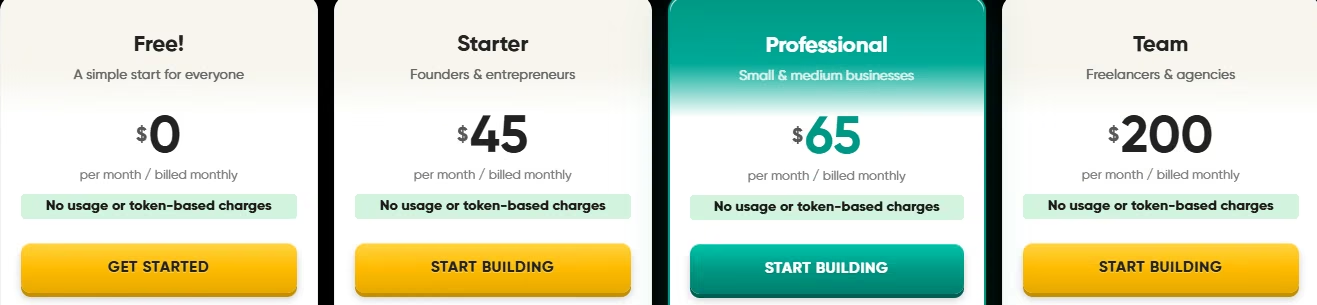
- Free plan: 500 records per app and unlimited test apps, but no published apps.
- Cheapest paid plan: Starter, at $45/month ($36/month, billed annually), which publishes one app.
- How usage is metered: Adalo bills by flat per-plan limits, with no usage or token meter.
Bottom Line
Building here with nobody technical besides you is three attempts on one conditional rule, with every correction after that landing somewhere in a property panel. The AI layer gets you moving. The canvas underneath is what a solo builder has to learn by hand, and that's where the hours go.
What You Start From, and Who You Ask When It Breaks
Two things shape how a first build goes, and neither one appears on a feature list: what you get to start from, and where you go the first time the tool does something you didn't ask for.
Starter Templates: How Much of the App Arrives Prebuilt
A template turns describing an app into editing one that already runs. With nobody technical to ask, editing something that works is also how you learn where a tool keeps its settings, so the gallery earns its keep twice.
The libraries aren't the same size or the same kind:
- Softr publishes 88 business app templates of its own.
- Adalo runs 39 cloneable kits across three types: full app templates, UI kits, and functional kits, all free to clone straight into the builder.
Bubble's template marketplace runs on a different model than the other two. The entries are built by other Bubble users and sold alongside the free ones, so the filter you reach for first is the price filter.
Count the entries second and check who made them first. A first-party library is controlled by the platform itself. A marketplace entry was built by somebody else, on whatever version of the tool they were using at the time, and nobody is obliged to keep it current.
Glide and Emergent both generated DeskLoop's first screen directly from the written brief. They begin without a template to edit. FlutterFlow's own shortcut is a Figma import, which only helps if a design file already exists.
Then there's what a gallery can't cover. A template ships the screens, and the rules are where it stops. Every hard requirement in DeskLoop is logic no prebuilt entry arrives with. That covers the overlap check, the tier-based advance-booking window, and the maintenance block that reaches backward into saved records.
A template hands you a booking app that looks finished. The parts that cost the most time in Bubble and Adalo are still yours to build.
When Something Breaks and There's Nobody to Ask
Every tool here eventually surprises you with something it wasn't asked to do. What happens next is decided by where the answer lives, and that's the question a builder with no developer is least likely to ask before signing up.
- Bubble wins this one outright, and that's what keeps its learning curve survivable at all. Whatever the workflow editor has done to you, somebody has already hit it and written the answer down. The tool that demands the most reading is also the one with the most reading available.
- Emergent inverts the problem. The build happens in a conversation, so being stuck is a message you send in the same place you described the app, and what comes back is a change to the app itself. The fix stays in the same conversation as the build.
- Glide keeps its own GlideOS documentation, and reading it surfaced the limit that would have caught me out. You can build on the free tier all you like, but any paid plan is required before you can share the app with anybody at all.
- FlutterFlow's version of this sits outside FlutterFlow. The DeskLoop build stalled in Firebase, a separate product with its own console and its own error messages. FlutterFlow's documentation explains how to connect a project. It can't tell you why a Firebase rule rejected a read.
- Adalo's is a search problem of a different shape, because you don't know what to search for. If Ada gets a rule wrong, the correction lives in a property panel somewhere on the canvas, and you can't look up the name of a setting you've never seen.
- Softr is the gentlest of the six here, for an accidental reason. Its failures are visible. A portal that came back as a stack of misaligned blocks is a layout you can see and drag into place. Nothing is hiding in a settings panel or a second console.
Judge a builder on how well it explains itself the third time it surprises you. First-screen speed is a different measure entirely, and it rarely points at the same tool.
No Code App Builders vs. Vibe Coding: Which One Fits a Builder With No Developer?
There's a second route to the same destination, and it skips the builder entirely. Vibe coding tools generate a whole codebase from a prompt, then rewrite the code underneath as you keep prompting.
The speed is the appeal. The harder question is what you're holding at the end of it, because the generated code becomes yours to understand. When a vibe-coded app misbehaves, the fix lives in the code, so you prompt, read the result, work out what went wrong, and prompt again.
A visual builder puts a guardrail in that same spot: the editor only exposes a fixed set of wiring options. You can't build past what the editor exposes, and you also can't break the app in a way you don't understand.
The distinction sharpens the moment an app handles other people's information. Code nobody reads can still ship the ordinary web application problems OWASP catalogs:
- Broken access control on a database.
- An endpoint anyone can call.
- A paid feature that isn't gated at all.
A builder with no developer has no one to catch that. None of the six warned me about these risks during the test. Visual builders still leave permissions for the builder to configure.
Neither route is work-free. A visual builder still asks you to model data and think in conditional rules, which is why the overlap check took effort in every tool that could handle it.
If you'd rather stay inside a guardrail, you can't step outside by accident; the six above are the shorter route. The coding-assistant route suits anyone who wants to open the misbehaving file and change it.
That second route has its own shortlists, and they sit outside this one. Replit alternatives and Cursor alternatives map that field. For costs and a direct comparison, see Replit's pricing, Cursor's pricing, and Claude Code vs. Cursor.
Start From Your Own Constraints
Three questions settle most of this before you compare a single feature. Answer them and the six above collapse to two or three candidates.
Are You Building a Web App, or Something That Installs on a Phone?
Answer this one first, because it eliminates faster than anything else. If the app has to sit on a home screen and go through the App Store or Google Play, the field narrows to four.
The four that reach a phone properly:
- FlutterFlow: Platform-standard native controls, at the cost of a separate Firebase project.
- Adalo: Web, iOS, and Android from one canvas, with an older visual workflow under the AI layer.
- Bubble: App store submission built in, behind the steepest learning curve here.
- Emergent: Web and mobile both, producing export-ready iOS and Android builds you submit to the stores yourself.
If a browser app or an internal portal does the job, this constraint disappears.
Pick a web-only tool and change your mind later, though, and there's no button that fixes it. A published GlideOS app lives at a Glide subdomain or at a custom domain you connect to it, and members reach it in a browser. Softr's portals work the same way. For a lot of teams, that's the whole distribution question answered.
GlideOS and Softr both publish browser apps, not App Store or Google Play listings, though people often conflate the two when they ask whether an app is available on their phone. The rest of the way means wrapping the web app in a native shell, which is developer work by definition, and it's the exact thing this page's reader has already ruled out.
Apple sets a floor on the practice as well. Its App Review Guidelines state that an app should include features, content, and UI that go beyond a repackaged website, so a thin wrapper around a portal is the specific case that the rule was written for.
Answer the store question before you pick a tool. Changing the distribution model later can require rebuilding the app for a different platform.
Where Does Your Data Already Live?
If your records already sit in an Airtable base, a Google Sheet, or Notion, Softr points at them directly, and the data stays yours. It's alone in that here, and it's the whole case for picking it.
If there's no data yet, you want something that brings its own. Emergent stood up the Members, Resources, and Bookings structure from the brief alone, with nothing separate to configure.
Bubble hands you the most control over how records relate and asks the most effort in return. FlutterFlow expects a Firebase project, a second account with its own console.
What Happens to the Bill Once People Start Using It?
This is the question a first-time builder is least equipped to answer, which is why it belongs up front. Three billing shapes show up:
- What you have: A flat plan price.
- What you build: Credits that draw down as you build.
- What your app does: Usage that scales as the app gets used.
Adalo is the clearest case of the first kind, since nothing meters underneath its plan price.
Bubble sits at the other end, where workload units track how much the app gets used. Emergent and Glide meter in credits, which is easy to reason about on a first app and harder to forecast once you iterate.
Softr and FlutterFlow do the same on top of a flat plan, so only part of their bill moves. FlutterFlow adds a Firebase bill underneath that, which is the one people forget. Between that and app store publishing fees, its real bill runs three lines deep, and only the plan tier shows up on FlutterFlow's own pricing page.
The figure that catches people out is usually the second limit behind the monthly price: an app cap, a record cap, or a feature that turns out to sit one tier above the plan you signed up for.
If budget is the binding constraint, the best free AI app builders roundup covers what you can get for nothing, and what it costs to create an app weighs this route against the alternatives.
If it's specifically the prompt-first half of this field you're shopping for, separate from the visual editors above, this roundup of prompt-first builders ranks that group on its own terms.
Which No Code App Builder Should You Choose?
Most of these six can get a simple app off the ground. What separates them is what happens once your build needs a conditional rule, a data model, or a plan for the day you outgrow the platform.
Choose FlutterFlow if you:
- Need iOS and Android output with native platform controls behind the screens.
- Are willing to keep a second console open, since logins and data live in a Firebase project outside the builder.
Choose Emergent if you:
- Can't say yet whether this stays a small internal tool or turns into the thing your work runs on.
- Want the code and the records still in your hands the day you stop paying.
Choose Bubble if you:
- Have one rule that has to be exactly right, like overlap detection across records that already exist.
- Can put in the time to learn a workflow editor, with room in the budget for a bill that moves with usage.
Choose Glide if you:
- Want something usable today, starting from material you already wrote down.
- Don't mind rebuilding the screens elsewhere later, as long as the records themselves export cleanly as a CSV file or a live connection.
Choose Softr if you:
- Already keep the data somewhere you trust, and only need a working front door onto it.
- Can spare time for a manual cleanup pass, since the AI's first layout draft won't arrive polished.
Choose Adalo if you:
- Need to know the bill before you start, because it's your own money going into a first build.
- Are publishing a single app and can live inside the entry tier's limit on that.
Skip this category entirely if:
- You need several team members with distinct permission levels.
- You're bringing on a developer from day one who'd rather build in their own stack.
Final Verdict
FlutterFlow is the pick if the app has to live on a phone, and no other tool here pairs native output with a complete code export. Emergent is the stronger call for anything browser-first that might outgrow a no code ceiling, since a database, a login system, and exportable code all came from one fast build. Bubble takes sheer depth if you have the patience, and Glide, Softr, and Adalo each win a narrower job.
How Emergent Helps When You Outgrow a No Code App Builder's Ceiling
Several tools here are clear about where they stop. Neither Adalo nor Bubble exports source code on any tier, and Glide's export covers only the data behind an app.
That's the trade-off a lot of these platforms make for speed. You move fast right up to the ceiling, and then the interface you built has nowhere to go, even on the tools that hand your records back.
What Arrives Instead
Emergent is built for that moment, without asking you to start over. You describe the app the way you'd describe it to a person, as with any prompt-first tool above.
One founder built a full-featured education platform without a dev team, using Emergent for several user types and connected product modules.
Emergent generates a build with a database, a login system, and hosting, and keeps later prompt changes in the same project.
When DeskLoop's double-booking rule needed a fix, one follow-up prompt got it right, inside the same 13 credits the whole build cost. That happened through the conversational flow you'd use for any change, with no panel to hunt through.
The code is exportable through GitHub on the Standard plan or higher, so a developer can continue from the generated codebase.
What a Developer Inherits
A developer joining a Bubble or an Adalo build must first understand the editor and recreate its logic elsewhere before adding new features.
Here they open a codebase, run it, and change the thing you asked them to change. The same is true if you want to add payments, connect an outside service, or move the app to your own hosting later.
Emergent is weaker on a few things worth naming. Heavy PDF reporting and Swift apps aimed at Apple Watch or iPad are both outside what it does well.
If you're building tools around AI workflows more broadly, Emergent's MCP connector is worth a look too. Otherwise, build your first app on Emergent and see how far a single written brief gets on your own idea.

Describe what you want and Emergent builds it. A real, production-ready app you can launch the same day.
- One prompt to build
- Zero code required
- Deploy in minutes







