



I spent the past few months putting eight coding models through the same builds, from multi-file bugs to long agent sessions. These are the five best AI models for coding in 2026, and the ones worth your tokens.
The 5 Best AI Models for Coding at a Glance
Here is how the top five compare before we get into each one. "Context" is how much code a model can hold in mind at once, and "open weights" means you can download the model and run it on your own machines.
Prices come from each provider's official pricing page and are worth a spot-check before you commit, since this part of the market moves week to week.
How I Tested These AI Coding Models
I ran each model on the same set of jobs a builder hits in a normal week: fixing a bug that spanned several files, planning a feature before writing it, refactoring a messy module, and keeping a long agent session on track without it losing the plot.
Here is what I weighed:
- Reasoning depth: Whether the model traced a bug to its root cause instead of patching the symptom you can see.
- Agentic stamina: Whether it stayed coherent across a long, multi-step task or drifted after the first few rounds.
- Context handling: Whether it kept track of a large codebase without forgetting earlier constraints.
- Cost per job: What a full job costs once you add up the back-and-forth, beyond the sticker price per million tokens.
- Where you can run it: Closed API only, or open weights you can host and tune yourself.
This split mattered more than any single benchmark score. A model that looks great on a one-shot test can fall apart the moment a fix breaks something three files away.
It helps to know the two benchmarks I mention most. SWE-bench Verified and the harder SWE-bench Pro both test whether a model can resolve actual GitHub issues end-to-end, so they track coding ability better than older puzzle-style tests.
One more piece of context worth holding onto: in Stack Overflow's 2025 developer survey, 84% of developers now use or plan to use AI tools, yet only 29% somewhat trust the output, and the top frustration (cited by 66%) is "AI solutions that are almost right, but not quite." Picking the right model for the task is how you shrink that gap.
1. Claude Fable 5: Best for the Hardest, Long-Horizon Work
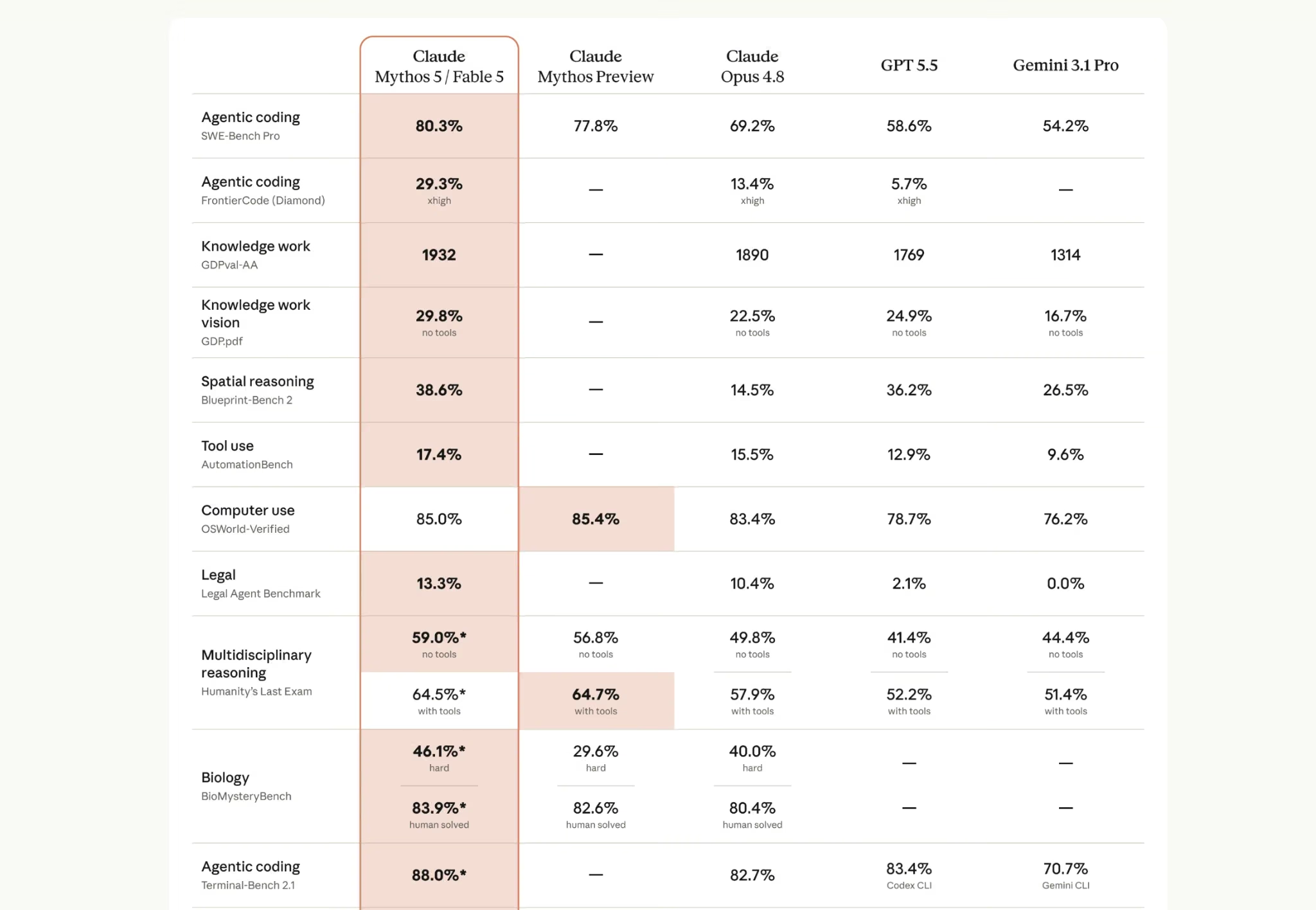
What it does: Anthropic's Claude Fable 5 is a closed frontier model from the new Mythos tier, a step above the Opus line, built for long-horizon reasoning and the hardest multi-file engineering.
Best for: Ambitious, long-running jobs like large migrations and deep cross-system debugging, where consistency across hours of steps matters more than raw speed.
Fable 5 is the highest-capability coding model you can call right now. Anthropic shipped it on June 9, 2026, as the public, safeguarded release of the same model behind its restricted Mythos 5, and it tops the coding charts by a clear margin: 80.3% on SWE-bench Pro against 69.2% for Opus 4.8 and 58.6% for GPT-5.5.
The design goal is stamina. Anthropic's framing is that the longer and more complex the task, the larger Fable 5's lead, and the early proof points are big: in one reported case, it ran a migration across a 50-million-line codebase in a single day.
Key Features
- Best-in-class coding scores: 95.0% on SWE-bench Verified and 80.3% on SWE-bench Pro, both ahead of every other model here, plus first place on the harder FrontierCode set.
- Long-horizon reasoning: Built to plan, use tools, test, and course-correct across hours of autonomous work without losing the thread.
- Big working memory: A 1M-token context window with up to 128K tokens of output, and text plus image input.
- Highest knowledge-work score: Leads Artificial Analysis's GDPval-AA at 1932 Elo, ahead of Opus 4.8's 1890.
Pros and Cons
Pros:
- The strongest public model for hard, long-horizon engineering, clearly ahead on SWE-bench Pro and FrontierCode.
- Holds a plan across long agentic sessions, so it shines exactly where one-shot models fall apart.
- 1M context and image input in a single model.
Cons:
- Expensive at $10 / $50 per 1M tokens, double Opus 4.8, so it only pays off on work that justifies it.
- Safeguards route cybersecurity, biology, chemistry, and model-distillation requests to an Opus 4.8 fallback, so you will not always get Fable-class output.
- Closed weights, and brand new, so its track record outside launch benchmarks is still thin.
What Developers Are Saying
On r/claude, the reaction is split. The fans report it clearing work Opus would spin on without progress: one developer ran it across a full codebase and got 57 recommendations, six of them security issues, and another called it cheaper than Opus in practice because it gets things right the first time instead of burning tokens on wheel-spinning.
The complaints target the rerelease rather than the model: tighter usage limits than the original launch window, everyday coding requests tripping the safeguard filters, and a few longtime users who feel the current version lost a step compared to the first release.
Pricing
Claude Fable 5 costs $10 per 1M input tokens and $50 per 1M output tokens on the Anthropic API, with the full 1M context billed at the standard rate. That is double Opus 4.8, which stays the cheaper step-down at $5 / $25 for routine work. You can also reach Fable 5 through Claude Code and paid Claude plans.
Bottom Line
I would reach for Fable 5 on the hardest, longest jobs: big migrations, gnarly cross-system debugging, anything that has already defeated a cheaper model. For everyday coding, Opus 4.8 or an open model does the job for a fraction of the price.
2. GPT-5.5: Best for Broad Agentic Coding and Tooling
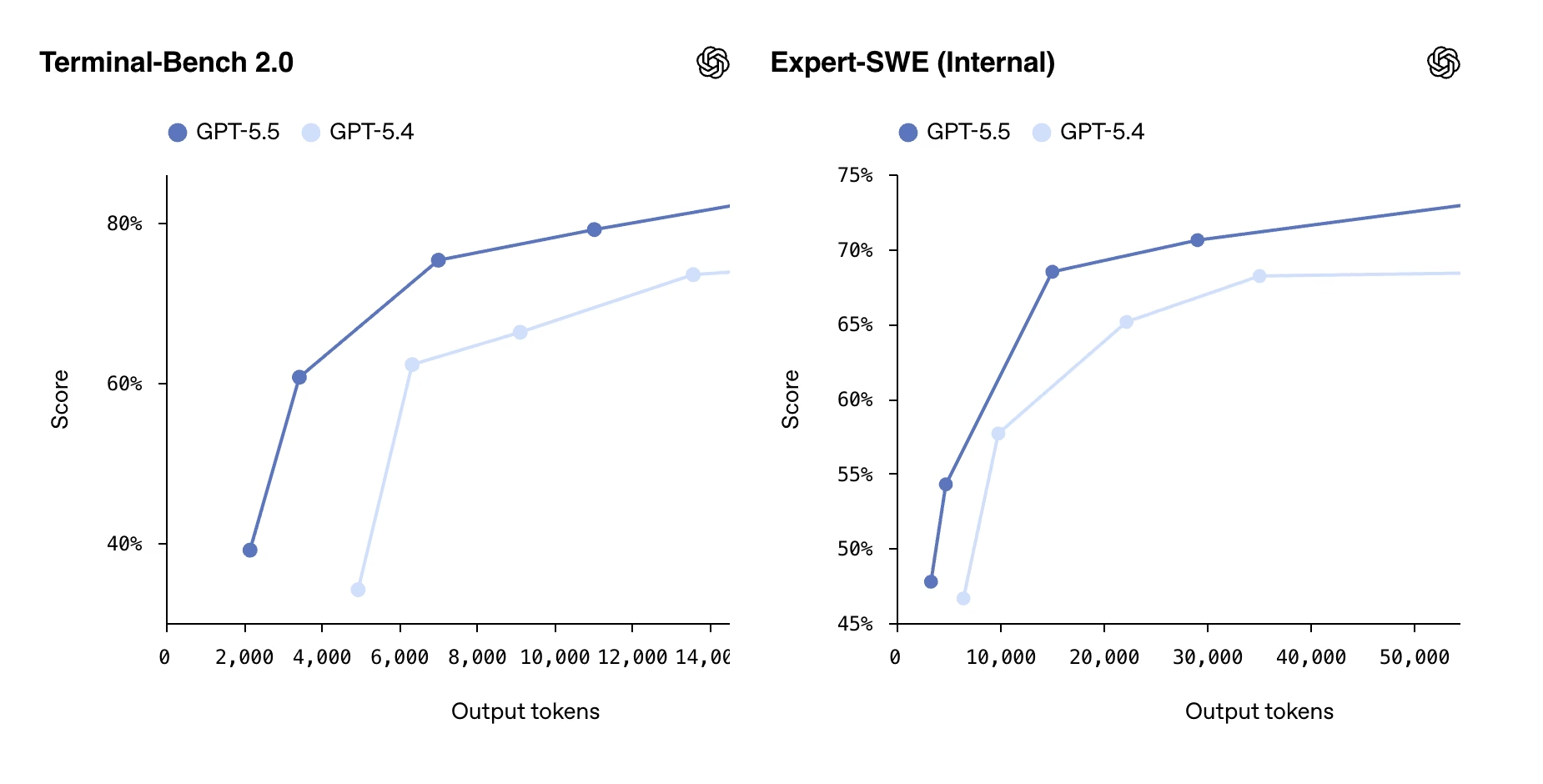
What it does: OpenAI's GPT-5.5 is a closed frontier model that pairs strong coding with deep tool use, computer use, and research, all in one system.
Best for: Teams that want one model to handle coding, multimodal input, and connected tools without switching between specialists.
GPT-5.5 is the most well-rounded option on this list. It posts an 82–83% on SWE-bench Verified, follows instructions tightly on long transformations, and is hard to beat when a task mixes code with images, documents, or browsing. OpenAI shipped it on April 23, 2026, and it powers Codex, where it leads the latest Terminal-Bench agent test.
Key Features
- Strong on defined transformations: Holds structure across long refactors and migrations where many models drift halfway through.
- Tool and computer use: Drives connected tools and a desktop well, which matters for agent workflows.
- Multimodal input: Reads text and images, useful when a bug starts from a screenshot or a chart.
- Large context: A 1M-token window (922K input, 128K output) keeps big jobs in view.
Pros and Cons
Pros:
- The most versatile single model for mixed coding, tooling, and research work.
- About 23% more likely to be factually correct than GPT-5.4, with factual errors roughly 3% less often, per OpenAI's reporting.
- Three variants (Standard, Thinking, Pro) let you trade speed for depth.
Cons:
- Trails the top Claude models on the harder SWE-bench Pro test (58.6% vs Opus 4.8's 69.2% and Fable 5's 80.3%).
- Highest output price on this list at $30 per 1M tokens.
- Closed weights, so no self-hosting or fine-tuning.
What Developers Are Saying
Hacker News threads frame GPT-5.5 as an autonomous agent, not a chatbot. While praised for speeding up workflows through advanced reasoning, some users report higher token consumption and risks of code bloat.
Pricing
GPT-5.5 costs $5 per 1M input tokens and $30 per 1M output tokens on the OpenAI API. The deliberative GPT-5.5 Pro variant runs at $30 / $180 per 1M tokens.
Bottom Line
I would pick GPT-5.5 when a single model needs to cover coding plus everything around it. For pure pull-request resolution on a hard codebase, Opus 4.8 still edges it out.
3. DeepSeek V4: Best for Frontier Coding on a Budget
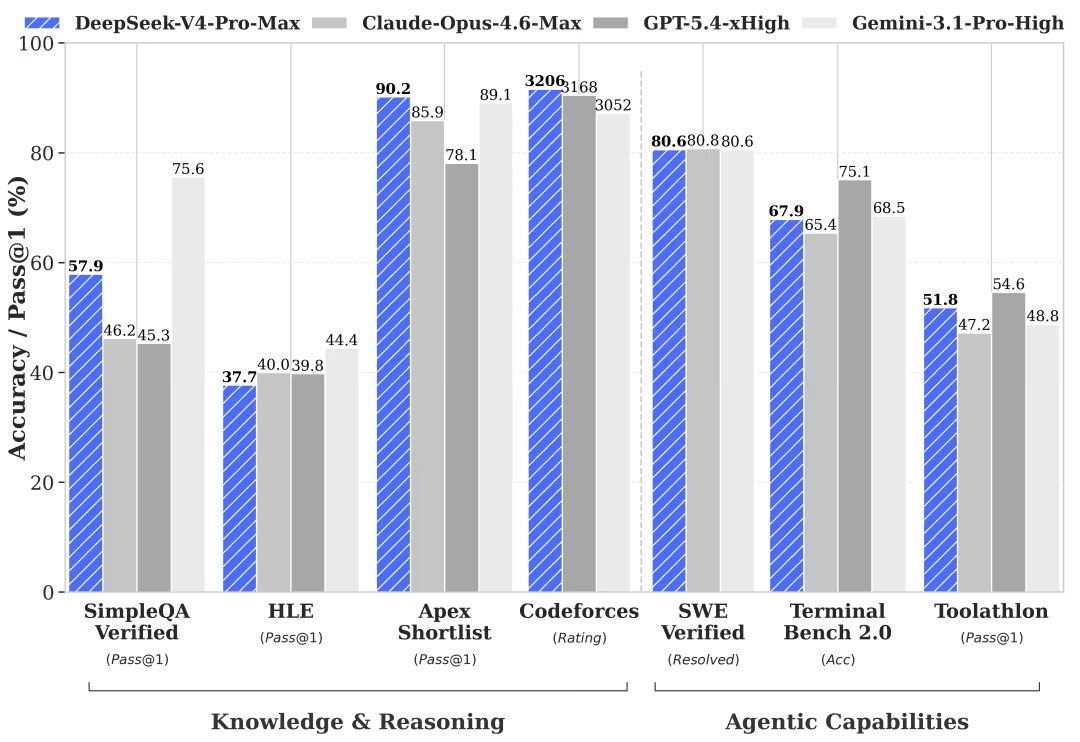
What it does: DeepSeek V4 is an open-weight model family that lands within striking distance of the closed frontier on coding and reasoning, at a fraction of the cost.
Best for: Cost-sensitive teams running high volumes of coding or agent work where price per task is the deciding factor.
DeepSeek V4-Pro is the cheapest near-frontier coding model I tested, by a wide margin. It scores 80.6% on SWE-bench Verified, the highest open-weight result and tied with Gemini 3.1 Pro, while costing nearly 30 times less per output token than Opus 4.8. DeepSeek released it on April 24, 2026, under the permissive MIT license, with weights on Hugging Face.
Key Features
- Near-frontier coding at open-weight prices: strong results on production bug-fixing tests for a fraction of closed-model cost.
- Two tiers: V4-Pro for the hardest work (1.6 trillion total parameters, 49 billion active per token) and the lighter V4-Flash for cheap, high-volume calls.
- Thinking and non-thinking modes: switch on step-by-step reasoning only when a task needs it.
- Huge context: a 1M-token window with up to 384K tokens of output.
Pros and Cons
Pros:
- Best value on the list, with output priced at $0.87 per 1M tokens.
- Open weights under MIT, so you can self-host and keep your data off a vendor's servers.
- Works with both OpenAI and Anthropic API formats, so it drops into existing setups.
Cons:
- Still trails Opus 4.8 and GPT-5.5 on the longest, hardest agentic loops.
- Self-hosting a 1.6-trillion-parameter model is heavy and not free in practice.
- Hosted API service has fewer enterprise guarantees than the closed providers.
What Developers Are Saying
The Hacker News reaction centers on praising DeepSeek V4 for offering near-frontier coding performance at a fraction of the cost of competitors, shifting AI-assisted engineering toward V4 Pro or V4 Flash. Community reviews, including discussions on Hacker News, highlight the model's high-speed performance in UI tasks and effective use in agent loops.
Pricing
DeepSeek V4-Pro costs $0.435 per 1M input tokens and $0.87 per 1M output tokens on the DeepSeek API, a price made permanent in May 2026. V4-Flash is cheaper still at $0.14 / $0.28 per 1M tokens.
Bottom Line
I would default to DeepSeek V4 when cost is the binding constraint and the work is not your single hardest agentic task. For those, keep a frontier model on call.
4. MiniMax M3: Best for Huge-Context, Multimodal Work You Run Yourself
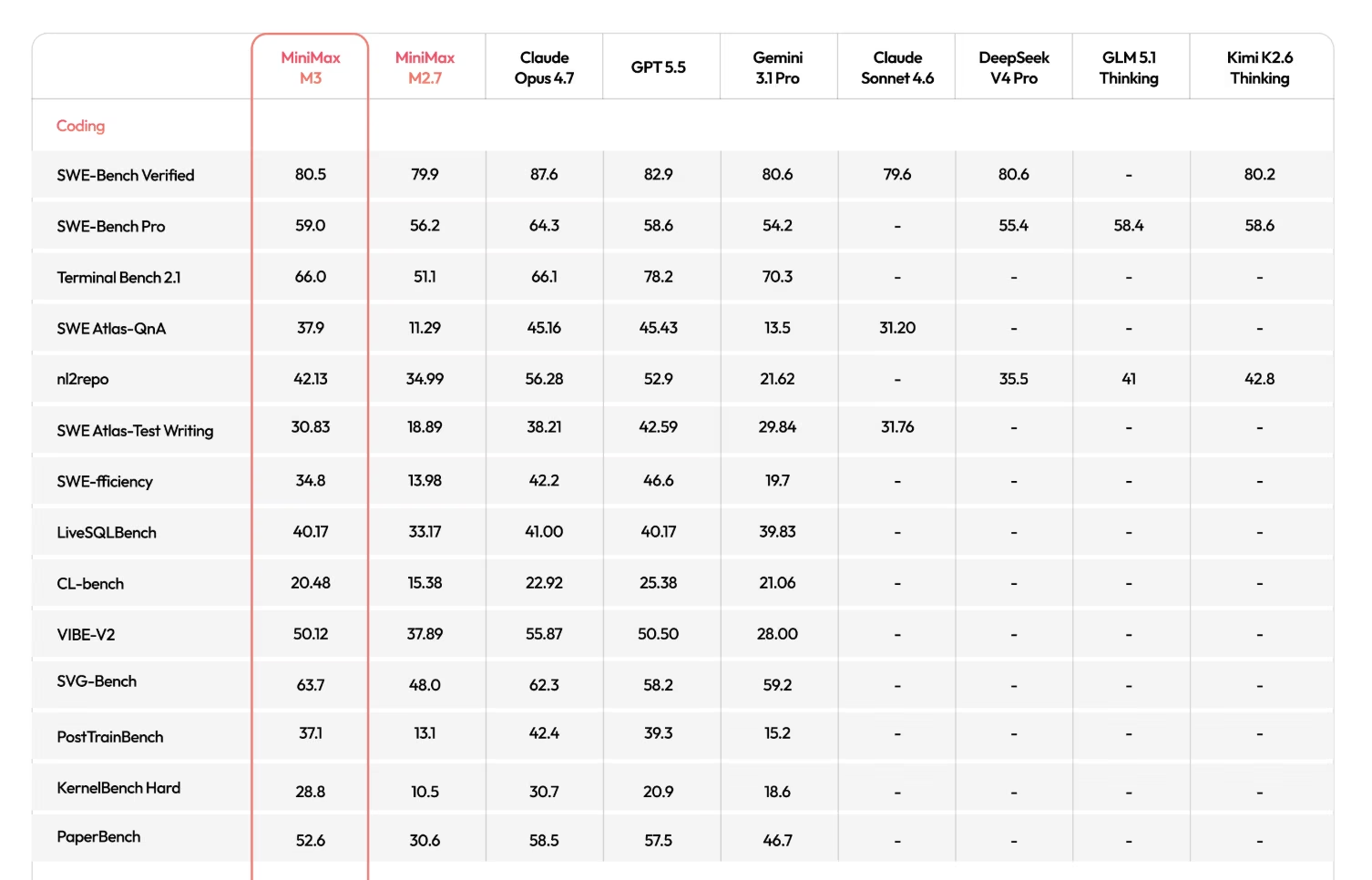
What it does: MiniMax M3 is an open-weight model that combines frontier-level coding, a 1-million-token context window, and native multimodality in one architecture.
Best for: Builders who want a single open model for long-context, image, and computer-use tasks they can host themselves.
M3 is the most ambitious open release I tested. MiniMax shipped it on June 1, 2026, and it is the first open-weight model to bring top-tier coding, a 1M-token context, and native multimodality together.
It reads text, images, and video, can operate a desktop, and scores about 59% on SWE-bench Pro, ahead of GPT-5.5 and behind Claude Opus 4.8.
Key Features
- Sparse attention for cheap long context: A new design (MiniMax Sparse Attention) keeps a 1M-token window practical, with far less compute per token at full length.
- Native multimodality: Trained on text, image, and video from the start, with vision built into the base model.
- Computer use: Can drive a desktop, which suits document-heavy and automation workflows.
- Efficient by design: A mixture-of-experts model that activates only a slice of its parameters per token, so it runs cheaper than its size suggests.
Pros and Cons
Pros:
- Rare mix of frontier coding, 1M context, and multimodal input in one open model.
- Open weights you can download and run on your own infrastructure.
- Cheap to call, at roughly $0.60 / $2.40 per 1M tokens on third-party hosts.
Cons:
- Brand new, so real-world reliability against the closed leaders is still being proven.
- The license terms on commercial use are worth reading closely before you ship.
- Running a 200-billion-parameter-class model well takes serious hardware.
What Developers Are Saying
Developers on Reddit are praising the MiniMax M3 model for its 1-million-token context window, high agentic performance, and cost-effective, frontier-level coding capabilities. While widely used for full-context debugging and frontend tasks, some users report inconsistent logic and potential over-engineering in complex scenarios.
Pricing
MiniMax M3 lists around $0.60 per 1M input tokens and $2.40 per 1M output tokens on its own pay-as-you-go plan, currently priced at a permanent 50% off (roughly $0.30 / $1.20), with the rate doubling above 512K tokens of context. Confirm the current numbers on platform.minimax.io and check the open-weight license before commercial use.
Bottom Line
I would reach for M3 when the job needs a huge context, mixed media, or self-hosting in one package. For the single hardest English-language reasoning tasks, a closed frontier model is still the safer call.
5. GLM-5.2: Best for Long-Horizon Agent Runs
What it does: Z.ai's GLM-5.2 is an open-weight model tuned for long-horizon agentic engineering, built to keep grinding through repository-scale coding tasks.
Best for: Builders running agents that need to stay coherent across long, tool-heavy sessions without stalling.
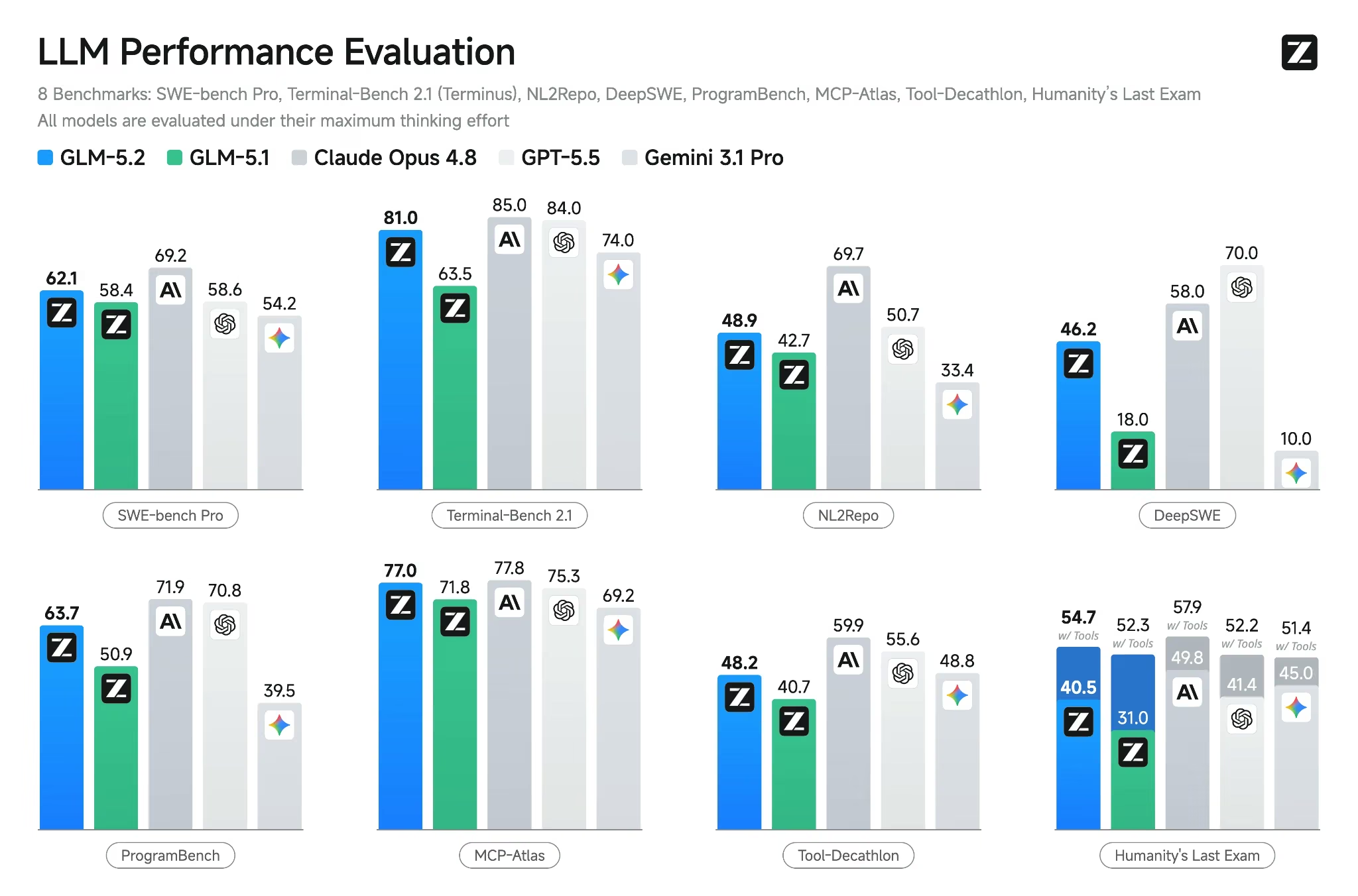
GLM-5.2 is the endurance specialist and right now the strongest open-weight coding model on the public benchmarks. Z.ai shipped it on June 13, 2026, and it is the first open model to clear 80% on Terminal-Bench 2.1 (81.0), while its 62.1% on SWE-bench Pro beats GPT-5.5's 58.6%.
The other headline is context: a 1M-token window, five times its predecessor's 200K, with output up to 131K tokens. On FrontierSWE, a long-horizon engineering test, it lands within about a point of Claude Opus 4.8.
Key Features
- Built for stamina: Leads the open pack across long-horizon suites like FrontierSWE and SWE-Marathon, holding a plan across long, messy agent trajectories.
- Top-tier open-source scores: 62.1% on SWE-bench Pro and 81.0 on Terminal-Bench 2.1, both ahead of every other open model.
- 1M-token context: Holds a full mid-size codebase in one session, with output up to 131K tokens.
- Drop-in for Claude-style agents: Its API mirrors Anthropic's, so it slots into Claude Code or Cline with a base URL swap.
- MIT licensed: Full commercial use, fine-tuning, and self-hosting allowed, with weights on Hugging Face.
Pros and Cons
Pros:
- Strongest open model for sustained, multi-step agent work, beating GPT-5.5 on long-horizon coding tests.
- Costs a fraction of comparable closed models at $1.40 / $4.40 per 1M tokens.
- Permissive MIT license with weights on Hugging Face.
Cons:
- Independent testing shows it burns far more tokens per task than rivals, which eats into the price edge.
- Very new, and it shipped without official benchmarks; the numbers above landed in the days after launch.
- Self-hosting the full model takes server-class hardware, so most teams will use it through an API.
What Developers Are Saying
On the r/ZaiGLM subreddit, the blunt verdict is that the hype mostly holds up. Developers pitting 5.2 against Claude and Codex call it Opus-class for everyday coding, and one described it tracking down a bug in an 11-year codebase that Codex had missed.
The recurring pushback is about efficiency rather than capability: it can burn through subscription limits faster than the low token price suggests, and Opus still edges it on the hardest, most meticulous work.
Pricing
GLM-5.2 costs $1.40 per 1M input tokens and $4.40 per 1M output tokens on the Z.ai API, with third-party hosts starting around $0.90 / $3.00. Subscription access through the GLM Coding Plan is cheaper still for steady use.
Bottom Line
I would choose GLM-5.2 for agent runs that need to grind through long, tool-heavy tasks on an open license. If you need image or video input, look at M3 instead.
3 More Coding Models Worth Watching
These three did not make my top five, but each one wins in a specific spot worth knowing about.
- Qwen3-Coder-Next (best for local coding on modest hardware): Alibaba's open-weight mixture-of-experts model holds 80 billion parameters but activates only 3 billion per token, so it can run on high-end consumer machines while reading a 256K-token codebase.
- Meta Llama 4 (best as a base to build on): Llama 4 is not the sharpest coder here, but as Meta's open foundation family, it is the default starting point for teams that want to fine-tune their own coding model or wire one into a multi-agent system. The huge community and self-hosting freedom are the draws here, more than raw benchmark wins.
- Kimi K2.7 Code (best for cheap, long agent sessions, with a caveat): Moonshot's open-weight 1-trillion-parameter coding model is built for long agentic runs and prices output at $4.00 per 1M tokens, well under Opus 4.8's $25. However, its strong scores are vendor-reported only, with no independent SWE-bench numbers yet.
How I'd Combine These Models in One Workflow
The biggest mistake is forcing one model to do everything. The builders getting the most out of these tools assign roles instead.
In practice, that looks like a frontier model for the hard parts and a cheaper open model for volume. I reach for Fable 5 or Opus 4.8 when a bug is tangled or a plan needs to hold across many steps, then hand routine, high-volume edits to DeepSeek V4 to keep costs down.
For long autonomous agent runs, GLM-5.2 earns its place, and when a job needs a huge context or mixed media, M3 covers it.
If you are wiring these models into an automated setup, our guide to the best AI agent builders covers the orchestration layer that sits on top.
Which AI Coding Model Should You Choose?
The right model maps to the kind of work you do, so here is how I would decide.
Choose Claude Fable 5 if you:
- Work on the hardest, long-horizon jobs where a missed bug is expensive and worth the premium.
- Want the highest available capability, with Opus 4.8 as the cheaper step-down for routine work.
Choose DeepSeek V4 if you:
- Run high volumes of coding or agent work and watch cost closely.
- Want near-frontier quality with open weights you can self-host.
Choose MiniMax M3 or GLM-5.2 if you:
- Need a huge context window, multimodal input, or a long-running agent.
- Prefer an open model you can tune and host yourself.
Skip the single-model approach if you:
- Build a range of work, since a frontier-plus-budget pairing beats any one model, or skip raw models for an AI app builder that handles the whole stack.
If you go that route, Emergent is built for exactly this. You describe the app in plain language, and a team of specialized agents plans, designs, builds, and tests it. You get working, deployable software to put in front of users, and you review the result instead of comparing token prices and context windows.
The vibe coding examples gallery shows what people build this way, and our head-to-head test of AI app builders covers how that build-and-test flow compares.
Final Thoughts
Claude Fable 5 is the one I would point at the hardest, longest jobs, with Opus 4.8 as the cheaper default underneath it. GPT-5.5 is the most versatile all-rounder, DeepSeek V4 resets the price-to-performance math, and MiniMax M3 and GLM-5.2 carry the long-context and long-horizon agent work.
The gap between open and closed models narrowed faster this year than most expected. On long-context and long-horizon work, the open source pack is no longer the budget compromise it used to be.

Most AI app builders stop at prototypes. Emergent creates production-ready apps you can actually launch.
- Production-ready apps
- Web & mobile apps
- Deploy in minutes







