AI Tools
•
What is Google Gemini? Features, Uses, and How it Works
Discover features, uses, and how it works while understanding what is Google Gemini, its multimodal AI capabilities, and role in boosting productivity.
Written By :

Aishwarya Srivastava

You have probably noticed the word "Gemini" popping up everywhere lately, whether it is in your Gmail, at the top of a Google search, or on your Android phone. It is Google's answer to the AI wave that has swept through practically every corner of the internet, and if you have been wondering what it actually is and whether it is worth your time, you are in the right place. This guide breaks it all down: what Google Gemini is, how it works, what you can do with it, and where it fits into your everyday workflow.
TL;DR
Google Gemini is a family of multimodal AI models developed by Google DeepMind
It powers a conversational AI assistant you can chat with directly
Integrates across Google products like Search, Gmail, and Docs
Can handle text, images, code, audio, and video
Available for free and through paid plans
No technical skills needed to get started
What is Google Gemini, and how is it different from other AI models?
Google Gemini is a multimodal AI model developed by Google DeepMind that can process and generate text, images, code, audio, and video. Unlike earlier AI tools that worked with just one type of input, Gemini is built to handle multiple data types at once, which gives it a significant versatility advantage. It also sits at the center of Google's entire product ecosystem, meaning it is not a standalone tool so much as an intelligence layer that runs through Search, Gmail, Docs, Android, and more.
Google Gemini at a glance: key features and capabilities
Here is a quick overview of what Google Gemini is and what it is built to do:
Parameter | Details |
AI type | Multimodal large language model (LLM) |
Core capability | Understands and generates text, images, code, audio, and video |
Supported inputs | Text, images, audio, video, code, PDF documents |
Primary use cases | Writing, research, coding, productivity, creative tasks |
Key strength | Deep integration with Google's product ecosystem |
Access points | gemini.google.com, Google Workspace, Google Search, Android |
Conversational interface | Yes, via the Gemini chatbot |
Multimodal processing | Yes, across all major data types |
Real-time capabilities | Yes, with live web access and real-time responses |
The evolution of Google Gemini: from Bard to a multimodal AI system
Google's AI assistant did not start as Gemini. It was announced in February 2023 under the name Bard, with limited public access opening in March 2023. Bard was a direct response to the sudden rise of ChatGPT, but its early days were bumpy. Users quickly spotted errors, and the tool struggled to match the performance of its competitors.
Over the course of 2023, Google upgraded Bard's underlying model to PaLM 2, which brought improvements in reasoning, coding, and multilingual support. Then, in late 2023, Google announced Gemini 1.0, a fundamentally different kind of AI model. In February 2024, Bard was officially rebranded as Gemini, and the chatbot was upgraded to run on the new Gemini Pro model.
The shift was not just cosmetic. Gemini was built from the ground up to be multimodal, meaning it could understand images, code, and audio natively, not just text. It also came with dramatically larger context windows, allowing users to share long documents and complex conversations without losing context. Since then, the model family has expanded through versions 1.5, 2.0, 2.5, and now Gemini 3, each iteration improving speed, reasoning, and capability.
Read More: ChatGPT vs Gemini
How does Google Gemini actually work?
At its core, Google Gemini is a large language model, which means it has been trained on enormous amounts of text, code, images, audio, and video data. When you give it a prompt, it draws on that training to predict and generate the most relevant, coherent response it can. But Gemini goes beyond what most LLMs do, thanks to its multimodal architecture.
Understanding multimodal AI (text, image, code, and more)
Most early AI models were single-modal, meaning they processed only one type of input, usually text. Multimodal AI changes that. Gemini can receive a mix of inputs in the same conversation. You might describe a problem in text, share a screenshot of an error message, and ask it to fix the code, all in one prompt. The model processes all of these together rather than treating them as separate requests.
How Gemini processes and combines different data types
Gemini uses a transformer-based neural network architecture, the same foundational approach that underpins most modern AI models. What sets it apart is that it was designed from the start to encode different types of data, including audio, images, text, and video, into a shared representational space. This means the model can reason across modalities rather than processing each one in isolation. The larger Gemini models, starting with 1.5 Pro, also use a Mixture of Experts (MoE) architecture, which routes different types of queries to specialised sub-networks, improving both performance and efficiency.
Model training and real-time capabilities
Gemini was trained on a multilingual, multimodal dataset compiled by Google. Beyond its pretrained knowledge, it also has access to live web search, which means it can retrieve current information when answering questions. This is a key differentiator from models that are limited to their training data. The context windows across the current Gemini family start at one million tokens, meaning Gemini can hold extremely long conversations or work with large documents without losing track of earlier context.
How Google Gemini is integrated across Google products
One of Gemini's most practical advantages is how deeply it is woven into the tools many people already use every day. Rather than requiring you to visit a separate app for every AI task, Gemini shows up where you already are.
Gemini in Search and Google Assistant
In Google Search, Gemini powers AI Overviews, the AI-generated summaries that now appear at the top of many search results pages. According to Google CEO Sundar Pichai, as of Q2 2025, AI Overviews reached over 2 billion monthly users across more than 200 countries (Google Q2 2025 earnings call, July 2025).

Gemini has replaced Google Assistant as the default AI on newer Android devices, offering a more conversational and capable experience.
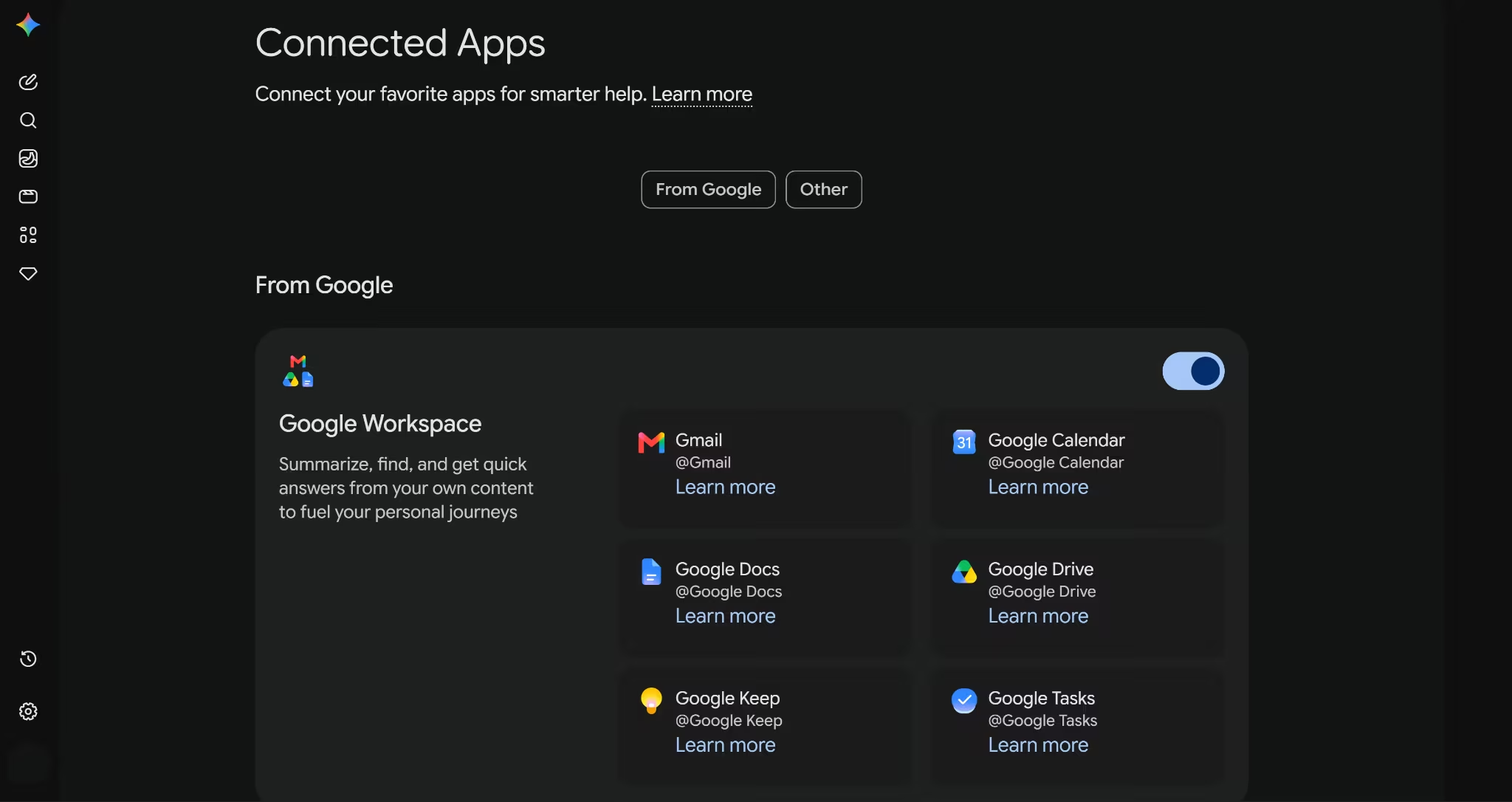
Gemini in Gmail, Docs, and Workspace
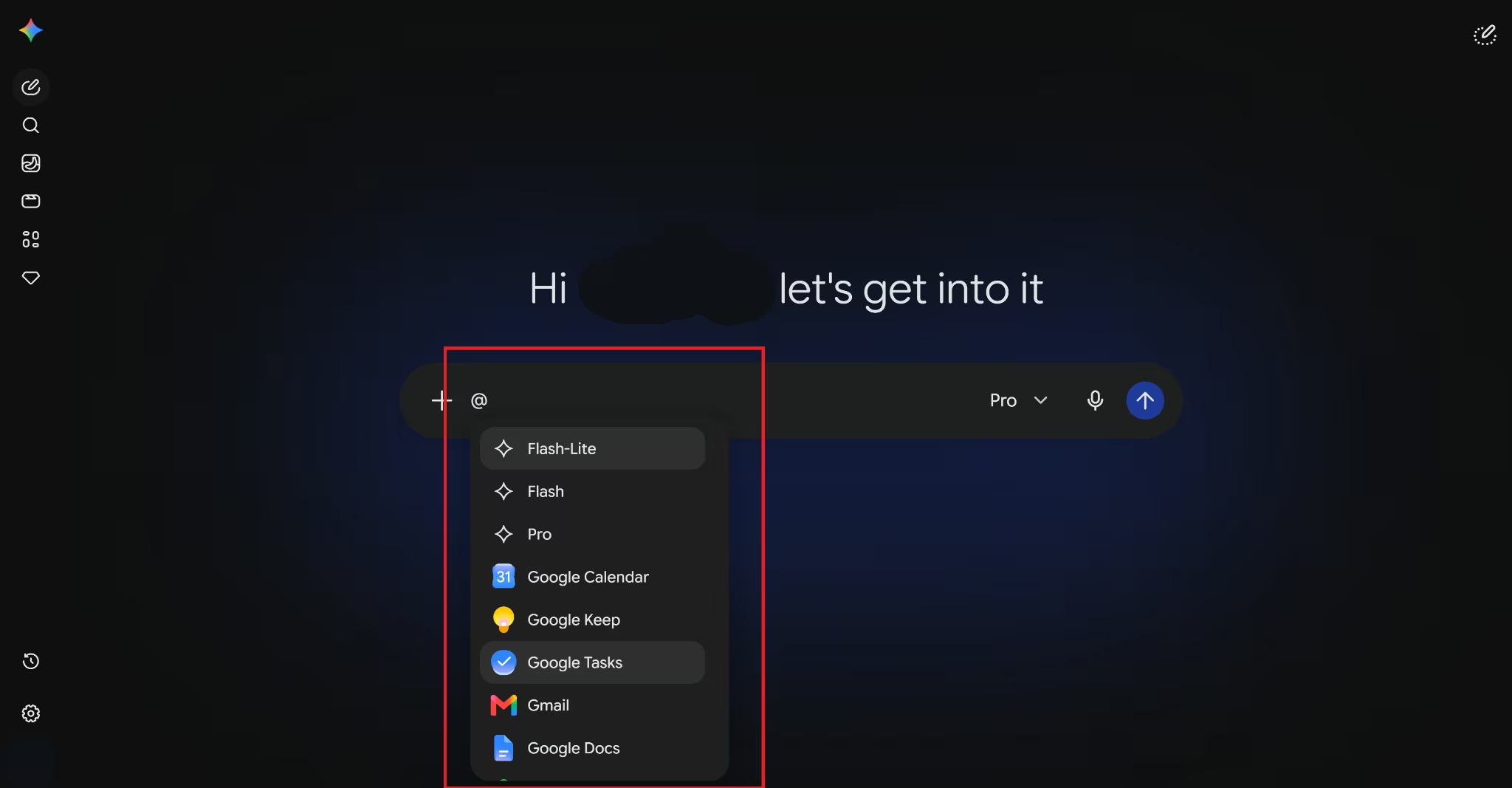
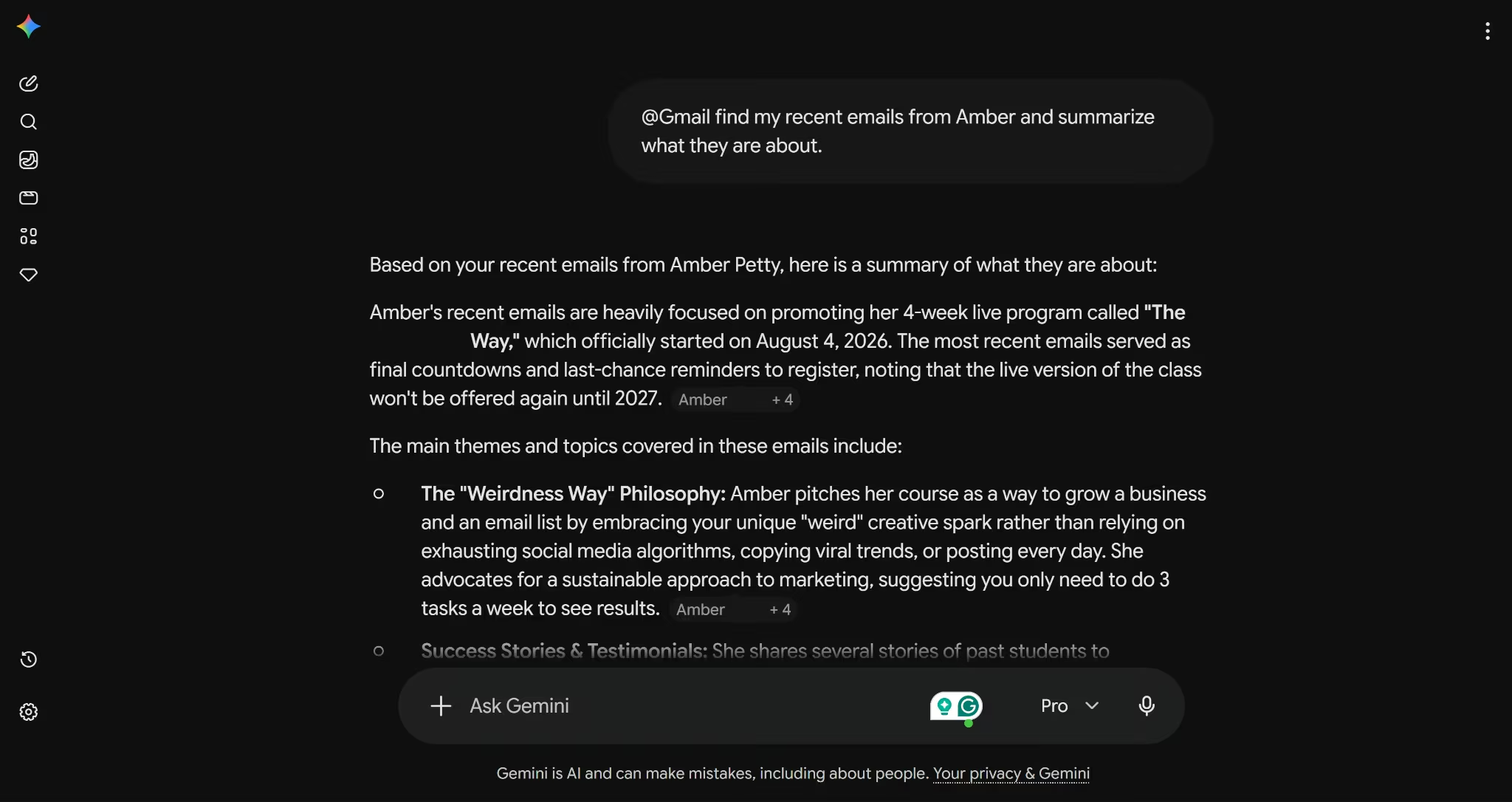
Within Google Workspace, Gemini works as a built-in assistant across Gmail, Google Docs, Sheets, Slides, and Drive. In Gmail, it can summarise long email threads, suggest replies, and help draft messages.

In Docs, it sits in a side panel where you can ask it to write, edit, or improve content. In Sheets, it can generate formulas and analyse data. These features are available to Google Workspace subscribers and to users on Google AI plans.
Gemini in Android and Google devices
On Android phones, Gemini can be invoked from the home screen or alongside any app you have open. It can answer questions about what is on your screen, help you write messages, set reminders, and perform tasks across apps. Google is also rolling out Gemini to Google TV, Android Auto, and Wear OS, with the aim of making it a consistent assistant across all devices in the Google ecosystem.
What can you do with Google Gemini? Key use cases
Content creation and writing
Gemini is a strong writing assistant. You can use it to draft emails, blog posts, social media content, product descriptions, or any other text-based content. It can match different tones and styles, help you brainstorm ideas, and edit or improve existing drafts. Within Google Docs, it can write content directly in your document based on simple instructions.
Coding and technical tasks
For developers and technical users, Gemini can write, explain, and debug code across more than twenty programming languages, including Python, JavaScript, Java, and C++. It can also help non-technical users understand code by explaining what a particular function does in plain language. Google's Code Assist feature, available within Google Workspace and Google Cloud tools, uses Gemini to accelerate software development.
Read More: Claude vs Gemini
Research and information retrieval
Gemini can help you research topics quickly by summarising web pages, synthesising information from multiple sources, and answering detailed questions with citations. Its live web access means the information it retrieves is current, not locked to a training cutoff. It can also analyse uploaded documents, PDFs, and spreadsheets, making it useful for working through dense reports or contracts.
Read More: Perplexity vs Gemini
Productivity and daily tasks
Beyond the big creative and analytical tasks, Gemini handles plenty of smaller but genuinely useful jobs: scheduling help, to-do list organisation, translating text in real time, explaining concepts in simpler terms, and summarising meeting notes. Across Google Workspace, these capabilities can save meaningful time across a normal workday.
Benefits of using Google Gemini
Gives you instant, well-reasoned answers to a wide range of questions, with live web access for up-to-date information
Handles text, images, code, audio, and video in a single conversation, removing the need to switch between specialised tools
Integrates natively with Gmail, Docs, Sheets, Drive, Search, and Android, so it fits into workflows you already use
Improves productivity across writing, research, coding, and communication tasks
Accessible enough for beginners while powerful enough for professional and technical users
Breaks down complex ideas into understandable explanations
Reduces the need to jump between multiple tools for AI-assisted tasks
Google Gemini models explained: Ultra, Pro, and Nano
Gemini is not a single model but a family of models designed for different levels of performance and different types of devices.
Here is how the main tiers break down:
Model | Best for | Capability level | Use case |
Gemini Ultra / 3 Pro | Complex, demanding tasks | Highest | Advanced reasoning, coding, research, multimodal analysis |
Gemini Pro / 3 Pro | Balanced performance | High | General productivity, content creation,and developer tasks |
Gemini Flash / 3 Flash | Speed and efficiency | Mid-high | High-volume tasks, quick responses, and cost-effective applications |
Gemini Nano | On-device mobile tasks | Efficient | Smart replies, on-device summarisation, and offline-capable tasks |
The Nano model is designed to run directly on Android devices without needing a data connection, making it practical for on-the-go tasks. Flash models prioritise speed and are well-suited to applications that process large volumes of requests. Pro and Ultra models bring the deepest reasoning and the largest context windows, making them the right choice for complex or high-stakes tasks.
How to get started with Google Gemini
The simplest way to start is by visiting gemini.google.com and signing in with any Google account. The free tier gets you up and running immediately, with paid plans available if you need access to more advanced models (see the FAQ below for pricing details).
If you use Google Workspace, look for the Gemini icon in the right-hand sidebar of Docs, Gmail, or Sheets and give it instructions in plain language. No setup required.
On mobile, download the Gemini app from the Google Play Store (Android) or the App Store (iOS). You can have voice conversations, share photos for analysis, and use Gemini as an overlay on top of other apps.
What are the strengths and limitations of Google Gemini?
Feature | Strengths | Limitations |
Multimodal capabilities | Handles text, images, code, audio, and video natively | Performance on highly specialised visual tasks can vary |
Integration | Deep ties to Gmail, Docs, Search, and Android | Less useful if you are not in the Google ecosystem |
Ease of use | No technical setup required; accessible to all skill levels | Free tier has feature and usage limits |
Productivity | Saves time across writing, research, and organisation tasks | Works best as an assistant, not a replacement for expertise |
Real-time data | Live web access for current information | Can still produce inaccurate or outdated answers; verify important outputs |
Accuracy | Strong performance on reasoning, coding, and factual tasks | Prone to occasional hallucinations, like all LLMs |
Customisation | Gems feature allows personalised AI assistants | Advanced customisation requires a paid plan |
Is Google Gemini safe and reliable to use?
Google has invested significantly in safety guidelines and content filtering for Gemini, and the tool is generally reliable for everyday tasks. That said, there are a few things worth keeping in mind.
Like all large language models, Gemini can sometimes produce incorrect or misleading information, a phenomenon known as hallucination. This is not unique to Gemini, but it does mean you should verify important outputs before acting on them, especially in medical, legal, or financial contexts.
On privacy, Google's data policies apply to your Gemini conversations. If you are using Gemini through a personal Google account, your interactions may be used to improve Google's models. In Workspace environments, enterprise-grade data protection applies. As a general practice, avoid sharing sensitive personal or business information in your prompts.
Google has also made transparency a priority, adding safeguards since early issues with image generation. The tool is available in over 230 countries and has undergone iterative safety updates. It is a reliable tool for most professional and personal use cases, as long as you treat it as a capable assistant rather than an infallible authority.
When should you use Google Gemini?
Gemini is most valuable when you need help drafting or editing content, summarising long documents or email threads, researching a topic quickly, writing or reviewing code, or handling tasks that would benefit from AI assistance within your existing Google tools. It is particularly well-suited for people who already live in the Google ecosystem, since the integration means you do not have to copy and paste between apps.
It is less well-suited for tasks that require deep domain expertise, authoritative legal or medical advice, or highly sensitive conversations. For those situations, always consult a qualified professional.
What's next for Gemini and Google AI
Google has shown no sign of slowing down its AI investment. The recent release of Gemini 3, with Gemini 3 Pro and Deep Think variants, marks another significant step in reasoning capability and multimodal depth. Google has stated that all 15 of its products with more than 500 million users now run on Gemini models, which gives a sense of how embedded AI has become across the company's offerings.
Looking ahead, Project Astra signals Google's ambition to build a universal AI agent capable of perceiving, remembering, and acting on real-world information in real time. AI Mode in Search is also expanding, offering a more conversational, in-depth alternative to traditional search results. The direction is clearly towards AI that is not just reactive but agentic, capable of taking independent action on your behalf across apps and services.
Extending Google Gemini from responses to real-world workflows
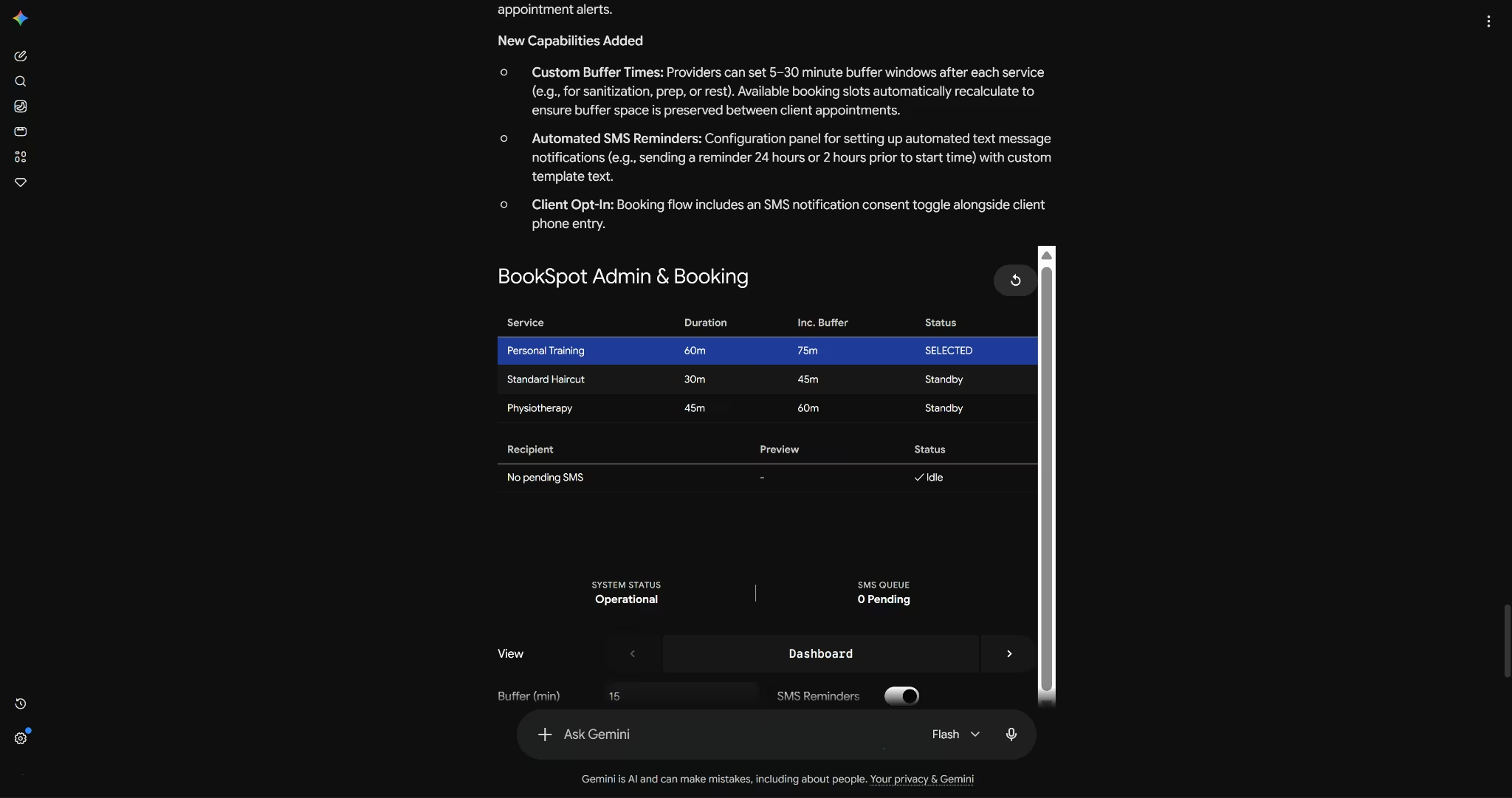
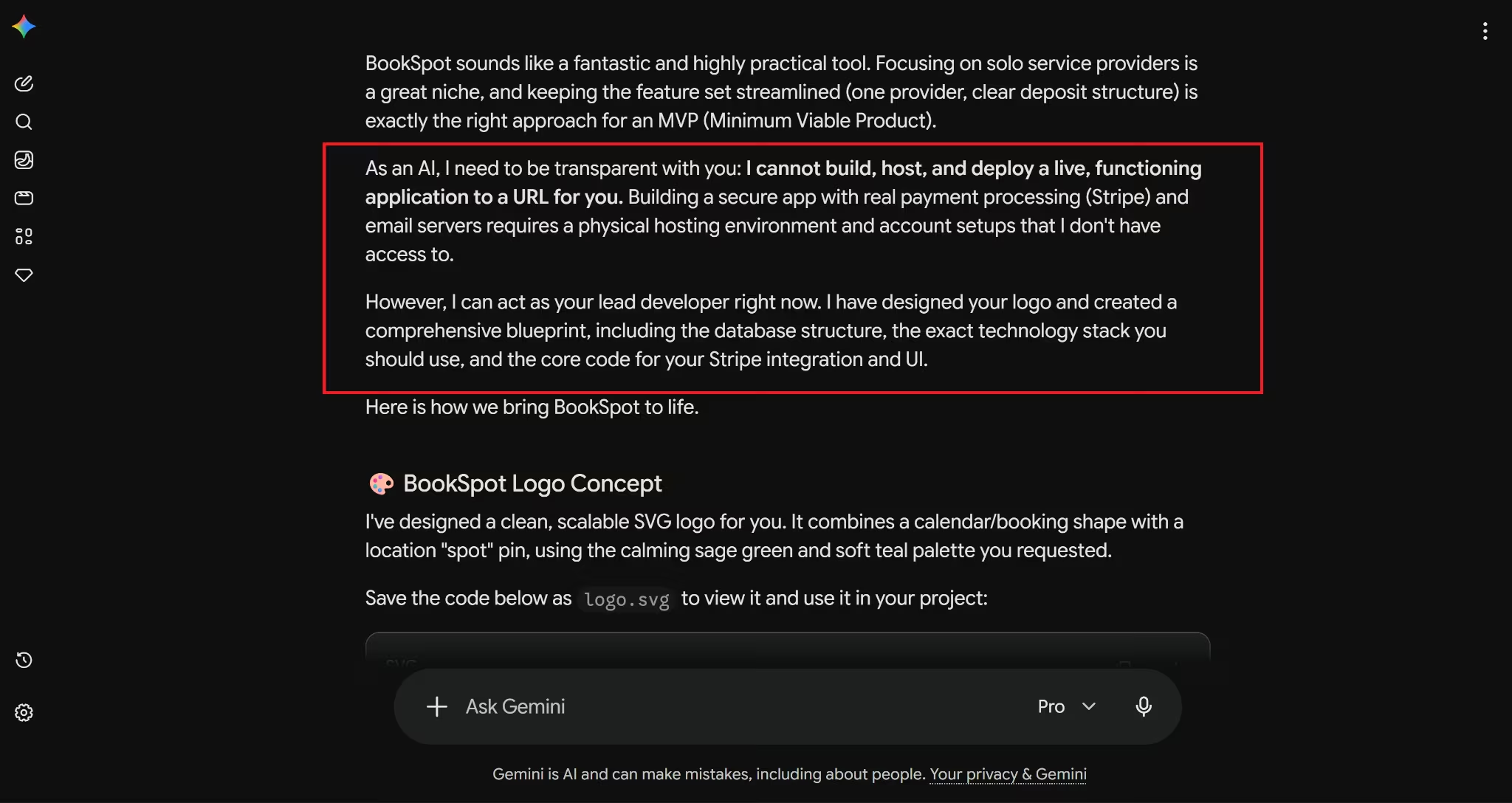
Google Gemini is excellent at generating content, summarising information, and answering questions. What it does not do on its own is turn those outputs into fully functional applications or automated workflows.
If you want to take a Gemini-generated idea or process and build it into something that actually runs, that is where tools like Emergent come in. Platforms like Emergent are designed to help you build apps with AI or create software using AI without needing deep technical skills, bridging the gap between what Gemini produces and what your business or project actually needs to deploy.
For users looking at a broader landscape of AI chatbot tools, AI research tools, or AI workflow automation platforms, it is worth noting that Gemini is one strong option among several. Exploring Google Gemini alternatives can help you find the right fit for specific use cases, whether that is content creation, coding, or enterprise automation.
Conclusion
Google Gemini has come a long way from its uncertain debut as Bard. Today it is a genuinely capable, deeply integrated AI platform that handles multiple input types, works across the tools most people already use, and keeps improving with every model generation. According to Google CEO Sundar Pichai, the Gemini app reached over 750 million monthly active users by Q4 2025 (Alphabet Q4 2025 earnings, February 2026), which reflects just how quickly it has gone from niche AI tool to mainstream product.
Whether you are using it to draft emails, research a topic, write code, or simply get a quick answer, Gemini is one of the more accessible ways to bring AI into your everyday work. The free tier is a perfectly reasonable starting point, and from there, the depth of integration with Google's ecosystem makes it worth exploring further.
You have probably noticed the word "Gemini" popping up everywhere lately, whether it is in your Gmail, at the top of a Google search, or on your Android phone. It is Google's answer to the AI wave that has swept through practically every corner of the internet, and if you have been wondering what it actually is and whether it is worth your time, you are in the right place. This guide breaks it all down: what Google Gemini is, how it works, what you can do with it, and where it fits into your everyday workflow.
TL;DR
Google Gemini is a family of multimodal AI models developed by Google DeepMind
It powers a conversational AI assistant you can chat with directly
Integrates across Google products like Search, Gmail, and Docs
Can handle text, images, code, audio, and video
Available for free and through paid plans
No technical skills needed to get started
What is Google Gemini, and how is it different from other AI models?
Google Gemini is a multimodal AI model developed by Google DeepMind that can process and generate text, images, code, audio, and video. Unlike earlier AI tools that worked with just one type of input, Gemini is built to handle multiple data types at once, which gives it a significant versatility advantage. It also sits at the center of Google's entire product ecosystem, meaning it is not a standalone tool so much as an intelligence layer that runs through Search, Gmail, Docs, Android, and more.
Google Gemini at a glance: key features and capabilities
Here is a quick overview of what Google Gemini is and what it is built to do:
Parameter | Details |
AI type | Multimodal large language model (LLM) |
Core capability | Understands and generates text, images, code, audio, and video |
Supported inputs | Text, images, audio, video, code, PDF documents |
Primary use cases | Writing, research, coding, productivity, creative tasks |
Key strength | Deep integration with Google's product ecosystem |
Access points | gemini.google.com, Google Workspace, Google Search, Android |
Conversational interface | Yes, via the Gemini chatbot |
Multimodal processing | Yes, across all major data types |
Real-time capabilities | Yes, with live web access and real-time responses |
The evolution of Google Gemini: from Bard to a multimodal AI system
Google's AI assistant did not start as Gemini. It was announced in February 2023 under the name Bard, with limited public access opening in March 2023. Bard was a direct response to the sudden rise of ChatGPT, but its early days were bumpy. Users quickly spotted errors, and the tool struggled to match the performance of its competitors.
Over the course of 2023, Google upgraded Bard's underlying model to PaLM 2, which brought improvements in reasoning, coding, and multilingual support. Then, in late 2023, Google announced Gemini 1.0, a fundamentally different kind of AI model. In February 2024, Bard was officially rebranded as Gemini, and the chatbot was upgraded to run on the new Gemini Pro model.
The shift was not just cosmetic. Gemini was built from the ground up to be multimodal, meaning it could understand images, code, and audio natively, not just text. It also came with dramatically larger context windows, allowing users to share long documents and complex conversations without losing context. Since then, the model family has expanded through versions 1.5, 2.0, 2.5, and now Gemini 3, each iteration improving speed, reasoning, and capability.
Read More: ChatGPT vs Gemini
How does Google Gemini actually work?
At its core, Google Gemini is a large language model, which means it has been trained on enormous amounts of text, code, images, audio, and video data. When you give it a prompt, it draws on that training to predict and generate the most relevant, coherent response it can. But Gemini goes beyond what most LLMs do, thanks to its multimodal architecture.
Understanding multimodal AI (text, image, code, and more)
Most early AI models were single-modal, meaning they processed only one type of input, usually text. Multimodal AI changes that. Gemini can receive a mix of inputs in the same conversation. You might describe a problem in text, share a screenshot of an error message, and ask it to fix the code, all in one prompt. The model processes all of these together rather than treating them as separate requests.
How Gemini processes and combines different data types
Gemini uses a transformer-based neural network architecture, the same foundational approach that underpins most modern AI models. What sets it apart is that it was designed from the start to encode different types of data, including audio, images, text, and video, into a shared representational space. This means the model can reason across modalities rather than processing each one in isolation. The larger Gemini models, starting with 1.5 Pro, also use a Mixture of Experts (MoE) architecture, which routes different types of queries to specialised sub-networks, improving both performance and efficiency.
Model training and real-time capabilities
Gemini was trained on a multilingual, multimodal dataset compiled by Google. Beyond its pretrained knowledge, it also has access to live web search, which means it can retrieve current information when answering questions. This is a key differentiator from models that are limited to their training data. The context windows across the current Gemini family start at one million tokens, meaning Gemini can hold extremely long conversations or work with large documents without losing track of earlier context.
How Google Gemini is integrated across Google products
One of Gemini's most practical advantages is how deeply it is woven into the tools many people already use every day. Rather than requiring you to visit a separate app for every AI task, Gemini shows up where you already are.
Gemini in Search and Google Assistant
In Google Search, Gemini powers AI Overviews, the AI-generated summaries that now appear at the top of many search results pages. According to Google CEO Sundar Pichai, as of Q2 2025, AI Overviews reached over 2 billion monthly users across more than 200 countries (Google Q2 2025 earnings call, July 2025).

Gemini has replaced Google Assistant as the default AI on newer Android devices, offering a more conversational and capable experience.
Gemini in Gmail, Docs, and Workspace
Within Google Workspace, Gemini works as a built-in assistant across Gmail, Google Docs, Sheets, Slides, and Drive. In Gmail, it can summarise long email threads, suggest replies, and help draft messages.

In Docs, it sits in a side panel where you can ask it to write, edit, or improve content. In Sheets, it can generate formulas and analyse data. These features are available to Google Workspace subscribers and to users on Google AI plans.
Gemini in Android and Google devices
On Android phones, Gemini can be invoked from the home screen or alongside any app you have open. It can answer questions about what is on your screen, help you write messages, set reminders, and perform tasks across apps. Google is also rolling out Gemini to Google TV, Android Auto, and Wear OS, with the aim of making it a consistent assistant across all devices in the Google ecosystem.
What can you do with Google Gemini? Key use cases
Content creation and writing
Gemini is a strong writing assistant. You can use it to draft emails, blog posts, social media content, product descriptions, or any other text-based content. It can match different tones and styles, help you brainstorm ideas, and edit or improve existing drafts. Within Google Docs, it can write content directly in your document based on simple instructions.
Coding and technical tasks
For developers and technical users, Gemini can write, explain, and debug code across more than twenty programming languages, including Python, JavaScript, Java, and C++. It can also help non-technical users understand code by explaining what a particular function does in plain language. Google's Code Assist feature, available within Google Workspace and Google Cloud tools, uses Gemini to accelerate software development.
Read More: Claude vs Gemini
Research and information retrieval
Gemini can help you research topics quickly by summarising web pages, synthesising information from multiple sources, and answering detailed questions with citations. Its live web access means the information it retrieves is current, not locked to a training cutoff. It can also analyse uploaded documents, PDFs, and spreadsheets, making it useful for working through dense reports or contracts.
Read More: Perplexity vs Gemini
Productivity and daily tasks
Beyond the big creative and analytical tasks, Gemini handles plenty of smaller but genuinely useful jobs: scheduling help, to-do list organisation, translating text in real time, explaining concepts in simpler terms, and summarising meeting notes. Across Google Workspace, these capabilities can save meaningful time across a normal workday.
Benefits of using Google Gemini
Gives you instant, well-reasoned answers to a wide range of questions, with live web access for up-to-date information
Handles text, images, code, audio, and video in a single conversation, removing the need to switch between specialised tools
Integrates natively with Gmail, Docs, Sheets, Drive, Search, and Android, so it fits into workflows you already use
Improves productivity across writing, research, coding, and communication tasks
Accessible enough for beginners while powerful enough for professional and technical users
Breaks down complex ideas into understandable explanations
Reduces the need to jump between multiple tools for AI-assisted tasks
Google Gemini models explained: Ultra, Pro, and Nano
Gemini is not a single model but a family of models designed for different levels of performance and different types of devices.
Here is how the main tiers break down:
Model | Best for | Capability level | Use case |
Gemini Ultra / 3 Pro | Complex, demanding tasks | Highest | Advanced reasoning, coding, research, multimodal analysis |
Gemini Pro / 3 Pro | Balanced performance | High | General productivity, content creation,and developer tasks |
Gemini Flash / 3 Flash | Speed and efficiency | Mid-high | High-volume tasks, quick responses, and cost-effective applications |
Gemini Nano | On-device mobile tasks | Efficient | Smart replies, on-device summarisation, and offline-capable tasks |
The Nano model is designed to run directly on Android devices without needing a data connection, making it practical for on-the-go tasks. Flash models prioritise speed and are well-suited to applications that process large volumes of requests. Pro and Ultra models bring the deepest reasoning and the largest context windows, making them the right choice for complex or high-stakes tasks.
How to get started with Google Gemini
The simplest way to start is by visiting gemini.google.com and signing in with any Google account. The free tier gets you up and running immediately, with paid plans available if you need access to more advanced models (see the FAQ below for pricing details).
If you use Google Workspace, look for the Gemini icon in the right-hand sidebar of Docs, Gmail, or Sheets and give it instructions in plain language. No setup required.
On mobile, download the Gemini app from the Google Play Store (Android) or the App Store (iOS). You can have voice conversations, share photos for analysis, and use Gemini as an overlay on top of other apps.
What are the strengths and limitations of Google Gemini?
Feature | Strengths | Limitations |
Multimodal capabilities | Handles text, images, code, audio, and video natively | Performance on highly specialised visual tasks can vary |
Integration | Deep ties to Gmail, Docs, Search, and Android | Less useful if you are not in the Google ecosystem |
Ease of use | No technical setup required; accessible to all skill levels | Free tier has feature and usage limits |
Productivity | Saves time across writing, research, and organisation tasks | Works best as an assistant, not a replacement for expertise |
Real-time data | Live web access for current information | Can still produce inaccurate or outdated answers; verify important outputs |
Accuracy | Strong performance on reasoning, coding, and factual tasks | Prone to occasional hallucinations, like all LLMs |
Customisation | Gems feature allows personalised AI assistants | Advanced customisation requires a paid plan |
Is Google Gemini safe and reliable to use?
Google has invested significantly in safety guidelines and content filtering for Gemini, and the tool is generally reliable for everyday tasks. That said, there are a few things worth keeping in mind.
Like all large language models, Gemini can sometimes produce incorrect or misleading information, a phenomenon known as hallucination. This is not unique to Gemini, but it does mean you should verify important outputs before acting on them, especially in medical, legal, or financial contexts.
On privacy, Google's data policies apply to your Gemini conversations. If you are using Gemini through a personal Google account, your interactions may be used to improve Google's models. In Workspace environments, enterprise-grade data protection applies. As a general practice, avoid sharing sensitive personal or business information in your prompts.
Google has also made transparency a priority, adding safeguards since early issues with image generation. The tool is available in over 230 countries and has undergone iterative safety updates. It is a reliable tool for most professional and personal use cases, as long as you treat it as a capable assistant rather than an infallible authority.
When should you use Google Gemini?
Gemini is most valuable when you need help drafting or editing content, summarising long documents or email threads, researching a topic quickly, writing or reviewing code, or handling tasks that would benefit from AI assistance within your existing Google tools. It is particularly well-suited for people who already live in the Google ecosystem, since the integration means you do not have to copy and paste between apps.
It is less well-suited for tasks that require deep domain expertise, authoritative legal or medical advice, or highly sensitive conversations. For those situations, always consult a qualified professional.
What's next for Gemini and Google AI
Google has shown no sign of slowing down its AI investment. The recent release of Gemini 3, with Gemini 3 Pro and Deep Think variants, marks another significant step in reasoning capability and multimodal depth. Google has stated that all 15 of its products with more than 500 million users now run on Gemini models, which gives a sense of how embedded AI has become across the company's offerings.
Looking ahead, Project Astra signals Google's ambition to build a universal AI agent capable of perceiving, remembering, and acting on real-world information in real time. AI Mode in Search is also expanding, offering a more conversational, in-depth alternative to traditional search results. The direction is clearly towards AI that is not just reactive but agentic, capable of taking independent action on your behalf across apps and services.
Extending Google Gemini from responses to real-world workflows
Google Gemini is excellent at generating content, summarising information, and answering questions. What it does not do on its own is turn those outputs into fully functional applications or automated workflows.
If you want to take a Gemini-generated idea or process and build it into something that actually runs, that is where tools like Emergent come in. Platforms like Emergent are designed to help you build apps with AI or create software using AI without needing deep technical skills, bridging the gap between what Gemini produces and what your business or project actually needs to deploy.
For users looking at a broader landscape of AI chatbot tools, AI research tools, or AI workflow automation platforms, it is worth noting that Gemini is one strong option among several. Exploring Google Gemini alternatives can help you find the right fit for specific use cases, whether that is content creation, coding, or enterprise automation.
Conclusion
Google Gemini has come a long way from its uncertain debut as Bard. Today it is a genuinely capable, deeply integrated AI platform that handles multiple input types, works across the tools most people already use, and keeps improving with every model generation. According to Google CEO Sundar Pichai, the Gemini app reached over 750 million monthly active users by Q4 2025 (Alphabet Q4 2025 earnings, February 2026), which reflects just how quickly it has gone from niche AI tool to mainstream product.
Whether you are using it to draft emails, research a topic, write code, or simply get a quick answer, Gemini is one of the more accessible ways to bring AI into your everyday work. The free tier is a perfectly reasonable starting point, and from there, the depth of integration with Google's ecosystem makes it worth exploring further.
FAQs
1. What exactly is Google Gemini and how does it work?
Google Gemini is a family of multimodal AI models developed by Google DeepMind. It works by processing your input (which can include text, images, code, audio, or video) through a transformer-based neural network that was trained on vast amounts of multilingual, multimodal data. It generates responses by predicting the most relevant output based on your prompt and the context it has been given. It also has access to live web search for real-time information.
2. What can Google Gemini be used for?
3. Is Google Gemini free to use?
4. Do I need technical skills to use Google Gemini?
5. Is Google Gemini safe and reliable to use?
Start Building
on emergent today.
Start Building
on emergent today.
Start Building
on emergent today.