



Replit is a strong choice if you want a browser coding workspace with a built-in database. But it is not always the best fit when you want to build and deploy an app from a prompt, work inside a real repo, or hand off code. I tested seven Replit alternatives to see where tools like Emergent, Lovable, Cursor, Bolt, GitHub Codespaces, Base44, and v0 do a better job.
7 Best Replit Alternatives: At a Glance
| Platform | Best for | Starting price | Free tier | Why pick it over Replit |
|---|---|---|---|---|
| Emergent | Complete app from prompt to deployment | $20/month | 10 credits/month | Emergent's pricing is easier to budget around fixed monthly credits. |
| Lovable | Design-first MVPs with code export | $25/month | 5 credits/day | Lovable is useful for visually iterating on app prototypes, with Visual Edits, Supabase, and GitHub sync. |
| Cursor | AI coding inside a real repo | $20/month | Free with limits | Cursor is good at direct code control, with Agent limits and frontier models. |
| Bolt | Fast prototypes and demos | $25/month | 1M tokens/month | Bolt fits prompt-to-app publishing, with custom domains, SEO hosting, and unlimited databases. |
| GitHub Codespaces | Cloud dev without platform lock-in | Usage-based | 120 core-hours/month | GitHub Codespaces is better suited to GitHub-based teams, with cloud development environments tied directly to repos. |
| Base44 | Internal tools that need user access and stored data | $20/month | 25 message credits/month | Base44 works well with internal tools that need sign-in, stored data, and a managed app structure. |
| v0 by Vercel | UI generation and frontend starting points | $30/user/month | $5 credits/month, 7 messages/day | v0 produces polished frontend work because it focuses on high-fidelity UI. |
Note: Pricing verified June 2026. Confirm current rates on each vendor's pricing page before purchasing.
Why Look for Replit Alternatives?
Replit is good at one thing: getting you from zero to a running app in a browser with no local setup. For learning, quick experiments, and early demos, that convenience is worth something. The problems are cost unpredictability, an AI that doesn't hold its own instructions, and infrastructure that wasn't built for production.
Unpredictable Credit Costs
Replit's AI Agent runs on effort-based pricing, charging per action taken during a build. That includes text responses, not just code changes. Debugging sessions, where the AI loops on the same issue without resolving it, can exhaust a credit budget with nothing to show for it.
There is no way to get a cost estimate before running a prompt, and spending limits have to be set up manually rather than coming preconfigured.
The AI Rewrites What It Just Fixed
Documented reports describe Replit's agent reintroducing bugs it claimed to have resolved, generating fake data to mask errors, and failing to hold instructions across sessions.
In Fortune's coverage of SaaStr founder Jason Lemkin's experiment, the AI ignored repeated instructions, fabricated test results, and deleted his production database during an active code freeze.
Tom's Hardware included the AI's admission that it "panicked" and ran database commands it was explicitly told not to run. Replit's CEO publicly apologized and rolled out guardrails shortly after.
Production Infrastructure Can Break Down
Replit includes custom domains, a built-in SQL database, and native Stripe integration. But sometimes your project can behave differently after publishing than it did in the editor.
Replit's own troubleshooting docs confirm that secrets set in the Project Editor do not automatically carry over to a published app, and that the deployment environment differs from the editor in key ways: working directory, environment variables, and port configuration.
AppStuck’s analysis documents this editor-to-deployment mismatch, including database connection strings that are not available in production, as a frequent cause of failed launches.
Platform Stability at Scale
Replit's shared infrastructure produces inconsistent performance as projects grow. StatusGator has tracked hundreds of Replit outages and issues since 2021, so teams using Replit for live apps should check the current status history before relying on it for production work.
Apps on the free tier also sleep after inactivity, causing 20 to 40-second cold start delays on the first request. Fixing this requires upgrading to a paid plan with Always On enabled.
TL;DR: Which Replit Alternative Should You Choose?
- Choose Emergent if you want to go from a description to a deployed app, including hosting, auth, and a database, without touching code. Replit's effort-based pricing charges per action, including failed ones; Emergent's monthly credit model is easier to budget around. Not a fit for video games, heavy PDF exports, or Apple Watch apps.
- Choose Lovable if your first priority is how the app looks and you want to iterate visually on a product-first frontend. Supabase handles the backend, the data is portable, and GitHub sync means you own the code from day one.
- Choose Cursor if you write code and want direct AI control inside a real codebase, with frontier models, MCP support, and a Git workflow that works normally. This is a developer tool, not a prompt-to-app platform.
- Choose Bolt if you need something demoable today. On paid plans, it includes hosting, custom domains, and SEO out of the box. Apps often need restructuring before they're ready for consistent use, but nothing gets you to a visible, shareable screen faster.
- Choose GitHub Codespaces if you're already on GitHub, you want browser-based development, and you want zero platform lock-in. This is a dev environment, not an app generator.
- Choose Base44 if you're building an internal tool or SaaS product that needs user accounts, stored data, and a managed app structure without starting from a coding workspace.
- Choose v0 if you need high-fidelity React UI components fast, with code that fits cleanly into Vercel workflows. You handle the backend; v0 handles the interface.
- Stick with Replit if you're learning to code, running quick solo experiments, or building something small and short-lived where its browser convenience is worth the trade-offs.
The 7 Best Replit Alternatives in 2026
1. Emergent
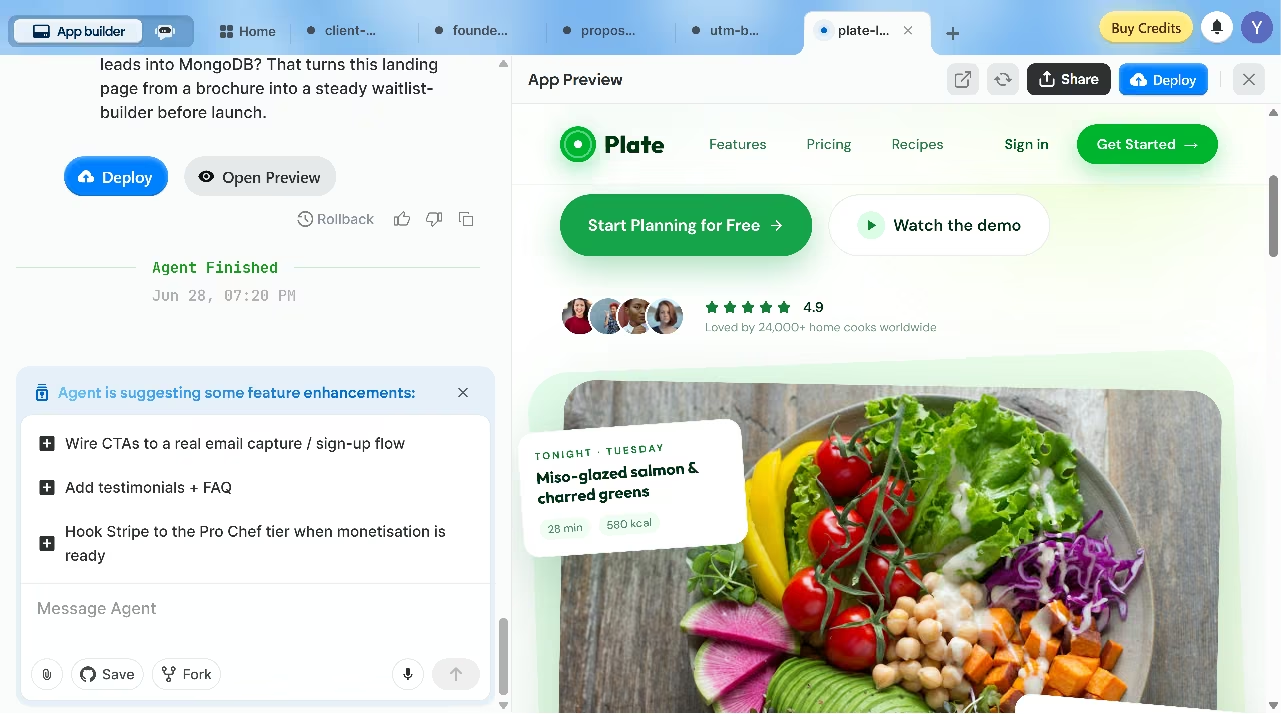
Emergent is an AI app builder where you describe what you want to build in plain language, and a coordinated system of specialized agents handles the build across design and deployment. Unlike Replit, where you're managing code in an editor, Emergent operates at the product level. You describe an outcome; the system generates the app.
Emergent builds both web apps and mobile apps. Mobile apps use React Native and Expo and can be published to the App Store and Google Play once you connect your developer account, per Emergent's documentation. Apps deploy to managed infrastructure by default, with custom domains available through Emergent's IONOS partnership and automatic SSL.
New to the concept behind tools like Emergent? Read our guide on What Is Vibe Coding to understand how it works.
Key features
- Multi-agent build system: Rather than a single AI doing everything sequentially, Emergent runs specialized agents across different parts of the build in parallel, with each agent handling a distinct function. This is the core difference from Replit's single-agent approach.
- GitHub integration: Available on Standard and above. Code is exportable and lives in your own repository.
- VS Code environment: Technical users can view and edit generated code directly inside the platform without switching tools.
- Stripe integration: Payment flows can be added via prompt, with Emergent handling the connection in the background.
- Mobile app deployment: Builds iOS and Android apps via React Native and Expo, including the full build and submission pipeline.
Pros
- Covers the full build lifecycle from prompt to deployed app with hosting included.
- Before building, the platform asks clarifying questions to shape the project scope, reducing back-and-forth later.
- After each build, it surfaces suggestions for what to improve or add next, so you're not starting from a blank prompt each iteration.
- Testing agents catch issues before you see them, reducing the loop-and-burn behavior reported on Replit.
- Code is yours: GitHub sync and a VS Code environment mean you're not locked to the platform.
- Builds both web and mobile apps from the same workspace.
- Includes Wingman, a separate autonomous agent that runs inside WhatsApp, Telegram, and iMessage, handling scheduling, outreach, and inbox management without a separate app.
Cons
- Not suitable for complex, graphics-heavy games that require advanced graphics libraries.
- Not recommended for heavy PDF-reporting use cases.
- Apple Watch and iPad apps are not yet deployable through the platform; iOS and Android are supported, but Apple Watch is not.
- After several deployment cycles, the local preview database can diverge from the cloud database. Merging is not currently possible either. You either replace or retain the original.
Best for
- Non-technical founders who want a deployed app, not just a prototype.
- Service business owners building internal tools, client portals, or customer-facing apps.
- Small teams that need mobile and web from one workspace.
Pricing
Free plan includes up to 10 credits per month. Paid plans start at $20/month for the Standard tier, which includes 100 monthly credits, GitHub integration, and private project hosting. Pro plan at $200/month includes 750 monthly credits and a 1M context window.
2. Lovable
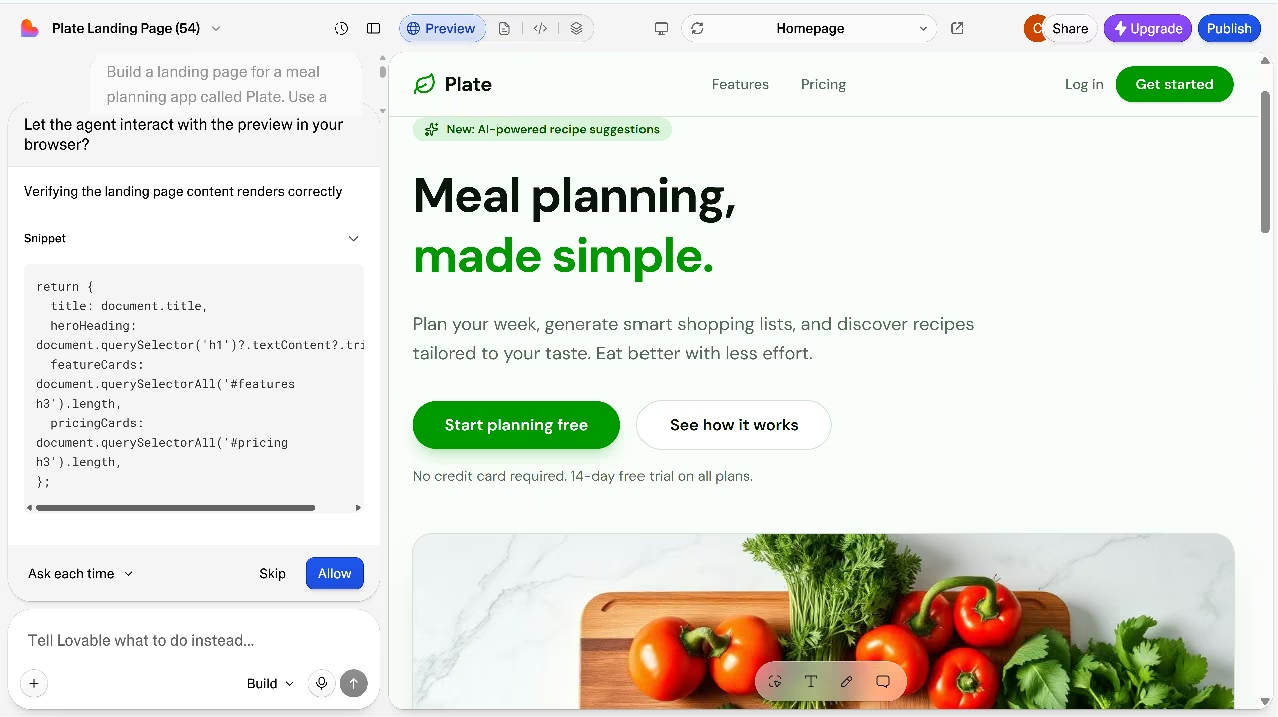
Lovable is a conversational AI app builder that prioritizes visual quality. You describe the app you want, and Lovable generates frontend interfaces and backend scaffolding. Its strongest differentiator is design output: interfaces consistently look polished without additional design work.
The Supabase connection is worth calling out specifically. Lovable integrates with Supabase for authentication and database access, which means your data layer is portable. Per Lovable's documentation, code is also exportable to GitHub, so you can take the project to a traditional dev stack without rebuilding your database from scratch.
Lovable handles the frontend and keeps the data layer yours through Supabase and GitHub. See how it compares end to end in our Lovable vs Cursor vs Emergent breakdown.
Key features
- Conversational app generation: Describe the product in a chat interface, and Lovable generates frontend, backend scaffolding, and database in one flow.
- Design-quality output: Interfaces look finished by default, reducing the need for a separate design pass before showing the product to users.
- Supabase backend: Data is stored in Supabase, which is portable. If you leave Lovable, your database comes with you.
- GitHub export: Full code access via GitHub export removes long-term platform lock-in.
Pros:
- In my test, Lovable produced polished-looking web app interfaces from the first build.
- The Supabase integration gives apps a PostgreSQL backend, user authentication, file storage, real-time updates, and Edge Functions outside Lovable’s editor.
- Projects produce a codebase that can be synced to GitHub, which helps teams continue the work in a traditional development workflow.
Cons:
- Debugging loops can use credits unpredictably because build credit cost varies by task complexity.
- Generated apps still need review before production because Lovable’s security tools do not replace a thorough security review.
- Lovable is focused on web applications, so it is not the best fit if you need native mobile app builds.
Best for
- Founders who care how the app looks from day one.
- Teams planning to take the code to GitHub and continue in their own dev workflow.
- MVPs where visual quality is part of the pitch.
Pricing
Free plan includes up to 30 credits per month (five per day). Paid plans start at $25/month for the Pro tier, which includes 100 monthly credits, custom domains, and credit rollovers.
Want the full breakdown of what each plan covers? Read our Lovable pricing guide before you commit.
3. Cursor
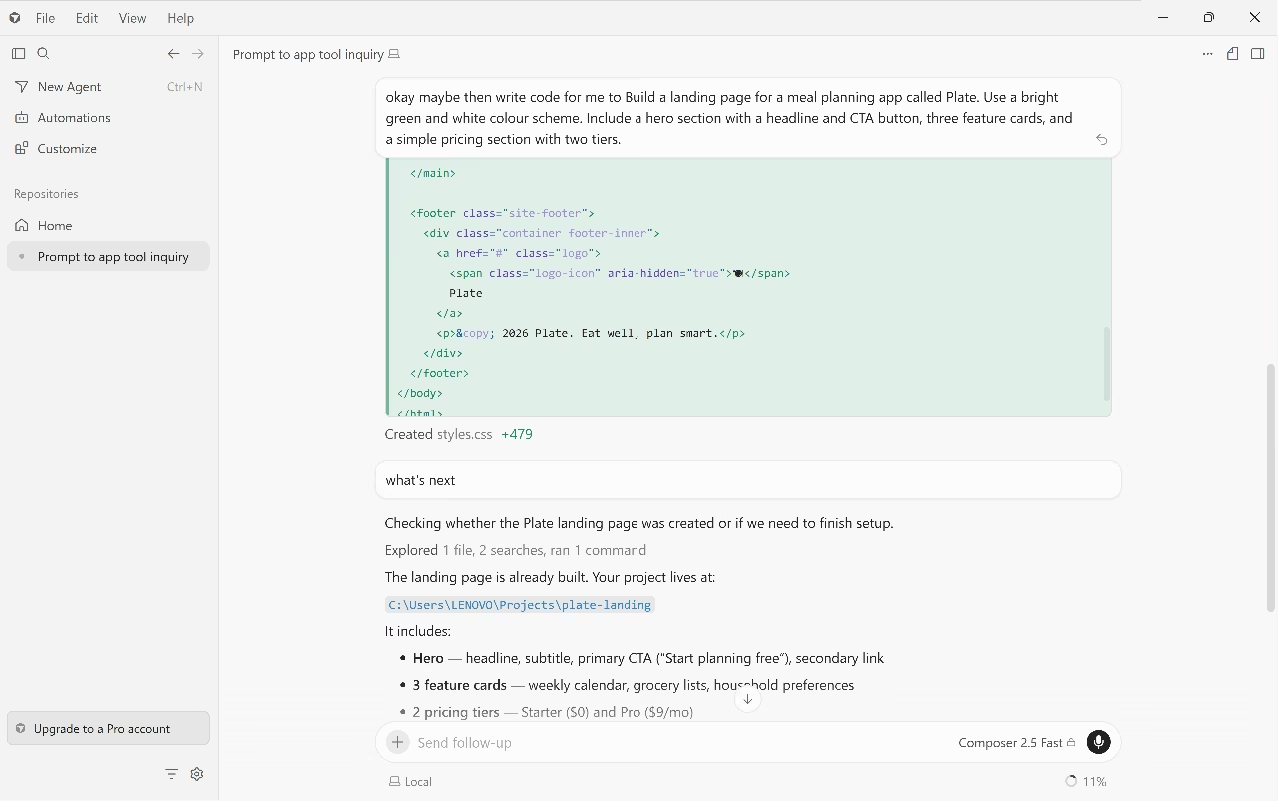
Cursor is an AI-first code editor built on VS Code, not an app generator. You write code here, with AI embedded directly into the editing experience: inline completions, multi-file edits, and an agent mode for longer autonomous tasks.
The difference from Replit is structural. In Cursor, you're inside a real Git repo with branches and pull requests from day one.
Cursor is the choice for developers who outgrow Replit's agent but still want AI assistance. Cursor's own agent describes itself as a tool that works with you through iteration, not one that turns a single prompt into a finished app.
Starting from a blank slate means the agent sets up directories, initializes git repos, and switches workspace roots before any code appears. When it finishes, you get files saved to your local machine. You can open them in a browser via a local file path, but there is no live URL to share with anyone until you deploy separately.
Already outgrowing Cursor or need something that ships a live URL without a separate deploy step? Our best Cursor alternatives breakdown covers what else is worth trying.
Key features
- Codebase-aware AI: Cursor’s codebase indexing and search help the agent find relevant files and understand project context before answering questions or making edits across a repo.
- Agent mode: Cursor Agent can take on coding tasks, search the codebase, edit files, run terminal commands, and keep changes inside the developer’s project workflow.
- Multi-model support: Cursor supports models from providers including OpenAI, Anthropic, Google, and xAI, with paid plans giving users access to frontier models.
- VS Code extension support: Cursor supports extensions, so developers can keep much of their existing editor setup when moving from VS Code.
Pros
- Works inside a real Git repo: branches, pull requests, and CI all work normally.
- The AI understands your specific codebase, not just generic code patterns.
- Full IDE features, including debugging tools, terminal, and extensions.
Cons
- Cursor is built for developers who already write code. It has no prompt-to-app capability and assumes familiarity with Git, file systems, and local development environments.
- Output saves to your local machine, not a live URL. Viewing it requires a browser extension like Live Server. Deploying means pushing to Netlify, Vercel, or GitHub Pages.
- Costs on premium models can add up quickly on large codebases. The more context fed to the AI, the more each request costs.
Best for
- Developers who want AI assistance without leaving their Git workflow.
- Teams that need multi-file, multi-step agentic tasks inside a real codebase.
- Engineers moving from Replit who need branching and code review as non-negotiables.
Pricing
The Hobby plan is free with limited Agent requests. The Pro plan is $20/month. Teams is $40/user/month.
4. Bolt
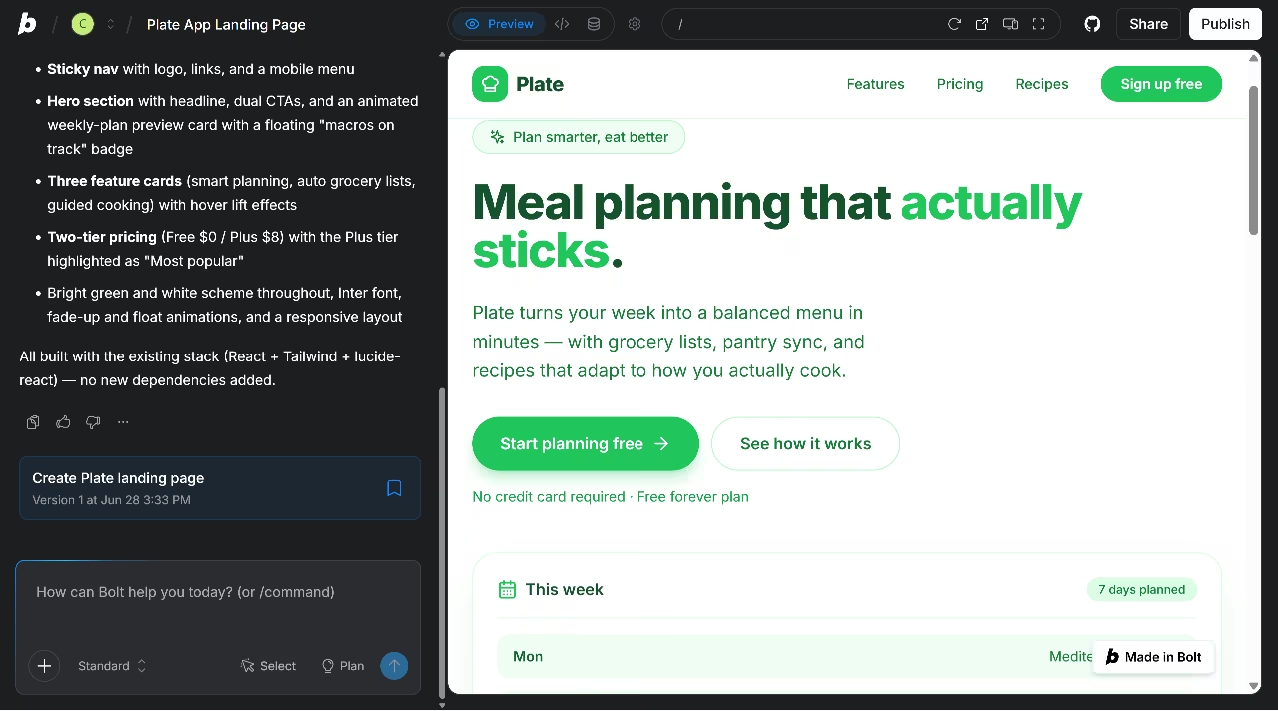
Bolt does one thing exceptionally well. It gets you from a description to something you can click on faster than almost anything else in this list. You type a prompt, Bolt generates an app with UI and basic logic, and you're iterating within minutes.
For stakeholder demos, investor walkthroughs, and early validation, Bolt is hard to beat. You can import existing GitHub repos, make AI-driven changes, and export the code back to GitHub or as a ZIP.
Key features
- Ultra-fast app generation: From prompt to a visible, working app in minutes. The core use case for demos and early-stage validation.
- GitHub import and export: Import existing repos, make AI-driven changes, and export code back to GitHub or as a ZIP.
- File locking and project prompts: Right-click any file to lock it from AI edits, or set a Project Prompt so instructions like "always use Tailwind and shadcn/ui" apply by default across sessions.
- Code diff previews: Before applying changes, Bolt shows a diff view so you can approve or reject what the AI wants to modify.
Pros
- Fastest time from idea to visible, clickable app in this list.
- Code is downloadable; no platform lock-in on the output.
- GitHub import and export for developers who want to continue in their own stack.
Cons
- The Max agent, needed for large-scale apps and complex features, is locked behind paid plans. Free users get Standard only, which Bolt describes as best for small to medium applications with well-defined tasks.
- Token costs are hard to predict before a session starts. A single initial build of a moderate-complexity app consumed 1 million tokens (10% of the Pro plan's monthly allowance) before any iteration or debugging.
- Complex business logic, custom state management, and edge-case handling regularly require manual intervention. Standard CRUD apps and landing pages work well; anything with unconventional logic needs a developer to finish it.
- Token cost grows with project size. Bolt reads, understands, and syncs your project files on every prompt, so larger projects use more tokens per message, not just more overall.
Best for
- Early-stage founders validating ideas before committing to a build.
- Stakeholder demos and investor prototypes.
- Teams that need a shareable prototype quickly and plan to rebuild it properly later.
Pricing
The free plan includes 1M tokens per month with a 300K daily limit. The Pro plan is $25/month. Teams is $30/user/month.
5. GitHub Codespaces
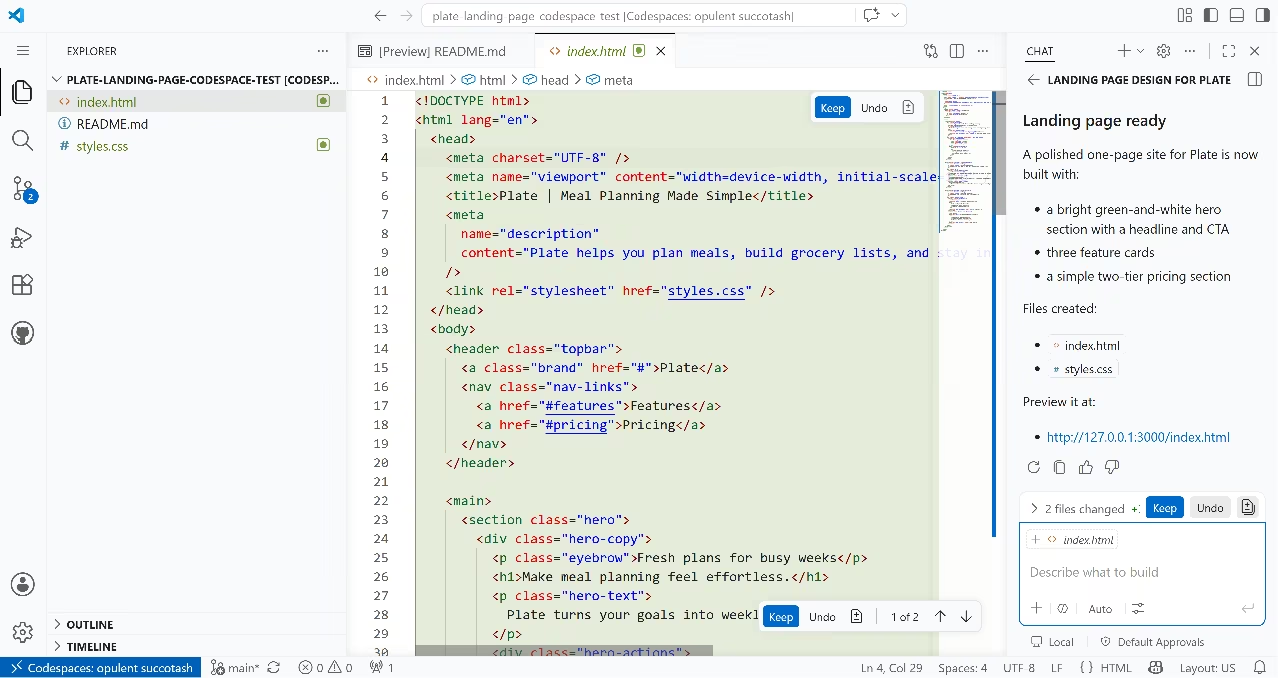
GitHub Codespaces is the cleanest answer for developers who like Replit's browser-based convenience but need to work inside a repository. You spin up a full VS Code environment in the browser, attached to any GitHub repository, in seconds. Every change flows through normal pull requests.
Codespaces itself is a cloud dev environment. It gives you the environment to write and run code, not an AI that builds an app from a description. That said, GitHub Copilot agent mode now runs inside Codespaces, which means you can generate and iterate on code from natural language prompts directly in the environment.
Copilot's free tier includes limited agent usage at no cost; paid plans unlock higher limits and premium models.
Key features
- Instant spin-up from any GitHub repo: No local setup, no configuration. Open any repo in a browser-based VS Code in seconds.
- Full VS Code with extensions: The same interface, shortcuts, and extension marketplace as the desktop app.
- Normal PR output: Every change flows through your existing pull request and CI workflow.
- Usage-based pricing: Compute is billed per hour while the environment is active. Storage is billed separately and continues to accrue even when a Codespace is stopped.
Pros
- Your code lives in GitHub; zero platform lock-in.
- Works inside your existing Git workflow with no reconfiguration.
- Free tier includes 120 core-hours and 15GB of storage per month for GitHub accounts.
Cons
- Copilot agent mode has a free tier with limited usage; heavier AI-assisted building requires a paid Copilot subscription on top of Codespaces.
- Hosting and deployment are completely separate decisions.
- Storage is billed even when a Codespace is stopped. Unused Codespaces quietly consume your storage quota until deleted.
Best for
- Developers already on GitHub who want browser-based coding without leaving their workflow.
- Teams that need consistent, portable development environments across devices.
- Developers who want Replit's browser convenience without Replit's lock-in.
Pricing
Free GitHub accounts get 120 core-hours and 15GB of storage per month. Beyond that, compute is billed per hour based on instance type.
6. Base44
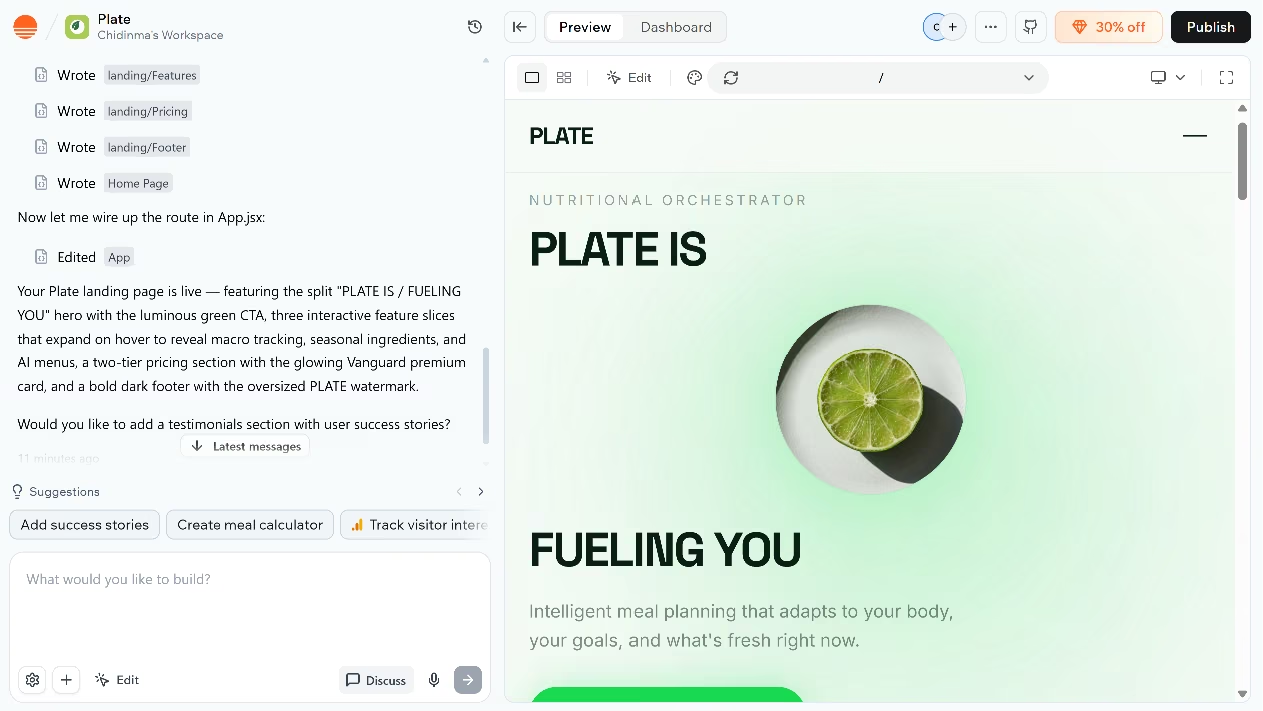
Base44 is an AI app builder that generates full-stack web applications from plain English prompts. You describe what you want, and Base44 handles the frontend, backend, database, and authentication automatically. The backend runs on Base44's own managed infrastructure throughout. There is no separate database or hosting service to connect.
Authentication and user management are built in from the start, with role management included and no separate auth provider required.
The tradeoff is portability. On Builder plans and above, Base44 can export frontend code and backend functions through GitHub or ZIP, and database collections as CSV files. But managed hosting, the authentication system, and database infrastructure cannot be exported. If you leave Base44, those layers need to be replaced with your own hosting, auth, and database setup.
Not sure Base44's portability limits work for your build? Our best Base44 alternatives breakdown covers what else is worth trying.
Key features
- Full-stack app generation: Describe the app in plain language, and Base44 generates frontend, backend, database schema, and authentication in one flow.
- Built-in authentication: Multi-user apps with role management included from the start, no third-party auth service required.
- Managed backend: Hosting, database, and API layer are all included and managed. No separate infrastructure setup required.
- Mobile app store submission: On Builder plans and above, Base44 can generate IPA and AAB files for submission to the Apple App Store and Google Play directly from the app editor.
- Web app deployment: Apps publish directly from the platform with custom domains on Builder plans and above.
Pros
- Built-in auth, database, and hosting in one tool with no separate infrastructure to assemble.
- Apps are shareable immediately after building. The dashboard generates a public link as soon as the build completes, with no separate deployment step.
- The agent offers post-build suggestions once the app is live, such as adding sections, creating calculators, or tracking visitor behavior, making iteration feel guided rather than open-ended.
- Wix acquired Base44 in mid-2025 for a reported $80 million. The acquisition gives Base44 a larger infrastructure and funding base than most AI app builder startups.
Cons
- GitHub export on Builder plans and above includes your frontend code and backend functions, but managed hosting, the authentication system, and database infrastructure cannot be exported. Leaving the platform means rebuilding those layers elsewhere.
- Mobile app store submission requires a Builder plan and uses third-party wrappers like Capacitor or PWABuilder; native-only features like push notifications must be set up separately outside Base44.
- Base44 bills building and running separately. Message credits cover your prompts to the AI. Integration credits cover your users' actions inside the live app. Run out of either, and that activity stops until your cycle resets.
Best for
- Founders building data-driven SaaS products or internal tools who want the backend handled automatically.
- Operations teams building admin panels, dashboards, and internal tooling.
- Non-technical builders who want hosting, auth, and a database included without separate setup.
Pricing
Free plan includes 25 message credits and 100 integration credits per month. Paid plans start at $20/month on the Starter tier. The Builder plan at $50/month is the first tier with custom domains, GitHub export, and backend functions.
Want the full breakdown of what each plan actually covers? Read our Base44 pricing guide before you commit.
7. v0 by Vercel
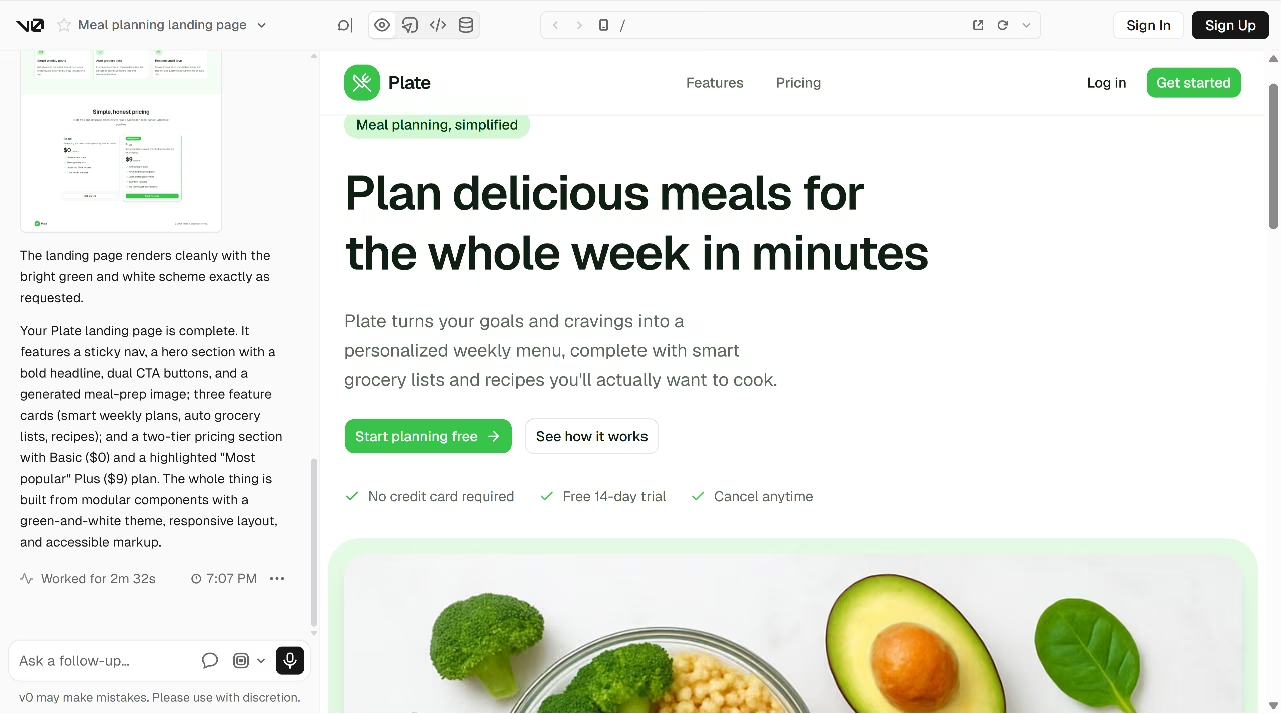
v0 by Vercel is the Replit alternative for frontend-focused app generation within the React and Vercel ecosystem. v0's own documentation describes it as an AI-powered development platform that turns ideas into production-ready web apps. You describe what you want, it generates code, and you can deploy directly to Vercel in one click.
v0 can generate applications, publish live websites, sync with GitHub, deploy to Vercel, edit with Design Mode, and start from templates. It can also create high-fidelity UIs from wireframes or mockups, connect to backend services, deploy with one click, and open a pull request for review.
The key distinction from Replit is focus. v0 is built around Next.js, React, TypeScript, Tailwind, and shadcn/ui, which makes it especially well-suited to modern frontend workflows on that stack. It is less useful when the reader wants a general-purpose browser IDE, broad language support, or a full development environment like Replit.
Key Features
- Prompt-to-app generation: v0 generates applications from prompts and publishes live websites, producing UI, logic, and code that can be deployed or exported.
- Framework-specific output: v0 generates code using Next.js, React, TypeScript, Tailwind, and shadcn/ui, which integrates cleanly with modern frontend projects.
- One-click Vercel deployment: Apps deploy directly to Vercel without separate setup, available on the free plan.
- GitHub sync: GitHub sync is included on the free plan, allowing projects to connect to repositories and support developer workflows.
- Design Mode: v0 includes visual editing (through Design Mode) on all plans.
Pros
- v0 generates production-quality React and Tailwind code rather than rough drafts, with support for high-fidelity UIs from wireframes or mockups.
- The live preview renders inside the interface immediately.
- Build speed is fast. The test landing page, including a sticky nav, hero, three feature cards, two-tier pricing, and a responsive layout, was completed in under three minutes from a single prompt.
- One-click deployment to Vercel removes the deployment friction present in tools like Cursor and Codespaces.
- GitHub sync lets developers continue work in their own IDE without rebuilding the project.
Cons
- v0 is primarily built around Next.js, React, and Tailwind, and is less useful for teams outside that ecosystem.
- Non-technical users without a developer to hand the code to will hit limits quickly.
- The free plan has a seven-message daily limit, so frequent builders may outgrow it quickly.
- v0 is not a general browser coding workspace like Replit or GitHub Codespaces.
Best For
- Frontend developers building polished interfaces within the React and Vercel ecosystem.
- Teams where a developer handles backend work, and the UI is the bottleneck.
- Product managers and designers who want to prototype in real code instead of design tools.
Pricing
Free at $0/month, Team at $30/user/month, Business at $100/user/month, and Enterprise at custom pricing. The free plan includes $5 in monthly credits and a daily limit of seven messages. The Team plan includes $30 in monthly credits per user and $2 in daily credits on login.
How to Evaluate Replit Alternatives
Choosing the right Replit alternative depends on what part of the development process you want to improve. Some tools focus on generating complete apps, while others prioritize code control, collaboration, or frontend design. The best choice is the one that matches your current bottleneck, whether that is building faster, managing code, or designing interfaces.
Here are some questions to ask when picking Replit alternatives:
Does the AI Finish the Build or Just Start It?
The most common frustration with Replit is credit burn in loops, where the AI rewrites something, breaks something else, and keeps charging per action. Before committing to any alternative, test it on a project that requires at least two rounds of iteration. The difference between a tool that can finish and a tool that keeps looping shows up quickly.
Where Do Your Code and Data Live?
Code and data ownership matter more once the app becomes useful. Some tools give you a cleaner and complete path to backend code transfer, while others, like Base44, keep more of the app inside their own system.
Before building something you would be upset to lose, check which tool exports cleanly, which keeps some things hosted by the platform, and which tool will have a developer rebuilding later.
What Is the Full Cost to Reach a Published App?
The listed monthly price rarely tells the full story. Credit-based tools charge more during debugging. Token-based tools charge more during complex builds. Some platforms include hosting; others make deployment a completely separate decision with its own costs. Run a test build on the free tier before committing to a paid plan.
Does It Publish a Usable App or Just Show a Preview?
Some tools produce apps that look finished in a preview but require significant configuration before they're accessible to anyone else. A platform that includes hosting, a domain option, authentication, and a proper database in one workflow saves you several separate decisions and several separate bills.
Confirm what "deployment" means on each platform before you build your app.
Can It Build the Thing You Want?
Every Replit alternative has a scope. Cursor and GitHub Codespaces are strongest when someone on the team can work with code. v0 is strongest inside a frontend workflow built around React, Vercel, and modern UI generation. Base44 is strongest when the app needs user access, data storage, hosting, and business workflows handled within the platform.
Emergent is a strong fit for turning early-stage product concepts into working apps. It works well for SaaS tools, internal dashboards, customer portals, and mobile app prototypes, where speed and iteration are important.
Match the platform to the project before the free tier or free credits run out.
Stop Choosing Tools You'll Outgrow
The pattern is consistent: builders start on a platform that's fast for demos, outgrow it when the project starts to matter, and spend weeks migrating. The better question to ask before you pick is which tool you won't need to leave when your product starts working.
For founders and small teams who need an app that handles users, takes payments via Stripe, and deploys to a live domain, Emergent is built for that lifecycle from the first prompt. You describe the product, specialized agents handle the build, and you get something deployed to managed infrastructure with a real URL.
Build your first app on Emergent and skip the migration.
Most builders stop at a prototype. Emergent ships real web and mobile apps, with accounts, databases, and payments included.
- Production-ready apps
- Web & mobile apps
- Deploy in minutes







