



I spent a few weeks running the same candle-and-ceramics store brief through seven Shopify alternatives to see which one fit each kind of store.
This guide gives you the store-by-store verdict so you can match a platform to your store in minutes instead of weeks.
7 Best Shopify Alternatives: Quick Comparison
The best Shopify alternative is the one that fits your store's shape, so match the platform to how you sell before you compare features.
Here's the one-screen view from running an identical home-goods store through each platform. Match the category to your store first, then read the full entry.
Prices are monthly-billed unless the cell notes annual. Square Plus is per location.
How I Tested These Shopify Alternatives
I gave every platform the same job. Each one had to support a small US lifestyle brand selling candles, ceramics, and a few seasonal gift bundles. The brief was identical each time, so the comparison stays apples-to-apples.
That brief covered a catalog of roughly 25 to 40 products with simple variants and basic SEO.
It also needed a configured checkout, US shipping and sales tax, one email integration, one payment integration, and room to grow into a couple of seasonal collections. I ran the same workflow on each tool as a controlled test, and none of the seven setups was a live business.
I used a category-by-category comparison, judging each platform against the job it is built for.
Here's what I weighed in each category.
- Catalog and B2B depth: How well it handles price lists, customer groups, and net terms for wholesale.
- Control versus maintenance: How much you own, and how much upkeep that ownership hands back to you.
- Speed to launch: How fast you get to a live, decent-looking store.
- Design versus ops: Whether the storefront polish is matched by the back-office work.
- In-person plus online: Whether one system covers a counter and a website on the same inventory.
- Embed simplicity: How easily a store drops onto a site you already run.
- Cost and free tiers: What the real starting floor is once you add what you need.
The same result showed up every time: fit beat features, and each tool was the right answer for a different kind of store. That thread runs through all seven entries below.
Plan Price Is Only Part of What a Store Costs
The monthly plan shows only part of the cost.
A cheaper platform can still cost more once you add paid apps, premium themes, developer help, migration work, redirects, and the time it takes to rebuild everyday workflows.
The reverse is true too. A platform with a higher sticker price can be cheaper if it replaces several paid apps or removes a platform transaction fee you were paying to keep your preferred processor.
I would switch platforms only when the new tool solves a structural problem. That might be native B2B pricing, tighter POS sync, WordPress ownership, a faster no-code launch, or the ability to add a store to a site you already have.
Otherwise, you are doing migration work to land in a setup that feels a lot like the one you left.
1. BigCommerce: Best for B2B and Complex Catalogs

What it does: BigCommerce is a hosted e-commerce platform built for stores with deep catalogs and wholesale buyers.
Best for: B2B sellers who need pricing rules, customer groups, and quote workflows out of the gate.
The extra machinery only earns its keep once you stop being a simple shop.
Loading in the home-goods catalog felt like overkill, right up until I switched to a wholesale buyer with net terms and customer-specific pricing.
BigCommerce trades simplicity for B2B and catalog depth. For a simple candle shop, it feels heavier than you need. For a store with tiered pricing, bulk buyers, and thousands of stock-keeping units (SKUs), that same depth becomes the reason to stay.
Key Features
- Native B2B selling: You set customer-specific price lists and groups without bolting on a paid app.
- Deep catalog handling: It manages large SKU counts and complex variants without slowing the admin to a crawl.
- Embedded-provider advantage: BigCommerce does not charge its Open Payment Provider Fee on orders processed through Embedded Payment Providers, so that extra platform fee does not apply when you use one of those providers.
Pros and Cons
Pros:
- Native B2B tools (price lists, customer groups, quote workflows) that most rivals charge extra for.
- Catalog depth that holds up at thousands of SKUs.
- No Open Payment Provider Fee on orders processed through Embedded Payment Providers.
Cons:
- The app ecosystem is smaller and clunkier than Shopify's.
- The first month leans dev-heavy before things click.
- Pricing jumps as your sales volume crosses each tier's threshold.
What Users Say
“It has a strong backend… abandoned cart recovery, discount engine, gift cards and great integrations.” - Anonymous, G2

“One of the main downsides of BigCommerce is the limited customization options.” - Anonymous, G2

Pricing
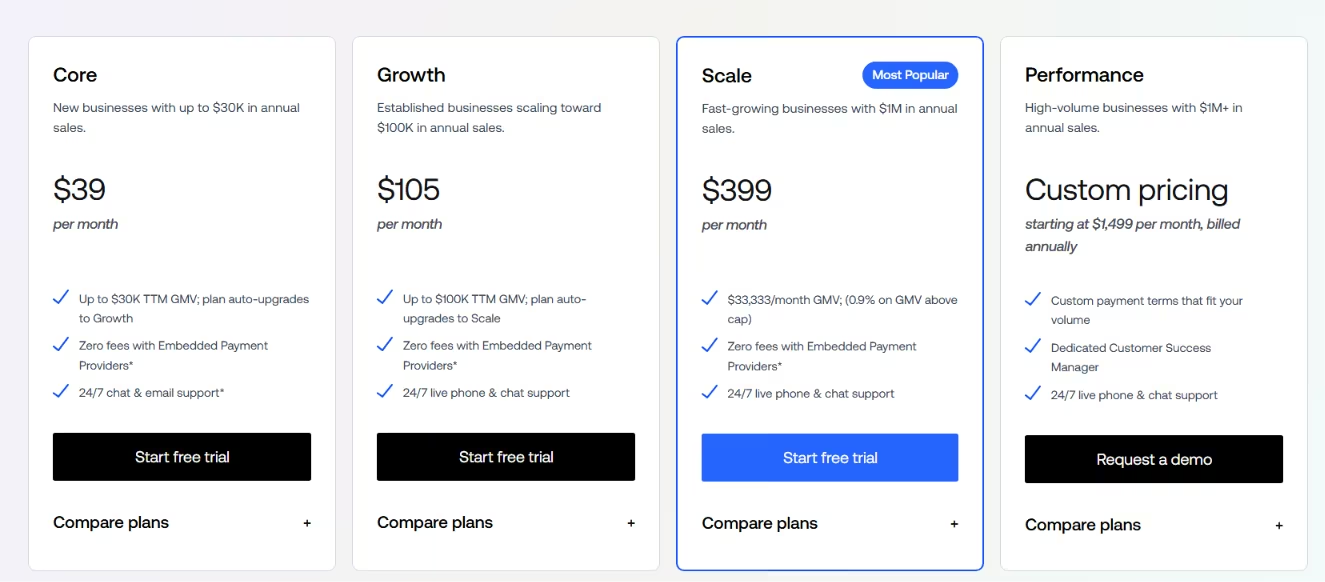
BigCommerce has no free plan. The Core plan starts at $39/month (or $29/month billed annually) and covers new stores up to $30K in annual sales. Growth runs $105/month ($79/month annually) for stores scaling toward $100K.
Scale is $399/month ($299/month annually) with a $33,333 monthly GMV cap and a 0.9% overage fee above that. Performance starts at $1,499/mo, billed annually, and is aimed at high-volume sellers doing $1M+.
Bottom Line
BigCommerce fits B2B and high-SKU sellers who need wholesale pricing rules and quote workflows without paying for an add-on. Most rivals charge extra for the same thing. If you're running a simple direct-to-customer store, skip it. The depth you'd pay for is depth you'd never use.
2. WooCommerce: Best for WordPress Control and Ownership

What it does: WooCommerce is an open-source store plugin for WordPress that runs your storefront on a site you host and control.
Best for: Owners who want full control over their data, code, and stack, and accept the upkeep that comes with it.
WooCommerce handed me control over every layer of the store. It also handed me the hosting, the plugins, the updates, and the security, which nobody else patches at 11 p.m. when a plugin update breaks checkout.
Key Features
- Open-source ownership: You own your data and code, and you can migrate hosts at any time without asking permission.
- Plugin extensibility: A large extension library lets you add almost any feature, from subscriptions to bookings.
- Low platform fees: There's no platform cut on sales, so your costs are mostly hosting, extensions, and payment processing.
Pros and Cons
Pros:
- The deepest customization of any tool here, down to the code.
- Full ownership of your store and the freedom to move it wherever you want.
- No platform transaction fee on sales.
Cons:
- You're responsible for hosting, security, and updates.
- Plugin conflicts can break the store, and you fix them.
- Performance can sag as the catalog and traffic grow.
What Users Say
“Constantly breaking down without any logical reason and the costs are endlessly higher than what I had before.” - Norahlux Rood Licht Therapie, Trustpilot

“The platform is so flexible and powerful, allowing us to customize everything from the look and feel of our shop to the way we manage inventory and process orders.” - Sarah Farneendaz, Trustpilot

Pricing

WooCommerce doesn't have a plan price because it's self-hosted. The core plugin is free, and your real costs are hosting, any premium extensions you add, and payment processing fees. Depending on how much you build out, that can land cheaper than a managed platform or more expensive. It varies entirely by setup.
Bottom Line
Go with WooCommerce if you're on WordPress, want to own your store, data, and code, and have the skills or a developer to run it.
Read More: How to Build a Website: The Only Guide You'll Need
3. Wix: Best for a Website-First Small Business

What it does: Wix is a no-code website builder with e-commerce built in.
Best for: Small businesses that need a polished website first and a store second.
Speed is where Wix wins. The candle store was live before my coffee went cold, and the editor only started dragging once I got into fine-tuning product pages.
Nothing here gets you to a decent-looking live store faster, especially with the AI-assisted setup. The friction shows up later when you push past the templates.
Key Features
- AI-assisted setup: It scaffolds a usable site fast, so you're editing rather than starting from a blank page.
- No-code editor: You drag and drop the whole layout without touching code.
- Integrated business tools: Bookings, email, and marketing live in the same dashboard as the store.
Pros and Cons
Pros:
- The fastest path to a live, attractive store.
- A low barrier for non-technical owners.
- Business tools bundled in one place.
Cons:
- The editor slows down on heavier pages.
- Customization hits limits past a point.
What Users Say
“I think Wix is absolutely great website building platform for beginner and for growing your business.” - Maria, Trustpilot

“You will have to create the design of the website with limited templates available on this software. Also after selecting a template it becomes very difficult to change it later on.” - Umesh K., G2

Pricing
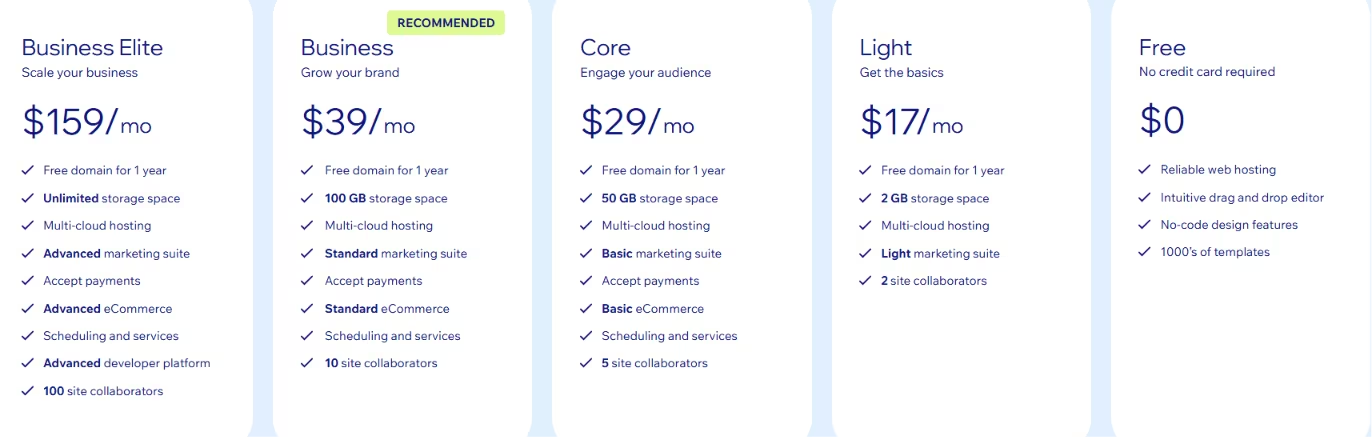
Wix has a free website builder, but you can't sell on it. To accept payments, you need the Core plan at $29/month billed annually, which is the real starting floor for a store. Business runs $39/month, billed annually, and adds advanced shipping and automated tax.
Business Elite is $159/month annually for the highest limits and priority support. The Light plan at $17/month covers a basic site but has no online store.
Bottom Line
Wix suits owners whose website matters more than heavy operations and who want a small catalog to go live fast. If you're building for scale, the editor drags on heavier pages, and the customization ceiling starts to pinch once a large catalog grows.
Read More: 5 Wix Alternatives That Give You More Control in 2026
4. Squarespace: Best for Design-Led Brands and Simple Shops

What it does: Squarespace is a template-driven website builder known for design quality.
Best for: Brand-led shops and portfolios that want a beautiful storefront with simple commerce.
Squarespace made the same store look finished almost immediately. Bulk orders, shipping labels, and tax exposed the thinner back office.
Few tools make a small catalog look this good this fast. The storefront sells the brand, but the operational side underneath it is not built for volume in the same way.
Key Features
- Award-quality templates: The starting designs look professional before you change a thing.
- Intuitive editor: Building and styling pages stays simple even for non-designers.
- Built-in hosting: Hosting and the design system come together, so there's nothing to wire up.
Pros and Cons
Pros:
- The best out-of-the-box visual quality in this lineup.
- Easy setup and editing, even for non-designers.
- Hosting handled for you.
Cons:
- Commerce workflows feel rigid past the basics.
- Bulk orders, shipping labels, and tax handling are thin.
- Operations do not scale as cleanly as the design does.
What Users Say
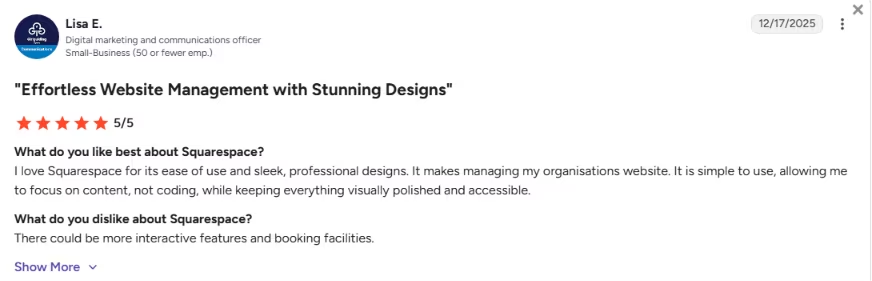
“I love Squarespace for its ease of use and sleek, professional designs.” - Lisa E., G2
“Customer service is absolutely terrible!” - Destiney Dangerfield, Trustpilot

Pricing
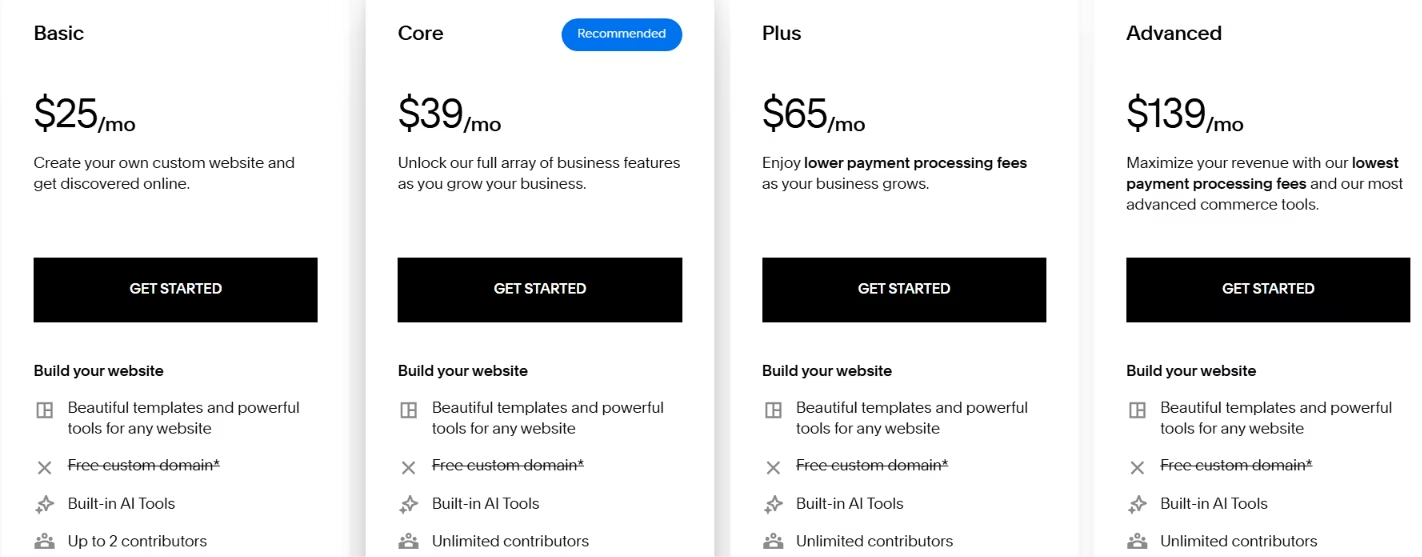
Squarespace has no free plan. Basic starts at $25/month ($19/month billed annually) and covers entry-level selling. Core is $39/month ($29/month billed annually) for growing stores, Plus is $65/month ($49/month billed annually), and Advanced is $139/month ($99/month billed annually) for larger operations.
Bottom Line
Squarespace fits design-led brands and simple boutique shops that want polish without fuss. At $25/month on Basic, the best-looking templates in this lineup come cheap.
Read More: Top Squarespace Alternatives That Perform Better in 2026
5. Square Online: Best for Brick-and-Mortar Retailers Selling Online

What it does: Square Online is the web store that connects to Square's point-of-sale system.
Best for: Shops that sell in person and want the same inventory online.
Square Online felt ordinary as a pure web store. The case for it is the counter. One stock count covers in-person and online sales, so a market-stall sale updates the website's inventory on its own.
Square Online earns its place when one system covers the counter and the website. That's where it's hard to beat.
Retailers who sell in person and online get the clearest benefit.
Key Features
- Unified POS and online: One inventory covers in-person and online sales, so stock never drifts apart.
- Reliable hardware: Card readers and registers process transactions instantly with little fuss.
- Built-in loyalty and marketing: Customer loyalty and email tools come bundled rather than bolted on.
Pros and Cons
Pros:
- In-person and online selling unified on one inventory.
- Hardware that just works at the counter.
- A free online plan to start with.
Cons:
- Payment holds and verification loops can freeze funds.
- Dispute and chargeback handling frustrates some sellers.
- The online store is shallower than the POS side.
What Users Say
“It is super simple to get a viable website up and running.” - Mickey S., G2

“Limited customization, basic SEO tools harder to optimize.” - Ravi P., G2

Pricing
Square Online starts free, with no monthly cost on the base plan and only processing fees per sale. Plus runs $49/month per location and unlocks advanced features and lower processing rates.
Premium is $149/month per location, drops in-person card rates to 2.4% + 15 cents, and includes 24/7 support. If you run multiple locations, note that paid plans are priced per location.

Bottom Line
Square Online suits brick-and-mortar shops that also sell online. If most of your revenue crosses a counter, start here. If you're online-only, better web stores exist on this list.
6. Ecwid: Best for Adding a Store to an Existing Website

What it does: Ecwid is an embeddable store you drop onto a site you already have.
Best for: Owners who do not want to rebuild their website just to start selling.
I treated Ecwid like adding a shelf to a room that already existed. The store bolts onto a site you already run in a few minutes, with no rebuild.
Ecwid works as a store layer inside the site, blog, or social pages you already run, so you can add e-commerce without replacing them. That makes it the lowest-effort way to add e-commerce to something live.
Key Features
- Embeddable storefront: The same store drops into any existing website without a rebuild.
- Multichannel selling: One catalog syncs across your site, Instagram, Facebook, and marketplaces.
- No transaction fees: Ecwid takes no cut on sales across its plans, so processing is your only per-sale cost.
Pros and Cons
Pros:
- Adds a store to a site you already have; no rebuild needed.
- Sells across multiple channels from one catalog.
- No platform transaction fees.
Cons:
- The longstanding free plan is gone, so there's a cost to start.
- Less compelling if you are building a brand-new store from scratch.
- Checkout gateway issues surface for some stores.
What Users Say
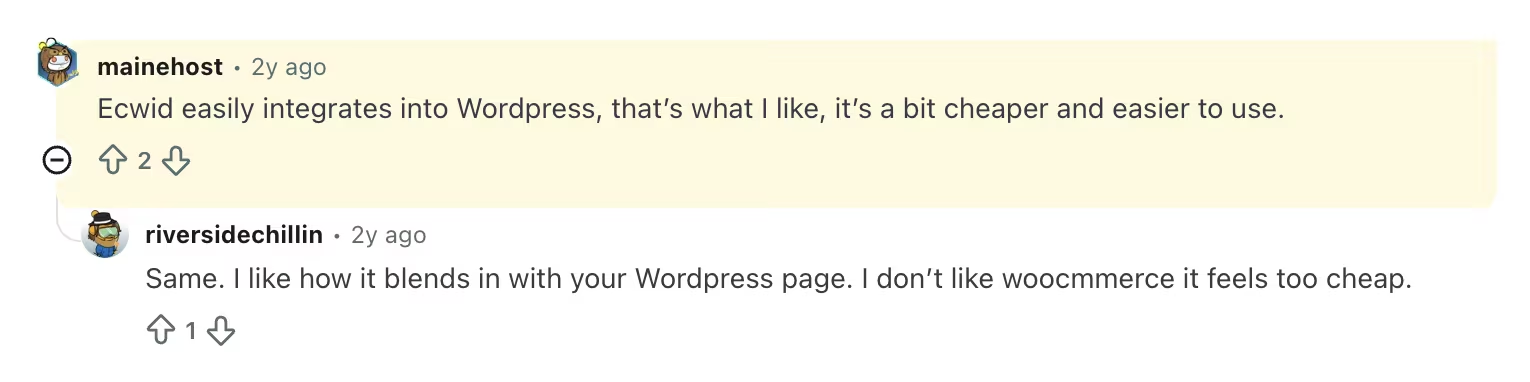
“Ecwid easily integrates into WordPress, that’s what I like, it’s a bit cheaper and easier to use.” - Mainehost, Reddit
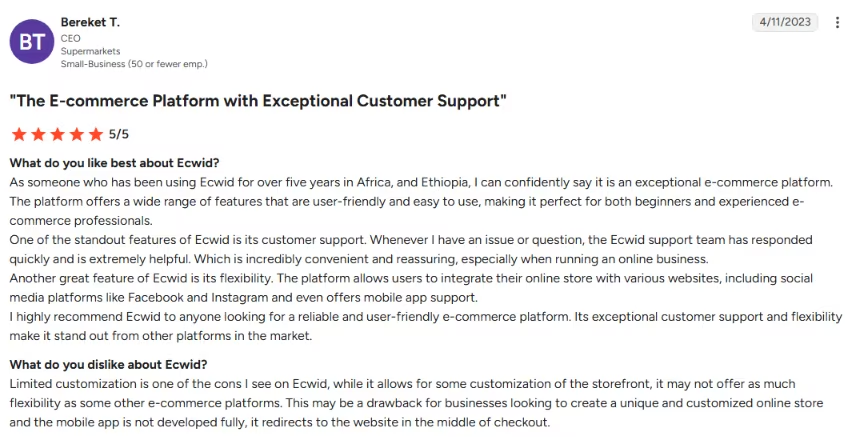
“Limited customization is one of the cons I see on Ecwid, while it allows for some customization of the storefront, it may not offer as much flexibility as some other e-commerce platforms.” - Bereket T., G2
Pricing

Ecwid no longer has a free plan. Starter is $5/month for up to 10 products, making it the lowest entry point if you want to bolt a store onto an existing site. Venture is $35/month ($29/month billed annually) for up to 100 products with social selling.
Business is $65/month ($49/month billed annually) for up to 2,500 products and marketplace selling. Unlimited is $149/month ($119/month billed annually) for unlimited products and in-person selling. There are no transaction fees on any tier.
Bottom Line
Ecwid is for anyone who already has a website that works and just needs it to sell. If you'd be starting from a blank page anyway, pick a full platform instead.
The right platform depends on whether your priority is building sales funnels or running a broader online store, which is where ClickFunnels vs Shopify becomes an important comparison.
7. Big Cartel: Best for Artists, Makers, and Tiny Catalogs

What it does: Big Cartel is a lightweight store builder aimed at independent creators.
Best for: Artists and makers with small catalogs who want to start selling cheaply and simply.
Big Cartel was the one I'd hand a friend selling their first ten ceramic mugs. I had a tiny catalog up fast, and I could also see the ceiling the moment I imagined growing.
Big Cartel is easy to start and easy to outgrow. For a maker with a handful of products, nothing here is friendlier or cheaper to start. The simplicity that gets you live fast is also the ceiling once orders climb.
Key Features
- Free starting tier: You can list a few products at no cost to test selling before you commit.
- Beginner-friendly setup: The whole store comes together without any technical know-how.
- No platform transaction fees: Big Cartel does not charge platform transaction fees on its plans, so your processor is the main per-sale cost.
Pros and Cons
Pros:
- A free tier and cheap paid plans to start.
- The lowest setup friction in this lineup.
- No platform transaction fees on Big Cartel plans.
Cons:
- A low ceiling once your catalog or sales grow.
- A thin feature set compared to full platforms.
What Users Say
“Fantastic selling platform for small home business that doesn't cost the earth.” - Lynne Bookhorn, Trustpilot

“I don't like that it costs a lot more to store more items, you can't use afterpay on big cartel, and the customization is limited.” - Anonymous, G2

Pricing
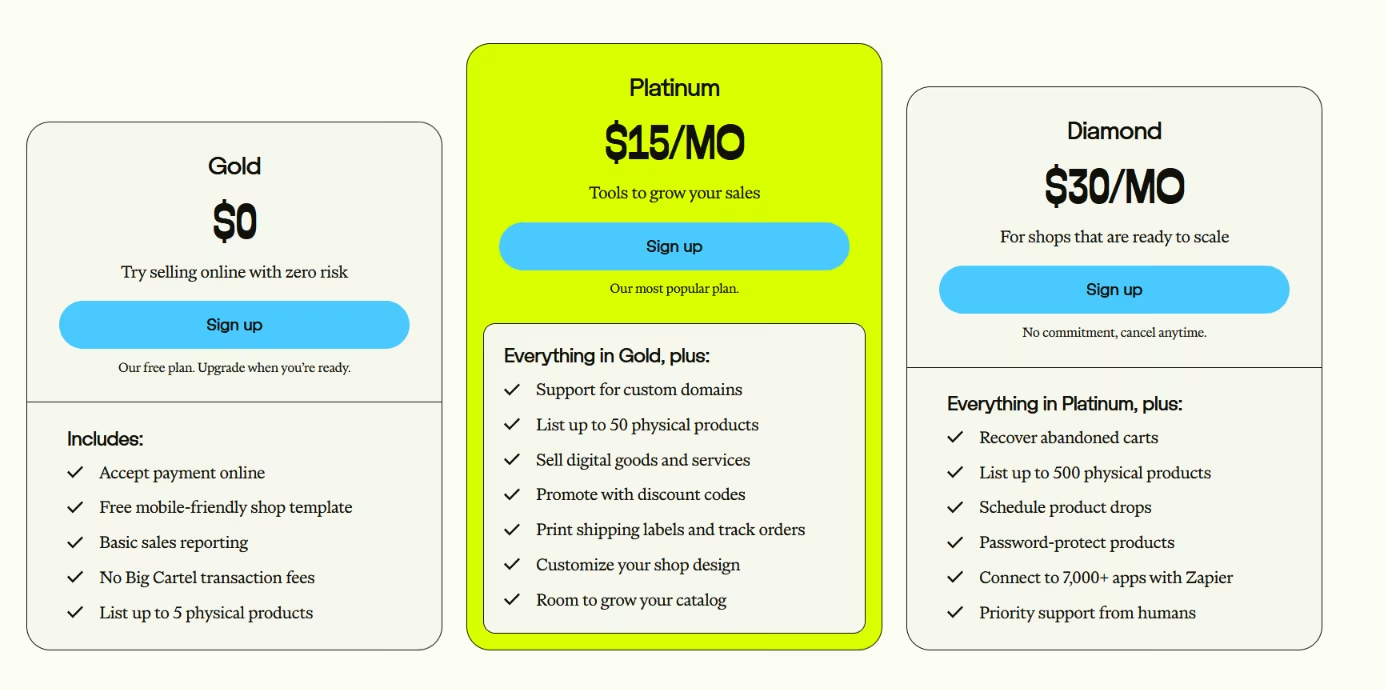
Big Cartel keeps pricing simple. The Gold plan is free for up to 5 products. Platinum is $15/month for up to 50 products, and Diamond is $30/month for up to 500.
There are no platform transaction fees on any plan. The pricing matches the tool: a cheap, simple way to start selling a small catalog, not a platform built to scale with you.
Bottom Line
Big Cartel earns its spot for artists and makers with a handful of products who want the cheapest, simplest start. Use it to launch and learn whether the shop has legs, then plan to move once the catalog outgrows a few dozen products.
Also read our best website builders for artists guide for what else is worth trying once your catalog starts to grow.
Which Shopify Alternative Should You Choose?
After running the same store through all seven, the store shape determined the decision.
Here's the map by what you're building.
- Choose BigCommerce if: You sell B2B or wholesale and need customer-specific pricing and quoting built in, and a deep catalog from day one.
- Choose WooCommerce if: You're on WordPress, want to own your store and data, and have the skills or a developer to run it.
- Choose Wix if: Your website matters more than heavy operations and you want a fast, good-looking store.
- Choose Squarespace if: Your brand leads with design and your catalog stays simple.
- Choose Square Online if: You sell in person and want one inventory across your counter and your website.
- Choose Ecwid if: You already have a website and want to add a store without rebuilding it.
- Choose Big Cartel if: You're an artist or maker selling a tiny catalog and want the cheapest, simplest start.
There is also a case for staying on Shopify.
Stay on Shopify if: You want one managed system with the deepest app marketplace and don't have a store-shaped reason to leave. These alternatives beat Shopify only where they fit best, so a clean replacement rarely exists.
Skip a dedicated platform if: None of these use cases fit the store you want, especially when you need custom catalog logic or a checkout flow that templates do not handle. At that point, you are closer to a custom build than a platform swap.
Also read our best AI website builders for beginners guide for what else is worth trying.
Final Verdict: The Best Shopify Alternative Depends on Your Store
I went in looking for one clean Shopify replacement and came out with a different answer.
The shape of your store determines which Shopify alternative fits best. No tool beats Shopify head-to-head for every store.
Each platform won a different niche. BigCommerce won for B2B and complex catalogs, WooCommerce for control and ownership, and Wix for a fast website-first store. Squarespace won for design, Square Online for in-person retail, Ecwid for adding a store to a site you already have, and Big Cartel for tiny creator shops.
Shopify stays the benchmark for a reason. Most stores that leave do so when their needs change, rather than because a rival is universally better.
Start with your store shape, find the segment that matches, and let that pick the tool.
How Emergent Helps You Build a Store No Template Quite Fits
Each platform is shaped for a specific use case. If your store needs custom catalog logic, a checkout flow the templates do not handle well, or an operations setup no plan supports, you end up bending the store to fit the tool.
When that is the wall you hit, the option left is building the store you described instead of choosing the closest template.
Emergent is built for custom stores outside those template categories. You describe the store in plain language, and a coordinated system of specialized agents splits the work across the build, from design and storefront logic to payments, customer logins, and integrations, with testing agents checking the work before anything ships.
The outcome is a working store with the catalog rules, checkout, and accounts you wanted. A template would have limited the store to the version it allowed.
Use a hosted platform when one of these templates fits the store you're building. When none of them quite match the store in your head, describing it and having it built may fit better. You can try building your first store on Emergent to see how close it gets.


Every alternative has trade-offs. Emergent just builds production-ready apps from one prompt.
- Production-ready apps
- Web & mobile apps
- Deploy in minutes







