



TL;DR
- 1. ChatGPT (with Search): Best drop-in replacement for everyday web queries and fast web-grounded research.
- 2. Google Gemini: Best for deeply integrated Google Workspace workflows and multi-modal searches.
- 3. Claude.ai: Best for long-document reasoning, complex analysis, and high-context synthesis.
- 4. Microsoft Copilot: Best for enterprise security and native integration across Microsoft Office tools.
- 5. Grok: Best for real-time X (Twitter) data and news-aware research alongside standard web search.
- 6. Elicit AI: Best for systematic literature reviews and structured data extraction from academic papers.
- 7. Logically: Best for researchers who want citations, reference management, and writing in one workspace.
- 8. Consensus: Best for research-backed claims and scientific paper verification.
- 9. Gemini Notebook: Best for organizing your own research documents into a cited, audio-summarized knowledge base.
If you want a fast, drop-in replacement for Perplexity right now, start with ChatGPT (with Search) for everyday queries, Google Gemini for native web integration, or Claude.ai if you need deep reasoning over raw speed.
Perplexity had been my default for market research, technical lookups, and long documents. Then this year's quota cuts landed, so I put nine replacements through the same three jobs I use it for most: competitor research, prospecting emails, and translation.
This list contains 9 Perplexity alternatives, split into two groups. The first five (ChatGPT, Google Gemini, Claude.ai, Microsoft Copilot, and Grok) are general-purpose assistants that can replace your daily Perplexity habit.
The last four (Elicit AI, Logically, Consensus, and Gemini Notebook) are specialized research tools built for deeper, citation-heavy academic work.
Two tools didn't make the cut. Perplexica, renamed Vane in 2026, is a genuine free, open-source Perplexity clone, and it's the one people recommend most often on Reddit, but it runs locally and needs an install with Ollama or an API key, which rules it out for most founders.
You.com is out because it has repositioned as web search infrastructure for AI agents and developers; its homepage now sells web search APIs rather than a consumer search tool.
I'll explain where each wins, where it falls short, and which one fits your workflow.
Why Look for Perplexity Alternatives?
Perplexity set the benchmark for AI-driven search. It parses hundreds of pages, pulls direct quotes, and footnotes sources in real time, which is why a lot of founders stopped opening Google first.
But recent changes to the platform created friction for daily operators:
- Sudden quota cuts: Mid-2026 updates slashed usage caps across paid accounts. One annual subscriber documented Deep Research falling from roughly 500–600 queries a day to just 20 a month. Pro Search moved from clear daily allowances to weekly limits that Perplexity's own support staff wouldn't put a number to.
- Model downgrades: Subscribers report that once you cross a query threshold, prompts get routed away from the premium models Perplexity advertises, such as Claude Opus 4.5 on Max, toward smaller, lighter ones. CEO Aravind Srinivas has said the fallback is by design and that the bug was the interface still showing the model you picked.
- Stuck in the research phase: Perplexity excels at gathering facts, then stops. It gives you a summary with no built-in way to turn that summary into a draft, a product spec, or a usable app.
- Citation quality still varies: Inline sources look authoritative at a glance, but scraping errors are real. You still have to open each link to check dates, numbers, and context before you hand data to a client.
How I Picked These Tools
I tested the first five across three integral parts of the founder workflow: problem-solving (competitor research), email generation, and language translation.
For problem solving, I prompted the tools to help me with a basic competitive research on a fictitious trucking company I just founded:
“I'm the founder of a new trucking/carrier company (called Four-Seven) in Frisco, Texas. Give me the 5 strongest local competitors I should keep an eye on.”
Then I checked how well each tool writes prospecting emails:
“Estes Accelerator is a rapid sheet metal product development and prototyping services company in Texas. Here's their website: https://www.estesdm.com. Write a 7-line prospecting email to their CEO, proposing to handle logistics on their behalf.”
The third test was language translation, from Spanish to English:
“Translate this to English: El estadio de Barcelona era el lugar favorito de Julio y Emiliano. Todas las noches, después de clase, iban allí a ver jugar a Messi.”
Since the last four tools are research-focused, I asked each to help me find the latest research papers on trigeminal neuralgia:
“Give me the latest findings on trigeminal neuralgia”
I also hopped on official product pages and docs, checked pricing, and looked at what other users are saying on G2 and Capterra.
I left speed and usability out of the five general tools' write-ups because all five scored highly on both, so neither separated them.
Which Perplexity Alternative Should You Choose?
If you want a fast decision based on your specific workflow needs, here's how the top options stack up:
- Choose ChatGPT or Google Gemini if you want a direct drop-in replacement with live search, minimal setup, and immediate answers.
- Choose Claude.ai if you need deep analysis, long-document processing, and nuanced synthesis.
- Choose Microsoft Copilot if your business already runs on Microsoft 365 and you need built-in enterprise-grade data protection.
- Choose Grok if you need real-time X (Twitter) data or breaking news alongside your research.
- Choose Elicit AI, Logically, Consensus, or Gemini Notebook if you need specialized research outputs: Elicit AI for systematic literature reviews, Logically for citation-backed writing and reference management, Consensus for peer-reviewed scientific claims, or Gemini Notebook for organizing your own uploaded documents.
- Stick with Perplexity if you're a casual searcher who stays well under the usage caps and relies heavily on its default side-by-side source checking.
How to Evaluate Perplexity Alternatives
When choosing a search platform for your business, evaluate tools based on their impact on workflow.
Here are five criteria to keep in mind:
- Quota transparency: Look for platforms that publish clear query caps and provide usage dashboards. You need to know your research won't get cut off mid-project by a cap you didn't see coming.
- Workflow integration: How easily does the tool fit into your existing stack? If your business runs on Google Workspace or Microsoft 365, selecting a search tool with native ecosystem integrations saves hours of manual copy-pasting.
- Time to value: How much setup time do you need? Cloud-based chat interfaces give you immediate answers with zero setup, while tools that import your existing reference library or documents, like Elicit AI, Logically, or Gemini Notebook, take longer to pay off until your sources are organized.
- Verification burden: How much manual fact-checking do you still have to perform? Check whether the platform displays exact quote previews and clickable links so you can verify claims in seconds.
- Output utility: What happens to your research once you find your answers? A summary trapped inside a chat window doesn't help you launch projects. Choose tools that offer built-in side workspaces, export features, or draft panels to convert facts into action items.
Best Perplexity Alternatives at a Glance
How the nine compare at a glance: use cases and entry-level paid tiers, side by side.
| Platform | Best for | Starting price |
|---|---|---|
| ChatGPT (with Search) | All-in-one web search and writing | $8/mo(Free tier available) |
| Google Gemini | Google Workspace integration | $4.99/mo(Free tier available) |
| Claude.ai | Long document analysis & synthesis | $20/mo(Free tier available) |
| Microsoft Copilot | Office apps; business-tier data protection on commercial licenses | $9.99/mo(Free tier available) |
| Grok | Search & real-time X (Twitter) data | $10/mo(Free tier available) |
| Elicit AI | Systematic literature reviews | $75/user/mo(Free tier available) |
| Logically | Reference management & citation-backed writing | $30/user/mo(Free tier available) |
| Consensus | Peer-reviewed academic research | $20/mo(Free tier available) |
| Gemini Notebook | Own-document research & audio summaries | $4.99/mo(Free tier available) |
Pricing verified as of September 2026.
The 9 Best Perplexity Alternatives: 5 General Assistants, 4 Research Tools
1. ChatGPT (with Search): The Direct Drop-In Replacement
ChatGPT with Search delivers real-time web citations directly inside OpenAI's conversational interface. It combines deep reasoning with live web indexing, making it the most direct replacement for daily search tasks.
For competitor research, ChatGPT was fast, producing the companies it thought were my competitors and giving me each competitor's physical address, rating, and why I should watch them.

It's one of only 2 of the 5 tools that produced a competitor map, so I can view them at a glance.

ChatGPT's email opens with a generic “I came across Estes Accelerator” and breaks every sentence into its own line rather than paragraphs, reading more like a bulleted list than a message someone would actually send.

ChatGPT rendered era as “was” and iban as “went,” flattening both into simple past and losing the habitual sense of the Spanish imperfect.

ChatGPT is an all-rounder you can rely on for your daily tasks.
Key features:
- Live web browsing: Pulls current pages and displays clickable source citations in real time.
- Canvas workspace: Opens a side-by-side editing panel where you can draft and revise documents or code directly, without leaving the chat.
- Advanced reasoning models: Switches into extended reasoning modes to solve multi-step research problems.
Pros:
- Work continuously with clear, reliable query limits
- Get a usable first draft in one prompt instead of three
- Ask fewer follow-ups to reach the same answer
Cons:
- Inline citation links require more clicks to preview
- Free tier limits apply to file uploads, image generation, and voice mode, and the low-cost Go plan can include ads
Best for:
- Founders who need live web answers combined with long-form writing tools
- Operators who want a reliable default assistant with no quota surprises
What Users Say
“One of my favorite things about ChatGPT is how easily it can shift between very different kinds of conversations without losing the thread.” - Aditya K., G2

“Even after tweaking the instructions, ChatGPT is the most 'agreeable' bot, which doesn't challenge you enough.” - Abhinav A., G2

Pricing:
- Free tier available
- Go: $8/month
- Plus: $20/month
- Pro: $100/month, or $200/month for 20x usage
2. Google Gemini: Built Into Google Workspace
Google Gemini grounds web search in Google's real-time index and plugs natively into Google Workspace. It handles web retrieval, complex reasoning, and multi-modal file uploads in a single view.
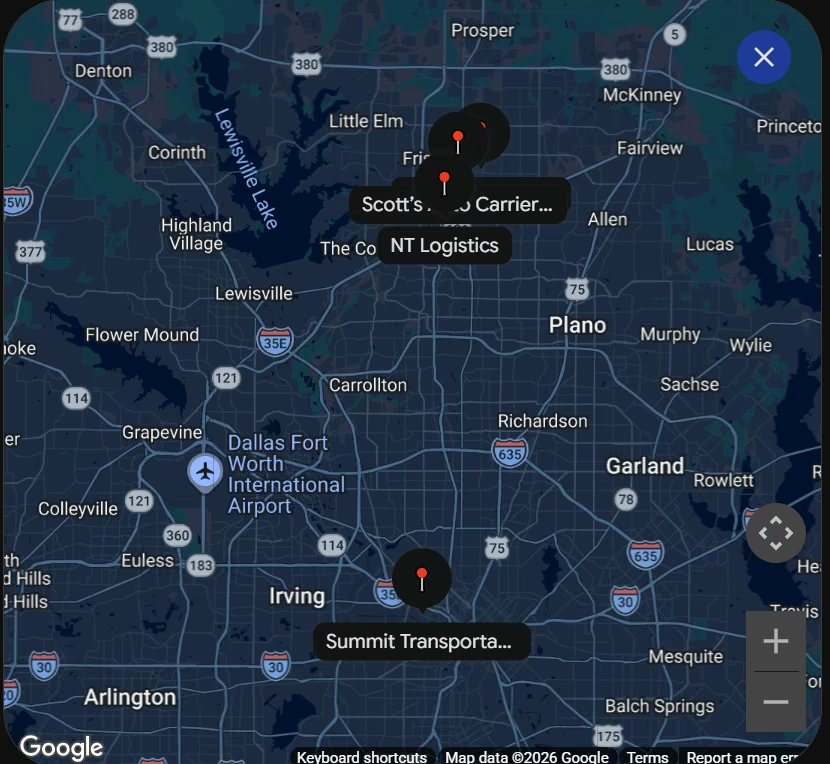
Gemini was a bit more detailed in its competitor research, giving me each tool's main focus, strength, why I should monitor them, and even more info on the side panel. Its top 5 businesses overlapped with those of ChatGPT.

Its map rendering was also more detailed, maybe a bit crowded.
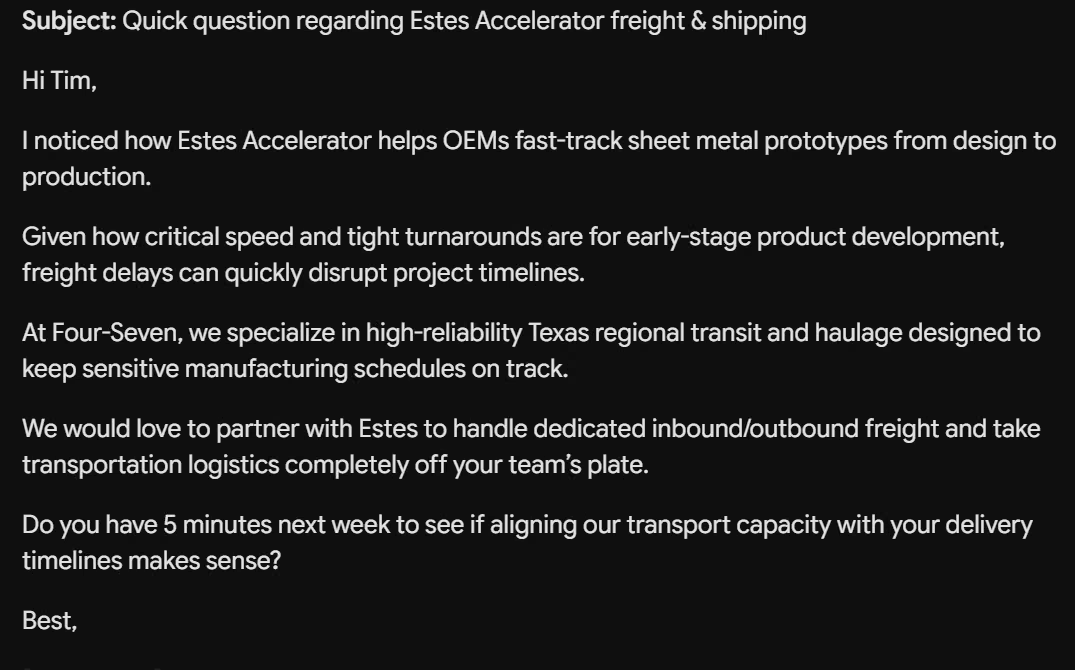
I’d say Gemini’s email rendering is superior to ChatGPT's, and it uses the problem-solution copywriting framework, sounding more human.
Gemini's wording was identical to ChatGPT's: “was” for era, “went” for iban, word for word.

Key features:
- Google Search integration: Uses Google's main search engine index for up-to-the-second web coverage.
- Workspace extensions: Pulls details from Gmail on the entry AI plan, and from Docs, Vids, and Drive on Google AI Pro and above.
- Deep Research mode (AI Pro and above): Synthesizes large sets of sources into structured summaries.
Pros:
- Track real-time news and breaking updates to publish timely commentary.
- Send draft copy, data, and tables straight into Google Docs or Sheets (AI Pro and above)
- Run all-day research without watching a query counter
Cons:
- Citation previews lack Perplexity's clean side-by-side card structure
- Prioritizes Google ecosystem sources over specialized sites
Best for:
- Teams that run their entire operation inside Google Workspace
- Service business owners who need fast web facts converted into client deliverables
What Users Say
“I use Gemini for my study, and I find it helpful because it can make short notes of big chapters within a few seconds.” - Cargo A., G2

“I’ve noticed in Gemini is that during longer project conversations, it can lose track of details or context I shared several prompts earlier.” - Sahil A., G2

Pricing:
- Free tier available
- Google AI Plus: $4.99/month
- Google AI Pro: $19.99/month
- Google AI Ultra: $99.99/month for the entry tier with roughly 5x AI Pro's usage limits and 20 TB storage, or $199.99/month for the 20x Ultra tier, which Google measures against non-subscriber access.
3. Claude.ai: More Depth Than Speed
Claude excels at synthesizing long documents, analyzing complex logic, and producing publication-ready writing. It skips raw web links in favor of carefully structured analysis over large files.
Claude produced one of the best results and understood the task better, and it felt like working with an assistant who already knew the account.
In addition to providing useful information about the companies, like their sizes, specialties, and when they were formed, it gave me the competitive landscape of the Frisco area and made useful recommendations on how to succeed as a new business.

The email hedges like a person thinking out loud, “I'd guess your shipping partner needs to match that pace,” and drops in a phrase a template wouldn't generate: “no dispatcher runaround.” I'd still edit it before sending, but getting that from a one-line prompt was impressive.

Claude was the only one of the five to catch the imperfect tense: it rendered iban as “would go” instead of “went,” keeping the habitual sense of those nights at the stadium that the other four flattened into simple past.

Key features:
- Massive context window: Processes whole books, PDF reports, and codebase dumps at once
- Artifacts workspace: Generates, previews, and edits documents and code in an interactive side panel
- Projects feature: Stores reference documents and custom instructions across all chats in a project, with sharing available on Team and Enterprise plans
Pros:
- Get publish-ready drafts that skip the usual AI tropes and need barely any editing
- Extract critical insights, data points, and context from massive documents
- Keep assets, research, and prompt context organized by client or campaign to eliminate re-briefing
Cons:
- Search results are woven into responses rather than shown as clickable citation cards like Perplexity's
- Usage caps can trigger during long research sessions
Best for:
- Operators summarizing long industry reports and strategy documents
- Founders who need polished written outputs over raw search links
What Users Say
“Claude has the ability to handle my complex tasks without any issues. I can give it detailed instructions, and it follows them faithfully.” - Brooke H., G2

“One drawback is that Claude can sometimes be overly cautious, leading to responses that feel more restrictive than necessary.” - Coralia R., G2

Pricing:
- Free tier available
- Pro: $20/month ($17/month billed annually)
- Max: $100/month for 5x Pro usage, or $200/month for 20x
- Team: $25/seat/month ($20 billed annually), for teams of 2 to 150
- Enterprise: $20/seat/month plus usage at API rates
4. Microsoft Copilot: Already Inside Microsoft 365
Microsoft Copilot combines Bing web search with enterprise-grade data security across the Microsoft ecosystem.
The tool, during competitor research, was precise and straight to the point, going even deeper than ChatGPT and Google Gemini. It showed each company's fleet size, safety rating, insurance coverage, freight types, and strength.

I wouldn't use the email it generated, as it talked more about my business than the prospects. You would have to be more detailed in your prompting if you want to generate good emails with Microsoft Copilot.
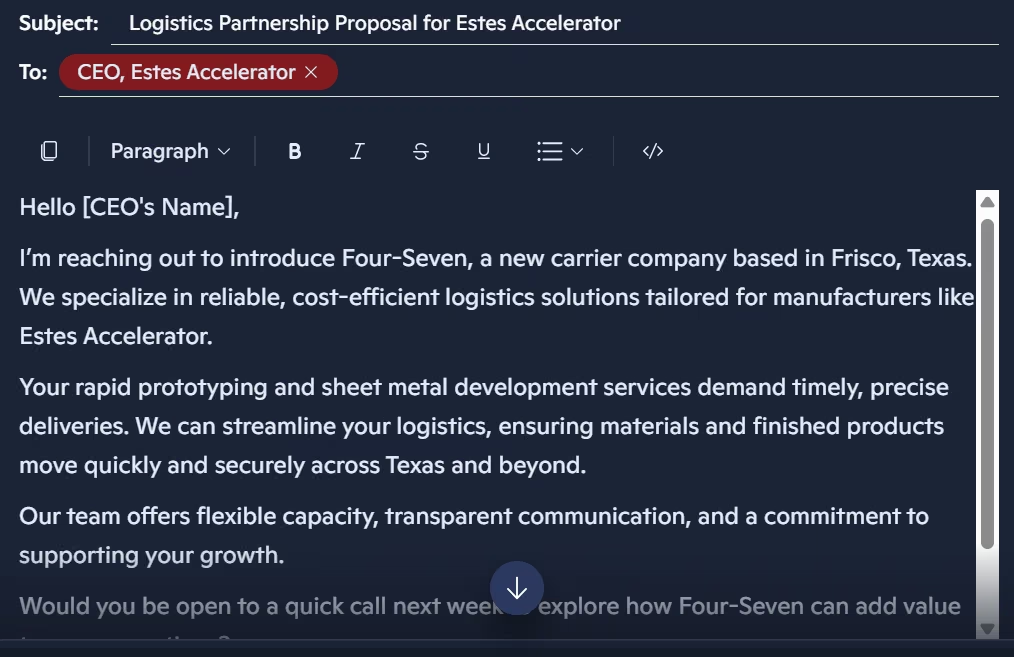
Copilot's wording matched ChatGPT's and Gemini's exactly (“was,” “went”), but it was the only one of the five to ask whether I wanted a more literary or a more neutral tone.

Key features:
- Web search (grounded via Bing): Fetches live web pages with inline source links in Copilot Chat.
- Office App integration: Works natively inside Word, Excel, PowerPoint, and Outlook.
- Enterprise data protection (business plans): On Microsoft's commercial Copilot licenses, prompts, responses, and Microsoft Graph data aren't used to train foundation models. The consumer Microsoft 365 plans priced below don't carry the DPA or the admin, audit and eDiscovery controls a commercial license brings, though Microsoft says consumer Copilot conversations in Word, Excel, PowerPoint and Outlook are also excluded from model training.
Pros:
- Run confidential client research on a business Copilot license, where prompts and responses sit under Microsoft's Data Protection Addendum rather than public model training.
- Generate complete Word documents, slide decks, or spreadsheets directly from web research outputs.
- Start on the Microsoft 365 plan your business already pays for, with no new vendor review.
Cons:
- Conversational tone can feel rigid compared to dedicated chat models
- Web search output can default to promotional Bing index pages
Best for:
- Consultants handling sensitive client data
- Businesses operating primarily inside Microsoft Office tools
What Users Say
“Microsoft Copilot helps save time by quickly generating content, summarizing information, and answering questions within the tools I use every day.” - Priyanka P., G2

“I would like Copilot to provide more consistent and context-aware responses.” - William Adrian C., G2

Pricing:
- Free tier available
- Microsoft 365 Personal: $9.99/month
- Microsoft 365 Family: $12.99/month (AI features for the subscription owner only)
- Microsoft 365 Premium: $19.99/month
5. Grok: Real-Time X Data Perplexity Lacks
Grok is a standalone AI assistant at grok.com, built by xAI, with real-time access to X (Twitter) data built in alongside standard web search.
It combines DeepSearch, an autonomous research mode, with Grok 4's reasoning to pull current social and news signals directly into your answers.
Grok's research named data points the other two missed: it cited FMCSA's SAFER and MCS-150 databases as the source to verify safety scores and insurance coverage, and flagged specialty operators like Mario Sinacola & Sons, a construction and excavating fleet, as an adjacent competitor worth watching.

Grok's email opens with “Dear Tim Estes,” which it found on the website my prompt supplied rather than guessing: Tim Estes is the president of Estes Design & Manufacturing. ChatGPT left a [CEO Name] placeholder instead, so Grok was the only tool that went looking.

Grok's wording matched the other three (“was,” “went”) and appended two unprompted suggestions, links to Camp Nou's history and other Spanish stadiums, that had nothing to do with the translation.

Key features:
- DeepSearch: Autonomous research mode that runs multiple search steps across X posts, web pages, and news feeds before producing an answer.
- Real-time X integration: Surfaces live social sentiment and breaking conversations that other assistants don't index.
- Think mode: Extended reasoning similar to Claude's extended thinking, shown step by step.
Pros:
- Track breaking social conversations, viral trends, and public sentiment directly from live platform feeds.
- Gauge real-time consumer reactions and brand perception as news unfolds.
- Research live web sources and social discussions even with a free account.
Cons:
- Full SuperGrok runs $30/month, above ChatGPT Plus and Claude Pro at $20, and the cheaper $10 Lite tier caps what you can do
- Less polished for long-form writing and document-heavy research than Claude or ChatGPT
Best for:
- Founders and marketers tracking real-time brand or market sentiment
- Operators who need news-aware research that general search engines miss
What Users Say
“I love how Grok has real-time access to X data.” - Nataporn C., G2

“I think Grok can work on improving the possibility of spreading misinformation, bias, and unreliable information.” - Sunny g., G2

Pricing:
- Free tier available
- X Premium (bundled access via X, optional): $8/month
- X Premium+: $40/month
- SuperGrok Lite: $10/month
- SuperGrok: $30/month
- SuperGrok Plus: $100/month
- SuperGrok Heavy: $300/month
- Business: $30/user/month
- Enterprise: Custom
6. Elicit AI: Built for Systematic Literature Reviews
Elicit AI automates literature review work: finding relevant papers, extracting data into structured tables, and generating evidence summaries.
It searches across more than 138 million academic papers and follows PRISMA-auditable workflows for systematic reviews.
Elicit surveyed 60 papers before generating its report, three times the 20 abstracts Consensus read for the same prompt, though it took noticeably longer to finish. The results were detailed, split into source, evidence type, paper, relevance, and topic.

Key features:
- Automated Research Reports: Generates a structured literature review report from a single research question.
- Data extraction tables: Pulls specific data points, like sample sizes or methodologies, into exportable columns across thousands of papers at once.
- Systematic review support: Every screening decision is PRISMA-auditable, and reports ship with PRISMA flow diagrams and a methods section.
Pros:
- Trace every claim in your report back to a named paper
- Compare a dozen studies side by side in one table
- Search more than 138 million academic publications for free to validate project feasibility
Cons:
- Narrower scope than Perplexity; not built for general web research or current events
- Higher report usage and high-accuracy extraction sit behind paid tiers
Best for:
- Founders and consultants building evidence-based reports or client proposals
- Researchers running systematic reviews or meta-analyses
What Users Say
“It summarises the paper beautifully and gives the sample, techniques, objectives, and to her relevant information in precise and clear terms.” - Verified User in Research, G2

“The format on which it gives you the information is large and requieres a lot of visual space [sic]” - Guadalupe R., Capterra

Pricing:
- Free tier available
- Pro: $75/user/month (billed annually at $49/user/month)
- Scale: $279/user/month ($169/user/month billed annually)
- Enterprise: Custom
7. Logically: Citations and Writing in One Workspace
Logically rolls an AI research assistant, a reference manager, a document writer, and a file annotator into one workspace. It's built by Afforai Inc., so most of its G2 and Capterra reviews are still filed under that name.

It's built for citation-backed research and writing, tracing every claim back to a specific page and paragraph in your sources.
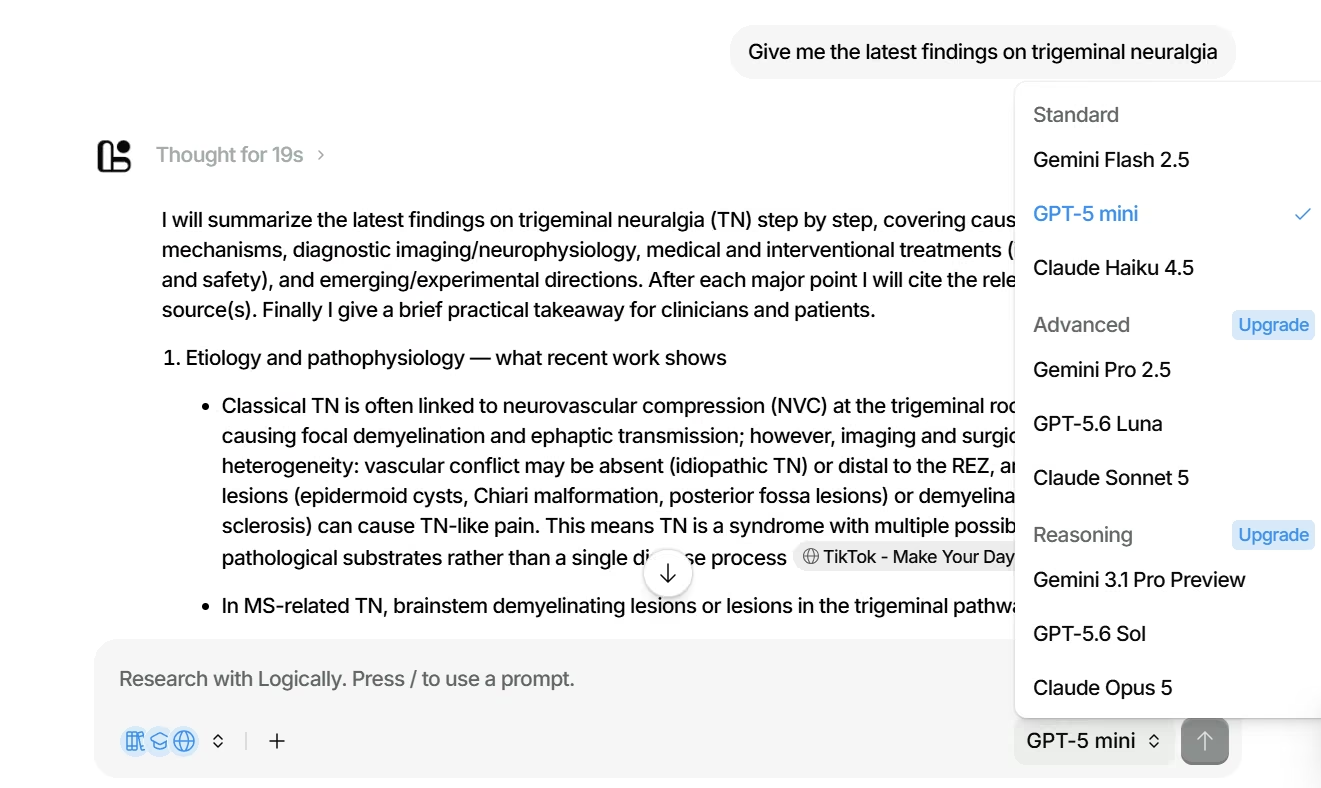
The user interface is a bit cluttered, and one citation in its answer was “TikTok - Make Your Day,” attached to a clinical claim about trigeminal neuralgia pathophysiology, the kind of source Elicit's academic-only database wouldn't return.
It leans more toward general writing than pure scientific research. There are also several models to choose from, with a couple behind a paywall.
Key features:
- AI Research Assistant: Runs citation-backed literature reviews and traces claims back to exact source locations.
- Reference Manager: Imports libraries from Zotero, Mendeley, or EndNote and auto-generates bibliographies as you write.
- Document Writer: Combines word processing, citation insertion, and AI writing assistance in a single editor.
Pros:
- Centralize source discovery, citation management, and document drafting into a single workspace.
- Check a citation down to the page and paragraph in seconds
- Test core research and citation features immediately
Cons:
- Primarily built for academic writing and citation workflows, with general web search as a secondary feature
- Real-time web search is more limited than Perplexity's or Grok's
Best for:
- Founders and consultants writing evidence-based reports with heavy citation needs
- Researchers replacing separate Zotero, Word, and citation-generator subscriptions
What Users Say
“This is such an amazing resource for researchers from any field.” - Vikas P., G2

“It would be great, if pdfs could be imported directly by drag and drop.” - Martin Richard F., G2

Pricing:
- Free plan available
- Unlimited: $30/user/month ($12/user/month billed yearly)
8. Consensus: Built for Peer-Reviewed Research
Consensus searches a database of more than 220 million peer-reviewed academic papers to deliver evidence-backed claims. It replaces general web pages with published research studies.
On the trigeminal neuralgia prompt, Consensus returned results faster than Elicit or Logically, and its Consensus Meter was the only output that told me how much of the literature actually agreed. The trade-off: it returns far more papers than Elicit and does less to organize them, so you do the sorting, which takes time and can be confusing.
It provides the number of times a research work has been cited, which I found useful for choosing works to use in your own research.

Key features:
- Academic paper search: Queries peer-reviewed journals instead of commercial blogs.
- Consensus Meter: Classifies study conclusions as Yes, No, Possibly or Mixed to show where the literature agrees.
- Synthesized study snapshots: Summarizes methodology and sample sizes for every source.
Pros:
- Skip SEO blogs and unverified web claims entirely
- Evaluate overall scientific agreement on complex medical or technical topics in seconds
- Link directly to published journal papers to validate claims
Cons:
- Not built for live news, pricing updates, or general market research
- Search queries must frame clear research questions for best results
Best for:
- Consultants building evidence-based client proposals
- Founders needing verified science behind health, bio, or technical claims
What Users Say
“What I like best about Consensus is how effective it is as a demonstration tool.” - Alexandre T., G2

“While they are shipping more improvements this year, the UI has been unnecessarily confusing.” - Ethan J., G2

Pricing:
- Free tier available
- Pro: $20/month ($12/month billed annually)
- Deep: $65/month ($45/month billed annually)
9. Gemini Notebook: Built for Your Own Documents
Gemini Notebook (formerly NotebookLM) is Google's AI research assistant built to answer questions using only the sources you upload, from PDFs and Docs to websites and YouTube transcripts.
It turns your own documents into a queryable knowledge base with cited answers and audio summaries, similar to how Perplexity Spaces organizes an ongoing research project.
Since Gemini Notebook works differently from the other three by default, I used its Deep Research mode with the same trigeminal neuralgia prompt.
It ran an autonomous web search and returned a well-organized report with inline citations, though it pulled from general web sources rather than Elicit and Consensus's dedicated academic databases, so paper coverage was thinner.
Gemini Notebook has additional features the other specialized tools don't have, so I had to test it further.
It can handle different kinds of materials (including Videos, PDFs, and website links), from different sources, and can perform a web search.
I added a YouTube video link of a Stanford Medicine Neurosurgery Master Class featuring Dr. Michael Lim and a link to a post on the advancements in trigeminal neuralgia diagnosis and biomarkers by the European Society of Medicine.
Then I uploaded a review of recent evidence on trigeminal neuralgia by the Journal of Oral Medicine and Pain, searched for recent discoveries on the ailment right inside Gemini Notebook, viewed and imported them, and added a research paper from my Google Drive.

Gemini Notebook summarized the materials within minutes and returned strong insights.
I love the fact that it added citations of the sources it pulled particular information from.
At my prompting, it generated an infographic to visualize treatment pathways.
Gemini Notebook is fast and powerful. A should-have for anyone who loves finding new information or ideas from different sources.
Key features:
- Audio Overviews: Turns your uploaded sources into a podcast-style audio conversation between two AI hosts, summarizing key points in a listenable format.
- Source-grounded chat: Answers questions using only your uploaded PDFs, Docs, websites, and YouTube transcripts, with every claim cited back to the exact source passage.
- Deep Research: Runs an autonomous web research agent that gathers sources and compiles a citation-backed report, or uses the lighter Discover Sources to add relevant pages with one click.
Pros:
- Free to use with generous limits: 100 notebooks, 50 sources each
- Every answer traces back to your own uploaded sources, which nearly eliminates hallucination on your material
- Audio Overviews turn dense reading into a listenable summary
Cons:
- Deep Research mode can gather live web sources for you, but it's a newer, narrower feature than Elicit's or Consensus's dedicated academic search engines.
- Deeper features like more sources, higher daily limits, and Cinematic Video Overviews require a Google AI subscription
Best for:
- Founders and researchers organizing an ongoing project's worth of documents, the closest replacement for Perplexity Spaces users
- Teams who want audio summaries of long reports or research materials
What Users Say
“It can summarize PDFs, Notes, youtube videos, research papers, and lecture materials and convert them into concise short notes.[sic]” - Saumy V., G2

“There’s no smooth way to push answers into the tools we actually work in.” - Bindu Madhuri J., G2

Pricing:
- Free tier available
- NotebookLM Plus (via Google AI Plus): $4.99/month
- NotebookLM Pro (via Google AI Pro): $19.99/month
- NotebookLM Ultra (via Google AI Ultra): from $99.99/month
- Included free with Google Workspace Business Standard and above
From Research to a Working App: What Happens After You Pick One
Every tool on this list ends at the same point: a well-sourced answer. The client portal, the intake form, and the internal tracker you were researching still don't exist.
If you've used AI search to validate an idea or map out a client workflow, the next step is building the app.
That's what Emergent does.
You describe the app you want in plain English, and Emergent’s AI web app builder creates it, so your team ends up with something they can open and use.
When you're ready to move from research to a real product, see how Emergent turns a validated idea into working software.

Every alternative has trade-offs. Emergent just builds production-ready apps from one prompt.
- Production-ready apps
- Web & mobile apps
- Deploy in minutes







