



If you’re choosing between Replit and Google Colab, you’re really deciding how you prefer to build and run code.
Replit is a browser-based cloud IDE designed for building, collaborating, and deploying applications. It supports multiple languages, offers AI assistance through Replit Agent, and allows one-click deployments for web apps and APIs.
Google Colab, on the other hand, is a hosted Jupyter notebook environment focused mainly on Python. It’s widely used for data science, machine learning experiments, and GPU-accelerated research workflows. It integrates deeply with Google Drive and Google Cloud.
Both run in the browser. Both remove local setup. But they serve very different workflows.
They overlap on simplicity. They differ on scope and production readiness.
Key Takeaways
- Choose Replit if you want to build and deploy full applications in multiple languages with collaboration built in.
- Choose Google Colab if you mainly work in Python for data science, ML experiments, or GPU-based notebooks.
Quick Comparison Table
Replit and Google Colab both run in the browser, but they serve very different technical goals. Below is the structured comparison using our locked parameter format.
| Parameter | Replit | Google Colab |
|---|---|---|
| Development Approach | Cloud IDE with built-in AI assistant, terminal access, multi-language support, and deployment tools. ⭐️⭐️⭐️⭐️⭐️ | Hosted Jupyter notebook environment focused on Python execution and data workflows. ⭐️⭐️⭐️⭐️ |
| Primary Use Case | Build, run, and deploy full-stack applications in the browser | Run Python notebooks for data analysis, machine learning, and experiments |
| Coding Required | Yes, developer-led workflow, AI can scaffold and assist across files. ⭐️⭐️⭐️⭐️ | Yes, notebook-based Python coding required. ⭐️⭐️⭐️⭐️ |
| Full Stack from Prompts | Partial. AI can generate features, but architecture decisions remain manual. | Not designed for full-stack apps. Focused on computational notebooks. |
| Hosting & Deployment | Built-in one-click deployment with custom domains and production hosting options. ⭐️⭐️⭐️⭐️⭐️ | No native app hosting. Notebooks can be shared but not deployed as production web apps directly. ⭐️⭐️⭐️ |
| Scalability | Supports hosted deployments and scalable backend services depending on plan. Suitable for growing apps. ⭐️⭐️⭐️⭐️⭐️ | Scales compute via GPU/TPU access in paid tiers, but not built for scaling production applications. ⭐️⭐️⭐️⭐️ |
| Collaboration | Real-time multiplayer coding in shared browser-based projects. ⭐️⭐️⭐️⭐️⭐️ | Easy sharing via Google Drive with commenting. Limited real-time IDE-style collaboration. ⭐️⭐️⭐️⭐️ |
| Code Ownership | Fully yours and exportable anytime. ⭐️⭐️⭐️⭐️⭐️ | Notebooks downloadable as .ipynb files. Full ownership of exported code. ⭐️⭐️⭐️⭐️⭐️ |
| Best For | Developers building SaaS apps, APIs, tools, or hosted web projects | Data scientists, ML engineers, students running experiments |
Replit vs Google Colab: Key Features Comparison in Detail
Ease of Setup and Onboarding
Getting started should not require hours of environment configuration. The easier the onboarding, the faster you can begin building or experimenting.
Replit
Replit runs entirely in the browser, so you can create a new project and start coding instantly without installing anything locally. It auto-configures the runtime, dependencies, and file structure for many popular languages.
For beginners, this removes friction completely. For professionals, it speeds up testing ideas, building prototypes, or collaborating in shared environments. Everything runs inside a managed workspace with built-in preview and terminal access.
Read More About: 7 Best Replit Alternatives
Google Colab
Google Colab also requires no local setup. You open a notebook in the browser and begin writing Python code immediately. Since it runs on Google’s infrastructure, you don’t manage environments manually.
However, Colab is notebook-based rather than project-based. That works well for experiments and data analysis, but it’s not structured for building full multi-file applications.
Our Recommendation:
If your goal is building applications or multi-file projects, Replit offers a more structured environment. If you are running quick Python experiments or ML notebooks, Colab is simpler and more focused.
Programming Language Support
The range of supported languages affects how flexible the platform is for different use cases.
Replit
Replit supports a wide range of programming languages including Python, JavaScript, TypeScript, Go, Rust, C++, Java, and more. You can switch between languages easily and run full-stack web apps within the same workspace.
This makes it suitable for backend APIs, frontend apps, bots, and even small production services. The flexibility makes Replit attractive for startups and indie developers working across stacks.
Google Colab
Google Colab is primarily built for Python. While you can run shell commands and limited system tools, the experience is clearly optimized for Python notebooks.
For data science and machine learning, this is perfect. But if you need to build in other languages or manage a full-stack app, Colab is not designed for that workflow.
Our Recommendation:
Choose Replit if you work across multiple languages or need web application flexibility. Choose Colab if your workflow is primarily Python-based data science or ML.
Deployment and Hosting
Turning code into something publicly accessible is a key differentiator between development environments.
Replit
Replit allows one-click deployments depending on your plan. You can host web apps directly and generate public URLs for sharing. Environment variables, logs, and secrets are managed inside the platform.
This makes Replit more than just a coding IDE — it functions as a lightweight hosting solution for prototypes and small production apps.
Google Colab
Colab is not designed for application hosting. You can run servers temporarily inside notebooks, but sessions disconnect and are not meant for long-term deployments.
If you want to deploy something built in Colab, you must export it and move it to another hosting platform.
Our Recommendation:
If deployment matters, Replit clearly wins. Colab is excellent for experimentation, but not for hosting live applications.
Collaboration and Sharing
Modern development often involves collaboration. The experience of sharing work matters.
Replit
Replit supports real-time multiplayer coding. Multiple users can edit the same project simultaneously, similar to collaborative document editing.
It also supports project sharing, role-based access, and team workspaces on paid plans. This makes it suitable for classrooms, startups, and remote teams.
Google Colab
Colab integrates with Google Drive and allows notebook sharing with view or edit access. Collaboration works similarly to Google Docs.
However, collaboration is notebook-focused. It does not provide structured team workspaces or project-based permission systems like a full IDE environment.
Our Recommendation:
For structured team collaboration on software projects, Replit is stronger. For sharing research notebooks, Colab is simple and effective.
Built-In AI Assistance
AI-assisted coding is becoming standard in development tools.
Replit
Replit includes Replit Agent, which assists with writing and modifying code inside your workspace. It can generate features, refactor functions, and help debug based on prompts.
This makes Replit more beginner-friendly and accelerates development for experienced users. AI is integrated directly into the coding interface.
Google Colab
Google Colab does not include a built-in AI coding assistant by default. You can manually integrate APIs or extensions, but AI assistance is not a core feature of the notebook environment.
This keeps Colab lightweight but less AI-enhanced compared to modern coding IDEs.
Our Recommendation:
If AI-assisted coding is important to you, Replit provides a more integrated experience. Colab focuses more on execution and experimentation rather than AI coding workflows.
Compute Power and Hardware Access
When running heavy workloads like machine learning or simulations, available compute resources matter a lot.
Replit
Replit provides managed compute environments depending on your plan. For standard web apps and moderate backend workloads, performance is stable and predictable.
However, it is not optimized specifically for GPU-intensive machine learning training. It is better suited for application development rather than deep ML experiments.
Google Colab
Google Colab shines here. It provides free access to GPUs and TPUs (with limitations), making it extremely popular for machine learning experiments.
For students and researchers, this is a major advantage. You can train models directly in the browser without owning expensive hardware. Paid tiers like Colab Pro offer extended sessions and better resource priority.
Our Recommendation:
If you need GPUs for ML work, Colab clearly has the edge. If you're building apps rather than training neural networks, Replit is more practical.
Project Structure vs Notebook Workflow
How your code is organized affects scalability and long-term maintainability.
Replit
Replit uses a traditional file-and-folder project structure. You can create multiple files, manage dependencies, and build structured backend or frontend apps.
This makes it suitable for real-world software development, where modular code and version control are important. It feels like a lightweight cloud IDE rather than a notebook.
Google Colab
Colab is notebook-based. Code is written in sequential cells, which works perfectly for experimentation and step-by-step analysis.
However, for larger applications, notebooks can become hard to maintain. Managing multi-file application architecture is not its primary design goal.
Our Recommendation:
For structured application development, Replit is the better fit. For exploratory coding and research workflows, Colab is ideal.
Version Control and Git Integration
Serious development usually involves Git workflows and collaboration through repositories.
Replit
Replit integrates with GitHub, allowing you to import and export repositories. Teams can connect projects directly to version control systems and deploy based on Git workflows.
This makes it compatible with professional development practices. You can collaborate, review, and manage changes more formally.
Google Colab
Colab allows saving notebooks to GitHub or Google Drive, but it is not deeply integrated with repository workflows.
You can export .ipynb files, but it does not function as a full Git-based development environment. Versioning feels more document-based than software-structured.
Our Recommendation:
For teams working in repositories, Replit is more aligned with Git workflows. Colab is better for individual experiments or research documentation.
Learning and Educational Use
Both platforms are popular among students, but they serve slightly different learning styles.
Replit
Replit is widely used in coding bootcamps and classrooms. Real-time collaboration, browser-based access, and easy sharing make it beginner-friendly.
Students can build actual applications, APIs, and web servers without worrying about installation issues. It bridges learning and real-world development.
Google Colab
Colab dominates in data science education. It is widely used for machine learning tutorials, research demos, and academic assignments.
Since everything runs in the notebook, instructors can combine explanations, code, and output in one document. It is perfect for step-by-step teaching.
Our Recommendation:
For learning web development or general programming, Replit is stronger. For learning data science or ML concepts, Colab is usually preferred.
Session Persistence and Runtime Limits
Long-running sessions can make or break certain workflows.
Replit
Replit sessions remain active based on plan limits. Paid plans offer more persistent deployments and uptime for hosted apps.
For long-running production-style apps, Replit’s deployment system is more stable than notebook-based sessions.
Google Colab
Colab sessions time out after periods of inactivity. Free users may experience shorter session durations and runtime resets.
This is acceptable for experiments, but not ideal for long-running services or persistent applications.
Our Recommendation:
If you need persistent uptime for applications, Replit is more reliable. Colab works best for temporary sessions and experiments.
Review Comparisons
Before diving into pricing, here’s how both platforms are rated across major review sites. These ratings reflect real user feedback around usability, reliability, and performance.
Star Ratings Overview
| Platform | G2 Rating | Capterra Rating | Product Hunt |
|---|---|---|---|
| Replit | 4.5 / 5 ⭐⭐⭐⭐☆ | 4.6 / 5 ⭐⭐⭐⭐☆ | 4.7 / 5 ⭐⭐⭐⭐⭐ |
| Google Colab | 4.6 / 5 ⭐⭐⭐⭐☆ | 4.7 / 5 ⭐⭐⭐⭐☆ | 4.8 / 5 ⭐⭐⭐⭐⭐ |
Ratings reflect publicly available listings as of 2026 and may change over time.
Review Summary Analysis
Replit
G2:
Users appreciate Replit’s browser-based IDE, collaborative editing, and ability to deploy apps without local setup. Many reviewers highlight its usefulness for students, startups, and rapid prototyping.
Capterra:
Feedback often emphasizes ease of use and accessibility. Users like that everything runs in the browser. Some note limitations in compute resources on lower tiers.
Product Hunt:
The community response has been positive, especially around AI integrations and one-click deployment features. Developers value how quickly they can move from code to live app.
Overall, Replit is rated highly among developers who want an all-in-one development and hosting solution.
Google Colab
G2:
Reviewers frequently highlight Colab’s strong support for machine learning workflows, GPU access, and easy sharing through Google accounts. It is popular among researchers and ML practitioners.
Capterra:
Users appreciate the simplicity of notebook-based coding and zero setup requirements. The most common complaint involves session timeouts and runtime limits in the free tier.
Product Hunt:
Colab receives strong engagement from the data science community. It is often praised as an accessible way to experiment with ML without investing in local GPU hardware.
Overall, Google Colab is rated extremely well within academic and ML-focused circles, particularly for experimentation and training workflows.
What Users Are Saying
Reddit discussions often reveal what review platforms do not. Below are recent threads highlighting real user frustrations and experiences.
r/replit – High Spending Concerns
In this thread, a user shared that they spent approximately $12,000 over 12 months on Replit. The discussion revolves around cost accumulation when running multiple projects and scaling usage over time.
Several commenters debated whether the cost justified the convenience of browser-based hosting and development. The key takeaway is that while Replit simplifies deployment and infrastructure, heavy usage can significantly increase expenses.
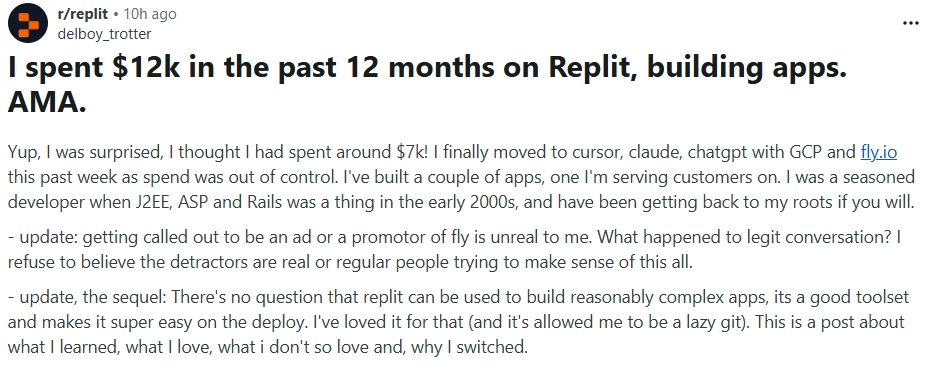
Source: r/replit
Reddit
Insight: Replit works well for convenience and scaling, but users building resource-intensive or long-running services should closely monitor billing and usage.
r/GoogleColab – UI Frustration
This thread focuses on dissatisfaction with the Google Colab interface. The user criticized the UI design and workflow friction compared to traditional development environments.
Other commenters echoed concerns about usability inconsistencies and interface limitations when managing complex notebooks.

Source: r/GoogleColab
Reddit
Insight: While Colab is powerful for computation, its notebook interface may feel restrictive or frustrating for users accustomed to structured IDEs.
r/GoogleColab – Session & Workflow Frustration
In this discussion, users expressed frustration over session timeouts, environment resets, and runtime limitations.
Colab’s free tier in particular can disconnect inactive sessions or reset environments, which can interrupt longer workflows. Several users noted that upgrading to paid tiers reduces but does not completely eliminate some friction points.
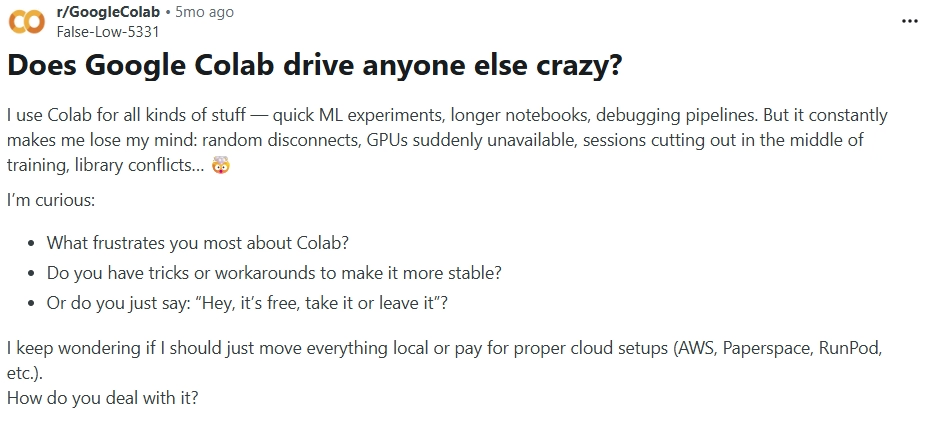
Source: r/GoogleColab
Reddit
Insight: Google Colab is excellent for experimentation, but session management and runtime limits can disrupt longer or more complex workflows.
Pricing Comparison
Below is a single combined pricing table covering currently available plans for both platforms. Pricing may change over time and should always be verified on official websites before making a decision.
| Plan Type | Replit | Google Colab |
|---|---|---|
| Free Plan | Free tier with limited resources, public projects, basic AI access, and limited deployment capabilities | Free access to notebook environment with limited GPU/TPU access and session time limits |
| Paid Individual Plan | Replit Core plan with higher compute limits, private projects, enhanced AI usage, and improved hosting options | Colab Pro with faster GPUs, longer runtimes, and more RAM |
| Higher Tier / Pro+ | Replit Teams and advanced plans offering collaboration features, higher resource limits, and scaling support | Colab Pro+ with priority access to faster GPUs and longer sessions |
| Enterprise Options | Enterprise plans with advanced security, SSO, and organizational controls | Enterprise options through Google Workspace integrations |
| Billing Model | Monthly subscription tiers based on usage and features | Monthly subscription tiers for Pro and Pro+ |
Introducing Emergent
If you are comparing browser-based builders like Replit with notebook platforms like Google Colab, you are essentially choosing between development depth and experimentation power.
Emergent positions itself differently. It focuses on AI-native app building where you can move from idea to working product using structured AI workflows, not just raw coding or isolated notebooks.
Here is how it fits in the broader landscape:
| Parameter | Emergent | Replit | Google Colab |
|---|---|---|---|
| Core Focus | AI-native app builder with structured workflows and production intent | Cloud IDE for multi-language development and hosting | Python notebook environment for ML and data experiments |
| Full Stack from Prompts | Designed to generate structured app foundations using AI workflows | AI assists but architecture decisions remain manual | Not designed for full-stack app generation |
| Hosting & Deployment | Built with production deployment intent | Built-in hosting and deployment | No native production hosting |
| Scalability | Structured for growing applications with guided architecture | Scalable app hosting depending on plan | Scales compute sessions, not applications |
| Best For | Founders, product teams, AI-first builders | Developers building SaaS or hosted apps | ML engineers, researchers, students |
How to Choose the Best AI Builder
Choosing the right platform depends on what you are actually trying to build. Use the checkpoints below to decide clearly.
Are You Building a Product or Running Experiments?
If you are building a SaaS tool, API, or web app, you need deployment and structured environments. Replit or Emergent makes more sense.
If you are training ML models, analyzing datasets, or running research experiments, Colab is purpose-built for that workflow.
Do You Need GPU Power?
If your work depends on GPU or TPU acceleration for machine learning training, Google Colab is the practical choice.
If you are building logic-heavy web apps rather than training neural networks, GPU access is less critical.
How Important Is Deployment?
If launching a live product matters, choose a platform with built-in hosting. Replit supports direct deployment. Emergent focuses on structured product creation with deployment intent.
Colab does not function as a hosting platform.
Do You Prefer Structured Development or Notebook Simplicity?
Replit provides a traditional IDE-like structure with folders and multi-file support. Emergent reduces complexity through guided AI workflows.
Colab keeps things simple with notebook cells, but this simplicity can become restrictive for large systems.
Are You Working Solo or With a Team?
Replit supports real-time collaboration inside projects.
Colab allows shared notebooks but is less structured for app teams.
Emergent is designed for collaborative product building workflows rather than research notebooks.
Practical Takeaway
- Choose Replit if you want to build and deploy full applications in multiple languages with collaboration built in.
- Choose Google Colab if you mainly work in Python for data science, ML experiments, or GPU-based notebooks.
They overlap on simplicity. They differ on scope and production readiness.
Conclusion
Choosing between Replit and Google Colab depends entirely on your goal.
If you are building a full-stack application, API, SaaS tool, or deployable web product, Replit is the stronger choice. It offers a complete cloud IDE, real-time collaboration, multi-language support, and built-in hosting. It is designed for product development, not just experimentation.
If you are working on machine learning projects, training models, analyzing datasets, or running Python experiments with GPU support, Google Colab is better suited. It removes hardware barriers and makes ML experimentation accessible directly in the browser.
In simple terms:
- Choose Replit for building and deploying applications.
- Choose Google Colab for data science and machine learning experiments.
Understanding this distinction makes the decision much easier. Both tools are powerful, but they solve different problems.

Most AI app builders stop at prototypes. Emergent creates production-ready apps you can actually launch.
- Production-ready apps
- Web & mobile apps
- Deploy in minutes







