



After a few months building small apps on Emergent by describing them in plain English, here are five vibe coding examples worth copying, plus the prompt that starts each one.
5 Vibe Coding Examples at a Glance
Each project below is something a non-technical builder can make and use day to day. Here is the quick version before the details.
| Example | What You Build | Best For | Key Pieces |
|---|---|---|---|
| Clothing brand landing page | A one-page site with a product gallery and sign-up | A label launching shirts and jackets | Hosting, sign-up form, email |
| Invoice generator | A tool that turns details into invoices | Freelancers billing clients | Forms, math, downloads |
| Personal website | A tech writer's portfolio site | Creators, consultants, job seekers | Hosting, custom domain |
| Dental booking app | A booking page with a deposit step | Clinics booking paid appointments | Calendar, card payments, email |
| Gym member tracker | A private database of members | Gym owners outgrowing spreadsheets | Sign-in, data storage, search |
How These Vibe Coding Examples Came Together
Vibe coding means you describe the software you want in normal language and guide an AI while it writes, tests, and fixes the code. AI researcher Andrej Karpathy coined the term in early 2025, and this overview of vibe coding is a good first stop if the idea is new to you.
I built each example on Emergent, an AI app-building platform designed around that loop. You describe the app, it asks a few questions to pin down the details, and a working version comes back as a preview on the right of the screen. Open it in a new tab to click through it, then refine it with follow-up prompts until it feels right.
After you sign in at emergent.sh, you see a large prompt box with build types to pick from. I worked on the Pro plan ($200 a month, 750 credits), which adds a Brainstorm tab for talking through an idea before the build starts.

Emergent also lets you choose which agent runs the build. I picked E-3, the more autonomous agent on the Pro plan, because I wanted the apps built quickly without much hand-holding. You describe what you want, the agent asks a few questions, and then it plans, builds, and tests the whole thing on its own.
The other choice is E-1, the step-by-step builder on the lower plans, which keeps you closer to each decision. For complex logic, Pro also has the Maxx feature, a slower, deeper reasoning mode that uses more credits. You can check current plan prices on the Emergent pricing page.
Whichever agent you pick, a system of specialized agents does the work under the hood. Some plan the app, others build the part people see, and testing agents run the finished app end to end and rewrite anything that breaks, among other roles. That is why a first version usually works without you opening any code.
Here is what I paid attention to with each build:
- Clarity: How well Emergent turned a plain description into a working first version.
- Moving parts: Whether the app needed a sign-in, payments, or stored data, and how cleanly Emergent wired those up.
- Refinement: How easy it was to change things with a follow-up prompt.
- Going live: What it took to publish the app for other people to use.
When a build was ready, I clicked the Deploy button. After about 15 minutes, the app went live on a free emergent.host web address that I could share right away.
1. A Product Landing Page for a Clothing Brand

What you build: A clean, one-page site for a clothing brand that shows off your shirts and jackets and collects sign-ups.
Best for: Founders who want to test a product idea before building a full online store.
Say you are starting a small clothing label and want to know whether people will buy your first run of shirts and jackets. A landing page is the fastest way to find out, and you do not need a full store to start asking.
I described a streetwear label called ShirTee, and the agent built the headline, a product gallery, and a working sign-up form in the first pass. The sign-ups are collected into a list for you, so you have a waiting list to export or connect to an email service whenever you want one.
What It Includes
- A product gallery that shows each shirt and jacket with a photo, a short description, and a price.
- A launch sign-up form that collects every new subscriber into a list, so you have a waiting list before the first item ships.
The Prompt That Starts It
"Build a one-page landing site for my clothing brand. Add a headline, a gallery of shirts and jackets with photos, prices, and short descriptions, and an email sign-up form for launch updates. Use a clean, modern look with plenty of white space."
Before building, the agent asked a few quick questions: the brand name and style, how to handle the product gallery, and where sign-ups should go. I gave it a minimalist streetwear direction, had it generate placeholder product mockups with sample prices, and chose to just collect sign-ups for now.
Once done, a preview of the app will be displayed on the right side of the screen. The agent already performs its own internal testing, but you can also open it in a new tab and do manual testing.
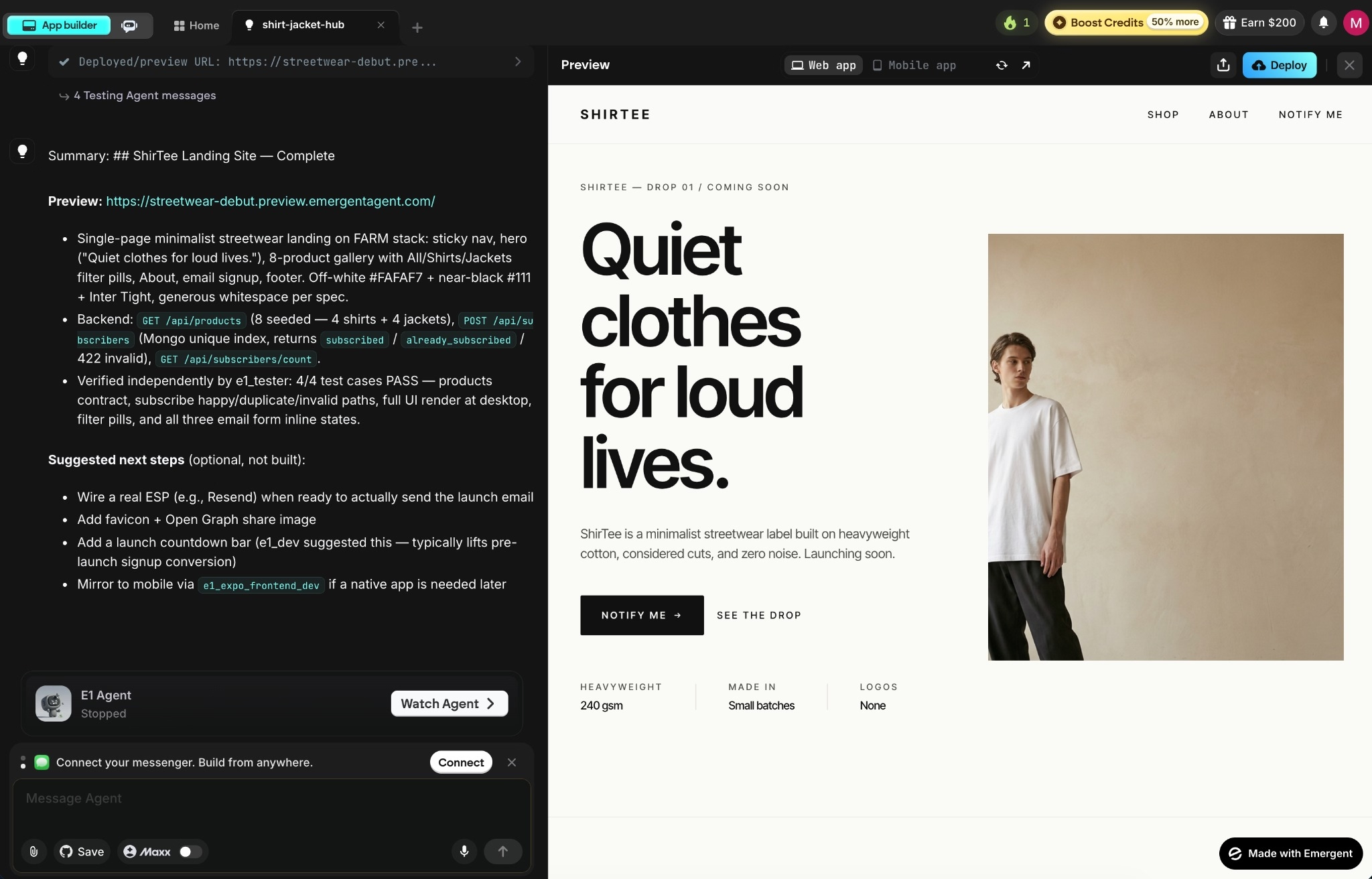
When you want your own web address instead of the free one, you can buy and connect a custom domain inside Emergent through its built-in domain service. The steps are in this guide to adding a custom domain.
Watch for: This example keeps things to one page so you can test demand. A full online store with a cart, inventory, and checkout is a larger build you can also do on Emergent, so start with the landing page and expand once you know people want the products.
Live demo: https://streetwear-debut.emergent.host
2. An Invoice Generator for Freelancers

What you build: A tool that turns client details and line items into an invoice you can download.
Best for: Freelancers and small service shops tired of fighting with spreadsheet templates.
Imagine a freelance designer who sends a handful of invoices every month. Each one means copying last month's file, wiping the old numbers, and hoping the totals still add up. This tool replaces that scramble.
You enter the client, the line items, the quantities, and a due date, and the tool does the math and lays out a clean invoice.
Emergent has a walkthrough for a conversational invoice generator where you can even type the details as a plain sentence and watch them fill in.
What It Includes
- Automatic totals and tax so you stop adding up line items by hand at 11 p.m.
- A download button that gives you a finished invoice in PDF format, ready to send to a client.
The Prompt That Starts It
"Build a simple invoice tool for my freelance work. Let me enter a client name, line items with quantities and prices, and a due date. Calculate the totals and tax, then let me download the finished invoice as a clean one-page file."
Before planning, the agent checked a few details: whether I needed logins, how to handle tax, the download format, and whether to save past invoices. I kept it to a single-user tool with no login, a fixed tax rate, a one-page PDF download, and a saved history of past invoices.
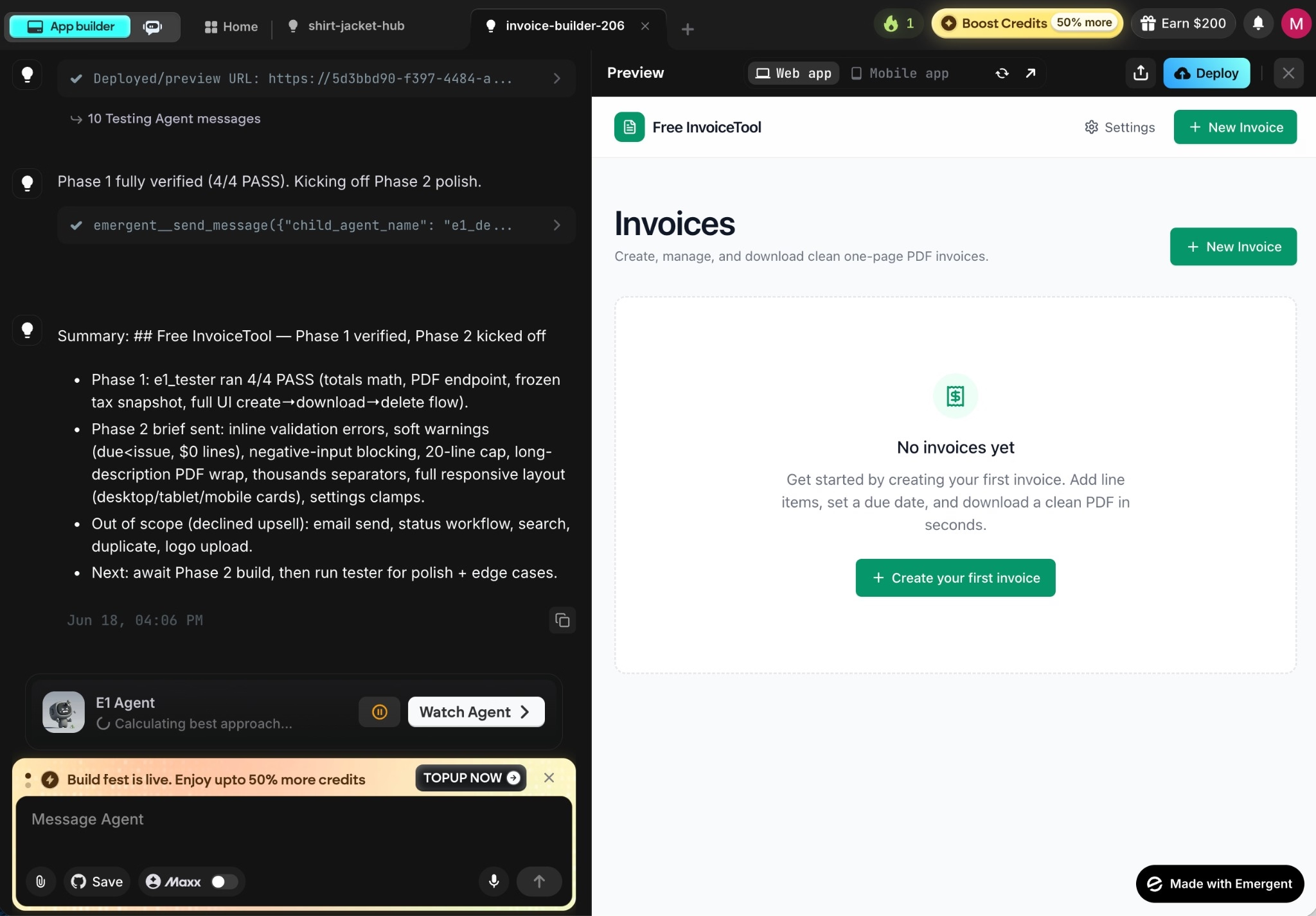
Watch for: Keep the invoice layout simple. Long, chart-heavy documents can break across pages when downloaded, so save dense financial reporting for a spreadsheet and use this for clean, standard invoices.
Live demo: https://invoice-app-75.emergent.host
3. A Personal Website for a Tech Writer

What you build: A portfolio or about-me site with your work, your links, and a way to reach you.
Best for: Creators, consultants, and job seekers who want a home on the web that they own.
Take John Doe, a tech writer in the U.S., who wants one place to show his published articles and pick up new clients. A personal site has few moving parts, which makes it a good warm-up before a heavier build.
I asked for an about section, a portfolio of writing samples with links, and a contact form. The first version came back close to what I pictured, and refining was a matter of asking for a different layout or a lighter color while the preview updated each time.
What It Includes
- A hero section with a photo and a short intro about who you are and what you do.
- A portfolio of writing samples with titles, short summaries, and links to each published piece.
- A contact form that confirms each message on screen, ready to connect to your inbox when you want it delivered.
The Prompt That Starts It
"Build a personal website for a tech writer named John Doe. Include an about section, a portfolio of writing samples with titles, summaries, and links, a list of social links, and a contact form. Keep it fast and clean, with a modern look."
Before building, the agent asked where the contact form should send messages, whether to seed sample articles, and the design direction. I had it show a confirmation on the form for now, seed six sample tech articles, link Twitter/X, LinkedIn, GitHub, and Medium, and use a sleek mix of light and dark.

Watch for: Because it is a light build, it is a low-risk place to get comfortable describing what you want and refining it from the preview. When you are ready, point it at your own custom domain so it lives at your name instead of a free web address.
Live demo: https://editorial-tech-hub.emergent.host
4. An Online Scheduling App for a Dental Clinic

What you build: A booking page where patients pick a time, leave a deposit, and get a confirmation.
Best for: Dental clinics and other practices that book paid appointments.
This is where a vibe-coded app starts doing the work of running a business. Imagine a dental clinic that wants patients to book a cleaning or a checkup online instead of calling the front desk.
I described a booking page for the clinic, and the agent built it out after a short round of setup questions.
The finished page lets a patient pick a service, choose an open slot, and reach a "Pay & Book" deposit step before a confirmation. The clinic signs in with Google to manage availability and see upcoming appointments.
What It Includes
- A "Pay & Book" deposit step that connects to Stripe for card payments when the clinic is ready to go live.
- Booking confirmations for patients, set to test mode while building, and switched to real emails before launch.
- A Google sign-in for staff, so managing availability and appointments does not need a separate password.
The Prompt That Starts It
"Build a booking page for a dental clinic where patients pick a service like a cleaning or checkup, choose an open time slot, pay a deposit by card, and get an email confirmation. Let the clinic sign in with Google to manage availability and see upcoming appointments."
Emergent confirmed the setup first: the services and prices, how to handle payments and email, and the sign-in. I gave it three services with deposits (a $120 cleaning, an $80 checkup, and a $300 whitening), kept payments and email in test mode while building, and used a single clinic Google sign-in.

Watch for: When Emergent asks its setup questions, be specific about payments, email, and the calendar. That is the moment the booking flow gets connected to the right accounts, so a clear answer saves you a round of fixes.
Live demo: https://clinic-slots-9.emergent.host
5. A Customer Tracker for a Gym

What you build: A private database of your members that you sign into, search, and update.
Best for: Gym owners and operators who have outgrown a spreadsheet but do not want a heavy off-the-shelf system.
This is the example that shows what Emergent does beyond simple sites. Think of a small gym tracking its members: who is on which plan, when they joined, and whether their membership is active or lapsed. A spreadsheet handles that fine until the list grows, the filters pile up, and you're spending more time fixing it than using it.
A member tracker is a small database app, the kind of internal tool a business runs on. I asked for a member list I could add to, tag by status, and search, and the agent built the storage, the sign-in, and the search in one go. The data is stored for you in the cloud. Emergent handles the database setup, with Supabase available as an integration if you want to manage it yourself.
What It Includes
- A private sign-in limited to specific staff emails, so only your team can see member data.
- Status tags and search that let you pull up every active member, or every lapsed one, in seconds.
- Edit, delete, and CSV export so the member list stays current and you can pull the whole thing out whenever you need it.
The Prompt That Starts It
"Build a private member tracker for a gym that I sign into with Google. Let me add members with name, email, plan type, and join date, tag each one by status like active, lapsed, or paused, and search or filter the list. Only staff should see the data."
The agent broke this one into phases. It asked about sign-in access, the plan types, and which extras to include beyond add, search, and tag.

I limited sign-in to specific staff emails, set Monthly, Quarterly, and Annual plans, and added edit and delete. It built the member list first, then added attendance, renewals, and CSV export when I asked it to keep going.
Watch for: Do your data entry in the live version after you publish. After several rounds of changes, the preview copy of your data and the live copy can drift apart, and they cannot be merged.
Live demo: https://staff-gym-dash.emergent.host
Which Vibe Coding Project Should You Start With?
Pick the build that matches what you are trying to do this month. The most impressive one is rarely the right place to start.
- Start with the clothing landing page if you are testing a new product and want something live fast to gauge interest.
- Start with the invoice generator or personal website if you want a quick, useful win that shows how a build comes together from a few prompts.
- Start with the dental booking app or gym member tracker if you are running a business and need software that handles paying customers, card payments, and stored records.
Final Thoughts
Vibe coding has crossed from party trick to a real way for non-technical people to ship working software, and these five builds are proof that you can start small.
The clothing landing page and the invoice tool are afternoon projects. The dental booking app and the gym member tracker handle bookings, sign-ins, and stored data, the kind of work that used to mean hiring a developer.
Your prompts decide your results. A vague request gets you a vague app, and the fix is almost always a clearer description rather than touching the code.
Emergent is not the right tool for everything. If you want a faster way to write code by hand, Cursor and Claude Code are built for that. Need a marketing site and nothing more? A website builder like Webflow will feel lighter.
If you need a quick prototype for one pitch meeting, most tools in this space will get you there. This roundup of vibe coding tools compares the main options if you want to weigh them.
But when the software you are building needs to work, take payments, and run a process people depend on, that is exactly what these examples are built to do. You can go from an idea to a working app people can use in less than a day.
Ready to Build Your First App on Emergent?
If one of these examples matches something you have been meaning to make, here is why Emergent is a good place to build it.
- Get something live the same day: Describe the app, answer a few setup questions, and click Deploy to put it online on a free emergent.host address.
- Add payments and sign-ins by asking: Mention a Stripe checkout or Google sign-in in your prompt, and Emergent wires up the whole flow for you.
- Keep full ownership of your code: On the Standard plan and up, every build saves to a GitHub account you control, so you can export it and host it anywhere.
- Start from a working example: Copy any of the five builds above as your starting point instead of staring at a blank prompt.

Describe what you want and Emergent builds it. A real, production-ready app you can launch the same day.
- One prompt to build
- Zero code required
- Deploy in minutes







