



After digging through Webflow's full 2026 pricing overhaul, here's what Webflow pricing adds up to once seats and add-ons push the total past the sticker price, and whether that's worth it.
Webflow Pricing Plans: At a Glance
Webflow charges across three separate layers. A Site plan covers your published website. A Workspace is where you and your team collaborate. It's where you manage staging sites, invite people to work with you, and get your monthly AI credits. Optional add-ons cover everything else.
Starter, Basic, and Premium are Webflow's Site plans for a standard website. Selling products swaps that out for an Ecommerce plan instead, covered further down. Team and Enterprise work differently. Instead of buying a Site plan and a Workspace separately, you get both packaged together in a single purchase, which Webflow calls a Platform plan.
Here's the full lineup after Webflow's May 2026 pricing restructure.
Here's how Webflow's Site and Platform plans break down:
| Plan | Price | Best For | Key Features |
|---|---|---|---|
| Starter | Free | Testing the platform | 2 static pages, 1 GB bandwidth, .webflow.io domain |
| Basic | $25/monthly($15/month billed annually) | Static sites with no blog | Custom domain,300 static pages, 10 GB bandwidth |
| Premium | $39/monthly ($25/month billed annually) | Content-heavy marketing sites | Webflow CMS,20,000 CMS items, up to 2.5 TB bandwidth |
| Team | $2,500/monthly, annual contract only | Fast-growing marketing teams | Localization, AEO agents, publishing workflows,10 seats total |
| Enterprise | Custom | Regulated or high-traffic orgs | SSO, dedicated account manager, custom SLAs |
Practical takeaway
If your site doesn't need a blog or any list-style content (case studies, team bios, resources), Basic covers you. The moment you want a CMS, skip straight to Premium. For standard Site plans, there's no separate CMS tier between the two anymore.
Webflow Pricing Plans Breakdown
Starter: Free
What's included: Webflow's Starter plan includes a .webflow.io subdomain, two static pages, one GB of bandwidth, 50 form submissions, 50 CMS items across 20 Collections, and limited access to Webflow AI.
Best for: Learning Webflow's visual editor (called the Designer) or prototyping before you commit to a domain.
Pros:
- No credit card required, no time limit.
- Full access to Webflow's visual editor.
- Includes a basic CMS, so you can test a content structure before paying for anything.
- Lets you test Ecommerce features before deciding whether you need a paid Ecommerce plan.
Cons:
- Can't connect a custom domain or remove the Webflow badge.
- Two pages are not enough for anything client-facing.
Basic: $25/month ($15/month billed annually)
What's included: Basic includes a custom domain, 300 static pages, 10 GB bandwidth, unlimited form submissions, and password protection.
Best for: Landing pages, portfolios, and brochure sites with no blog or dynamic content.
Pros:
- Cheapest way to get off the Webflow subdomain.
- Static page limit doubled to 300 in the 2026 update.
- Unlimited form submissions, useful for lead-gen or contact-heavy landing pages.
Cons:
- Zero CMS access, so no blog, no case studies, no dynamic list pages.
- 10 GB bandwidth disappears fast on an image-heavy site.
- Can't use Ecommerce features at all, even a store-styled template with checkout off; that requires Premium or higher.
Premium: $39/month ($25/month billed annually)
What's included: Everything in Basic, plus Webflow CMS with 20,000 items, 40 Collections, code components, site search, form file upload, and bandwidth that scales up to 2.5 TB.
Best for: Any site with a blog, documentation, or a growing content library, whether that's run by an agency, an education team, or a product team.
Pros:
- Merges the old CMS and Business plans into one tier at a lower entry price than Business used to cost.
- 20,000 CMS items are enough for almost any small or mid-size site.
- Form file upload lets visitors attach files directly through a form, which Basic doesn't support.
Cons:
- Base bandwidth (50 GB) is lower than the old Business plan's 100 GB, so heavy-traffic sites may need a bandwidth add-on.
- Monthly billing costs 56% more than annual billing.
Team: $2,500/month, annual contract required
What's included: A bundled site and Workspace with five full seats, five limited seats, 100 CMS Collections, Localization, AEO agents, publishing workflows, single-page publishing, page branching, a site activity log, custom SSL certificates, and priority support.
Best for: Growing teams of five to 15 people who've outgrown Premium but don't need a full Enterprise contract.
Pros:
- Bundles Localization and governance tools that used to require Enterprise.
- Fixes the gap between self-serve and custom pricing.
- Content API rate limit jumps to 600 requests per minute, five times Premium's 120 cap, so a bulk CMS import that would get throttled on Premium can run straight through instead.
Cons:
- Annual billing only, no month-to-month option.
- $2,500/month is a steep jump from Premium's $39/month.
Enterprise: Custom
What's included: Everything in Team, plus granular permissions, custom roles, single sign-on, a dedicated account manager, and custom SLAs.
Best for: Large or regulated organizations that need SSO, SCIM, or a formal MSA.
Pros:
- Fully negotiable limits on traffic, CMS items, and bandwidth.
- 99.99% hosting uptime SLA, which works out to under an hour of downtime a year, versus roughly 3.5 days a year on Team's 99%.
Cons:
- No published pricing, so budgeting requires a sales call.
- Overkill for anyone under roughly 10 active site contributors.
Webflow Ecommerce Plans
Webflow Ecommerce plans add a shopping cart, checkout, and order management to a site, so customers can buy directly rather than just browse.
You can use an e-commerce-style template on a regular Premium Site plan and disable checkout, which works fine for a catalog-style site where customers contact you to buy rather than checking out online. The moment you turn checkout on, you're paying Ecommerce plan prices instead of Site plan prices.
Once checkout is what you need, the three Ecommerce tiers are:
- Standard: $42/month ($29/month billed annually). Up to 500 items, 2% transaction fee.
- Plus: $84/month ($74/month billed annually). Up to 5,000 items, 0% transaction fee, unbranded emails.
- Advanced: $235/month ($212/month billed annually). Up to 15,000 items, 0% transaction fee, unbranded emails.
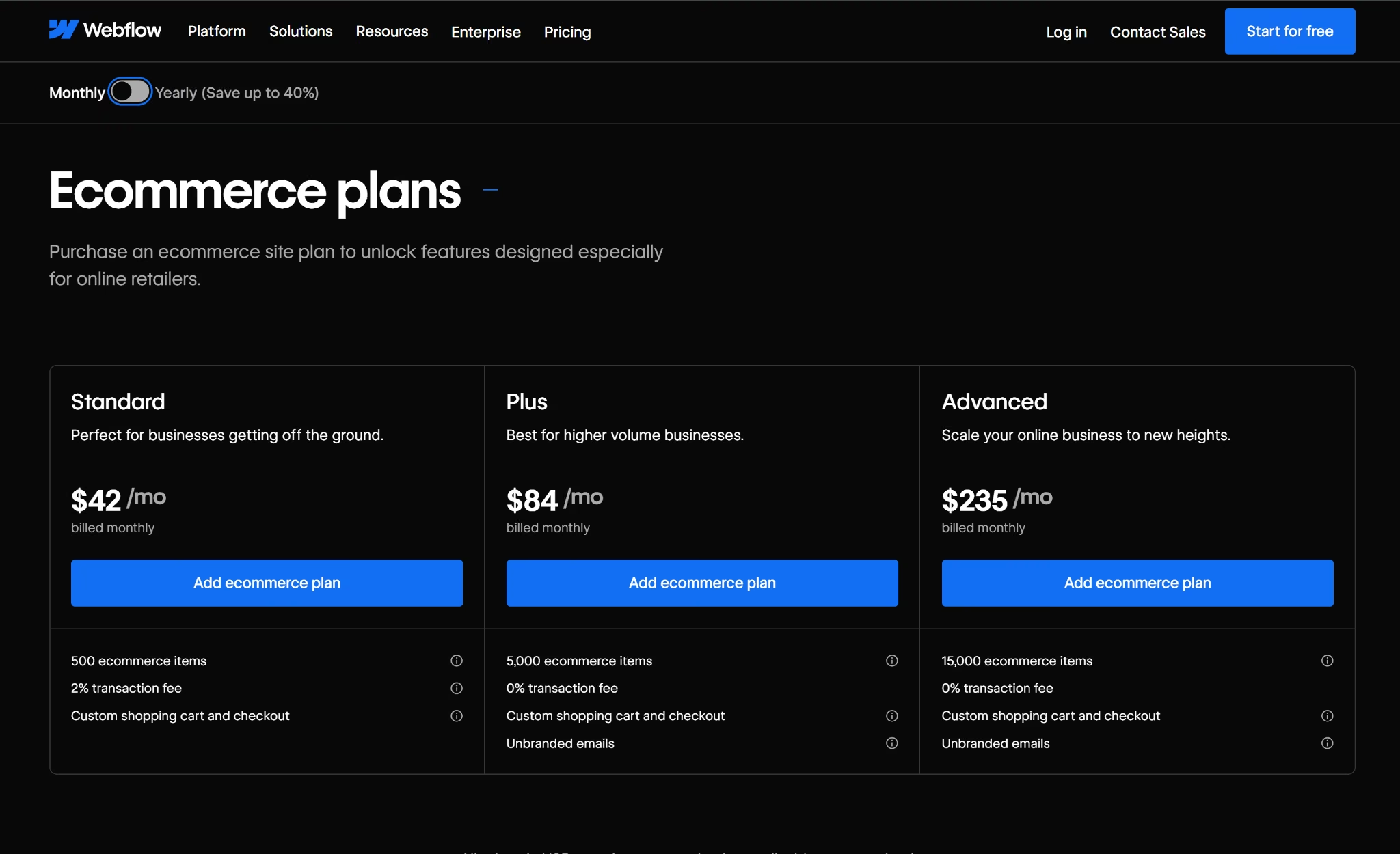
Ecommerce Standard looks cheaper at first, but it charges a 2% transaction fee on every sale. Ecommerce Plus removes that transaction fee but costs more each month.
At a certain sales volume, that 2% fee on Standard adds up to exactly as much as the extra amount Plus costs. That's the break-even point: below it, Standard is cheaper; above it, Plus is cheaper. This is how.
On monthly billing:
- Standard fee: 2% of sales
- How much more does Plus cost per month: $42/month
- Break-even sales volume: $2,100/month
- Why: 2% of $2,100 = $42
On annual billing:
- Standard fee: 2% of sales
- How much more does Plus costs per month: $45/month
- Break-even sales volume: $2,250/month
- Why: 2% of $2,250 = $45
So, if you sell more than $2,100/month on a monthly plan or $2,250/month on an annual plan, Ecommerce Plus is the better deal.
For example, at $5,000/month in sales:
- Standard's 2% fee = $100/month
- Plus costs $42 (monthly) or $45 (annual) more
- This means that Standard would cost: $100 − $42 = $58 more than Plus on monthly billing, or $100 − $45 = $55 more on annual billing
Webflow Workspace Plans
A Site plan controls an individual website, while a Workspace plan controls staging and collaboration across your team. You need both because a Workspace plan doesn't replace a Site plan, and a Site plan doesn't include team collaboration.
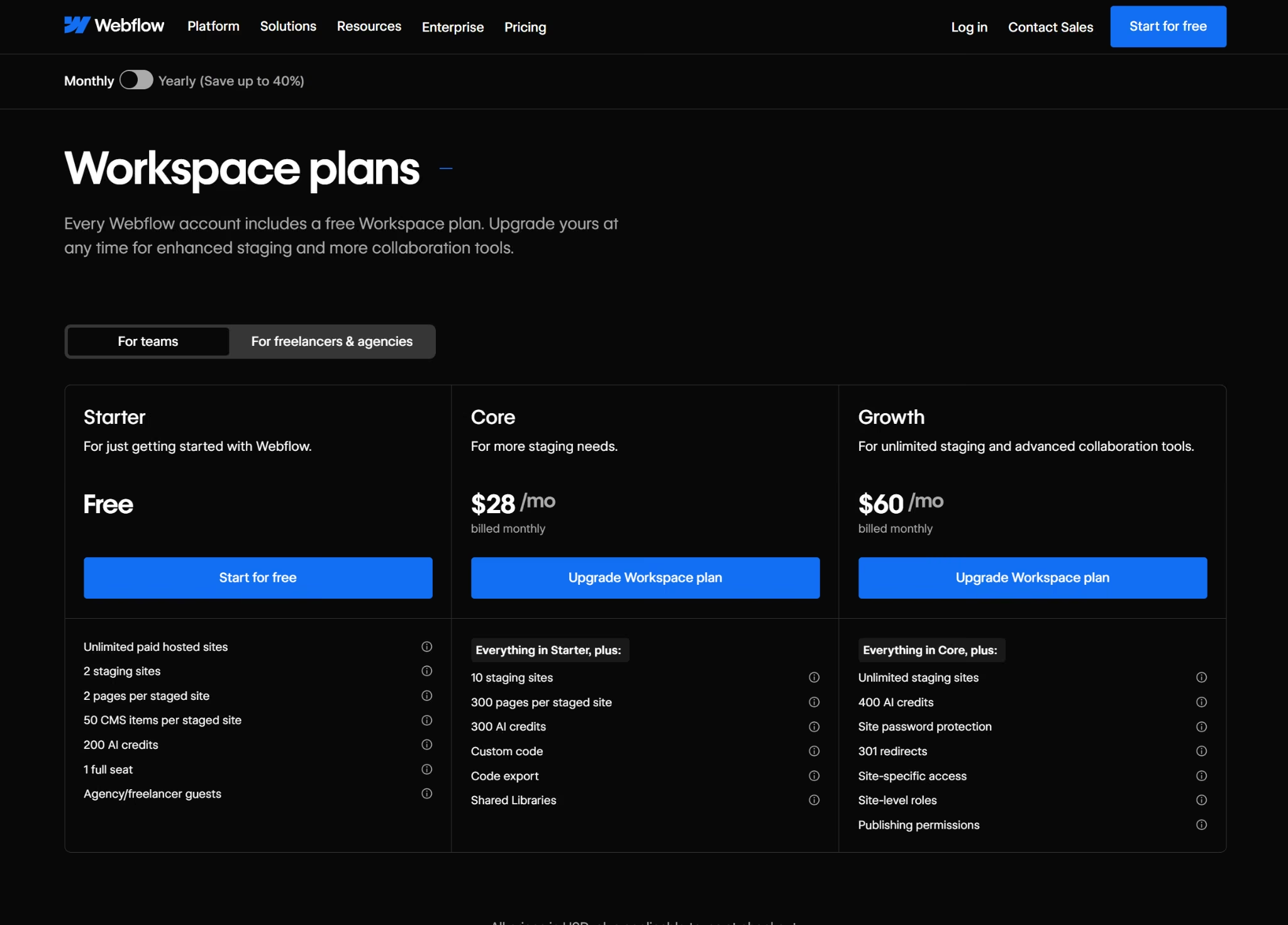
For in-house teams, the self-serve Workspace tiers are:
- Starter: Free. Includes two staging sites, one full seat, and 200 AI credits.
- Core: $28/month ($19/month billed annually). Includes everything in Starter, plus 10 staging sites, custom code, code export, and 300 AI credits.
- Growth: $60/month ($49/month billed annually). Includes everything in Core, plus unlimited staging sites, site-level roles, and publishing permissions.
For freelancers and agencies managing client sites, the Workspace tiers are:
- Starter: Free. Includes two staging sites and 1 free client seat per paid site.
- Freelancer: $24/month ($16/month billed annually). Includes everything in Starter, plus 10 staging sites, client payments, and full CMS access on staging.
- Agency: $42/month ($35/month billed annually). Includes everything in Freelancer, plus unlimited staging sites and three free client seats per site.
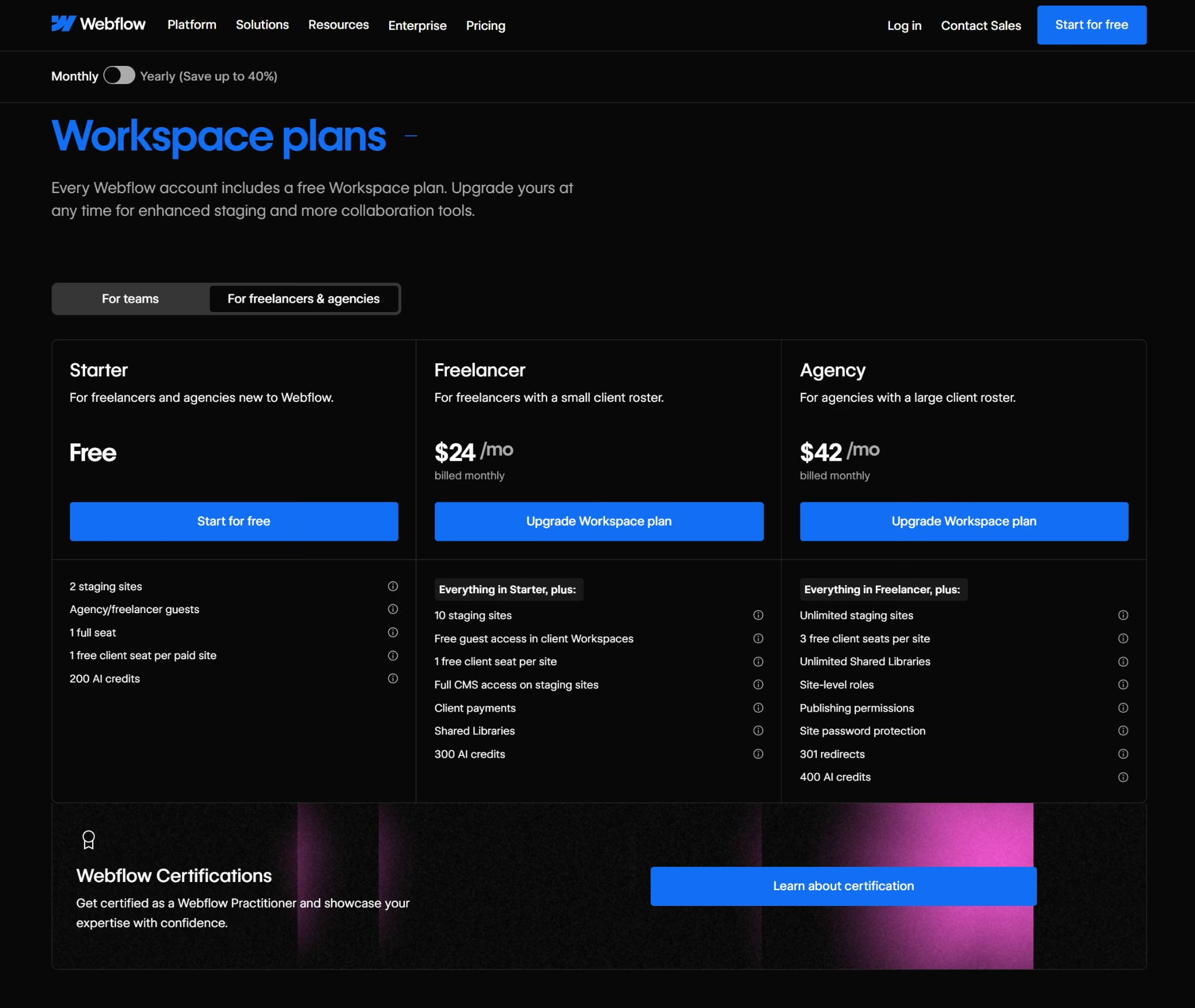
Best for: Anyone collaborating with other people on a Webflow site. In-house teams pick Core or Growth, while agencies and freelancers managing client sites pick Freelancer or Agency.
Webflow Seats and AI Credits
Every Workspace tier includes exactly one Full Seat by default, whether it's Starter, Core, Growth, Freelancer, or Agency. One person gets full access for free, and anyone beyond that first seat costs extra, no matter which tier you're on.
Webflow Seats
What extra seats cost:
- Full seat: $45/month ($39/month billed annually)
- Limited seat: $19/month ($15/month billed annually)
- Free seat: $0/month, for reviewers and commenters
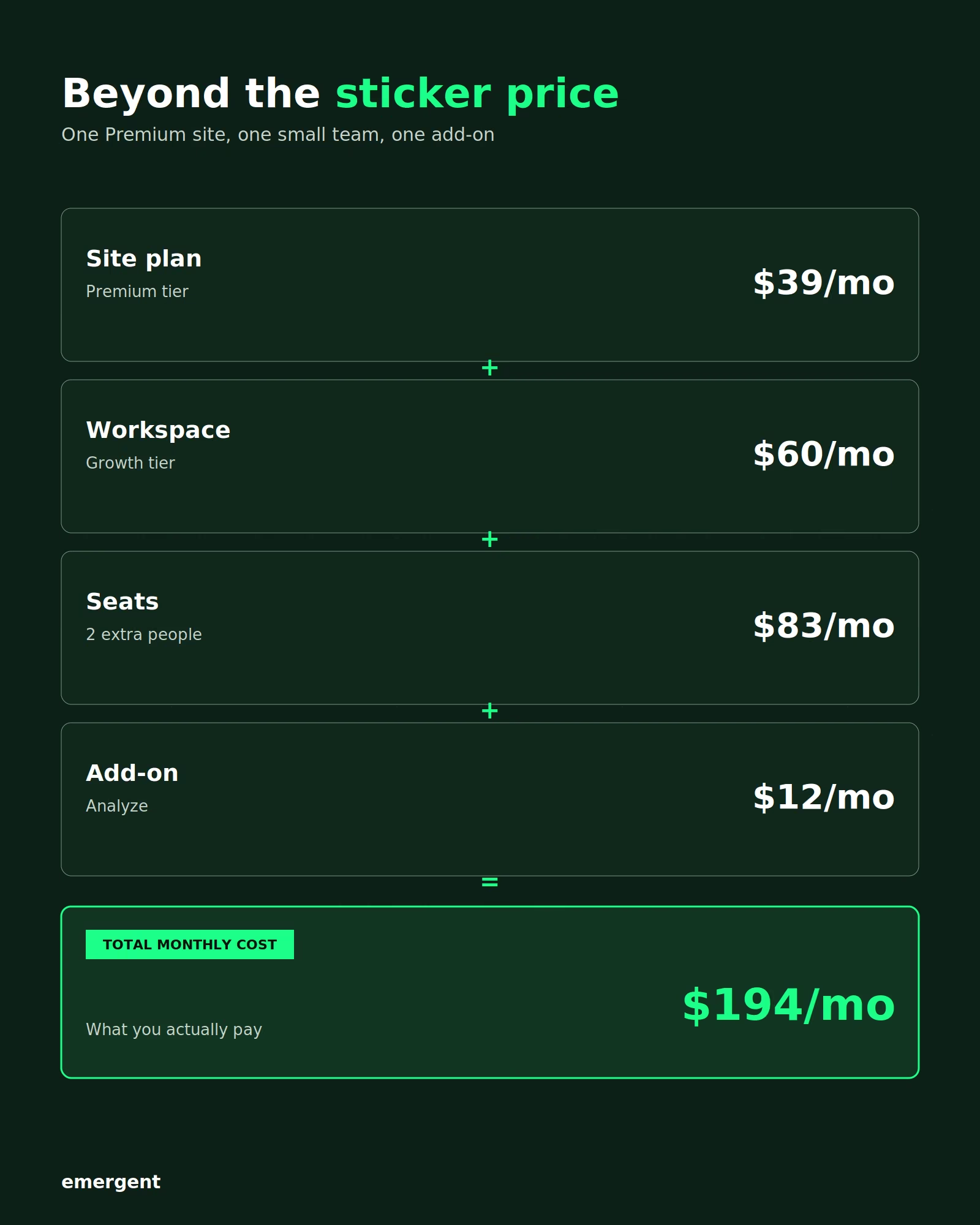
For example, let’s say you have two designers and two content editors on a Growth Workspace tier. One Full seat is already included, so here's the math on the rest:
- One extra Full seat (for the other Designer): $45/month ($39/month billed annually)
- Two Limited seats (for the two content editors): $38/month ($30/month billed annually)
- Total: $83/month ($69/month billed annually)
That's before you've ever published your site or added the cost of things like extra AI credits.
AI Credits
Webflow introduced AI credits as part of its May pricing update.
Every Workspace plan now includes a set number of AI credits each month, from 200 on Starter up to 400 on Growth, with Team and Enterprise getting a larger pool that resets once a year instead.
Credits get used by AI-generated copy, AI Optimize suggestions, CMS item generation, and SEO and AEO audits. Going over your included credits stops AI features until you buy more or upgrade your plan.
Extra credits cost $25/month ($20/month billed annually) for 2,000 more.
Webflow Add-Ons: Optimize, Analyze, and Localization
Add-ons are not included with any Site plan. They're separate purchases you buy on top. Webflow sells three of them: Optimize, Analyze, and Localization, which has two tiers: Essential and Advanced.
All three add-ons can be purchased on both Basic and Premium plans. Webflow Team already includes Localization, but still needs to add Optimize and Analyze in the same way. Enterprise gets custom-priced versions of all three.
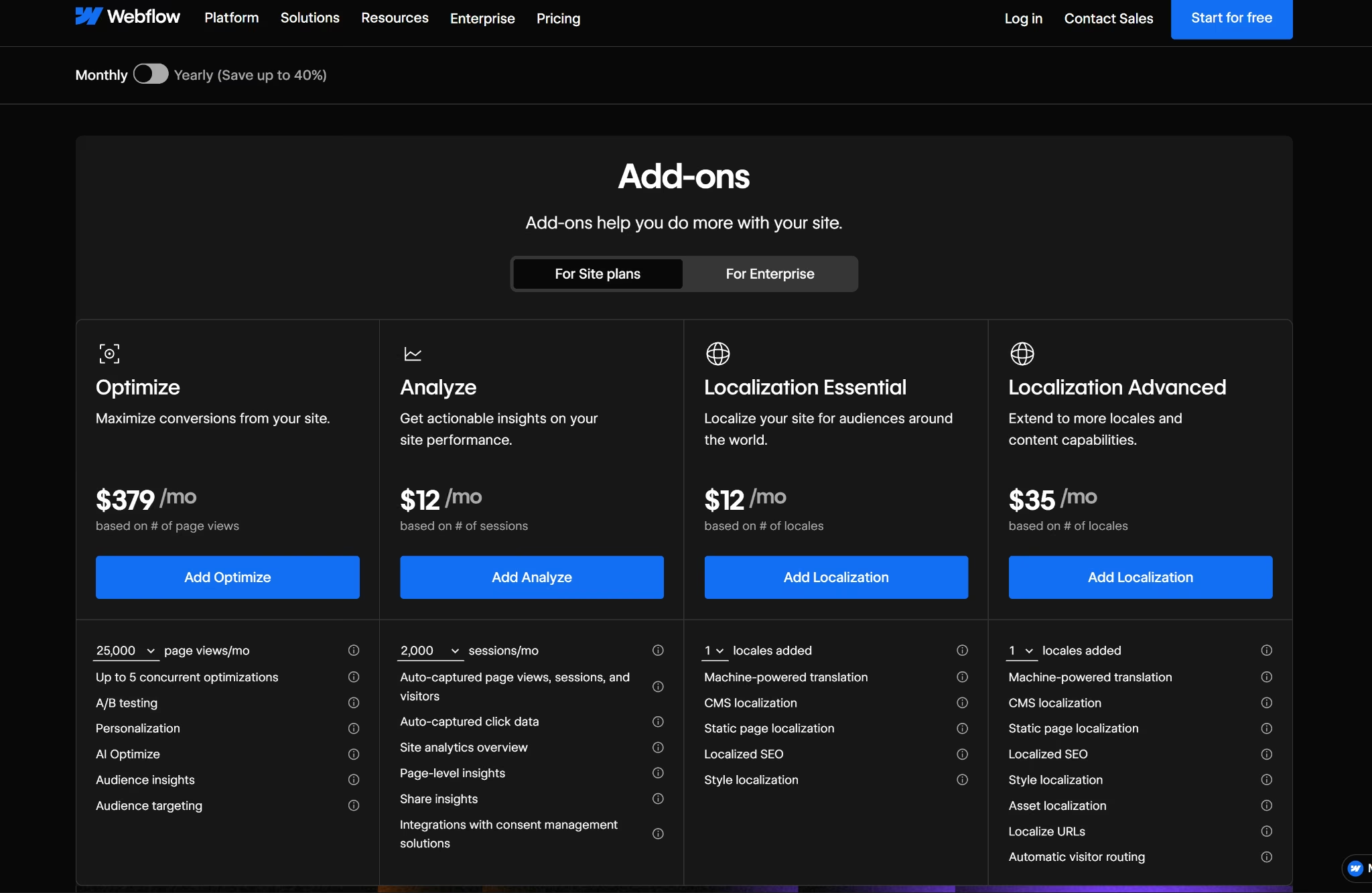
Here's what each one costs and does:
- Optimize handles A/B testing, personalization, and AI-driven test suggestions. Starts at $379/month ($299/month billed annually) for up to 25,000 page views and scales up as your traffic grows.
- Analyze is Webflow's native site analytics, covering page views, click data, and consent-management integrations. Starts at $12/month ($9/month billed annually) for up to 2,000 sessions and scales up from there.
- Localization adds multi-language support. The Essential tier starts at $12/month ($9/month billed annually) per locale; the Advanced tier runs $35/month ($29/month billed annually) per locale and adds automatic visitor routing and localized URLs.
Team includes Webflow Localization by default. Basic and Premium do not, so if you need to publish your site in more than one language on either plan, budget for the Localization add-on separately.
Which Webflow Plan Should You Choose?
Choose Starter if you:
- Are still learning Webflow or prototyping before committing to a domain.
- Don't need to publish anything public-facing yet.
Choose Basic if you:
- Need a simple, static site with no blog or content that updates on a schedule.
- Want the cheapest path to a custom domain without touching the CMS.
Choose Premium if you:
- Run a blog, case studies, or any content collection you'll keep adding to.
- Expect enough traffic that Basic's 10 GB bandwidth would run out fast.
Choose Team if you:
- Have five or more people who need structured publishing controls and Localization.
- Have already tried stitching together Premium, plus several Workspace seats, and it's gotten messy.
Choose Enterprise if you:
- Need SSO, custom security review, or a formal MSA for procurement.
- Run traffic or CMS needs that outgrow what Premium plus bandwidth add-ons can support.
Choose an Ecommerce plan if you:
- Need functional checkout, cart, and payment processing, not just a store-styled template.
- Are selling enough monthly volume that the Standard plan's 2% transaction fee costs more than upgrading to Plus.
Choose the Freelancer or Agency Workspace if you:
- Manage sites for clients rather than building one for yourself.
- Need to hand clients editing access without spending a paid seat on each one.
No matter which plan you choose, most teams end up adding a Workspace, extra seats, or an add-on before they ever publish. Here's what that adds up to for one realistic setup.
Is Webflow Worth the Cost?
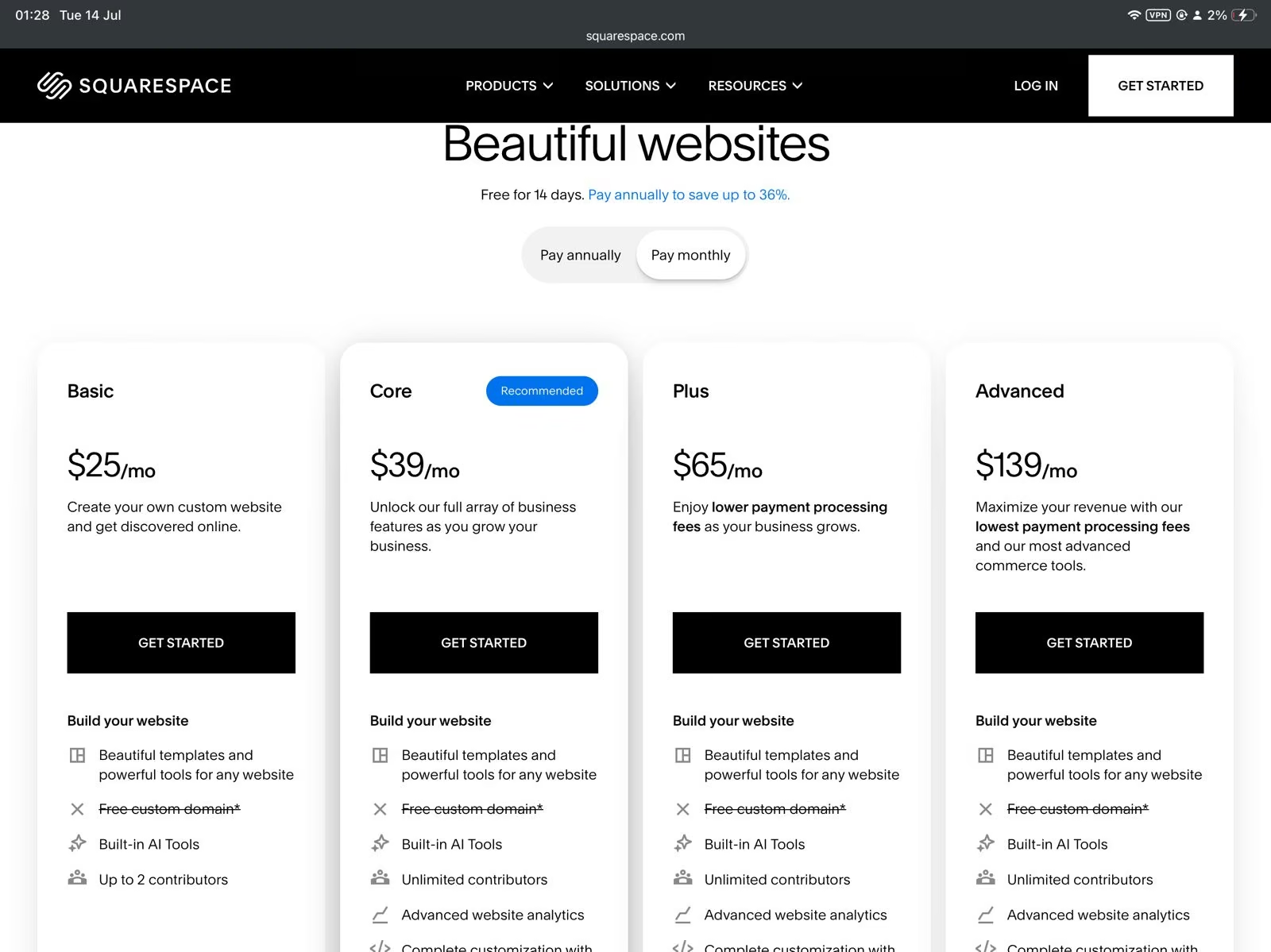
At $39/month, Webflow Premium costs the same as Squarespace's Core monthly plan and more than Framer's $45/month Pro monthly plan. The difference is the CMS you get for it.
Squarespace works well for standard websites, stores, and service-business sites. But it doesn’t give you the level of CMS control Webflow offers. For custom content types like team profiles, case studies, locations, resources, or directories, you need more control over how content is stored, connected, and reused across pages.
Squarespace also doesn’t support database integration or backend access, so those builds are harder to scale within Squarespace.
Framer is closer, but its Pro plan still has a lower CMS ceiling. Framer Pro includes 10 CMS collections by default, and you can expand that with paid add-ons, but only up to 40 CMS collections. Webflow Premium includes 40 CMS collections at its base price, so content-heavy sites can reach that same structure without paying extra for CMS capacity.
Webflow is worth it if you:
- Need design control that an off-the-shelf template can't give you, and you're willing to pay for CMS and bandwidth as you scale.
- Run a content-heavy marketing site where a blog, resource hub, or case study library is core to the business.
Skip Webflow if you:
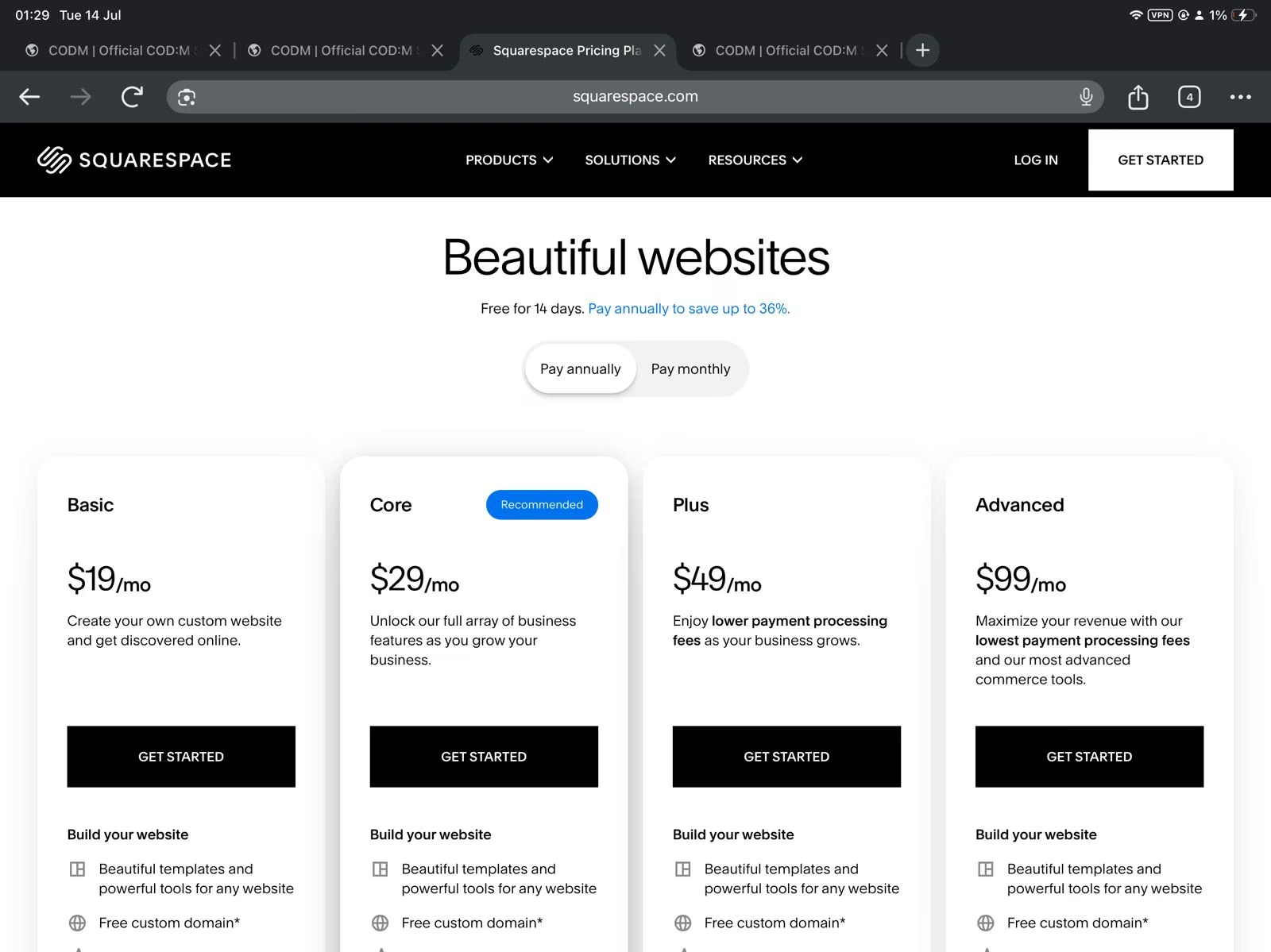
- Just need a static one-pager with no CMS ambitions; a $25/month ($19/month billed annually) Squarespace Basic plan does the same job for less setup.
- Aren't comfortable writing code. Webflow Cloud can host a functional product, such as a dashboard or a booking flow, but it still requires familiarity with Next.js and Astro.
- Need a native mobile app for the App Store or Google Play. Webflow only publishes browser-based websites. Getting an app into a device store requires a third-party wrapper tool, and Apple's App Store guidelines can reject apps that are just repackaged websites.
Webflow Alternatives & Pricing Comparison
Here's how the main Webflow alternatives compare on price:
| Tool | Starting Price | Best For | Key Advantage |
|---|---|---|---|
| Emergent | Credit-based, see Emergent's pricing | Founders who need a functioning product, not a marketing site | Builds full apps from a prompt, not just a website |
| Framer | $15/monthly ($10/month billed annually) | Design-heavy landing pages and portfolios | Cheaper entry point, strong built-in animation tools |
| Wix | $24/monthly ($17/month billed annually) | Beginners who want drag-and-drop simplicity | Larger app marketplace for bolt-on features |
| Squarespace | $25/monthly ($19/month billed annually) | Creatives and service businesses | Simpler plan structure, no separate Workspace layer |
Also read our guide on the best Webflow alternatives for a deeper look at what else is worth trying in 2026.
When You Need More Than a Website
Webflow is built to publish and manage content, and its Site plans stop there. Want to take payments? That means upgrading to a separate e-commerce plan. Want user logins or memberships? That's not possible at all anymore, since Webflow sunset the native feature in January 2026. Want a full mobile app? No Site plan can produce one.
But Emergent does.
Emergent handles payments from the same chat you're already building in, wiring up Stripe by description alone, with no separate plan required.
Logins work the same way. Webflow no longer has a native path to this, so you'd need a third-party tool like Memberstack or Outseta layered on top. Emergent builds member accounts and gated access directly into the app, just as you are describing it.
Didn’t remember to add it to your initial prompt? No problem. Emergent suggests useful features and integrations, or you can add them later on.
Mobile apps are another thing Webflow does not do well, either. Webflow only publishes browser-based sites, with no built-in way to build a native app for the App Store or Google Play. Turning a Webflow site into a mobile app requires a third-party wrapper tool, and Apple's guidelines may reject apps that are merely repackaged websites.
Emergent builds a mobile app straight from a chat instead, no wrapper tool needed. You describe what you want, and Emergent's agents generate the mobile app’s React Native code and let you preview it live on your own phone through Expo Go. Once you connect your Apple or Google developer account, you can publish directly to the App Store or Google Play.
Here's what else comes with Emergent:
- Universal LLM Key: Plug Claude, OpenAI, or Gemini into your app using Emergent's own credits, without managing separate API keys for each one
- MCP Connector: Connects Emergent directly to Claude or ChatGPT, so you can describe and build an app from inside a chat conversation instead of switching to a separate builder
- GitHub sync: Every build syncs to your own GitHub repository, so the code is yours to export or hand off to a developer later
My Bottom Line on Webflow Pricing
Webflow's 2026 restructuring is more straightforward than the one that came before it. With this new structure, Site plans, Platform plans, and Ecommerce plans each answer a different question. Are you publishing a site, running a growing team, or selling products?
The catch is that what you're quoted up front rarely matches what you actually pay. Seats, Workspace tiers, AI credit limits, and add-ons stack up fast for anyone running more than a one-person site, and Ecommerce sellers have their own transaction-fee math on top of that.
My advice? Do your calculations and budget for the whole stack. Learn a bit of Next.js while you're at it, and know Webflow's limits. Payments need their own plan, logins have no native path anymore, and a mobile app isn't possible at all.
But if you'd rather prompt an app than code one, or need something Webflow can't build at all, use Emergent.

Most AI app builders stop at prototypes. Emergent creates production-ready apps you can actually launch.
- Production-ready apps
- Web & mobile apps
- Deploy in minutes







