



I set up one automation to catch sales leads, and within months, my bill quietly crept from $20 to over $100. Here's the full Zapier pricing breakdown, plan by plan, and whether it's worth it.
Zapier Pricing Plans: At a Glance
Zapier pricing is easier to follow once you know how tasks work. You build a "Zap," a small automation that watches for something to happen and then does a job for you. The thing it watches for is the trigger. The job it does is an action.
Say a new lead fills out a form on your site. That's the trigger. Zapier then saves their details to your contact list and sends your sales team a heads-up in Slack. Those are two actions.
Zapier pricing at a glance:
| Plan | Price | Best For | Key Features |
|---|---|---|---|
| Free | $0/month | Testing the waters | 100 tasks/month, two-step Zaps |
| Professional | $29.99/month ($19.99/month billed annually) | Solo builders running real automations | 750 tasks/month, multi-step Zaps, premium apps |
| Team | $103.50/month ($69/month billed annually) | Teams sharing the same automations | 2,000 tasks/month, 25 users |
| Enterprise | Custom | Large companies that need control | Unlimited users, yearly task pool |
Zapier's task system shapes your final bill. Zapier charges you for each action, and it calls one action a task. The trigger is free. Saving the lead is one task, and the Slack message is a second task. So that one lead costs you two tasks, every time it comes in.
Now scale it up. Say each lead saves the contact, sends a Slack alert, and fires a welcome email. At 10 leads a day, that's 30 tasks a day, or about 900 tasks a month, from a single automation. The entry paid plan includes only 750 tasks, so one busy lead form can blow past it.
You're not stuck at these task counts. Each paid plan lets you buy a higher tier, all the way up to two million tasks a month, and the more you prepay for, the less each task costs.
Zapier Pricing Plans Breakdown
Each pricing plan increase raises the price for a different reason. Depending on the plan, the higher price covers additional tasks, users, or administrative controls. Here's what you get at each tier.
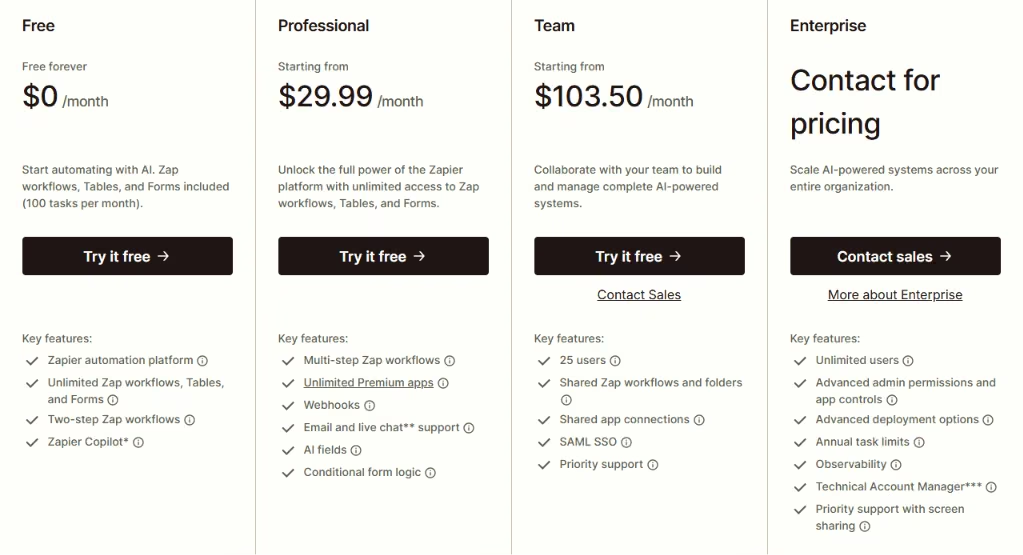
Free: $0/month
The free plan gives you 100 tasks a month and lets you build two-step Zaps, meaning one trigger and one action. Our lead-capture example would only get you halfway, since saving the lead and pinging Slack is already two actions.
Best for: Trying Zapier out and seeing if automation clicks for you.
Pros:
- It's free forever, and you don't need a card to start.
- You can build as many Zaps as your 100 tasks allow.
Cons:
- The 100 tasks disappear fast. I used mine up in about two days once a real form was feeding it.
- Two-step Zaps only, so you can't add the email or any decision-making.
Professional: $29.99/month ($19.99/month billed annually)
The Professional plan is what most solo users need. You get 750 tasks a month and, more importantly, multi-step Zaps, so one trigger can set off a whole chain of actions instead of just one.
It also unlocks premium apps, including tools like Salesforce that Zapier keeps behind the paywall. You also get webhooks, which connect apps that aren't in Zapier's library.
Filters and Paths add logic to a Zap without costing tasks. A Filter can stop a Zap unless a lead is worth acting on, and a Path can send different leads down different routes.
Best for: Freelancers and small business owners running automations across a few apps.
Pros:
- Multi-step Zaps let one lead trigger your whole follow-up chain.
- Premium apps and webhooks connect the tools you use.
- Filters and Paths add decision-making without burning tasks.
Cons:
- That 900-task lead form from earlier already overshoots the 750 you're paying for, and going over bills you at a higher rate.
- Live chat help only kicks in once you're paying for the 2,000-task tier.
Task limits adding up faster than expected? Our best Zapier alternatives for workflow automation breakdown covers what else is worth trying in 2026.
Team: $103.50/month ($69/month billed annually)
The Team plan exists for one reason: more than one person needs to build and manage the automations. It includes 25 user seats and lets your team share Zaps and app connections, so nobody's passing passwords around.
It also adds SAML SSO, which lets people log in through your company's existing system instead of a separate Zapier password.
Best for: Marketing or sales teams where several people touch the same automations.
Pros:
- 25 users can share workflows and connections on one account.
- SAML SSO and priority support make it fit a company setup.
Cons:
- The price triples while tasks only go from 750 to 2,000. Most of that increase covers the additional user seats.
- A small team that just needs more tasks gets a lopsided deal here.
Enterprise: Custom pricing
Enterprise is for big organizations, and you only get a price by talking to their sales team. The headline feature is a yearly pool of tasks instead of a monthly reset, so a quiet month banks tasks for a busy one.
It also adds the controls a company's IT department cares about, like detailed user permissions and SCIM, which automatically grants and removes access as people join or leave.
Best for: Large companies that need to manage and monitor automation across many teams.
Pros:
- The yearly task pool smooths out spiky months.
- Deep admin controls help meet security and compliance needs.
Cons:
- No public price, so you can't plan without a sales call.
- It's far more than a small team will ever use.
Which Zapier Plan Should You Choose?
The right Zapier plan depends on two things: how many people build the automations, and how many tasks you burn through. Match yourself to the case below.
Choose Free if you:
- Just want to test the idea before paying.
- Run one light automation that stays under 100 tasks a month.
Choose Professional if you:
- Work solo and need a few real, multi-step automations.
- Use premium apps or want decision-making logic.
Choose Team if you:
- Have several people building on the same automations.
- Need shared logins and connections for a company setup.
Choose Enterprise if you:
- Run automation across many teams and need IT oversight.
- Want a yearly task pool instead of a monthly reset.
I learned the hard way that plenty of solo users jump to Team for more tasks, even when a higher Professional tier would cost them less. Work out your task count first, then pick the plan.
Is Zapier Worth the Cost?
Zapier is worth it when the time it saves outweighs the cost. Once the task volume turns that bill into a monthly worry, the value starts to disappear. I still pay for it on my simpler automations, because wiring those apps together myself and keeping them running would cost more than $30 a month of my time.
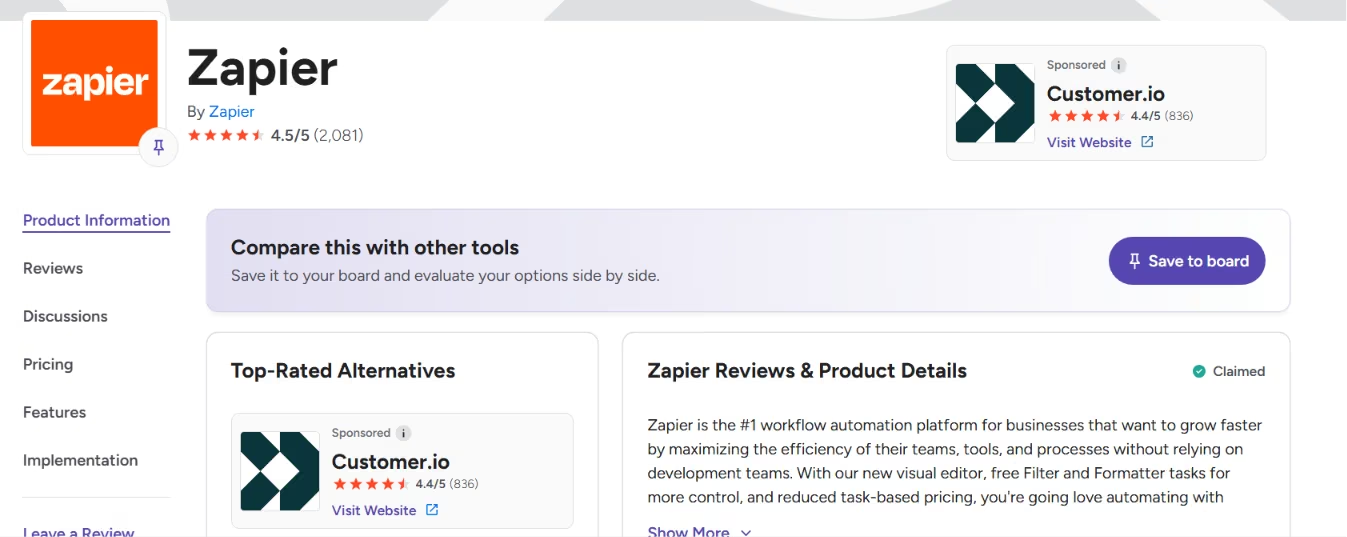
G2 and Trustpilot reviews present two very different pictures. On G2, Zapier holds a 4.5 out of 5 across more than 2,000 reviews. People praise how much time it saves and how little setup it takes. The complaint that keeps surfacing, even in happy reviews, is that the cost climbs as task volume grows.
Trustpilot is harsher, sitting at 1.4 across 300+ reviews. That score needs a caveat: Trustpilot notes that Zapier doesn't actively ask customers for reviews, so the people who show up there tend to be frustrated.
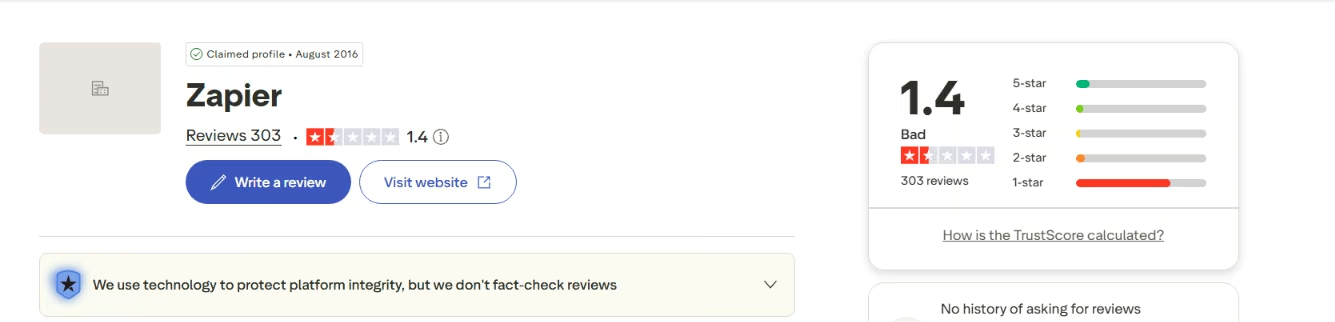
The common threads are billing, reliability, and support. One reviewer wrote, "burn through your monthly 'task' limit incredibly fast," which is the exact pattern I hit with my lead form. Others point to Zaps that break and slow replies from support. One reviewer said, “There is also no straightforward way to reach customer support.”
The pricing trouble usually traces back to volume or AI. Zapier now treats AI steps like any other action, so they pull from the same task pool. Add a few AI steps to a busy automation, and the number climbs without you adding a single new app. That's how my own bill quietly doubled.
Zapier is worth it if you:
- Run a handful of automations and would rather not maintain them yourself.
- Rely on its huge app library to connect tools that don't otherwise talk.
Skip Zapier if you:
- Run heavy volume, where paying per action adds up fast.
- Need a custom tool instead of a task-based automation chain.
Zapier earns its price at low to moderate use. Once you're running tens of thousands of tasks, it's worth seeing what else is out there.
Zapier Alternatives & Pricing Comparison
If the task meter is your problem, you can run the same automations more cheaply or build a custom tool. Here are three options, with the cheapest paid plan for each. Prices are current as of June 2026.
How the three options stack up:
| Tool | Starting Price | Best For | What Sets It Apart |
|---|---|---|---|
| Emergent | $20/month ($17/month billed annually) | Replacing a stack of Zaps with a single custom app | You get a real app you own, with no per-task meter |
| Make | $16/month ($12/month billed annually) | Complex automations on a budget | Cheaper pricing for multi-step work |
| n8n | $24/month ($20/month billed annually) | Technical teams that want full control | You can run it yourself for free |
These tools use different methods to count usage. Zapier bills per action. Make bills "credits," which work out cheaper when an automation has many steps. n8n bills per full automation run, regardless of how many steps it contains. A 12-step workflow, therefore, costs the same as a two-step one, which appeals to heavy users.
Also read our guide on the best n8n alternatives for workflow automation for a deeper look at what else is worth trying in 2026.
Rough math makes the gap clear. Zapier's entry plan works out to about $26.65 for 1,000 actions, while Make's Core plan bundles 10,000 credits for $16 a month ($12 billed annually), which is close to a dollar per 1,000 credits. Treat that as a ballpark, not a like-for-like price, since each tool counts usage differently.
Emergent takes a different path from all of them. It builds a brand-new app from your description, such as an expense tracker or simple customer database, while Zapier connects apps you already use. You get the finished app and the code behind it, so there's no task meter running in the background.
Emergent uses credits while it builds, and those credits reset monthly. It works best when you want a custom tool rather than a quick automation.
Emergent vs Zapier: Which Should You Choose?
These two tools solve different halves of the same problem. Zapier links apps you already pay for and bills you per action, while Emergent builds a standalone app you own outright, with no task meter running underneath.
Zapier is better for linking existing apps together. Its library of thousands of ready-made connections handles work you'd never want to build from scratch, and it reliably retries when something fails. For a fast, no-code link between two tools you already pay for, it's the quicker pick.
Emergent is better for linking apps you already pay for. If these Stripe sales, Slack alerts, and Google Sheets records are really one system you keep patching together with Zaps, Emergent builds it as a single app you own, with the payments, notifications, and records handled in one place and no task meter counting every step.
Use both if you build your core tool in Emergent, then let Zapier handle the handoffs to the outside world. Your Emergent app holds the core logic and data, while Zapier passes information to Slack, your inbox, or your CRM. You stop paying Zapier to do the heavy lifting and only pay it for the simple connections it does best.
After using both, I follow one rule: I keep Zapier for quick links between apps, and I reach for Emergent the second an automation starts to feel like a product. When you're building an app, paying by the task stops making sense.
Tired of watching the meter run? Try Emergent for free and build the tool instead of the task chain.

Already thinking about building the tool instead of the task chain? Our guide on how to create a business app in an afternoon shows how fast you can get there.
My Bottom Line on Zapier Pricing
Zapier is worth paying for when you want a few automations to work reliably. It becomes harder to justify when task volume or AI steps push the bill high enough that you must monitor it. I still keep it for simple links between apps, because the reliability and the giant app library save me more than $30 a month of doing it myself.
The price can grow without drawing much attention. Since you pay per action, a couple of multi-step automations and a few AI steps can double your bill without you touching anything new. That's the trade-off with paying per action: your bill tracks your activity, not the value you got from it.
My recommendation depends on your usage. Stay on Zapier if you're at low-to-moderate volume and value the convenience. Move to a cheaper model like Make or n8n once you're running tens of thousands of actions. Build the tool itself the moment an automation starts behaving like an app you'd rather just own.

Most AI app builders stop at prototypes. Emergent creates production-ready apps you can actually launch.
- Production-ready apps
- Web & mobile apps
- Deploy in minutes







