



After shipping a handful of internal tools with Emergent over the past six months, here's the eight-step process I use to get a working business app live in an afternoon.
What Is a Business App?
A business app is software that handles a specific operational workflow inside your company. Think task managers, internal CRMs, approval portals, employee directories, and inventory trackers. These aren't consumer products built to scale to millions of users, but tools your team uses every day to get work done.
Custom business apps used to take months and serious money to build. Industry data shows that small-to-mid business apps with multiple integrated features cost between $50,000 and $120,000 when built by traditional development agencies. AI app builders changed that math. You describe what you need in plain English, and you get a working app generated in hours, with production-grade code you fully own.
Why Build a Business App With AI?
Building a business app with AI is worth it because you can finally make the small, specific tools your team needs without paying agency rates or waiting on a developer's schedule. A lot of useful software never gets built because the cost-to-value math doesn’t work.
According to BizBuySell's Q1 2026 Insight Report, 63% of small businesses now use AI in some part of their operations, up from 26% in 2023. That isn't surprising when you see how fast LLMs have improved, even over the last 18 months alone.
Two apps I've shipped recently make the point: one assigns and tracks work across my team; the other turns a messy database into a view anyone can read. Neither was worth a $50K agency quote or three months of internal engineering time, so before AI builders, neither existed.
Now they take an afternoon each, and the team uses both every day.
If your team is running an important workflow inside a spreadsheet that keeps breaking, that workflow is now worth turning into an app.
What You'll Need Before Starting
Prerequisites:
- Emergent account: Sign up free at emergent.sh
- App idea: Define the workflow your app will replace or improve.
- User roles: List each role and what it can do, such as admin, manager, member or viewer.
- Page list: Create a rough page list. For the Task Manager example, this includes Landing, Login, Signup, Kanban Board, Team, Tasks, Performance, Meetings and Approvals.
- GitHub account: Optional but recommended so you can own the source code from day one.
The time required depends on what you're building. A simple tool that starts from a template can be live in under an hour. A multi-page app with several roles and custom workflows usually takes two to four hours. The more complex the app, the more iteration it takes, which is completely normal.
How to Create a Business App: Step-by-Step
For this guide, I'll walk through building a task manager for an internal team: a Kanban-based tool with role-based permissions, task comment threads, and an approvals workflow. The same eight-step process works for any business app you want to ship.
STEP 1: Define the Workflow and Roles First
Before writing a single prompt, write down three things on paper or in a notes app:
- The core workflow. What action does this app help someone complete? For our task manager, it's: create a task, assign it, track status on a Kanban board, and approve when done.
- The user roles. Who uses the app, and what can each role do? In our case: admins (full control, invite members), managers (assign and approve tasks), members (update their own tasks), viewers (read-only).
- The pages you need. For our task manager: Landing, Login, Signup, Kanban Board, Team, Tasks, Performance, Meetings, and Approvals.
Skipping this step means you’ll get vague results from the AI app builder.
Pro tip: For more than five distinct user actions, list them as a numbered list before prompting. AI does a much better job translating structured input into clean code than translating a wall of text.
STEP 2: Pick a Template or Start From Scratch
Head to emergent.sh and create a free account. Once you're in, you have two paths:
- Use a template. Emergent ships with starter templates including a Task Manager, Preview Remix, Discord welcome bot, and MongoDB monitoring app. When something matches your idea even partially, remix it. Remixing a working template is faster than starting from a blank prompt because the signup flow, database, and core layout are already wired up.
- Start from a prompt. When no template fits, describe your app in plain English in the prompt box. The first version won't be perfect, but it gives you something to iterate from.
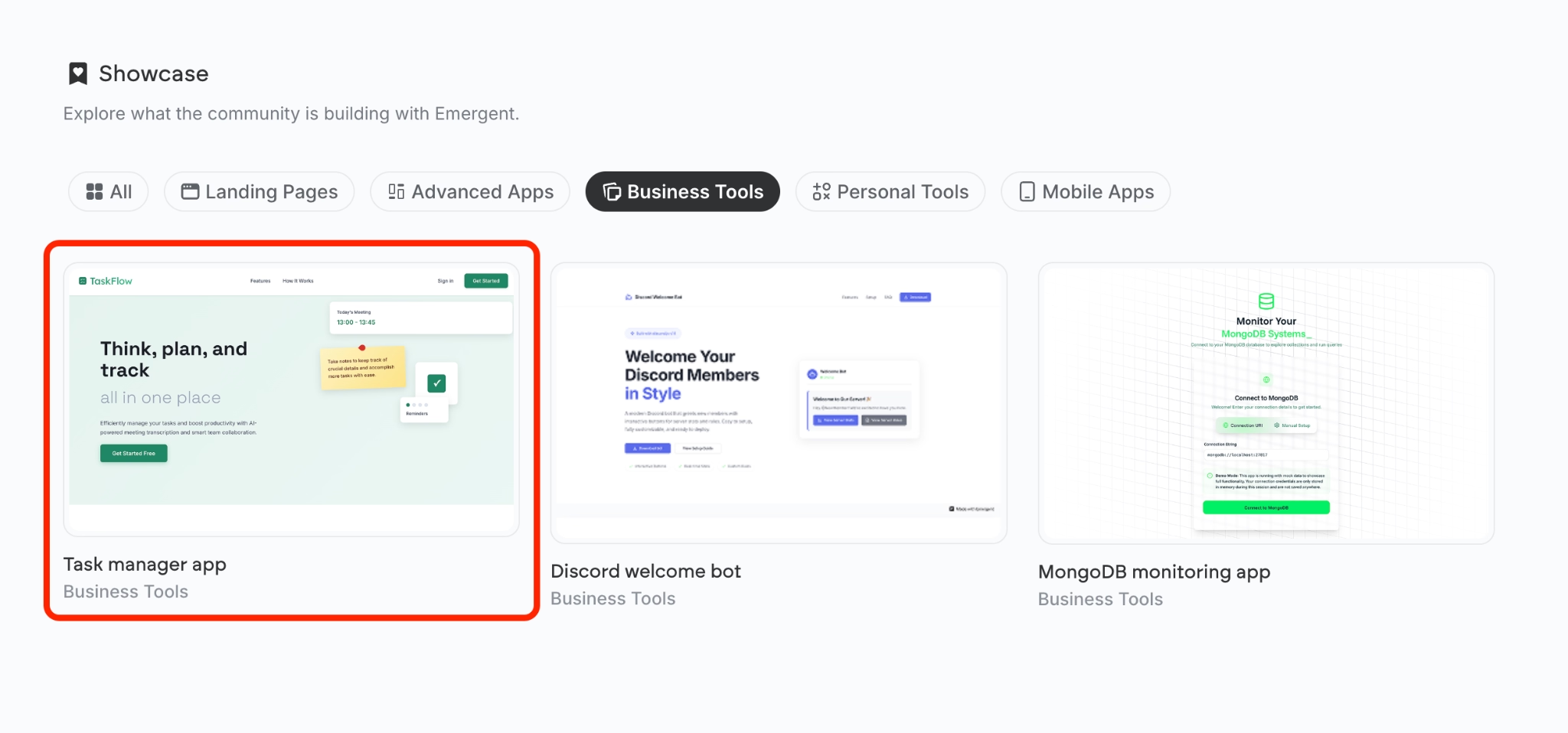
For our build, I picked the existing Task Manager template and remixed it. It gave me a working Kanban board, signup flow, and team management from the first build in about five minutes.
STEP 3: Review the AI-Generated Plan
When you click Remix on a template (or submit your first prompt from scratch), Emergent's agent doesn't immediately start writing code. It generates a plan first, providing a checklist of what the app already does, what's missing, and what needs fixing.
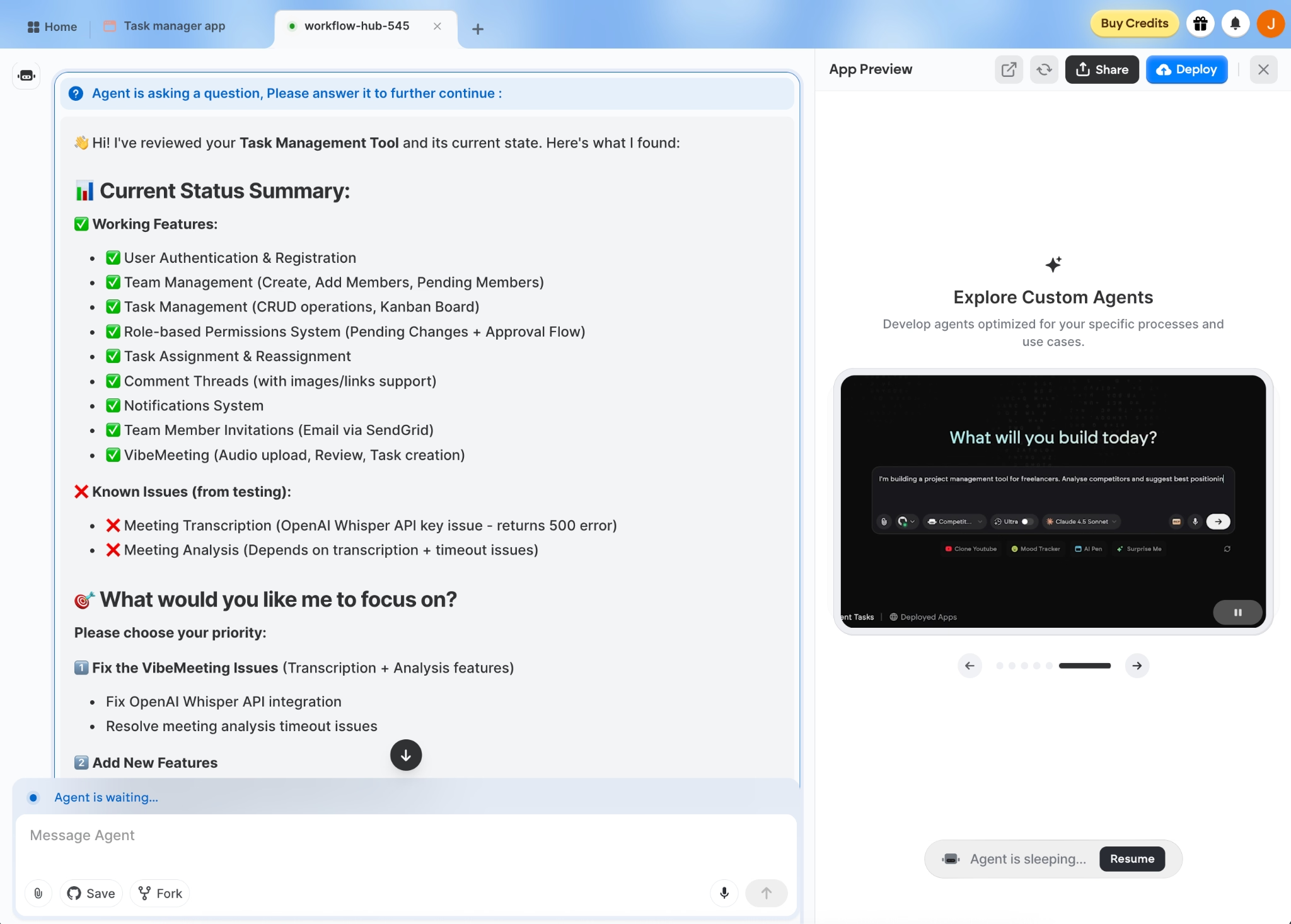
It's tempting to skim past this and let the agent get to work, but the plan is your best chance to catch missing features or wrong assumptions before any code gets written. It's worth a careful read.
Read every line of the working features list. Anything you expected to see that isn't there? Reply with something like: "Also add a Performance metrics page showing tasks completed per team member this week, and an Approvals page where Managers can review tasks marked Done." The agent updates the plan and only starts building once you confirm.
Pro tip: Don't try to specify visual design at this stage. Lock in the functionality first, then handle styling once you have a working app. Asking for both at once gives you half-baked results on both.
STEP 4: Let Emergent's AI Agents Build Your App
Once you submit the prompt, Emergent takes over. A team of specialized AI agents works together on different parts of your app at the same time.
| Agent | What It Does |
|---|---|
| Planning | Reads your prompt, decides how the pieces fit together, and writes the technical plan so the rest of the build has something to follow |
| Design | Generates the look of every page, from layout to colors to how buttons and forms behave when someone clicks them |
| Code | Writes the actual working software, both the part that users see and the part that handles data behind the scenes |
| Testing | Runs every flow end-to-end, catches anything that broke, and fixes it on the spot without you having to debug |
| Integration | Wires up external services like Stripe payments or Google sign-in, keeping access keys safely out of the code itself |
You don't need to know which agent is doing what. The output you see is a single, coherent app being built in front of you, usually in 3 to 10 minutes for a multi-page business app like this one.
While it runs, the agents narrate what they're doing in the chat window. Skim along. If you spot an early decision you disagree with, like the agent picking light mode when you wanted dark, flag it right then. Catching a wrong assumption in minute two saves you a round of rework in minute 20.
STEP 5: Test the Core Workflows Before You Touch Design
Once the code generation finishes, you'll see a live preview of your app. Here’s what our example app looks like:
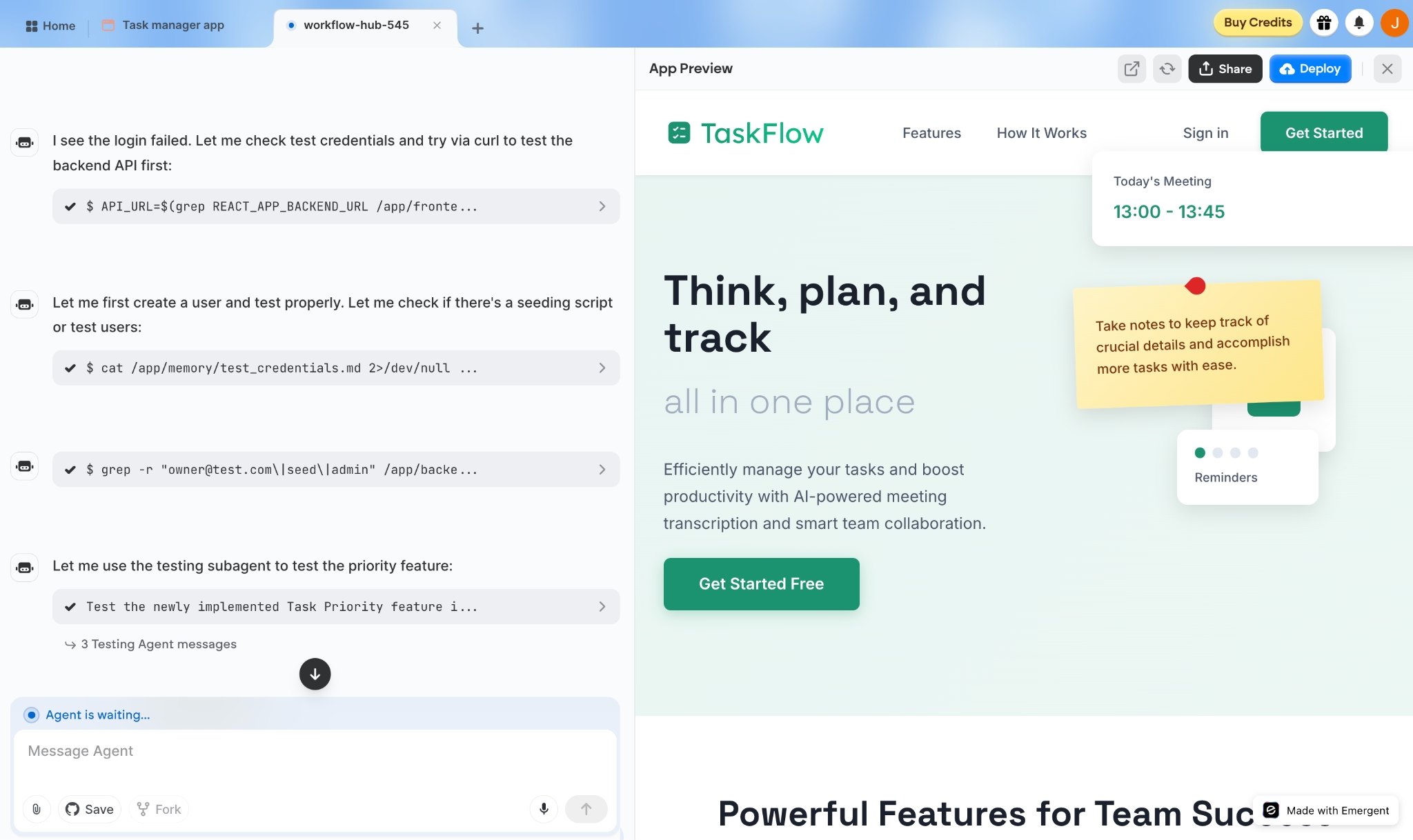
For our Task Manager, I ran through these scenarios:
- Signed up with Google Sign-In. Confirmed the account got created and routed to the dashboard.
- Created a task and dragged it across the Kanban board. Confirmed state persisted on page refresh.
- Switched to a Member account and tried to reassign a task. Confirmed the permission was correctly blocked.
- Added a comment with an image upload. Confirmed the image appeared in the thread for all team members.
When something breaks, all you need to do is describe the bug in plain English: "The image upload in comment threads isn't saving the file. Fix this." Emergent diagnoses the issue and automatically patches the code.
Pro tip: Test with at least two user accounts (one admin, one member) before doing any design work. Permission and access-control bugs are among the most common failure modes for apps, and they're easier to spot when you can see both sides at once.
STEP 6: Refine Pages and Visual Design
With the core flows working, start shaping the UI. Use follow-up prompts focused on one page at a time:
- "Redesign the Kanban board with rounded card edges, a subtle drop shadow, and color-coded priority labels."
- "On the Team page, show member avatars, role badges, and last active time."
- "Add a chart on the Performance page showing tasks completed per team member this week."
Asking for 10 changes at once gives you 10 half-finished changes. Iterate one page at a time, and your design quality stays consistent across the whole app.
STEP 7: Sync to GitHub and Inspect the Code
This is where Emergent separates itself from no-code platforms that lock you in. On the Standard plan and up, you can connect your GitHub account in settings. Once it's linked, every build saves to a code repository under your own account.
From there, you can:
- Open the live codebase inside a free code editor (VS Code), through Emergent's official plugin.
- Edit code directly for fine-grained control over specific features.
- Export the entire project and run it on AWS, Vercel, or any infrastructure you choose.
There are no proprietary file formats, and no rebuilding from scratch.
STEP 8: Deploy and Invite Your Team
Emergent handles hosting by default, and your app goes live at a generated address (something like yourapp.emergent.host).
For a business app, you'll want a custom domain that matches your company.
Emergent has a built-in IONOS integration that handles the whole setup for you, including a free domain for the first year. It's point-and-click, with no DNS settings to manage.
Already own a domain from another registrar? You can connect that to your Emergent app too.
Then invite your team. For our Task Manager, I sent invites to four teammates, assigned roles (one admin, two managers, one member), and the app was in active use within 30 minutes of finishing the build.
Common Mistakes to Avoid
These are the five missteps I see most often when people start building business apps, all worth catching before they cost you a round of rework.
- Vague prompts. “Build me a task app” gets you a generic tool nobody wants to use. “Build a task app for 10 people with a Kanban board, four user roles, and Google sign-in” gets you something usable on the first try.
- Mixing functionality and design in one prompt. Get the logic right first, then style. Doing both at once produces visual polish on broken workflows.
- Skipping permission testing. Broken role permissions are one of the most common app bugs. Test every role on every page before deploying.
- Ignoring the GitHub sync (Standard plan and up). Even if you never plan to touch the code yourself, syncing to GitHub gives you a backup, a record of every version, and a way to roll back when a build breaks something that was working an hour ago.
- Not testing with real users early. Your teammates will find edge cases you missed. Get the app in their hands within the first day, not the first week.
Want better results from every build? Check out these vibe coding best practices.
More Ways to Get Better Apps Out of Emergent
Once you've shipped your first app, a few habits will make every one after it better. Here are the ones we recommend most often to new users.
- Let Emergent handle sensitive integrations for you. Mention Stripe, Google Workspace, or Google sign-in in your prompt, and Emergent sets up the entire connection in the background, keeping your access keys out of the code itself.
- Make a copy of your project before you add a major feature. That way, if the new version breaks something that was already working, you've still got the original to fall back on.
- Once your data crosses ~10,000 records, pages start to lag. Prompt the agent: “Add indexes on the most-queried fields.” Load times drop five to 10x without you touching the database.
- Plan for at least three user roles, sometimes four. Most teams need admin, manager, member, and viewer, not just admin and user. Mapping this out in your prompt saves a round of rework later.
- Describe the workflow the way it actually happens, not in shorthand. Instead of “approval system,” write “managers get an email when a task is marked Review, and approve or reject from a single button inside that email.”
My Final Thoughts
The honest verdict after six months of building with these tools: AI app builders now handle the kind of internal tool work a junior dev would, at least for the simpler builds.
Coding agents have improved at a staggering pace. On SWE-bench, a benchmark built around real GitHub issues, top models went from solving fewer than 2% of issues in 2023 to more than 80% by early 2026.
The work delegation tool and the database dashboard I built in Emergent would've cost me somewhere between $50K and $120K to commission from a freelance developer or an agency. They took me one afternoon each, and I own the code.
The tools aren't perfect. I still hit errors on most builds. The fix is almost always a clearer prompt rather than anything technical. But for the everyday software that keeps a business running, the gap between "we should build that someday" and "it's live and the team is using it" has never been smaller.
Ready to Ship Your First Business App With Emergent?
If the eight steps above made the process feel doable, here's what makes Emergent specifically the right place to run it.
- Get an internal tool live by the end of the day: You don’t need to wait weeks for a developer to wire up the basics. Emergent handles planning, design, code, testing, and integrations in parallel from a single prompt, so you focus on what you're building instead of how it gets built.
- Keep full ownership of the code: Your app moves with you if you ever switch tools or hire a developer. Standard plan and up gives you GitHub sync, with the option to run the code on any hosting service you choose.
- Stop rebuilding the same login and payment screens: Mention Google sign-in or Stripe checkout in your prompt once, and Emergent sets up the entire flow for you.
- Cut your first version in half by remixing a working app: You won’t be starting from a blank screen. The Task Manager, MongoDB monitoring app, and bot starters are ready for you to extend.
- Skip the no-code lock-in trap: Other AI builders trap your work inside their platform. Emergent generates standard code (React, MongoDB) that any developer can read and edit.
Emergent pricing starts free with 10 credits to try it out, and the $20/month Standard plan covers a first build and a few rounds of iteration for most internal tools. Start building your first app on Emergent today.

Describe what you want and Emergent builds it. A real, production-ready app you can launch the same day.
- One prompt to build
- Zero code required
- Deploy in minutes







