



TL;DR
- Choose Base44 if you want to turn an idea into a web app without dealing with much of the technical setup yourself.
- Choose Replit if you want more control over how the app is built, expect to work with code at some point, or need a dedicated mobile app.
You have an app idea, but you don't want to spend weeks learning to code or hiring a development team before you can see whether it works.
Base44 and Replit both promise a shorter route. You type what you want into a chat box, and the platform turns the prompt into an app. The harder part is knowing which one will give you the better result without wasting your time or budget.
You don't have to figure that out alone. I tested both platforms with the same prompt for a small moving company app, then compared the build experience against broader factors that affect your choice, including pricing, code access, backend options, mobile development, security, and privacy.
By the end, you will know which platform is the better fit for your app, budget, and level of technical experience.
Base44 vs Replit: The Main Difference
The main difference is technical visibility and control. Base44 keeps more of the setup in the background, while Replit lets you inspect and change the code directly.
Base44 is an AI app builder that lets you create web apps through conversation. It handles the database, user accounts, hosting, and other technical parts inside the same platform, so you can stay focused on the app itself.
Replit is a broader coding platform with an AI Agent built into it. You can still start with a prompt, but the code, files, and development tools remain visible in the Project Editor.
How I Tested Base44 and Replit
I gave Base44 and Replit the same prompt:
Build an app for a small moving company called BlueRoute Movers. It needs a customer intake form that captures move date, addresses, and job size; a job-status dashboard for the team; a basic client portal where a customer can log in and see only their own move; and a tracker for upcoming moves.
Provide two separate demo logins: one for the moving team and one for a client. Prefill the login details on each login screen.
I kept the prompt short so I could see how each platform interpreted the same business idea.
I compared:
- Build time
- Credits used
- Flows done
- Corrections needed
- Technical effort
For the flows score, I checked whether each app could handle these five flows:
- A customer submits their move details
- The team can view and update jobs
- A client can log in and see only their move
- Upcoming moves appear in a dedicated tracker
- The prefilled team and client logins work without extra effort
Base44 vs Replit at a Glance
Base44 and Replit can both turn a prompt into an app, but they suit different kinds of builders.
| Category | Base44 | Replit |
|---|---|---|
| Best for | Non-technical founders who want a more managed experience | Technical founders and developers who want more control |
| Code access | Code editor, ZIP export, and GitHub export on eligible plans | Full access to the project files throughout the build |
| Mobile apps | Responsive web apps and progressive web apps | Dedicated React Native and Expo apps |
| Starting paid price | $20 monthlyor $16 per month billed annually | $20 monthlyor $18 per month billed annually |
Base44 vs Replit: Feature-by-Feature Comparison
Base44 and Replit differ most in how they handle the build, how much technical control they give you, the kinds of apps they can produce, and what you pay as the project grows. The sections below show where each advantage comes from and where the choice is less clear.
App Building
I gave Base44 and Replit the same BlueRoute Movers prompt, then tested whether each app could complete the five workflows in the brief. Base44 generated its first version faster, but only two workflows worked as requested.
Base44 test results:
- Build time: 4 minutes
- Credits used: 3 of 25 monthly; 3 of 5 daily
- Flows done: 2 of 5
- Corrections: 2 prompts and 1 revert
- Technical effort: High around login setup
The first preview was convincing. Base44 had created the dashboard, intake form, client portal, upcoming-moves tracker, and separate login screens in one pass.
Logging in was the frustrating part. The demo logins did not work, and my first correction changed the login interface but did not fix the underlying access problem. Testing the team and client sides eventually required a workaround with two Google accounts.
The customer journey was also incomplete. Base44 turned the intake form into an internal team tool, while the client portal needed manual account and data matching before it could show the right move.
Things got better with the Teams side, though. I could create a move, update its status, and see those changes reflected across the dashboard and data table.
So Base44 did well at the team workflow, but needed too much help around authentication and client setup. Confirmation messages also piled up over the dashboard and refused to close properly.
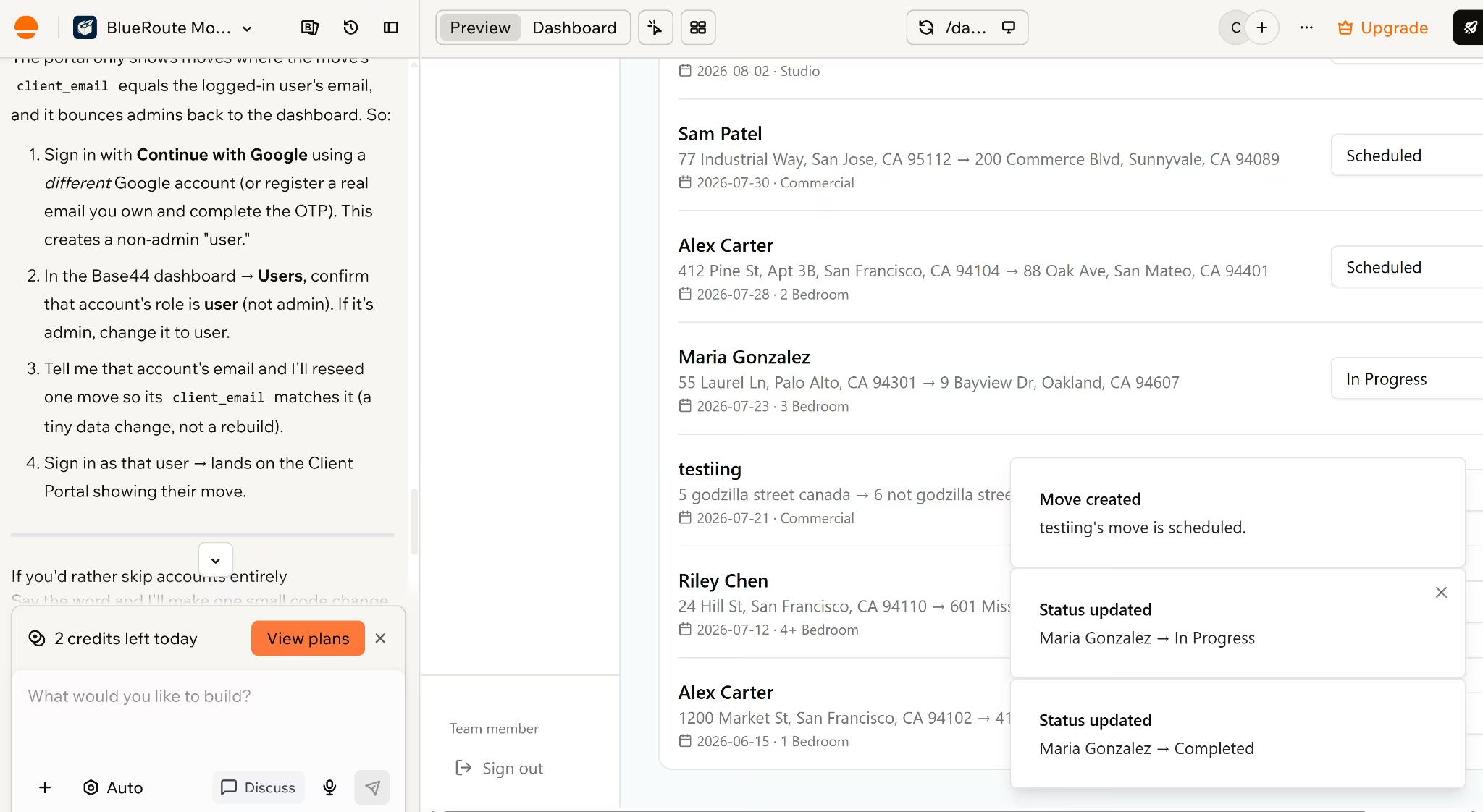
It did at least give me a visual editing mode for selecting elements directly in the preview.
There was also a built-in radio player. I did not recognize the songs, but the 90s hip-hop helped me through the login gauntlet.
Replit took twice as long and used considerably more of its free daily allowance.
Replit test results:
- Build time: 8 minutes
- Credits used: 65% of the daily Agent allowance
- Flows done: 3 of 5
- Corrections: No extra build prompt
- Technical effort: Moderate debugging needed
Replit’s first result covered more of the customer-facing brief. The intake form was public, the team and client options were clearly presented together, and the app included the dashboard, client portal, seeded jobs, and upcoming moves page.
The login path still felt uncertain. One button seemed to do nothing until I refreshed the page, even though the session had gone through.
Once inside, reliability became the bigger concern. Some job views did not match the dashboard data, the upcoming-moves flow did not work properly, and parts of the app loaded slowly or appeared stuck. Replit got closer to the requested structure, but I would have needed to debug the app before trusting it with real moving jobs.
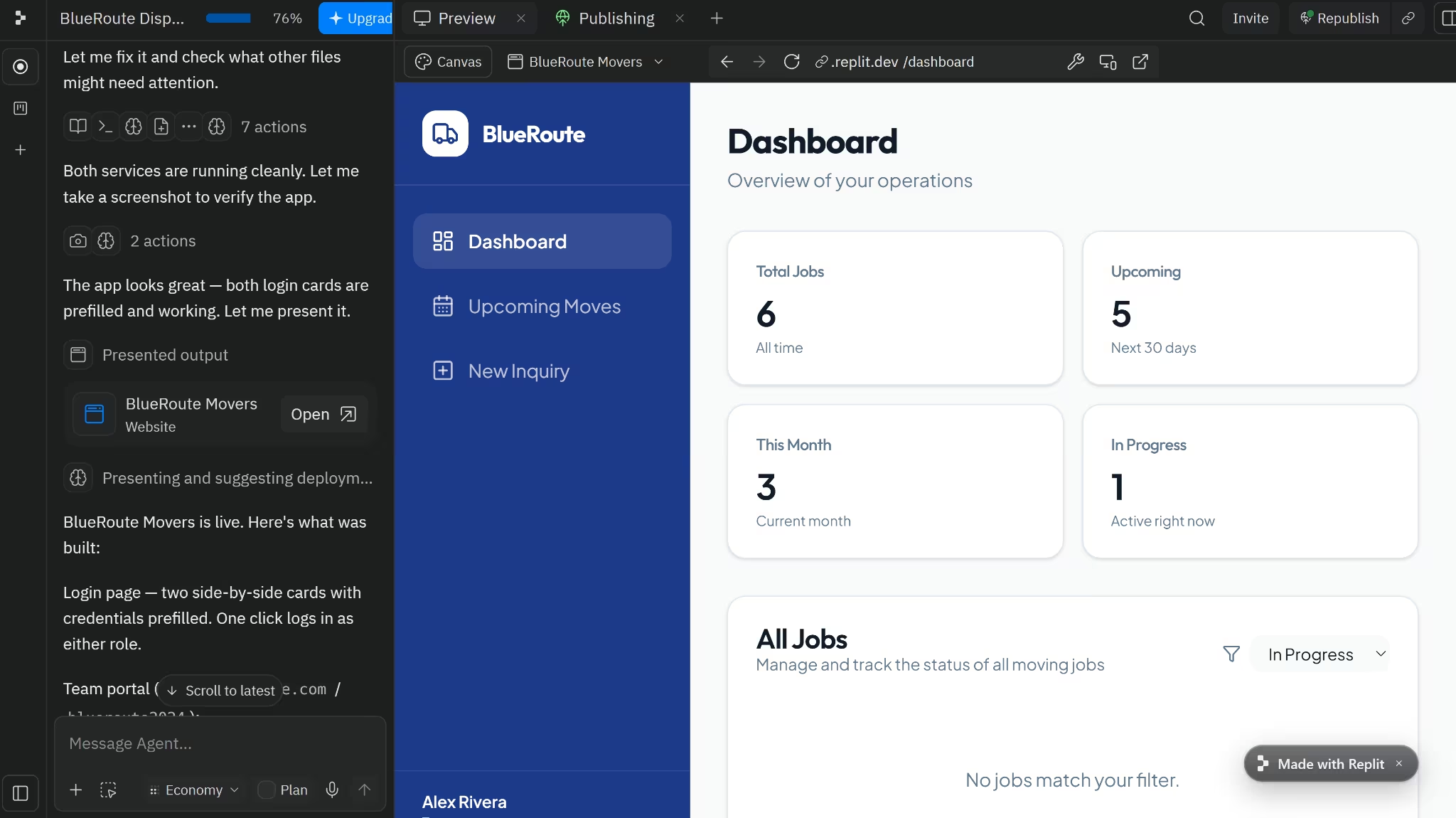
Replit also had the broader visual workspace. Its Canvas included tools for chatting, drawing, editing, generating, and reimagining the interface. Base44’s visual editor was simpler, but easier to understand at a glance.
Winner: Base44. It built BlueRoute in half the time and used a smaller share of the available credits. The login workaround was longer than it should have been, but its main team workflow worked. Replit completed more of the prompt, yet the slow loading and inconsistent data left more debugging to do.
Backend and Integrations
Base44 and Replit both built the database behind BlueRoute without asking me to set one up first. The difference is what happens when you want to inspect or change it.
Base44 created the move records, user access, and data rules as part of the first build. When I added a move or changed its status, the new information appeared in the dashboard and Data tab.
Base44’s managed backend includes:
- A NoSQL database
- Authentication and user management
- Real-time data updates
- Hosting
- Serverless backend functions
You can manage most of this from the Base44 dashboard rather than connecting separate services. Its data entities also include access rules, which BlueRoute used to limit clients to moves associated with their accounts. The restriction worked, although I still had to match the client account to the correct move manually.
For more advanced apps, Base44 backend functions can handle webhooks, protected credentials, outside APIs, and custom endpoints. The functions use TypeScript, but non-technical users don't need to touch them for a straightforward app like BlueRoute.
Base44 also includes ready-made tools for:
- File uploads
- Image and video generation
- AI model calls
These built-in integrations don't require you to supply separate API keys. OAuth connectors and custom API integrations are available when the app needs to work with external accounts or services. In my Free-plan test, the Integrations area was locked, and BlueRoute used none of the 100 included integration credits.
Replit also generated the data layer for BlueRoute, including the seeded jobs. Its database tools are more exposed, which matters when something goes wrong.
Replit lets you:
- Inspect the database and schema
- Run queries
- Edit server-side routes
- Install packages
- Connect other databases and APIs
- Store API keys outside the code with Secrets
That control would have been useful in my test because some BlueRoute views did not agree about the job data. A developer could inspect the queries and application logic directly, rather than asking the builder to diagnose everything via chat.
Replit also supports connectors for outside services, while the project remains a regular codebase that can use different frameworks and packages. The trade-off is more technical responsibility: Replit gives you more ways to change the backend, but you may also need to understand it when the generated logic breaks.
Winner: Tie. Both platforms can handle the database, authentication, backend logic, and external integrations. Base44 suits people who want those services connected and managed inside the builder. Replit suits people who want more control over how the backend is built and changed.
Code Access and Export
Both platforms let you see the code behind the app. The difference is what you can do with it during the build.
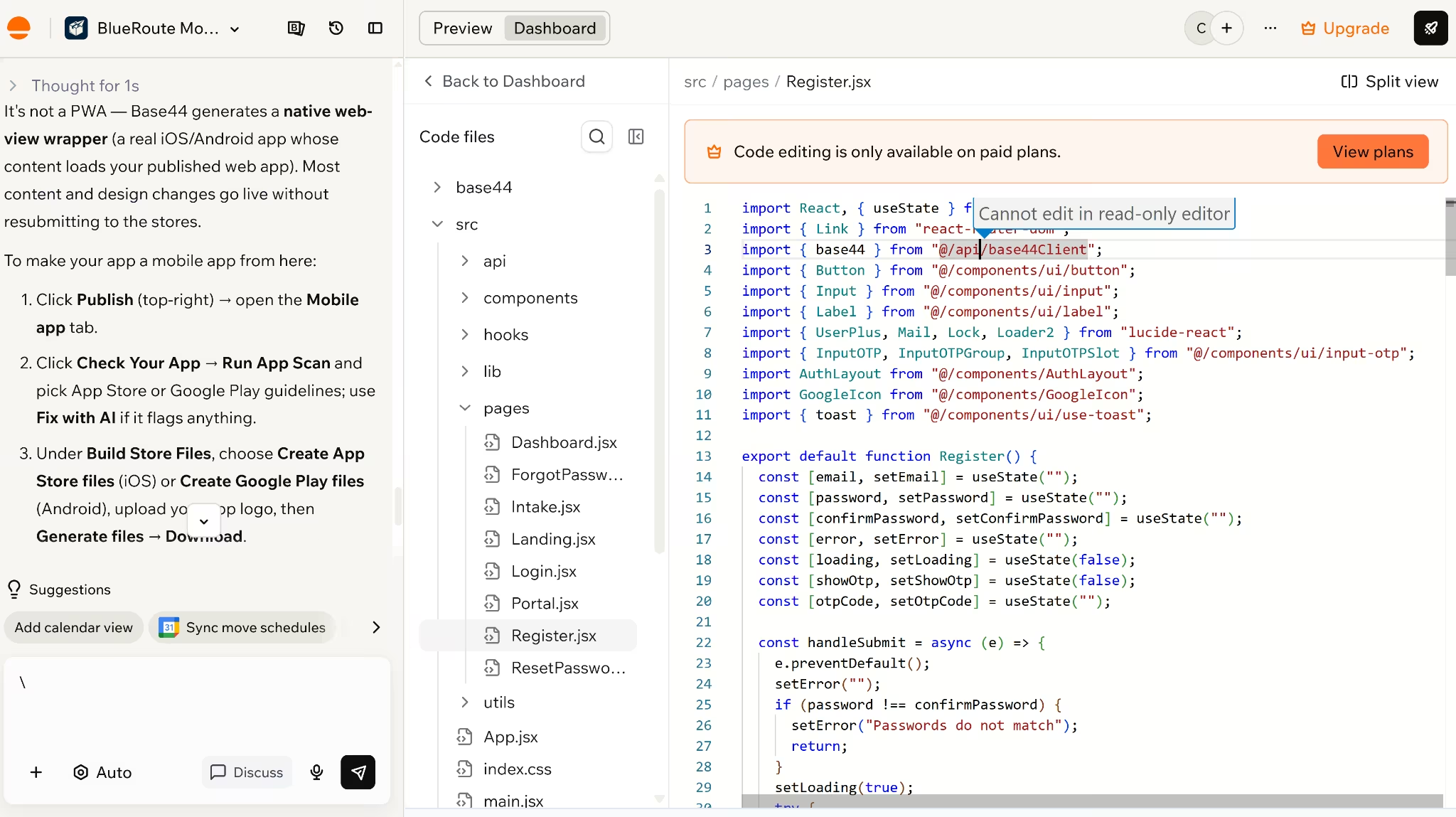
In my Base44 Free test, I could open the Code tab and inspect the files behind BlueRoute. I couldn't edit them.
Base44’s access depends on the plan:
- Free: View the generated code
- Starter: Edit code inside Base44
- Builder and higher: Connect GitHub and export the project as a ZIP
The export includes the frontend and backend functions. Base44 also provides a CLI and SDK for local development.
Exporting the files does not automatically remove every Base44 dependency. An app may still rely on its authentication, database, integrations, or SDK, so moving it elsewhere can involve replacing those services.
Replit gave me much more control during the test. I could open the project files, edit the generated code, check errors in the Console, run commands in the Shell, and use Git without leaving the workspace.
It also gives you several ways to keep working outside Replit:
- Edit the code directly
- Export the project as a ZIP
- Connect GitHub and use Git version control
- Change packages and project settings from the workspace
- Roll back to earlier Agent checkpoints
Replit-hosted services, such as its database, deployment, or connectors, may still need to be replaced if you move the app elsewhere. The code itself, however, is already open and editable from the start.
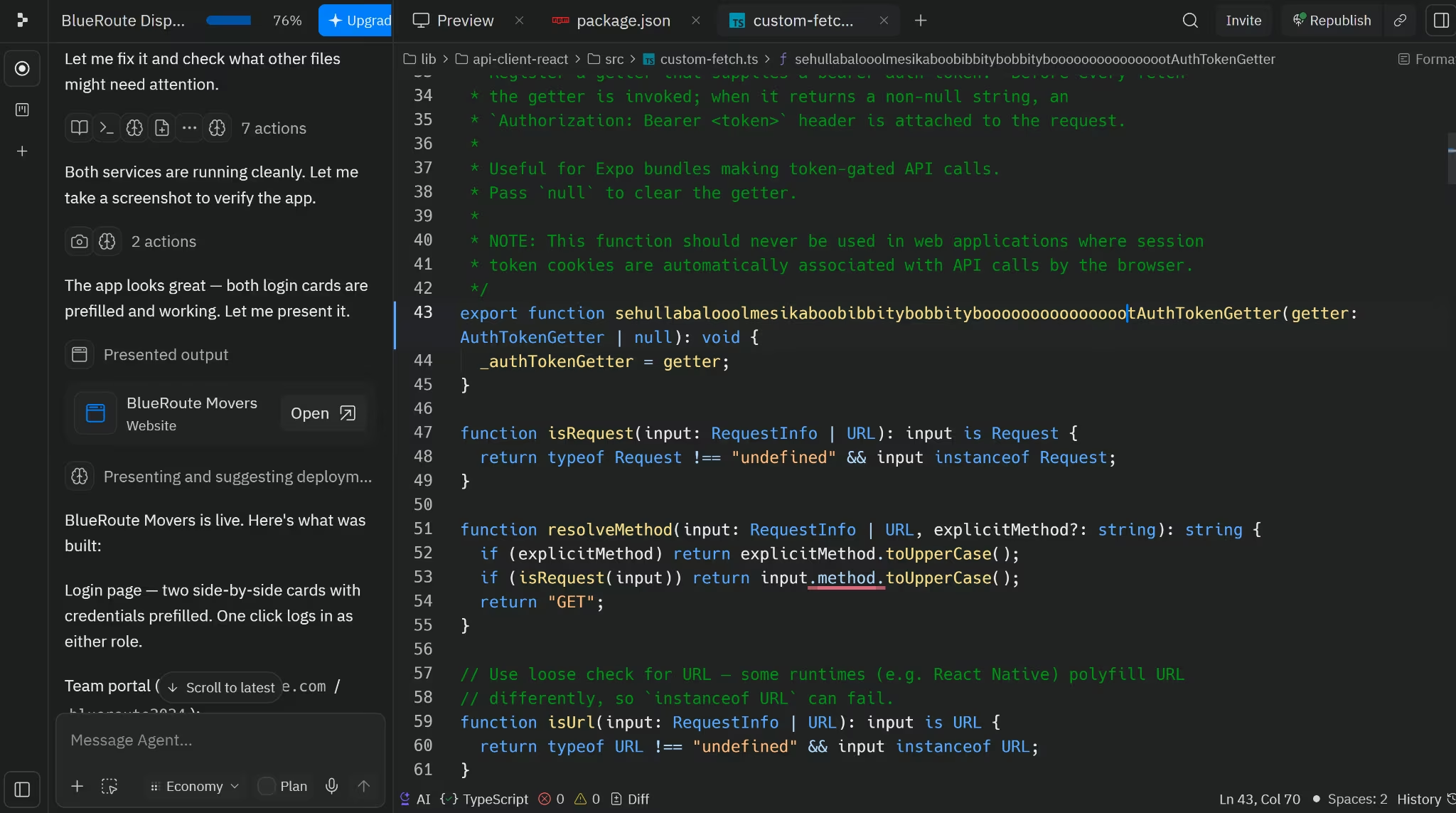
Winner: Replit. Base44 lets you inspect the generated code for free and adds editing and export on paid plans. Replit lets you open, edit, debug, version, and export the project from the beginning.
Web and Mobile Apps
Both platforms published BlueRoute as a web app. The bigger difference was how long the free app stayed live and what each platform meant by “mobile app.”
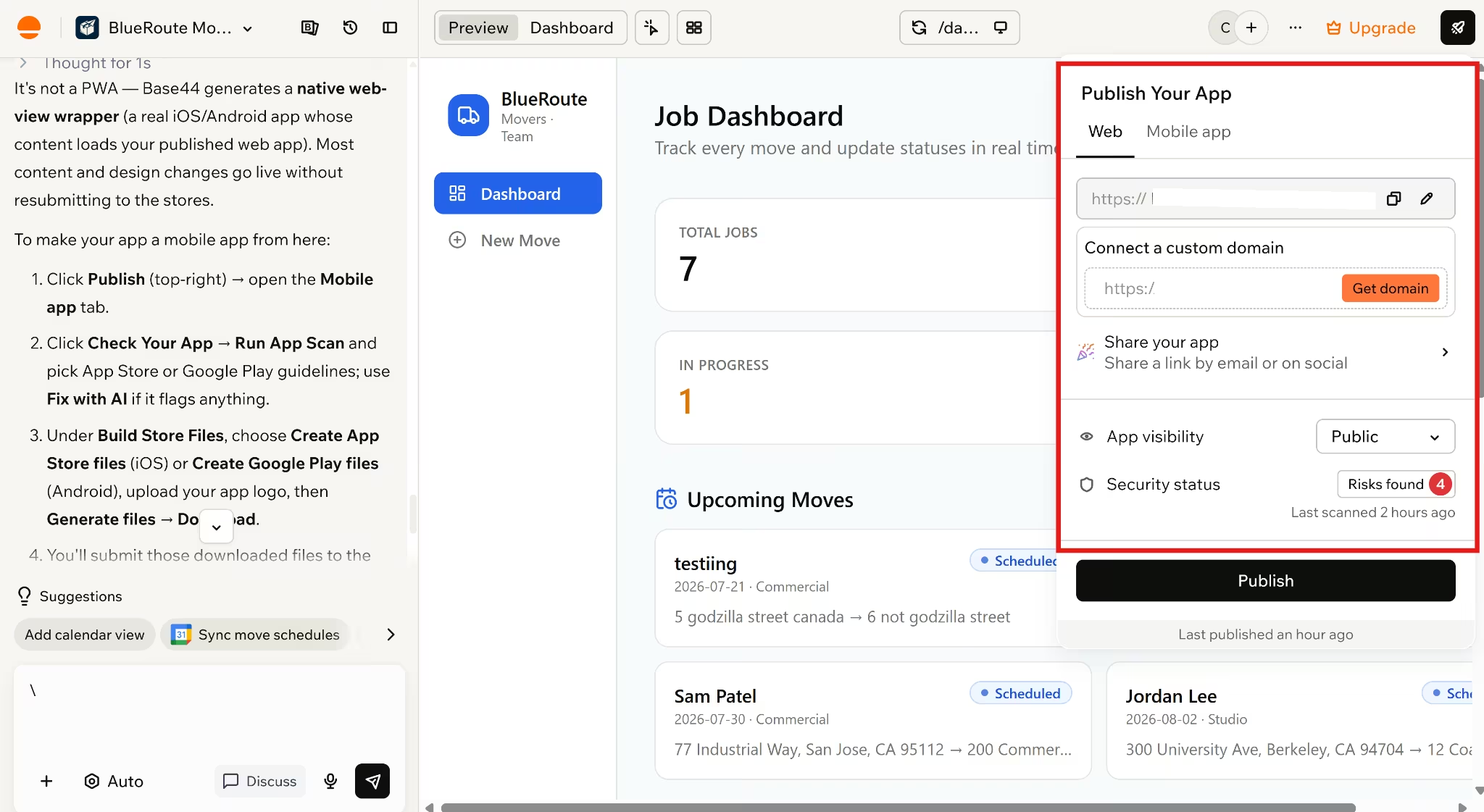
On Base44, BlueRoute published for free with no expiry warning, and each mobile option started from the web app.
In my test, that meant:
- Web publishing: Free in my test
- Expiry: No expiry warning appeared
- Custom domain: Upgrade required
- Mobile option: Web app, PWA, or native web-view wrapper
- Store files: Builder plan or higher
Every published Base44 app comes with PWA features that let users open it from a mobile browser and add it to their home screen. Updates also appear automatically when the web app is republished.
That route may be enough for BlueRoute. Office staff could use the full dashboard on a computer, while movers open the same responsive app from their phones.
Base44 also lets you scan the app against Apple and Google guidelines and generate IPA and AAB store files from the editor. You can run the readiness scan for free, but downloading the files requires a Builder plan or higher.
The resulting mobile app is a native wrapper that loads the published Base44 app inside a secure web view. Most content and design changes can therefore appear without another store submission.
The trade-off is that native-only features such as push notifications, full offline mode, and HealthKit aren't currently supported.
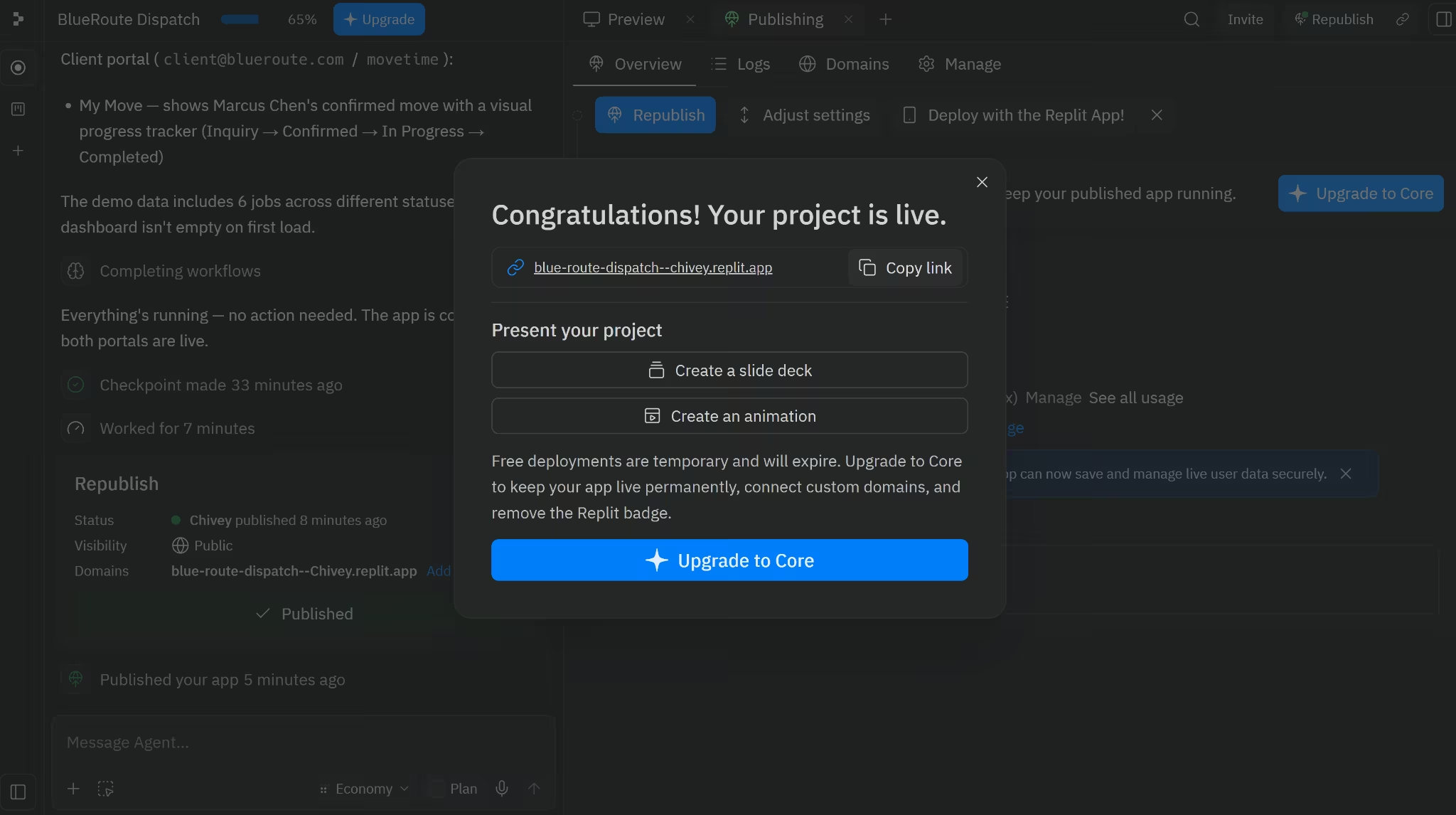
On Replit, BlueRoute went live on a free .replit.app URL, while its mobile route used React Native and Expo.
I found these publishing limits and mobile options:
- Web publishing: One free published app
- Expiry: 30 days
- Custom domain: Available with an upgrade in my publishing screen
- Mobile option: React Native with Expo
- Mobile testing: Phone preview or paid browser simulators
Replit’s Starter plan includes one published app that goes offline after 30 days. You can publish it again, but keeping unlimited apps live requires the Core or Pro plan.
Free published apps also display a “Made with Replit” badge that Core users can remove. Published apps use a Replit subdomain, while supported deployment types can also connect to a custom domain.
When I asked Replit about mobile, it offered to build an Expo app alongside the web version and connect both to the same backend and authentication. I did not build it, so I treated this as an available route rather than a tested result.
Replit can create React Native apps for iOS, Android, and the web through Expo. You can preview the app on a phone with Expo Go, while Core, Pro, and Enterprise users can run an iOS Simulator or Android Emulator inside Replit.
Replit also provides a guided path from an Agent-built React Native app to App Store submission.
Winner for mobile apps: Replit. Base44 can package an existing web app for the stores, which is useful when the web experience already does what you need. Replit gives you a dedicated React Native project with more room for native mobile features.
Web-app verdict: Tie. Both published BlueRoute for free. Base44’s Publish control was harder to find, but I saw no expiry warning. Replit made publishing clearer, but its free app lasts 30 days.
Pricing
Base44 and Replit both start at $20 per month. Base44 Starter costs $16 per month with annual billing, while Replit Core costs $18. Base44 therefore costs $2 less per month, or $24 less per year, when you pay annually.
| Base44 plan | Monthly billing | Annual rate | Message credits | Integration credits |
|---|---|---|---|---|
| Free | $0 | $0 | 25 per month | 100 per month |
| Starter | $20/month | $16/month | 100 per month | 2,000 per month |
| Builder | $50/month | $40/month | 250 per month | 10,000 per month |
| Pro | $100/month | $80/month | 500 per month | 20,000 per month |
| Elite | $200/month | $160/month | 1,200 per month | 50,000 per month |
Starter adds in-app code editing. Builder adds backend functions, GitHub integration, model selection, and custom domains.
Base44 separates the credits used to build an app from those used after it goes live.
Base44 credit types:
- Message credits cover prompts that create, change, or fix the app.
- Integration credits cover actions triggered by features such as AI calls, email, file handling, and backend functions.
You should note that credit use depends on the action and model involved. Free accounts can use up to 5 message credits per day, with a maximum of 25 per month. Unused credits don't roll over.
Base44 is also rolling out a newer workspace system that separates plan features from credit levels. It isn't available to every account yet, so some readers may see a different billing setup from the one I tested.
Also read our Base44 pricing guide for a full breakdown of what each plan actually covers before you commit.
Replit Core matches Base44 Starter at $20 per month, but costs $2 more per month with annual billing.
| Replit plan | Monthly billing | Annual rate | Included credits | Collaboration |
|---|---|---|---|---|
| Starter | $0 | $0 | Free daily Agent credits | Individual |
| Core | $20/month | $18/month | $25 per month | Up to 5 collaborators |
| Pro | $100/month | $90/month | $100 per month | Up to 15 collaborators and 50 viewers |
| Enterprise | Custom | Custom | Custom | Custom |
The Replit Starter plan includes daily Agent credits, but Replit does not specify a fixed number on its public plan page. The allowance resets daily and is subject to a monthly cap.
Building BlueRoute cost $0 on the Starter plan, with no paid upgrade required.
Also read our Replit pricing guide for a full breakdown of what each plan actually covers before you commit.
Free publishing is where the plans separate. Base44 published BlueRoute without showing an expiry warning during my test. Replit Starter includes one free published app that goes offline after 30 days, although you can publish it again.
Winner: Base44. Both platforms have the same $20 monthly starting price, but Base44 costs less with annual billing. Its free published app also showed no expiry warning in my test, while Replit’s goes offline after 30 days.
Security and Privacy
Both platforms scanned BlueRoute for security problems, but they looked for different things.
Base44 focused on the app’s login setup and who could access its data.
Its security setup included:
- User login: Built-in
- Record access: Controlled by user and role
- Security scan: Available in the dashboard
- Private apps: Paid plans
- Compliance: SOC 2 Type II and ISO 27001
The access controls worked in my test. My account opened the team dashboard, while a second account entered the client portal and couldn't see another customer’s move. Base44 can limit which records each signed-in user can view or change, which is useful for portals containing customer, employee, or project data.
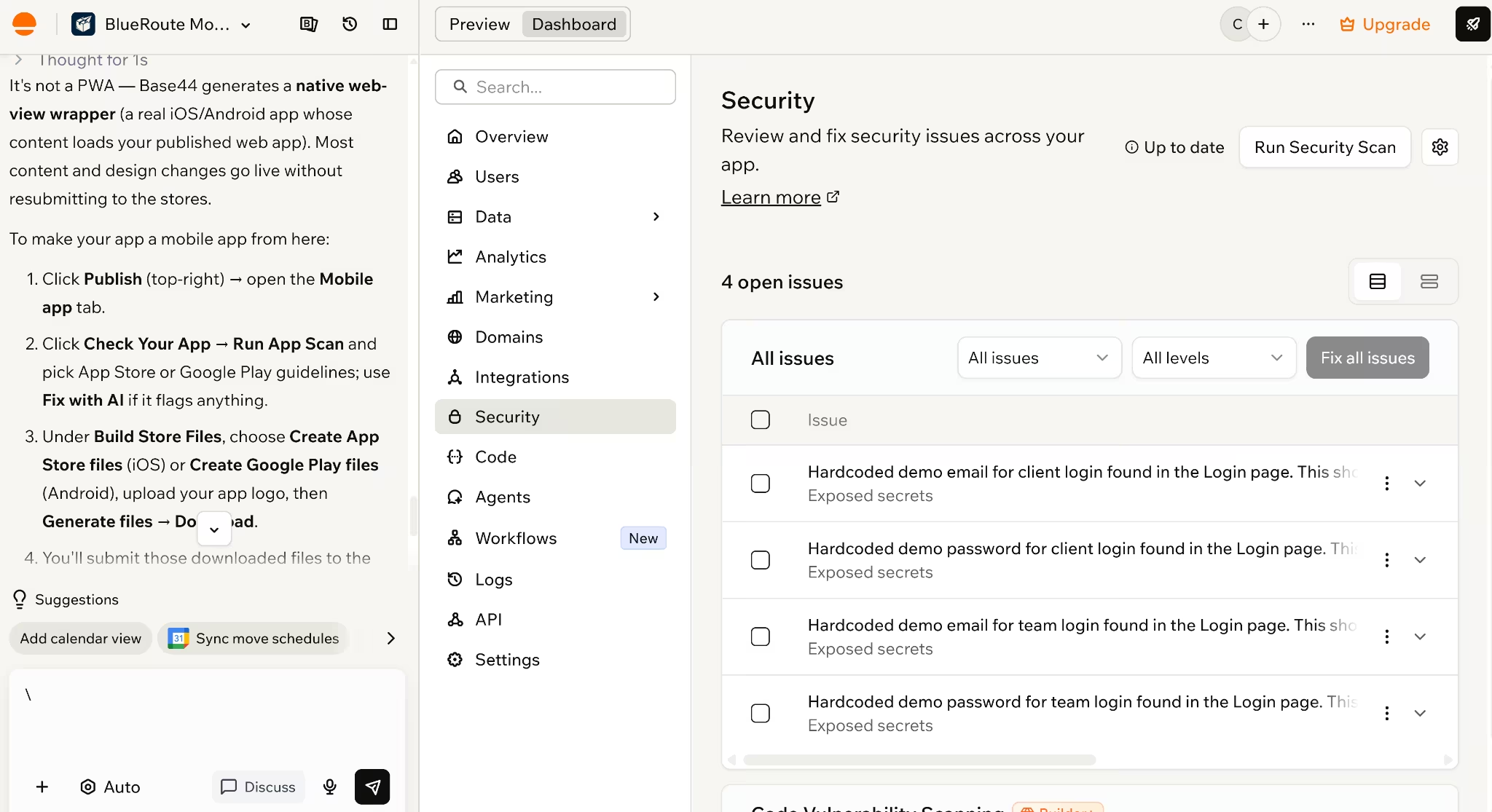
Base44’s security scan found four issues before I published BlueRoute. All four came from the demo emails and passwords that Base44 had placed directly in the login page.
The scan had done its job. The awkward part was that Base44 had created the same problem it later flagged. It also allowed me to continue publishing without fixing the warnings, so you still need to review the results yourself.
Base44’s free scan did not cover the full codebase. Code vulnerability scanning required the Builder plan or higher.
Base44 also includes:
- Encrypted storage for API keys and credentials
- Public, workspace-only, and private access settings
- Checks for exposed credentials, open data permissions, and login gaps
Private apps require a Starter plan or higher, while public apps can still require users to sign in.
For companies with formal security requirements, Base44 has SOC 2 Type II and ISO 27001 certification, encrypts data in transit and at rest, and offers regional data storage on eligible plans.
Replit focused more heavily on the packages and code behind BlueRoute.
Its security setup included:
- Package scanning: Free and automatic
- Deeper code scan: Paid
- Private publishing: Available on every plan
- API-key storage: Encrypted Secrets tool
- Compliance: SOC 2 Type II and ISO 27001
Replit’s free background scan found two security issues in BlueRoute’s installed packages. It also showed the affected packages and offered a Fix all button.
This feature is useful for someone who does not know how to manually inspect every dependency. Replit’s free automatic scans check installed packages against known vulnerability records, then group the findings by severity.
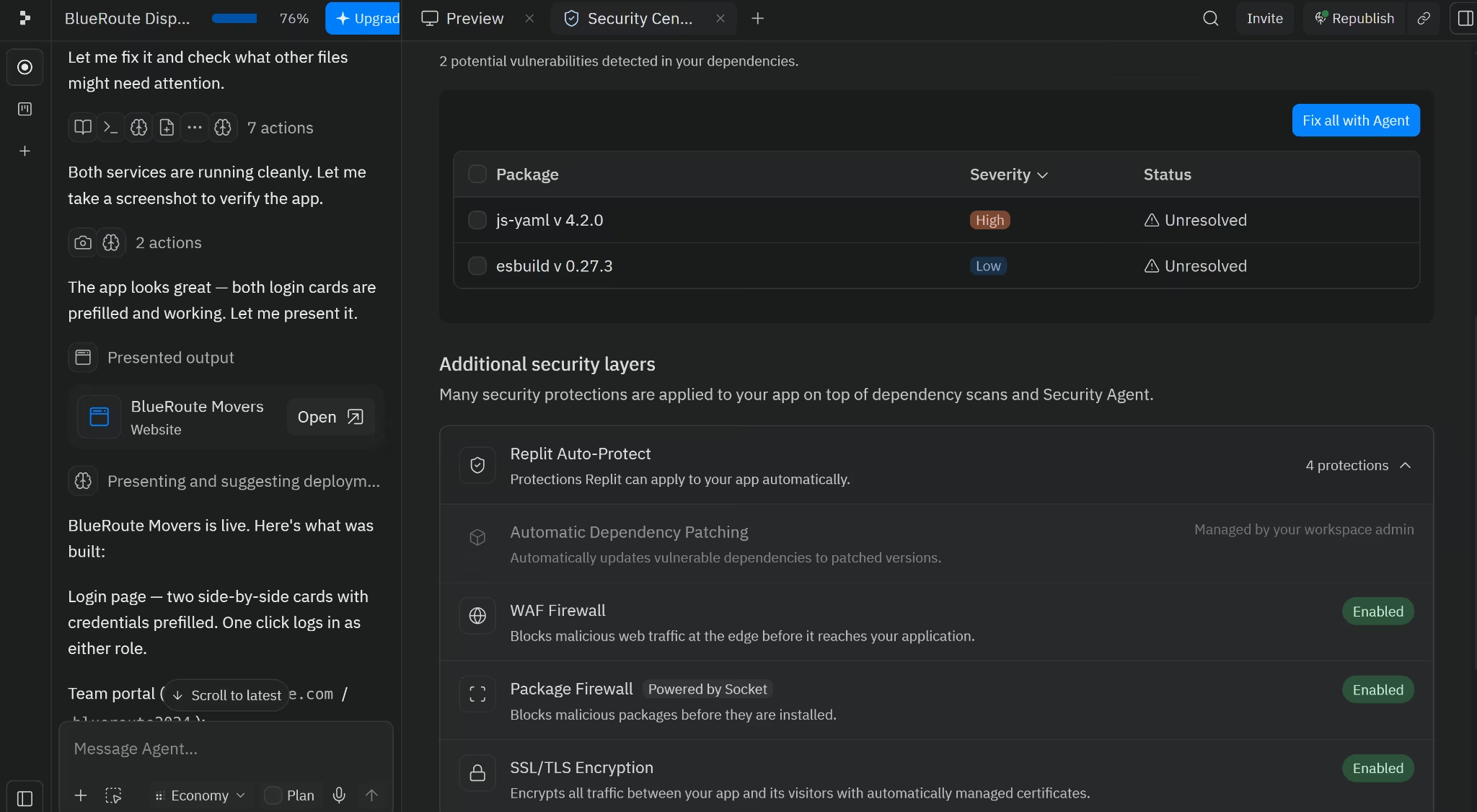
The deeper Agent security scan was locked behind an upgrade. Paid users can run a broader review of the app’s code, routes, data handling, and privacy risks, rather than checking installed packages alone.
Replit also showed several protections already enabled for BlueRoute:
- A firewall for malicious web traffic
- A firewall that blocks risky packages
- SSL/TLS encryption for traffic between the app and its users
- Automatic background package scans
Sensitive credentials can be kept outside the source code using Replit’s Secrets tool, which encrypts them and passes them to the app as environment variables.
Replit also has an advantage for private internal tools. Private deployments are available on every plan, and Replit adds the login screen without requiring you to build that access layer yourself.
For larger organizations, both platforms add features such as company sign-in, automatic user removal, stricter publishing rules, and activity records for security reviews. Most small businesses won't need to evaluate those controls unless an IT or compliance team asks for them.
Replit has SOC 2 Type II and ISO 27001 compliance and encrypts platform data at rest and in transit.
Winner: Replit. Both platforms caught problems in BlueRoute. Base44 did a good job checking login and data access, but Replit’s free scan exposed package-level risks and gave me a clearer route from finding an issue to fixing the underlying code. Private publishing on every plan also gives it the edge for internal apps.
What Real Users Are Saying
Some of the review patterns matched what I ran into while building BlueRoute.
Base44’s Trustpilot rating is used here because its G2 profile had only four reviews. This was too few for a meaningful comparison with Replit’s 397 G2 reviews, so I used Base44’s Trustpilot instead.
Base44 2.9/5 From 820 Trustpilot Reviews
One business owner said Base44 had replaced “thousands of dollars worth of software subscriptions.” That is the kind of outcome that matters if you are trying to cut down the number of tools your business pays for.
The negative review matched my BlueRoute test more closely. Adam noted that the AI kept saying things were “fixed” or “done” even when nothing had changed, while small edits turned into a long back-and-forth. I ran into the same pattern with the login flow. It looked complete, but fixing it took extra prompts and a manual workaround.
Want the full picture of what users are saying? Read our Base44 Reviews for a closer look at what builders actually ran into.
Replit 4.5/5 From 397 G2 Reviews
One reviewer liked that Replit removed the usual setup work, including “dependency hell” and version conflicts. They could start building without first configuring a local development environment.
Another reviewer said larger projects can still encounter “performance slowdowns and occasional debugging friction.” That came through in my test, too. BlueRoute was quick to generate, but some pages loaded slowly, and the data did not stay consistent across the app.
Want the full picture of what users are saying? Read our Replit Reviews for a closer look at what builders actually ran into.
Base44 vs Replit: Which Should You Choose?
Your decision comes down to how involved you want to be after the first build.
Base44 fits you better when you want to stay focused on the app rather than the technical setup. You will get more value from it if you:
- Need a straightforward business web app
- Want the database, authentication, and hosting already connected
- Prefer not to edit code
- Want to get the first version live quickly
Replit makes more sense when you expect to work on the project after Agent finishes. It is the stronger fit if you:
- Want to inspect and edit the generated code
- Need custom packages, services, or backend logic
- Plan to build a dedicated React Native mobile app
- Have someone who can debug and extend the project
For BlueRoute, Base44 suited the small-team use case better. Replit would be the better route if you or someone on your team can work in the code and expect the app to become more custom over time.
Where Base44 and Replit Fall Short
Base44 fell short on login setup, customer access, and the amount of manual work needed to complete the core BlueRoute flows.
The main problems were:
- The demo logins looked ready but did not work
- The customer intake form became an internal team form
- Testing both roles required two Google accounts
- The client portal needed manual data matching
- Fixes quickly ate into a daily limit of five credits
Base44’s mobile route has limits, too. It can package the published web app inside a native shell for the App Store and Google Play, but the result is still the web experience running inside a wrapper.
It is less suitable for apps that need offline access, push notifications, or deeper phone integration.
Also read our best Base44 alternatives guide for what else is worth trying if Base44 doesn't fit your build.
Replit covered more of the original brief, but reliability became the problem once I started using the app.
The main problems were:
- Some pages disagreed about the same job data
- The upcoming moves tracker did not work properly
- Parts of the dashboard loaded slowly or appeared stuck
- One login seemed unresponsive until I refreshed
The first build had already used 65% of the daily Agent allowance. Fixing those problems would mean using more credits or opening the code and tracing the issue myself.
That might be fine for a developer who's comfortable in the code. But for a non-technical founder, it simply moves the problem from the app into the editor.
Also read our best Replit alternatives guide for what else is worth trying if the technical workflow or credit costs don't fit.
When to Consider Emergent Instead
Emergent is the stronger option when you want the first build to work as one connected product. It combines the guided setup Base44 offers with the code access and flexibility you get in Replit, while giving you a clearer path into integrations, publishing, and native mobile.
It took longer and used more credits than either tool, but it was the only one that completed every BlueRoute flow without a correction prompt.
Emergent test results:
- Build time: 12 minutes
- Credits used: 11.04
- Flows done: 5 of 5
- Correction prompts: None
- Technical effort: Low
Before building, Emergent checked how I wanted the logins, intake form, statuses, and design handled. That gave it the context Base44 and Replit had to guess.
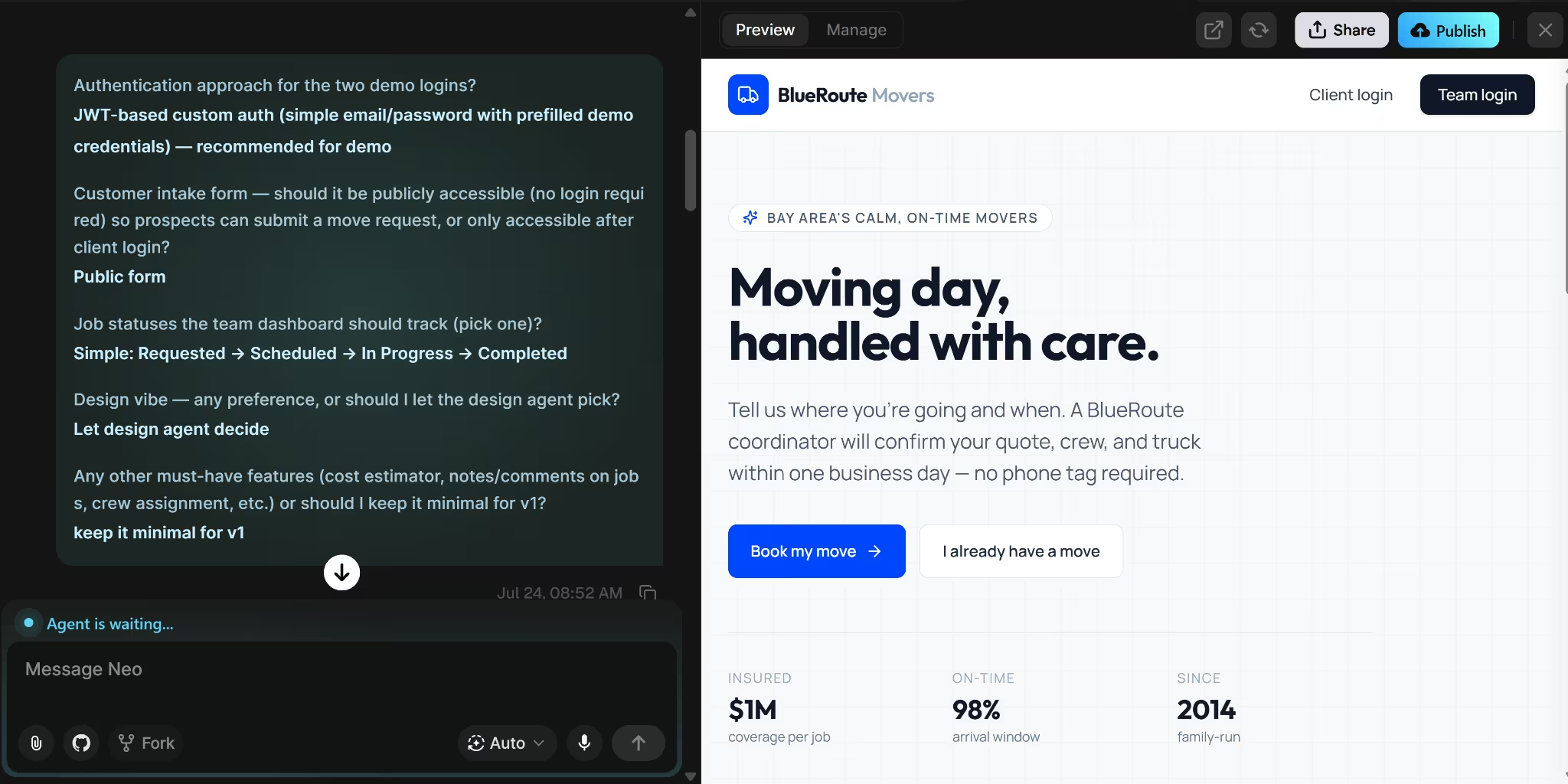
The result was the only BlueRoute build where every flow worked without another prompt.
Here’s how it went:
- Customer intake: The public form stored a new move request
- Demo access: Both prefilled logins worked
- Team dashboard: The request appeared with the other jobs
- Job management: The team could filter moves, open details, and update statuses
- Client portal: The customer saw only their own move
- Status sync: Team updates appeared in the client portal
The homepage also looked ready for real customers. Emergent added trust signals, service promises, and clear paths to book a move or track one already in progress.
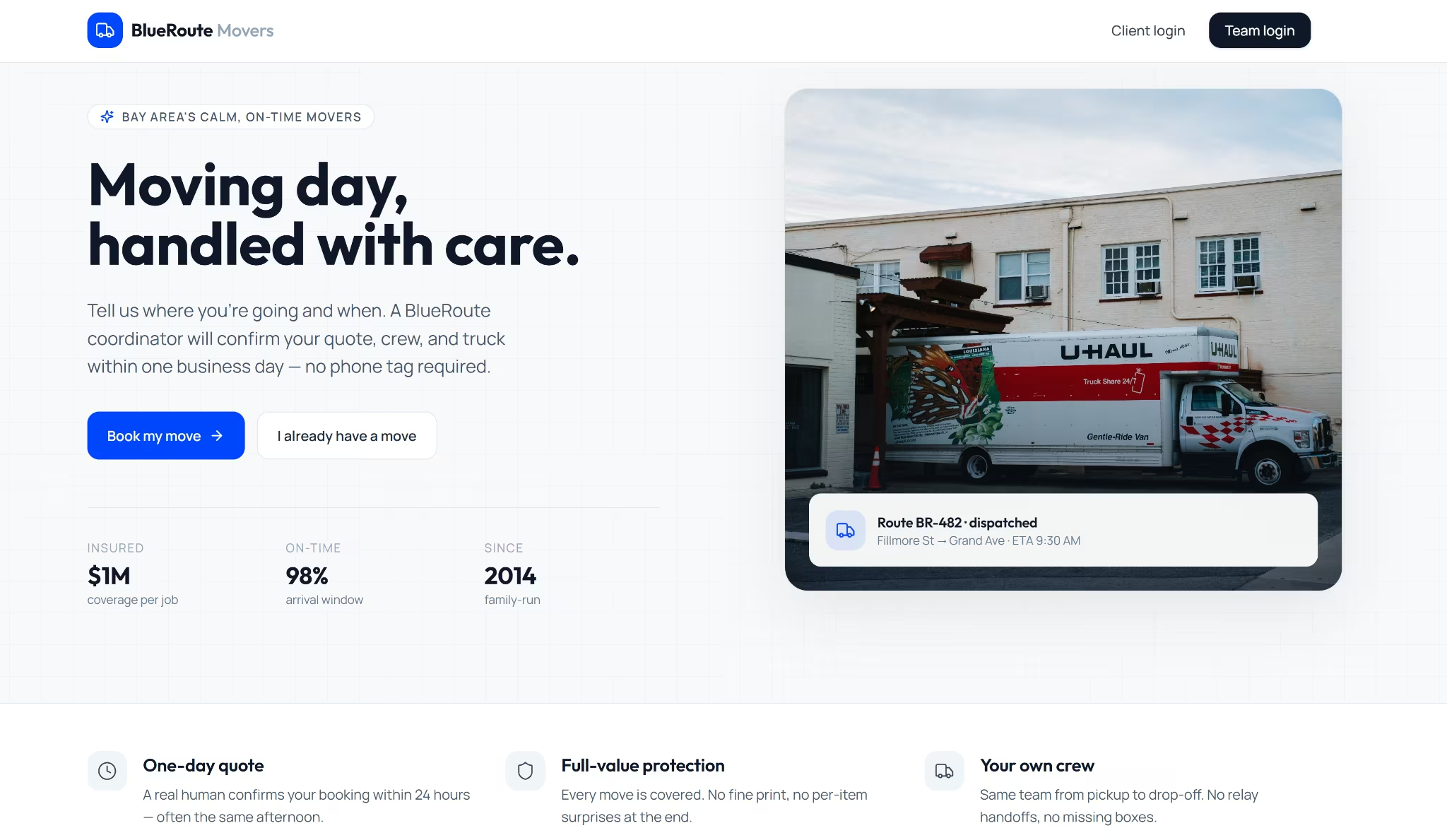
The data stayed connected throughout the app. I submitted a request through the public form, found it in the dispatch dashboard, opened its details, and changed a move’s status. The client portal showed the update when I logged back in.
Emergent also gives you a stronger route to native mobile than Base44’s web-view wrapper. Its Mobile Agent builds a dedicated iOS and Android app using Expo and React Native, rather than placing the web version inside a mobile shell.
That gives you more freedom to design the experience for smaller screens and use phone features such as push notifications, location, file access, sensors, and the camera.
You can still keep a browser-based dashboard for office staff, and build an installed mobile app for customers or field teams.
Emergent also gives you direct access to the project through a browser-based VS Code workspace. You can inspect and edit the code yourself or hand it to a developer.
Its GitHub integration supports pushing, pulling, branches, and team collaboration, while rollback lets you return to an earlier version when a change breaks something or takes the project in the wrong direction.
Once the main workflow works, you can extend it with:
- Payments: Stripe, PayPal, and Razorpay
- Authentication: Google sign-in and email-password login
- Messaging: Twilio, Resend, and SendGrid
- AI features: OpenAI, Anthropic, Gemini, and the Universal Key
- Voice: ElevenLabs
- Database and storage: Supabase, file uploads, images, and video
- MCP connections: Memory, Supabase, Notion, Google Stitch, and custom MCP servers
Publishing was one click too. I could run an optional app-health check first, then manage the live URL, database, secrets, logs, custom domain, analytics, and resources from the project dashboard.
By this point, build speed counts for less. The real test is whether the builder can take the app from idea to launch and still leave the code open for a developer to inspect, edit, or extend. Emergent does both.
The Verdict on Base44 vs Replit
Base44 is the better pick when you want a straightforward web app and prefer not to work in the code. It was faster in my test, and its main team workflow worked once I got past the login setup.
Replit is better when you want to inspect, edit, and extend the code yourself. It also gives you more control over the backend and a dedicated React Native route for mobile apps, but you may need enough technical confidence to fix what Agent gets wrong.
My final verdict is to use Base44 when you want the quickest route to a managed web app. Use Replit when you have the technical confidence to inspect, fix, and extend what the Agent builds.
Emergent took longer, yet it completed all five BlueRoute flows without a correction prompt and still gave me editable code, GitHub, integrations, native mobile development, and one-click publishing.
Try Emergent when you want the app built, connected, and ready to extend.

Most AI app builders stop at prototypes. Emergent creates production-ready apps you can actually launch.
- Production-ready apps
- Web & mobile apps
- Deploy in minutes







