



Budibase is a strong internal tool builder, especially if you care about open-source deployment and self-hosting. But it is not the only good fit. Some teams want deeper developer controls, some want a more database-first tool, and others want an AI-assisted way to build without assembling every screen by hand.
I compared 10 Budibase alternatives using official product pages, pricing pages, source-model details, hosting options, and fit for internal tools. I focused on the tradeoffs that matter most for this search: open-source status, self-hosting, app type, AI features, governance, and real pricing.
The strongest picks are Appsmith for open-source internal tools, ToolJet for AI-assisted internal apps, and Retool for developer-led enterprise teams. By the end, you should know which tool fits your team, which ones are adjacent rather than direct replacements, and when Budibase is still the better choice.
10 Best Budibase Alternatives: TL;DR
Here are the 10 best Budibase alternatives, ranked:
- Appsmith: Best for engineering-led teams that want open-source internal tools with Git, roles, and audit logs.
- ToolJet: Best for teams that want an open-source internal app builder with AI-assisted building and self-hosting.
- Retool: Best for developer-led teams building governed dashboards, admin panels, and workflows.
- UI Bakery: Best for teams building admin panels, customer portals, and internal dashboards with many viewers.
- Superblocks: Best for enterprises that need governed AI app building on private company data.
- Baserow: Best for teams that want an open-source, data-first workspace before building lightweight apps.
- NocoDB: Best for self-hosted Airtable-style workflows and spreadsheet-like database apps.
- Zite: Best for non-technical teams that want AI-assisted internal tools, workflows, and databases.
- NocoBase: Best for teams building open-source, self-hosted business systems with permissions and workflows.
- Emergent: Best for builders who need an AI-native way to describe and ship a full app, not another traditional internal-tool builder.
Why Look for Budibase Alternatives?
Budibase is strong for teams that want an internal app builder with a visual interface, automations, agents, internal and external data sources, and self-hosted options. Its open-source self-hosted plan includes unlimited apps, automations, agents, and users, while paid cloud plans start at Pro and scale through Premium, Business, and Enterprise.
- Action-based pricing may not fit every workflow. Budibase counts agent tool calls, automation node executions, saved rows, and deleted rows as actions. These actions are hard monthly limits, so teams that run heavy automations may need to move up a tier instead of absorbing simple overages.
- Cloud costs can grow across actions, creators, and end users. Budibase Pro starts at $23/month ($19/month billed annually), Premium starts at about $59/month ($49/month billed annually), and Business starts at about $359/month ($299/month billed annually), with add-ons for end users and creators.
- Self-hosting gives control, but it also adds ownership. Budibase's open-source plan is free and self-hosted, which is useful for teams that want infrastructure control. The tradeoff is that your team handles hosting, updates, backups, and operational support.
- Some teams need a narrower fit. Appsmith and ToolJet are closer to open-source internal tool builders. Retool and Superblocks fit teams with heavier governance needs. Baserow and NocoDB work better when the database is the product center. Emergent fits builders who want to describe an app and get a working first version, not teams looking for a classic drag-and-drop tool builder.
Also read our guide on What Is Vibe Coding to understand the approach behind prompt-driven app building before you decide.
How I Compared These Budibase Alternatives
I did not treat this as a generic low-code roundup. I compared each tool against the jobs Budibase users usually care about: internal tools, self-hosting, open-source control, workflow automation, database-backed apps, governance, and pricing.
I used official product pages and pricing pages for current facts, then weighed each tool by how close it is to Budibase’s core use case. That is why Appsmith, ToolJet, Retool, Baserow, NocoDB, and NocoBase rank higher than broader platforms like Bubble or Google AppSheet. Emergent stays on the list, but as the different-category AI-native option for building full app drafts through conversation.
I looked at five practical criteria:
- Source model: Whether the tool is open-source, self-hostable, commercial, or fully managed.
- Internal tool fit: Whether it can build admin panels, dashboards, portals, and business workflows.
- Builder skill level: Whether it works best for developers, operators, non-technical teams, or enterprise IT.
- Pricing model: Whether costs scale by users, builders, seats, credits, apps, or one-time licenses.
- Launch and control: Whether the platform supports permissions, hosting choices, audit logs, workflows, and production handoff.
This approach kept the list focused on real Budibase replacement value instead of every low-code tool that happens to build apps.
Which Budibase Alternative Should You Choose?
- Choose Appsmith if you want an open-source low-code platform with self-hosting, Git versioning, custom roles, audit logs, and predictable per-user pricing. It is not the best fit if you want a highly polished visual app-building experience for non-technical users.
- Choose ToolJet if you want an AI-assisted internal app builder with visual building, built-in database options, on-premise deployment, and a generous free plan. Watch builder pricing closely because paid plans can become expensive for larger teams.
- Choose Retool if your developers need to build internal tools fast while keeping control over data sources, workflows, environments, permissions, and enterprise deployment. It is less ideal for non-technical teams that want to avoid developer involvement.
- Choose Baserow or NocoDB if the work starts with structured data, tables, records, permissions, and lightweight internal apps. They are not one-to-one Budibase replacements for complex app screens and workflows.
- Choose Emergent if what you actually need is a way to describe and ship a full app through conversation. It is the AI-native route for founders, agencies, and operators who want a working first version before hiring developers. If your main priority is open-source self-hosting, a visual admin-panel assembly, or a direct Budibase-style internal tool builder, Emergent won't fit.
Stick with Budibase if you value its open-source self-hosted plan, built-in apps, automations, agents, and data source model, and your team is comfortable with its action-based pricing.
A few more tools are worth a look if your needs sit outside the core Budibase use case:
- Microsoft Power Apps is stronger for Microsoft-heavy enterprises.
- Zoho Creator fits teams already using Zoho.
- Directus works better as a data and content layer for teams that want a self-hostable headless CMS and database-backed admin interface.
- Forest Admin is built for governed back-office operations.
- DronaHQ covers internal tools, portals, dashboards, forms, and mobile/web apps.
- Google AppSheet covers teams building field apps and simple workflow apps.
- Bubble is better for public-facing web and mobile apps.
I left them outside the main 10 because they're useful adjacent options, not the closest Budibase alternatives for most readers.
10 Best Budibase Alternatives: At a Glance
| Platform | Best For | Price |
|---|---|---|
| Appsmith | Open-source internal tools | Free, paid from $15/user/month. |
| ToolJet | AI-assisted internal apps | Free, paid from $99/builder/month ($79/month billed annually). |
| Retool | Developer-led enterprise tools | Free, paid from $12/builder/month ($10/month billed annually), plus internal-user fees. |
| UI Bakery | Admin panels and portals | Free, paid from $25/developer/month ($20/month billed annually). |
| Superblocks | Governed enterprise apps | From $125/AI Builder/month ($100/month billed annually). |
| Baserow | Data-first app building | Free, paid from $12/user/month ($10/month billed annually). |
| NocoDB | Self-hosted data apps | Free, paid from $15/seat/month ($12/month billed annually). |
| NocoBase | Open-source business systems | Free Community edition, paid commercial editions from $800 one-time. |
| Zite | AI no-code internal tools | Free, paid from $19/month ($15/month billed annually). |
| Emergent | Prompt-to-app building | Free, paid from $20/month ($17/month billed annually). |
Pricing correct as of July 2026. Verify with each vendor before publishing or buying because billing cadence, add-ons, and usage limits can change.
Also read our best AI app builders guide for a broader look at what's available beyond internal tool builders in 2026.
The 10 Best Budibase Alternatives
1. Appsmith
Source model: Open-source and self-hostable.
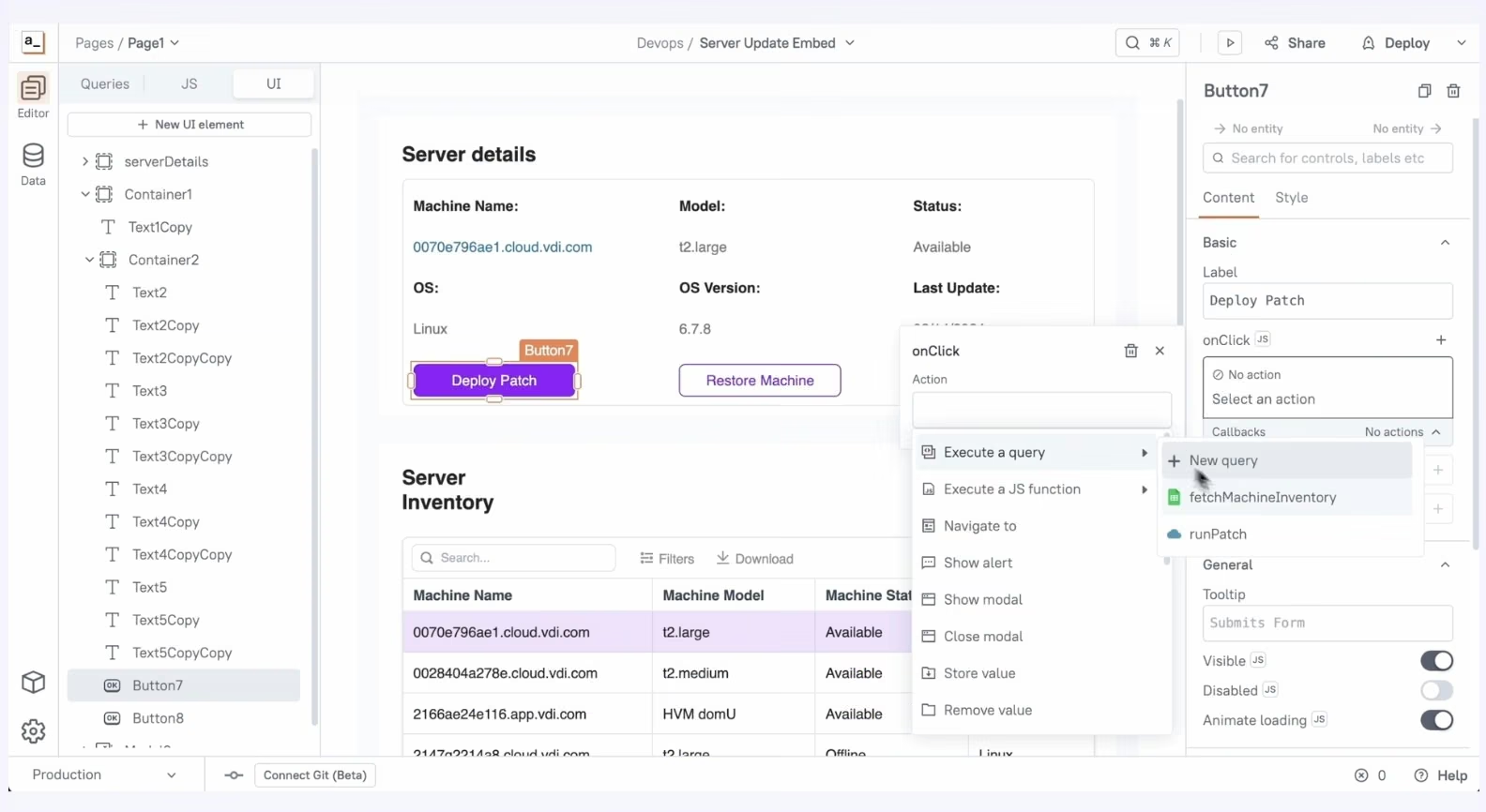
Appsmith is a good Budibase alternative for teams that want open-source internal tools with developer-friendly control.
Appsmith fits engineering, data, and operations teams that want to build internal tools on top of existing databases and services. The practical reason to choose Appsmith over simpler visual builders is control: Git versioning, roles, audit logs, and self-hosting matter when internal tools are owned by engineering.
Key Features
- Open-source platform: Build internal tools with lower vendor lock-in than closed low-code systems.
- Git versioning: Track changes and support safer collaboration across app projects.
- Custom roles and audit logs: Give teams more control over who can build, edit, and view apps.
Pros
- Strong fit for developers and technical operators.
- Free plan for small teams and individual builders.
- Business plan has clear per-user pricing.
Cons
- Less beginner-friendly than simple no-code builders.
- Enterprise starts at $2,500/month for 100 users, so large teams need budget approval.
- Some advanced deployment and security features sit behind higher tiers.
Best For
- Engineering-led internal tools.
- Open-source teams comparing Budibase, Appsmith, and ToolJet.
- Teams that want Git, roles, and audit logs.
Pricing
Appsmith has a Free plan, Business at $15/user/month, and Enterprise at $2,500/month for 100 users.
2. ToolJet
Source model: Open-source and self-hostable.
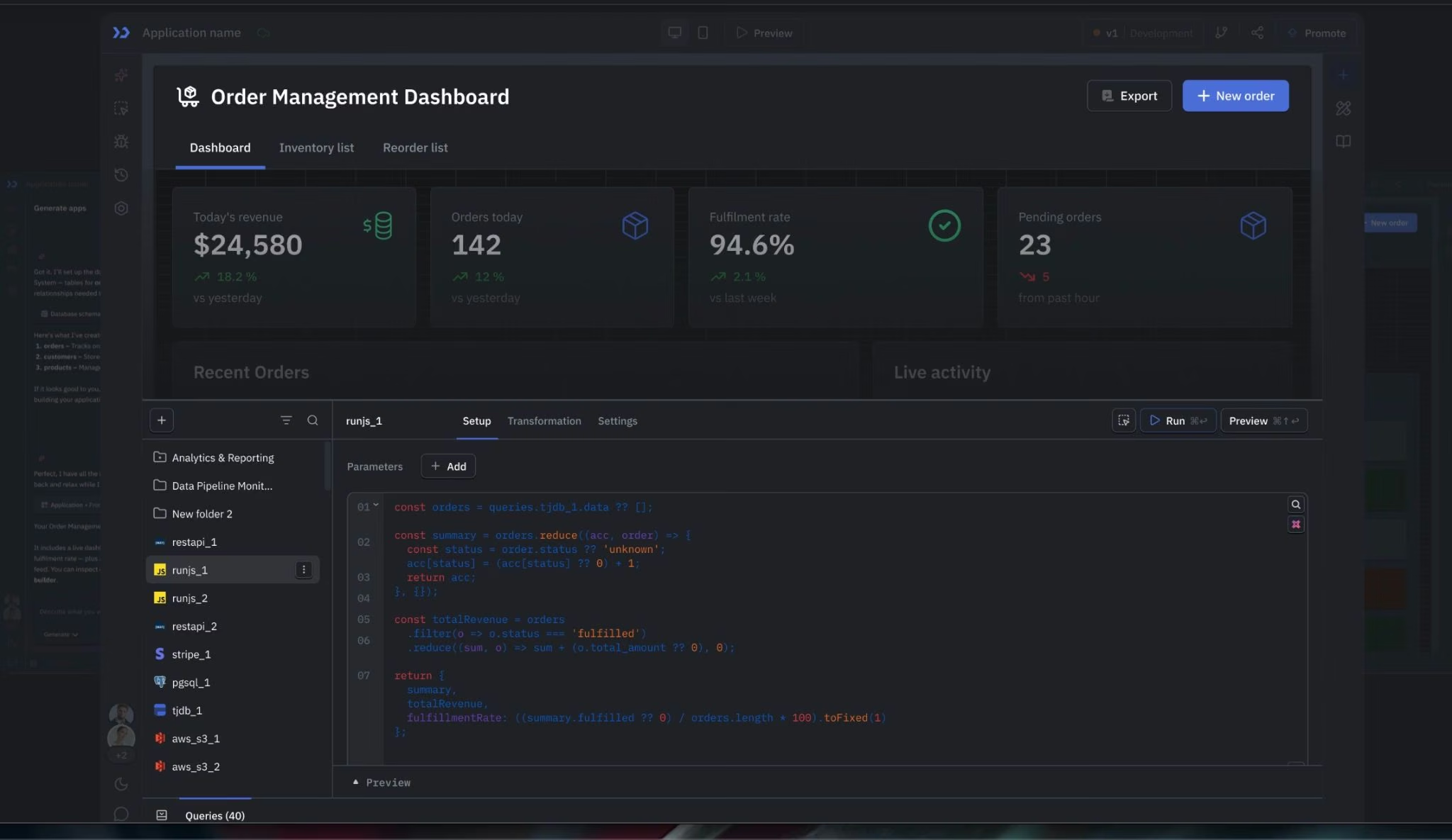
ToolJet is useful for AI-assisted internal apps and self-hosted teams that want a visual builder. It combines an app builder, workflow automation, ToolJet Database, and an agent builder. Choose ToolJet for its balance of open-source control and AI-assisted building.
Key Features
- Visual app builder: Build internal apps with components, pages, and connected data sources.
- AI credits: Use included AI credits for app generation, query changes, debugging help, and UI work.
- On-premise deployment: Deploy community and enterprise editions on-premise, with air-gapped deployment available.
Pros
- Strong open-source and self-hosting story.
- Free plan is useful for small evaluations.
- AI features help speed up app generation and debugging.
Cons
- Paid builder pricing is higher than Appsmith.
- Free plan limits apps, builders, and end users.
- Enterprise pricing starts high for small teams.
Best For
- Teams comparing Appsmith, Budibase, and ToolJet.
- Internal tools with AI-assisted building.
- Organizations that need on-premise deployment.
Pricing
ToolJet offers Paid plans, including Pro at about $99/builder/month ($79/month billed annually), Team at $249/builder/month ($199/month billed annually), and Enterprise starting at $3,000/month. ToolJet also sells extra AI credits at $1 per 100 credits.
3. Retool
Source model: Commercial platform with cloud and self-hosted options.

Retool is a great Budibase alternative for developer-led teams building serious internal tools. It is a strong pick when engineers need speed but still want control over data sources, environments, workflows, permissions, and app logic. The tradeoff is clear: Retool gives developers more power, but it is less approachable for business users who want to build without engineering help
Key Features
- AI-native app builder: Retool says its rebuilt app builder can generate a working app connected to your data from a description.
- Cloud or self-hosted deployment: Retool can run in the cloud or in your own virtual private cloud on Enterprise plans.
- Enterprise controls: Business and Enterprise plans add permissions, audit logs, environments, source control, and single sign-on.
Pros
- Strong for data-heavy internal tools.
- Good fit for teams with developers on staff.
- Deep governance features for larger organizations.
Cons
- Less friendly for non-technical builders.
- Advanced self-hosting and enterprise controls require higher plans.
- Per-builder and user pricing can add up as usage grows.
Best For
- Engineering teams building dashboards, admin panels, and workflows.
- Enterprises that need governance and permission controls.
- Teams that want internal tools connected to many data sources.
Pricing
Retool has a Free plan. Team starts at about $12/builder/month ($10/month billed annually), plus about $7/internal user/month ($5/month billed annually). Business starts at about $65/builder/month ($50/month billed annually), plus about $18/internal user/month ($15/month billed annually).
Enterprise pricing is custom. Retool's official pricing page shows the annual builder and internal-user rates and notes that annual billing saves 20%.
4. UI Bakery
Source model: Commercial platform with cloud and self-hosted options.

UI Bakery is one of the best Budibase alternatives for admin panels, dashboards, and customer portals with lots of viewers. The tool focuses on internal tools, admin panels, dashboards, database apps, and portals. It makes the most sense when finished business apps matter more than open-source community control.
Key Features
- Drag-and-drop apps: Build pages, actions, components, and reusable modules.
- Unlimited apps and data sources: Avoid pricing surprises when you create many internal tools.
- Self-hosting support: Use self-hosted plans when you need more infrastructure control.
Pros
- Good fit for admin panels and operations dashboards.
- Unlimited apps and data sources across plans.
- Clear developer-seat pricing for self-hosted Team.
Cons
- Advanced security, audit, and deployment features are strongest on Enterprise.
- AI usage credits may add cost depending on workspace setup.
- Less community-driven than open-source-first tools.
Best For
- Admin panels.
- Customer portals.
- Teams that care more about finished business apps than open-source licensing.
Pricing
UI Bakery has a Free plan, Builder at $25/developer/month ($20/month billed annually), Team at $40/developer/month ($35//month billed monthly), and custom Enterprise pricing.
5. Superblocks
Source model: Commercial enterprise platform.
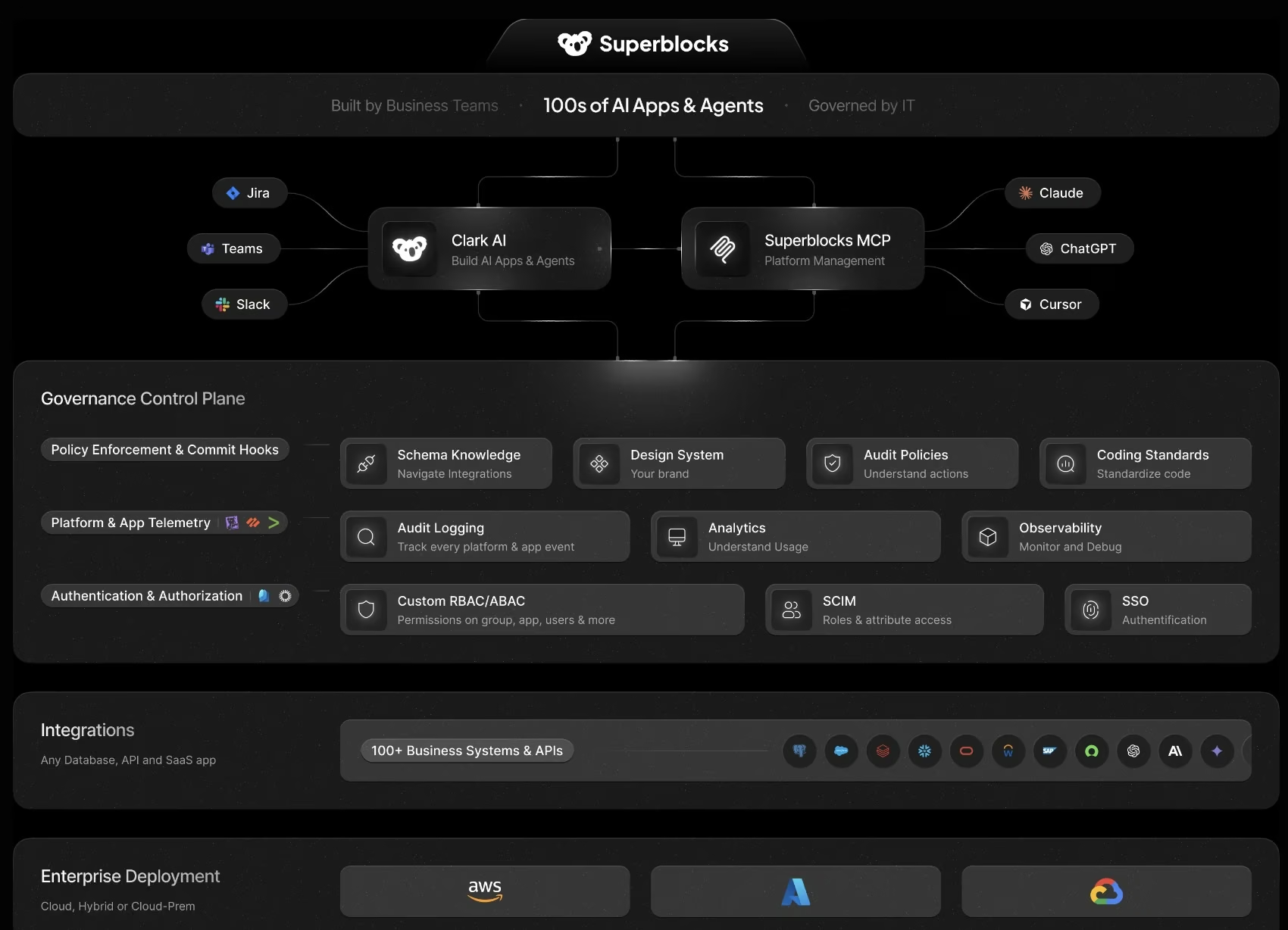
Superblocks is a solid Budibase alternative for enterprises that want governed AI app building on private company data. This tool is positioned around Clark, its AI agent for building secure internal apps. It is best treated as an enterprise governance pick, not a budget-friendly Budibase replacement.
Key Features
- Clark AI agent: Build internal apps through natural language while respecting organizational permissions.
- Enterprise deployment choices: Superblocks supports cloud, hybrid, and cloud-prem deployment models.
- Governance features: Enterprise adds source control, secrets management, embedded apps, role-based access control, audit logs, and VPC deployment.
Pros
- Strong enterprise governance story.
- Good fit for private data and regulated environments.
- Natural-language building can help business teams move faster.
Cons
- No low-cost plan for small teams.
- Additional hosted apps cost extra on Teams.
- Enterprise value depends on governance needs.
Best For
- Enterprise internal apps.
- Regulated teams with strict governance.
- Business users who need AI help without losing IT control.
Pricing
Superblocks Teams costs $125/AI Builder/month, billed monthly or $100/AI Builder/month billed annually. Enterprise pricing is custom, and additional Teams-hosted apps cost $100/app/month.
6. Baserow
Source model: Open-source and self-hostable.

Baserow is useful for teams that need a data-first open-source platform. Note that it isn't a full one-to-one replacement for Budibase's app builder and automation model, but it works well when tables, records, permissions, and lightweight applications are the core job.
Its platform includes a database builder, application builder, automations, dashboards, integrations, and AI features. Choose Baserow when the database is the center of the workflow.
Key Features
- Database builder: Organize operational data with tables, views, fields, and templates.
- Application builder: Turn structured data into basic internal applications and portals.
- Automation credits: Paid plans include monthly automation credits that scale by tier.
Pros
- Strong fit for data-heavy operations workflows.
- Free plan includes unlimited databases and 3,000 rows per workspace.
- Paid plans are cheaper than many internal tool platforms.
Cons
- Not as flexible as Budibase for complex custom internal apps.
- Some application builder features are still marked as "soon.”
- Advanced permissions and security require higher plans.
Best For
- Data-first internal tools.
- Teams replacing spreadsheets.
- Operations teams that want open-source control.
Pricing
Baserow has a Free plan, Premium at $12/user/month ($10/month billed annually), Advanced at $22/user/month ($18/month billed annually), and Enterprise on request.
7. NocoDB
Source model: Fair-code community edition with paid cloud and business plans.

NocoDB is a solid Budibase alternative for self-hosted database apps and Airtable-style workflows.
NocoDB is a free and self-hostable Airtable alternative that gives teams a spreadsheet-like layer over databases. It is useful when you need records, views, forms, automations, permissions, and external database connections, but it is not a complete Budibase-style app builder for complex interfaces.
It is strongest when your team wants spreadsheet-like access to structured data, not a full internal app builder.
Key Features
- Spreadsheet-style data layer: Give non-developers a friendlier way to work with structured database records.
- External database connections: Business and higher plans support external database use cases.
- Permissions and security controls: Higher plans add private bases, single sign-on, row-level security, audit logs, and field permissions.
Pros
- Strong self-hosted data management option.
- Free plan works for small personal projects.
- Paid plans support unlimited-seat pricing after 9 users.
Cons
- Plus does not support external database connections.
- It is more data platform than full internal app builder.
- Advanced access controls require higher plans.
Best For
- Self-hosted Airtable-style workflows.
- Internal databases and lightweight data apps.
- Teams that want spreadsheet usability on top of structured data.
Pricing
NocoDB has a Free plan for up to three users. Plus costs $15/seat/month ($12/month billed annually), or $135/month for unlimited seats ($108/month billed annually). Business costs $30/seat/month ($24/month billed annually), or $270/month for unlimited seats ($216/month billed annually). Scale costs $54/seat/month ($45/month billed annually).
8. Zite
Source model: Commercial AI no-code builder.

Zite is a good Budibase alternative for non-technical teams that want AI-assisted internal tools, workflows, and databases without per-user pricing.
Zite fits this list because it targets internal tools and business apps from an AI-first direction. Teams can describe what they need, then build apps, workflows, and databases for their team.
It is less relevant if you specifically need open-source self-hosting. It is strongest for teams that want to start from a plain-language app idea, but it should not be framed as a direct open-source Budibase replacement.
Key Features
- Prompt-based app building: Zite lets users describe the app they need, then build business apps from that prompt.
- Built-in database and workflows: Zite includes a built-in database, and its help center says workflows can read and write data, send Slack messages, run AI operations, and power app logic.
Pros
- Strong fit for non-technical teams building internal tools, portals, dashboards, and business web apps.
- Unlimited users on every plan, including Free.
- More AI-native than Budibase, which helps teams start from a plain-language app idea.
Cons
- Not open-source or self-hosted like Budibase’s open-source option.
- Credit limits can matter for teams that rely heavily on AI generation.
- Not the closest fit if the reader specifically wants a traditional low-code internal tool builder.
Best For
- Non-technical teams building internal tools.
- Small teams that want flat pricing instead of per-seat pricing.
- Operators building dashboards, portals, workflows, and business apps.
Pricing
Zite has a Free plan with limited credits, 5,000 database records, 1,000 workflow runs/month, unlimited users, and unlimited apps. Pro is $19/month ($15/month billed annually), and Business is $69/month ($55/month billed annually).
9. NocoBase
Source model: Open-source and self-hostable.

NocoBase is a great tool for teams that want an open-source, self-hosted platform for internal business systems.
NocoBase is closer to Budibase than NocoDB when the goal is to build internal systems, not only spreadsheet-style database views. Its official site positions it as an open-source AI plus no-code platform for building business systems fast, with a WYSIWYG interface and self-hosted control.
It deserves a main-list slot because it is closer to Budibase than NocoDB when workflows, permissions, and business-system structure matter.
Key Features
- Open-source, self-hosted control: NocoBase says its core code and foundational plugins are open source, and that data and AI interactions run in your own environment.
- AI + visual building: Teams can build with AI coding agents, build manually in a WYSIWYG interface, or combine both.
- Business-system infrastructure: NocoBase includes data models, permissions, workflows, and audit logs as built-in infrastructure.
Pros
- Strong fit for open-source and self-hosted internal systems.
- No per-user, per-app, or data-volume pricing on its licensing model.
- Better fit than NocoDB when you need workflows, permissions, and business-system structure.
Cons
- Commercial pricing is one-time license pricing, not simple monthly SaaS pricing.
- Advanced features like single sign-on, advanced workflows, stronger security, and edit history are listed under Professional or Enterprise needs.
- It may feel more infrastructure-heavy than simpler internal tool builders.
Best For
- Open-source internal business systems.
- Self-hosted teams that want more control than closed SaaS tools.
- Teams building CRMs, order management tools, help desks, project management systems, or similar operational apps.
Pricing
NocoBase has a Free Community Edition. Paid commercial editions start with Standard at $800, then Professional at $8,000, with Enterprise pricing available by contacting sales. The official pricing page describes Standard as a one-time payment for lifetime use.
10. Emergent
Source model: Commercial AI-native app builder.

Emergent is the best Budibase alternative for builders who want to describe an app and get a working first version through conversation.
Emergent sits in a different category from Budibase. It helps founders, agencies, service businesses, and operators turn plain-language app ideas into working apps with screens, logic, data, integrations, and hosting support.
It belongs on this list for AI-native app building, but it is not a direct replacement for Budibase’s open-source internal tool workflow.
Key Features
- Prompt-based app building: Describe the app, screens, logic, data, and integrations in plain language.
- Web and mobile apps: Build for web, Android, iOS, and progressive web app use cases.
- Hosted app path: Emergent handles hosting and infrastructure so non-technical builders can focus on the app idea.
Pros
- Strong fit for non-technical founders and service businesses.
- Useful when you want a working app draft before hiring developers.
- Supports web apps, mobile apps, dashboards, tools, and workflows.
Cons
- Not an open-source Budibase replacement.
- Not ideal if you need classic drag-and-drop internal tool building.
- Apps with payments, permissions, private data, or production users still need human review before launch.
Best For
- Founders turning app ideas into working apps.
- Agencies building first versions for clients.
- Small businesses replacing spreadsheets or point tools with custom apps.
Pricing
Emergent has a Free plan with 10 monthly credits, Standard at $20/month or $17/month annually with 100 credits/month, Pro at $200/month or $167/month annually with 750 monthly credits, and custom Enterprise pricing.
How to Evaluate Budibase Alternatives
What to check before switching:
| Evaluation Criteria | What to Ask |
|---|---|
| App type | Are you building internal tools, databases, portals, mobile apps, automations, or customer-facing products? |
| Hosting model | Do you need cloud, self-hosting, on-premise, hybrid, or fully managed infrastructure? |
| Skill level | Will developers build the apps, or do operators and non-technical teams need to own the workflow? |
| Pricing model | Are you paying by seat, builder, user, action, app, workload, credit, or custom contract? |
| Data and integrations | Does the tool connect to your databases, spreadsheets, software, and services without awkward workarounds? |
| Governance | Do you need roles, permissions, audit logs, single sign-on, source control, or deployment approvals? |
Use-Case Fit
The best Budibase alternative depends on the job. Use Appsmith, ToolJet, Retool, UI Bakery, or Superblocks for internal tools. Use Baserow or NocoDB when the data layer matters most. Use Bubble for public-facing apps. Use Emergent when the goal is to create a working app draft through conversation.
Hosting and Control
Self-hosting matters if your data cannot leave your infrastructure. Appsmith, ToolJet, Budibase, Retool Enterprise, Baserow, and NocoDB are stronger here. Emergent, Bubble, AppSheet, and UI Bakery are better when you want a more managed path.
Builder Skill Level
Retool, Appsmith, and ToolJet work best when someone technical can design the app and judge the output. AppSheet and Baserow are easier for business users. Emergent is the most natural fit when a non-technical builder wants to describe the app instead of assembling screens manually.
Pricing Model
Do not compare only starting prices. Budibase charges by actions and add-ons. Retool charges by builder and user type. Bubble uses workload. Superblocks charges by AI Builder and app hosting. Emergent uses credits. The cheapest tool on paper can become expensive if the pricing model does not match your real usage.
Launch and Maintenance
Ask what happens after the first app works. You may need testing, release history, backups, audit logs, permissions, staging environments, custom domains, hosting, app store submission, or developer review. For apps that handle payments, private data, or user permissions, treat generated output as draft work until a qualified person reviews it.
Pick the Budibase Alternative That Matches the Work
The best Budibase alternatives solve different jobs.
Appsmith and ToolJet are the closest open-source internal tool alternatives. Retool and Superblocks fit teams that need stronger governance. Baserow and NocoDB are better for data-first workflows. NocoBase is the stronger pick for self-hosted business systems with workflows and permissions. Zite fits non-technical teams that want AI-assisted internal tools without per-user pricing.
Emergent belongs on the shortlist when your goal is to turn an app idea into a working version through conversation. Keep Appsmith, ToolJet, NocoBase, and Retool higher on your list if you need a direct Budibase-style internal tool builder.
Try building the first version in Emergent before committing to a custom development budget, and bring in technical review before using it for payments, permissions, private data, or production users.

Every alternative has trade-offs. Emergent just builds production-ready apps from one prompt.
- Production-ready apps
- Web & mobile apps
- Deploy in minutes







