




The best FlutterFlow alternatives are Nowa if you want to stay in Flutter, Draftbit if you want React Native code export, and Emergent if you want to describe an app and get a working web or mobile product without managing every screen manually. I compared 9 tools using their live builders, product screenshots, official pricing pages, code-export options, launch paths, and best-fit use cases so you can choose the tool that fits how you actually want to build.
Also read our best AI app-building tools guide for a fuller picture of what else is worth trying.
How I Tested These FlutterFlow Alternatives
I tested these FlutterFlow alternatives by reviewing each tool against the same practical build brief: a small app with user-facing screens, data or workflow logic, a publishing path, and a clear handoff option. I checked the live product experience where screenshots were available, official pricing pages, code-export rules, mobile or web publishing options, and how much setup the tool expects from you before the app becomes usable.
I cut tools that only produced mockups, didn’t support a relevant web or mobile publishing path, or made code handoff unclear. The 9 tools below stayed because they match the main reasons people leave FlutterFlow: Flutter control, React Native export, simpler no-code app building, agent-led app creation, internal tools, workflow-heavy web apps, and Figma-to-native app workflows.
9 Best FlutterFlow Alternatives: At a Glance
Best alternatives at a glance:
Pricing correct as of July 2026.
Also read our best AI mobile app builders guide for what else ships real apps beyond this comparison.
Why Look for FlutterFlow Alternatives?
FlutterFlow is still a strong visual builder if you want Flutter and Dart output.
FlutterFlow offers a Free plan; Basic at $39/month; Growth at $80/month for the first seat and $55/month for the second seat; and Business at $150/month for the first seat and $85/month for seats two to five.
FlutterFlow also lists annual billing as “Save ~25%.” It supports mobile, web, and desktop apps; Firebase and Supabase integrations; API endpoints; code and APK downloads; one-click store deployment; GitHub integration on Growth; and collaboration on higher plans.
That makes FlutterFlow a good choice when you want Flutter code, visual control, app store deployment, and developer handoff in one workflow. But you should choose something else if:
- You need a different code stack. Use Draftbit if your developer works in React Native, not Flutter. Use Bravo Studio if your design starts in Figma and you want native app builds from that design.
- You want less manual setup. FlutterFlow gives you visual control, but you still need to plan screens, states, data rules, integrations, and user flows. If you’d rather describe the app in plain language and keep refining it through prompts, Emergent fits better.
- You’re building an internal tool, not a consumer app. Use Glide or AppSheet if the app is a field tracker, approval flow, client portal, inventory tool, or spreadsheet-powered dashboard. You’ll get there faster than forcing an internal workflow into a mobile app builder.
- You want an easier first build. Adalo and Thunkable give you a simpler path for basic native apps. Choose them when speed and ease are more valuable than deep code control.
The 9 Best FlutterFlow Alternatives
1. Nowa

Screenshot of the Nowa homepage showing its AI Flutter app builder for creating iOS, Android, and web apps.
Nowa keeps you closest to FlutterFlow’s core promise: visual Flutter app building with source-code access. It gives you Flutter source-code downloads, unlimited projects, local and cloud projects, Firebase and Supabase integrations, and API support.
The screenshot used in this section shows Nowa’s builder working with a mobile app layout, screen hierarchy, component controls, and AI instructions in the same workspace. That makes the tradeoff clear: Nowa gives you more Flutter ownership than most no-code tools, but you still need to understand the app’s screens, logic, and data structure before a developer can safely take over.
I’d choose Nowa before any other tool if Flutter is still the plan. It keeps the handoff path clean because your developer can work with Flutter source code instead of rebuilding the app in another stack.
Key Features
- Flutter source-code download: You can keep the app portable and hand it to a Flutter developer.
- Android and iOS deployment: Paid plans support one-click Android and iOS deployment.
- Firebase, Supabase, and API support: You can connect common data tools without leaving the Flutter workflow.
Pros
- Best fit for Flutter teams: You don’t need to abandon Flutter to leave FlutterFlow.
- Strong code ownership: Unlimited source-code downloads give you more control.
- Good handoff path: Local projects and GitHub support make developer handoff easier.
Cons
- Smaller community than FlutterFlow: FlutterFlow has more templates, tutorials, and forum answers.
- You still need to plan the app: AI help won’t decide your data model, permissions, or edge cases for you.
- Complex launches need a Flutter developer: Payments and permissions are still developer territory, so budget for a handoff before you ship.
Best For
- Flutter builders who want source-code access.
- Startups that want to hand work to a Flutter developer later.
- Teams that like FlutterFlow’s category but want a different builder.
Pricing
Nowa offers Starter for free, Launch at $29/month ($24/month billed annually), and Scale at $59/month ($49/month billed annually). Enterprise is custom priced.
2. Draftbit
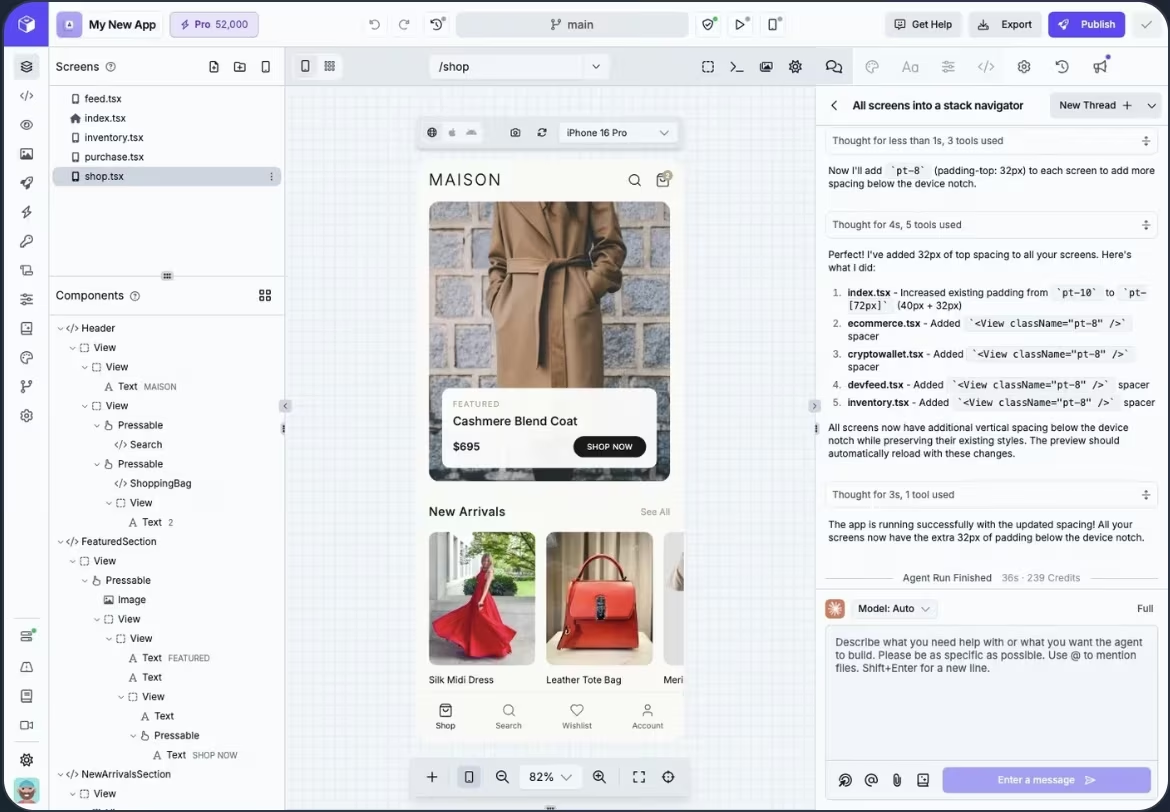
Screenshot of the Draftbit homepage showing its AI and visual editing platform for building native mobile and web apps.
Draftbit makes the most sense when React Native is the codebase you want after the visual build. The Standard package includes unlimited projects, unlimited integrations, access to AI agents and models, full code editing and export, one-click publishing for iOS, Android, and web, custom domains, and branding removal.
The screenshot used here shows Draftbit editing a mobile shopping-style app with screens, components, a device preview, and an AI agent panel in one view. That tells you who Draftbit is really for: you can start visually, but the tool becomes much more useful when you or your developer knows how to work with React Native after export.
Key Features
- React Native workflow: You build in a stack many mobile developers already know.
- Full code editing and export: You can move beyond the visual builder when needed.
- Publishing for iOS, Android, and web: Draftbit supports app launch paths across the main platforms.
Pros
- Great developer handoff: React Native teams can keep improving the app after export.
- Useful free-to-paid path: Free, Standard, Pro, Team, and Enterprise plans give you room to grow.
- Code control starts early: Standard includes full code editing and export.
Cons
- Not Flutter: Don’t choose Draftbit if Flutter/Dart output is the requirement.
- More technical than beginner tools: Export, publishing, and integrations still require product judgment.
- GitHub export needs Pro: Pro starts at $30/month or $24/month billed annually and adds GitHub export, advanced agent configuration, simulators, and app store submission help.
Best For
- React Native teams.
- Agencies building mobile apps for clients.
- Founders who want code export before hiring developers.
Pricing
Draftbit offers Free at $0/month, Standard at $15/month ($12/month billed annually), Pro at $30/month ($24/month billed annually), and Team at $150/month ($120/month billed annually). Enterprise is custom priced.
3. Adalo

Screenshot of the Adalo homepage showing its no-code AI app builder for designing and publishing iOS, Android, and web apps.
Adalo gives you the simpler native-app path if FlutterFlow feels heavier than the app you’re trying to build. It gives you a visual builder, hosted Postgres database, unlimited app actions, unlimited screens, test apps, mobile preview, Ada AI, web publishing, and automated app store publishing on paid plans.
The screenshot in this section shows an Adalo project with many connected app screens laid out in a visual canvas. That makes Adalo easier to reason about for simple app flows like directories, booking apps, portals, and lightweight marketplaces, but it also shows why advanced apps can get crowded once screens, data, and actions start multiplying.
Key Features
- Native and web publishing: Starter includes one published app, web publishing, and automated app store publishing.
- Built-in database: You can build database-driven apps without bringing your own setup.
- Ada AI: You can use natural language to generate and edit app screens.
Pros
- Easy first build: Adalo is friendlier than most developer-heavy builders.
- Good native app path: You can publish to web, Apple App Store, and Google Play on paid plans.
- No usage-based charges: Paid plans do not meter by tokens, app actions, or workload units.
Cons
- Less code control: Don’t choose Adalo if you need full source-code ownership.
- Plan limits shape the app: Published apps, editors, records, storage, and integrations change by plan.
- Advanced logic gets harder: Use Bubble, Draftbit, or Emergent if the app needs deeper workflows.
Best For
- First-time app builders.
- Simple native apps.
- Directories, portals, forms, and lightweight marketplaces.
Pricing
Adalo offers Free at $0/month, Starter at $45/month ($36/month billed annually), Professional at $65/month ($52/month billed annually), and Team at $200/month ($160/month billed annually). Adalo Blue is custom priced.
4. Emergent
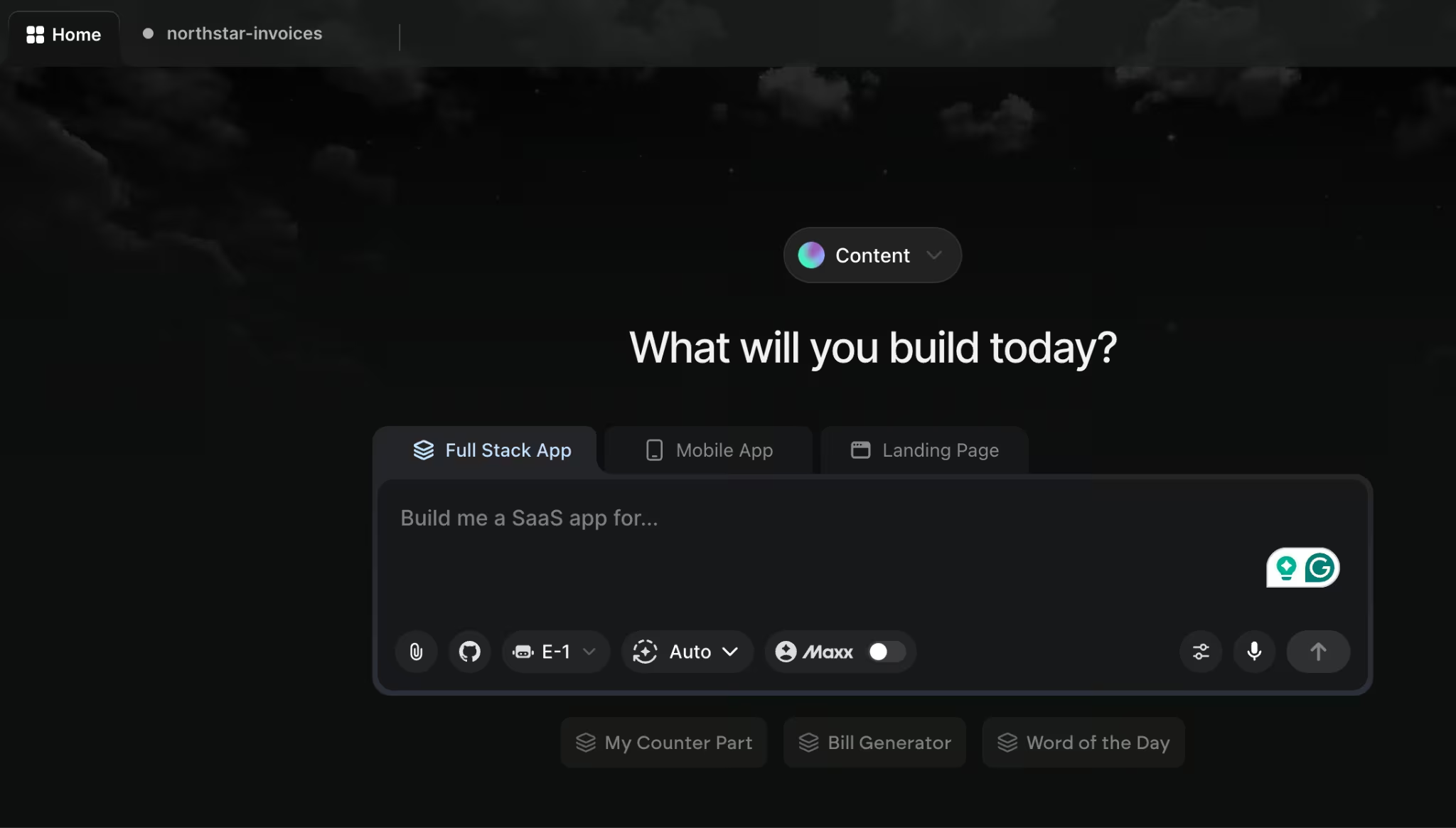
Screenshot of the Emergent homepage showing its AI app builder for creating apps, websites, dashboards, and SaaS tools from prompts.
Emergent is the strongest FlutterFlow alternative when you want to describe the app and have agents work in parallel on the build. You chat with Emergent’s AI agents, and they design, code, test, integrate, and launch the product instead of making you wire every screen manually.
The screenshot here shows Emergent starting from a prompt box with separate web app and mobile app options, which fits its core difference from FlutterFlow: you begin by describing the product instead of arranging every screen yourself. That’s why Emergent makes more sense when the goal is a working product with user flows, logic, data, and integrations, and you don’t want to wire all of that manually.
Use it for apps, websites, dashboards, SaaS tools, mobile app drafts, and business workflows that need more than a simple no-code interface.
Key Features
- Plain-language app building: You describe what you want, and Emergent creates the structure, screens, and functionality.
- Web and mobile support: You can build mobile apps, dashboards, SaaS tools, and web apps in one workflow.
- Integrations and launch support: Emergent supports payments, sign-in, notifications, analytics, databases, storage, and external tools by connecting your accounts.
Pros
- Less manual wiring: You don’t need to create every screen, rule, and flow from scratch.
- Good for first working versions: Founders and service businesses can move from idea to usable draft faster.
- Broader build workflow: Emergent focuses on the app logic, integrations, testing, and launch path, not only the interface.
Cons
- Not a Flutter/Dart builder: Choose Nowa or FlutterFlow if Flutter output is the requirement.
- Credit usage varies: A simple landing page and a complex SaaS app won’t use credits the same way.
- Sensitive workflows need a checkpoint: Have someone test money, roles, and private data before real users touch the app. The launch-review section below covers this in more detail.
Best For
- Non-technical founders building a first product.
- Service businesses replacing spreadsheets or point tools.
- Small teams that want a working app draft before hiring developers.
Pricing
Emergent offers Free at $0/month, Standard at $20/month ($17/month billed annually), and Pro at $200/month ($167/month billed annually). Business and Enterprise are custom priced.
Also read our guide on how to build an AI app in under an hour to see how fast you can go from prompt to working product.
5. Bubble
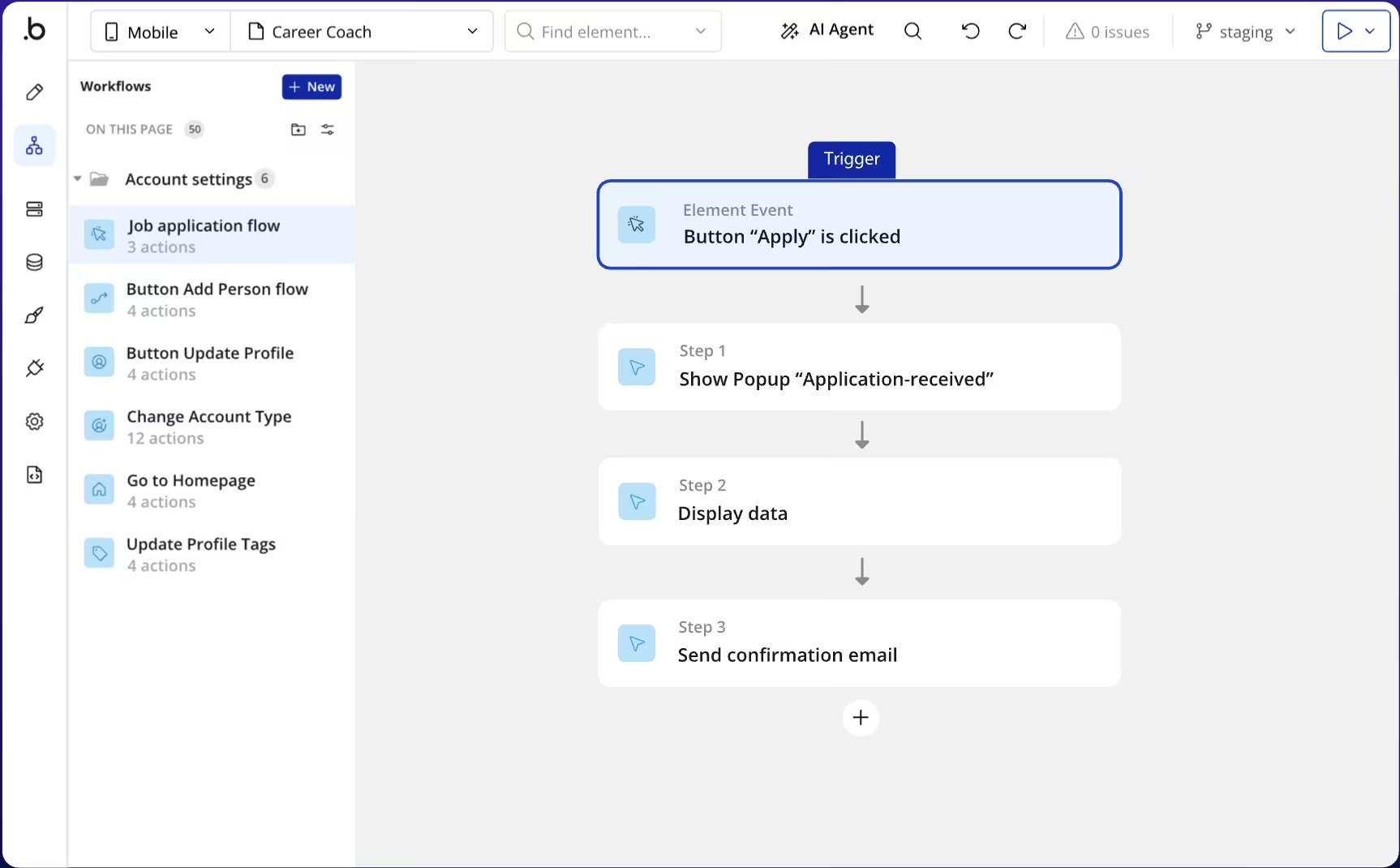
Screenshot of the Bubble homepage showing its no-code AI app builder for creating web and mobile apps.
Bubble is the better call when the product is a workflow-heavy web app first and a mobile app second. Bubble now supports web, iOS, and Android apps across its Web & Mobile plans. The Web + Mobile Starter plan costs $69/month ($59/month billed annually) and includes a live website, custom domain, five mobile build submissions per month, three live app versions, and 175K workload units per month.
The screenshot in this section shows Bubble’s workflow builder inside a “Career Coach” app, including a job application flow, button actions, profile updates, and a confirmation step. That is where Bubble separates itself from simpler mobile builders: it gives you more control over app logic, but you need to understand workflows, events, and data before the app feels easy.
Key Features
- Web and mobile plans: You can build web, iOS, and Android apps in the same product.
- Shared app logic: Mobile and web apps can share the same database, workflows, and API connections.
- Workload-based scaling: Starter, Growth, and Team include workload units, with add-ons available when usage grows.
Pros
- Strong workflow builder: Bubble is great for user roles, dashboards, databases, and business logic.
- Strong no-code community: Bubble has years of templates, plugins, tutorials, and forum answers behind it, which helps when you hit workflow or database issues.
- Good for web-first products: You can launch a serious web app before investing in native mobile.
Cons
- Not Flutter-native: Bubble uses a different platform model and won’t give you Flutter output.
- Usage pricing needs attention: Workload units and add-ons can change the real monthly cost.
- Learning curve is real: Bubble gives you power, but you still need to understand workflows and data.
Best For
- SaaS-style web apps.
- Marketplaces and customer portals.
- Products with workflows, roles, and databases.
Pricing
Bubble offers Free at $0/month for building and testing. Paid plans are split into Web only, Mobile only, and Web + Mobile.
Paid monthly: Starter costs $32/month for Web only, $49/month for Mobile only, and $69/month for Web + Mobile. Growth costs $134/month for Web only, $199/month for Mobile only, and $249/month for Web + Mobile. Team costs $399/month for Web only, $529/month for Mobile only, and $649/month for Web + Mobile.
Paid annually: Starter costs $29/month for Web only, $42/month for Mobile only, and $59/month for Web + Mobile. Growth costs $119/month for Web only, $169/month for Mobile only, and $209/month for Web + Mobile. Team costs $349/month for Web only, $449/month for Mobile only, and $549/month for Web + Mobile. Enterprise is custom-priced.
Looking beyond FlutterFlow means weighing different ways to build an app, and FlutterFlow vs Adalo shows how the two platforms differ in their approach.
6. Thunkable

Screenshot of the Thunkable homepage showing its no-code app creation platform for building mobile apps.
Thunkable gives beginners a more approachable way to build native mobile apps without starting in Flutter. Choose Thunkable if you’re building a simple mobile app and want a visual workflow that’s easier to learn than FlutterFlow.
The screenshot used here shows Thunkable’s AI prompt screen with an example prompt for an app that monitors your diet. That makes the fit clear: Thunkable is strongest when you want to turn a simple mobile idea into a first app quickly, but it’s weaker when you need source-code handoff or more complex product logic.
Key Features
- AI-assisted mobile building: You get AI tokens for generative app-building features.
- iOS, Android, and web publishing: Builder supports one live app across Google Play, Apple App Store, or web.
- Private projects on paid plans: Builder gives you 10 private projects, while Advanced gives you unlimited private projects.
Pros
- Beginner-friendly: Thunkable is easier to approach than code-first tools.
- Good mobile focus: It’s built around iOS and Android app creation.
- Clear publishing limits: Builder gives you one live app, while Advanced gives you unlimited live published apps.
Cons
- Free plan is limited: Five screens per project won’t work for serious app builds.
- Published apps require an active subscription: You need to keep a paid plan active for published apps to remain active.
- Less code ownership: Don’t choose Thunkable if source-code handoff is the goal.
Best For
- Beginners building a first mobile app.
- Schools and training programs.
- Simple business or consumer apps.
Pricing
Thunkable offers Free, Accelerator at $19/month, Builder at $59/month, and Advanced at $189/month. Enterprise and Education plans are custom priced.
7. Glide

Screenshot of the Glide workpage showing its no-code app builder for creating custom business apps from data.
Glide turns existing spreadsheet data into internal apps faster than a mobile-first builder like FlutterFlow. It connects to Glide Tables, Google Sheets, Airtable, Excel, and other data sources.
The screenshot in this section shows Glide generating a “Savings Reminder” app with goals, reminders, and a mobile preview already visible. That is the right kind of use case for Glide: dashboards, trackers, portals, and team tools where the data matters more than app-store polish.
Key Features
- Spreadsheet-to-app building: You can turn existing spreadsheet data into business apps.
- Workflows and API calls: Business includes workflow automation and connected-tool actions.
- Business user controls: Paid plans are built around users, updates, rows, support, and data sources.
Pros
- Fast internal tools: Glide works well when your data already exists.
- Great for operations teams: It fits approvals, dashboards, portals, job tracking, and field tools.
- No app-store distraction: You build tools your team can use, not consumer apps you need to submit.
Cons
- Not a native app-store builder: Glide is strongest for web-based business tools.
- Business pricing starts high: The Business plan costs more than beginner app builders.
- Usage limits matter: Users, updates, rows, and overages can raise the real cost.
Best For
- Internal tools.
- Client portals.
- Operations dashboards and field-team apps.
Pricing
Glide offers Free at $0/month, Explorer at $25/month ($19/month billed annually), Maker at $60/month ($49/month billed annually), and Business at $249/month ($199/month billed annually). Enterprise is custom priced.
8. Google AppSheet
Screenshot of the Google AppSheet homepage showing its no-code platform for building business apps from data and workflows.
Google AppSheet belongs on the shortlist when your data and team already live inside Google Workspace. You can prototype free with a small test group, then deploy to your team on a paid plan. Choose AppSheet for field operations, inspections, approvals, inventory, checklists, and internal workflows. Skip it if you want a polished consumer app with a custom design system.
The screenshot here shows AppSheet setting up a new app, which matches the tool’s main value: it helps you turn structured business data into a working operations app. It’s a practical fit for inspections, approvals, inventory, and field checklists, but it won’t give you the same design freedom you’d expect from a consumer app builder.
Key Features
- Automation bots: AppSheet can send emails, SMS, and push notifications when your app data changes.
- Google-friendly data setup: Starter and Core connect to spreadsheets, cloud file storage, and AppSheet databases.
- Enterprise controls: Enterprise Plus adds more data connections, enhanced security, team management, governance controls, machine learning modeling, and priority support.
Pros
- Great for Google Workspace teams: AppSheet fits teams that already use Google Sheets and Google admin tools.
- Low starting price: Starter begins at $5/user/month.
- Strong operations fit: It works well for inspections, forms, approvals, and field workflows.
Cons
- Not design-first: AppSheet apps usually feel like business tools, not polished consumer apps.
- Per-user pricing grows: The cost rises as more people use the app.
- Enterprise Plus requires admin setup: You need Google Workspace administrator access to sign up for Enterprise Plus.
Best For
- Google Workspace teams.
- Field operations and inspections.
- Internal tools tied to spreadsheets or business records.
Pricing
Google AppSheet lets you build and test apps with up to 10 users at no cost. Paid plans are Starter at $5/user/month, Core at $10/user/month, and Enterprise Plus at $20/user/month.
9. Bravo Studio
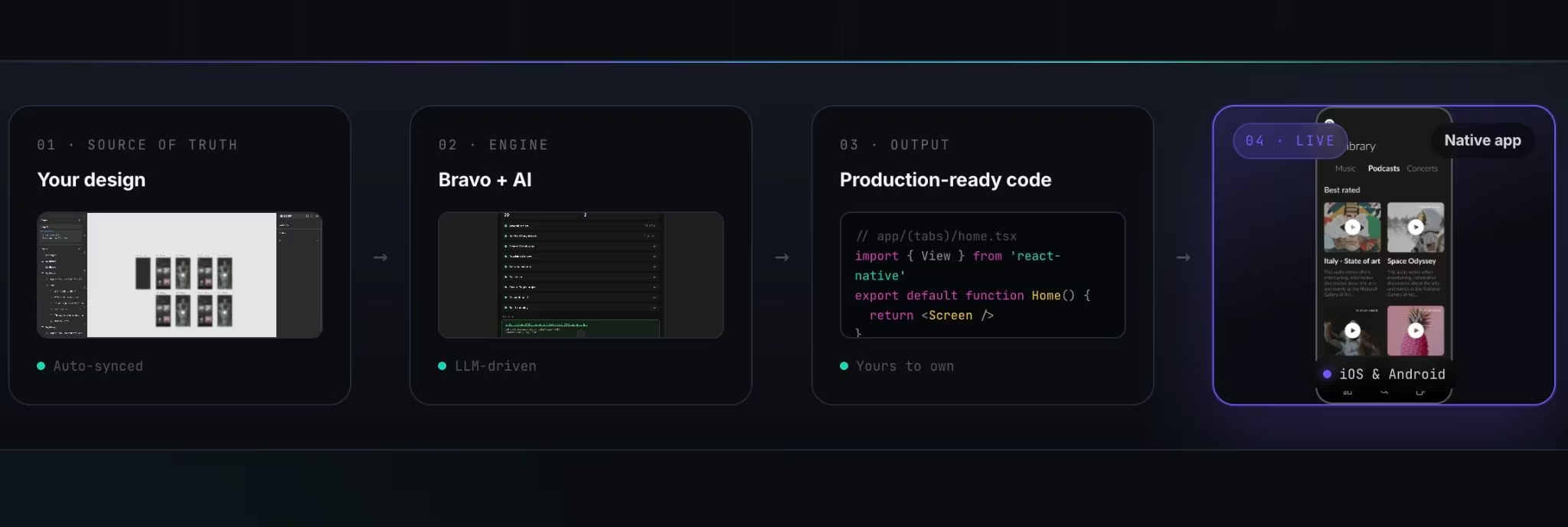
Screenshot of the Bravo Studio homepage showing its Figma-to-native-app builder for creating iOS and Android apps without code.
Bravo Studio is built for the Figma-first workflow: start with the design, then turn it into a native app. Use Bravo if you’re a designer or product team with a finished Figma design and you want to turn it into a native app. Don’t use it if you want full source-code export from Bravo Studio.
The screenshot in this section shows Bravo’s workflow moving from design source to app logic, generated code, and a native app preview. That is the appeal: you can keep Figma as the source of truth, but Bravo is much less helpful if you’re starting with only a rough idea and need the builder to shape the product for you.
Key Features
- Figma-first workflow: Your design stays central to the app-building process.
- Native app builds: Bravo creates native app files for Android and iOS publishing.
- Design-led integrations: Solo includes features like Stripe, OAuth, Firebase, deep links, charts, and native maps.
Pros
- Great for designers: Bravo fits teams that already work in Figma.
- Strong design fidelity: You can keep the app close to the original design.
- Native publishing path: Solo gives you unlimited app builds for stores.
Cons
- Not ideal without Figma skills: If you don’t design in Figma, Bravo adds another tool to learn.
- No source-code export in Bravo Studio: Bravo Studio generates build bundles, not source code.
- Data logic still needs planning: A great Figma file won’t solve roles, data flows, integrations, or testing.
Best For
- Designers turning Figma files into apps.
- Agencies building polished mobile app prototypes.
- Product teams that care most about design fidelity.
Pricing
Bravo Studio offers Starter for free and Solo at $22/month. Professional services are custom quoted.
How to Evaluate FlutterFlow Alternatives
1. Match the Tool to the App Type
The best FlutterFlow alternative depends on the app you’re building. A client portal with logins, files, and approvals needs a different tool than a consumer mobile app with polished onboarding, push notifications, and app-store release steps. Start with the job the app needs to do, then pick the builder that matches that job.
Don’t choose a mobile app builder just because the word “app” is in your brief. A field tracker, team dashboard, and customer app need different tools.
Also read our best app building software guide to find the right tool before you commit to a builder.
2. Check Code Ownership and Handoff
Code ownership is a consideration when you plan to hire a developer later. Nowa gives you Flutter source-code downloads. Draftbit gives you code editing and export. FlutterFlow also offers code download on paid plans.
Before you pick a platform, ask what your developer receives, whether they can run it locally, and how hard it is to keep building after export.
3. Understand the Real Cost
The cheapest monthly plan can still cost more once you publish, scale, or add users. Some tools charge by seats. Others charge by credits, workload units, updates, users, app add-ons, or published apps.
App-store projects also bring platform fees. Apple’s Developer Program costs $99 per membership year, so include that in your launch budget if you plan to publish an iOS app.
4. Look Past the First Version
The first build is not the finish line. You still need to publish, fix bugs, update screens, manage users, connect tools, and protect data.
For app-store projects, check build files, submission support, developer-account setup, and update rules. For internal tools, check permissions, data source limits, user limits, and usage overages.
5. Pick the Skill Level You’ll Actually Stick With
A powerful builder fails if you don’t want to use it. FlutterFlow, Nowa, Draftbit, and Bubble give you more control, but they ask for more product thinking.
Use Adalo or Thunkable if you want a simpler first app. Use Emergent if you want to start with a plain-language brief instead of manually wiring every screen and workflow.
Lovable, Bolt, and Replit are worth comparing if you’re also looking at AI code builders, but they solve a slightly different problem than Flutter-native visual app building.
Also read our Lovable vs Bolt vs Emergent breakdown to see how the three compare before you commit to a builder.
6. Review Risk Before Real Users Touch the App
Any app with money, private data, roles, or business-critical workflows needs a real launch review. AI app builders and no-code platforms help you move faster, but they don’t remove your responsibility to test.
Get expert review before launching apps with payments, subscriptions, health data, legal data, financial records, child-related data, admin panels, or high traffic expectations.
Treat AI-generated app code as a draft until it has been tested and reviewed. OWASP’s GenAI Security Project covers security and safety risks for large language model applications, agentic AI systems, and AI-driven applications, which is exactly the risk zone for app builders that generate code or workflows from prompts.
Pick the FlutterFlow Alternative That Matches How You’ll Build
The right FlutterFlow alternative depends on whether you’re replacing FlutterFlow’s visual Flutter workflow, its launch path, or its app-building complexity. Don’t compare these tools by feature count alone. Compare them by what happens after the first version works: who owns the code, who maintains the app, and how safely you can launch it.
Emergent fits a different problem: you have an app idea, but you don’t want to spend your first week wiring screens, data, integrations, and launch steps by hand.
Use Emergent if you’re a non-technical founder or service business owner and you want to describe the product, create the logic, connect tools, and get to a working web or mobile draft before hiring a developer.
Try building the first version in Emergent before committing to a custom-development budget.

Every alternative has trade-offs. Emergent just builds production-ready apps from one prompt.
- Production-ready apps
- Web & mobile apps
- Deploy in minutes







