Alternatives and Competitors
•
5 Best Hostinger Website Builder Alternatives and Competitors in 2026
Look at the best Hostinger Website Builder alternatives in 2026. Compare Emergent, WordPress, Wix, GoDaddy & Webflow for flexibility and scale.
Written By :

Devansh Bansal
Website builders have become essential tools for businesses and creators across industries, enabling rapid deployment of web presences without heavy engineering investment. Hostinger’s Website Builder combines affordable hosting with a simple editor and performance-focused infrastructure, making it a solid choice for basic sites and small businesses. However, market adoption data and user expectations are shifting toward platforms that support deeper customization, broader content models, stronger SEO controls, and integrated commerce capabilities, especially as digital experiences become central to customer engagement and revenue generation.
For many growing teams, the decision to evaluate Hostinger alternatives arises when site requirements expand beyond the basics. Limitations around page complexity, design flexibility, extensibility, workflow automation, or integrated commerce can become operational bottlenecks. Choosing the right alternative early can save significant time, technical debt, and replatforming costs, particularly when internal tools, brand differentiation, or performance at scale matter. This guide highlights the five best Hostinger Website Builder alternatives and competitors in 2026, spanning next-generation AI-assisted builders, open ecosystems, and purpose-built platforms for commerce and dynamic content.
Challenges with Hostinger Website Builder and Why Some Users Explore Alternatives
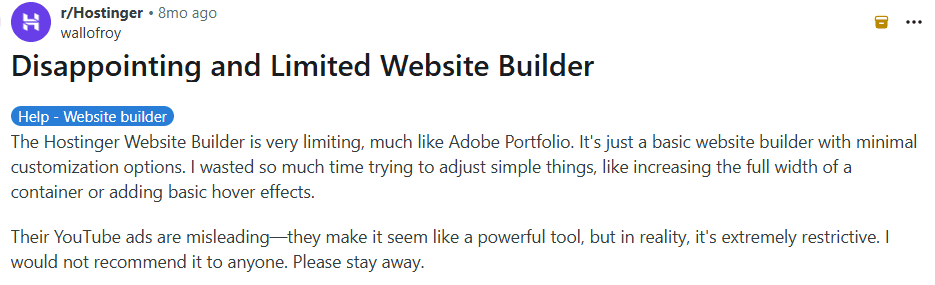
Very Limited Customization and Layout Control
Users on Reddit repeatedly describe Hostinger Website Builder as restrictive and overly basic for anything beyond simple sites.
Source: Reddit
Functional Bugs and Feature Gaps
Hostinger Website Builder users have reported real bugs and functional issues in the site editor and site behavior:
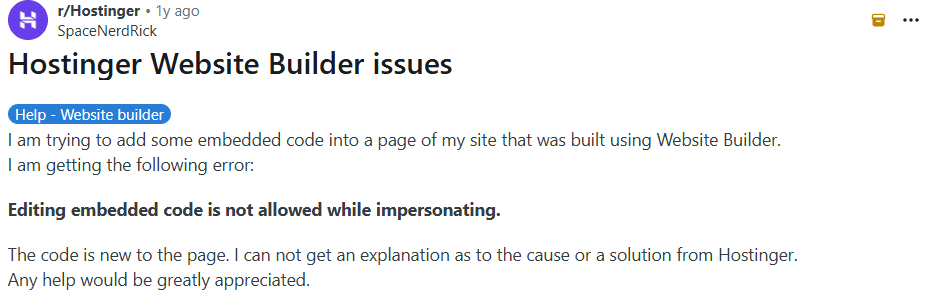
Embedded code restrictions: One user ran into an error preventing embedded code from being added, with no clear explanation provided by support.
Source: Reddit
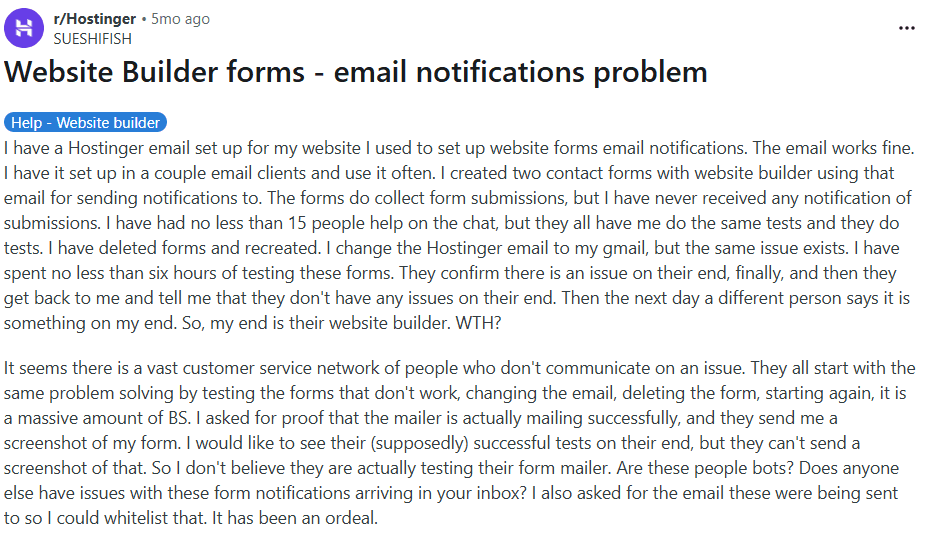
Email form notification failures: Several site owners reported that form submissions did not trigger email notifications, despite repeated support attempts and tests.
Source: Reddit
Top Hostinger Website Builder Alternatives and Competitors in 2026
Emergent
Emergent is one of the best, full-stack, AI-powered vibe coding and no code platforms for building websites and web applications. Instead of relying on pre-built templates or rigid section editors, Emergent lets teams describe site structure, content behavior, and workflows in natural language. The platform generates frontend pages, backend logic, integrations, and deployment as a unified system. Compared to Hostinger Website Builder, which focuses on simplicity and affordability, Emergent is built for flexibility and long-term scalability. This makes it suitable for businesses that expect their website to evolve beyond basic pages.
Key Features of Emergent
Natural language website creation
Emergent allows users to define layouts, content flow, and site behavior using plain English prompts. The system translates intent into structured pages and logic without manual configuration. Hostinger users often find this approach more adaptable once requirements extend beyond basic layouts. Updates happen by refining intent rather than reworking sections. This reduces friction as sites grow.
Full-stack architecture for dynamic sites
Emergent generates frontend UI alongside backend services, data handling, and integrations. This enables dynamic content, custom forms, and user workflows without plugins. Compared to Hostinger’s lightweight builder, Emergent treats websites as applications from day one. This supports richer functionality and cleaner scaling.
Separation of design, content, and logic
Design, content, and business logic are kept independent by default. This allows teams to redesign or restructure content without breaking workflows. Hostinger’s builder ties behavior closely to page elements. Emergent’s separation improves maintainability over time.
Built-in automation and workflows
Emergent supports automations for lead capture, content updates, and third-party integrations. These workflows scale without becoming brittle. Hostinger users typically rely on external tools for similar functionality. Emergent centralizes automation in one platform.
Integrated testing and deployment
Sites can be tested and deployed directly from the platform. Changes are validated before going live, reducing unexpected issues. Compared to Hostinger’s publish-first flow, Emergent emphasizes reliability and controlled releases.
Who Should Use Emergent?
Businesses outgrowing basic site builders
Emergent fits teams that need more than static pages. Dynamic content and workflows are first-class. This suits growing companies.
Founders building interactive web experiences
Sites with custom logic, automation, or integrations benefit from Emergent’s system-first approach. It supports richer behavior than Hostinger Website Builder.
Teams planning long-term scalability
Emergent works best when websites are expected to evolve into platforms. Early structure reduces future rework and migrations.
Teams prioritizing flexibility over drag-and-drop
Emergent rewards clarity of intent rather than manual layout tweaking. Teams focus on outcomes, not editor constraints.
Advantages vs Limitations
Advantages | Limitations |
Full-stack websites beyond templates | More capability than simple brochure sites need |
Natural language driven customization | Requires clear thinking to guide outcomes |
Designed for dynamic, scalable sites | Less suited for quick static launches |
Clean separation of logic and design | |
Built-in automation and deployment | |
Long-term ownership and flexibility |
Pricing
Plan | Pricing | Key Highlights |
Free | $0/month |
|
Standard | $20/month |
|
Pro | $200/month |
|
Team | $300/month |
|
Enterprise | Custom |
|
WordPress
WordPress is an open-source content management system used to build everything from simple blogs to large, high-traffic business websites. Unlike Hostinger Website Builder, which combines hosting with a lightweight visual editor, WordPress separates the website layer from hosting and infrastructure. This gives users freedom to choose themes, plugins, and hosting providers based on performance and budget needs. WordPress is often selected when teams want full ownership over their site and the ability to extend functionality without platform limits. It is positioned as a long-term foundation rather than a bundled website builder.
Key Features of WordPress
Open-source core with full ownership
WordPress is open source, meaning users own their site, data, and code. This removes platform lock-in and allows long-term flexibility. Hostinger’s builder keeps users inside a managed environment. WordPress supports future migrations and custom development when needed.
Extensive plugin ecosystem
Thousands of plugins add functionality for SEO, forms, security, performance, and integrations. This allows sites to grow far beyond basic pages. Compared to Hostinger’s built-in features, WordPress offers much broader extensibility. Plugin selection and maintenance require care.
Advanced content management
WordPress supports posts, pages, custom post types, taxonomies, and editorial workflows. This makes it suitable for blogs, content hubs, and complex publishing needs. Hostinger’s builder offers only basic page management. WordPress scales content cleanly.
Granular SEO control
SEO plugins provide control over metadata, schema, sitemaps, and performance optimization. This enables advanced SEO strategies. Compared to Hostinger’s limited SEO tools, WordPress offers far more depth. Proper configuration is essential.
Freedom of hosting and infrastructure
Users can choose shared, best VPS hosting, or cloud hosting based on traffic needs. This allows performance tuning as sites grow. Hostinger bundles hosting with its builder. WordPress allows infrastructure to evolve independently.
Who Should Use WordPress?
Businesses prioritizing ownership
WordPress fits teams that want control over their website and data. Vendor independence matters. This supports long-term planning.
Content-heavy websites
Publishers, blogs, and marketing teams benefit from WordPress’s CMS depth. Content workflows are flexible. Scaling content is straightforward.
Teams comfortable managing complexity
WordPress requires updates, backups, and security management. Teams willing to handle this gain flexibility. Non-technical teams may need support.
Projects needing custom functionality
Sites requiring unique features often choose WordPress. Custom plugins and themes enable differentiation beyond builder limits.
Advantages vs Limitations
Advantages | Limitations |
Full ownership and open-source flexibility | Requires ongoing maintenance |
Massive plugin and theme ecosystem | Plugin conflicts can cause issues |
Strong content management capabilities | Security depends on proper setup |
Advanced SEO customization | Performance tuning is necessary |
Flexible hosting options | Learning curve for beginners |
Large global community | Quality varies across plugins |
Pricing
Plans | Pricing | Key Highlights |
Premium Website Builder | $12.99 per month |
|
Business Website Builder | $13.99 per month (limited-time deal, renews at $18.99) |
|
Wix
Wix is a popular all-in-one website builder known for its drag-and-drop editor, large template library, and bundled hosting. It is designed to help users launch websites quickly without technical setup. Compared to Hostinger Website Builder, Wix offers more visual flexibility and a richer app marketplace, but it still operates within a managed, template-driven environment. Sites are built visually with limited access to underlying structure or code. Wix is often chosen by small businesses and creators who want design freedom without managing hosting or plugins. It is positioned as a convenience-first builder rather than a long-term extensible platform.
Key Features of Wix
Freeform drag-and-drop editor
Wix allows users to place elements almost anywhere on the page. This provides more visual freedom than section-based builders. Hostinger users often appreciate this flexibility for custom layouts. The downside is that designs can become inconsistent across breakpoints if not managed carefully.
Large template and design library
Wix offers hundreds of templates across industries. These provide quick starting points for different use cases. Compared to Hostinger’s smaller set, Wix’s variety is broader. Changing templates later requires rebuilding pages.
App marketplace for added functionality
The Wix App Market includes tools for forms, bookings, marketing, and analytics. This extends site functionality without code. Compared to WordPress plugins, options are more limited. Dependency on apps can increase costs.
Built-in SEO and marketing tools
Wix includes basic SEO controls, email marketing, and analytics. These cover common needs for small sites. Compared to Hostinger’s SEO tools, Wix offers more guidance but less granular control. Advanced SEO strategies can feel constrained.
Managed hosting and security
Hosting, SSL, and updates are handled by Wix. Users do not manage infrastructure. This simplifies maintenance but limits performance tuning and server-level control.
Who Should Use Wix?
Small businesses and creators
Wix fits users who want to design sites visually without technical setup. Speed and convenience matter. It supports common business use cases.
Teams prioritizing visual control
Design-focused users appreciate Wix’s editor. Custom layouts are possible. Structure and scalability are secondary.
Projects with limited complexity
Sites with simple pages and basic integrations work well. As logic and performance needs grow, limits appear.
Users avoiding hosting management
Wix suits teams that want hosting handled end to end. Control is traded for simplicity.
Advantages vs Limitations
Advantages | Limitations |
Flexible visual editor | Template changes require rebuilding |
Large template selection | Performance tuning is limited |
Built-in apps and marketing tools | Advanced SEO control is constrained |
No hosting management required | App costs can accumulate |
Quick setup for beginners | Scaling beyond basic sites is difficult |
Wide feature coverage for small sites | Platform lock-in risk |
Pricing
Plan | Pricing (USD) | Key Highlights |
Starter | $39/month |
|
Shopify (Grow) | $105/month |
|
Advanced | $399/month |
|
Plus | From $2,300/month (3-year term) |
|
GoDaddy
GoDaddy’s Website Builder is designed for speed and simplicity, bundling domains, hosting, and a guided site editor into a single product. It focuses on helping users get online quickly with minimal setup through prebuilt sections and AI-assisted layouts. Compared to Hostinger Website Builder, GoDaddy leans even more toward guided workflows and reduced configuration. This makes it accessible for beginners but also limits flexibility as needs grow. GoDaddy is often chosen by users already buying domains or email from the same provider. It is positioned as an entry-level builder rather than a platform for long-term customization.
Key Features of GoDaddy
AI-assisted website setup
GoDaddy uses AI prompts to generate layouts, content sections, and basic structure. This speeds up first-time setup significantly. Hostinger users often find this helpful for quick launches. The trade-off is limited control over final structure.
Section-based visual editor
Pages are built from predefined sections rather than freeform elements. This reduces layout errors and keeps designs consistent. Compared to Wix’s drag-and-drop editor, flexibility is lower. Custom layouts are constrained.
Bundled hosting and domains
Hosting, SSL, and domain management are integrated. This simplifies setup and billing. Hostinger also bundles hosting, but GoDaddy offers tighter integration with domains and email. Infrastructure control is minimal.
Basic e-commerce and bookings
The builder supports simple product listings, payments, and bookings. This suits small catalogs and service businesses. Compared to Shopify, features are limited. Scaling commerce workflows is difficult.
Built-in marketing tools
Email marketing, social posting, and basic analytics are included. These tools cover common needs for small businesses. Advanced customization and automation are limited.
Who Should Use GoDaddy?
First-time website builders
GoDaddy fits users launching their first site. The learning curve is low. Advanced customization is not expected.
Businesses using GoDaddy services
Teams already using GoDaddy for domains or email benefit from consolidation. Management is centralized. Flexibility is secondary.
Simple brochure or service sites
Sites with basic pages, contact forms, and bookings work well. Complex logic is out of scope.
Users prioritizing convenience over control
GoDaddy suits teams that want minimal setup and maintenance. Control is traded for speed.
Advantages vs Limitations
Advantages | Limitations |
Very fast setup with AI assistance | Limited design and layout flexibility |
Integrated domains and hosting | Not suitable for complex websites |
Low learning curve for beginners | Basic e-commerce capabilities |
Built-in marketing and email tools | SEO control is constrained |
Simple management dashboard | Difficult to scale beyond small sites |
Good for basic business sites | Platform lock-in risk |
Pricing
Plans | Pricing | Key Highlights |
Basic | $9.99 per month |
|
Standard | $11.99 per month |
|
Premium | $14.99 per month |
|
Ecommerce | $20.99 per month |
|
Webflow
Webflow is a visual web development platform that gives designers and teams fine-grained control over layout, structure, and responsive behavior without relying on templates. Unlike Hostinger Website Builder, which prioritizes simplicity and affordability, Webflow exposes core web concepts such as the box model, positioning, and breakpoints directly in the editor. This makes it significantly more powerful for custom design and performance tuning, but also more demanding to learn. Webflow is often chosen when teams want production-quality websites with clean structure and strong SEO control. It is positioned between traditional website builders and full custom development.
Key Features of Webflow
Precise visual control over layout
Webflow allows designers to control spacing, typography, positioning, and responsiveness at a granular level. Layouts behave predictably across devices. Hostinger users often move here to escape section-based limitations. The learning curve is higher, but flexibility is unmatched among builders.
Robust CMS for structured content
Webflow includes a powerful CMS for managing collections like blogs, case studies, directories, and landing pages. Content is separated from design, making updates safe and scalable. Compared to Hostinger’s basic page editor, Webflow supports more complex content models.
Advanced interactions and animations
Webflow supports rich interactions and animations without custom JavaScript. This enables polished user experiences and micro-interactions. Hostinger offers only basic animation options. Webflow’s interaction system is far more expressive.
Clean code output and performance
Webflow generates clean HTML, CSS, and JavaScript under the hood. This improves load times and SEO performance. Compared to Hostinger Website Builder, Webflow sites are easier to optimize. Performance is a key differentiator.
Managed hosting with developer-like workflows
Hosting, SSL, versioning, and staging are built in. Teams can publish confidently without managing servers. Compared to Hostinger’s hosting-first approach, Webflow balances control with convenience.
Who Should Use Webflow?
Designers and creative teams
Webflow fits teams that care deeply about design precision. It supports bespoke layouts. Agencies often standardize on it.
Marketing teams needing flexibility
Landing pages, campaign sites, and content hubs benefit from Webflow’s control. Iteration is fast once learned.
Content-driven businesses
Webflow works well for CMS-heavy sites. Content models scale cleanly. Editorial workflows are supported.
Teams comfortable with a learning curve
Webflow rewards users willing to learn web fundamentals. Non-technical users may need time to adapt.
Advantages vs Limitations
Advantages | Limitations |
Granular design and layout control | Steep learning curve for beginners |
Strong CMS for structured content | Not a full backend application platform |
Advanced interactions without code | E-commerce less flexible than Shopify |
Clean, performant output | Custom logic requires integrations |
Solid SEO foundations | Higher cost than basic builders |
Agency-friendly workflows | Overkill for simple sites |
Pricing (Site Plans)
Plan | Pricing | Key Highlights |
Starter | Free |
|
Basic | $14/month |
|
CMS | $23/month |
|
Business | $39/month |
|
How to Choose the Right Hostinger Website Builder Alternative?
Decide Whether You Need Simplicity or Long-Term Flexibility
Hostinger Website Builder works well for basic sites, but alternatives vary widely in how they scale. If your site is expected to remain simple, builders like GoDaddy or Wix may suffice. If you anticipate dynamic content, automation, or custom logic, platforms like Emergent, WordPress, or Webflow provide stronger long-term flexibility. Choosing based on future needs reduces the risk of replatforming later.
Assess Design Control and Branding Requirements
Some teams want quick templates, while others need precise control over layout and branding. Wix offers more visual freedom, while Webflow provides granular control at the cost of a learning curve. Hostinger’s builder sits closer to the simple end of this spectrum. Understanding how much design control you need helps narrow choices.
Evaluate Content Management and SEO Depth
Content-heavy sites and SEO-driven businesses benefit from robust CMS features and optimization control. WordPress and Webflow offer deeper content models and SEO customization. Hostinger and GoDaddy provide basic SEO tools that may not support advanced strategies. Matching platform capability to content goals is critical.
Consider E-commerce and Monetization Needs
If selling products or services online is a priority, Shopify is purpose-built for scalable commerce. Wix and GoDaddy support basic selling, but limitations appear as catalogs and workflows grow. Choosing a commerce-first platform early can prevent costly migrations later.
Match the Platform to Your Team’s Technical Comfort
Non-technical teams may prefer guided builders with minimal setup, while technical teams unlock more value from platforms that expose structure and logic. WordPress and Webflow require more involvement but offer greater flexibility. The right choice balances ease of use with control.
Conclusion
Hostinger Website Builder is a solid entry-level option, but many users explore alternatives as their requirements mature. The platforms covered here represent different paths forward, from AI-driven full-stack builders to open-source CMS and design-first tools. There is no single best replacement, only better alignment with your goals, growth plans, and technical comfort. Choosing the right Hostinger Website Builder alternative in 2026 is ultimately about removing future constraints before they slow progress or limit differentiation.
FAQs
1. What are the best Hostinger Website Builder alternatives in 2026?
The best Hostinger Website Builder alternatives in 2026 include Emergent, WordPress, Wix, GoDaddy, and Webflow. Each platform serves different needs, from simple site creation to scalable, highly customizable websites.