



Searching for a Wix alternative usually comes down to a handful of reasons. A site outgrows its template, pricing jumps once selling starts, or the project needs more than a drag-and-drop editor can handle.
Six platforms made this list, chosen for the different reasons people actually leave Wix, from wanting more design control to needing something closer to a working app than a themed site.
For this piece, I signed up for all six, built a sample project on each with the same starting brief, and compared what each one does.
By the end, you'll know what each of these six is built for, where it falls short, and which one fits the reason you're looking elsewhere.
How I Tested These Wix Alternatives
Not every platform used a prompt-to-app flow. However, I tested the tools on a coffee roastery website and used a prompt for the platforms that could build with one.
Here’s the prompt I used:
Build a web app for Marlow & Birch, an independent coffee roastery based in Asheville, North Carolina.
Core idea: A Coffee Club membership portal where customers create an account, see their subscription status, and manage their orders.
Must include:
- A homepage with the same brand story: small-batch coffee, direct-trade beans, founded 2019
- User sign-up and login (email and password)
- A logged-in dashboard showing the customer's current subscription plan (House Blend, Ethiopia Single Origin, or Decaf Blend) and next delivery date
- A page where logged-in customers can change their subscription plan or pause deliveries
- An admin view (or simple way to simulate one) showing a list of all current subscribers
- A contact page with name, email, and message fields
Tone: Warm and approachable, not corporate. Name of the business to display in the header and footer: Marlow & Birch.
Not every tool works the same way. Emergent's chat and Hostinger's AI generator both take a written description and build from it directly.
Squarespace's Blueprint AI has no field to type a brief into at all; it's a guided wizard that builds from picks like topic, tone, and color rather than free text. Webflow, Shopify, and WordPress don't have an AI build flow either; those three were built by hand against the same brief instead, the way most people use them.
Beyond the build itself, I checked pricing directly against each platform's pricing page, signed up for a real account rather than relying on marketing pages, and confirmed whether each platform offers a migration path from Wix.
Why Look for Wix Alternatives?
Wix works well for getting a simple site live fast, and it reports over 250 million users worldwide. Independent tracking from W3Techs puts Wix at 4.3% of all websites globally, ahead of Squarespace's 2.5% and well behind Shopify's 5.3%.
For a straightforward small-business site, the drag-and-drop editor does what it advertises. People start looking elsewhere once the site grows past that first version.
Template lock-in is the most common frustration. Wix has no template-switching option once a site is created. The workaround is building an entirely new site and moving the content over by hand.
The free plan isn't built for a business site. Wix's plan comparison shows the free tier stuck on a Wix-branded subdomain, capped at 500MB of storage, with Wix ads on every page. A custom domain and an ad-free site both require a paid plan from day one.
Selling anything at all costs more than it should. Wix's plans page puts Light at $17 monthly, but Light can't accept payments, so a store means skipping straight to Core at $29 monthly. That's a $12 jump just to sell anything at all.
Squarespace's cheapest plan sells from the start. Basic runs $19/month, billed annually, and can take payments immediately, with no equivalent jump required to reach the same starting point that Wix charges $29 for.
Which Wix Alternative Should You Choose?
- Choose Squarespace if: You run a service-based business and want first-party scheduling through Acuity.
- Choose Emergent if: You need custom logic that none of the five templates cover, or a real mobile app alongside the site.
- Choose Webflow if: You or your designer need full control over layout and animation, and clean code output is a priority.
- Choose WordPress if: You want full ownership of your content and the freedom to extend the site with plugins.
- Choose Shopify if: Selling products is the core of the business, and the whole site is built around that.
- Choose Hostinger if: Budget is the main constraint, and you want the cheapest realistic path to a live site.
- Stick with Wix if: Your current site already does the job and none of the above frustrations have cost you anything yet. Switching has a cost, too.
6 Best Wix Alternatives: At a Glance
How the six compare at a glance:
Pricing correct as of July 2026; verify current numbers on each platform's own pricing page before deciding.
The Best Wix Alternative for Your Type of Business
The best Wix alternative depends on the job. Squarespace fits service businesses that want polished design and first-party scheduling; Webflow suits design-led teams; WordPress prioritizes ownership and extensibility; Shopify focuses on ecommerce; Hostinger keeps launch costs low; and Emergent fits projects that need custom application logic or a mobile app.
Each option below is evaluated on the capability that sets it apart from Wix, along with its main tradeoffs, pricing, and migration path.
Emergent: Best for Custom Logic and Native Mobile Apps
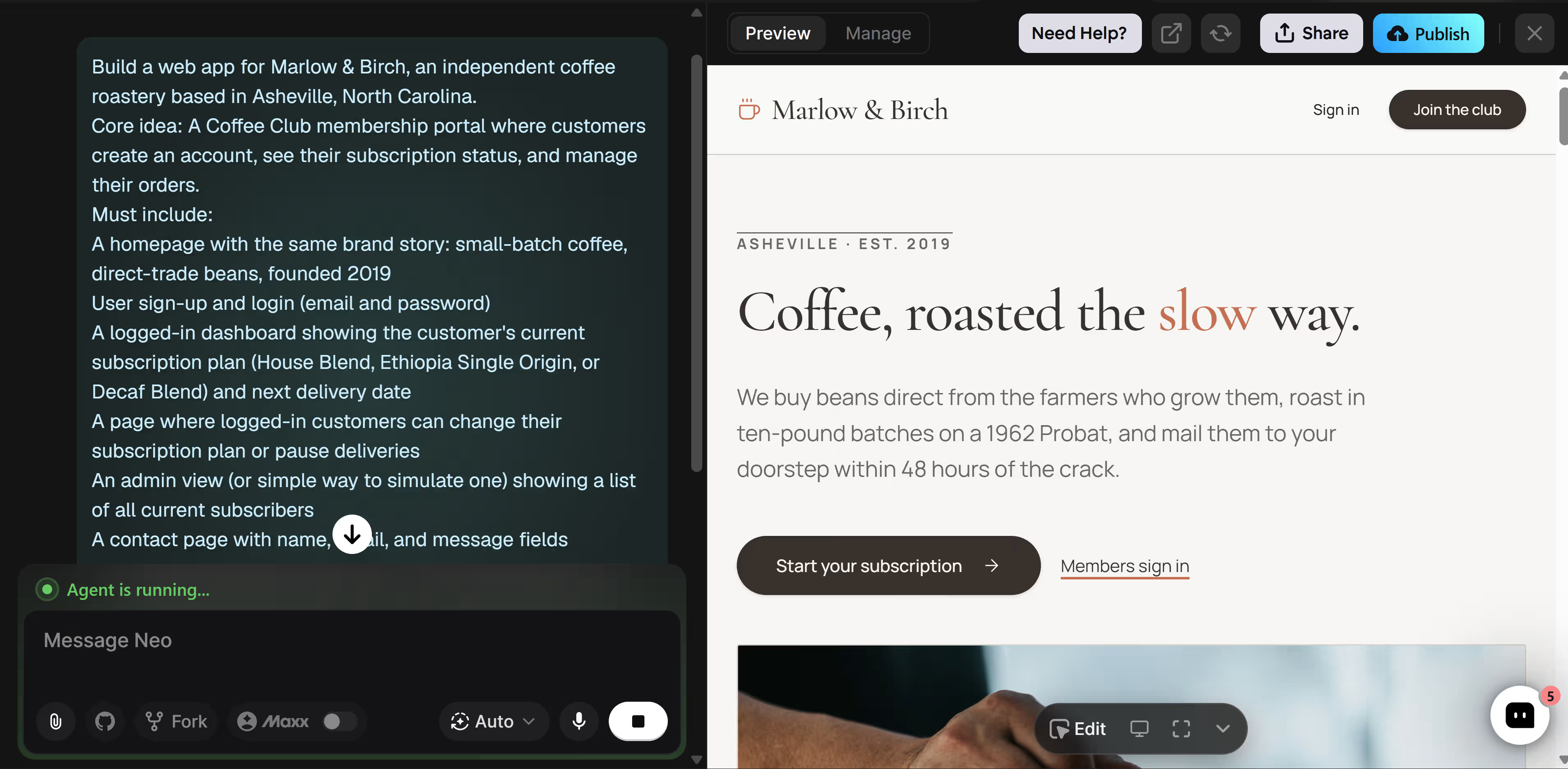
Emergent approached Marlow & Birch as an application rather than a themed website. Before building, it asked how sign-in should work, how admins should be identified, whether subscriptions needed live payments, where contact messages should go, and how much freedom it had over the design.
Those questions shaped the build. I created a customer account, signed in, saw the current plan and next delivery date, then changed the coffee and paused the subscription.
What worked in the test:
- Separate user roles: Customers and admins opened different dashboards.
- Connected account data: Customer plan changes appeared in the admin table.
- Subscription controls: Members could switch coffee or pause deliveries.
- Contact management: Form submissions appeared inside the admin view.
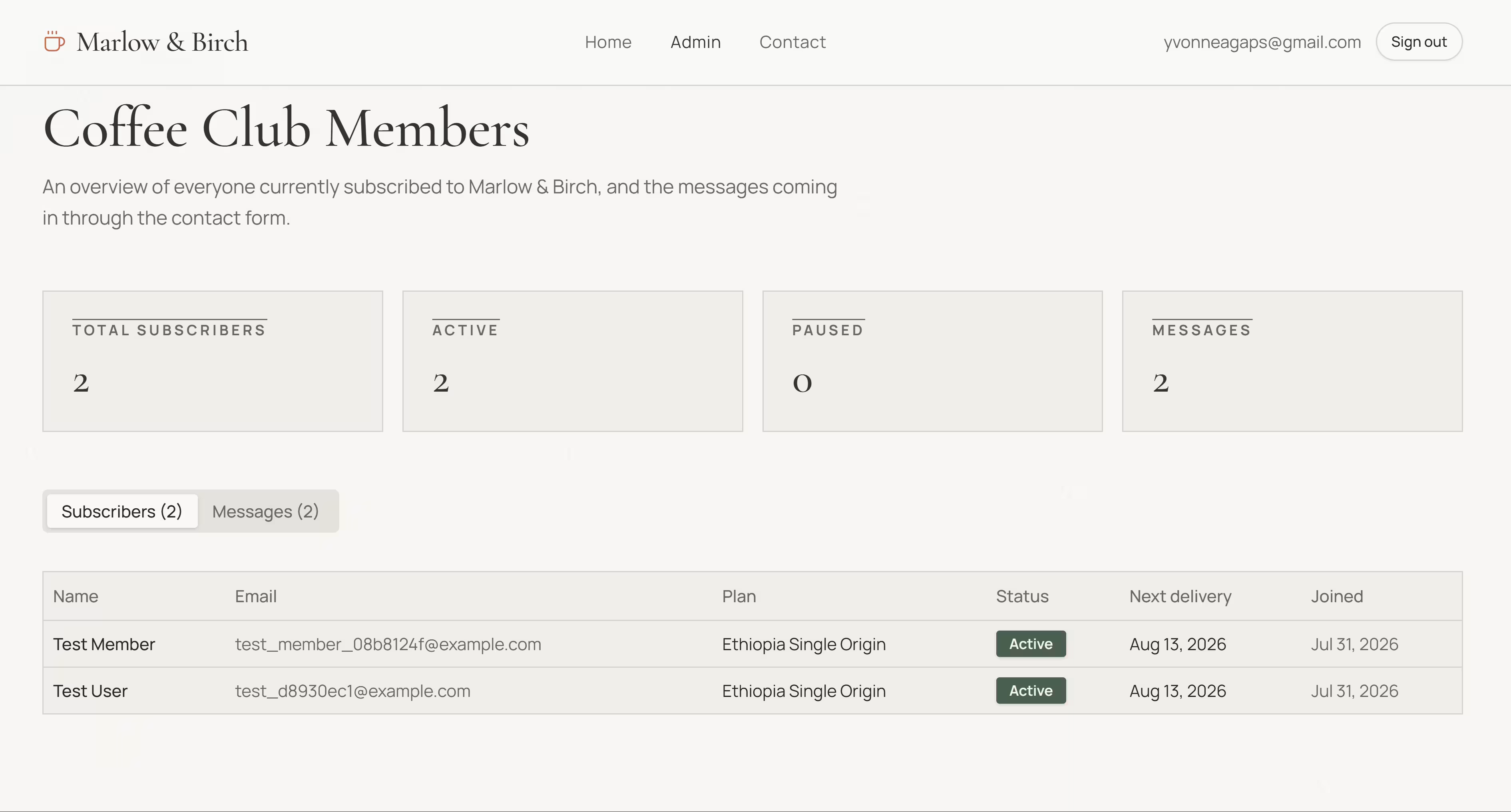
The admin dashboard showed subscriber totals, active and paused accounts, current plans, delivery dates, and contact messages. What made it useful was that the same records stayed connected across both dashboards.
You can access your code on Emergent through GitHub syncing. You can push and pull the project, work with branches, or let a developer inspect and continue the code outside Emergent.
Emergent also gives you two routes to mobile. A mobile-first product can start with the Mobile Agent, which builds one Expo and React Native codebase for iOS and Android.
An app that’s already live can use one-click web-to-mobile conversion. Emergent creates the mobile interface while keeping the backend, database, sign-in, users, and stored data connected. The web and mobile screens can then change separately without splitting the customer records or business logic.
Key Features
- Custom business logic: Build permissions, dashboards, workflows, and account rules around the business.
- Connected user roles: Give customers, staff, and admins different views while using the same underlying data.
- Everything in one build: Generate the interface, the logic that runs behind it, sign-in, how data is stored, and a live, hosted app, all from the same conversation.
- GitHub access: Push, pull, branch, and continue development throutgh a standard repository.
- Two mobile routes: Start with the Mobile Agent or convert an existing deployed web app.
- Device access: Build mobile features that use notifications, cameras, photos, location, files, and sensors.
- Business integrations: Connect Stripe, Gmail, Slack, Mailchimp, and QuickBooks.
- Targeted editing: Select part of the preview for a focused change or continue revising through chat.
Pros
- Customer and admin data stayed connected
- Role-based routing worked
- Customers could change or pause subscriptions themselves
- Contact messages appeared inside the admin dashboard
- GitHub gives developers access to the project
- Web and mobile versions can share users, data, and backend logic
- Integrations can connect the app to existing business tools
Cons
- Credit-based usage can interrupt a build before the final fixes are finished
- Small visual changes may take longer than moving elements in a drag-and-drop editor
- Mobile development is tied to Expo and React Native rather than several native stacks
- One-click web-to-mobile conversion is still in early access, so the workflow may change
- App-store publishing still requires Apple and Google developer accounts and their review processes
Best For
- Customer portals with separate member and staff views
- Memberships and subscriptions with account-level controls
- Internal dashboards, approval flows, and custom processes
- Products where one user’s action must update another user’s view
- Teams that want access to the project through GitHub
- Businesses planning both web and native mobile versions
- Apps that need payments, email, marketing, accounting, or staff alerts
What Users Say
Emergent has a 4.3/5 rating from six G2 reviews. Reviewers praise its ease of use, quick setup, and ability to build apps without advanced coding skills. Criticism includes unclear credit use, the need for more credits to finish some projects, and slower generation at times.
Pricing
- Free: $0 with 10 monthly credits
- Standard: $20 per month with 100 monthly credits
- Pro: $200 per month with 750 monthly credits
Paid plans also let users buy extra credits. Monthly credits reset each billing cycle, while purchased credits do not expire. Check Emergent’s pricing page for current pricing plans before subscribing.
Migrating From Wix to Emergent
Moving from Wix to Emergent requires rebuilding the site. Wix does not allow complete websites to be transferred to another platform, so the pages, design, and Wix features must be recreated.
You can still export useful data, including contacts and orders, before rebuilding the project in Emergent.
Squarespace: Best for Service Businesses That Want First-Party Scheduling
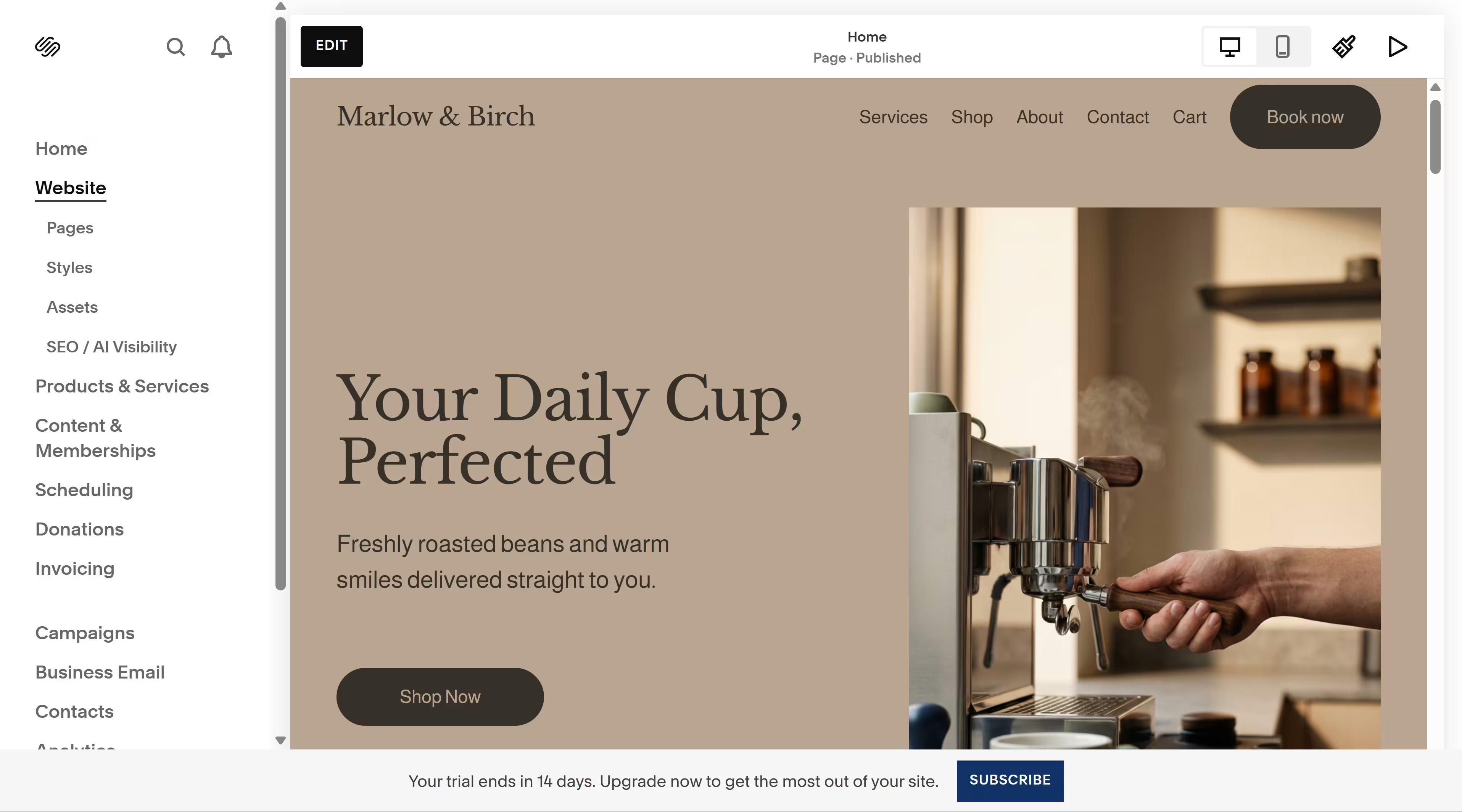
Squarespace is the strongest Wix alternative for service businesses that want a well-designed site and appointment booking in a single product ecosystem.
Acuity Scheduling is owned by Squarespace and can be added to a Squarespace site, although the Acuity subscription is billed separately from the website plan.
Squarespace starts you with Blueprint AI Builder, a guided setup tool that creates a custom starting template. Instead of asking you to type a complete website brief, it walks you through choices such as your site title, brand personality, pages, fonts, and colors, then generates a starting design.
The setup was quick, although it collected less information about the business than a prompt-based builder would.
I then checked whether Blueprint’s starting design could be replaced with another Squarespace template. It could not.
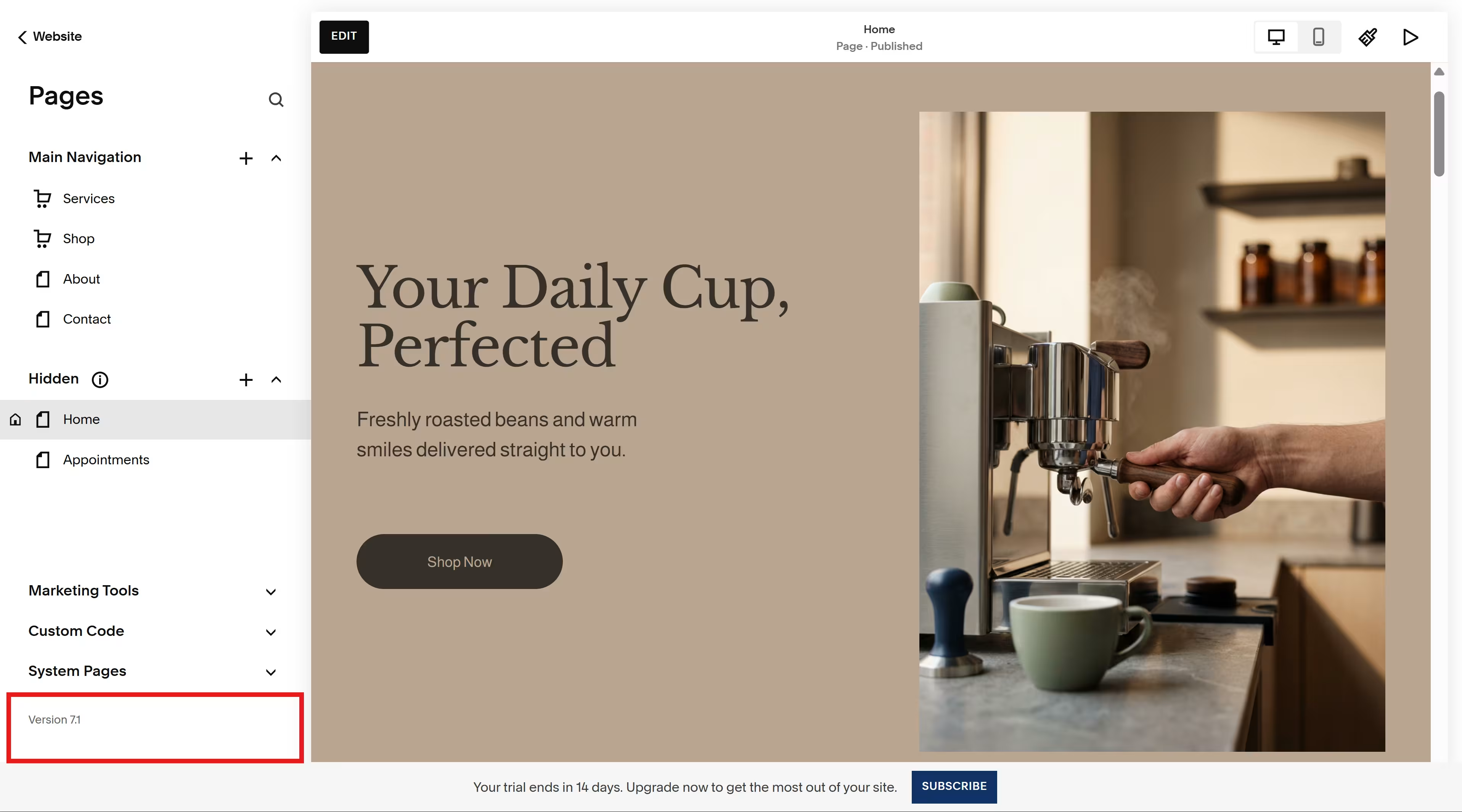
The generated site was on version 7.1, where all sites share the same template family and template switching is unavailable. The Pages panel shows the Version 7.1 label at the bottom.
Once the template test was finished, I tried changing the site through a prompt. But there was no option for that. Editing meant opening the visual editor, selecting blocks on the page, and then moving or re-styling them myself.
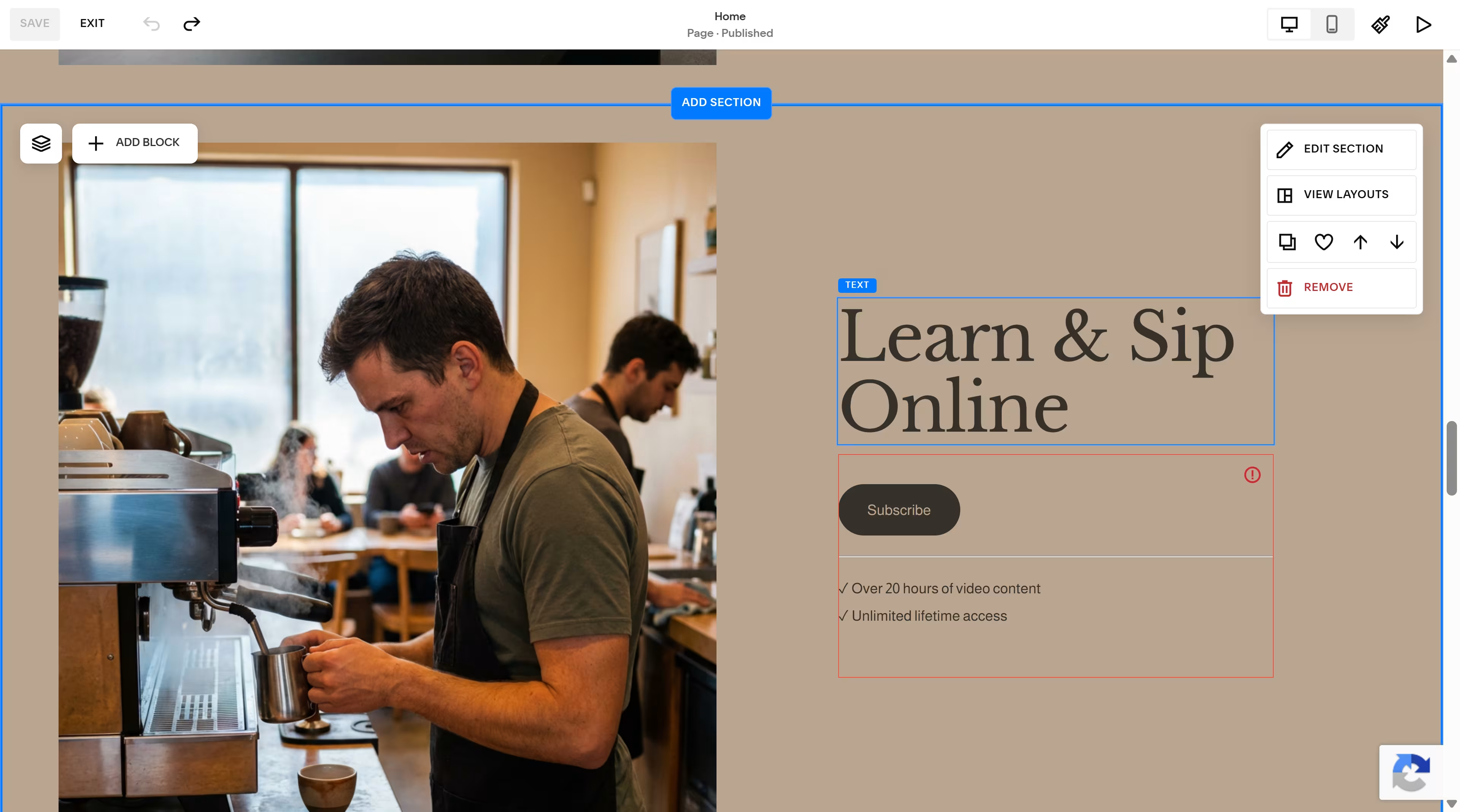
You can also use Site Styles, which controls the site-wide design, including fonts, color palettes, spacing, buttons, and forms. The screenshot below shows the panel Squarespace AI opened, rather than applying the requested change.
Blueprint produced a visually cohesive starting point, with warm photography, a muted cream palette, and typography that suited a premium coffee brand. The content still needed cleanup, though.
It ignored the Marlow & Birch site title I entered during setup and left “Your Site Title” in the footer. The design direction was usable, but the page was not ready to publish without correcting the branding and copy.
Service-business features are the bigger reason to choose Squarespace. Acuity can handle client appointments from the site, while the version 7.1 SEO report checks for missing page descriptions and image alt text and offers AI suggestions for unfinished fields.
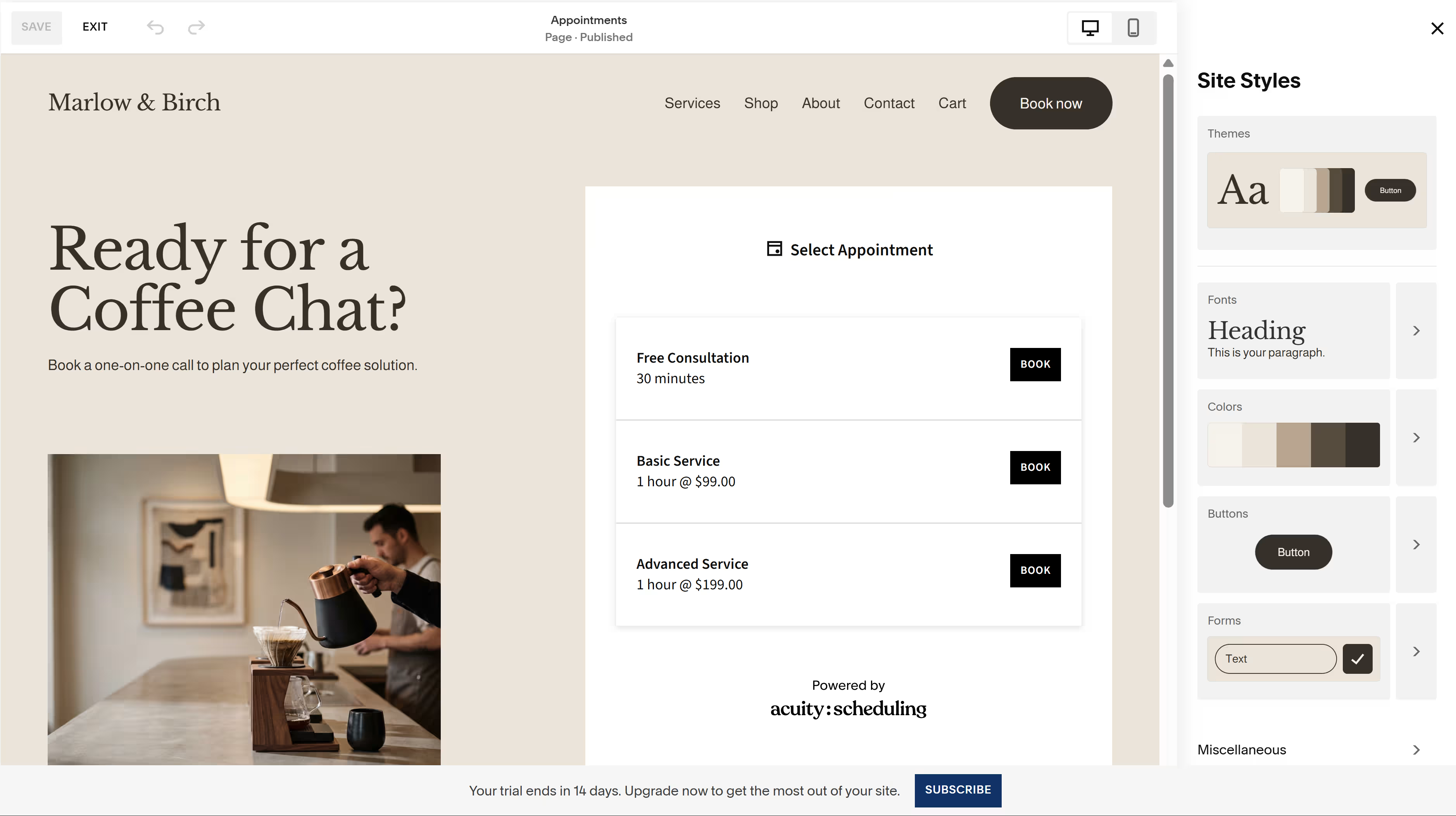
Squarespace works best for a service business that values a strong initial design and is comfortable making later changes via a visual editor. It is less suitable for someone expecting to keep redesigning the site through prompts or switch freely between complete templates.
Key Features
- Acuity Scheduling: Squarespace’s appointment and class-booking product. Visitors can book through a Scheduling block on the site, but Acuity requires a separate subscription.
- Squarespace Payments: A native payment solution for managing transactions and payouts from the Squarespace dashboard, where available.
- Site Styles: Site-wide controls for fonts, colors, spacing, buttons, and forms. Changes are made manually through the visual editor.
Pros
- Design quality is consistently rated among the strongest of any builder in this category
- Acuity booking can be embedded directly into the website
- Eligible annual plans include one free custom domain for the first year
Cons
- Basic charges a 2% online-store transaction fee; Core and higher remove it
- Acuity requires a separate subscription on top of the website plan
- There is no permanent free plan; the 14-day trial remains private unless shared through a password
- Blueprint ignored the Marlow & Birch site title I entered, while Squarespace AI opened the relevant settings instead of applying my requested design change
Best For
- Coaches, consultants, and wellness professionals who take appointments
- Photographers and creatives who want polished portfolio layouts
- Small service businesses that need a website with light selling rather than a large online store
What Users Say
On G2, where Squarespace holds a 4.4/5 average from over 1,100 reviews, one reviewer called it "the most well-known website builder for laypeople." Others on the same page point to limited customization once a project pushes past what the templates were built for.
Pricing
- Basic: $25 monthly ($19/month billed annually), sells with a 2% transaction fee
- Core: $39 monthly ($29/month billed annually), transaction fee drops to 0%
- Plus: $65 monthly ($49/month billed annually), adds advanced ecommerce and merchandising tools
- Advanced: $139 monthly ($99/month billed annually), with the lowest payment rates, no digital-product transaction fee, and unlimited video storage
To better understand what Squarespace is like to use in practice, Squarespace review covers its strengths, limitations, and overall value.
Migrating From Wix to Squarespace
Products can be exported from Wix and imported into Squarespace using a CSV file. The layout, design, fonts, and other site content do not transfer, so the pages have to be rebuilt on a new Squarespace site. Eligible domains purchased through Wix can also be transferred to Squarespace.
Webflow: Best for Agencies and Designers Who Need Pixel-Level Control
Webflow suits agencies and design-led teams that want detailed control over how every page looks. Its Style panel exposes controls for layout, spacing, sizing, typography, backgrounds, borders, effects, and responsive breakpoints, all inside a visual canvas.
That freedom is useful when a designer will take over after the first draft. But it can feel like a lot when the person building the site has never worked with CSS-style controls.
Webflow does have a prompt-to-build flow in addition to its template and build-your-own flows. Its AI site builder first turns the prompt into a proposed sitemap and section plan, which you can review, rearrange, or change before it generates the pages.
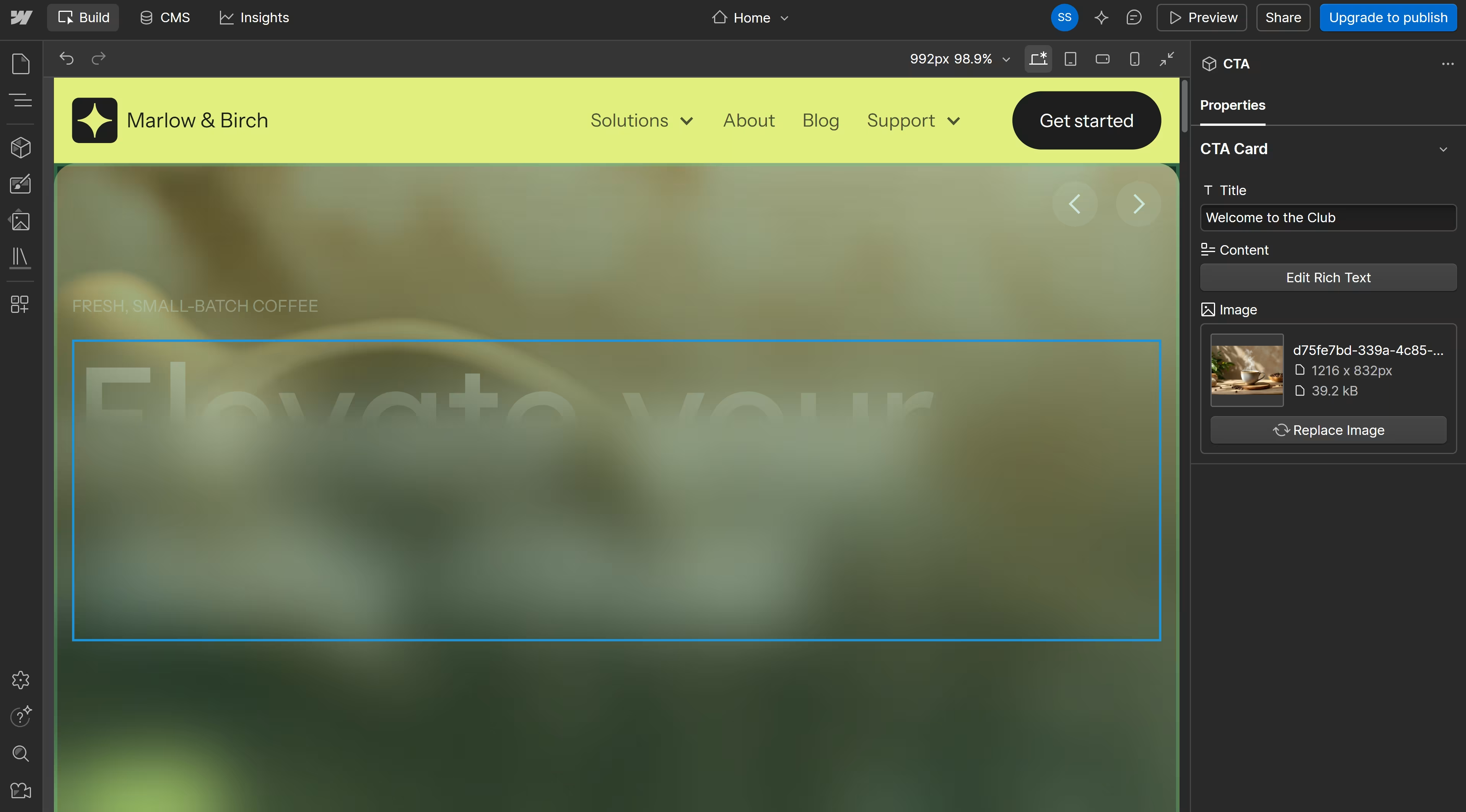
At first glance, the generated build looked like a solid fit. I could see the title and all. But on closer inspection in preview mode, I realized it was way off the mark.
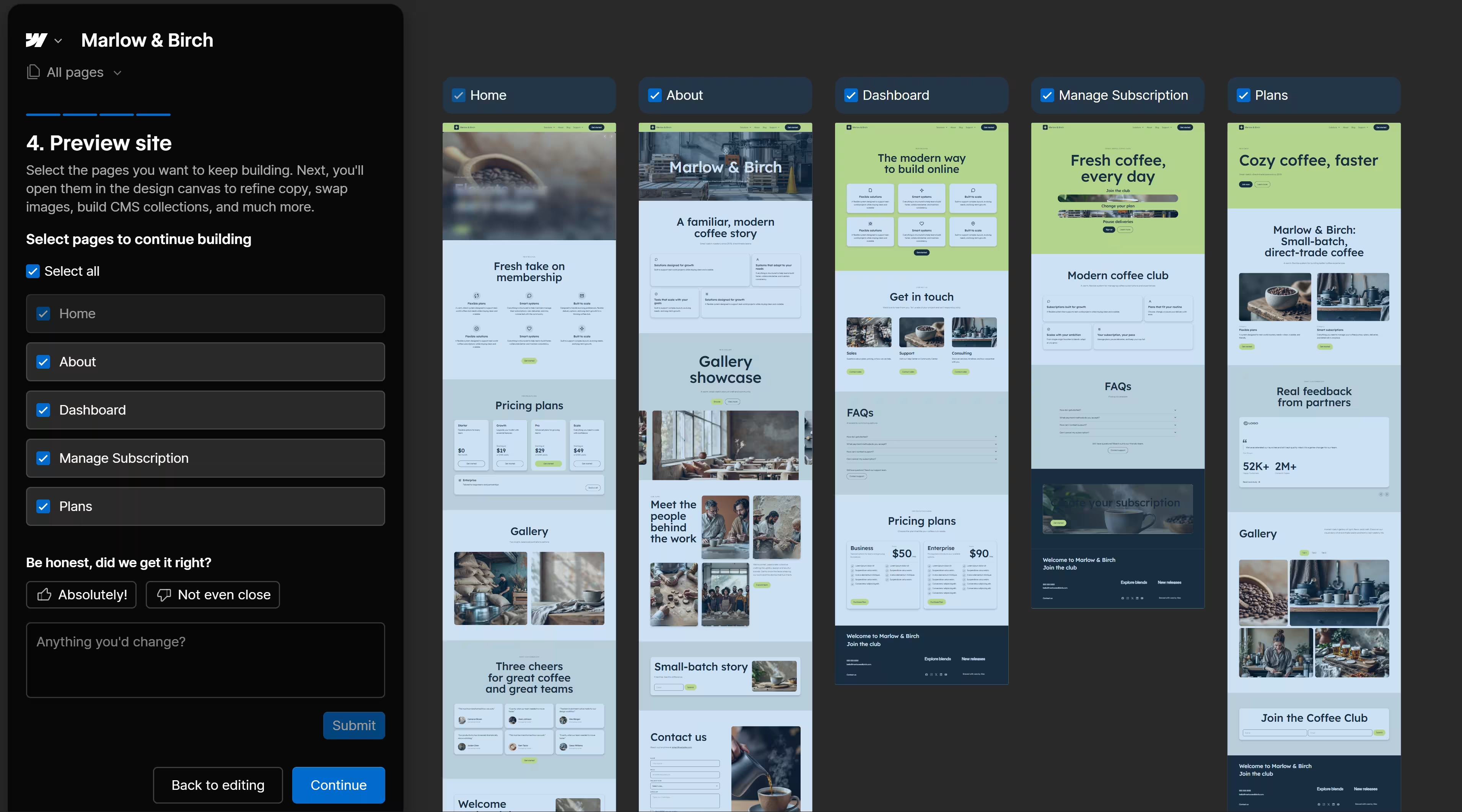
Design-wise, the lime-green-and-blue theme looked more like a software landing page than a warm coffee roastery. Webflow invented four plans called Starter, Growth, Pro, and Scale instead of using the three coffee subscriptions in the prompt. It also added generic testimonials, placeholder company names, empty image boxes, and repeated lines such as “Smart systems” and “Built to scale.”
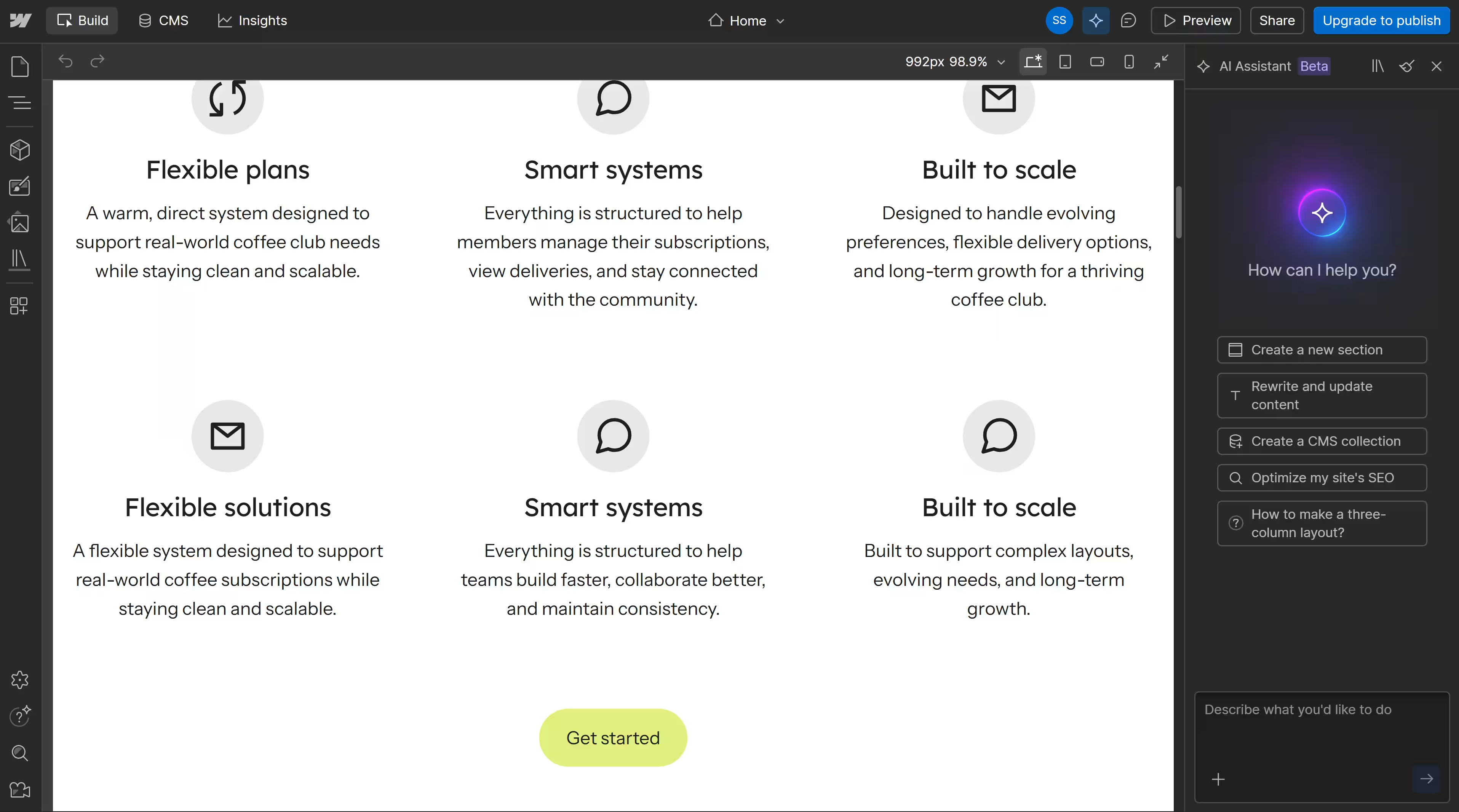
The navigation was unfinished, too. It showed Solutions, About, Blog, and Support, even though Webflow had generated Home, About, Dashboard, Manage Subscription, and Plans.
About and Blog did nothing when I clicked them.
Editing in Webflow can be done manually or with a prompt. I could select an element and change it myself, or select a generated section and ask the AI Assistant to revise it.
The AI assistant does not help you switch templates, though. Webflow templates are added to the dashboard as new sites; they do not replace the layout of an existing site. A full change of direction means either redesigning the current pages or starting a new site using the preferred template.
Key Features
- AI Site Builder: Generates a proposed structure of up to five pages, then lets you review the pages and sections before building them.
- Visual styling controls: The Style panel covers layout, spacing, position, typography, backgrounds, borders, effects, and responsive breakpoints.
- CMS Collections: Stores structured content such as blog posts, authors, projects, or locations in reusable collections.
- Interactions: Webflow’s visual GSAP timeline supports scroll effects, hover animations, and longer motion sequences without requiring JavaScript.
Pros
- The planning step lets you correct the sitemap and section order before generation
- The editor provides detailed control over individual elements and responsive layouts
- CMS Collections suit sites with a large amount of repeating or structured content
- Designers can create custom animations without writing JavaScript
Cons
- The AI draft used generic software copy, invented pricing, placeholder testimonials, and a theme that did not fit the brief
- Site-wide cleanup still meant finding and editing problem sections individually
- A different template cannot be applied to an existing site
- Basic has no CMS, and selling requires a separate Ecommerce Site plan
- Webflow User Accounts were disabled on January 29, 2026, so native customer logins and gated membership pages now require a third-party membership service or custom app work
Best For
- Design agencies building distinctive client websites
- Marketing teams with a designer or Webflow specialist available
- Content-heavy sites that need structured CMS collections
- Brands that care more about precise layout control than the quickest setup
What Users Say
On G2, Webflow holds a 4.4/5 rating from about 995 reviews. One reviewer captured its main strength and a tradeoff too: “with great power sometimes comes great complexity.” Learning curve, limited features, and price also appear among the platform’s recurring negative review tags.
Pricing
Webflow changed its Site plans in May 2026. New purchases now use Starter, Basic, and Premium, while online stores use separate Ecommerce plans.
- Starter: Free, with a Webflow subdomain, two static pages, and limited CMS access
- Basic: $25 monthly ($15 per month billed annually), with a custom domain but no CMS
- Premium: $39 monthly ($25 per month billed annually), with up to 20,000 CMS items and 40 Collections
- Ecommerce Standard: $42 monthly ($29 per month billed annually), with 500 ecommerce items and a 2% transaction fee
- Enterprise: Custom pricing
A Site plan covers the cost of publishing one website. Workspace plans are billed separately when a team needs broader collaboration, staging, or client-management features.
If you want a closer look at Webflow beyond the comparison, Webflow review covers its design capabilities, usability, pricing, and overall experience.
Migrating From Wix to Webflow
There is no automated Wix-to-Webflow conversion. Page layouts, styles, forms, and interactions must be rebuilt in Webflow, using the original site as a reference.
Wix CMS collections and store products can be exported, and structured content can then be imported into Webflow through CSV files.
Wix blog posts require manual copying. A domain registered through Wix cannot be transferred directly to Webflow because Webflow is not a registrar; it must remain with Wix and be pointed to Webflow via DNS, or be moved to another registrar first.
WordPress.com: Best for Content-Heavy Sites That Want Room to Grow
WordPress.com gave me two ways to start: build with AI or create the site myself.
The AI route sent me through domain selection and onto the plan page before I could enter the Marlow & Birch brief. The AI website builder is only available on paid plans, so I wasn’t too surprised.
I went back and chose the free self-build route.
The free route started with a template selection. Most of the coffee designs I found required Premium or Business, although filtering for free shop themes left two options (Attar and Winkel).
I chose Attar, but activating it did not install the polished shop shown in the preview. WordPress previews can use demo content, while activation applies the theme to the content already on your site.
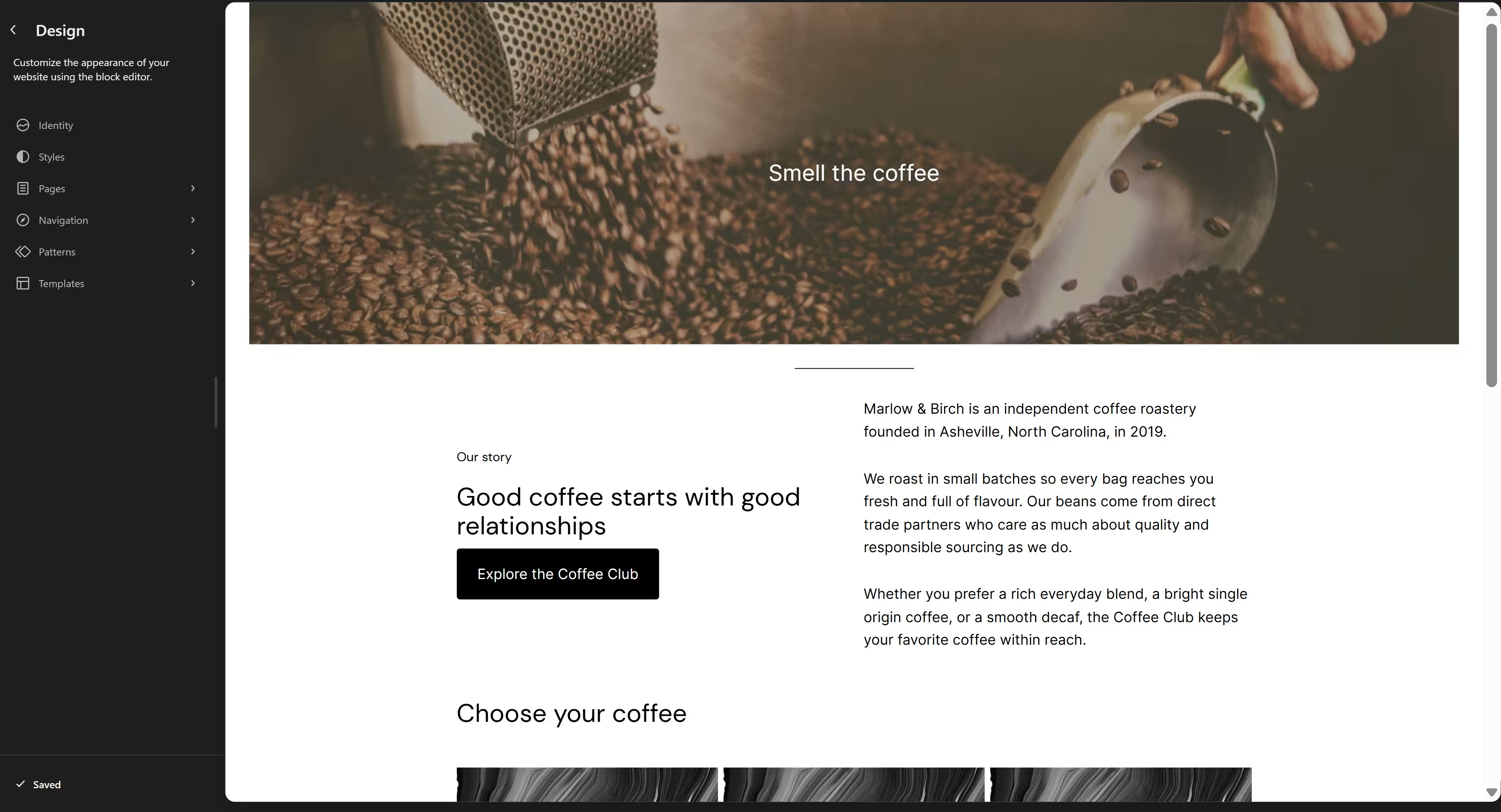
Since I couldn’t get a somewhat polished shop up and running from the start, I decided to build a basic homepage myself. The work was a tad annoying since design controls were spread across themes, templates, patterns, pages, navigation, and Styles.
And even when I tried to change the dreary black-and-white color palette to one of the custom palettes in the design menu, I was prompted to upgrade to a paid plan. Global colors, fonts, backgrounds, and layout spacing require Personal or higher, although individual blocks can still be edited separately.
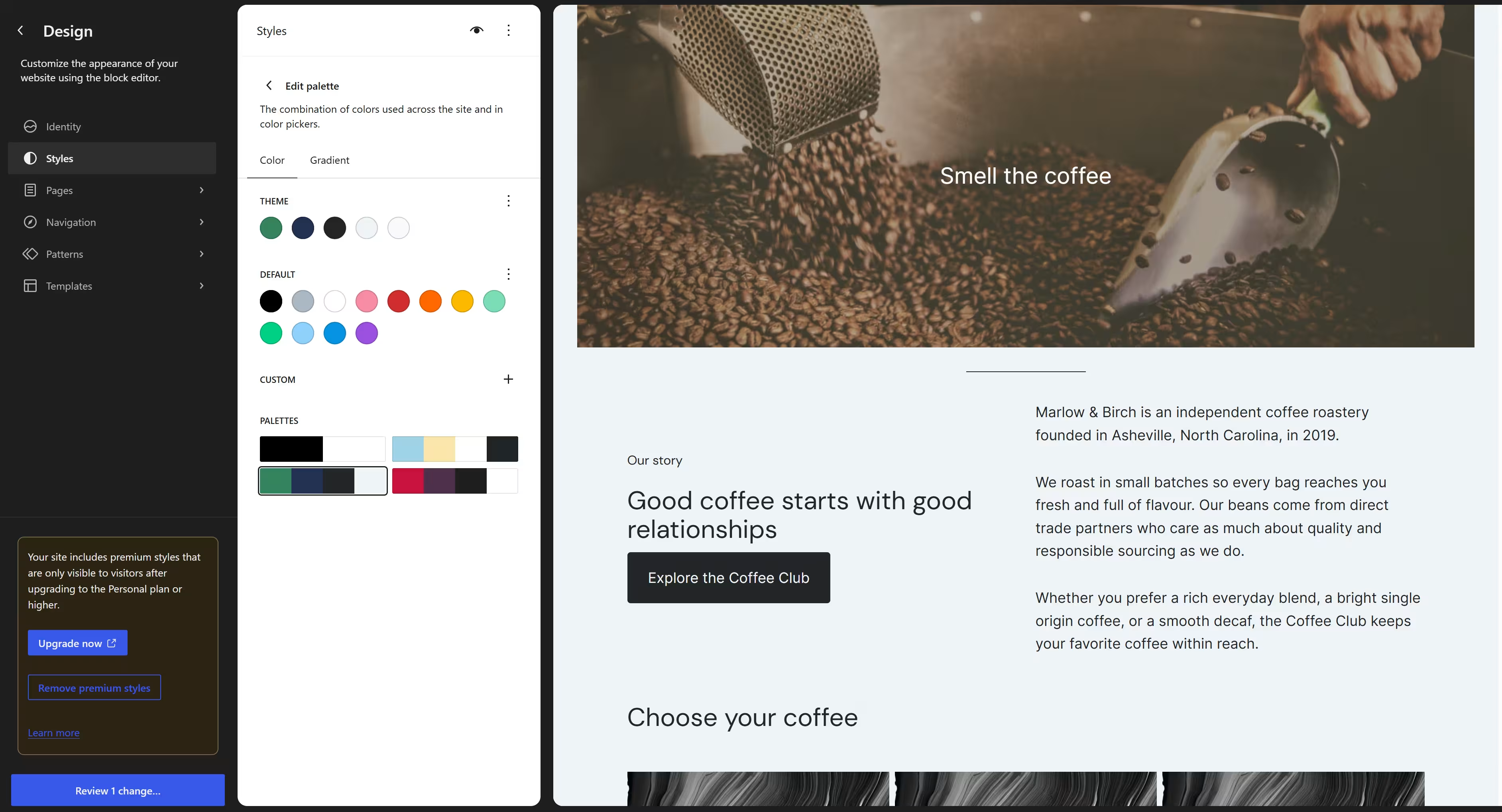
Other limits on a free plan include:
- Storage: 1 GB for images and other media files
- Domain: A WordPress.com address rather than your own custom domain
- Advertising: WordPress.com displays ads to visitors
- AI building: The AI website builder requires a paid plan
- Site-wide design: Global colors, fonts, backgrounds, and spacing cannot be published
- Plugins and themes: Installing plugins and uploading third-party themes require a paid plan
It’s not all bad news, though. The free plan still includes hosting, automatic WordPress updates, and unlimited pages, posts, users, and visitors. It also shows seven days of traffic statistics.
For a personal blog or a basic information site, that may be enough. A small business will probably need the Personal tier before WordPress.com feels like a practical Wix alternative. Personal removes the ads, adds a custom domain and site-wide Styles, and opens access to plugins and uploaded themes.
Key Features
- Block editor: Build pages from text, image, button, column, form, gallery, and other content blocks.
- Theme switching: Change themes without deleting existing pages, posts, or media, although the homepage and navigation may need checking afterward.
- Plugin access: Every paid plan includes access to plugins for stores, memberships, forms, SEO, booking, and other features.
- Content export: Export posts, pages, comments, categories, and tags as an XML file. The standard export does not include the theme, plugins, or design customizations.
- Wix importer: Import pages, images, menus, and the site title from Wix.
Pros
- Free hosting with no expiration date
- Unlimited pages, posts, users, and visitors on every plan
- Existing content stays in place when you switch themes
- Plugins and uploaded themes are available from Personal upward
- WordPress.com provides a first-party Wix importer
- Written content can be exported and moved elsewhere
Cons
- The AI website builder requires a paid plan
- The free plan uses a WordPress.com address and displays ads
- Free sites receive only 1 GB of media storage
- Plugins, uploaded themes, and global Styles require an upgrade
- Activating a theme may leave you with a bare site rather than the demo shown in its preview
- Common design tasks are split across several parts of the dashboard
Best For
- Blogs, publications, and content-heavy websites
- Businesses prepared to use Personal or a higher plan
- Teams that want access to WordPress plugins without managing their own server
- Site owners who want to change themes or export their content later
For a broader look at website-building options, Squarespace vs WordPress compares the two platforms across flexibility, ease of use, and customization.
What Users Say
On G2, WordPress.com has a 4.4/5 rating based on 2,700+ reviews. Reviewers like that they can update a site without coding, but getting the layout right can take time. Lovepreet S. said they did not need “any coding knowledge to start working on it” and found the export tools useful for backups and migration.
Matthew W., however, “struggled at first to get my thumbnails and excerpts to look right” and needed some trial and error. The feedback suggests the platform gets easier with use, but the initial setup can frustrate beginners.
Pricing
WordPress.com plans are available with monthly, annual, two-year, and three-year billing:
- Free: $0 with no expiration date, 1 GB of storage, a WordPress.com address, ads, and no plugin installation
- Personal: $9 monthly ($4 per month billed annually), with 6 GB of storage, a custom domain, no ads, plugins, uploaded themes, and global Styles
- Premium: $18 monthly ($8 per month billed annually), with 13 GB of storage, all premium themes, payment tools, Google Analytics, and SEO features
- Business: $40 monthly ($25 per month billed annually), with 50 GB of storage, backups, staging, SFTP and SSH access, database management, and developer tools
- Commerce: $70 monthly ($45 per month billed annually), with 50 GB of storage and WooCommerce store features
Annual paid plans include a custom domain for the first year. The domain renews separately at its standard rate afterward.
Migrating From Wix to WordPress.com
WordPress.com’s Wix importer transfers static pages, images, menus, and the site title. The Wix template and exact page styling do not transfer, so you still need to choose and configure a WordPress theme.
Wix blog posts are not included in the main import. An RSS feed can bring over the 20 most recent posts through an import plugin, while older posts may need to be copied manually. A Wix domain can be connected to WordPress.com or transferred after the new site is ready.
Shopify: Best for Ecommerce Businesses That Need Built-In Sales Infrastructure
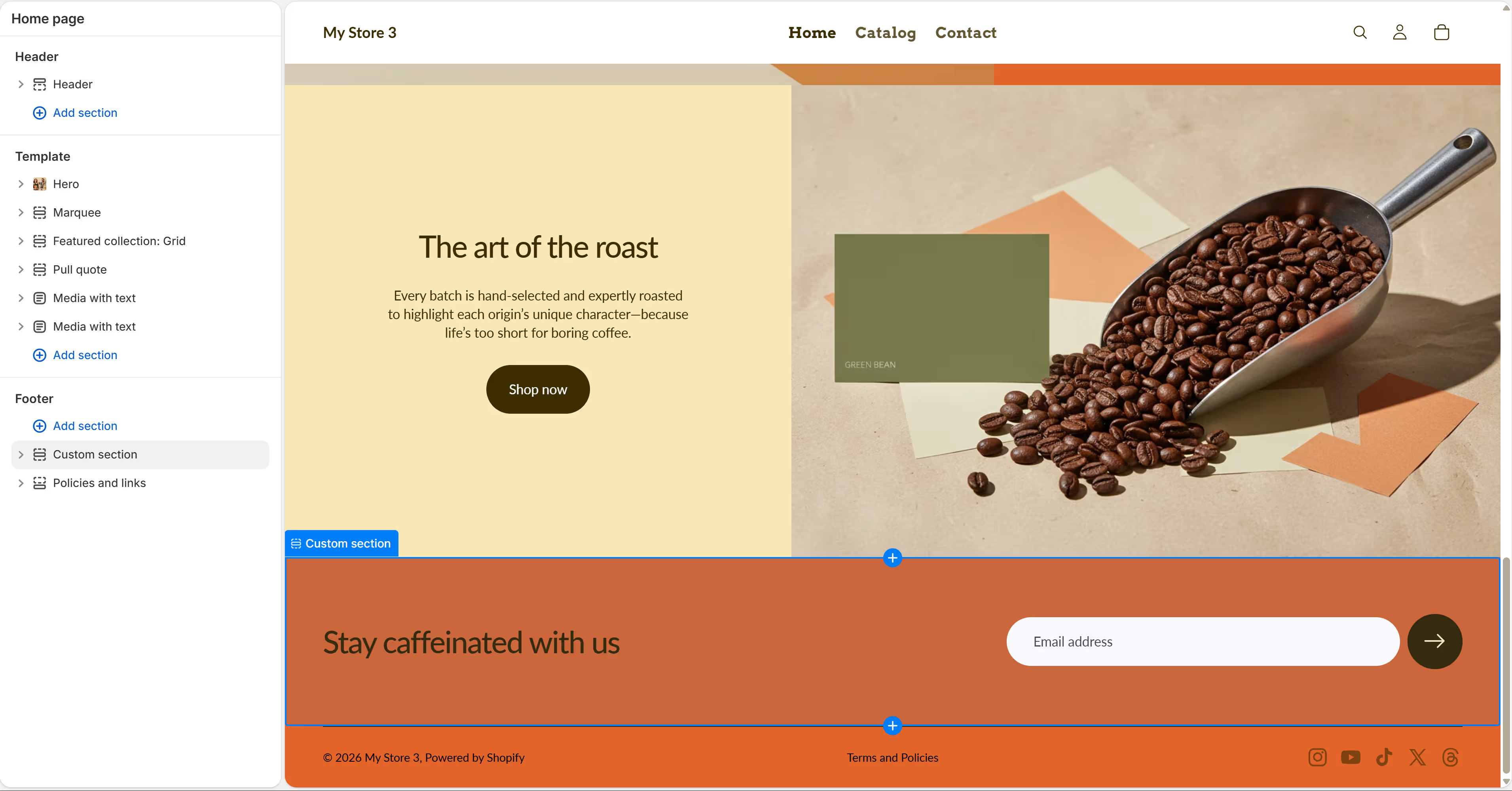
Shopify treated the store as the main product rather than a website with selling added later. Its Online Store page let me keep the default theme, browse ready-made designs, or describe the business and generate a custom storefront.
Shopify’s AI theme generator creates a free personalized theme from a written description, and it returned three visibly different designs for Marlow & Birch.
I chose the warmest Coffee Club option. The first draft already had Home, Catalog, and Contact pages, a contact form, product images, prices, customer account access, and several branded content sections. I wasn’t starting from a blank canvas.
My only issue was that Shopify did not populate my fictional store name while generating the build. But that was easily solved later with Shopify’s AI assistant, Sidekick.
Sidekick handled this site-wide change better than I expected. I asked it to replace “My Store 3” with “Marlow & Birch” everywhere. It created a to-do list, updated the main store setting, then worked through the header, footer, and SEO references.
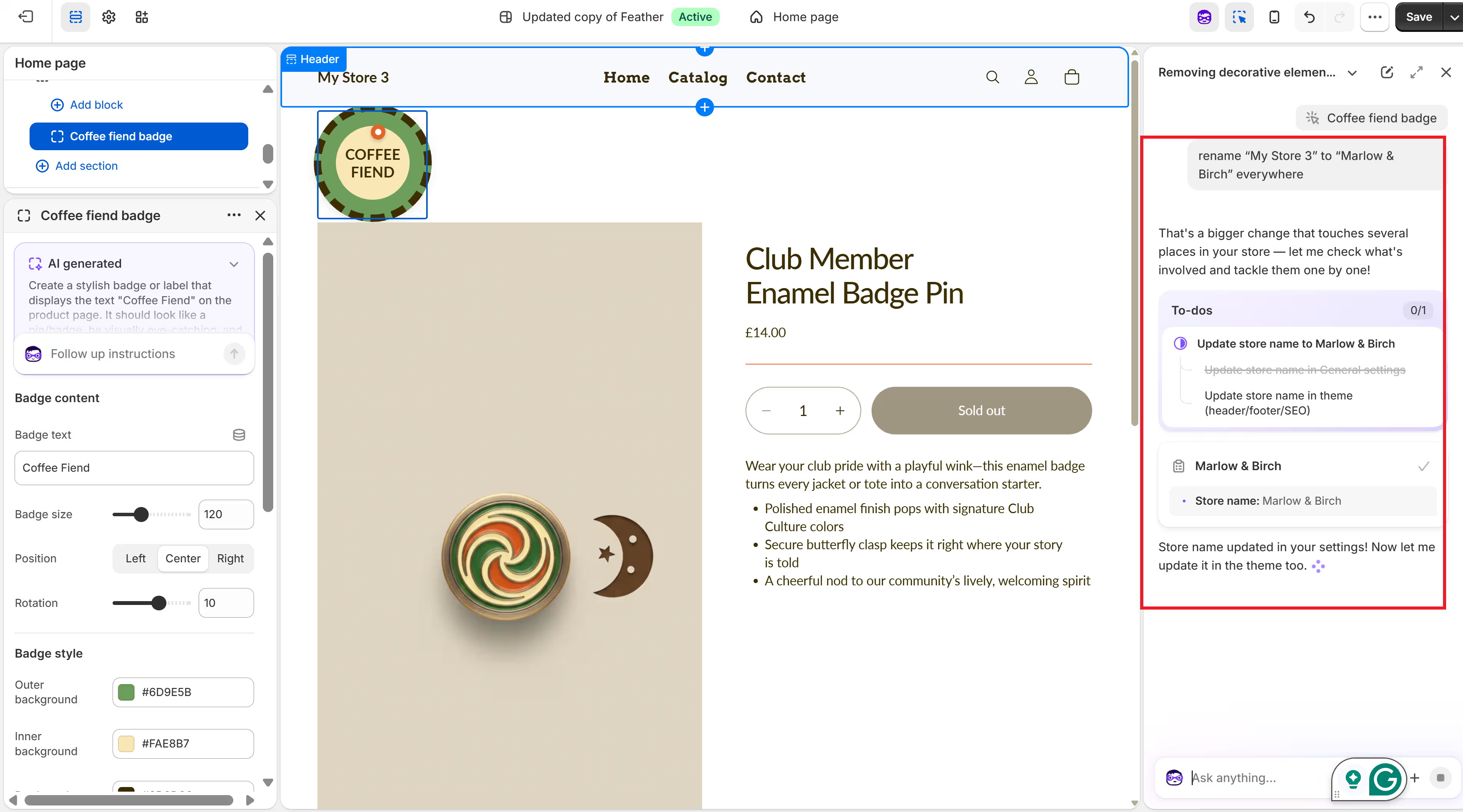
Shopify also lets you edit specific elements on your website manually or through prompting.
The selected-element test was less successful. I asked Sidekick to change an enamel badge (one of the products) to read “Coffee Fiend.” Instead of altering the original image, it generated a separate theme block.
The new block was functional, but the flat 2D illustration Shopify generated looked out of place.
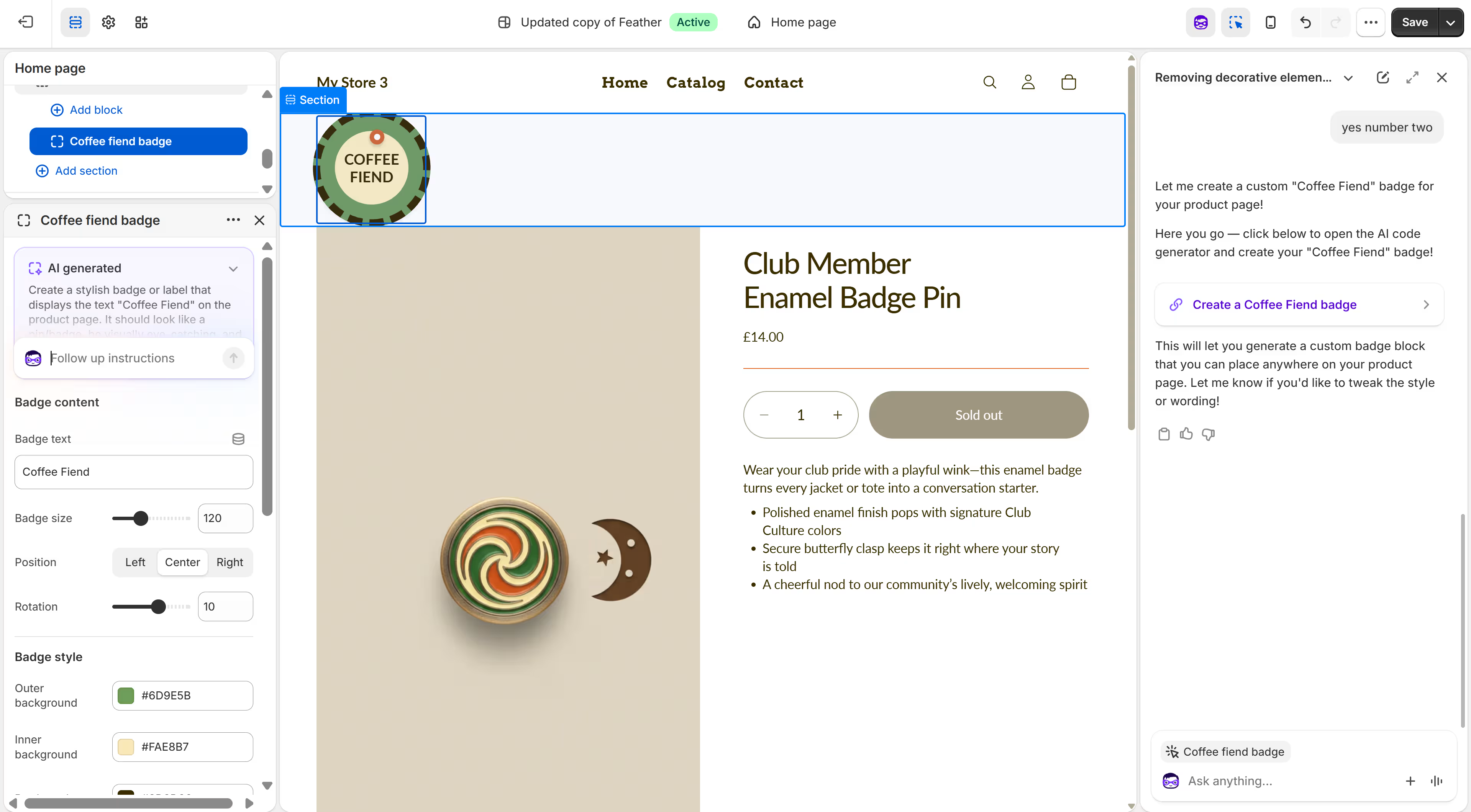
A better result would have required a much more specific prompt covering materials, depth, lighting, and the existing color palette.
Theme switching went more smoothly. Sidekick directed me to the Theme Library rather than changing the design itself. I added one of the previously generated options as a draft, previewed it, and published it over the original theme. The products, navigation, and Marlow & Birch name stayed in place while the page layout and visual direction changed.
Shopify’s Theme Store listed more than 1,200 free and paid themes when I checked. Stores on Basic, Grow, and Advanced can keep up to 20 themes in their library, allowing you to test another design without immediately replacing the live one.
The commerce foundations were already present. I could create a customer account, sign in, and access the customer-facing account flow. Shopify customer accounts let shoppers view orders, update profile information, reorder products, and manage returns where enabled.
Key Features
- AI storefront generation: Create a personalized starting theme from a business description, then edit it through a visual canvas.
- Sidekick: Ask for help with store settings, content, products, reports, customer segments, and other admin tasks.
- Customer accounts: Give customers access to their orders, profile details, addresses, returns, and repeat-purchase options.
- Inventory and order management: Manage products, stock, customers, orders, payments, and fulfillment from the same admin.
- In-person selling: All paid Shopify plans include core Shopify POS features, while POS Pro adds more retail, reporting, inventory, and staff tools for an extra charge per location.
Pros
- The AI generator produced three different store designs from one brief
- The first draft included products, navigation, a contact form, and customer accounts
- Sidekick completed a multi-step store-name change across settings and theme content
- The visual editor made individual sections and blocks easy to find
- Switching themes kept the products, navigation, and store identity intact
- Security is built-in; PCI compliance, hosting, and free TLS certificates are handled by Shopify
Cons
- The generated catalog ignored the requested Coffee Club plans and marked every item as sold out
- The AI-generated badge did not match the 3D style or finish of the existing product imagery
- Sidekick completed some jobs itself but only gave directions for others, including theme switching
- Deeper visual changes may require Liquid code, a paid app, or developer help
- Paid themes must be purchased before they can be published
Best For
- Product businesses that need an online store rather than a marketing site with a small shop
- Merchants managing products, inventory, customers, orders, and payments from one system
- Businesses that want to sell through a website, social channels, marketplaces, and physical locations
- Store owners who want AI help but are comfortable reviewing and refining its work
What Users Say
Shopify holds a 4.4/5 rating from 5,100+ G2 reviews. One reviewer said, “the initial setup was very easy.” But cost was a common complaint, with another reviewer stating that “Shopify’s main disadvantages include hidden costs from paid apps”.
Pricing
A full Shopify storefront starts with Basic.
- Basic: $39 monthly, or $29 per month with annual billing, with a full online store, unlimited products, and core selling features
- Grow: $105 monthly, or $79 per month with annual billing, adding five staff accounts, lower card rates, and more reporting
- Advanced: $399 monthly, or $299 per month with annual billing, adding 15 staff accounts, third-party calculated shipping rates, and regional store controls
- Plus: $2,500 per month on a one-year term or $2,300 per month on a three-year term, with custom checkout options, B2B tools, and additional enterprise controls
Using Shopify Payments avoids Shopify’s additional fee for using a third-party payment provider, but standard card-processing fees still apply. Prices and processing rates vary by country.
If you’re exploring different ways to build and manage an online store, Best Shopify Alternatives and Competitors looks at platforms that offer an alternative to Shopify.
Migrating From Wix to Shopify
Shopify provides a first-party Wix migration process. Its Store Migration app is in early access and available only to some stores on desktop, but it can import Wix products and customers from a Wix CSV file.
The migration does not recreate the Wix design. The Shopify theme, homepage sections, navigation, and styling still need to be set up separately. Orders can be processed via CSV files, while Wix reviews require a separate review app or a manual import.
Hostinger: Best for Budget-Friendly Websites and Web Apps
Hostinger has two separate building products, and that distinction shaped my test. Hostinger Website Builder is the conventional option, with AI generation, more than 300 templates, and a drag-and-drop editor.
Hostinger Horizons is the prompt-based builder for custom browser apps with accounts, data, and application logic.
The Website Builder route did not work for me. As soon as I filled in my prompt and fictional site details, Hostinger herded me to the pricing page and told me to upgrade to a Business Website Builder plan offer.
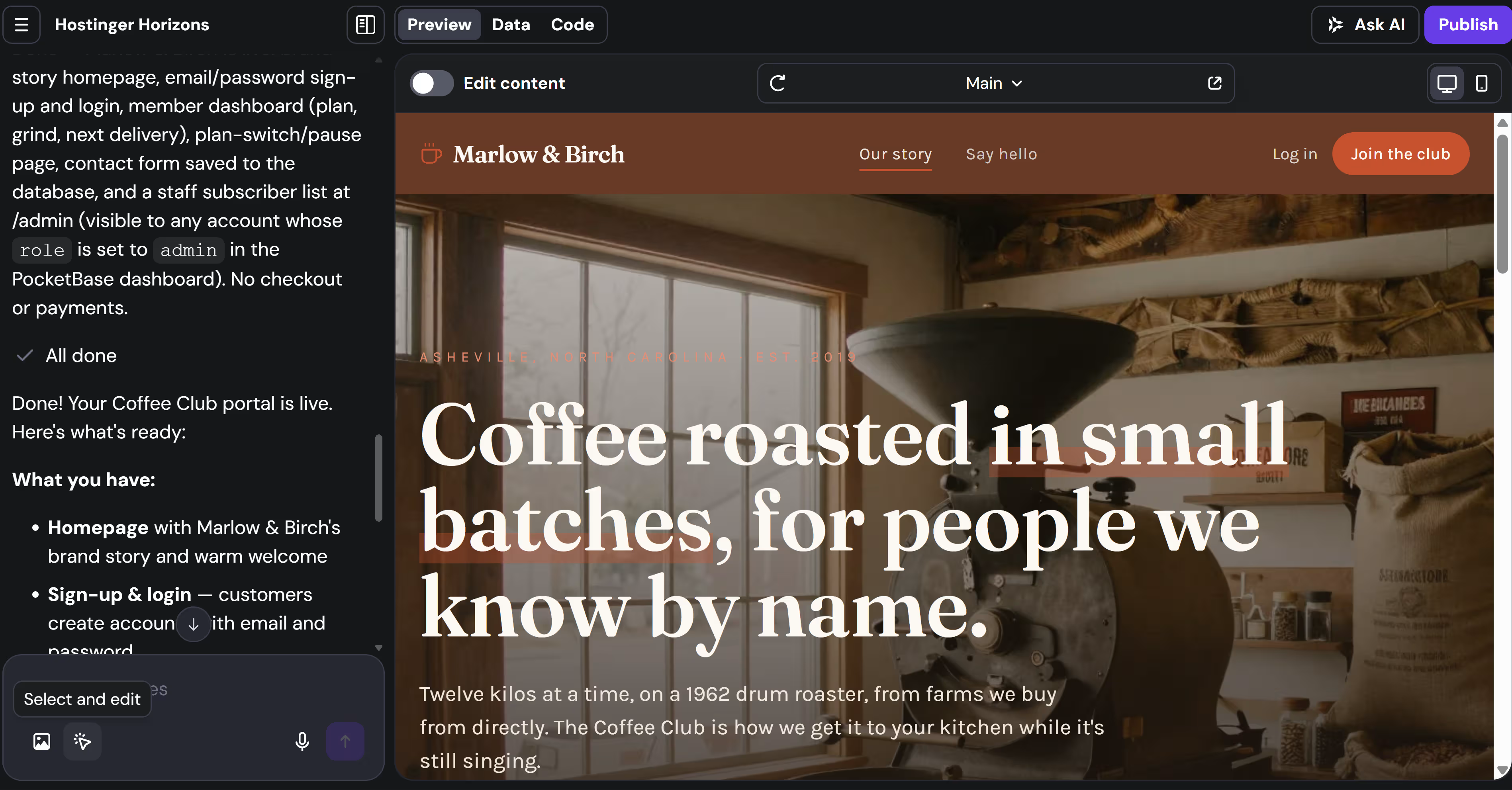
Horizons handled the full brief differently. Before building, it asked whether customers should pay through the site or whether this was a portal for subscriptions managed elsewhere. I chose the portal, which kept the project focused on account access and plan management rather than adding checkout.
Horizons created the homepage, email-and-password sign-up, member login, customer dashboard, three coffee plans, delivery dates, plan switching, pausing, a contact page, and an /admin route.
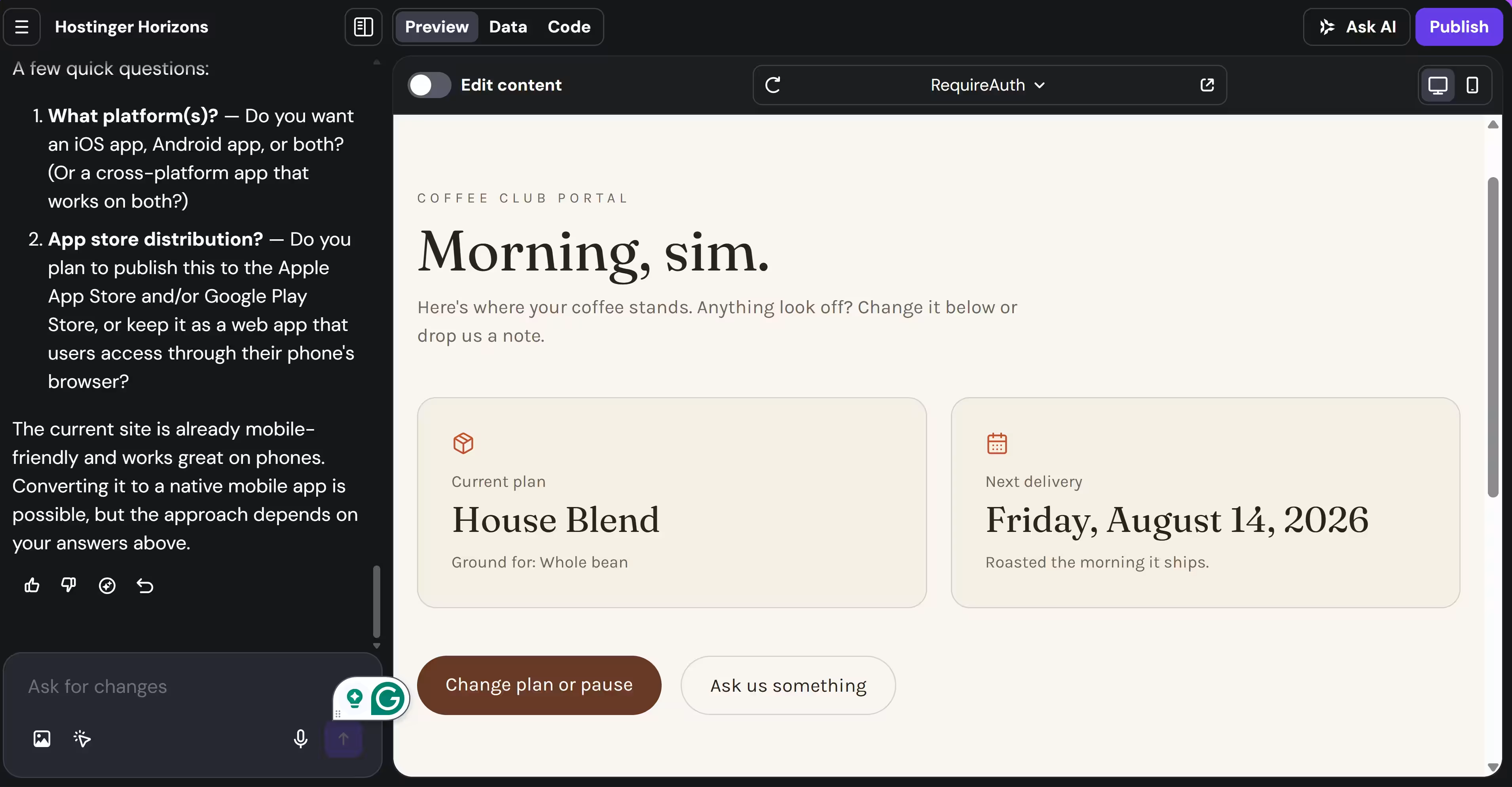
The customer side worked well. I created an account, signed in, and saw all my subscriptions. I could also pause, resume, or switch subscriptions.
The admin side was less convincing. Horizons created an /admin route, but clicking it in the preview did nothing. Its build notes first said the page required an account with an admin role, while the assistant later claimed it could be opened without a separate admin login.
I ran out of Horizons credits before I could ask for a repair, so I would not count the admin view as finished.
Publishing your website also requires an upgrade. And so does code export. An edited export cannot be imported back into Horizons for more prompting.
Horizons does not do mobile apps. It can create responsive web apps and includes a mobile preview, but native iOS and Android apps are outside its current scope. App Store or Google Play distribution would require a separate mobile development process.
Key Features
- Two build paths: Use Website Builder for templates and drag-and-drop editing, or Horizons for prompt-built websites and browser apps.
- Accounts and data: Horizons Explorer and higher support user accounts, logins, and data storage.
- Project views: The Horizons workspace includes Preview, Data, and Code areas, plus a mobile layout toggle.
- Code ownership: Paid Horizons users can download the generated React and Vite project.
- Ecommerce: Business Website Builder supports up to 1,000 products and more than 100 payment methods, with no additional Hostinger transaction fee.
- Bundled services: Paid plans can include hosting, email mailboxes, and a domain, depending on the product and term selected.
Pros
- Horizons understood the difference between a storefront and a member portal before it started building
- Sign-up, login, the customer dashboard, and plan switching worked
- The first design used the correct company name and matched the coffee-roastery direction
- The Data area exposed the user and contact-message collections
- Website Builder combines hosting, site creation, and ecommerce in one subscription
- Paid Horizons plans allow code export rather than keeping the project entirely inside the builder
Cons
- The /admin route existed but did not open in the preview
- Horizons gave conflicting explanations about how admin access worked
- Five free credits were not enough to build, test, and repair every part of the portal
- The free Horizons plan cannot publish the project or export its code
- Native App Store and Google Play publishing are not supported
- The lowest Website Builder prices require paying for 48 months upfront
- Website Builder and Horizons are separate products with different plans, limits, and editing experiences
Best For
- Solo founders launching a basic business site on a small budget
- Small stores that want ecommerce and hosting bundled together
- Customer portals, dashboards, and internal tools that need accounts and stored data
- Founders who want to prototype a browser app without starting with code
- Projects that do not need native iOS or Android distribution
What Users Say
Hostinger has a 4.4/5 rating from 830 G2 reviews. A reviewer called it “very affordable and user-friendly” and said the AI features made it easier to launch a first website. But another reviewer found that advanced settings “feel a bit limited” and noted that one-month plans cost more than longer commitments.
Pricing
Hostinger Website Builder and Hostinger Horizons have separate pricing. The Website Builder discounts below require a 48-month payment upfront, while the Horizons prices are based on a 12-month term.
Hostinger Website Builder:
- Premium Website Builder: Paid as $143.52 upfront; renews at $10.99 per month
- Business Website Builder: Paid as $181.92 upfront; renews at $16.99 per month and adds e-commerce and the broader AI toolset
Hostinger Horizons:
- Free: $0 with five AI credits, one project, no hosting, and no publishing
- Explorer: $6.99 per month billed annually, with 30 monthly credits, one project, hosting, accounts, logins, and data storage
- Starter: $13.99 per month billed annually, with 70 monthly credits, up to 25 projects, subscriptions, product sales, analytics, and collaboration
- Hobbyist: $39.99 per month billed annually, with 200 monthly credits, up to 50 projects, the code editor, and project duplication
Explorer, Starter, and Hobbyist renew at the same displayed monthly rate after the first annual term.
Migrating From Wix to Hostinger
Hostinger’s assisted migration service is intended for sites built with open-source systems such as WordPress or Joomla. Sites made with proprietary website builders must be recreated, so a Wix layout cannot be moved into Website Builder or Horizons as a finished design.
When Your Project Needs More Than a Website
A website builder can take you a long way. The friction starts when the site needs to remember users, apply different permissions, update information across several screens, or show customers and staff completely different views.
The five tools above can still handle these requirements. The difference is how much you have to assemble yourself.
Where each tool starts to stretch
- Squarespace: Member Sites can restrict content to signed-in members, while extensions and client-side code can add more features. However, Squarespace does not support server-side code, so a custom portal or internal workflow usually needs an outside service or developer.
- Webflow: Design and CMS remain its strengths, but Webflow retired its native Logic and User Accounts tools. Customer logins, gated areas, and workflow automation now rely on partner apps or custom development.
- WordPress: Paid WordPress.com plans can install plugins and add custom code, so the platform can stretch far beyond a standard website. The tradeoff is choosing, configuring, paying for, and managing those additions yourself.
- Shopify: Apps and Functions can change customer accounts, checkout, delivery rules, discounts, and other store logic. That suits commerce workflows, but a broader client portal or non-commerce product may require several apps or custom development.
- Hostinger: Horizons came closest to an app builder. It created customer accounts, stored subscription data, a member dashboard, and plan switching. But the admin route did not work in my test. Hostinger does not create native iOS or Android apps either.
Mobile is another place where these tools fall short. Every tool I tested gave me a website or web app that worked in a phone browser, but none produced a native iOS or Android app ready for the App Store or Google Play.
For a brochure site, that may well be all you need.
It becomes more limiting when customers are expected to return frequently, receive push notifications, upload photos using their phone’s camera, or manage their account without first finding the right browser tab on a tiny phone screen.
People spent about 3.6 hours a day in iOS and Google Play apps in 2025, so asking customers to keep returning through a browser can add friction for a service built around repeat use.
The same tradeoff applies to custom logic and code.
These tools can be extended through plugins, apps, or development. But the more the product depends on connected customer and admin views, permissions, stored data, and native mobile access, the more you have to assemble around the website builder.
Instead of stitching add-ons around a website builder, you can build the whole thing in a custom app builder like Emergent.
How to Choose the Right Wix Alternative
Start with the problem you need the new platform to solve. A platform can suit your industry and still be wrong for the most important part of your website.
1. Identify the Main Job
- Selling products: Put Shopify on the shortlist when checkout, orders, inventory, and shipping drive the business
- Running accounts or workflows: Consider Emergent when customers need sign-in, dashboards, subscriptions, approvals, or a native mobile app
- Booking services: Consider Squarespace when polished service pages and appointments are the priority
- Publishing content: Look at WordPress.com when articles, guides, and other content will shape the site over time
- Controlling the design: Consider Webflow when layouts, responsiveness, and interactions need closer control
- Launching quickly: Look at Hostinger when you need a standard business site without a long or expensive setup
2. Decide What Cannot Go Wrong
Several platforms may still fit. A store might also care deeply about design. A service business might sell products. A content site might need paid memberships.
Choose based on the part of the website that has the biggest effect on revenue, customer service, or daily operations.
For example:
- A product brand may compare Shopify, Webflow, and Squarespace, then decide whether commerce, design control, or simpler site management matters most
- A membership business may compare Squarespace, WordPress.com, and Emergent, then decide how much account logic and connected data it needs
- A publisher with a small store may compare WordPress.com and Shopify, then decide whether content or selling drives most of the business
Those are examples, not fixed pairings. Any two or three platforms may overlap depending on the project.
3. Check the Reason You Are Leaving Wix
The replacement should fix a specific problem rather than move it to another dashboard.
- Design limits: Check how much control you get after the first template or generated draft
- Rising costs: Include paid apps, plugins, transaction fees, and plan upgrades
- Missing features: Confirm the feature works without several extra services
- Locked-in content: Check what data, content, and code you can take elsewhere
- Hard daily management: Make sure the person running the site can update it confidently
4. Test the Most Important Task First
Recreate one core customer journey before moving the whole site.
A store could test adding a product and completing an order. A service business could test booking and rescheduling. A membership business could test sign-up, account changes, and staff access.
The right alternative is the one that handles your most important task well and fixes the reason you started looking beyond Wix.
When a Website Builder Isn't the Right Fit Anymore
You probably will not outgrow a website builder all at once. The signs usually appear gradually. Customers need accounts, your team needs different access, records must stay in sync, or the product needs approvals, payments, and mobile access.
Once several of those needs depend on one another, switching templates will not solve much. You need a platform that supports how your product works, rather than forcing you to piece it together through add-ons.
Emergent lets you build around your own requirements, including internal tools, customer-facing products, marketplaces, and native mobile apps.
Build the version your business has grown into.

Every alternative has trade-offs. Emergent just builds production-ready apps from one prompt.
- Production-ready apps
- Web & mobile apps
- Deploy in minutes







