



Bubble vs Lovable: What's the Difference?
Bubble and Lovable can both generate an app from a prompt, then let you refine it through AI and visual editing. The main difference is how you control the app after the first generation.
Bubble keeps the interface, database, and workflows inside its visual development environment. Lovable creates a code-based web project that you can continue changing through prompts, visual edits, direct code changes, or GitHub.
- Choose Bubble if: You want to manage your app's design, data, and workflows visually without reading or editing code, and you are comfortable keeping the app on Bubble.
- Choose Lovable if: You want a prompt-led building process with access to the underlying code, either to inspect it yourself or hand the project to a developer later.
Bubble and Lovable keep coming up in the same conversation. Ask where to build a first app without an engineer, and both names show up, often in the same sentence, like they're two versions of the same answer.
For a founder without an engineering team, the risk is choosing based on how quickly each tool gets started, only to find the app is difficult to fix, secure, scale, or hand off to a developer. To test this, I built the same app on each platform, then compared the workflow logic, code access, security defaults, and cost.
You'll know which one fits how you'd build, and whether either gets you all the way to a finished product, or if that still takes a third tool.
Meet Bubble
Bubble is a visual development platform where founders can design pages, structure a database, and connect actions through workflows. It also hosts the editor and the apps built with it, so you don’t need to set up a separate database or hosting provider before launching.
Bubble also has a large marketplace for extending the platform's capabilities. It currently lists more than 7,000 plugins and 1,600 templates, including options for payments, analytics, bookings, dashboards, and other common app requirements.
Meet Lovable
Lovable is built around the app’s code rather than a marketplace of community plugins. You can inspect and edit the source code inside Lovable, download the project, or sync it with GitHub when a developer needs to review the code or continue working outside the platform.
You also don’t have to begin with an empty prompt. Lovable has remixable templates for apps, SaaS products, internal tools, ecommerce sites, portfolios, and other projects. External services are added through app connectors, chat connectors, and API integrations, rather than Bubble-style plugins that you install from a community marketplace.
How I Tested
I gave Bubble and Lovable the same brief and compared how far each got, what needed manual cleanup, and how well the approval logic held up.
Build: A gear rental system for a fictional boutique photo and video equipment shop, Aperture Rentals. Standard gear (tripods, lighting kits, basic lenses) books instantly, while high-value gear (cinema cameras, drones) needs owner approval first, since it requires a deposit and ID check.
A dashboard lets the shop owner see all requests, approve high-value bookings, and see who is on the waitlist once an item is fully booked.
The prompt I used on Lovable and Bubble's AI App Generator:
"Build a gear rental system for a photo and video equipment rental shop called Aperture Rentals. Customers submit a request choosing gear and a rental date range. Standard gear (tripods, lighting kits, basic lenses) books instantly. High-value gear (cinema cameras, drones) needs owner approval before it is confirmed, since it requires a deposit and ID check. The owner dashboard shows all requests, lets the owner approve high-value bookings, and moves a request to a waitlist automatically once an item is fully booked for that date range."
The build tests a conditional approval branch: high-value gear needs a sign-off, standard gear doesn’t. It also tests a waitlist trigger tied to inventory running out. It's exactly the kind of multi-step conditional logic these two platforms handle very differently.
I compared:
- Time to a working first version
- How much manual cleanup the AI output needed
- Whether the approval branch and the waitlist trigger both worked correctly
- Data ownership and export options
- How easily a Stripe deposit charge could be added for high-value bookings
- Whether existing plugins, templates, or starting points sped up either build
Bubble vs Lovable: At a Glance
The clearest decision points are how you make changes, what you can take elsewhere, and whether native mobile publishing matters.
| Decision Area | Bubble | Lovable |
|---|---|---|
| Best for | Non-technical founders who want to inspect and change app logic visually | Founders who want to build through prompts and retain access to the code |
| How you make changes | Continue prompting the AI oredit the pages, data, and workflows visually | Continue prompting, use visual edits, orchange the source code directly |
| Code portability | You can export your data, butthe application logic can’t be exported as code | You can download the project code orsync it with GitHub |
| Native mobile | Itsnative iOS and Android builderis available in beta | It buildsmobile-friendly web appsrather than native mobile apps |
| Main compromise | Leaving Bubble means rebuilding the application logic elsewhere | Native mobile publishing requires a different development route |
Bubble vs Lovable: Feature-by-Feature Comparison
Bubble and Lovable differ less in whether they can generate an app and more in what they ask you to manage afterward. The better choice depends on the control you need, the work you are willing to handle yourself, and how much flexibility you want later.
The sections below compare Bubble and Lovable across app building, workflow logic, code ownership, security, integrations, mobile support, and pricing.
Bubble vs Lovable: The Build Test
I gave Bubble and Lovable the same Aperture Rentals brief, a gear-rental app with three booking rules. Standard items should be confirmed immediately; high-value items should require owner approval; and requests for unavailable dates should be moved to a waitlist.
Bubble’s build snapshot:
- Build time: 8 minutes after one stalled attempt
- What worked: Owner-side approval and rejection, catalog browsing, search, and filtering
- What blocked the app: A broken inventory form, a misdirected request link, and failed customer submissions
- Main logic gap: Every item was treated as high-value, regardless of its assigned tier
Bubble needed two attempts to generate Aperture Rentals. The first build stalled at 55% and remained there until I restarted it.
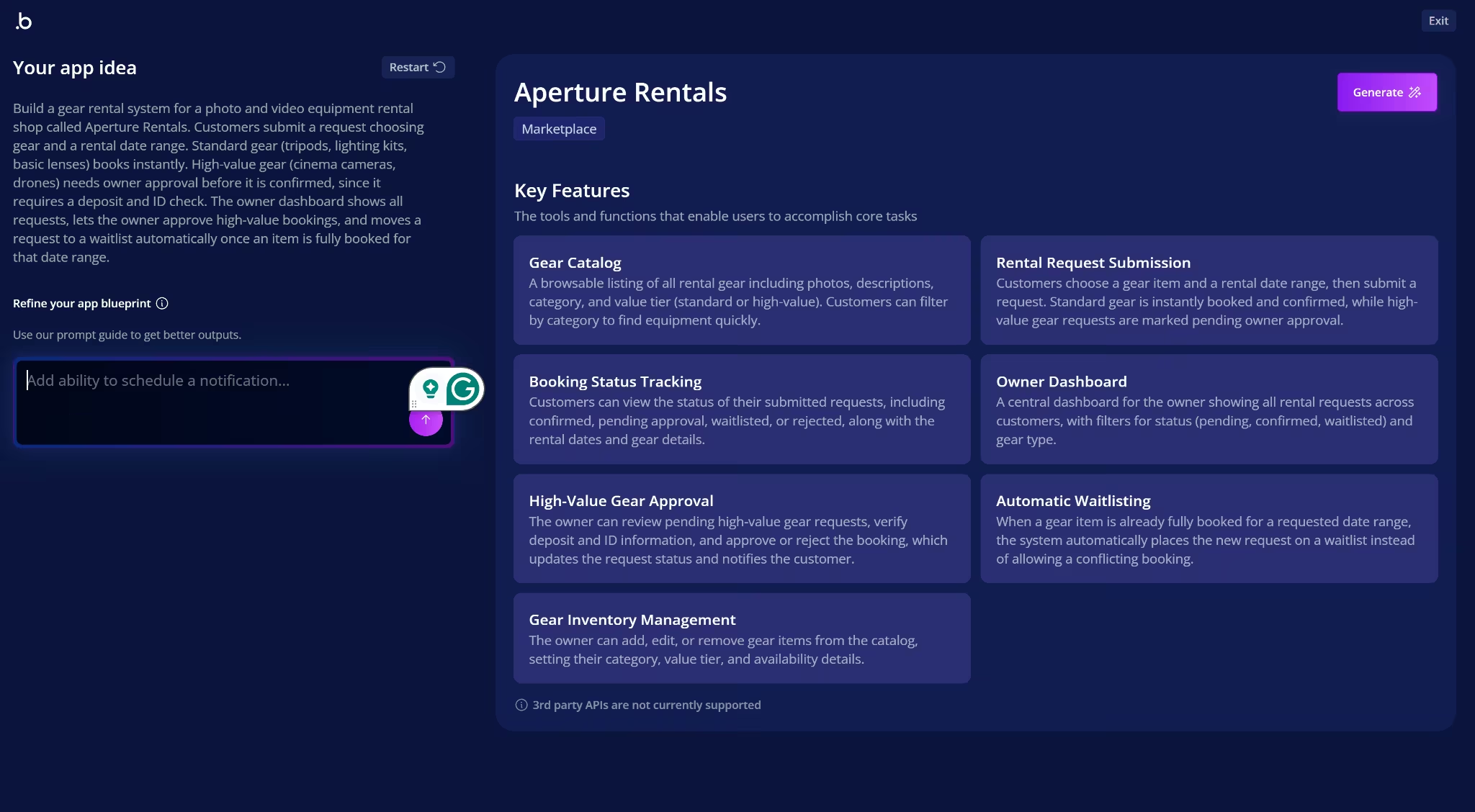
The second attempt finished in 8 minutes. Before building, Bubble turned the brief into a blueprint with seven features covering the catalog, rental requests, approvals, waitlisting, and inventory management. It also recognized that standard and high-value items needed different booking paths.
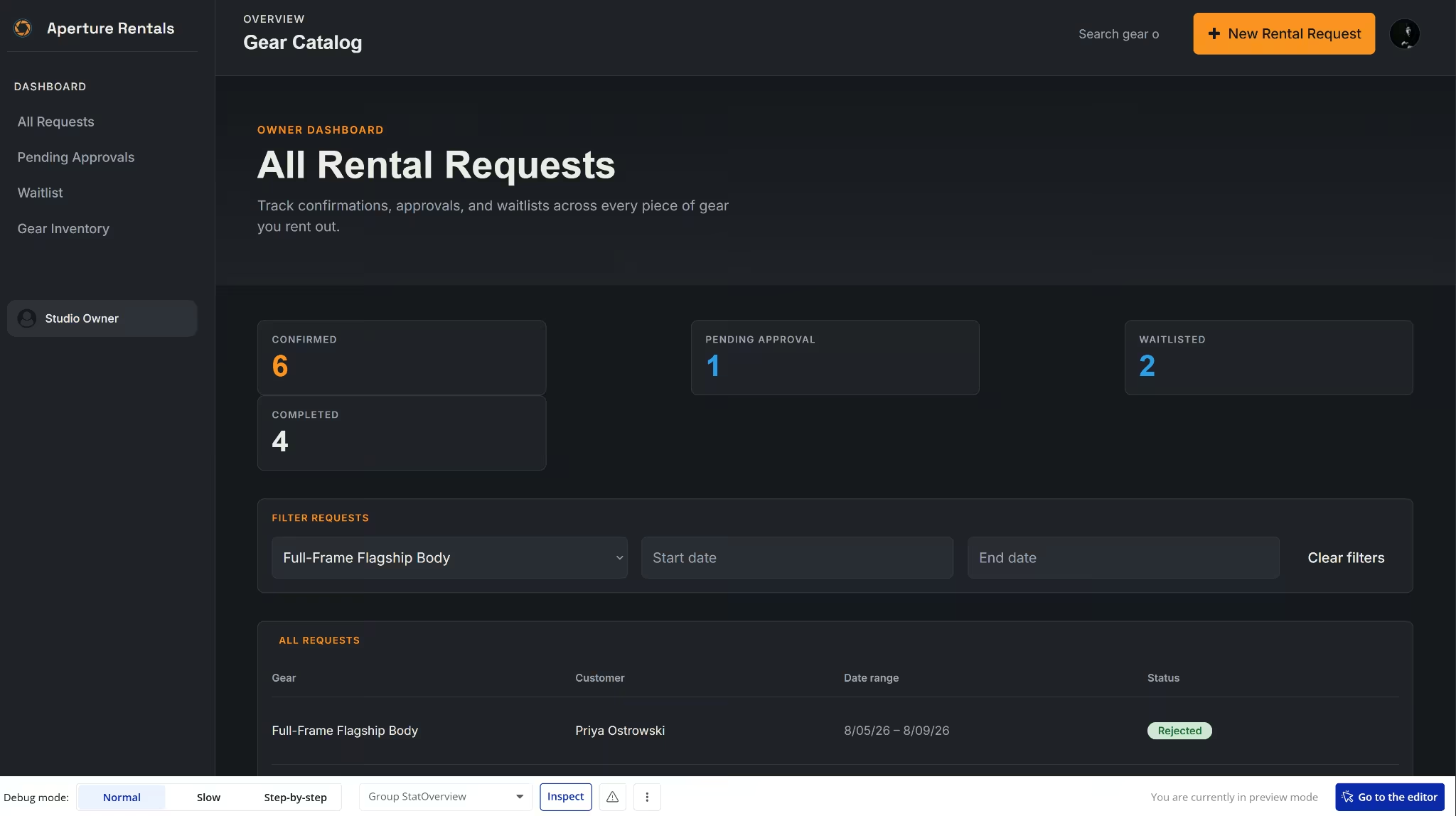
The owner side worked well. Pending requests could be approved or rejected, their statuses updated correctly, and the dashboard filters returned the right bookings. Bubble also added Completed and Rejected as separate states, even though I had not requested them.
Problems appeared once I moved beyond the existing requests:
- Broken inventory form: Some fields stopped accepting changes after I entered the item name, and saving the form didn’t create a new inventory record.
- Misdirected request link: The main option for starting a rental request opened the owner dashboard instead of a customer form.
The customer homepage itself was well put together. It included more than 15 items, category and tier labels, search, and working filters. Customers could also open a request form from an individual gear card, which gave me another way to test the booking flow.
The customer request flow failed at that point. Every item opened the high-value request form, including standard gear that should have qualified for instant booking. Submitting the form didn’t create a request.
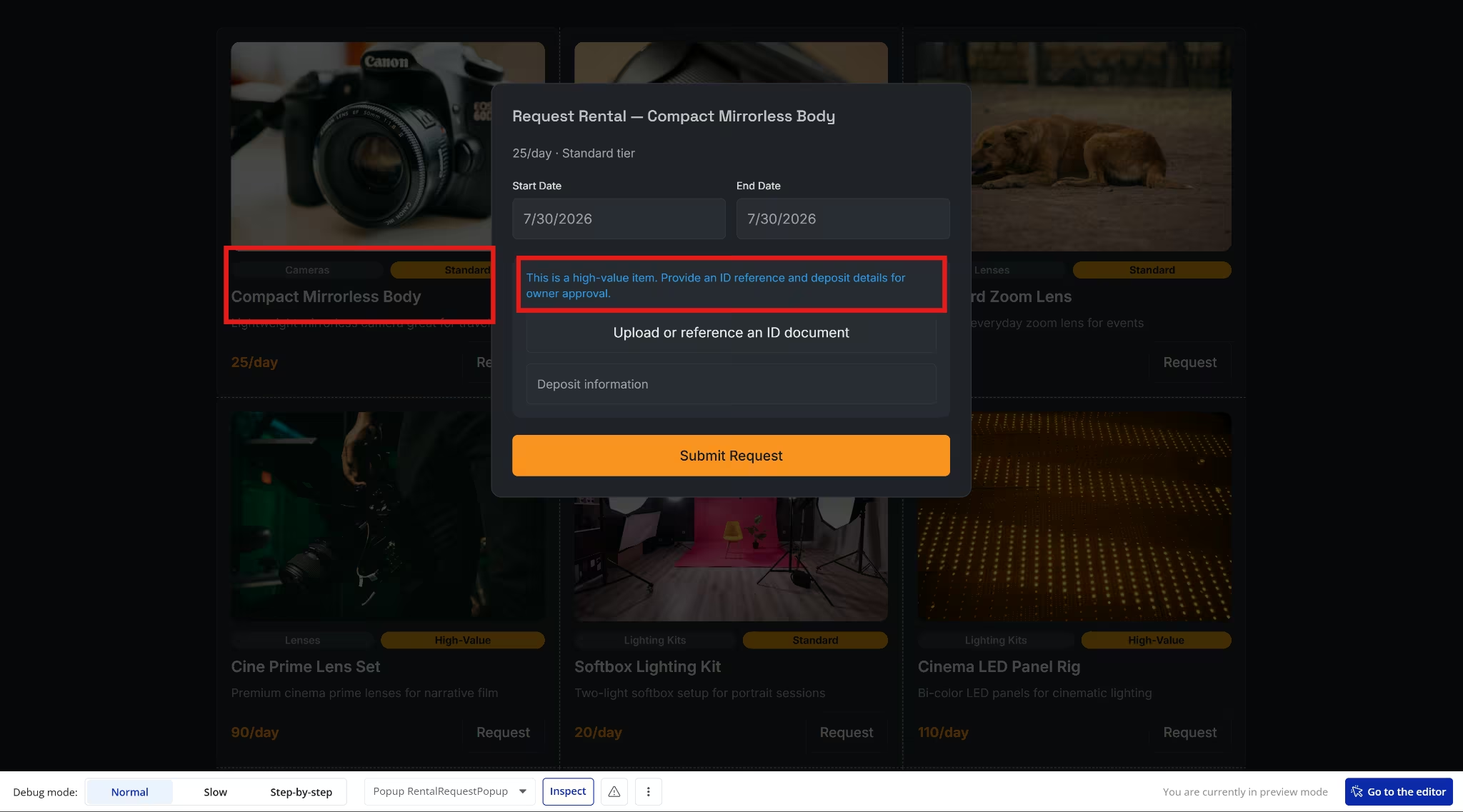
The failed submission meant I could not test whether overlapping dates would trigger the waitlist. I am treating the waitlist path as untested rather than broken.
Bubble’s issue checker found four unresolved problems, including a missing navigation state and field-type mismatches connected to the broken inventory and request flows. It directed me to the affected parts of the visual editor, but each fix still required manual work.
Bubble also gave the catalog’s Standard and High-Value badges the same amber color. The label text remained different, but the visual treatment made the two booking tiers harder to distinguish. Pending and Waitlisted also shared the same dashboard color despite representing different stages.
Also read our best Bubble alternatives guide for what else is worth trying when the broken flows or manual fix overhead becomes a concern.
Lovable’s build snapshot:
- Build time: 11 minutes
- What worked: Automatic routing for standard, high-value, and overlapping requests
- What blocked the app: Missing owner permissions and a public catalog error
- Main logic gap: An owner could confirm a waitlisted request without checking availability again
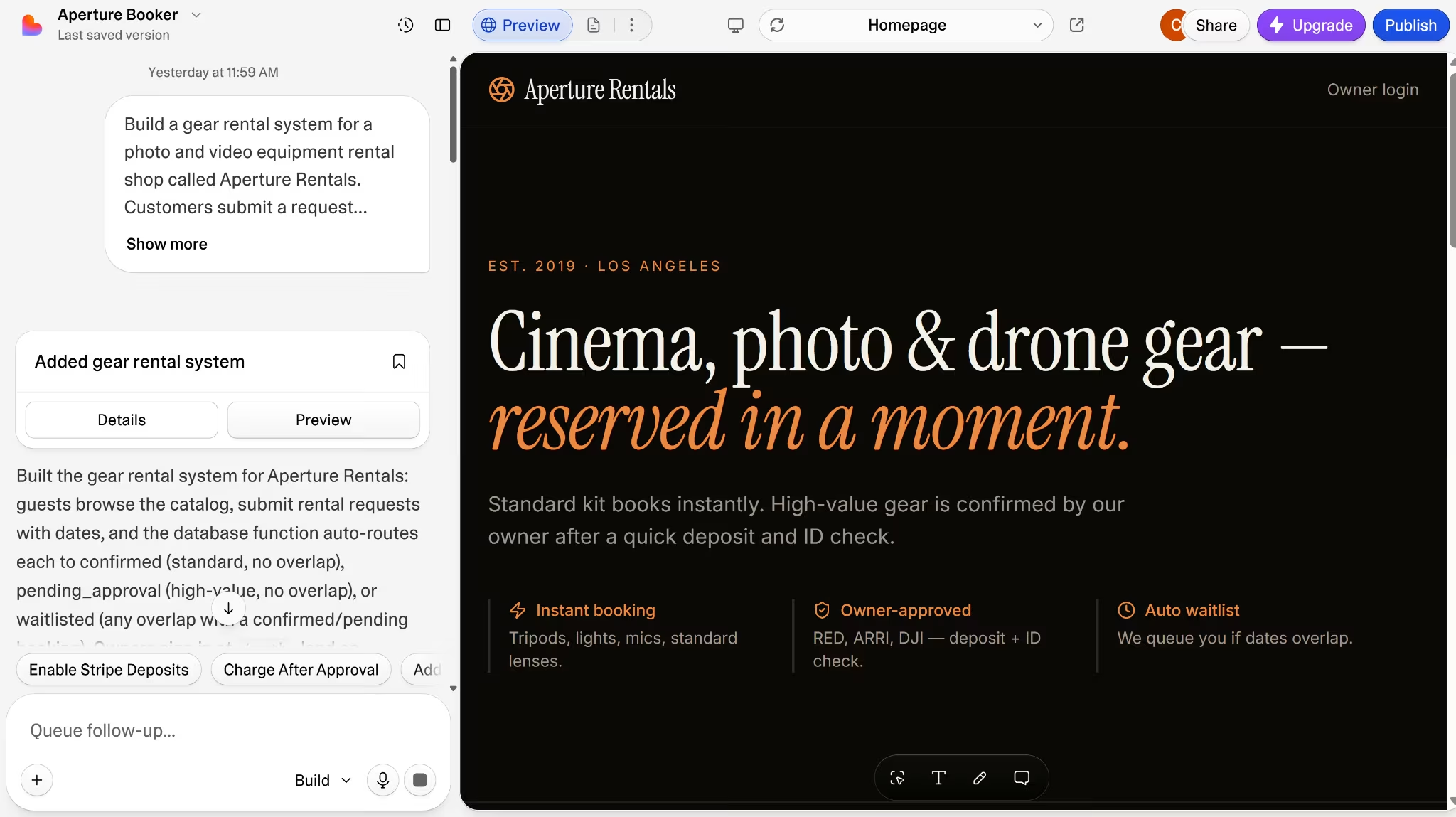
Lovable created the interface, database, and booking logic from the initial prompt. It also went beyond what was requested by checking each new booking against the dates of existing bookings.
The app checked availability before deciding whether an item needed owner approval. A date conflict, therefore, moved the request straight to the waitlist rather than placing an unavailable item in the approval queue.
Before I could test those booking rules, two issues blocked the main users:
- The owner lacked access: The first owner account didn’t receive the permissions needed to manage bookings, so I had to grant them manually.
- Customers could not browse: The public catalog returned a 401 error to visitors who were not signed in. The storefront was unavailable to the people who needed to see it.
Both problems were fixable, but neither was a cosmetic cleanup. One blocked the owner from running the app, while the other blocked customers from starting a booking.
Once those issues were fixed, I tested each booking outcome:
- Available standard item: The request was confirmed immediately.
- Available high-value item: The request waited for the owner’s decision.
- Unavailable item: The overlapping request moved directly to the waitlist.
- Rejected request: The owner could deny a pending booking.
Lovable also added a way for the owner to move a waitlisted request into Confirmed. I had not requested this option, but it made sense for cases where the dates changed or the item became available.
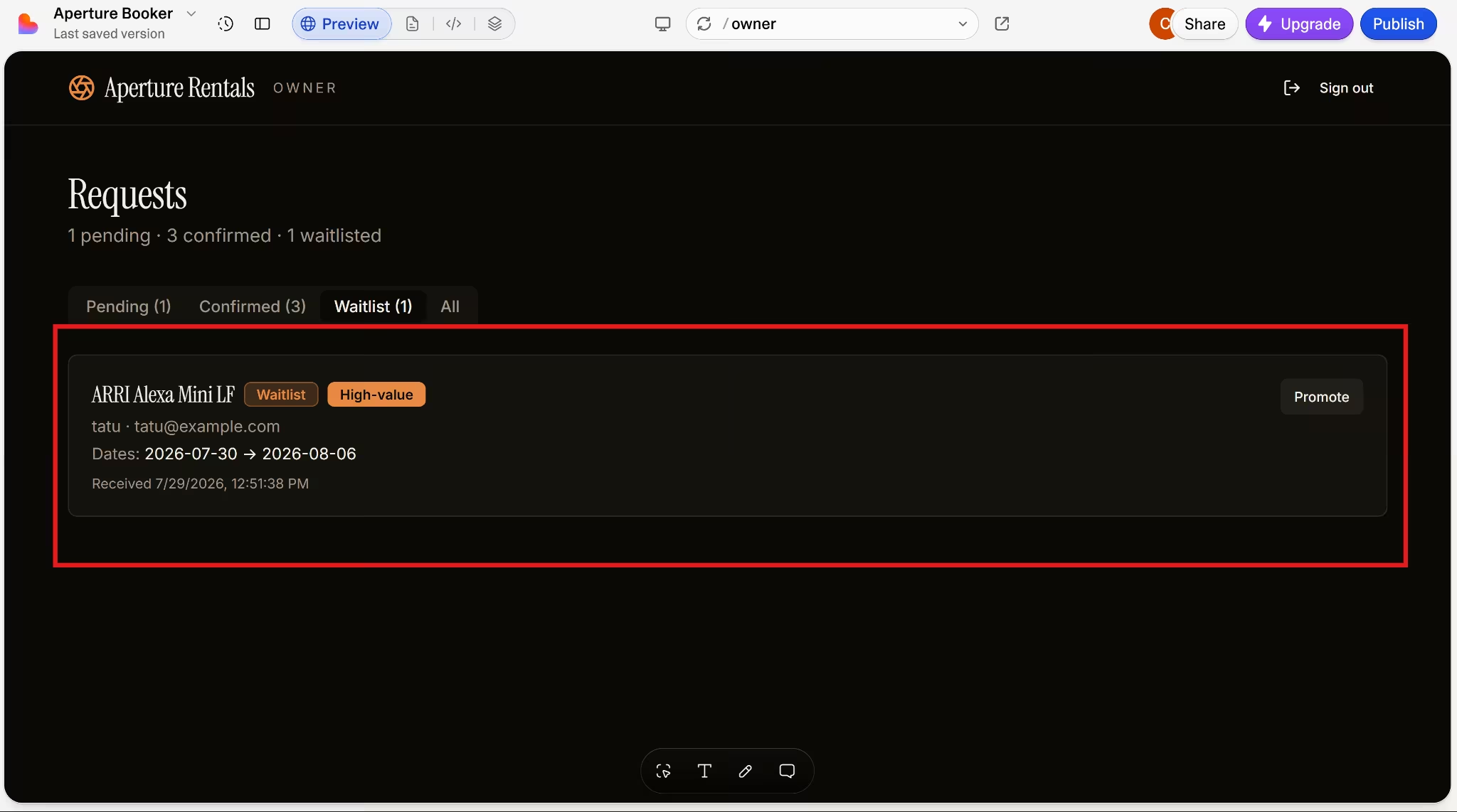
The problem appeared when I tested that manual confirmation path. Lovable changed the waitlisted request to Confirmed without rechecking the booking dates to see if they clashed.
As a result, the app allowed two confirmed customers to reserve the same item for overlapping dates. The automatic booking flow protected against double bookings, but the owner’s manual action could bypass the same protection.
Winner: Lovable. Both platforms produced a usable owner dashboard and a polished customer-facing catalog. Lovable’s request flow worked after two setup fixes, while Bubble’s customer submission never completed. The main action Aperture Rentals depended on remained broken.
Also read our best Lovable alternatives guide for what else is worth trying when permissions and logic gaps slow the build down.
Code Ownership and Export
Bubble lets you export your app’s data, but the application itself can’t be exported as source code. Moving to another platform means rebuilding the pages and workflow logic.
Its GitHub integration doesn’t change that. Bubble can sync code created in its plugin editor, but it doesn’t send the full app to a repository.
Lovable gives you more ways to take the project elsewhere. You can download the full codebase or connect the project to GitHub for two-way syncing, local development, and deployment outside Lovable.
The GitHub connection is not automatic. Until you set it up, the code remains inside Lovable. Once connected, changes made in Lovable and on the repository’s main branch sync in both directions.
Both platforms also let you return to earlier versions without relying on an external repository. Here’s how:
- Bubble: Paid apps include version control, savepoints, and separate development and live branches. Higher-tier plans add custom branches, merging, and hotfix workflows.
- Lovable: Project history lets you preview and restore earlier versions. Connecting GitHub adds conventional branches, commits, pull requests, and code reviews.
Winner: Lovable for portability. Bubble’s version control is useful while the app remains on Bubble, but Lovable gives you the application code itself and a clearer route to continue development elsewhere.
Security and Privacy
Neither platform makes the app secure simply by generating it. Bubble asks the builder to define data-access rules inside its editor, while Lovable generates basic row-level security policies and runs automated checks that still need human review.
| Security Factor | Bubble | Lovable |
|---|---|---|
| Platform compliance | SOC 2 Type IIand a GDPR-compliant DPA | SOC 2 Type II, ISO 27001:2022, and GDPR compliance |
| App-level data access | Privacy rules must be configuredfor the relevant data types | Basic RLS policies are generated automatically, but builders are told to review and adjust them |
| Security checks | The Security Dashboard checks privacy rules, exposed fields, pages, and other potential risks | RLS, database, and dependency checks run when relevant and before publishing; the code-security review runs on demand |
| AI data use | Bubble may use inputs and outputs from its AI tools to train and improve those tools | Lovable doesn’t use customer prompts, code, or workspace data to train its models |
Bubble’s SOC 2 audit covers Bubble itself, not every app built on the platform. You still need to decide which users can see or change each type of data and set those privacy rules yourself.
Lovable gives you a stronger starting point by creating basic database access rules and checking them for common gaps. Those rules control who can view or edit individual records, but Lovable can’t know every restriction your business needs. A passed scan can still miss a mistake in how the app’s roles and permissions are meant to work.
That risk has caused problems before. A 2025 security issue affected Lovable-built projects, where people without an account could see or change data they should not have had access to. Lovable disputes how the issue was characterized, but the practical lesson remains: test the app while logged out and under every user role before publishing it.
Winner: Lovable for automated checks. Bubble gives builders detailed control over privacy rules, but Lovable checks database policies earlier and more often. Neither platform removes the builder’s responsibility to test who can view or change each type of data.
Mobile Apps
Bubble can build native iOS and Android apps inside the same project as a web app. The native mobile editor remains in public beta, so features may change, and some devices or workflows may still need extra testing.
An existing web app doesn’t automatically become a mobile app. Bubble lets both versions share the same database, user accounts, backend workflows, and API connections, but you must rebuild the mobile interface with mobile-specific views, navigation, and interactions.
What changes for mobile:
- Shared with the web app: Database, authentication, backend workflows, conditions, and API connections
- Rebuilt for mobile: Screens, navigation, layouts, and device-specific interactions
- Current AI limitation: For native mobile, Bubble's AI app generator currently produces front-end screens with dynamic expressions only. Full workflow and data generation are still evolving, unlike web generation, which includes functional workflows from the start.
- Older Android support: Bubble warns that apps may not work reliably on Android 8 and Android 10
I saw the same separation in the editor. The mobile side appeared next to the web app and used its existing backend, but it opened without mobile screens to reuse.
Bubble supports publishing native apps to the App Store and Google Play, although Apple and Google still control developer registration, store listings, testing requirements, and approval. Apple charges $99 per membership year, while Google charges a one-time $25 fee for full distribution.
Lovable builds web applications that can adapt to mobile screen sizes, but it doesn’t build native mobile apps. Publishing a Lovable project as an installable customer app requires taking the code outside Lovable and adapting it through a separate mobile development process.
Lovable now has its own iOS and Android app, but that app is for prompting, editing, and reviewing Lovable projects from a phone. It doesn’t turn the web applications you create into native customer apps.
Winner: Bubble. It supports native iOS and Android publishing inside the platform, while Lovable only produces mobile-friendly web apps. Bubble still requires separate mobile screens, and its mobile builder remains in beta.
Pricing
Bubble and Lovable both let you start without paying, but they charge for different types of usage. Bubble applies a plan to each project and measures the resources the app consumes after launch. Lovable applies a plan to the workspace and uses credits for building and running its projects.
Bubble web-only plans
Bubble’s web-only annual prices and included workload allowances are:
| Plan | Monthly Price | Workload Units per Month |
|---|---|---|
| Free | $0 | 50,000 |
| Starter | $32/month ($29/month billed annually) | 175,000 |
| Growth | $134/month ($119/month billed annually) | 250,000 |
| Team | $399/month ($349/month billed annually) | 500,000 |
The Free plan is useful for building and testing, but it only provides a development version. You need Starter or higher to deploy a live website and connect a custom domain.
Bubble plans are purchased separately for each project. The included workload covers actions such as database searches, workflows, and API requests, so two apps on the same plan can consume their allowances at different rates.
Apps that exceed their allowance can use pay-as-you-go overages at $0.30 per 1,000 workload units or add a discounted workload tier. Bubble sends warnings at 75% and 100% usage. You can turn overages off, but the app will go offline if it reaches its limit before the monthly reset.
Adding native mobile raises the annual-billing prices to $59 for Starter, $209 for Growth, and $549 for Team. Web and mobile activity share the same workload allowance because both versions use the same backend.
Want the full breakdown of what each plan actually covers? Read our Bubble pricing guide before you commit.
Lovable plans
Lovable’s current subscription prices and credit allowances are:
| Plan | Included Credits | Price |
|---|---|---|
| Free | 5 daily build credits, up to 30 per month | $0 |
| Pro | 100 monthly credits, plus daily grants | $25/month ($21/month billed annually) |
| Business | 100 monthly credits, plus daily grants | From $50/month ($42/month billed annually) |
| Enterprise | Volume-based credits | Custom |
Lovable credits aren’t equal to a fixed number of prompts. In Default Mode, credit use changes with the complexity of the task, while Plan Mode costs one credit per message. A small text edit can therefore cost less than adding authentication or generating a complete page.
Lovable now uses one credit balance across building, Cloud hosting, and AI features inside deployed apps. Every workspace also receives monthly Cloud credits, while paid plans include additional daily build grants. Small apps may stay within those allowances, but higher traffic, heavier Cloud use, or repeated build changes can consume more of the workspace balance.
Winner: Lovable for the lower paid entry price. Pro costs $25 month-to-month, compared with $32 for Bubble Starter. Neither platform has completely fixed costs, though. Bubble can charge for extra workload, while Lovable’s credit use varies with the building task and the resources used by deployed projects.
Want the full breakdown of what each plan actually covers? Read our Lovable pricing guide before you commit.
What Real Users Are Saying
Star ratings tell part of the story, but the actual reviews behind them explain why the two platforms split so sharply by audience.
Bubble: 4.4/5 From 166 Reviews on G2
The positive reviews I found focused on speed. One reviewer said Bubble took them “from idea to working prototype in days instead of months.” Andre F. also liked how quickly he could create functional web apps.
The editor drew more criticism. A verified software user said Bubble has “a lot of ‘quirks’” to learn and can sometimes feel “unstable.” They described spending time looking for a problem, only for it to disappear after refreshing the page.
Want the full picture of what users are saying? Read our Bubble Review for a closer look at what builders actually ran into.
Lovable: 4.6/5 From 326 Reviews on G2
The reviews agree on the speed. Atharva S. praised how quickly Lovable turned their prompts into “functional web applications.” They could get a first version on screen without building each part manually.
Tarun K. ran into problems once the app needed more precise changes. Lovable gave him a “working foundation,” but correcting the interface and logic took several more prompts when the output missed his requirements.
Want the full picture of what users are saying? Read our Lovable Review for a closer look at what builders actually ran into.
Which One Should You Pick
Bubble is better when you are willing to learn its visual editor and want to keep managing the app yourself. You can inspect and change workflows without reading code, but building and repairing those workflows requires more hands-on work.
Lovable is better when you need a web app quickly and want the option to involve a developer later. It gets further from the initial prompt, but precise logic still needs careful testing and may take repeated prompts or code changes to correct.
When You Need More Than Bubble or Lovable
Bubble’s biggest long-term limitation is the lack of app code export. You can export the data, but the pages and workflows stay on Bubble. Moving later means rebuilding the application elsewhere.
Its mobile builder creates another interface to manage. The web and mobile versions can share the same database and backend workflows, but the mobile screens and interactions must be built separately. The mobile editor is still in beta, too.
Lovable has a different mobile limit. It has no native app output. It creates mobile-friendly web apps, but publishing a native iOS or Android app requires leaving Lovable and moving the project into another development process.
Taking a Lovable project outside its managed environment also means more backend setup. Hosting, authentication, database access, monitoring, and security checks then become your responsibility or your developer’s.
You don’t have to choose which limitation to live with. Emergent brings code ownership, native mobile, and managed infrastructure into the same build.
Where Emergent Fits
Emergent is a vibe coding platform that builds web and mobile apps from a prompt. It builds the whole working app, including the screens customers use, the data behind them, sign-in, testing, and live hosting, in one place. A small team doesn’t have to finish the first version, then find someone to connect all the technical pieces before customers can use it.
Before building Aperture Rentals, Emergent asked five questions about users, approvals, deposits, inventory, and waitlists. Afterward, I could request changes via chat or by clicking an element in the live preview and explaining what I wanted changed.
Emergent build snapshot:
- Build time: 14 minutes, including five clarifying questions
- What worked: Automatic confirmations, owner approvals, waitlists, stock limits, and manual overrides
- What blocked the app: Nothing
- Main logic gap: None found in the booking flow I tested
Lovable got the core request flow running. But Emergent went further and added two things the Lovable build missed.
1. Customer accounts
Instead of leaving customers to submit a request and wait for an email or call, Emergent created client accounts for them. After submitting a request, customers could return to their account to see whether each request was confirmed, awaiting approval, or waitlisted. They would not need to contact the business each time they wanted an update.
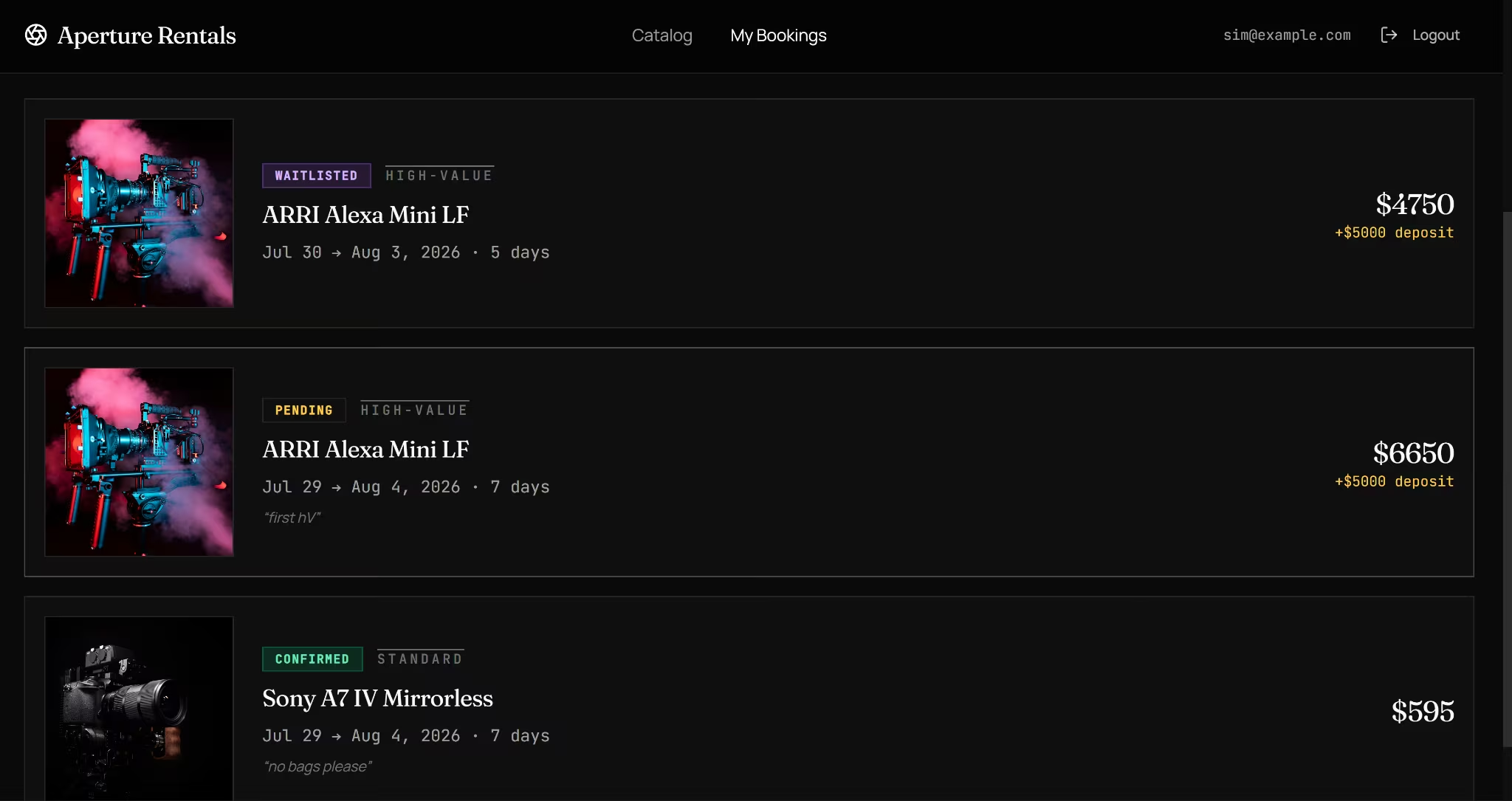
2. Manual approvals still checked live inventory
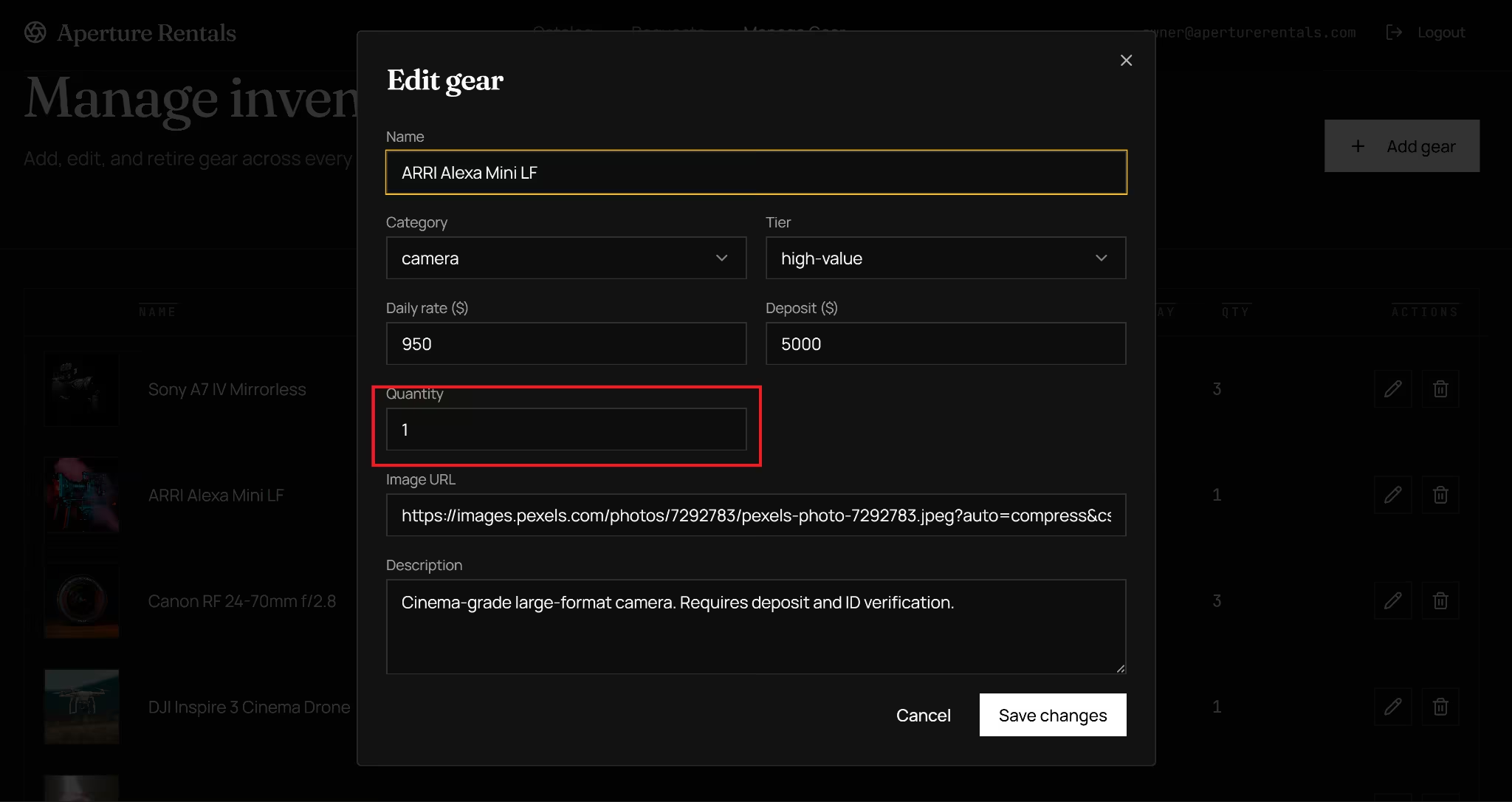
Lovable allowed the owner to move a waitlisted request to confirmed without checking the dates again. Emergent blocked the same action when all available units were already booked.
Changing the quantity in the inventory screen also immediately changed what the owner could approve. For a rental business, that safeguard prevents a helpful manual override from becoming a double booking.
The app itself is only part of the decision. A small team also has to think about what happens when it needs to collect payments, bring in a developer, or reach customers on mobile. Emergent gives it more room in all three areas.
3. More payment options
Emergent supports payment providers including Stripe, Razorpay, and PayPal. You can ask it to make payment part of the app’s own rules, such as charging a deposit only after a booking is approved or updating an order when payment succeeds.
Emergent can add the checkout screen, backend payment logic, and webhook connections needed to keep the payment status in sync with the rest of the app. You still supply the payment account and credentials, but you aren’t left connecting the checkout to the booking, order, or subscription flow yourself.
4. Code you can inspect, keep, and hand off
Emergent gives you access to the project files and lets you push the codebase to GitHub. The app doesn’t remain a black box that only the builder can change. A developer can review how the database, sign-in, payments, and business rules were set up, then continue the work through branches and their usual development workflow.
5. Two routes to a mobile output
Emergent’s Mobile Agent builds iOS and Android apps with Expo and React Native. It gives you a single mobile codebase for both platforms, with Expo EAS handling cloud builds and app store submission.
Emergent also offers one-click web-to-mobile conversion for an app you have already built and deployed. It creates the mobile interface while keeping the existing backend, database, sign-in, users, and data connected.
This means you can avoid rebuilding the product underneath the screens or running separate customer records for the web and mobile versions. The app can start on the web, then reach iOS and Android without replacing the system the business is already using.
My Verdict
Lovable is the overall winner in this comparison with Bubble. It got further in the build test, gives you access to the code, and costs less to start. Its generated logic still needs careful testing, especially when the app includes exceptions such as manual approvals and waitlist overrides.
Bubble is the better option for visual workflow control and native mobile publishing. You can manage pages, data, and logic without reading code, but the platform required more repair work in my test and gives you less freedom to move the app elsewhere later.
Emergent is the stronger route when you don’t want to compromise between a usable customer experience, business logic, code ownership, and mobile.
A developer can continue the project through GitHub, while the web app can move to iOS and Android without rebuilding its backend or duplicating customer records. You keep control of the product as it expands beyond the browser.
You have the brief. Put it to work with Emergent.

Most AI app builders stop at prototypes. Emergent creates production-ready apps you can actually launch.
- Production-ready apps
- Web & mobile apps
- Deploy in minutes







