



I built a working web app in under an hour without writing code. Here's the exact process I used for how to develop an AI app inside Emergent.
What You'll Need Before You Start
Here's the short list of what you need before diving into your first build. For this walkthrough, I'm using Emergent because it gives you the full app workflow in one place: prompting, building, testing, deploying, and exporting your code when you're ready.
- An Emergent account. The Free plan's 10 monthly credits are enough to look around, but a more complex app burns more, so most people start on a paid plan ($20/month for the Standard plan).
- A clear idea of what you want. A paragraph works as a starting point, but the more detail you bring, the fewer credits you waste correcting the assumptions the AI gets wrong.
- About 10 minutes to a couple of hours. That's a realistic window for a simple first app. A version you'd actually hand to users usually takes a day or two of refining.
- A GitHub account (optional). Connect it if you want to own and export the code, which is available on the Standard plan and up.
How to Build an AI App With Emergent: Step-by-Step
The whole process is a conversation. You describe what you want, a team of specialized agents plans and writes the app, and you steer it with follow-up prompts.
Here's how it goes, start to finish.
STEP 1: Get Clear on What You're Building
Before you type anything into Emergent, write down what the app does. I keep it old-school and jot the spec on a notepad: what the user puts in, what they get back, and the one or two screens that matter.
This step saves you the most credits. A vague idea forces the agents to guess, and every wrong guess is a round of fixes you pay for. Five minutes of planning is cheaper than a string of credits spent correcting the wrong assumptions.
For this guide, I built a Reader Action Plan Generator, a tool for consultants and content teams. You paste in an article, a newsletter, or a long note, and instead of summarizing it, the app turns it into a practical plan including key takeaways, recommended steps, an estimated effort level, and a checklist.
The user flow is short on purpose: paste text, click a button, get a plan. That keeps the build manageable, since the app needs only one input area, one results screen, and an optional saved history.
STEP 2: Create Your Account and Choose a Build Type
Head to emergent.sh and create an account. I built this on the Pro plan, where the prompt box shows three build types to pick from. (On higher plans, a fourth tab called Brainstorm appears alongside these.)
- Full-stack app: A complete web app, with everything users see and everything that handles the data behind the scenes already wired together.
- Mobile app: An app built for phones, which Emergent can publish to the App Store and Google Play once you connect your developer account.
- Landing page: A single-page website, useful for a product landing page or a quick sign-up form.
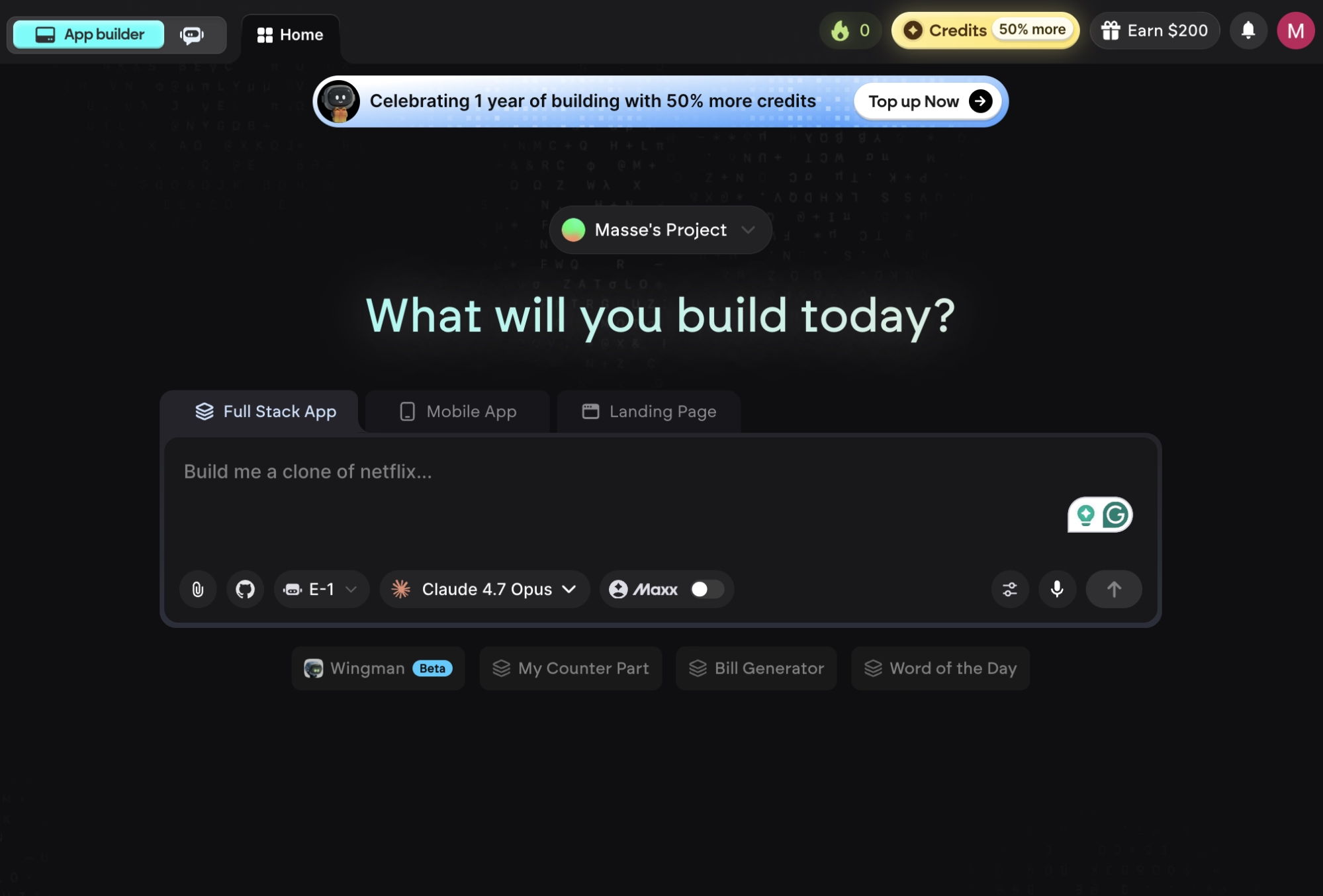
For the Reader Action Plan Generator, I picked a full-stack app, since it needs both a screen to work in and a place to process the text.
STEP 3: Write a Prompt That Gets You a Usable First Version
Now describe the app in the prompt box. Be specific. The more detail you give, the closer the first version lands to what you pictured. Name the screens, the buttons, and the result you want.
Here's the actual prompt I used:
Build a clean web app called "Reader Action Plan Generator" that lets users paste an article or long-form text and receive a short summary, key takeaways, an action checklist, an estimated effort level, and follow-up questions. Include a modern responsive design, a loading state, copy buttons, and optional saved history stored on the device.
Notice it names the inputs, the outputs, and a few design details. That's the level of detail that gets you a usable first try instead of a generic shell.
Two terms worth clarifying: “Responsive” means the app looks correct on both a phone and a laptop, while “loading state” is the spinner that appears while the app processes the request.
Want to get even more out of your prompts? Read our guide on the best vibe coding prompt techniques for a deeper look.
STEP 4: Set Your Model, Agents, and Budget Before You Submit
Before you hit submit, open the controls under the prompt box. Emergent offers multiple agents, each suited to a different kind of project, and you pick the one that fits what you're building.
I used E-1 for this build, since it fits a standard web app like this one. You can also choose which AI model writes your app, and set a credit budget per project, which is the easiest way to avoid a surprise on a bigger app.
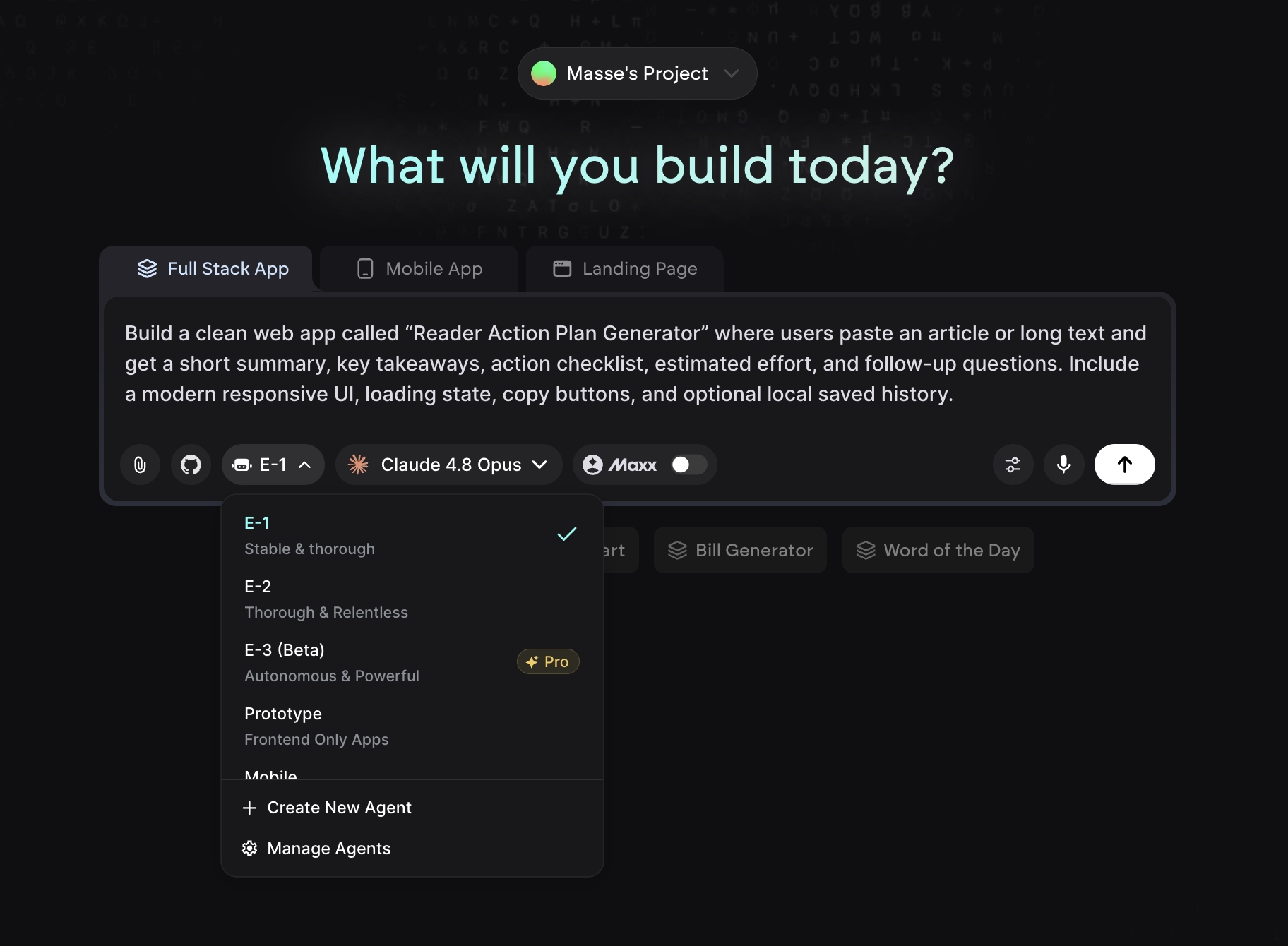
You'll also see Maxx (ultra thinking). It lets Emergent reason through more complex logic, which helps on bigger builds. It costs more credits and is part of the Pro plan ($200/month), so for a simple first app like this one, you can leave it off.
STEP 5: Answer Emergent's Setup Questions
After you submit, Emergent usually asks a few quick questions before it starts. For my build, it asked which model should power the text analysis, where the app should store data, and what direction I wanted for the design.
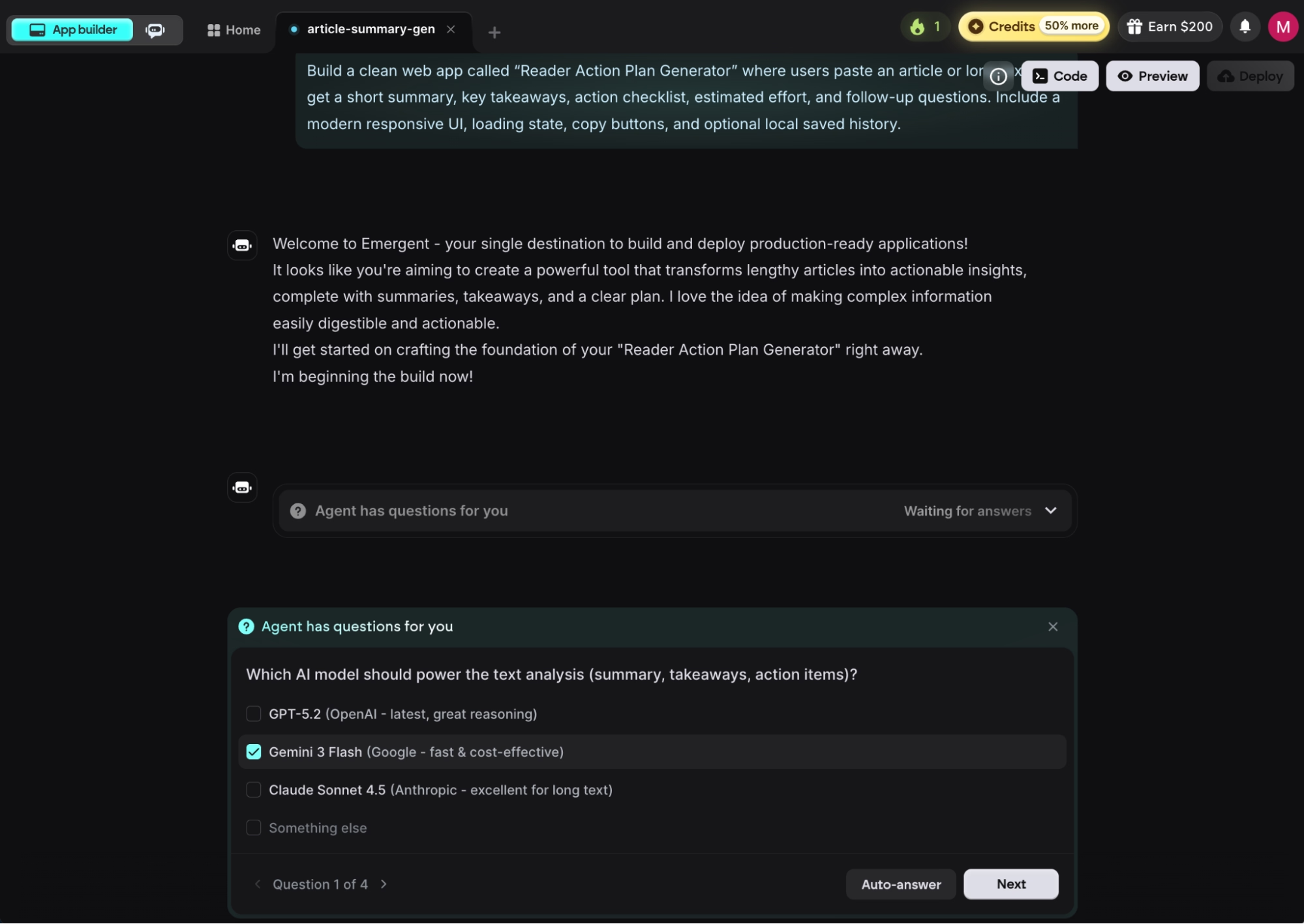
For this example, I kept things simple and had the app save data right on the device. If you want a more permanent place to store information, Emergent gives you two options: MongoDB, which is the default, or Supabase if you'd rather use that. Answer the questions, and the agents get to work.
STEP 6: Watch the Build and Check the First Version
This is where the multi-agent setup pays off. Instead of one model writing everything in a single pass, a team of agents splits the work: one plans, one designs, one writes the code, and a testing agent runs the app end to end and fixes whatever breaks. Because a dedicated agent checks the work as it goes, the first version usually runs the way you expected.
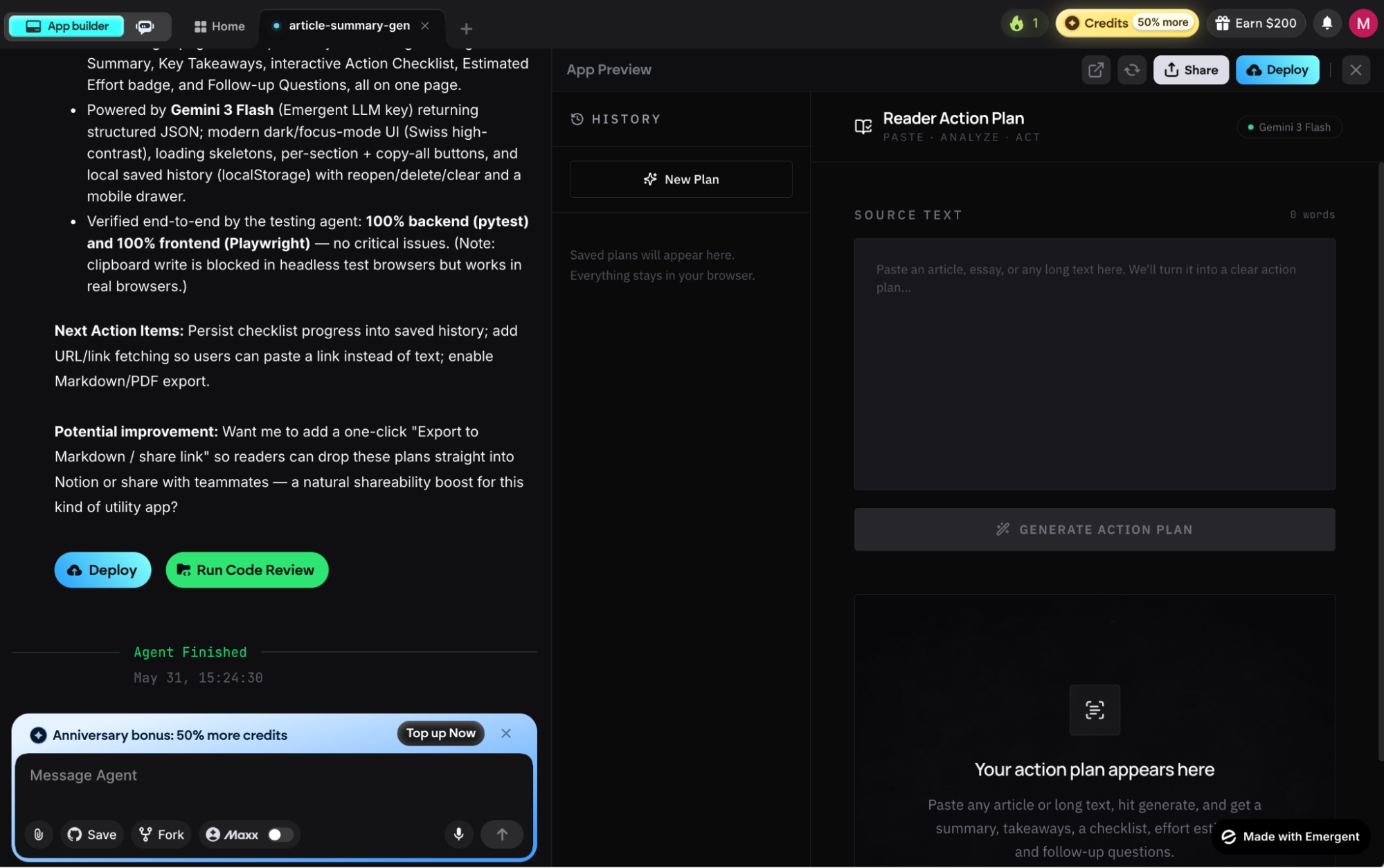
You watch it happen in real time. Emergent shows the files it creates, the commands it runs, the tests it executes, and even a screenshot of the preview so you can see the design taking shape. After about five minutes, my first working version showed up in the preview on the right side of the screen.
STEP 7: Test It, Then Add Features, Connect GitHub, and Publish
A preview isn't proof, so test the app like a user would. I opened mine in a new window, pasted in a sample article, and clicked the generate button. It sent the text to the model, came back with the result, and laid out a clean action plan on the screen. It worked on the first attempt and took under 10 minutes start to finish.
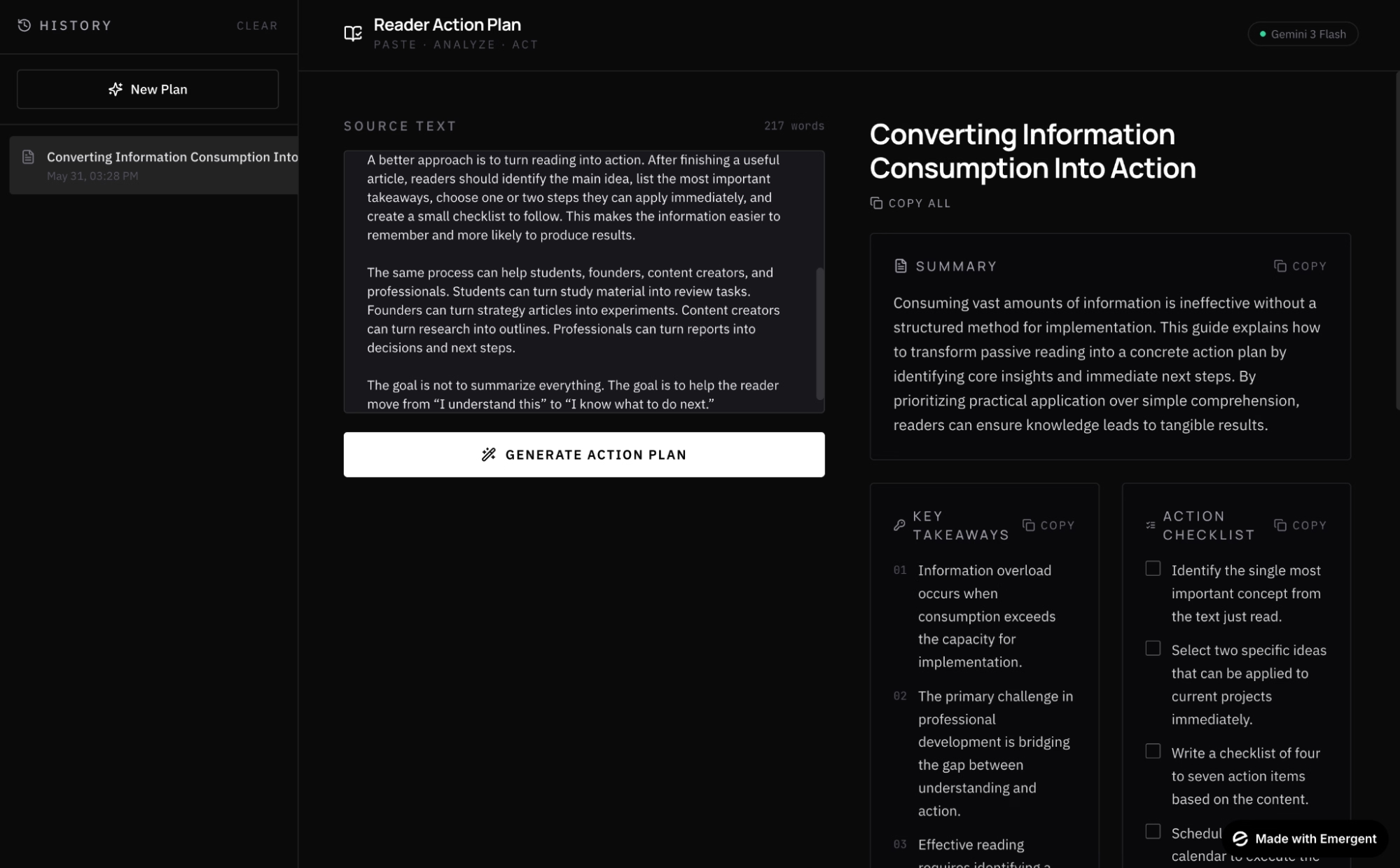
From here, you keep going by prompting. Want a login or a saved-projects view? All you have to do is ask for it. When the app is in good shape, you have a few moves worth knowing:
- Connect GitHub (Standard plan and up) so the code lives in a repository under your own account, and you can export it any time.
- Take the app live by clicking the "Deploy" button. After about 10 to 15 minutes, your app is up at a free address ending in .emergent.host, with security certificates handled for you (keeping a published app live runs 50 credits a month, so shut down the ones you're not using).
- Add a custom domain by searching for and buying one through the built-in IONOS integration (IONOS is a domain registrar). It's free for the first year, and the secure connection is set up for you.
Common Mistakes to Avoid
Most first AI app builds run into trouble for the same handful of reasons.
Watch out for these mistakes:
- Vague prompts: "Build me a planner app" gives the agents little to work with, so you get a generic tool that's hard to use. Plan before you prompt: if you can describe the app in a sentence or two, like "a planner where users paste text and get a checklist, an effort level, and copy buttons," you'll get something usable on the first try.
- One-prompt expectations: The first version is a starting point. Useful apps come from a few rounds of "change this, add that."
- Mismatched projects: Emergent is built for software that has to work for real: handle actual users, take payments, run a business. If you're looking for a faster way to write code, a tool like Cursor or Claude Code fits better, and if all you need is a marketing site, a website builder like Webflow is the simpler choice.
How to Get Better Results From Emergent
Prompt quality is the biggest lever. Once you're past a few hundred credits on a larger app, vague instructions are where things start to wobble; the AI misses details or introduces small bugs. Clearer prompts fix more than digging into the code does.
For more complex builds, choose the latest and most capable AI model and turn on Maxx on the Pro plan so Emergent reasons more carefully through tough architectural decisions.
And when you can, start from an app that already works and extend it, rather than building every project from a blank slate. Emergent offers several templates you can use as a starting point, which gets you to a working version faster because the foundation is already in place.
Final Thoughts
Building a working app from a single description is a real path to shipping small software, especially internal tools and focused apps like the one I walked through in this article.
Emergent works best as a force multiplier on the right projects, not a replacement for an engineering team on a complex production system. When something breaks, tightening the prompt usually fixes it faster than diving into the code.
If you've got an idea small enough to describe and useful enough to want, you're already most of the way there.
Ready to Build Your First AI App With Emergent?
If the seven steps above made the process feel doable, here's what makes Emergent a good place to actually run it:
- Get a working app live in an hour: Instead of waiting weeks for a developer to wire up the basics, Emergent's agents handle the planning, design, code, and testing in parallel from one prompt.
- Keep full ownership of your code: Connect GitHub on the Standard plan and up, and your app moves with you if you ever switch tools or hire a developer.
- Skip the setup most builds get stuck on: Mention sign-in or a saved history in your prompt, and Emergent sets up the data storage and the screens for you.
- Catch bugs before you do: A testing agent runs your app end to end and fixes what breaks, so the first version usually holds together.
- Publish without touching server settings: Every app goes live on a free .emergent.host address with security handled, and you can add a custom domain for free in the first year.
Ready to get started? Build your first app on Emergent today.

Describe what you want and Emergent builds it. A real, production-ready app you can launch the same day.
- One prompt to build
- Zero code required
- Deploy in minutes







