




TL;DR
- You can create a booking app with AI in under an hour without coding: describing it in plain English to Emergent's agents produced a working version in one session and a shareable link about 10 minutes after deploying.
- Map every service, duration, and price before you prompt: the trainer build ran on a 60-minute session at $70 and a 90-minute consultation at $30, and the AI cannot schedule availability it was never told.
- Add payments during the build, not after: the Stripe integration collects deposits or full payment upfront, which cuts no-shows because clients who commit cash are far likelier to attend.
- Test double bookings and cancellations before sharing: a second account confirming the app rejected overlapping slots catches the errors that make an early build look unprofessional.
- Deploy on the builder's subdomain while collecting feedback: it lets testers vote on a business name before you commit, and small additions like auto-expiring unpaid bookings took about one minute each.
All booking apps work the same way. Users create an account, giving them access to a calendar, from where they can make bookings and receive notifications. That’s the case whether the app is for events, accommodation, professional services, etc.
You’d think that building an app with all these moving parts would be quite an ask for someone without any coding skills. And it was before AI builders entered the scene. I built one for a personal-trainer friend, and it was live in under an hour. Follow along as I show you how to create a booking app with AI, and build your own as you go.
What You'll Need Before Starting
You’ll need a few things before you start building. Make sure you have the following on hand.
Prerequisites:
- An app idea: You’ll need an idea you can write as a prompt for the AI builder.
- A target audience: Know who your app is intended for and the problem it solves.
- An Emergent account: You can start free and build with the credits included on the free plan.
- Not required: Coding, installs, or technical setup; it runs in your browser.
Time required: Going from an idea to a working app can take as little as 40 minutes. Set aside an hour, and you’ll have a live URL you can share online.
How to Create a Booking App in Under an Hour
Step 1: Map Services and Availability Before You Build
Before you start building, you’ll need to know the availability for each one of your services. List each one, how long it lasts, and the cost. I built a booking app for a friend of mine who's a personal trainer. She wanted me to include a 60-minute one-on-one session ($70) and a 90-minute consultation call ($30).
Once you know which services to include, you’ll need to map those services and their availability to a calendar. If you’re a service provider, you’ll also need to consider prep time between calls.
If you work with clients or customers, make sure to tell the app which details to collect for each booking, such as contact information and service preferences.
Step 2: Use Plain English to Describe Your Booking App
Here’s where I got to tell Emergent exactly what I wanted in plain English (also known as vibe coding). I got specific with availability, costs, and reminders. Once the AI builder asked me a few initial questions, I watched it start planning and creating my app.

You won’t need to do anything while the agents build, and you won’t have to wait long either. You can have a working app ready to test in a single session.
Don't forget to include your design preferences with your initial prompt. Functionality might be the most important aspect of a working app, but a good design can make all the difference.
Step 3: Connect Your App to a Payment Provider
Next, it was time to add a payment provider to the app. After the agents started building, they asked me which method of payment I wanted to use. I chose Emergent’s Stripe integration.

Collecting deposits or full payments in advance reduces no-shows, as those who book are far more likely to attend once they’ve committed with actual cash. And when your builder has Stripe integration built in, there’s really no reason not to include this feature.
If your business already has payment policies in place, include them. This makes resolution easier should a client ever raise an issue after booking via your app.
Step 4: Test Your App Before Sharing It
It was time to give the app a test run, so I created an account and booked a session. I also created a second account to make sure the app wasn’t accepting double bookings. Then I tried to cancel the booking. All tests passed.
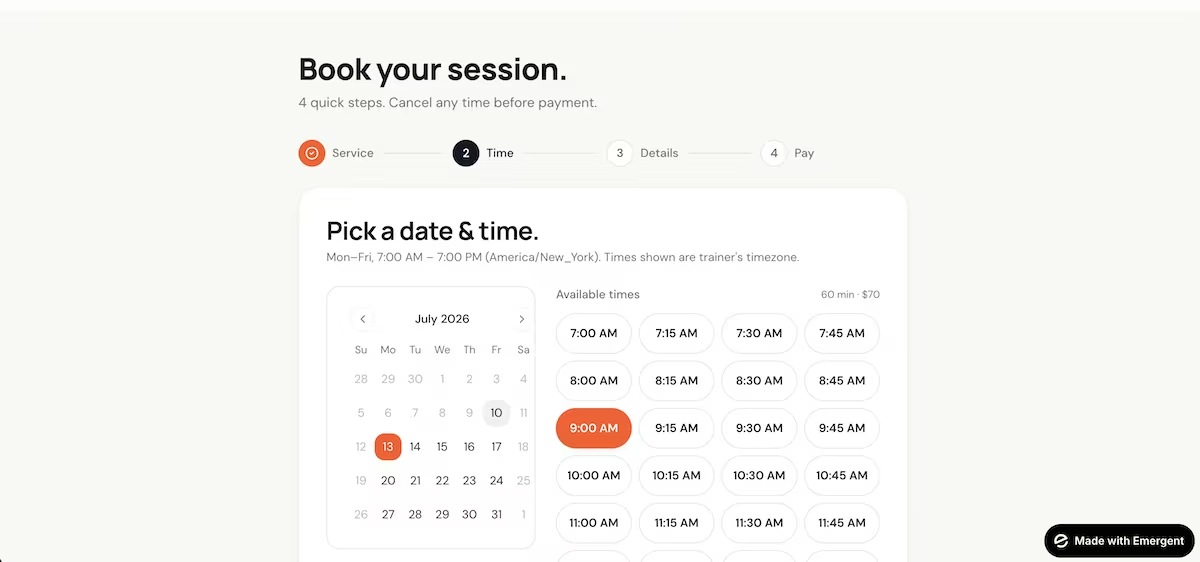
You don’t want to share a link to your booking app if it’s full of basic errors. You’ll look unprofessional, and your friends and family members could become frustrated and less willing to help when you send them your second version.
Testing can save you a lot of time by finding bugs and having the agents fix them early. If you only find them once you've added new features and scaled, it can make fixing errors more complicated.
Step 5: Adding a New Feature
Here, I added one of the builder’s suggested new features: auto-expiration of unpaid pending bookings. This keeps slots from being held by people who never pay. If they still want the session, they can simply book again later. Adding this feature took just one minute.

You can always add new features after deployment (the next step), after getting feedback from your testers. But there might be one or two features you want to add at this stage as well. That could be something you thought of while testing, or a suggestion from the AI builder.
Don't dilute your core features with shiny new extras. Plenty of features sound good in the moment but add very little.
Step 6: Deploy and Share
Once I was happy with how the site worked and felt comfortable enough to share it, I deployed the app. Within about 10 minutes, I had a shareable link.

Deploying your app puts it in front of real users and begins the feedback phase. It's a big step toward getting your app out into the world.
You could deploy to a custom domain right away, but stick with Emergent's subdomain while you collect feedback. You can even ask your testers to vote on a business name at the same time, which may save you a rebrand later.
Common Mistakes to Avoid
Building an app can seem like a breeze, so it’s easy to forget some of the more common mistakes.
Watch out for these:
- Not knowing your target audience: Make sure that the app you build caters to what your actual users need and want. This starts with spending real time figuring out who your users are.
- Going too heavy on features: Overloading the app draws attention away from its main purpose. Emphasize the core features and don’t add any more until you’ve got them right.
- Ignoring security: You can run a security test after the initial build, but you’d be wise to have the AI builder account for it early. Secure logins and encryption aren’t merely nice-to-haves.
- Neglecting mobile users: Test the app on all devices. If it fails on your target audience’s preferred devices, they likely won’t return.
Emergent Makes Building a Booking App Easier
Everything I documented above started with a plain-English prompt, which is where Emergent excels. All you need to do is describe the output you want, and its agents get to work.
Here’s how Emergent helps you with building a booking app:
- From prompt to working app: You tell Emergent what you want (account, calendar, time slots, confirmation), and it starts working on your build before giving you the first version of your app.
- Payment integration: Emergent’s Stripe integration allows customers to make a payment when booking, without you needing to get under the hood.
- Scheduling logic: Emergent builds the scheduling logic, so booked slots show as unavailable, which avoids double bookings.
- Shareable link within minutes: Once you’re happy with your app, you can deploy it, after which Emergent gives you a shareable link. You can even deploy it to a custom domain if you wish.
Start building your booking app with Emergent today. The free tier comes with 10 credits, so you can get going as soon as you create your account.

Describe what you want and Emergent builds it. A real, production-ready app you can launch the same day.
- One prompt to build
- Zero code required
- Deploy in minutes







