



After comparing AI app builders, no-code builders, and full-stack app workflows, vibe coding vs no-code comes down to one question: do you want to assemble an app from a platform’s ready-made blocks, or describe what you want and walk away with real code you can own, review, and extend?
Vibe Coding vs No Code: Quick Comparison
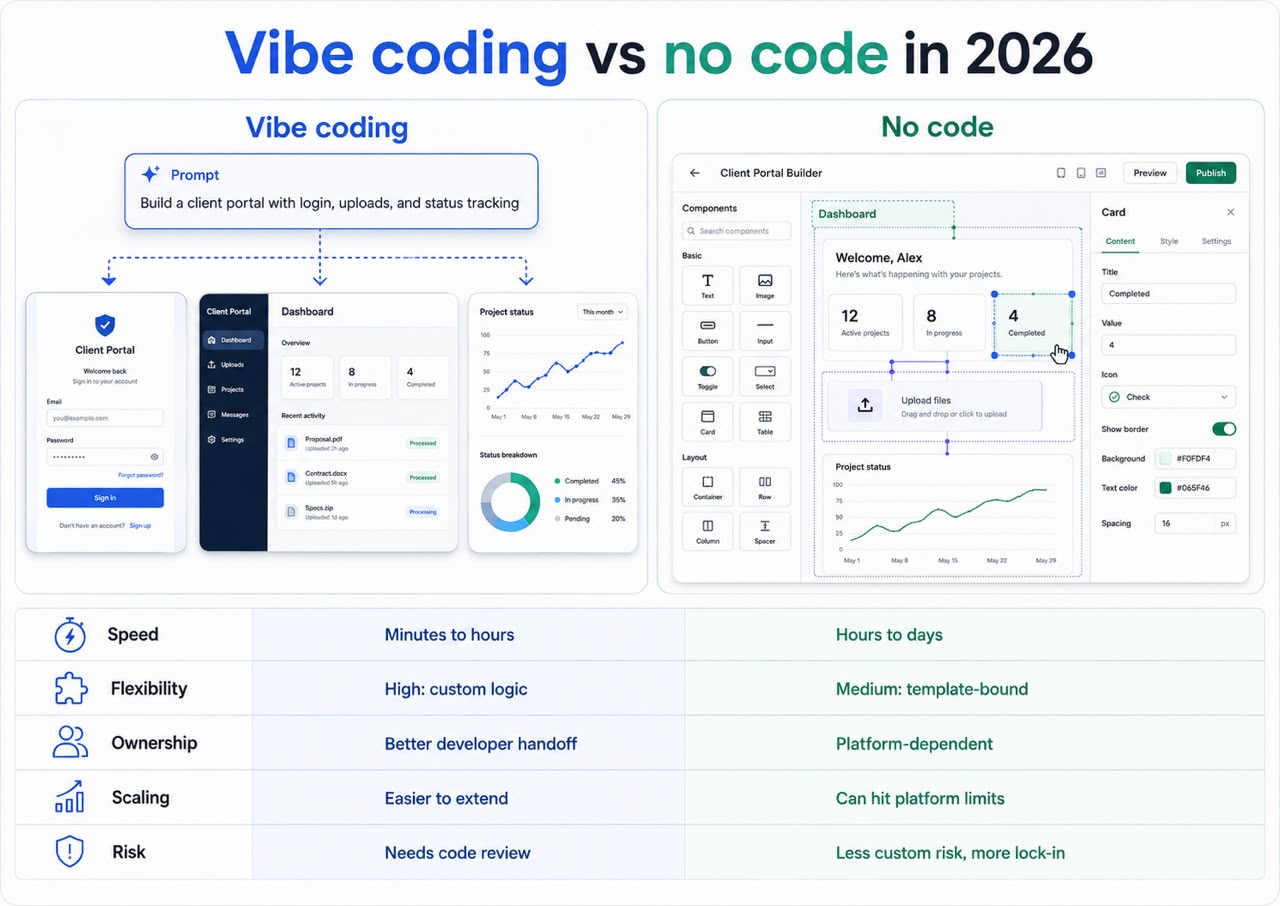
Vibe coding and no-code sit at different points on the same build spectrum. No-code assembles apps from pre-built blocks inside a platform that controls the underlying code. Vibe coding is the hybrid middle path: you describe what you want, AI writes and revises the real code underneath, and you can take that code past the platform’s ceiling.
The real question is not which one is “better.” It is who can maintain the app after it ships.
How they differ at a glance:
| Category | Vibe coding | No-code |
|---|---|---|
| Build method | Describe the app in natural language | Drag, drop, and configure |
| Best for | Custom apps, SaaS MVPs, dashboards, and AI workflows | Forms, portals, simple automations, and database views |
| Speed | Minutes to hours for a usable first version | Hours to days, depending on setup |
| Control | Higher, because real code can be generated and changed | Lower, because templates and platform rules set the limits |
| Developer handoff | Easier when code, GitHub, or export options exist | Harder if the app stays locked inside the builder |
| Long-term maintenance | Better when developers may review or extend the code | Better when non-technical owners need to update the app visually |
| Main risk | Shipping AI-generated code without review | Hitting a platform limit after the app grows |
Quick rule: If your app is mostly a form, portal, or tracker, no-code may be enough. If your app needs custom logic, user roles, AI features, APIs, or future developer handoff, test vibe coding first.
What Is Vibe Coding?
Vibe coding is a hybrid way to build software: you describe what you want in plain language, AI generates and revises the real code underneath, and you keep that code to own, review, and extend. It sits between no-code’s fixed blocks and the overhead of writing and maintaining everything by hand: more control than the first, less setup than the last.
Collins named “vibe coding” its 2025 Word of the Year, defining it as software development that turns natural language into code using AI.
Simply put: You explain the product, not the syntax.
A strong vibe coding platform can help create the frontend, backend, database logic, integrations, and deployment flow. You still guide the product. You still test the output. You still make the key decisions.
What Is No Code?
No-code is a way to build apps without manual programming by using visual builders, templates, blocks, workflows, and pre-built integrations. A no-code app builder works best when your app fits the platform’s structure.
No-code tools remove the blank screen. You choose components, connect data, and set rules for what happens when a user clicks, submits, pays, or updates a record.
That structure is useful, but it is also the limit.
No-code can launch faster when the use case is simple. It can get restrictive when you need custom data models, complex permissions, unusual integrations, or an app that must evolve like normal software.
If you are comparing no-code app builders, look past launch speed. Ask what happens after the first 100 users, 10 workflows, or three new feature requests.
How Are Vibe Coding and No Code Different?
The main difference is what you can change after the build. No-code lets you configure the blocks a platform exposes, but the platform still controls the underlying code. Vibe coding turns your intent into real code you can own, review, and extend, so you can go beyond preset options, but you also need to test what the AI built.
That makes vibe coding more flexible. It also puts more responsibility on review before real users rely on the app.
Best fit by use case:
| Need | Better fit | Why |
|---|---|---|
| Simple form or portal | No-code | The structure already exists |
| Custom SaaS MVP | Vibe coding | You get more control over logic and app flow |
| AI workflow inside a product | Vibe coding | AI features often need full-stack behavior |
| Internal tracker | No-code or vibe coding | The better choice depends on complexity |
| App with future developer handoff | Vibe coding | Code ownership matters |
| Regulated or sensitive app | Hybrid | AI speed still needs expert review |
Who Owns the Code?
No-code usually keeps your app inside the builder. That can be fine for simple tools, but it can make developer handoff harder if the app grows.
Vibe coding is stronger when the platform gives you editable code, GitHub history, or export options that a developer can inspect later.
What Happens When You Hit a Limit?
No-code limits usually show up when your workflow stops matching the template. You may need plugins, workarounds, low-code help, or a rebuild.
Vibe coding handles custom logic more directly, but the risk moves to code quality, security, and how well the AI-generated app is reviewed.
Who Can Maintain It Later?
No-code often wins maintenance for simple apps because changes stay visual. A team member can update a form, workflow, page, or database view without touching code.
Vibe-coded apps are easier to extend as software, but they still need someone who can test changes, review risky areas, and spot broken logic.
Low-code sits between the two: visual building plus the option to add code. It suits teams that want business users to move quickly but still have developer support for custom logic.
What Should You Check Before You Pick a Tool?
Before choosing a no-code or vibe coding platform, look past the first prototype. The real test is what happens when you need to change, secure, hand off, or scale the app.
Does the Tool Support GitHub, Export, or Developer Review?
GitHub support matters when your project may become a serious product. Branches, pull requests, version history, and code review make it easier for developers to inspect and extend the app.
GitHub’s Copilot agent docs describe workflows where an agent can research a repository, plan code changes, edit files, and create pull requests for review.
That does not mean every AI-generated pull request is safe to ship. It means developer review is becoming part of the AI build process.
What Can a Free Plan Tell You?
Free plans are useful for comparing vibe coding and no-code because they expose different risks before you pay. With no-code, you are testing whether the template fits and whether your team can maintain the app visually. With vibe coding, you are testing whether the generated app can be reviewed, changed, and handed off.
Use a free plan to test:
- Template fit: Does the no-code builder already support the pages, forms, workflows, and permissions you need?
- Visual maintenance: Can a non-technical teammate update the app without breaking the flow?
- Code access: Can the vibe coding tool give you code, GitHub history, or export options that a developer can inspect?
- Authentication: Can users sign in safely, and can you control who sees what?
- Database control: Can you manage the data model without awkward workarounds?
- Deployment quality: Can the app handle a real test with users, not only a polished demo?
Pro tip: If the free version shows that your app fits a template and your team can maintain it visually, no-code may be enough. If you hit limits around custom logic, user roles, APIs, or code handoff, test vibe coding before committing to a fixed builder.
When Is No Code the Better Choice?
No-code is the better choice when the person who owns the app also needs to maintain it. Its real advantage is not speed alone. AI can build simple things quickly, too. No-code wins when a non-technical team member needs to update a form, workflow, page, or database view later without a developer and without asking AI to rewrite something that already works.
Use no-code when:
- The app is mainly a form, directory, portal, landing page, or database view.
- A non-technical owner needs to manage changes after launch.
- The team wants visual, predictable logic instead of generated code.
- A template already matches most of the use case.
- Rebuilding later would not be expensive or risky.
This is where Airtable-based portals, template site builders, and visual workflow tools still shine.
No-code gets weaker when the product stops being predictable.
Once users ask for custom onboarding, unusual permissions, multi-step logic, or complex data relationships, pure no-code may stop being enough. At that point, compare low-code, vibe coding, with developer review, and custom development based on the risk of the app.
When Is Vibe Coding the Better Choice?
Vibe coding is the better choice when you need a code-based first version faster than a traditional development cycle. It works best for MVPs, dashboards, SaaS concepts, AI workflows, and internal tools that are too specific for templates but not risky enough to start with a full custom build.
Use vibe coding when:
- You need a working code-based prototype, not only a configured workflow.
- The app needs frontend, backend, database logic, and deployment together.
- A template gets you close, but not close enough.
- Developers may review, clean up, or extend the code later.
- The app needs AI features, APIs, dashboards, or role-based flows.
For regulated, security-heavy, or business-critical apps, vibe coding should not replace technical review. It should speed up the first version, then bring in human judgment before launch.
Here is a practical example:
For a five-screen SaaS MVP, a founder might spend four hours prompting, two hours testing, and one hour refining flows. That can create a usable first version in seven focused hours instead of waiting through a multi-week development cycle.
The same five screens might launch just as fast in a no-code builder if a template already fits. The difference shows up later. No-code is easier for a non-technical owner to keep updating visually, while vibe coding is better when the product needs code-level changes that the template cannot handle.
That does not make every vibe-coded app production-ready. It means the first build arrives faster, so the work moves from “Can we build this?” to “Can we test, review, and improve it safely?”
Ready to build the right way from the start? Read our best vibe coding practices guide before you ship your first version.
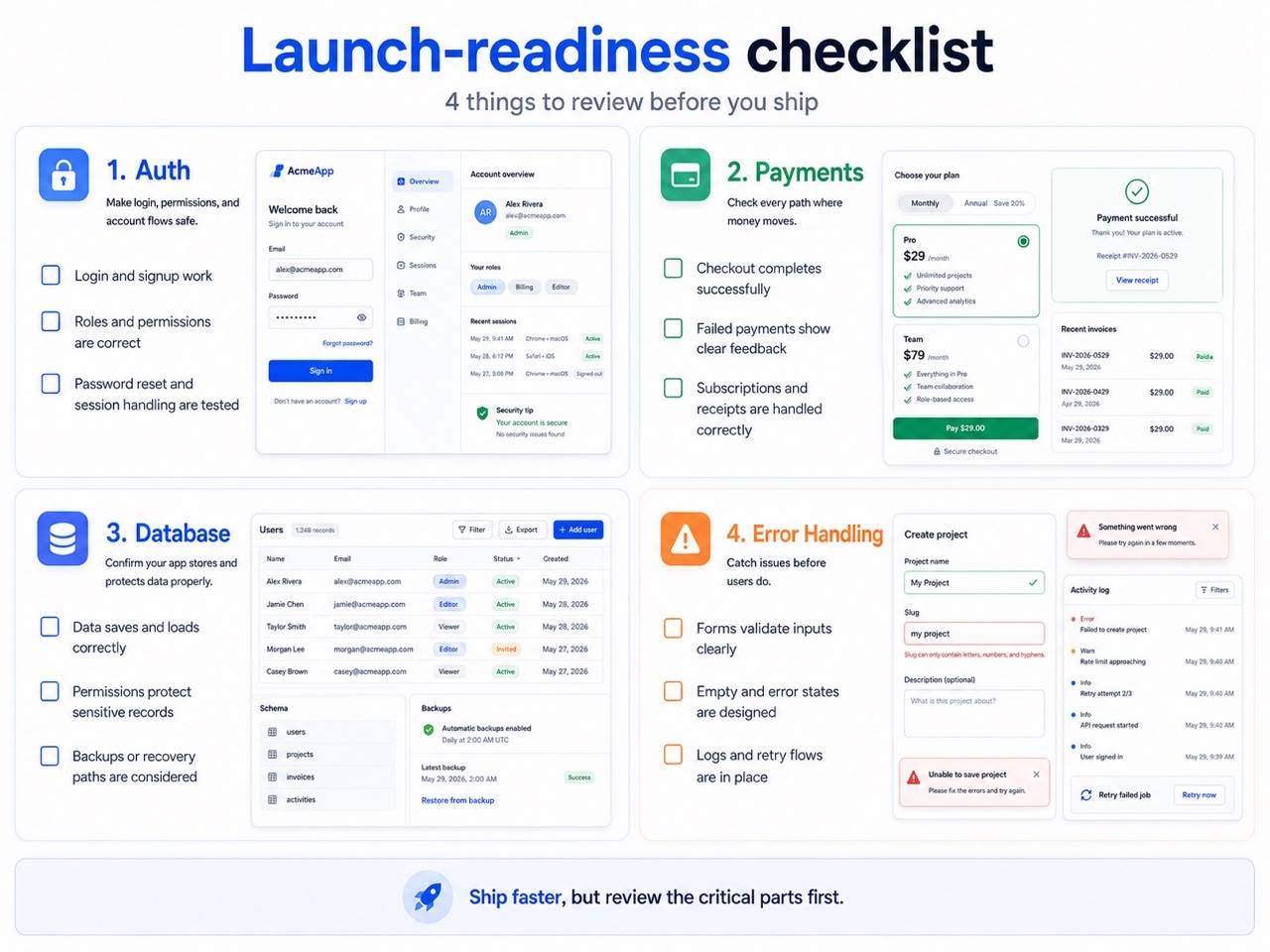
Pro tip: Before launch, review four high-risk areas every time: authentication, payments, database permissions, and error handling. Speed only helps if the app survives real users.
How Does Vibe Coding Compare With Traditional Code and Agentic Coding?
Vibe coding, traditional coding, and agentic coding sit on a spectrum. Traditional coding gives developers the most control. Vibe coding uses prompts to generate and revise software. Agentic coding lets AI agents plan, edit files, run tests, and complete multi-step tasks.
Where each build style fits:
| Build style | How it works | Best for |
|---|---|---|
| Traditional code | Developers write and review code manually | Complex, regulated, or performance-heavy systems |
| Vibe coding | A user prompts AI to generate and revise software | MVPs, dashboards, SaaS apps, and AI tools |
| Agentic coding | AI agents plan, edit, test, and iterate across a project | Larger apps, multi-step builds, and team workflows |
None of this replaces the earlier choice. It shows where vibe coding sits once you decide you need real code instead of fixed no-code blocks.
The vibe coding vs no-code debate is not about whether developers still matter. It is about when they matter. No-code can delay developer involvement for simple visual apps. Vibe coding can move faster at the start, but developers still matter for review, security, architecture, and scale.
The vibe coding vs agentic coding difference is autonomy. Vibe coding is prompt-led. Agentic coding is goal-led.
Emergent sits closer to the agentic side because it helps plan, build, test, and deploy full-stack apps through one workflow.
Still weighing how vibe coding compares to the way you build today? Our Vibe Coding vs Traditional Coding breakdown gives you an honest take before you commit.
What Are the Best Vibe Coding Tools?
The best vibe coding tool depends on whether you are a non-developer building an app or a developer working inside a codebase. Non-developers should look for AI app builders. Developers may prefer AI coding editors.
For non-developers, common options include:
- Emergent: Best fit when you want to describe, generate, test, and deploy a full-stack app in one workflow.
- Replit: Useful when you want a cloud coding workspace that can turn prompts into apps.
- Lovable: Common for fast web app prototypes.
- Bolt: Often used for quick frontend-heavy builds.
- Base44: Built around AI app generation for business users.
For developers, tools like Cursor and Devin Desktop often work better because they add AI assistance inside a code editor.
The best vibe coding tool for non-coders is usually the one that reduces setup, keeps project context, and gives you a working app you can test.
That is why Emergent focuses on full-stack app generation, not only code suggestions.
How Do You Start Vibe Coding With Emergent?
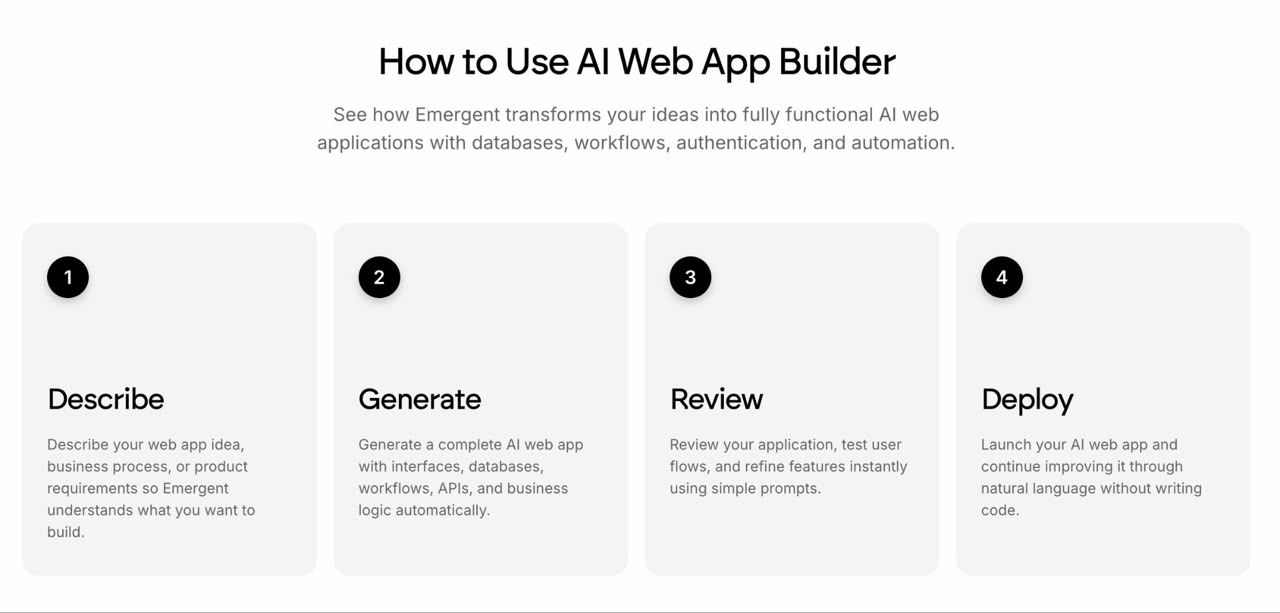
The safest way to start vibe coding with Emergent is to build one small app with one clear user, one core workflow, and three must-have screens. That keeps the AI focused and gives you something real to test before adding more features.
Use this five-step workflow:
- Describe the user and app in one sentence. Example: “Build a client portal for a marketing agency.”
- List the three core screens or flows. Example: Login, document upload, and project status.
- Describe the data the app should save or display. Example: Customer name, uploaded files, project stage, due date, and messages.
- Ask Emergent to generate the first version. Keep the first build narrow: You can add more later.
- Test the app, then prompt changes in small batches. Fix one flow at a time instead of rewriting the whole app in one prompt.
A strong prompt looks like this:
Build a client portal where customers can log in, upload documents, track project status, and message our team.
That prompt works better than “build me a business app” because it names the user, the workflow, and the output.
For a deeper starter workflow, read our guide on how to start vibe coding. If your goal is to learn vibe coding, begin with small tools before attempting a full SaaS product.
Pro Tip
Keep each feature prompt under 150 words. If the request needs more detail, split it into two prompts: one for structure and one for behavior.
Final Thoughts
Vibe coding vs no-code has one practical answer: use no-code when a platform’s pre-built blocks fit and your team needs to maintain the app inside that system. Use vibe coding when you need real code you can review, edit, and extend beyond a platform’s limits.
No-code is not dead. It is still useful when the workflow is clear, the template fits, and the owner needs to make updates without technical help.
Vibe coding still needs clear prompts, testing, and human review, but if you are building a product that may evolve beyond templates, vibe coding gives you a stronger starting point. You can move fast without accepting every limit of a visual builder.
AI does not remove the need for good judgment. It helps more people reach a working first version before they bring in technical help.
Build Your First App With Emergent
Emergent gives you one place to describe, generate, review, and deploy full-stack apps without managing separate frontend, backend, database, and hosting tools.
That makes it useful when no-code feels too limited and traditional coding feels too slow.
Start with the smallest version of your idea. Give Emergent the user, the workflow, and the outcome. Then test, refine, and decide what deserves more time.
Emergent’s free plan currently includes 10 free credits per month, according to its pricing page.

Describe what you want and Emergent builds it. A real, production-ready app you can launch the same day.
- One prompt to build
- Zero code required
- Deploy in minutes







