



After building and testing small first-app workflows, the most reliable pattern I’ve found is to start small, ask the AI for a plan, build once, and test each action before adding more. Here’s how to start vibe coding with a repeatable process that helps you catch broken features early and avoid messy rework.
What Is Vibe Coding?
Vibe coding is a way to build software by describing what you want in plain English and letting an AI tool generate the first version. Collins named “vibe coding” its 2025 Word of the Year and defines it as using AI prompted by natural language to write computer code.
A better working definition for beginners is this: you own the intent, the AI drafts the implementation, and you check the result.
Vibe coding works well for prototypes, internal tools, dashboards, landing pages, simple mobile apps, and early product ideas. It does not replace testing, security review, or basic product thinking.
Curious how the process actually works end to end? Read our How Does Vibe Coding Work deep dive.
What You’ll Need Before Starting
Before you start vibe coding, you need four things: a small scope, a tool, sample data, and a way to test whether the app works. A full technical spec isn't one of them.
Prerequisites:
- One small app idea: Pick a simple workflow, such as a habit tracker, booking request form, or customer request tracker.
- One target user: Know who the app is for and what they need to do.
- One AI tool: Use a chatbot, AI code editor, or AI app builder.
- Sample data: Use fake names, fake requests, and fake inputs while testing.
- A success test: Know what the app must do before you call it “working.”
- A cost limit: AI builders may use credits, messages, tokens, or paid plans.
Time required: Plan for one to two hours for your first useful pass. A simple first app can come together in minutes to a couple of hours, and a version you’d hand to real users often takes a day or two of refining.
Starter project for this guide:
| Project | User | First workflow | Keep out of version one |
|---|---|---|---|
| Customer request tracker | Local service business owner | Add request, set status, view open requests | Payments, login, SMS, CRM sync, team roles |
This project is useful, boring, and easy to test. That’s what you want for your first vibe coding app.
How to Start Vibe Coding: Step-by-Step
Follow these steps in order. Don't add more features until the first workflow works.
STEP 1: Choose One Small Workflow
Start with one job that the user needs to complete. For the customer request tracker, the job is simple: a business owner needs to add a customer request and track whether it’s open, in progress, or done.
A full CRM is too much for the first pass. Start with the smallest workflow that proves the idea works.
Good first scope: A customer request tracker where a user can add a request, update its status, and filter requests by status.
Bad first scope: A CRM with payments, invoices, email marketing, SMS, analytics, user roles, calendar sync, and mobile apps.
Pro tip: If you can’t explain the app in one sentence, the scope is too broad for a first build.
STEP 2: Define the User, Goal, and First Version
Tell the AI who the app is for and what outcome matters. Features make more sense when the user and the goal are clear.
Use this format:
The app is for [specific user].
It helps them [specific outcome].
The first version should let them [main action].
Example:
The app is for a small home cleaning business owner.
It helps them track customer requests and follow-ups.
The first version should let them add a request, assign a status, and see which requests are still open.
This gives the AI a product direction. It also gives you a better way to judge whether the first version works.
Pro tip: Write the user and goal before you open the tool. A five-minute note can save several rounds of fixing vague AI output.
STEP 3: List the Screens, Fields, and Limits
Now turn the workflow into a small app structure with enough detail to stop the AI from guessing.
For the customer request tracker, use:
| App part | What to include |
|---|---|
| Dashboard | Shows all requests and current status. |
| Request form | Adds customer name, contact details, request type, notes, and status. |
| Status filter | Shows open, in progress, and done requests. |
| Edit action | Lets the user update notes or status. |
| Save behavior | Keeps requests after refresh. |
Also, say what the app shouldn’t include yet.
Version one limits:
- No payments
- No login
- No email or SMS
- No calendar sync
- No team permissions
- No real customer data while testing
AI tools often try to be helpful by adding extra features. Extra features create more things to test and more ways for the first version to break.
Pro tip: Tell the AI what not to build. A good exclusion list protects the first version from becoming too complex.
STEP 4: Choose One Vibe Coding Setup
The best setup depends on what you want to walk away with. A popular tool isn’t automatically the right one, so pick the setup that matches the output you need.
Best fit by workflow:
| Setup | Best for | Tool examples | Tradeoff |
|---|---|---|---|
| Chat-based AI | Planning, learning, snippets, and debugging help | ChatGPT, Claude, Gemini | You still need somewhere to run and manage the code. |
| AI code editor | Developers or technical beginners who want file-level control | Cursor, Claude Code | You need to understand files, errors, version control, and project structure. |
| Browser-based app builder | Beginners who want a working app from prompts | Emergent, Lovable, Replit Agent, Bolt, v0 | You still need to test the app and review risky features. |
| Hybrid workflow | Teams that want speed plus developer review | AI app builder plus GitHub and a developer | It takes more coordination, but it lowers risk before launch. |
Use a browser-based app builder if you want a working web app, dashboard, or mobile app from prompts. Use an AI code editor if you already have a codebase or want direct control over files.
Not sure which setup fits your workflow? Our roundup of the best vibe coding tools breaks down exactly which tools work best for app builders, code editors, and everything in between.
Pro tip: Stay in one tool for the first build. Switching tools too early makes it harder to know whether the problem is your prompt, the app, or the platform.
STEP 5: Write and Run Your First Prompt
Your first prompt should describe the outcome, user, screens, features, limits, and success test. It should also ask the AI to summarize the plan before building.
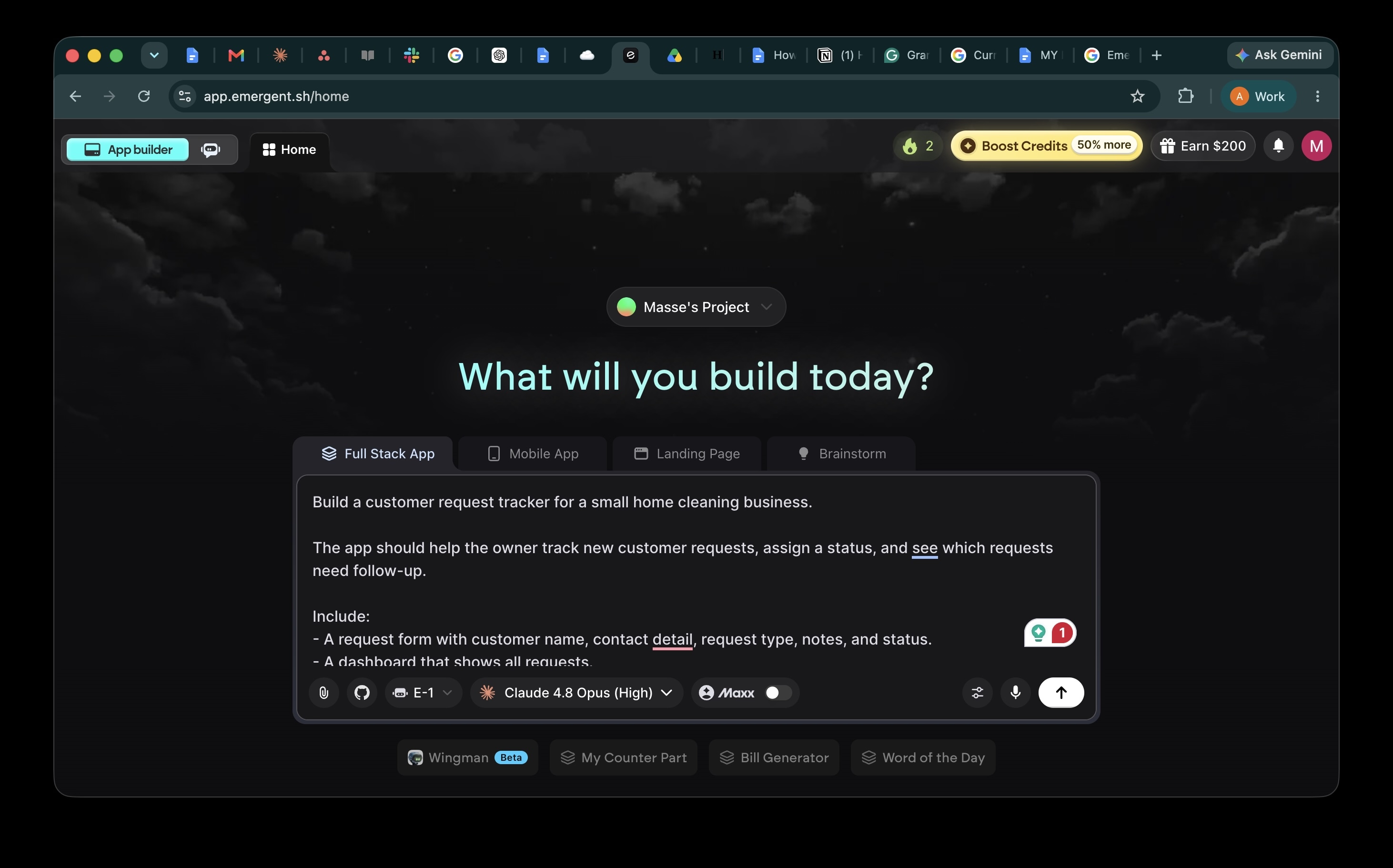
Copy this starter prompt:
Build a customer request tracker for a small home cleaning business.
The app should help the owner track new customer requests, assign a status, and see which requests need follow-up.
The first version should include:
- A request form with customer name, contact details, request type, notes, and status.
- A dashboard that shows all requests.
- Filters for open, in progress, and done.
- An edit option for notes and status.
- Keep the design clean and mobile-friendly.
- Don't add payments, login, email, SMS, calendar sync, or team roles yet.
Before building, summarize the plan and list:
- Screens
- Data fields
- Main user actions
- Any assumptions
Success test:
I can add a request, edit its status, refresh the app, and still see the saved request.
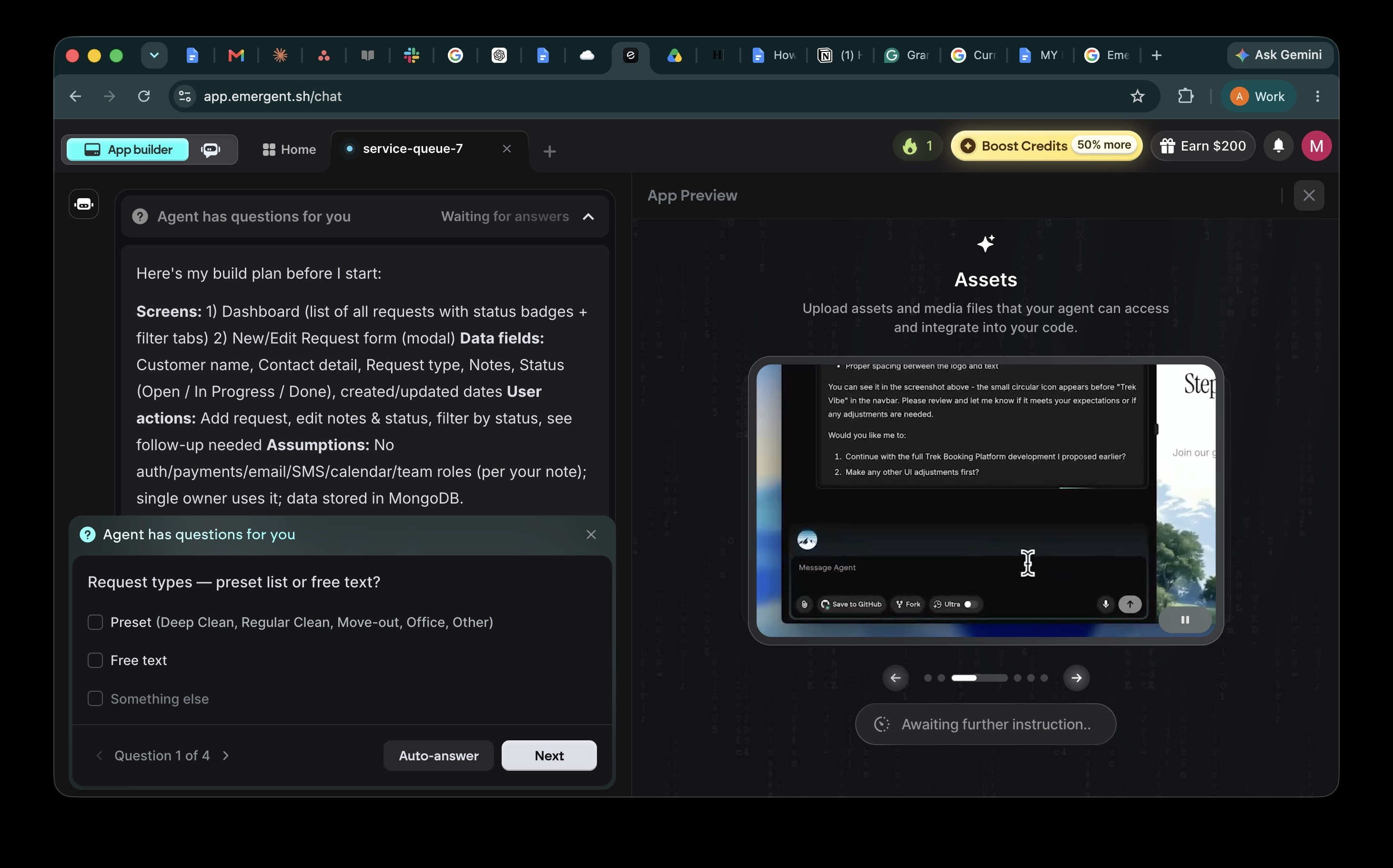
In a builder like Emergent, paste this prompt and let the agent return a plan before it starts building. Emergent may also ask a few setup questions before it continues, like whether the app should use preset options or free-text fields, which statuses to include, whether the app needs a login, and whether it should preload sample data. These questions are useful because they pin down decisions the agent would otherwise have to guess before writing code.
This prompt works because it gives the AI a clear job and a stopping point. The “before building” line is also important because it helps you catch the wrong plan before the tool spends time or credits building.
Want to get even more out of your prompts? Read our guide on vibe coding prompts for a deeper look at what works and what doesn't.
Pro tip: Ask for the plan first when the app has more than one screen. Review the screens and fields before you let the tool build.
STEP 6: Test the First Version Before Adding Features
Once you have a clickable version, stop prompting and test it. AI-generated software can look finished while forms fail, data disappear, or mobile layouts break.
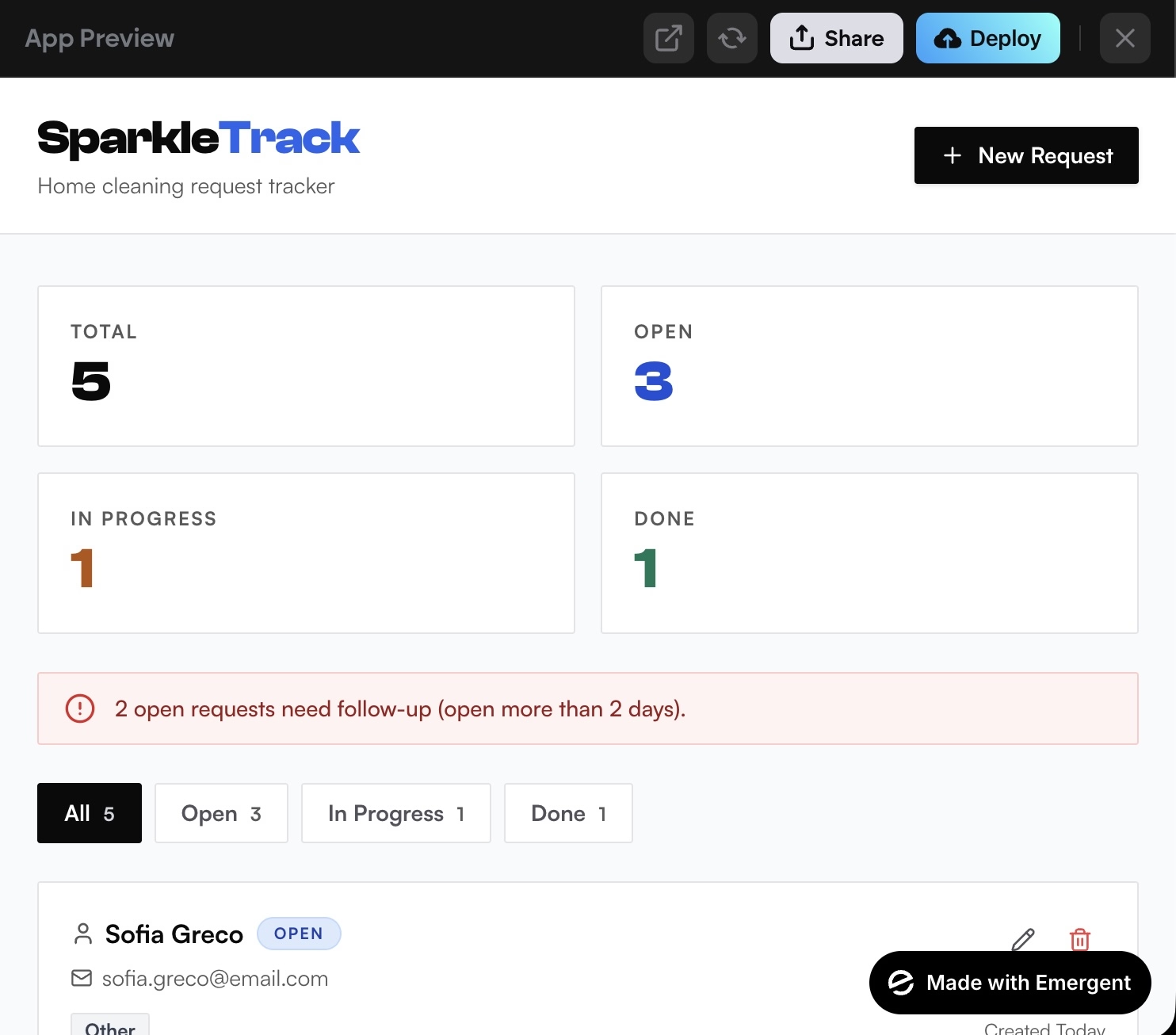
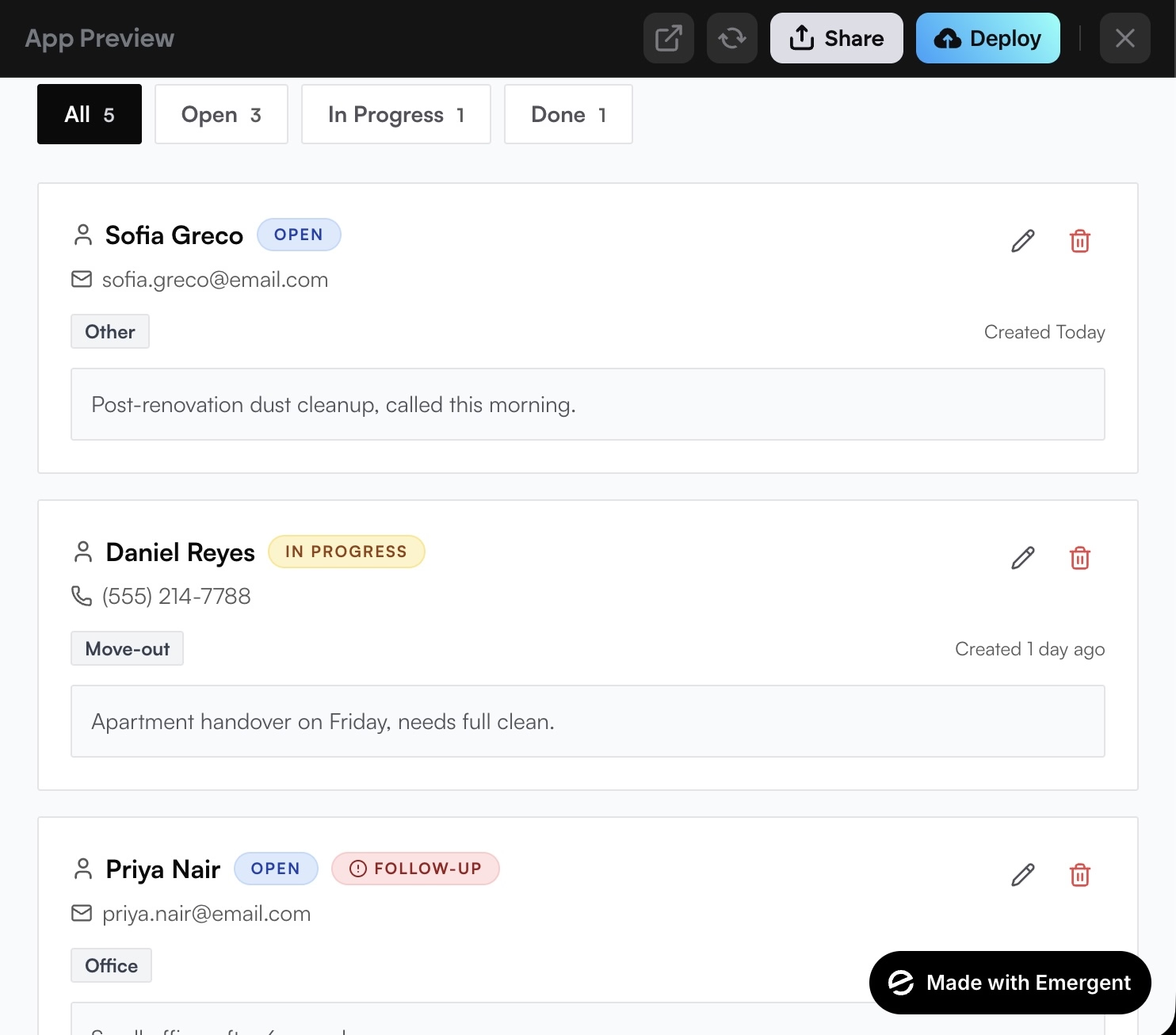
Test the first version like this:
| Test | What to check |
|---|---|
| Screen test | Can you open every page without errors? |
| Form test | Can you submit valid, empty, and wrong inputs? |
| Data test | Does saved data still appear after refresh? |
| Flow test | Can a user complete the main job without help? |
| Mobile test | Does the app work on a small screen? |
| Error test | Does the app explain what went wrong? |
| Regression test | Did the latest change break something that worked before? |
Do this before asking for charts, accounts, notifications, or integrations. A simple test loop gives every follow-up prompt better context: what worked, what failed, and what needs to change next.
Pro tip: Use fake data while testing. Don’t paste real customer names, private records, API keys, or payment data into a beginner build.
STEP 7: Fix One Issue at a Time, Then Decide What Comes Next
When something breaks, give the AI a clear bug report with the action, expected result, actual result, and scope.
Use this debugging prompt:
I clicked “Save request” after filling out the form.
I expected the request to appear in the dashboard, but the dashboard stayed empty.
Check the form submission, data storage, and dashboard rendering.
Change only what is needed to fix this bug.
Don't change the layout or add new features.
After fixing it, explain what changed and how I can test it.
This prompt is better because it tells the AI what failed and what not to touch. It also asks for a test, so you know how to confirm the fix.
After the first workflow works, choose the next move:
| If the app is for | Next step |
|---|---|
| Personal use | Save it, keep testing, and add one small feature. |
| Internal use | Test with fake data, then limited real data. |
| Client or team use | Get the app reviewed before using private data or business-critical workflows. |
| Public users | Review security, data handling, performance, and deployment before launch. |
Pro tip: Keep a change log. Write one line after each prompt: what changed, what worked, and what broke.
Common Mistakes to Avoid
Most beginner vibe coding problems come from asking for too much, testing too late, or treating AI output as finished.
- Starting too big: A marketplace, CRM, or social app has too many moving parts for a first build. Start with one workflow.
- Using vague prompts: “Build me an app” forces the AI to guess. Name the user, goal, screens, fields, and success test.
- Skipping the plan: If the AI starts with the wrong app structure, every fix gets harder. Ask for screens, fields, and assumptions first.
- Adding features before testing: A broken simple app becomes a more broken complex app. Test the main flow first.
- Fixing too many issues at once: Long fix prompts can create surprise changes. Fix one bug, then test again.
- Letting the AI change working parts: Say “change only what is needed” when you debug.
- Using real data too soon: Start with fake data, especially for customer, financial, health, legal, or child-related information.
- Ignoring review: Vibe coding can help you reach a working proof, but risky apps still need human review.
Taking It Further: Test, Review, and Scale Safely
Once the first version works, your job changes. The question shifts from whether AI can build it to whether the app is safe, clear, and useful enough for real users.
Use this checklist before you share the app widely:
- Review the data flow: Know what data the app collects, stores, edits, and deletes.
- Check permissions: Make sure users can only see or change what they should.
- Audit integrations: Slow down before connecting payments, email, SMS, CRMs, analytics, or databases.
- Test edge cases: Try empty forms, long text, wrong formats, duplicate records, and refreshes.
- Ask for developer review: Do this before public launch if the app touches money, private data, accounts, permissions, or critical business systems.
For security-heavy apps, follow OWASP guidance and treat AI-generated code as draft code that needs human review before deployment. NIST’s AI secure development profile also adds AI-specific practices to secure software development guidance.
Know the limits before you scale. Read our vibe coding limitations guide to understand where AI-generated code needs the most human oversight.
Emergent Makes Vibe Coding Easier
Emergent fits the browser-based app builder path. Use it when you want to describe an app in plain English, build a first version, test it, and prepare it for deployment in one place.
Here’s how Emergent helps with vibe coding:
- Prompt-based building: Describe the app, screens, user flows, and features in natural language.
- Full-stack app support: Build apps that include UI, data, backend logic, workflows, and integrations.
- Preview and testing: Test the first version before adding more features.
- Deployment: Publish when the app is ready for a test audience.
- GitHub hand-off: On Standard and higher plans, connect to GitHub when a developer needs to review or extend the project.
Emergent’s pricing page lists a Free plan with 10 monthly credits, a Standard plan at $20 per month with 100 credits, and a Pro plan at $200 per month with 750 credits.
Standard also includes GitHub integration and fork tasks. Pro lists a 1M context window, Maxx (Ultra thinking), system prompt edit, custom AI agents, high-performance computing, and priority customer support.
Start building with Emergent.
Final Takeaway: How to Start Vibe Coding
The best way to start vibe coding is to build one small app from start to finish, then use what you learn to improve the next version. A narrow workflow gives the AI a clear target, a strong first prompt reduces guessing, and a testing loop helps you catch broken forms, missing data, and confusing flows before they turn into bigger problems.
Once the first version works, slow down before adding high-risk features. Use fake data, keep your fixes focused, and bring in human review before the app touches payments, private data, user accounts, or business-critical workflows.
If you want to follow this process in a browser-based app builder, start building with Emergent.

Describe what you want and Emergent builds it. A real, production-ready app you can launch the same day.
- One prompt to build
- Zero code required
- Deploy in minutes







