



To build MVP app ideas into something people can test, start with one job, one user type, and one measurable action before you spend time on a full product.
After building a working invoice-tracker MVP in Emergent and checking current MVP guidance and builder pricing, I’d build an MVP app by cutting the idea down to the smallest version that proves demand, then testing it with real people before funding the full app.
What Is an MVP App?
A minimum viable product (MVP) app is the most basic working version of your app that lets real people complete the core action and give useful feedback. Think of it as the shortest path to real feedback: a working app test, not a pitch deck, mockup, or stripped-down version of your dream product.
A good MVP app has:
- One clear user: A contractor, consultant, real estate agent, student, buyer, seller, or internal team member.
- One core job: Book an appointment, send an invoice, track a lead, upload a document, submit a request, or view a dashboard.
- One success signal: A completed workflow, a paid pilot, a waitlist signup, a repeated login, or a customer asking for access.
- One feedback loop: A way to learn what broke, what confused people, and what they wanted next.
I’d avoid calling something an MVP if it only proves that screens exist. The point is to test behavior.
Types of MVP App Formats
Most MVP app tests fit one of four formats:
- Landing-page MVP: Use a landing page, waitlist, or pricing page to test demand before building the app.
- Concierge MVP: Deliver the workflow manually while customers experience it as a product.
- Wizard-of-Oz MVP: Show an app-like interface while the work happens manually behind the scenes.
- Single-feature MVP: Build only the core workflow, such as creating and sharing one invoice.
Use a single-feature MVP when you need to test whether people can complete the workflow inside the product. Use the other formats when you need demand proof before you build the app.
A good MVP still needs clear product structure, so define your screens the same way you’d define a larger app design and development plan: user action first, interface second.
Should You Build an MVP or Go Straight to a Full App?
You should build an MVP first when demand, workflow, pricing, or usability is still unproven. You should go straight to a full app only when the user problem is proven, the workflow already creates revenue, and the app needs stronger engineering, security, or reliability from day one.
My recommendation: build the MVP first unless you already have proof. A full app is the right move when you’re scaling a known workflow, not discovering whether people care.
An Emergent client case study shows this pattern in action: a US-based specialty contractor built a custom invoicing and payment tool to replace manual billing. One business problem, one workflow, and one outcome the owner already understands.
What You’ll Need before Starting
You need a clear app scope, fake test data, a build route, and a small test group before you build an MVP app. Start with the user action you need to prove, not a feature list.
Use this starter checklist:
- Target user: Name the exact person the app helps.
- Core workflow: Write the one action they need to complete.
- Must-have fields: List only the data version one needs.
- Success metric: Pick one number that tells you the MVP worked.
- Test group: Find 5 to 20 people who match the user.
- Build route: Choose AI app builder, visual builder, freelance developer, agency, or internal engineer.
- Test data: Use fake customers, fake invoices, fake messages, and fake payments first.
For a simple AI-built app, Emergent’s own AI app guide says a first version can range from about 10 minutes to a couple of hours, while a version you’d hand to users often needs a day or two of refining.
For a wider budget breakdown across AI builders, freelancers, agencies, and traditional development, use Emergent’s app cost guide.
How to Turn Your MVP Scope into a Testable Launch
A testable MVP launch starts with one narrow workflow and ends with real feedback from the people who would use or buy the app.
Step 1: Pick One User and One Expensive Problem
Choose one user type and one problem that already costs them time, money, or sales. If you can’t name the person and the pain in one sentence, the MVP is still too broad.
Use this format:
This app helps [specific user] do [specific action] without [specific pain].
Example:
This app helps small concrete contractors send invoices, share payment links, and track unpaid jobs without managing billing in spreadsheets.
Step 2: Write the Promise before the Feature List
Write the promise your MVP makes before you list screens or features. The promise keeps you from adding features that sound useful but don’t prove demand.
For the contractor invoice example, the promise is:
Send a job invoice in under two minutes, share a payment link, and see unpaid invoices in one dashboard.
That promise tells you what version one needs. It also tells you what to cut.
Keep:
- Customer record.
- Invoice builder.
- Payment link placeholder or payment integration.
- Invoice status.
- Unpaid invoice dashboard.
Cut for version one:
- Payroll.
- Inventory.
- Vendor portals.
- Fleet tracking.
- Multi-branch reporting.
- Advanced accounting exports.
Step 3: Define the Smallest Working Version
The smallest working version should let someone finish the core workflow without your help. If the user needs you on a Zoom call to explain every click, you don’t have a testable MVP yet.
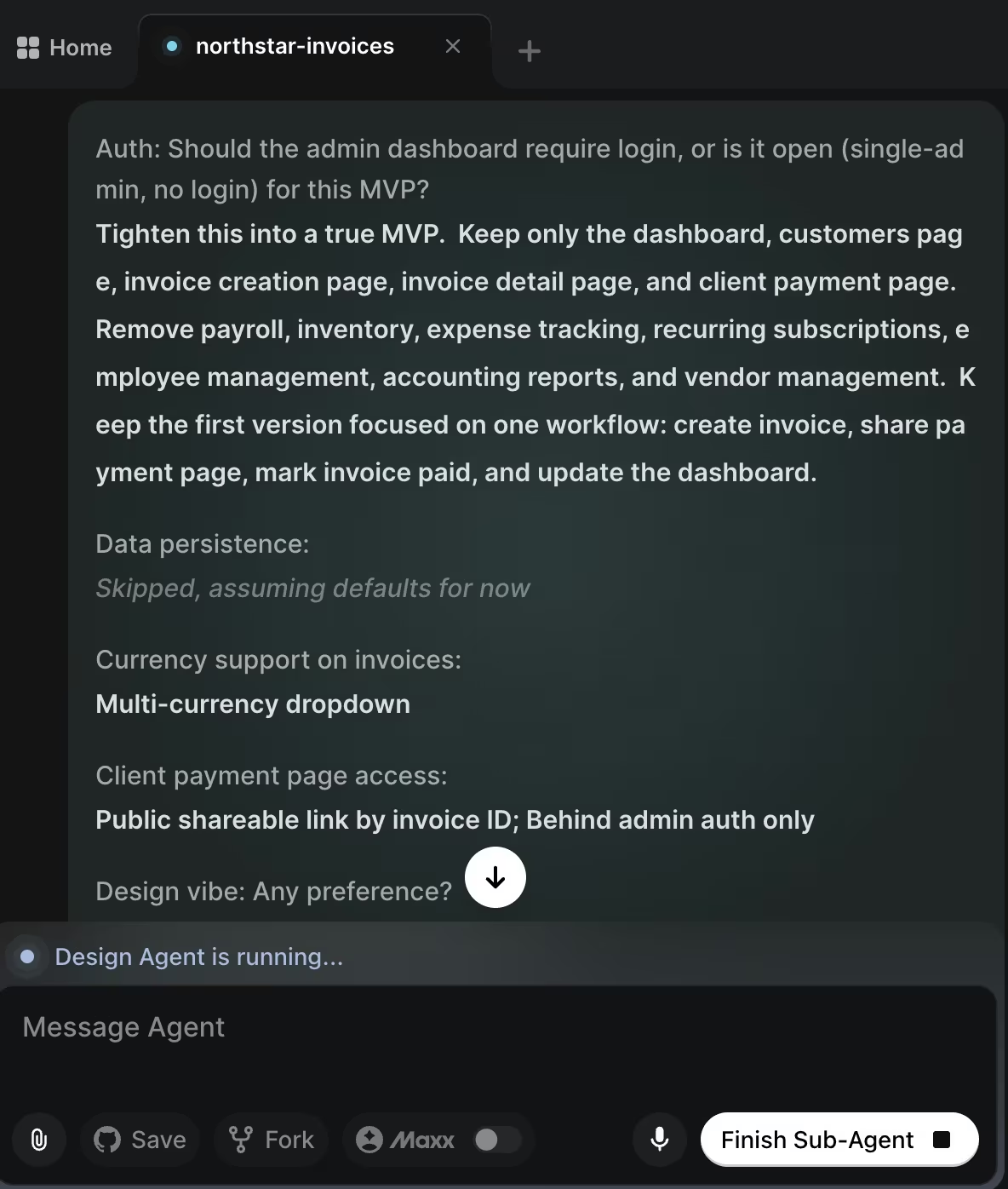
For the Northstar Invoice Tracker MVP, I’d build five screens:
- Dashboard: Show unpaid, paid, and overdue invoices.
- Customers: Add and edit customer details.
- Invoice Creation: Create invoice line items and totals.
- Invoice Detail: Show invoice status, due date, line items, and total.
- Client Payment Page: Show invoice details and a test payment link.
That’s enough to test the core workflow, and deliberately too little to run a full contracting company.
This same scoping logic applies to CRM-style MVPs, where leads, customers, and follow-ups are the core records.
Step 4: Choose One Build Route
Choose the build route based on the riskiest part of the MVP. If the main risk is demand, use the fastest route to a working version. If the main risk is security, compliance, scale, or custom native performance, bring in technical help earlier.
Here’s how I’d pick between the four routes:
- Use an AI app builder: Best for dashboards, booking flows, internal tools, simple CRMs, invoice tools, client portals, and workflow MVPs.
- Use a visual app builder: Best when you want drag-and-drop control, and you’re comfortable learning the platform’s data rules.
- Use a developer or agency: Best for regulated data, complex payments, native phone features, high traffic, or long-term engineering ownership.
- Use a fixed-scope MVP service: Best when you want a team to scope, build, and ship the first version for a set project fee.
Also read our best AI app-building tools guide to find the right builder before you commit to a route.
Step 5: Build the First Version with a Specific Prompt
Your first prompt should describe the user, workflow, screens, fields, permissions, and limits. A vague prompt gives the builder too much room to guess.
Use this starter prompt:
Build a web MVP called Northstar Invoice Tracker for a small concrete contractor. It should let an admin add customers, create invoices, share a payment link placeholder, mark invoices as Draft, Unpaid, or Paid, and view paid and outstanding totals in a dashboard. Use fake data. Include Admin and Customer views. Keep the first version to five screens: Dashboard, Customers, Invoice Creation, Invoice Detail, and Client Payment Page. Before building, ask me any missing questions.

Then add constraints:
Version one should not include payroll, inventory, vendor management, route planning, or accounting exports. Keep the design simple and make every button label clear.
Also read our guide on how to build an AI app in under an hour to see how fast you can go from prompt to working product.
Step 6: Test with Fake Data before Real Data
Test the MVP with fake data before you connect real customers, payments, email, or production records. I use fake data because it lets me break things without creating a customer support problem.
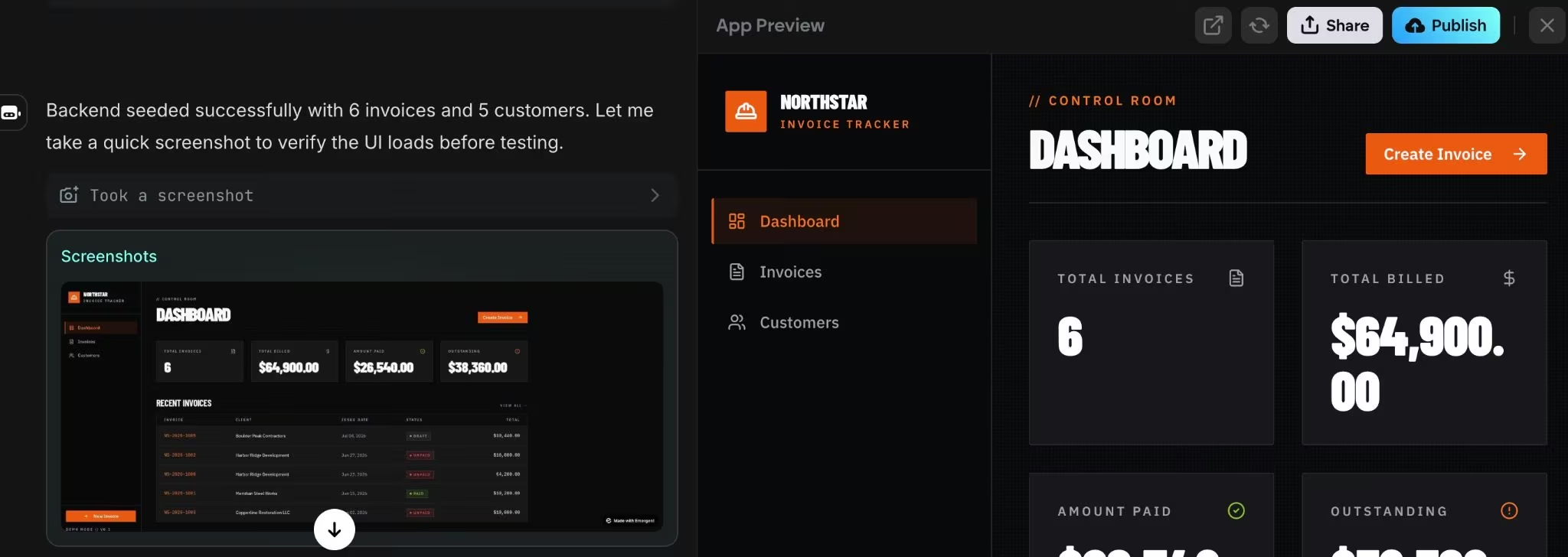
Run this test pass:
- Add a fake customer.
- Create a fake invoice.
- Open the invoice detail page.
- Open the Client Payment Page.
- Mark the invoice as paid.
- Refresh the dashboard.
- Try a missing field.
- Try a wrong email format.
- Try a duplicate customer.
- Try deleting a record.
The first test pass should answer one question: Can someone complete the core workflow without help?
If the MVP touches payments, personal data, or anything else on the security-review list later in this guide, get a developer or security check before launch.
OWASP’s Top 10 for LLM applications calls out risks like prompt injection (hidden instructions that trick the AI), apps trusting AI-written code without checking it, and AI tools leaking private data or taking actions nobody approved. NIST’s AI-focused companion to its Secure Software Development Framework (SP 800-218A) recommends building safeguards into every stage of development, not just the end.
Step 7: Launch to a Small Group and Decide What Comes Next
Launch the MVP to a small group that matches your target user, with the payment link still in test or placeholder mode, so you’re not handling real money before a security review. Launch to people who feel the problem enough to give honest feedback or pay for a better version, not everyone you know.
Use this decision ladder:
- 0 users finish the workflow: Fix the workflow before adding features.
- Some users finish, but need help: Improve the flow, labels, and required fields.
- Users finish and return unprompted: Keep building the same workflow.
- Anyone offers to pay or pilot: Treat that as the strongest signal and plan the next build.
- Most testers ask for a different app: Re-scope the idea before adding features.
After the first test, decide one of three things:
- Cut: The problem isn’t painful enough.
- Repeat: The problem is real, but the workflow needs work.
- Expand: The workflow works, and the next feature removes a real blocker.
An MVP earns its budget here. You’re deciding from real behavior instead of a feature list.
Common Mistakes to Avoid When You Build an MVP App
The most common MVP mistake is building the full product too early. The second is testing with people who were never going to buy, use, or approve the app.
Avoid these:
- Building year two in version one: Version one should prove the core workflow, not support every future edge case.
- Skipping the buyer: If the user and buyer differ, test both. A field tech may love the app while the owner refuses to pay.
- Using real data too early: Fake data protects you while forms, permissions, payments, and exports are still unstable.
- Treating AI output as final: AI-built code still needs testing, review, and human judgment.
- Choosing mobile too soon: App stores add extra steps, fees, and review time. Apple lists the Developer Program at $99 per membership year, and Google Play lists a one-time $25 registration fee.
- Ignoring handoff: If you’ll need engineers later, choose a route that gives you code access, documentation, and a clear path to handoff.
Decide the revenue model after the first workflow works. Emergent’s guide to app revenue models explains the main options once you have real usage signals.
Take it Further: Validate, Review, and Scale Safely
Once the MVP works for a small test group, improve the next bottleneck instead of adding a bundle of new features. The next feature should remove a real blocker from sales, onboarding, support, payment, or repeat usage.
Side Note From Testing: While I was testing the Northstar Invoice Tracker build, Emergent’s agents suggested four next-step improvements: wiring a real payment gateway on /pay/:id, adding invoice PDF export and email sending, making invoices editable from the detail page, and adding customer detail pages with invoice history.

I wouldn’t add all four before the first user test. I’d ship the current MVP with fake data first, then prioritize the next feature based on what testers actually need. For this invoice tracker, the strongest next step is payment testing because it connects directly to the core workflow: create invoice, share payment page, and mark the invoice as paid.
Use this next-step checklist:
- Activation: Did the user reach the first useful result?
- Completion: Did the user finish the core workflow?
- Clarity: Did they understand the labels, buttons, and next steps?
- Retention: Did they come back without being reminded?
- Payment: Did they ask about price, access, or a pilot?
- Support load: Did the app create fewer manual tasks or more?
- Risk: Does the next version touch payments, personal data, roles, permissions, or external systems?
Bring in a developer or security reviewer before expanding into:
- Payments, subscriptions, invoices, or refunds.
- Personal, financial, health, legal, or child-related data.
- User accounts, roles, and permissions.
- Admin panels.
- Production databases.
- External tools that send messages, spend money, or update records.
- App Store or Google Play submission.
- High-traffic or business-critical workflows.
Emergent Makes MVP App Building Easier
Emergent helps you build an MVP app when the idea can be described as screens, data, workflows, and launch steps. It works best for founders, service business owners, consultants, agencies, and operators who need a working version before they hire a full engineering team.
Here’s how Emergent helps with MVP app building:
- Prompt-based building: Describe the app, screens, user flows, data, and limits in plain language.
- Web and mobile output: Emergent’s AI app builder supports web apps, Android, iOS, and progressive web app publishing paths.
- Launch workflow: Build through conversation, with specialized agents that design, code, and deploy the app.
- Credit-aware building: The Free plan includes 10 credits per month, while Standard costs $20/month or $17/month annually.
- Code handoff: GitHub integration on the Standard tier lets you review or extend the MVP later.
Use Emergent for the first working version when you need speed, clarity, and fast iteration.
Final Takeaway: Build MVP App First, Then Earn the Full App
Define your MVP app scope first when you still need proof that the user, workflow, and pricing are right. Go straight to a full app only when demand is proven, risk is high, or customers are already waiting for a reliable production system.
My recommendation is simple: ship the smallest version that tests the riskiest assumption. If people use it, pay for it, or ask for access again, you’ve earned the next build cycle.


Describe what you want and Emergent builds it. A real, production-ready app you can launch the same day.
- One prompt to build
- Zero code required
- Deploy in minutes







