



I built a real SaaS product and studied dozens of founder accounts to find what works. Here's how to start one, start to finish, from validating the idea to landing the first paying customers.
What Is a SaaS Business?
A SaaS business sells software that people pay to use online, usually month to month, instead of buying it once. Slack and Dropbox are SaaS. You log in, you use it, you keep paying while it solves a problem for you.
A client portal is one kind of SaaS and a useful example for this guide. Picture a design agency. Its clients email to ask where a project stands, when the next file is due, and whether an invoice has been paid. A portal puts all of that behind one login, so clients can check for themselves.
Validate the Idea Before You Build
With the portal, I almost started building too early. I had the idea, wanted to ship it, and treated customer conversations like a delay.
CB Insights studied hundreds of failed startups and found that 43% died from poor product-market fit, which is a softer way of saying they built something not enough people wanted.
Validation kept me from making that mistake. For me, it came down to three jobs, and none of them required code.
First, I talked to people who lived with the problem. Instead of asking friends, I spoke with design agency owners who were drowning in client emails. I asked what they used, what made them groan, and what they would pay to make it stop.
Ten honest conversations told me more than ten weeks of building would have. A few agency owners described the portal back to me before I had built it.
Then I ran a quick competitor scan. I spent an afternoon Googling, signing up for free trials, and reading one-star reviews. Angry users often tell you where the gap is.
I was looking for tools people already paid for, tolerated, and quietly hated. That showed me there was money in the category, but still room for a better workflow.
Last, I defined the one core feature. For my portal, it was the project status view, which gave clients a reason to log in instead of sending another email.
File storage, messaging, and invoicing went on a later list. Feature two had to wait until people kept coming back for feature one.
Tip
Write down the exact sentence a customer uses to describe their pain. Keep it word-for-word. That sentence can become your landing page headline later, and it converts far better than a line you invent yourself.
3 Ways to Build Your SaaS Product
There's no single right way to build a SaaS product. The best path depends on your budget, your technical skills, and how complex the product needs to be.
Method 1: No-Code App Builders
No-code means you build a working app by dragging pieces together visually, without writing any code. Bubble, Glide, Softr, and FlutterFlow all work this way.
You design screens, connect them to a database, and set rules through a visual editor. When I took the client portal down this route, I had the basics up in a couple of days.
The login, a dashboard, and a place for paid features were all there. That early speed is the whole appeal. You get from idea to something you can click on faster than you'd expect.
Reach for no-code when you need to test an idea fast or land your first customers before investing in engineering.
The screens turned out to be the easy part of the portal. The harder part was everything underneath. Who gets to see which client's files? What happens the moment after someone pays, and what happens when their card fails?
I also had to decide how the data was stored and what would break if I changed that structure three months in. The first time I added a second type of user, the whole thing needed re-planning.
Each tool also has its own ceiling. Bubble gets slower and pricier to run as traffic grows. Glide and Softr hit a customization wall when a client wants something off-template. FlutterFlow exports real code, so you're less locked in, but it leans low-code. No-code gets the idea out of your head fast, but it doesn't make the founder's decisions for you.
Hitting the ceiling on your current no-code tool? Our best no-code software builders breakdown covers which platforms hold up as your app grows.
Method 2: AI-Assisted App Builders
AI-assisted builders let you describe the app you want in plain language and generate a working version, including the parts that usually need an engineer.
Instead of arranging every screen by hand, you describe what you need, and the tool generates the app structure for you. A tool like Emergent can turn a plain language prompt into a working SaaS app with logins, per-client access, and payment flows sooner than most visual builders.
This path fits when your idea will likely grow past simple screens, since portals tend to need custom rules or billing later.
The custom logic that the visual templates choked on for me, per-client permissions and payment handling, is exactly the part this approach builds from the start. For a portal you know will need custom permissions and payment handling, the AI-assisted path keeps you from rebuilding from scratch the moment you outgrow a template.
Ready to build something that scales past templates from day one? Our best app building platforms breakdown covers the fastest, most scalable options worth trying in 2026.
Method 3: Hand-Coding From Scratch
Hand-coding means writing the software yourself or hiring a developer to do it.
You choose your own tools, write the code, and host it yourself. Nothing is locked to a platform, and you can build anything you can code.
Choose this once you already have paying users and know the product works. You get full control and no platform limits, but it's the slowest way to build, and many founders who start here stall before they ever launch.
The founders I read about who started here often spent months building before they spoke to a single customer. The ones who launched fastest built a simpler version first. They only rebuilt in code once paying users gave them a reason to.
Wondering where hand-coding still makes sense in 2026? Our Vibe Coding vs Traditional Coding breakdown gives you a developer's honest take.
What Real Users Are Saying About These Tools
I tested these tools myself, but I'm one person. So here's what the wider crowd reports on public forums, because the pattern across hundreds of reviews matters more than my single opinion.
Bubble Reviews
For Bubble, reviewers rate it highly for raw power, then run into cost at scale.
On G2, the complaint that stands out is Workload Unit pricing.

Source: G2
The more your app does, the more it costs to run, and the reviewer warns that a sudden traffic spike could burn through a young startup's budget.
Glide Reviews
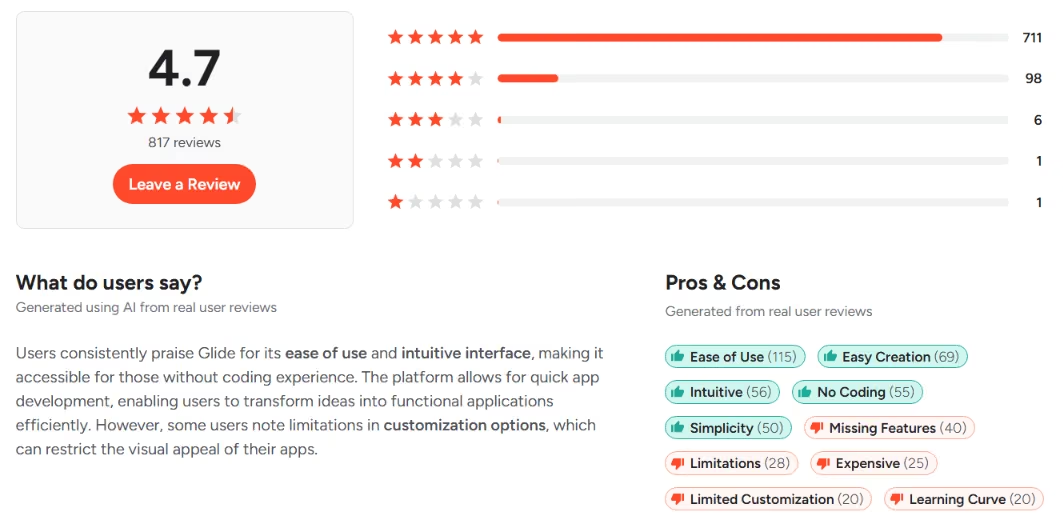
Glide gets praise for speed and ease of use, and its G2 rating sits around 4.7 out of 5.
Source: G2
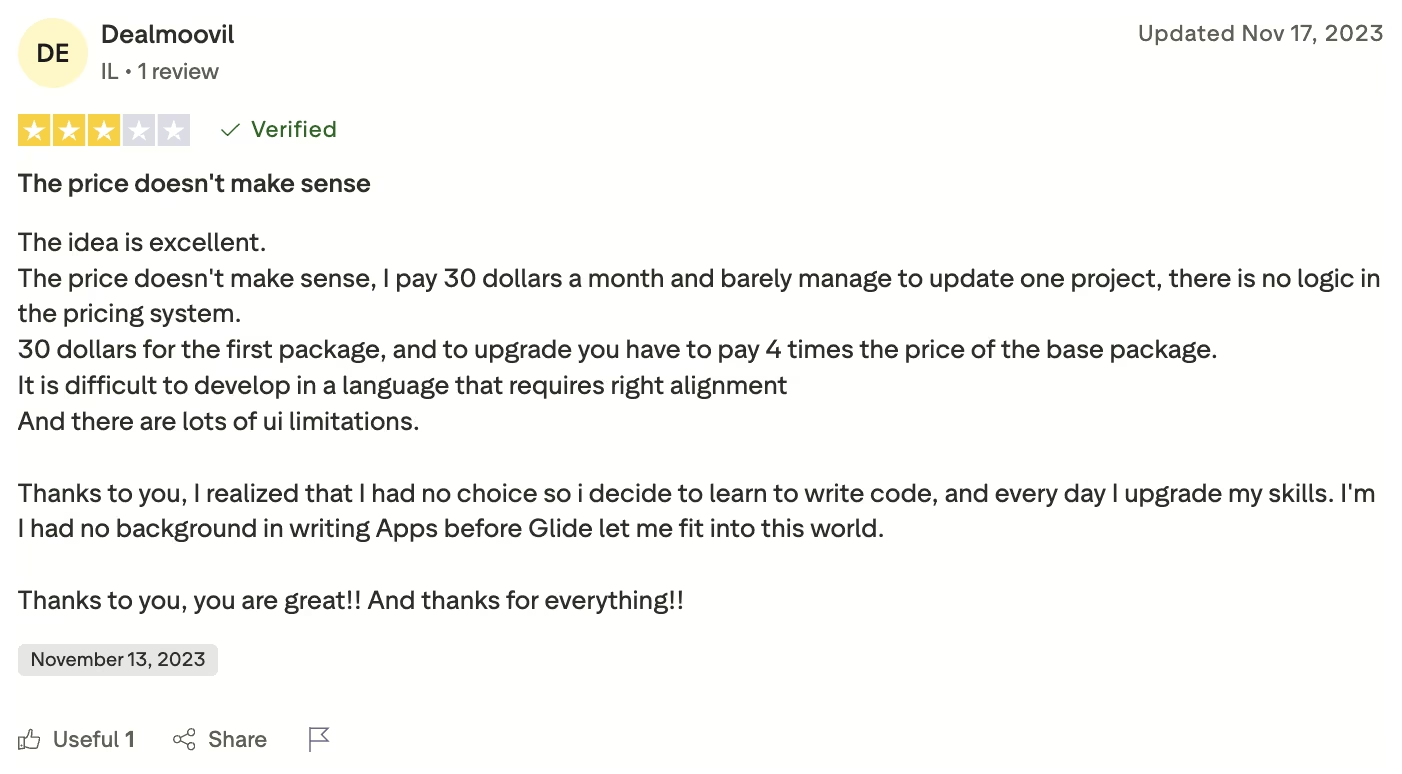
A common complaint is that Glide's pricing can feel hard to justify once an app grows beyond a simple use case.
Source: Trustpilot
Softr Reviews
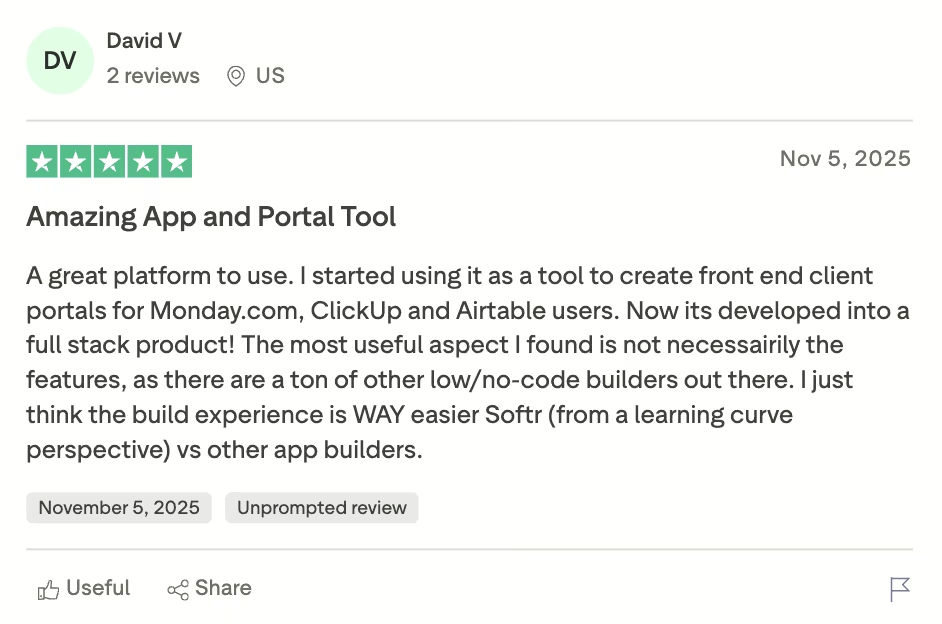
On the other hand, Softr gets consistent praise for how quickly users can stand up a client portal on top of Airtable, and support also gets strong mentions.
Source: Trustpilot
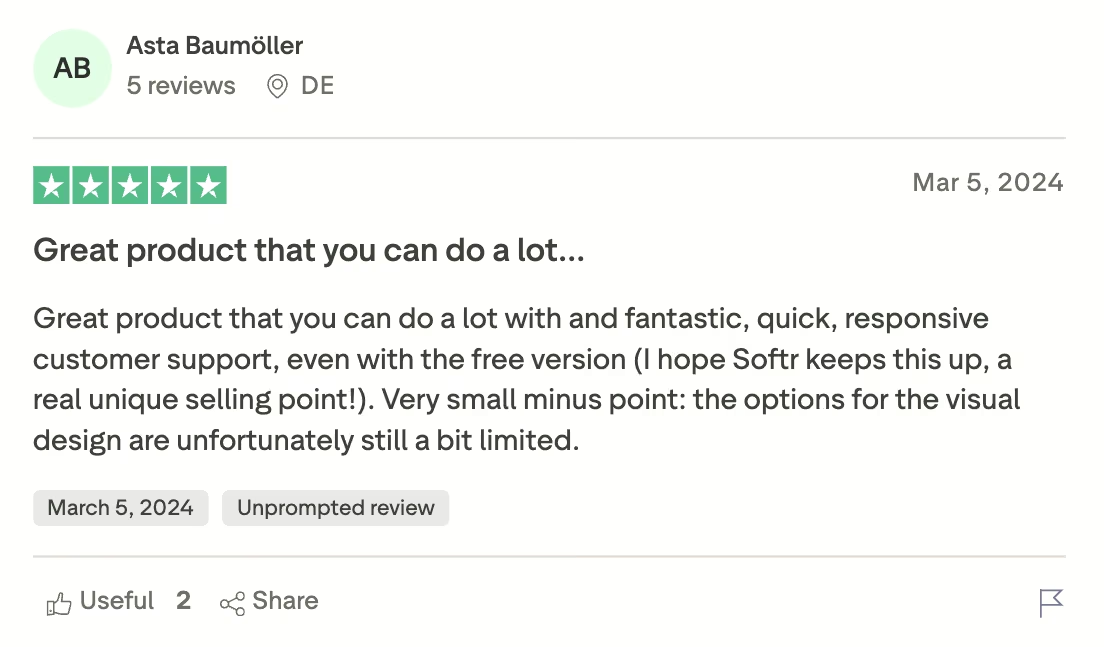
The most common complaint by a wide margin is limited design freedom. Users describe the prebuilt blocks as clean but rigid. Costs also climb once you need SQL, custom code, or more users.
Source: Trustpilot
Emergent Reviews
Emergent reviews describe it as fast and capable for full-stack builds. One clear plus is code export, which gives you ownership that the no-code tools above do not offer.

Source: Trustpilot
The repeated knock is credit-based pricing, since every build, test, and even keeping an app live spends credits. The bill can creep up if you iterate a lot.
Across these reviews, the same pattern keeps coming up. The tools feel strongest at the start, then the harder trade-offs show up around customization and cost at scale.
Which Method Should You Choose?
The right path comes down to where you are now and where you expect to be in a few months.
Choose no-code if:
- You want to test an idea or land your first customers as fast as possible.
- Your portal is simple, closer to a clean dashboard than a complex app.
- You're not technical and want to avoid hiring early.
Choose AI-assisted if:
- You expect the product to need custom rules, roles, or payments soon.
- You want speed and a path that avoids rebuilding once you outgrow templates.
- You'd rather describe what you want than arrange every screen by hand.
Choose hand-coding if:
- You've already validated demand with paying users.
- You need full control over performance and ownership.
- You have the engineering skill or budget to support it.
SaaS Pricing Models and How I Picked One
Pricing gave me more anxiety than any line of code. Charge too little and the product feels like a toy. Charge too much before the value is clear, and people leave.
Most SaaS pricing falls into six models:
- Flat-rate pricing gives everyone one price and one plan. It is easy to sell, but bigger customers pay the same as smaller ones.
- Tiered pricing uses a few plans at rising prices, like Starter, Growth, and Pro. A freelancer and a 50-person agency can both find a plan that fits.
- Per-user pricing charges for each person who logs in. It works for team tools like Slack, but every added teammate raises the bill and can push people to share logins.
- Usage-based pricing charges for what people consume, such as API calls or emails sent. It feels fair and scales with value.
- Freemium gives people a free tier, then relies on a smaller share upgrading to paid. It fills the funnel quickly, but free users cost money, and most never convert.
- Hybrid pricing mixes models, such as a tiered plan with a usage cap.
For the portal, I chose tiered pricing.
Per-user pricing made no sense because the agency's clients were the users. Charging more every time an agency added a client would punish growth. Usage-based pricing was too much for a simple portal, and flat-rate pricing left bigger accounts paying the same as tiny ones.
Three tiers, based on active client projects, fit the product and the way agencies grow.
My biggest pricing lesson: price against the pain first. The agencies I talked to were paying a junior staffer to send status updates by hand. That meant money and annoyance every week, so I priced against that cost and put the middle tier at $49 a month. Next to a salary, that felt like an easy yes.
When you compare tools, read the limits instead of the plan names. A "starter" or "maker" plan can include very little you can use, while the real product plan sits two steps up.
Emergent's free tier is a good example. With about 10 credits a month, it works as a test drive rather than enough to build and ship a working app. So you should judge plans by limits instead of labels.
How to Start a SaaS Business Step by Step
Once I had the product idea and build path clear, the rest came down to four practical steps: set up the business properly, choose how to fund it, get the first users, and track the numbers that show whether it is working.
Step 1: Set Up the Legal Basics
Founders often put off legal setup because it feels boring. That usually gets expensive later. It is easier to handle the basics early than to deal with a tax issue, ownership problem, or naming conflict once the product is live.

For most first-time US SaaS founders, the early choice is between an LLC and a C-corp. I am not a lawyer, so treat this as a practical overview, not legal advice.
Source: Stripe Atlas
An LLC is usually the simpler option. It is cheaper to set up, easier to manage, and keeps your personal assets separate if the business gets sued. For a bootstrapped product like my portal, it was the obvious choice.
A C-corp makes more sense if you plan to raise venture funding. Most VCs expect that structure, and tools like Stripe Atlas can help set one up. The tradeoff is more paperwork, more cost, and more admin from the start.
Before you commit to a name, check whether the (dot)com domain is available, search your state's business registry, and look for obvious trademark conflicts.
Then handle the basics. Get an EIN from the IRS. Open a separate business bank account. Set up sales tax. For a simple SaaS, that is usually enough to get started without overcomplicating it.
Read More: How to Build a Membership Website: Step-by-Step Guide
Step 2: Choose How You Will Fund It
The next decision is how to pay for the business. Most founders either bootstrap or raise money, and those paths lead to very different companies.
Bootstrapping means you fund the product yourself through savings, a day job, or early revenue. You keep control, but growth is limited by your own cash and time.
Raising money means taking capital from angels or VCs in exchange for equity. That gives you more runway and faster execution, but investors now have a stake in the company and a say in where it goes.
I bootstrapped the portal because it served a clear niche, did not need a huge upfront investment, and was built for steady recurring revenue instead of venture-scale growth.
A simple rule helps here. If you can reach paying users without spending a lot upfront, bootstrapping usually makes more sense. If the product needs serious capital before it can work and the market is large enough to justify that risk, raising is worth considering.
Step 3: Get Your First Users
The build is only half the job. A product with no users is still just an idea with a login screen.
Your first users usually do not come from SEO or paid ads. Those channels take time. Early on, the faster path is direct outreach and real conversations.
I started with people I already knew in the agency world. I reached out because they had the exact problem the portal was built to solve.
Then I spent time where agency owners were already active, including niche Discord groups, Facebook communities, and LinkedIn threads. I joined conversations and answered questions, and let the product come up naturally instead of leading with a pitch.
I also sent short outbound messages to agencies whose work I liked. I mentioned one specific detail so the message felt personal instead of generic. The response rate was not high, but the conversations were useful.
Content and product-led growth came later. Blog posts, free trials, and sharing loops worked better once I already had a few users and knew what resonated.
Two things did not work. Posting to empty social accounts did nothing. Talking only to people who liked the idea but never paid also wasted time. Early on, one real customer matters more than a long list of compliments.
Step 4: Track the Numbers That Show Traction
Once people start paying, you need a few numbers to tell you whether you are building a real business or just having a good month.
MRR, or monthly recurring revenue, is the predictable subscription revenue coming in each month. At the start, direction matters more than size. Going from $400 to $600 tells you more than the raw number alone.
Churn is the percentage of customers who cancel over a given period. That tells you whether the product keeps delivering value after the first signup.
CAC, or customer acquisition cost, is what you spend to get one customer. Early on, that often includes your own time, not just ad spend.
LTV, or lifetime value, is the total profit you expect from a customer before they leave. In general, a 3:1 LTV-to-CAC ratio is a healthy baseline, and 5:1 is strong.
My early numbers were small and messy. I had a few paying agencies, churn that spiked when I shipped bugs, and a CAC that was mostly my own evenings and weekends. That is normal in the early stage. Early numbers won't be clean, and that's fine. The goal is to catch problems before they grow.
If you only check one metric every week, make it the one that would hurt you most if it quietly got worse. For me, that was churn. In a portal product, when clients stop logging in, cancellation usually follows.
How Emergent Makes Starting a SaaS Easier
For a first-time founder, speed matters more than the perfect tech stack. Emergent can take a prompt and turn it into a working app with logins, client access, and billing, which makes it easier to test the product before you hit the limits.
Emergent helps with your first SaaS in four ways:
- Working app fast: describe the portal you want and get the logins, dashboard, and file access built in.
- Per-client access: the permission rules that stall visual templates are handled from the start.
- Room to grow: add billing or heavier logic later without tearing the product down.
- Less rework: the parts that usually need an engineer are there from day one, so traction doesn't force a migration.
You can try Emergent when you're ready to build your first version.

Describe what you want and Emergent builds it. A real, production-ready app you can launch the same day.
- One prompt to build
- Zero code required
- Deploy in minutes







