




Replit vs Bolt: TL;DR
Replit works like a browser coding workspace with AI built into it. You can ask Agent to create the app, then inspect the files, edit the code, or use the development tools yourself. It also supports a wider range of programming languages and frameworks.
Bolt also starts with a prompt, but you can switch to Code View to open and edit the generated files. Its technical range is narrower because it focuses on JavaScript web frameworks and Node.js backends.
Replit suits people who want more choice in how they build and expect to work directly with the code. Bolt suits people building a JavaScript web app who want to stay in prompts and previews most of the time, with the code available when needed.
Some people want an AI app builder to write the first version, then hand them the files, terminal, and code so they can take over. Others would rather keep describing what they want and stay out of the implementation for as long as possible.
Replit and Bolt look like they can do both. You can start with a prompt, keep refining the app through chat, or open the code and work on it yourself. For a nontechnical founder, the overlap makes it hard to tell which tool will feel simpler and which one will pull you closer to the code.
I gave both the same app to build and compared pricing, code access and exports, web and mobile support, security, and team use. You can see which one fits the way you want to build, where each falls short, and whether a simpler option would suit you better.
How I Tested
I gave Replit and Bolt the same prompt:
Build a vendor coordination site for an event rental business called Loop & Lattice. It needs two experiences: a public request page for clients and a private operations dashboard for the team.
The client page needs a rotating carousel of styled event setups, a cream, terracotta, and deep green palette, and a form for the event date, item categories, and guest count. After submission, show a confirmation that someone will follow up within an hour by phone or email. Add a subtle fade effect as sections enter the screen.
The staff dashboard needs a table of all requests. Staff should assign a vendor to each item category. Mark a request as confirmed only after every category has a vendor. Flag requests happening within five days when at least one category remains unassigned.
The test covered both how the app looked and whether its rules worked.
I compared:
- Build time
- Credits or tokens used
- Workflows completed
- Design adherence
- Corrections needed
For workflow completion, I submitted a request, assigned and removed vendors, and checked whether the status and five-day urgency rules updated correctly. For design adherence, I reviewed the carousel, palette, scroll effect, and urgent styling against the brief.
Meet Replit
Replit is a browser platform for building and publishing software with AI. Its latest Agent 4 can plan and create websites, web apps, mobile apps, dashboards, and other projects from a prompt.
You can keep refining the project through chat, make visual changes on the Design Canvas, or edit the files yourself. The project editor also brings testing, collaboration, version history, and publishing into the browser, so you do not need to set up a separate coding environment on your computer.
Also read our best Replit alternatives guide for what else is worth trying when the browser IDE or credit costs don't fit.
Meet Bolt
Bolt is an AI builder for websites, web apps, and mobile apps. You describe what you want in chat, watch Bolt create it in a live preview, and continue making changes through prompts.
Bolt keeps the rest of the building process in the same browser window. You can restore earlier versions of the project, publish it through Bolt’s hosting, connect a database, or open Code View when you want to inspect or change a file yourself.
Also read our best Bolt.new alternatives guide for what else is worth trying when token limits or the browser environment become a constraint.
Replit vs Bolt: The Numbers Side by Side
| Dimension | Replit | Bolt |
|---|---|---|
| Building model | AI Agent inside a browser coding workspace | Prompt-first builder with a preview and optional code tools |
| Free plan | Daily Agent credits and one published app | 1M monthly tokens with a 300K daily limit |
| Starting paid price | Core: $20/month or $18/month billed annually | Pro: $25/month |
| Stack coverage | Wider language and framework support | JavaScript-based apps and Node.js backends |
Replit vs Bolt: Breaking Down the Key Features
Replit and Bolt both turn prompts into apps, expose the generated code, connect databases, and publish projects. Replit supports more languages and frameworks, while Bolt supports JavaScript frontends and Node.js backends.
But one technical distinction does not decide which platform is better for you. Looking at the products feature by feature gives a fairer answer.
The Build Test: Loop & Lattice
Replit Build
Replit worked for six minutes before the free Agent allowance ran out. I tested the app immediately and found a half-finished result. The public page loaded, but the form did nothing, and the dashboard was empty. I could sign up, verify my email, and log in, but there was no request data to work with.
When I opened the same project the next day, my credits still had not reset. The app had changed anyway.
The form submission worked, and my test request appeared in the dashboard. I still could not tell what had happened between the two checks.
Replit build snapshot:
- Build time: 6 minutes before the allowance ran out
- Usage: Free Agent allowance exhausted
- Workflows: Completed on the next-day retest
- Design: Carousel and palette matched
- Corrections: Scroll-fade effect was missing
The public page followed the visual brief closely. Its carousel used styled event setups, while the cream background, deep green text, and terracotta accents carried through the page.
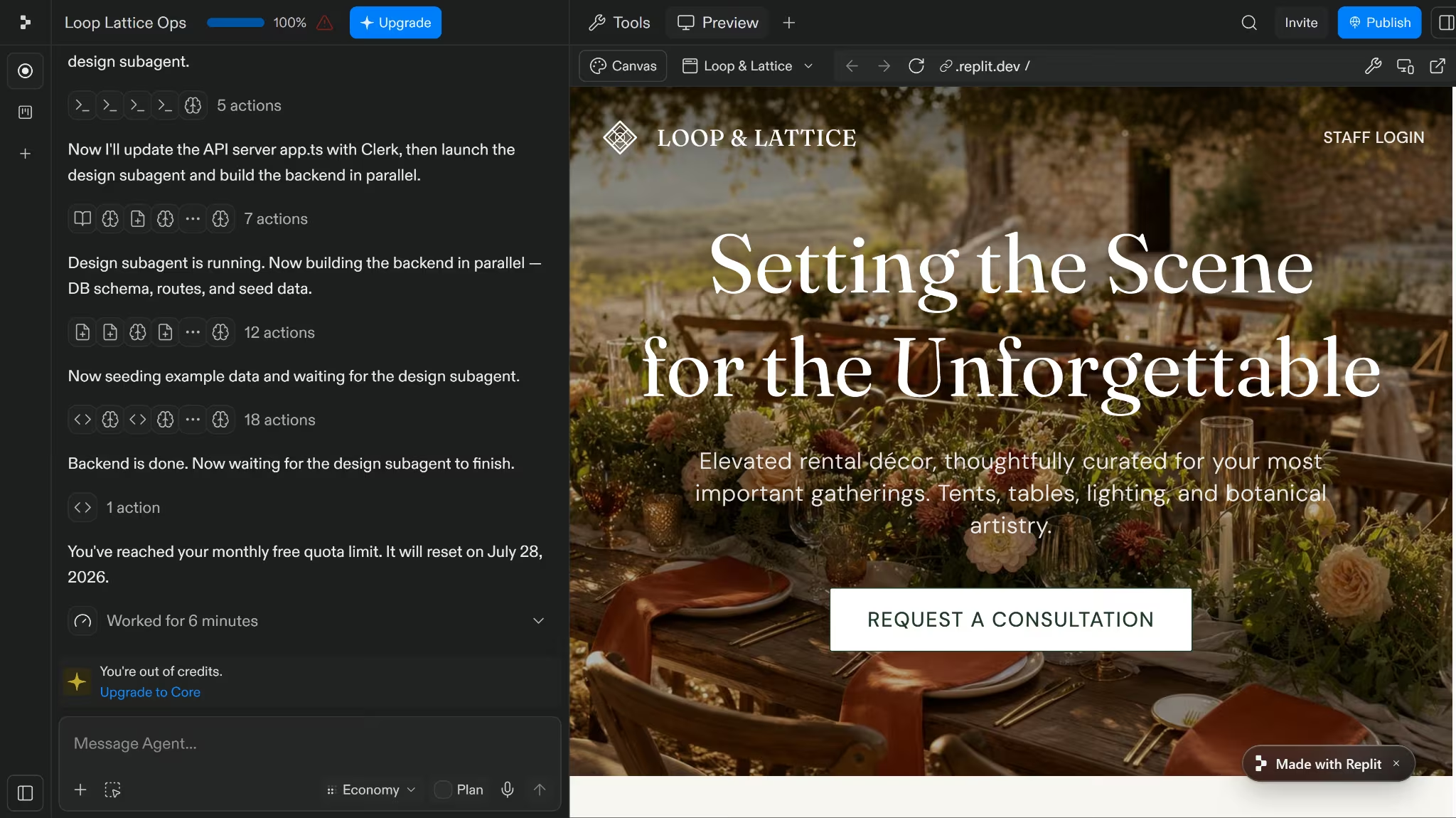
The form worked on the second check and showed the promised message that someone would follow up within an hour by phone or email. My sample request, “sand,” then appeared in the dashboard and increased the total request count from six to seven.
The assignment rules worked as requested. Adding a vendor to one category kept the job pending. The status changed to confirmed only after every category had a vendor, and removing an assignment moved it back to pending.
The five-day rule worked too. A request stayed urgent while its event was close and at least one category remained unassigned. The pending, confirmed, and urgent totals changed as I added and removed assignments.
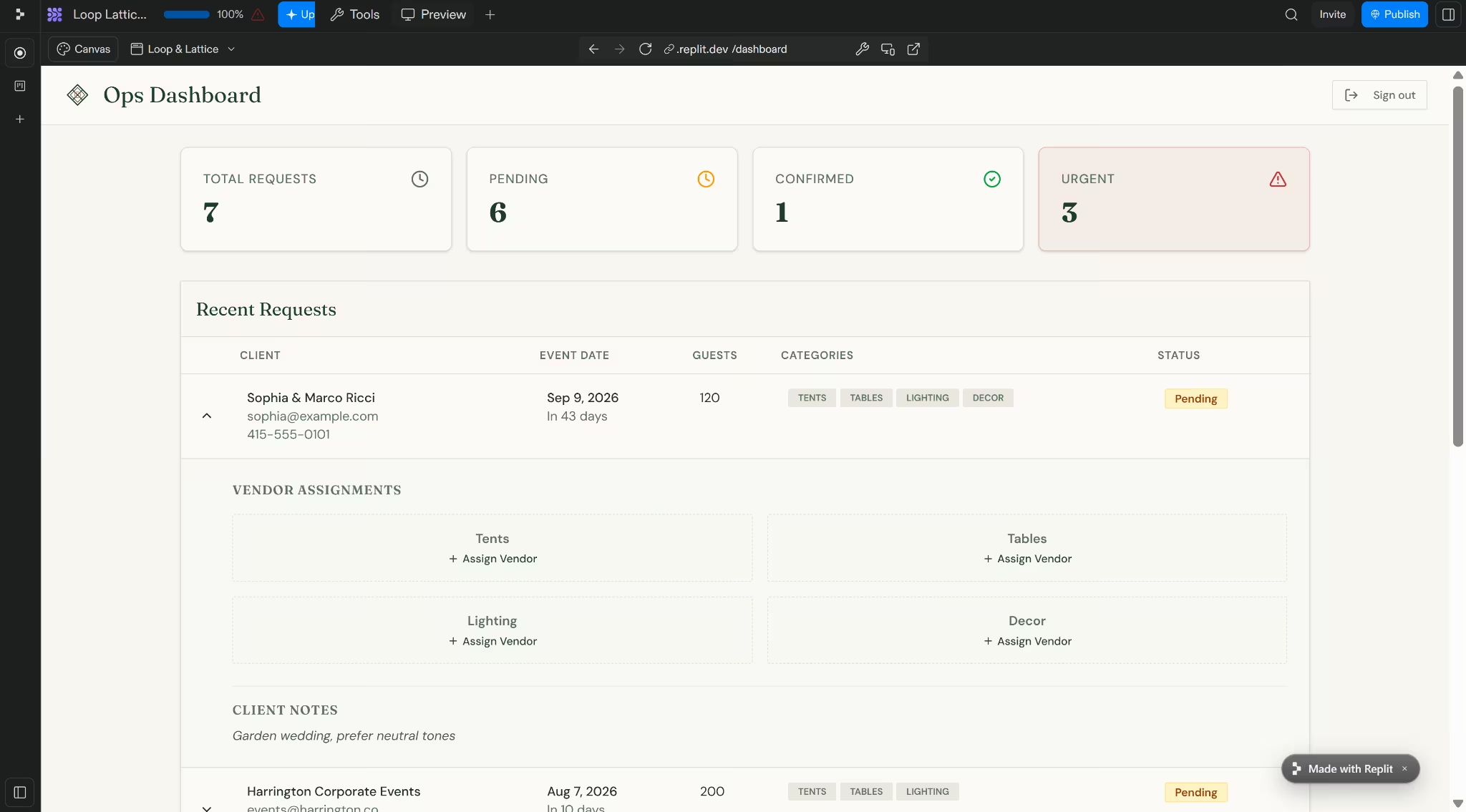
Replit required me to type each vendor name and optional contact details. The other builds used preset vendor names and dropdowns, so their assignment flows involved less manual entry, although the prompt had not required either approach.
I counted the core workflow as complete, but not as a clean six-minute finish.
Replit looked (and acted) broken when the allowance ended and only became usable when I checked it the next day.
Bolt Build
Bolt took a more orderly route from the start. It mapped out the database, login, public page, dashboard, vendor assignments, confirmation rule, and urgency logic before it began building.
Four minutes later, it said the app was finished. Unlike Replit’s first check, the form and dashboard worked as soon as I tested them.
Bolt build snapshot:
- Build time: 4 minutes
- Usage: Stayed within the free daily token limit
- Workflows: All requested flows worked on the first check
- Design: Carousel and palette matched
- Corrections: Scroll fade was missing, and database permissions needed tightening
The public page followed the cream, terracotta, and deep green palette across the hero, form, and footer. The carousel also worked, with crossfade transitions and dot navigation.
The images were less accurate. Instead of neutral rental setups, Bolt included wedding photos with couples and venue signs in the frame.
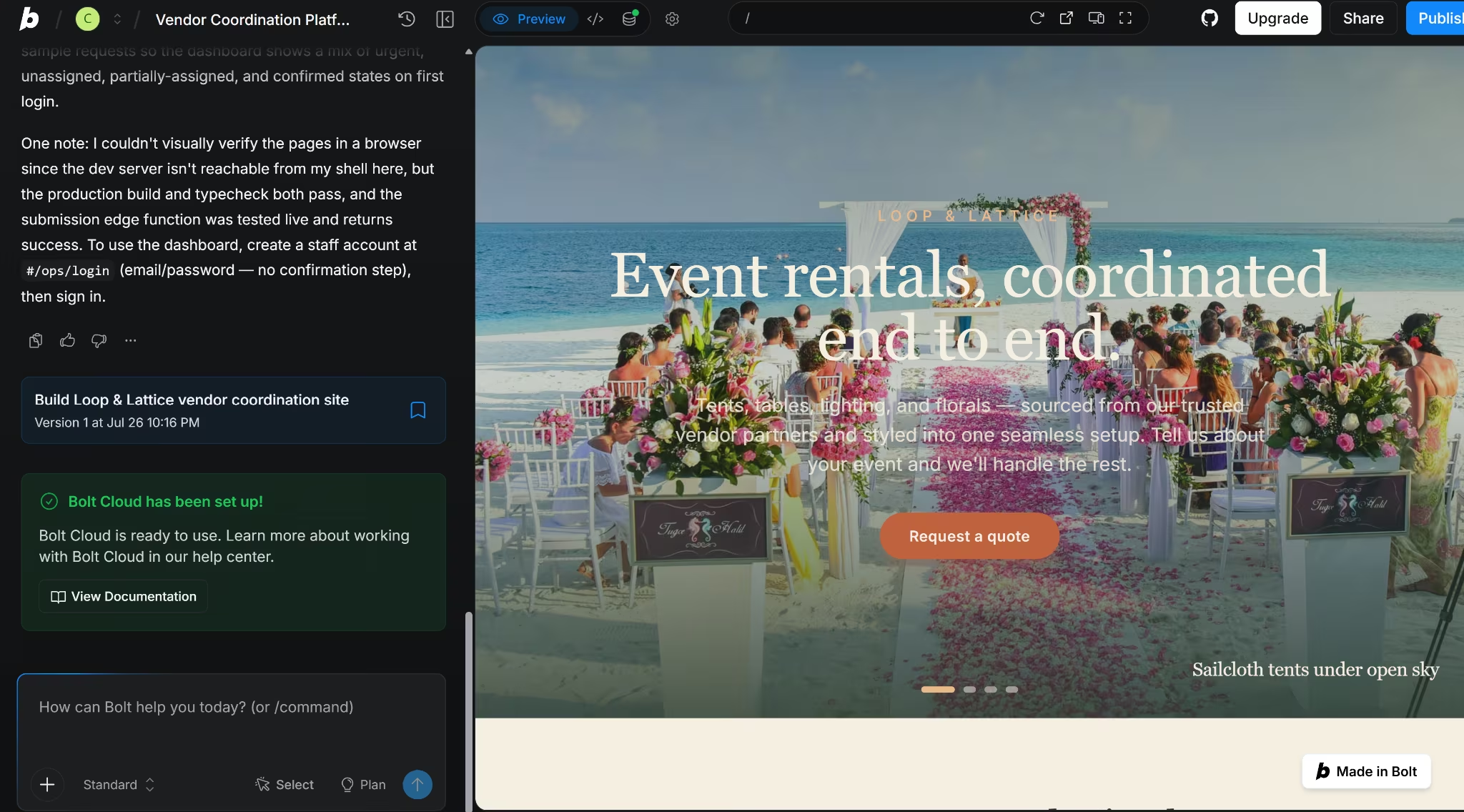
The form submitted on the first try and showed the promised one-hour follow-up message. The request then appeared in the staff dashboard without any delay.
Bolt used seeded vendor names and a dropdown, so assigning categories took less typing than it did in Replit. A partially assigned request stayed pending, while assigning every category changed it to confirmed.
Removing an assignment moved the request back to pending. Swapping a vendor also updated the request without breaking the status logic.
The five-day urgency rule worked as requested. Jobs due soon remained urgent even when a category remained unassigned, while confirmed jobs and requests further away did not receive the warning.
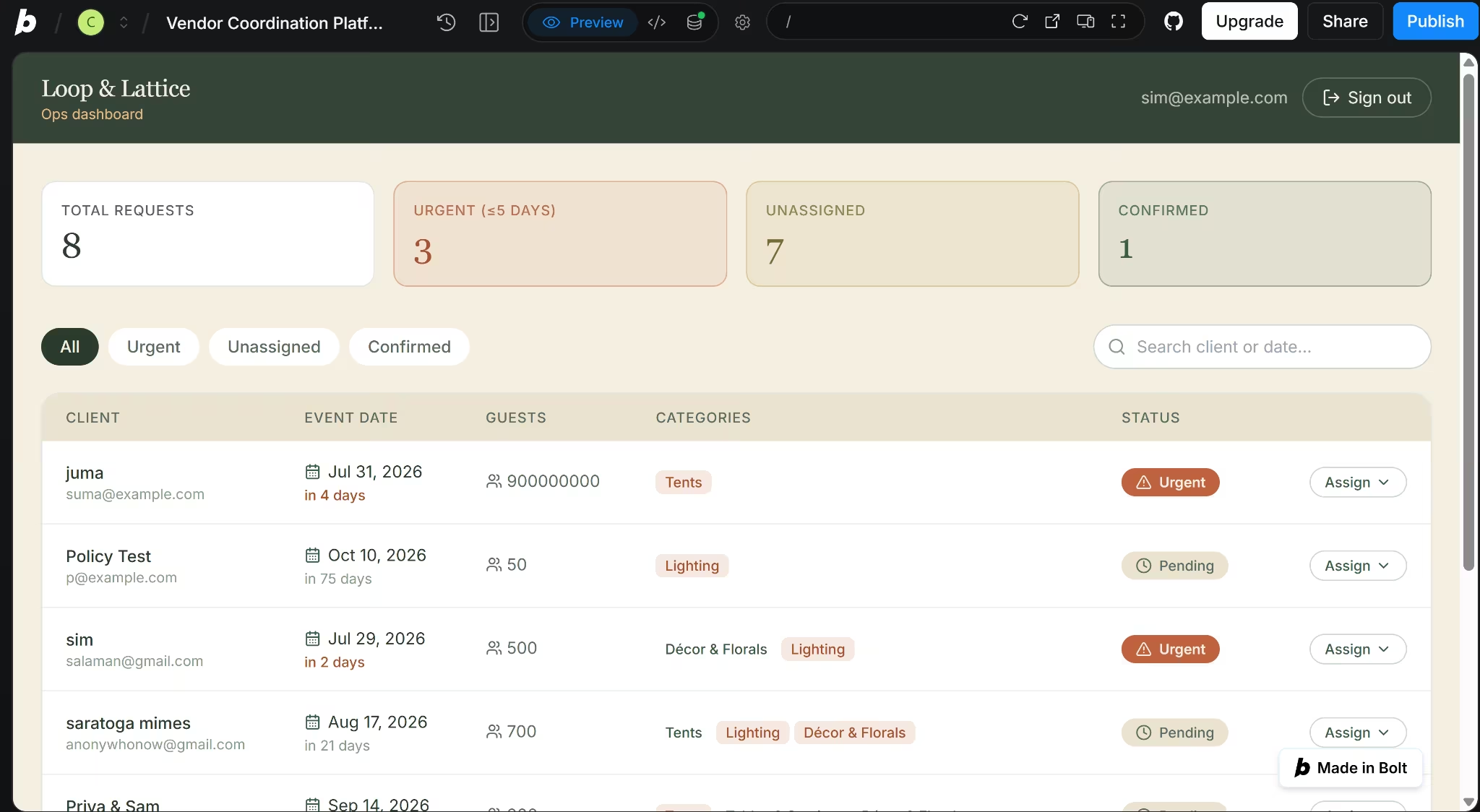
Bolt missed the scroll-fade effect, just as Replit did. Its Security Audit also found eight overly broad database permission rules, so I asked Bolt to narrow them before testing the public and staff routes again.
Both tools eventually completed the core workflow. Bolt’s advantage was that its version worked during the first session, while Replit’s only became usable when I checked it the next day.
Winner: Bolt. It completed the full workflow in four minutes and worked on the first check, while Replit only worked when I returned the next day.
Code Access and Export
Replit and Bolt both let you open and edit the code they generate. The clearer separation is what each platform gives you once you start working directly with the project.
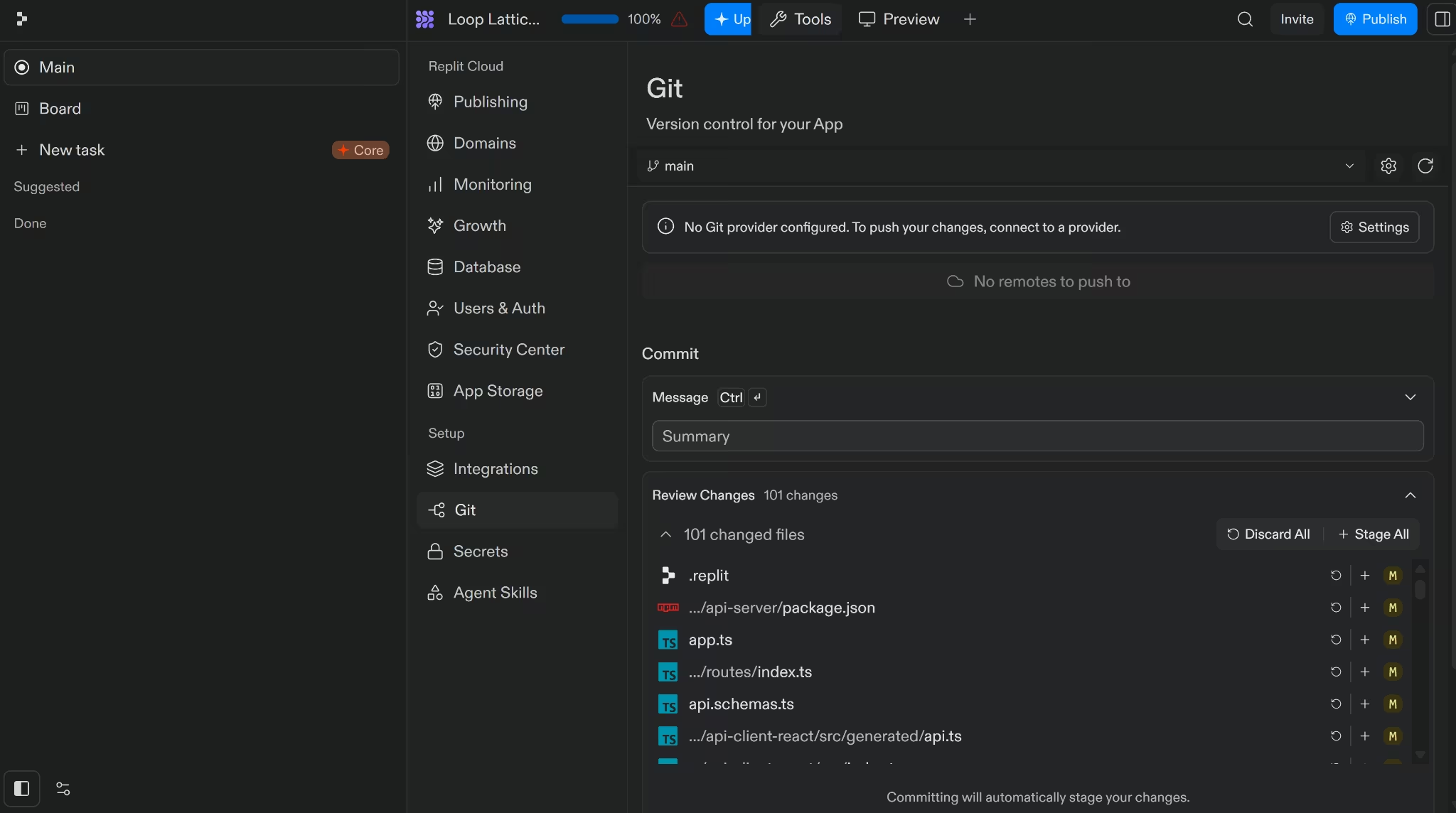
Replit keeps the generated files open inside its browser-based Project Editor, where you can inspect and edit the code directly. You can also use its visual Git tools to review changes, create branches, and sync the project with GitHub.
Agent also creates checkpoints that preserve the project files, AI conversation, settings, and connected database. You can roll back the whole project or export the source code as a ZIP.
For a nontechnical founder, the benefit is choice. You can keep building through Agent, then let a developer inspect the same project, connect it to GitHub, or move the files elsewhere without rebuilding the app from scratch.
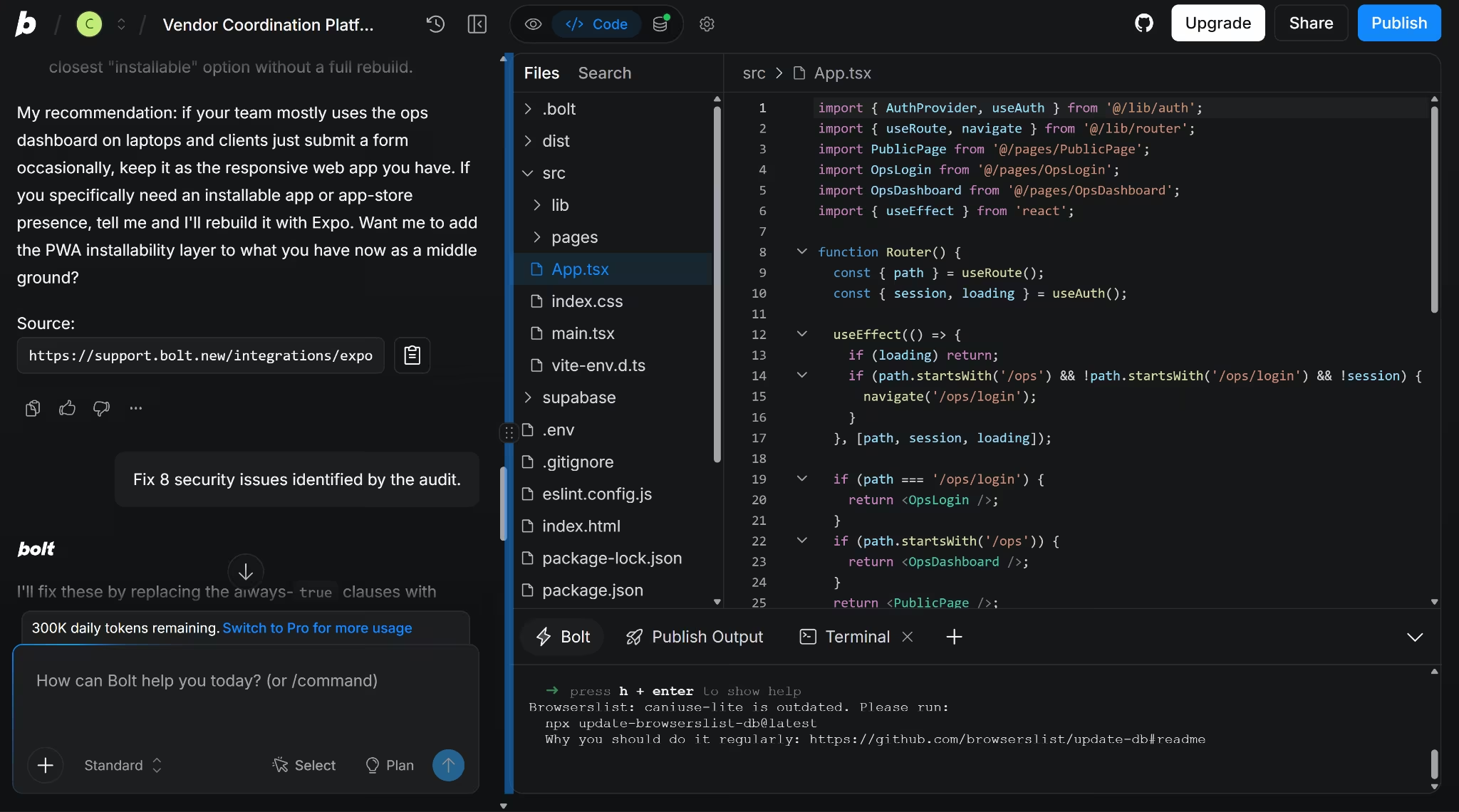
Bolt gives you similar ownership through Code View. You can open and edit the generated files directly, and those manual edits do not use tokens. Its terminal sits below the editor when you need to run a command or inspect an error.
For handoff, you can download the project as a ZIP, open it in StackBlitz, or connect it to GitHub. The GitHub connection keeps a history of changes and lets you continue working outside Bolt.
The code can leave either platform, but the whole hosted setup does not travel with it automatically. Replit notes that database values and secret keys are not carried into an imported Agent project, while Bolt treats project downloads and database-row exports as separate actions.
Winner: Replit. Both give you editable files, ZIP downloads, and GitHub handoff, but Replit provides more built-in tools for reviewing changes and restoring earlier project states.
Web and Mobile Apps
Replit and Bolt can both publish a web app from the same browser workspace used to build it.
Replit Starter includes one free published app, but the deployment goes offline after 30 days. You can publish it again when the period ends.
Bolt Free includes 10 GB of bandwidth and 333,333 requests each month. Those limits apply to all published projects in the account, so several sites can draw from the same allowance.
Image-heavy pages use the bandwidth faster because every visit transfers more data. Bolt estimates that a typical free account can handle around 10,000 to 15,000 monthly visits, although the result depends on the size of the sites. Reaching either limit takes them offline until the next billing cycle.
Bolt Pro increases the allowance to 30 GB and 1 million requests per month. Paid users can also automatically buy additional traffic, up to a spending limit they set.
Mobile follows a different path. Replit creates native apps with React Native and Expo, with previews through Expo Go and built-in iOS Simulator or Android Emulator access for paid builders.
Replit can also add a mobile app to an eligible existing project. The web and mobile versions can share the same backend and database, instead of requiring two completely separate builds.
Its guided iOS flow builds the app in the cloud and sends it to App Store Connect for TestFlight. An Apple Developer membership is still required, and Apple handles the final review.
Bolt also uses Expo and React Native for native mobile apps. You need to request a mobile app in the first prompt because an existing Bolt web project does not convert easily.
Testing can happen through Expo Go, but publishing requires downloading the code and setting up Node.js, Git, Expo EAS, and the relevant Apple or Google developer account on your computer.
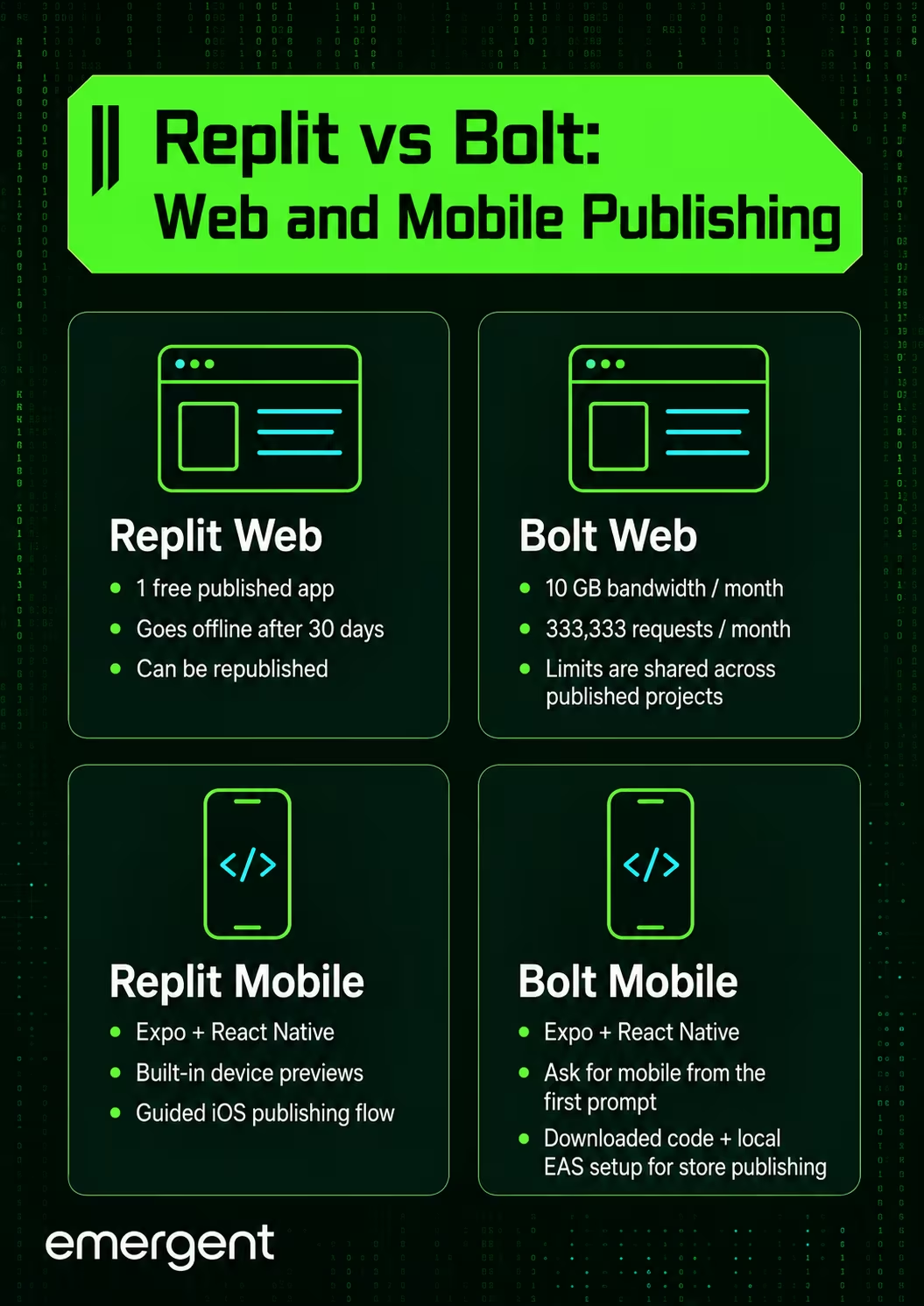
Winner: Replit for mobile apps; Bolt for free web publishing. Replit gives you a more guided mobile workflow, while Bolt’s free web hosting lasts until the account reaches its monthly traffic allowance.
Also read our best AI mobile app builders guide for what else is worth trying when mobile publishing is the priority.
Pricing and Value
Replit and Bolt charge for AI work differently.
Replit uses effort-based pricing, so the credits used depend on the work Agent performs. The same credits also pay for publishing, databases, storage, and other cloud services.
Core and Pro users can keep paying after their included credits run out, but spending limits and budgets can stop unexpected charges.
Bolt measures AI use in tokens. Larger projects can consume more because Bolt may need to read more files with each prompt. Paid tokens remain available for one additional month, provided the subscription stays active.
Replit
| Plan | Price | Included Usage and Access |
|---|---|---|
| Starter | Free | Limited daily Agent credits, monthly cloud credits, and one published app |
| Core | $20/month or $18/month billed annually | $20 in monthly credits and up to 5 collaborators |
| Pro | $100/month or $90/month billed annually | $100 in monthly credits, up to 15 collaborators, pooled usage, and two-month credit rollover |
Want the full breakdown of what each plan actually covers? Read our Replit pricing guide before you commit.
Bolt
| Plan | Price | Included Usage and Access |
|---|---|---|
| Free | $0 | 1M monthly tokens with a 300K daily limit |
| Pro | $25/month | 10M monthly tokens, no daily cap, and one-month rollover |
| Teams | $30/month per paid member | An individual token allowance for each paid member, centralized billing, and team controls |
| Enterprise | Custom | SSO, audit logs, compliance support, data controls, and priority support |
Want the full breakdown of what each plan actually covers? Read our Bolt.new pricing guide before you commit.
In my test, both free plans ultimately produced a working app, but the experience was very different. Bolt left me with enough tokens to ask follow-up questions, scan the project for problems, fix the issues it found, and still have tokens left over.
Replit used up its free Agent allowance in about six minutes and stopped me before I thought the build had finished. I was mildly surprised to find the app working when I returned the next day. Replit Core costs $5 less per month than Bolt Pro.
Their allowances are not directly comparable, though. Replit’s credits cover both Agent and cloud costs, while Bolt Pro’s 10 million tokens cover AI usage.
The team comparison is clearer. Three Bolt Teams seats cost $90 per month, while four cost $120 per month. Replit Pro costs $100 per month for up to 15 collaborators, so it becomes cheaper once a team needs four paid Bolt seats.
Replit also pools its Pro credits across the workspace. Bolt gives each paid team member a separate allowance, and those tokens cannot be shared with another member.
Winner: Replit. Core has the lower monthly starting price, while Pro becomes cheaper than Bolt Teams at four paid seats.
Security and Privacy
A secure platform can still generate an app with weak permissions or exposed data. Replit and Bolt protect the services you build on, but the finished app still needs checks for database access, authentication, dependencies, secrets, and live behavior.
| Security factor | Replit | Bolt |
|---|---|---|
| Independent compliance | SOC 2 Type 2 attestation; GDPR and CCPA aligned | SOC 2 Type 2 compliant; GDPR and CCPA aligned |
| Platform protection | TLS 1.2+ in transit and AES-256 at rest | Enterprise-grade encryption and browser-level isolation |
| Enterprise controls | SSO, SCIM, roles, and organization-wide security rules | SSO, audit logs, provisioning, and data-governance controls |
| Generated-app checks | Dependency scans and full-codebase reviews | Database Security Audit |
Replit gives you two levels of app review. Automatic scans check project dependencies against known vulnerabilities, while paid builders can run a deeper Security Agent review across the codebase.
The deeper scan maps routes, APIs, and data flows, creates a threat model, and checks for insecure code and privacy risks. Replit still recommends using it alongside code review, testing, dependency checks, and checks on the live app.
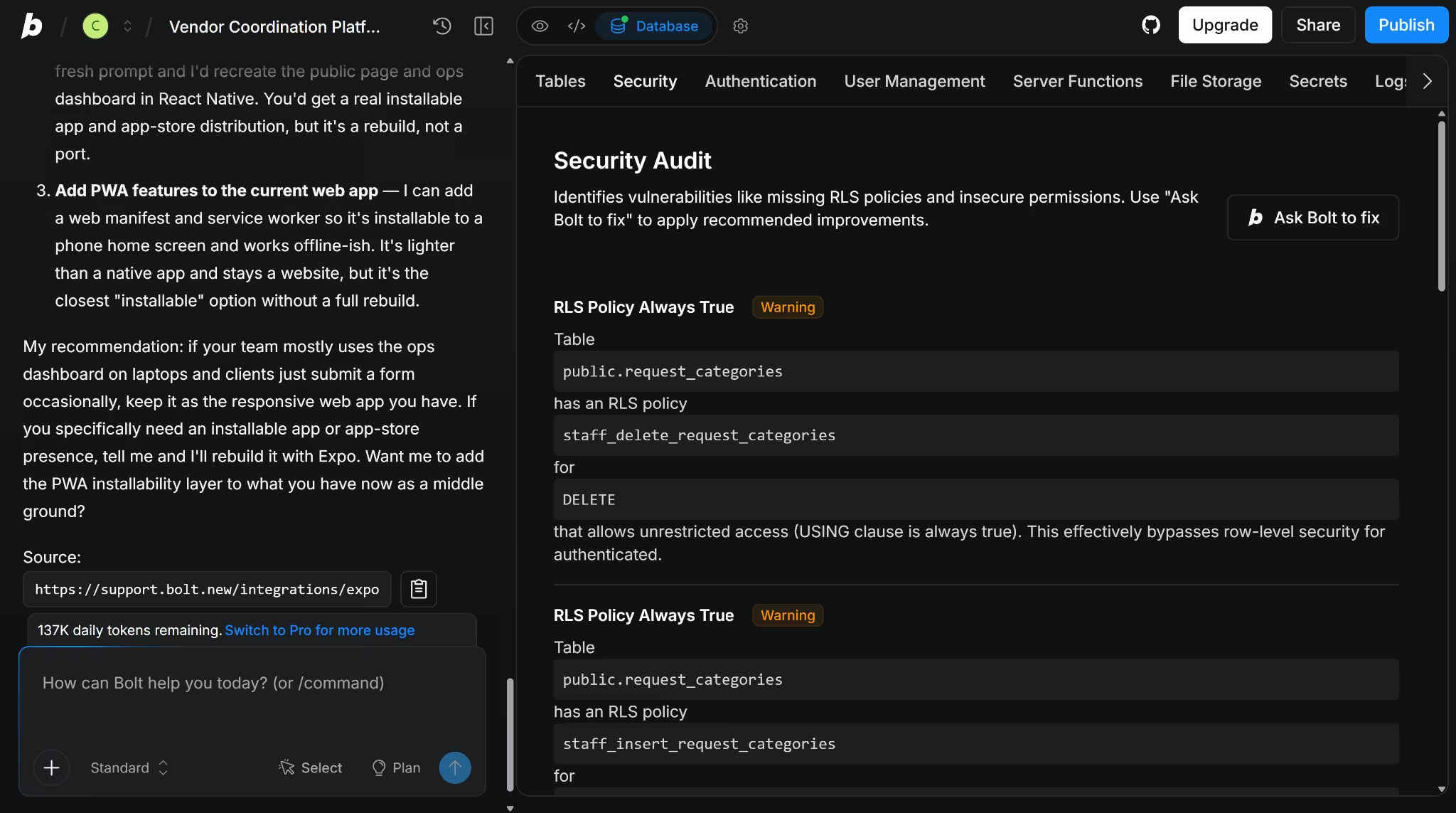
Bolt keeps its Security Audit closer to the database. It flags problems such as missing row-level security policies and insecure permissions, then gives you an option to ask Bolt to fix them. Bolt also checks for security problems when you publish.
In my test, Bolt found eight row-level security policies (by itself) with always-true conditions in the app it had generated. Those rules could have given people broader access to database records than the app required.
I asked Bolt to replace them with specific conditions, then tested the affected workflows again. Public submissions still worked, and the flagged policies no longer used always-true rules.
Securing the finished app answers only one privacy question, though. You also need to know what can happen to the prompts, code, and files you provide while building it.
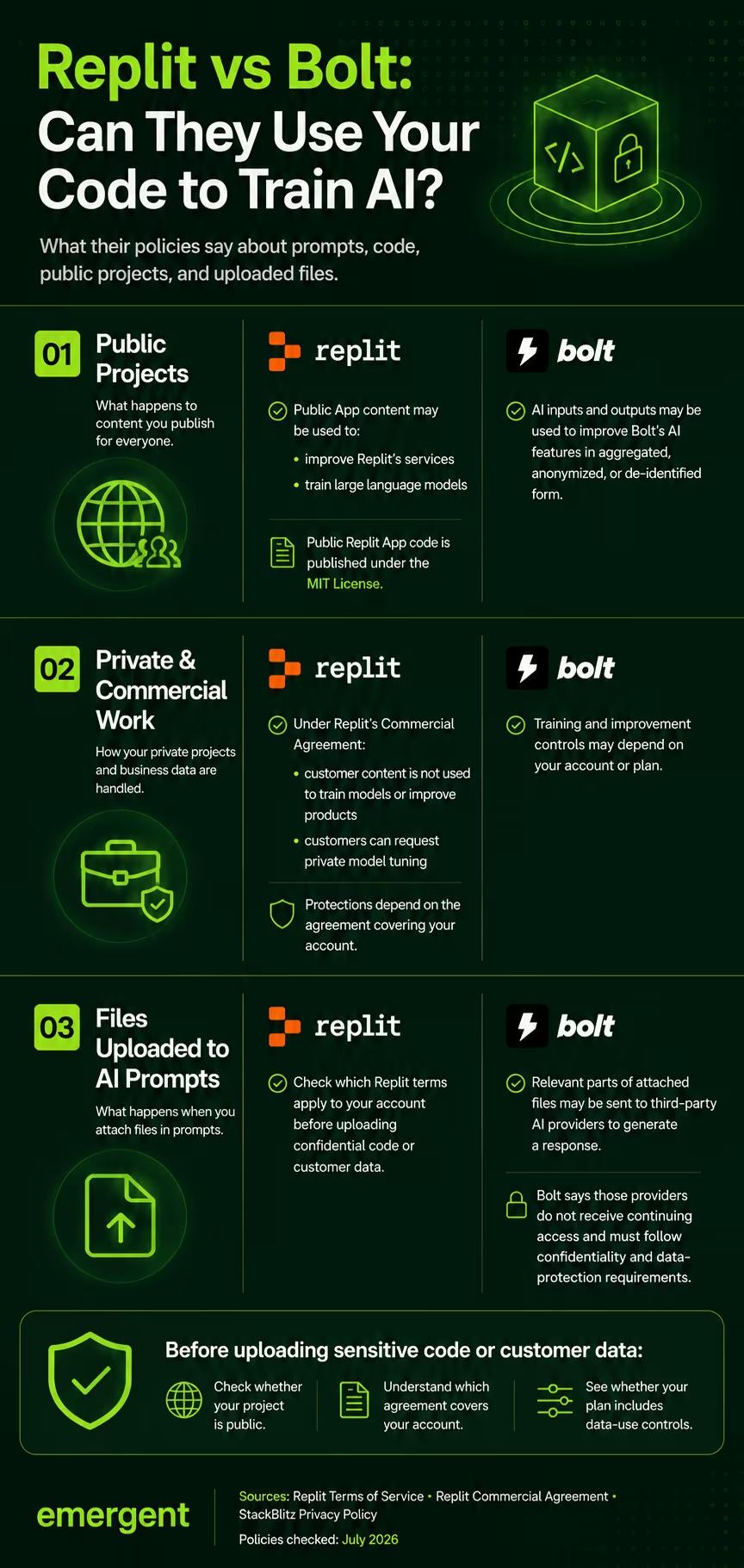
Under Replit’s consumer Terms of Service, content published as a public App may be used to improve the service, including training large language models. Public App code is also automatically placed under the MIT License, which allows other people to view, copy, modify, and distribute it.
Commercial users receive different protections. The Replit Commercial Agreement says Replit will not use customer content to train machine-learning models or improve its products, except where the agreement expressly permits it. A customer can also request private tuning for its own use.
Bolt’s privacy policy says it may use AI inputs and outputs to improve the service, but such use is limited to aggregated, anonymized, or de-identified data. The ability to limit or opt out of training or improvement may depend on the account or plan.
Relevant parts of files attached to a Bolt prompt may also be sent to third-party AI providers to generate a response. Bolt says those providers do not receive continuing access to the files and are bound by confidentiality and data-protection requirements.
Winner: Replit for security tooling. Both platforms offer SOC 2 Type 2 compliance and enterprise controls, but Replit checks dependencies and the wider codebase.
What People Building With Them Say
A clear pattern runs through Replit's G2 reviews and Bolt.new's G2 reviews: both make the first build feel unusually easy. The harder part comes later, when the project grows, or a small edit starts creating more work.
Replit 4.5/5 from 397 G2 reviews
Replit’s appeal is immediate in its G2 reviews: open the browser and start building. Arjun S. called it a “zero-setup environment,” with coding, debugging, and deployment all available in one place.
The trade-off becomes more apparent as the project becomes more demanding. Ravindra N. found himself “moving to a local IDE” for “more control over tooling, performance, and debugging.”
Replit removes the friction at the start, but larger projects can eventually push you back toward a traditional development setup.
Bolt.new 4.2/5 from 55 G2 reviews
Speed is also the clearest theme across Bolt.new’s G2 reviews.
Chirag M. went from an idea to a “working React app” “within a couple of minutes,” complete with a live preview and deployment.
Refining that first result is where the experience can turn. Parth P. said Bolt “burns through your tokens” and sometimes rewrites “entire multi-hundred-line files” for small changes.
Bolt can make the first build feel effortless; repeated edits may cost more tokens and disturb code that was already working.
Which One Should You Pick
Both platforms can work for a nontechnical founder, a developer, or a small team. The better choice depends on the app you are building and how much of the technical setup you want inside the platform.
Choose Replit when your app needs a language or framework Bolt does not support, or when you want prompting, code tools, mobile previews, and publishing gathered in the same development workspace.
Choose Bolt when you are building within its JavaScript and Node.js stack and want the prompt-and-preview workflow that reached a working result faster in my test.
Replit Is Better For
- Nontechnical founders who want Agent to build the app but may need a wider choice of languages or frameworks later.
- People who want to work mainly through prompts while keeping files, version history, a terminal, and manual editing close by.
- Developers working on projects outside Bolt’s JavaScript and Node.js stack.
- Mobile builders who want iOS and Android previews inside the Replit workspace.
- Small teams that prefer pooled credits and Replit’s flat Pro subscription.
Bolt Is Better For
- Nontechnical founders building a JavaScript web app who want a quick route from a prompt to a published project.
- People who prefer to stay in chat and live previews for most changes.
- Developers who already work comfortably with JavaScript, Node.js, React Native, or Expo.
- Mobile builders who are comfortable testing with Expo Go and moving to local Expo tools when it is time to publish.
- Small teams that prefer separate token allowances for each member.
Where Replit and Bolt Still Leave Work to You
Bolt’s Security Audit found eight database policies with always-true conditions in the app it had generated. I had to ask Bolt to replace them before I could trust the permissions around customer data.
Publishing the mobile version added another handoff. I would need to download the code and set up Node.js, Git, and Expo’s tools on my computer before sending the app to a store.
Replit created a different kind of uncertainty. Its free Agent allowance ended about six minutes into the build, leaving me with an empty dashboard and a form that did nothing.
The app became usable when I checked again the next day, even though the credits had not reset. I could not tell what had fixed it or when the change happened.
Both platforms could generate the app. The real question was how much checking, fixing, and technical follow-up remained after the first build.
Where Emergent Fits
For founders who would rather not track down what fixed a stalled build or leave the platform to publish mobile, Emergent covers that gap. It works on a vibe coding model: describe the app, answer targeted questions, and continue shaping the app through conversation while Emergent handles the implementation.
Before building Loop & Lattice, Emergent asked how staff should sign in, where the vendor data should come from, which images to use, whether the app needed notifications, and how it should look. Those questions resolved details my original prompt had left open before the build began.
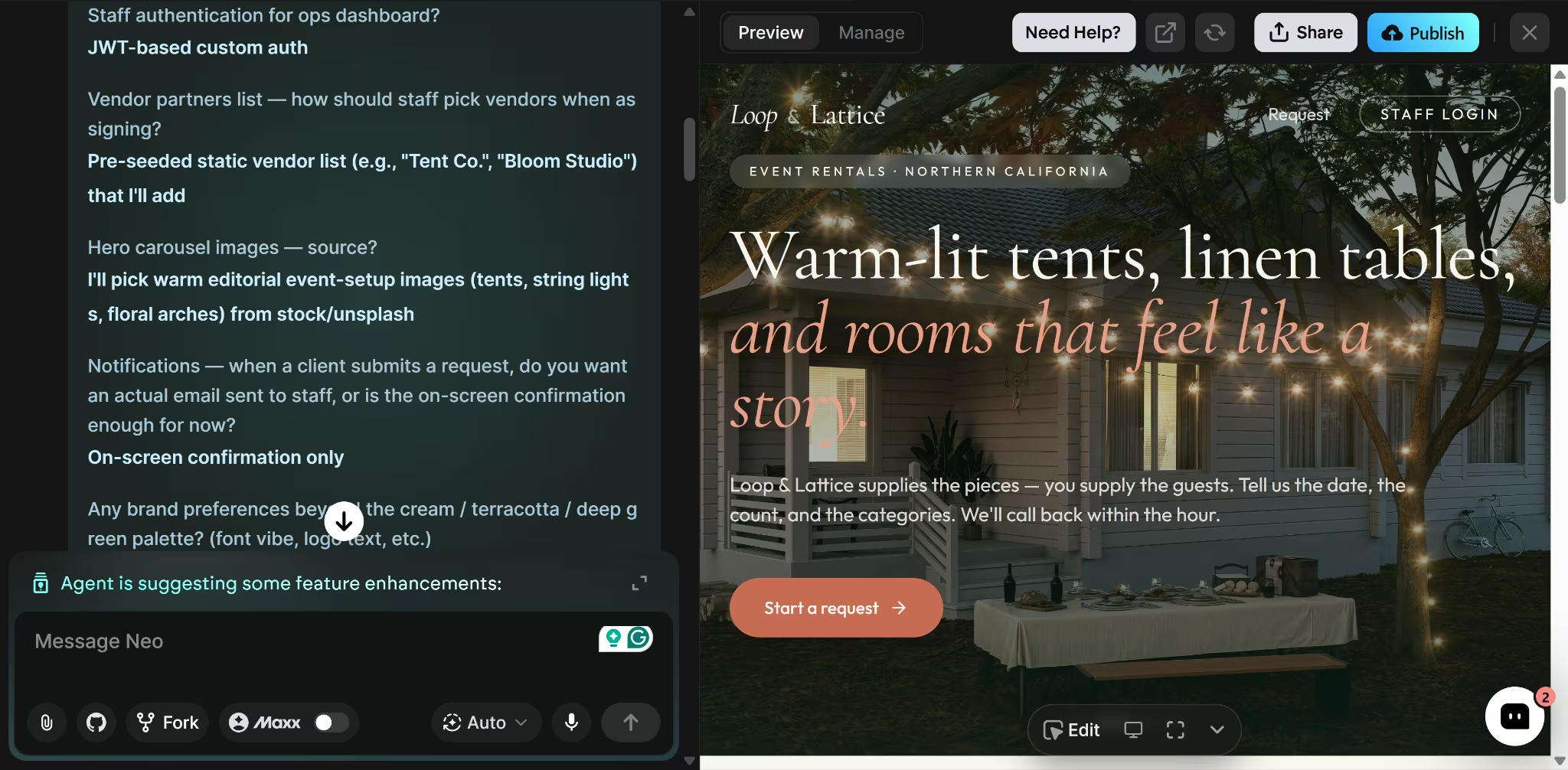
Emergent build snapshot:
- Build time: 14 minutes
- Credits used: 14.39 credits (Emergent’s Standard plan)
- Workflows completed: Client and staff flows worked
- Design adherence: Palette, carousel, and scroll effect matched
- Corrections needed: None in the workflows I tested
The client form submitted on the first check and showed the promised one-hour follow-up message. The cream, terracotta, and deep green palette carried through the page, the carousel worked, and the sections faded in as I scrolled.
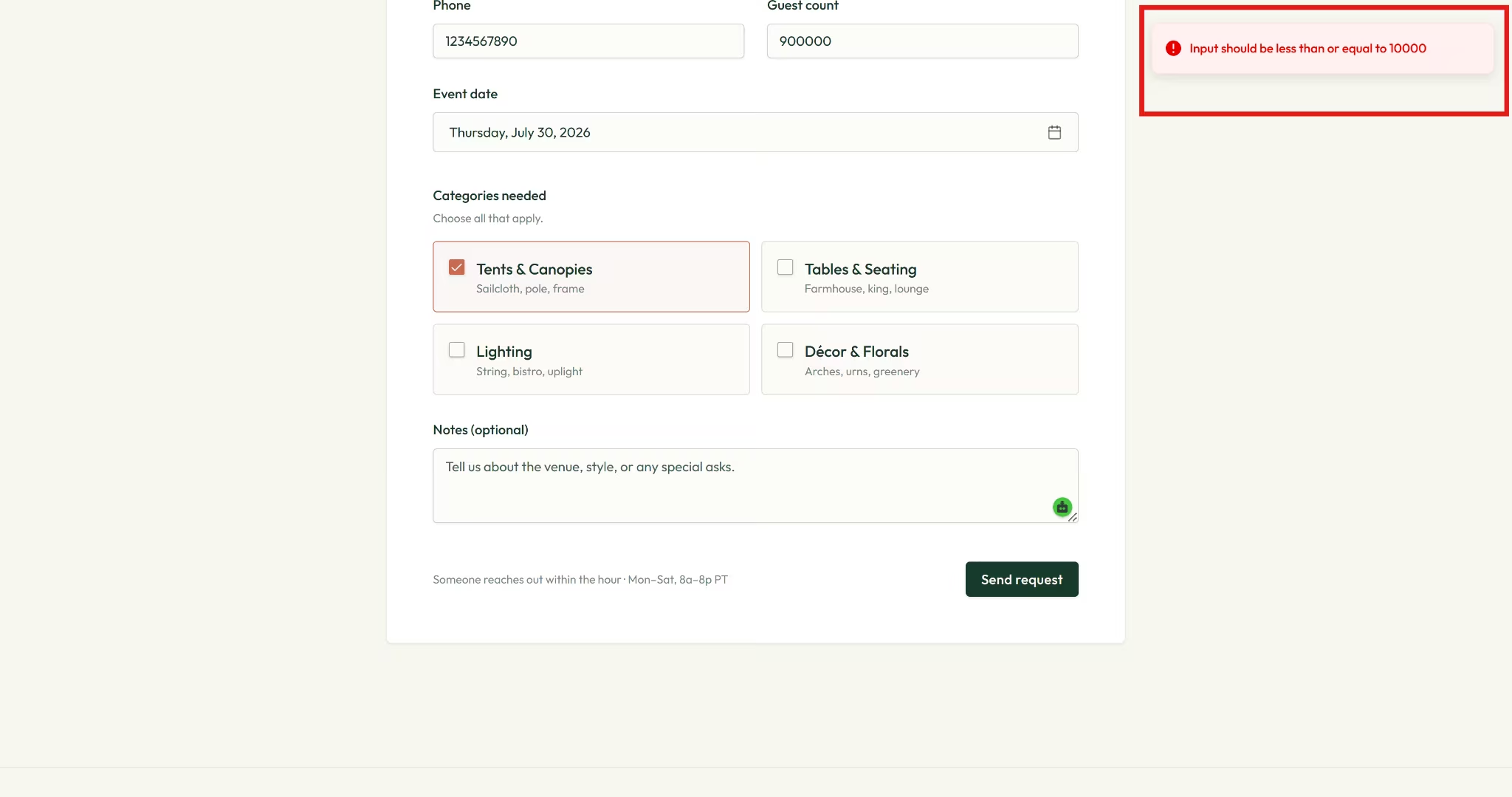
The form also caught an edge case I had not written into the prompt. A guest count of 900,000 triggered a validation message in Emergent, while the same number went through in Bolt and Replit when I checked it afterward.
The prompt set no maximum, so the validation came from the build rather than an instruction I had given.
Once the main build was finished, Emergent suggested helpful features like vendor management, dashboard filters, notifications, and a public gallery as possible additions.
Outside the web build I tested, Emergent can also:
- Publish a web app and connect it to a custom domain
- Build iOS and Android apps with its Expo and React Native Mobile Agent.
- Connect more than 100 third-party services, including tools for payments, authentication, email, messaging, and databases.
- Save, pull, and manage project code through GitHub.
- Start and manage a build from ChatGPT or Claude through the Emergent MCP Connector.
The trade-off was time for a full build experience that kept my attention on the product rather than the development workspace. It asked useful questions, followed the brief closely, handled every workflow I checked, and made a sensible call on an input rule I had not defined.
My Verdict
Bolt produced the strongest first build in this test, completing the full workflow in four minutes. Its database policies needed a manual fix before the app was safe for real customer data, though.
Replit's Agent covers more ground once you're past the free tier: broader language support, guided mobile builds, and a security scan across the whole codebase. The free allowance ran out before this particular build was usable.
Emergent completed every tested flow on the first attempt, caught a validation gap neither other tool caught, and kept the code available through GitHub for anyone who wants a developer to take over later.
Bolt is the faster route for a JavaScript app you're comfortable reviewing yourself. Replit is the broader workspace for technical teams. Emergent is the more direct path if you'd rather shape the product through conversation and let the platform handle the rest.
Start your next build with Emergent.

Most AI app builders stop at prototypes. Emergent creates production-ready apps you can actually launch.
- Production-ready apps
- Web & mobile apps
- Deploy in minutes







