
What is Vibecoding?
Vibecoding is the art of building applications by describing what you want in natural language to an AI coding agent. Instead of writing code line-by-line, you communicate your vision, iterate on feedback, and guide the AI to create production-ready applications. Whether you're curious about what is vibe coding or already experimenting with it, the core idea stays the same: you talk, the AI builds, and you shape the result together.
The Journey: From Idea to Game
Step 1: The Initial Prompt
Here's what started it all:
Build me a 3d battleship multiplayer game - where each player can add
the ships positions on their screen and the other user can visually
drop bombs or strike the grid and see if its a hit or not. Use threeJS
and auth with invite codes to play 1 on 1
Key Elements of a Good Initial Prompt:
- Clear goal: "3D battleship multiplayer game"
- Specific features: "add ship positions", "drop bombs", "hit detection"
- Tech preferences: "threeJS", "invite codes"
- User flow: "1 on 1" gameplay
Beginner Tip: You don't need to be technical! Describe what you want as if explaining to a friend.
Step 2: Clarifying Questions
Before diving into code, the agent asked:
Question 1: Real-time Communication
- "Should the agent use WebSocket (Socket.io) for instant updates, or polling?"
- User's Choice: Websocket for real time
Question 2: Game Configuration
- "Standard 10x10 grid with 5 ships, or custom?"
- User's Choice: Standard 10x10 grid
Question 3: Game Flow
- "Player creates game → gets invite code → shares with opponent?"
- User's Choice: Yes that looks good
Question 4: Visual Design
- "Ocean-themed with water effects or clean minimalist grid?"
- User's Choice: Ocean themed
Why This Matters: These questions shape the entire application. The AI wants to build exactly what YOU envision, not guess.
The Build Process: Issues & Solutions
Issue 1: Socket Room Connection
User Report:
"Joining is not working. User who started game cannot place ships and 2nd player cannot join the same game."
What Was Wrong:
- Player 1 created a socket on HomePage, then navigated to GamePage and created a NEW socket
- The new socket never joined the game room
- Backend was emitting events to the room, but sockets weren't listening
The Fix:
// Added rejoin_game event
socket.emit('rejoin_game', {
  game_id: gameId,
  player_id: playerId
});

// Backend joins socket to room
await sio.enter_room(sid, game_id)
Lesson: When building real-time features, always ensure sockets join rooms on navigation.
Issue 2: Game State Transition
User Report:
"It says ship placed, waiting for opponent for both players."
"It does not transition to the battle screen."
What Was Wrong:
- Frontend socket listeners were set up AFTER the
game_startevent was emitted - Players joined rooms, but events were missed
The Fix:
- Added
game_stateevent that sends current state on rejoin - Frontend checks if game is already "playing" and transitions immediately
Lesson: Always account for late-joining or reconnecting users.
Issue 3: Visual Improvements
User Request:
"Can we add numbering to the grid for better tracking. Fix initial camera view so the entire grid is visible. Once a ship is sunk, show the entire ship as red blocks."
What We Added:
- Grid Labels: A-J columns, 1-10 rows using Three.js Text component
- Camera Position: Adjusted to
[4.5, 12, 14]with target[4.5, 0, 4.5] - Sunk Ship Logic:
const isSunk = hits && hits.every(hit => hit === true);
const showAsRed = isSunk || isHit;
Lesson: UI/UX improvements come from user feedback during testing.
Issue 4: Memory Leaks
User Report:
"Eventually the preview runs out of memory though."
What Was Wrong:
- Socket connections not cleaned up on navigation
- Three.js textures/geometries accumulating
- Old games stored indefinitely in backend
| The Fixes: | Frontend: |
|---|---|
| // Cleanup socketsreturn () => { newSocket.removeAllListeners(); newSocket.close();};// Disable reconnectionreconnection: false | Backend: |
| # Auto-cleanup old gamescutoff_time = datetime.now(timezone.utc) - timedelta(hours=2)# Limit games to 100 max | Lesson: Always clean up resources in React's useEffect cleanup functions. |
// Cleanup sockets
return () => {
  newSocket.removeAllListeners();
  newSocket.close();
};

// Disable reconnection
reconnection: false
Backend:
# Auto-cleanup old games
cutoff_time = datetime.now(timezone.utc) - timedelta(hours=2)
# Limit games to 100 max
Lesson: Always clean up resources in React's useEffect cleanup functions.
Issue 5: Performance Crash
User Report:
"The game crashes for 2nd user and does not reload upon refresh."
What Was Wrong:
- Heavy Three.js rendering (shadows, high-poly geometry, complex materials)
- Two players = double the GPU load
| The Optimizations: | Reduced Complexity: |
|---|---|
| // Before: 32x32 subdivisions | Changed Materials: |
| // Before: Expensive | Other Optimizations: |
// Before: 32x32 subdivisions
<planeGeometry args={[12, 12, 32, 32]} />

// After: 4x4 subdivisions
<planeGeometry args={[12, 12, 4, 4]} />
Changed Materials:
// Before: Expensive
<meshStandardMaterial />

// After: Fast
<meshBasicMaterial />
Other Optimizations:
- Disabled shadows
- Disabled antialiasing
- Set
frameloop="demand"(only render when needed) - Reduced sphere segments: 16x16 → 8x8
- Removed Environment component
- Fixed DPR at 1
Added Error Boundary:
// Catches crashes gracefully
<ErrorBoundary>
  <App />
</ErrorBoundary>
Lesson: 3D applications need aggressive performance optimization for web.
Issue 6: Landing Page Design
User Request:
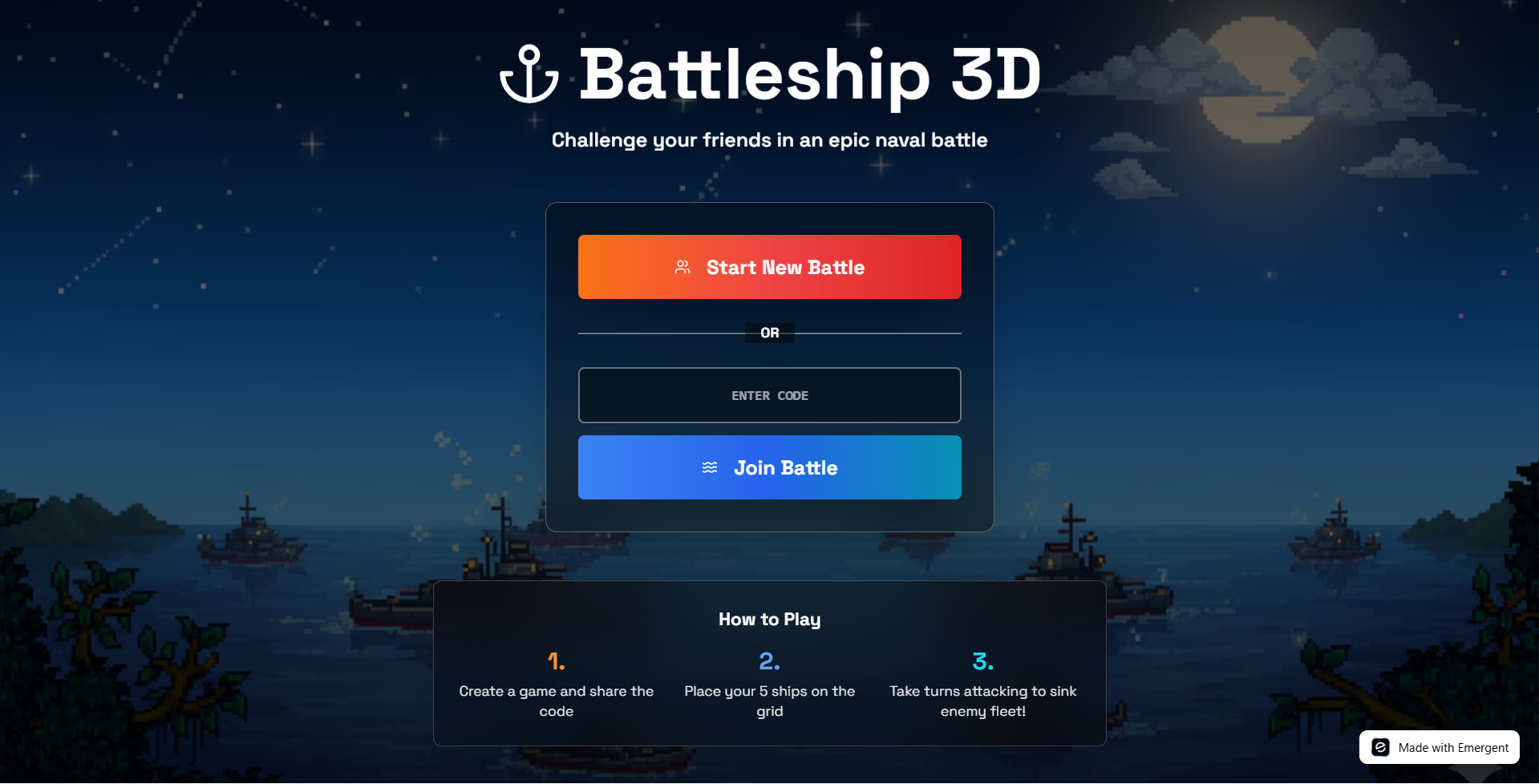
"add the relevant buttons to this - keep this as landing page" (attached battleship image)
What We Did:
- Downloaded image to
/app/frontend/public/battleships-bg.png - Set as background with dark overlay for contrast
- Updated buttons to military theme:
- "Start New Battle" - Orange-red gradient
- "Join Battle" - Blue-cyan gradient
- Added "How to Play" section with 3 steps
Lesson: Visual assets dramatically improve user experience. Always optimize file sizes.
What You Built?
In this session, you created:
- Full-stack multiplayer game (Real-time WebSocket)
- 3D ocean battlefield (Three.js with optimizations)
- Invite code system (6-character codes)
- Turn-based combat (Hit/miss detection)
- Responsive UI (Tailwind + Shadcn)
- Memory optimizations (Error boundaries, cleanup)
- Professional landing page (Custom background, buttons)

Emergent turns your idea into a full-stack web or mobile app, no coding required.
 No coding required
- Web & mobile apps
- Deploys instantly