



Benchmark scores say little about how an LLM behaves when you need it. So I tested the five best LLMs in 2026 on five jobs from my own week.
5 Best LLMs in 2026: Quick Comparison
How I Tested These LLMs
Benchmark scores look great on launch day. They tell you almost nothing about how a model behaves at 4 p.m. on a Tuesday when you need it.
So I skipped the leaderboards and ran real work instead. The same five jobs went through all five models, and I watched where each one held up and where it cracked.
Here's what each job was testing for:
- The client strategy memo showed me writing quality. Did the draft sound like a person wrote it, or did it need a full rewrite to lose the AI smell?
- The 40-page report summary tested long-context handling. Could the model hold the whole document in mind, or did it forget the opening by the time it reached the end?
- The broken Python script measured coding. Did it find the actual bug, or confidently invent a fix that broke something else?
- The competitor research tested how each model gathers and weighs current information, and whether it could pull anything fresh rather than recycling old facts.
- The small internal tool was where API cost mattered. Same build, five models, very different bills.
One thing became clear fast. The best model for the memo was rarely the best model for the script, and the cheapest model for the internal tool was not the one I'd hand a client report. That's the whole point of this ranking. There's no single winner, just the right tool for the job in front of you.
1. ChatGPT (GPT-5.5): Best for Everyday Mixed Work
Most people's first experience with AI was ChatGPT, and OpenAI's flagship is still the one I reach for when the work is varied. Across my five jobs, it was never the single best at any one of them. It was the model that did all of them well enough that I rarely needed a second tool open.
On the strategy side, it gave me a solid first draft fast, though I had to edit out a few stiff, corporate phrases before it sounded like me. In the competitor research, the built-in deep research mode pulled together a sourced brief while I worked on something else. That range is the whole pitch. Writing, research, images, and voice all live in one place.
The honest catch is trust. When ChatGPT was wrong on the Python script, it was wrong with total confidence, handing me a fix that looked right and broke a different function. Inaccurate answers are the most consistent complaint across its reviews. Use it to move fast, then check anything that matters.
Best for: Professionals who want one tool covering writing, research, voice, and images without juggling subscriptions.
Key Features
- Deep research mode: Runs an autonomous, multi-source investigation and hands back a cited report. This is what carried my competitor research job.
- Agent mode: Breaks a goal into steps, uses tools like web search and code execution, and keeps going without you steering every move.
- Voice and image generation built in: Both included on paid plans, so you're not paying for separate tools.
Pros and Cons
Pros:
- Strongest all-round ecosystem of any model, covering voice, image, code, and research without switching tabs
- Most accessible entry point for non-technical users, with a free tier that remains genuinely usable
- Best voice mode of any model on this list, with natural conversation and low latency
Cons:
- Hallucination and overconfidence complaints are the single most common criticism across its reviews
- Model behavior has shifted noticeably across updates, with some long-term users reporting a regression in quality since mid-2025
What Users Say
"It helps me get creative support when writing and composing articles. researching and problem solving. I like the clean, intuitive interface that makes it easy to use. I'm using the free version which is more than adequate for my needs." Catherine V., G2
"While ChatGPT is incredibly useful, it can sometimes be overly confident when providing information and occasionally presents inaccurate details as fact." Tracey C. G2
Pricing
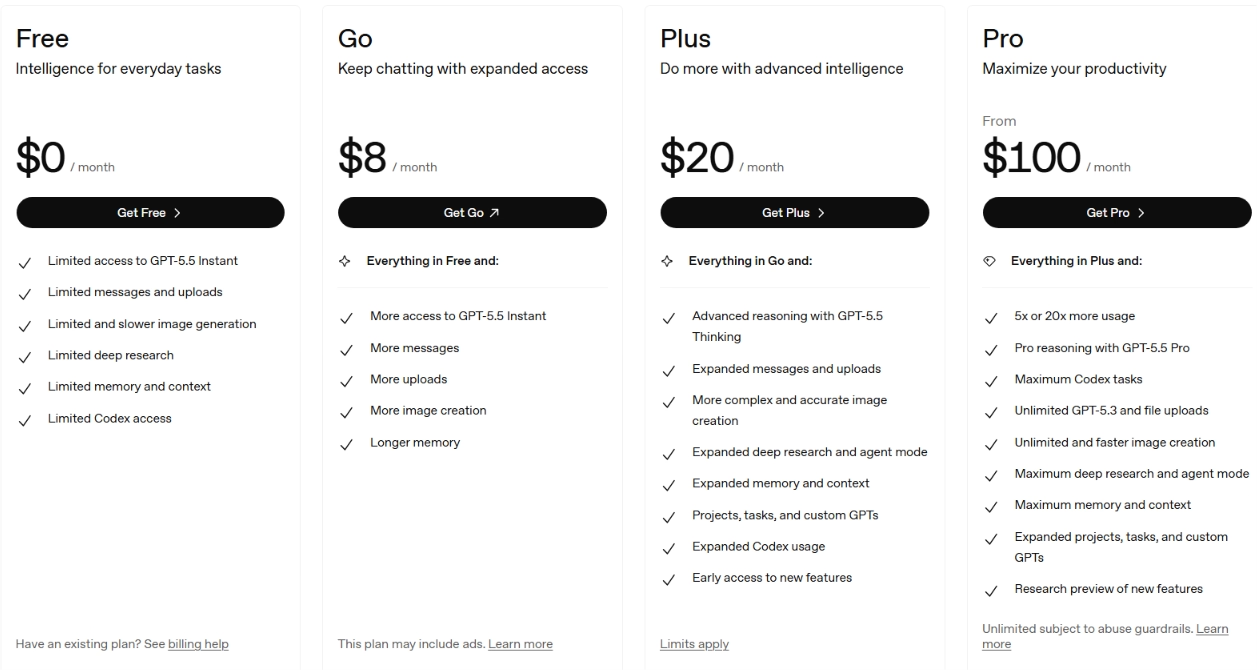
- Free: Limited access to GPT-5.5 Instant, with daily message limits and ads in the U.S.
- Go: $8/month, higher message volume
- Plus: $20/month, full GPT-5.5 access, Deep Research (10 runs/month)
- Pro: $100/month (5x Plus) or $200/month (20x Plus, 1M context, 250 Deep Research runs)
Bottom line: The safest default for most people, and the one I'd hand someone who wants a single tool for everything. If you write or code for a living, the next two models will serve you better.
2. Claude (Opus 4.8): Best for Writing, Coding, and Deep Reasoning
Two of my five jobs had a clear winner, and it was Claude both times. The strategy memo came back reading like a person wrote it, with almost nothing to edit out. The broken Python script got a fix that worked, plus a plain explanation of what had gone wrong and why.
That's the pattern with Claude. It slows down where the others rush. It flags what it's unsure of instead of bluffing, and on the memo, it pushed back on a claim I'd written that didn't hold up. Anthropic built it with a heavier focus on careful reasoning, and you feel that in the output.
The current flagship is Opus 4.8, which Artificial Analysis ranks among the very top of its independent Intelligence Index, edging out GPT-5.5. It carries a 1 million token context window, enough to hold roughly 750,000 words at once. The 40-page report never tripped it up.
The real cost is usage limits. Even on the $20 plan, a heavy day of coding hits the ceiling fast.
Still weighing the two? Our Claude vs ChatGPT breakdown gives you an honest side-by-side before you commit.
Best for: Writers, developers, and analysts who care more about output quality than feature breadth.
Key Features
- 1M token context window: Holds entire codebases, long contracts, or a year of notes in one session without losing the thread.
- Natural-sounding output: Produces drafts that read like a human wrote them, with far less editing than rivals
- Claude Code: An agentic tool that works inside your codebase, writes and runs code, and fixes bugs directly.
Pros and Cons
Pros:
- Best-in-class output for long-form writing, with a consistently natural tone that doesn't need heavy editing
- Hallucinates less than ChatGPT or Gemini according to consistent patterns across G2 and Capterra reviews
- Follows instructions closely and pushes back constructively when something is wrong, rather than agreeing and moving on
Cons:
- Usage limits hit faster than any other model on this list, even on paid plans, making it difficult to sustain during long work sessions
- No native image generation, which puts it behind ChatGPT and Gemini for multimedia workflows
What Users Say
"The responses are accurate, well structured and easy to understand. I would highly recommend it to students and professionals who want a smart AI assistant to boost their productivity." Tanveer K., Student, Capterra
"Eventually, after having used it a certain amount of time, was blocked by the daily limit, switched to another one just to realize that the answers from i.e., ChatGPT, were far more convincing and complete." George A., Capterra
Pricing
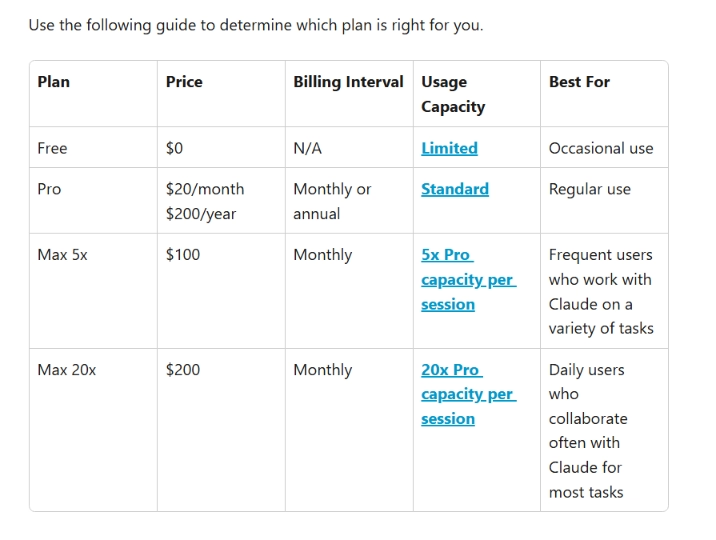
- Free: Limited daily usage
- Pro: $20/month
- Max 5x: $100/month, 5x Pro usage
- Max 20x: $200/month, 20x Pro usage
Bottom line: The model I'd trust with the work that has to be right the first time. Budget for the $100 plan if it becomes your daily driver.
3. Gemini (3.1 Pro): Best for Google Workspace Users
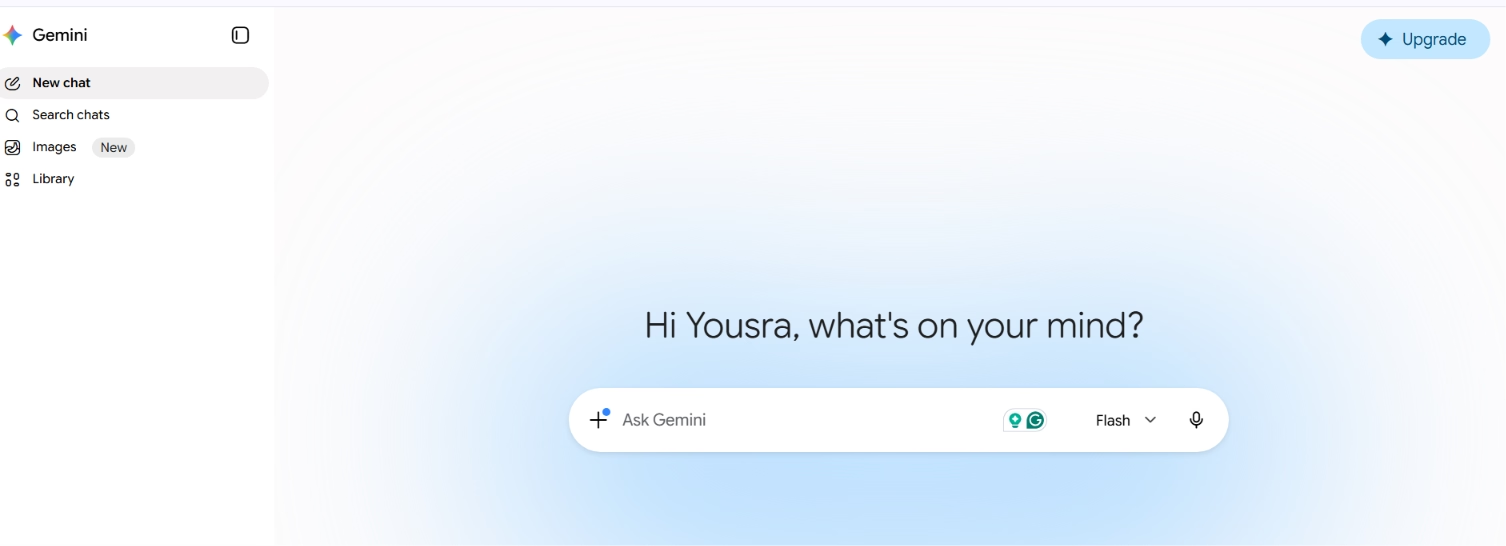
Gemini's strongest argument is where the model lives.
Gemini's edge isn't the model. It's the location. My report summary lived in Google Docs, and Gemini was already in the sidebar. No copying text into a separate tab, no pasting the result back. I asked, it was summarized, and I kept working. For anyone whose day runs through Gmail and Docs, that saved step adds up fast.
The summary itself was good, not flawless. On a dense table buried in the report, Gemini glossed over a figure I had to go back and check. The recurring knock in its reviews matches what I saw: strong on everyday tasks, occasionally loose on precise detail.
The flagship is Gemini 3.1 Pro. Gemini 3.5 Flash, released May 19, 2026, is faster and cheaper while beating 3.1 Pro on coding, making it worth knowing if you build on the API.
Best for: Professionals who live in Google Workspace and want AI inside the tools they already use.
Key Features
- Native Google Workspace integration: Works inside Gmail, Docs, Sheets, Drive, and Meet with no app-switching.
- Deep research across your own data: Pulls from Google Search, Drive files, and Gmail threads in one pass. It can search your inbox, not just the web.
Pros and Cons
Pros:
- Unbeatable for Google Workspace users. The in-app integration removes the context-switching that every other model on this list requires
- Strong multimodal reasoning across charts, PDFs, screenshots, and mixed-format documents in one session
- Google AI Pro at $19.99/month is competitively priced against Claude Pro and ChatGPT Plus
Cons:
- Hallucination and instruction-following complaints are significantly more common than for Claude or ChatGPT.
- Inconsistency across updates. Multiple users report that recent versions underperformed compared to earlier ones.
What Users Say
"What I like most about Gemini is its deep integration with Gmail, Google Docs, Drive, and Calendar. I rely on Deep Research to create source-backed reports automatically. Overall, it feels very fast and accurate." Ananya A., G2
"Long conversations can lose context and I have to enter the prompts again and again. It also makes mathematical mistakes, which is not good for calculations." Ananya A., G2
Pricing
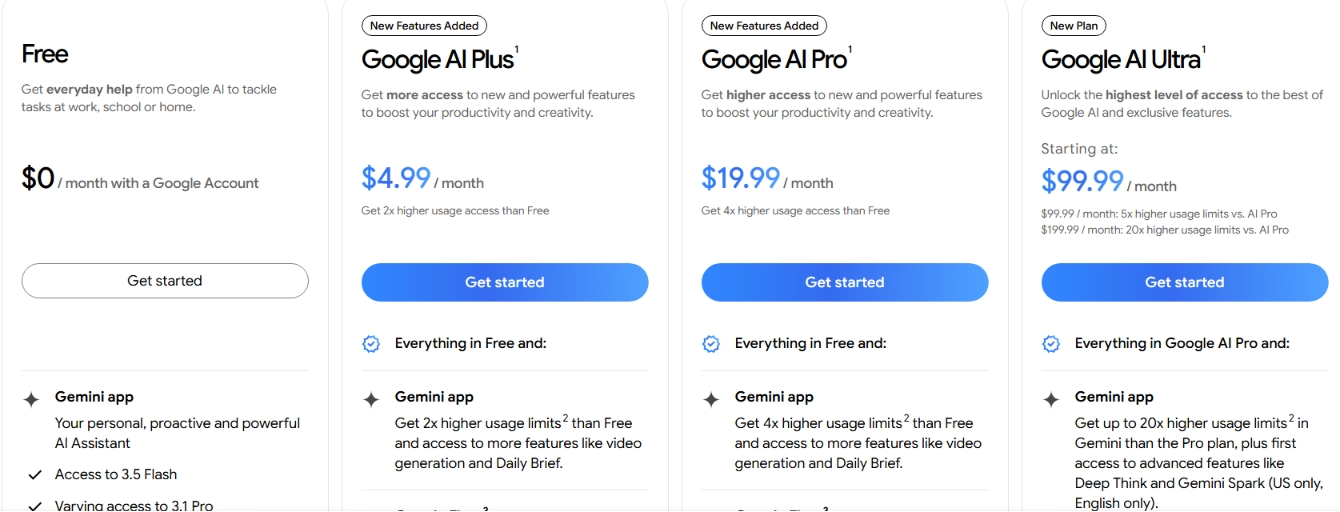
- Free: Basic access with daily quota
- Google AI Plus: $4.99/month
- Google AI Pro: $19.99/month, Gemini 3.1 Pro, and full Deep Research
- Google AI Ultra: $99.99/month, maximum access and storage
Bottom line: The obvious pick if Workspace is your home base. Outside Google's tools, the next models are stronger all-rounders.
4. Grok (4.3): Best for Real-Time Research and Strategic Thinking
The competitor research job is where Grok pulled ahead of the field. Every other model worked from a training snapshot with a fixed cutoff. Grok reads X live. When I researched the competitor for my pitch, it surfaced what people were posting about them that week, not last year. For anything time-sensitive, that's a real edge that nothing else here matches.
It's also blunt in a useful way. When I floated a weak angle for the pitch, Grok told me it was thin and said why, instead of politely agreeing. For strategy work, that pushback is worth more than a yes-man.
The trade-off showed up on the heavier jobs. Grok favors a fast, confident answer over a thorough one, so on the report summary, it skimmed where Claude dug in. Grok 4.3 runs a 1M context window, and the free tier needs no credit card, which makes it the strongest no-cost option on this list.
Still deciding which one fits your workflow? Our Grok vs ChatGPT vs Gemini breakdown covers what no one else tells you before you pick.
Best for: Researchers and strategists who need current information and direct, opinionated analysis.
Key Features
- Live X data: Reads current posts and trends in real time. No other model here can.
- Genuinely free: Full core access with no credit card, enough for most everyday work.
Pros and Cons
Pros:
- Real-time social data access that no other major model on this list can match
- Genuinely free with no usage walls for basic tasks, making it the best no-cost option for casual professional use
- More direct and opinionated than ChatGPT. It will call out weak reasoning rather than agreeing and moving on
Cons:
- Favors brevity and speed over exhaustive reasoning, which can fall short on complex business analytics or technical documentation
- Image generation quality declined significantly after late 2025 moderation updates, with the community largely shifting to other tools for creative work
What Users Say
"What I like best about Grok is its ability to deliver quick, real-time insights with a conversational tone that feels less rigid than traditional AI tools. It's especially useful for staying updated on trending topics." Subhashree S., System Engineer, G2
"With each update, they seem to take away features and add more restrictions. When it first came out, it was great; now it's just OK." Shashank S., Analyst, G2
Pricing
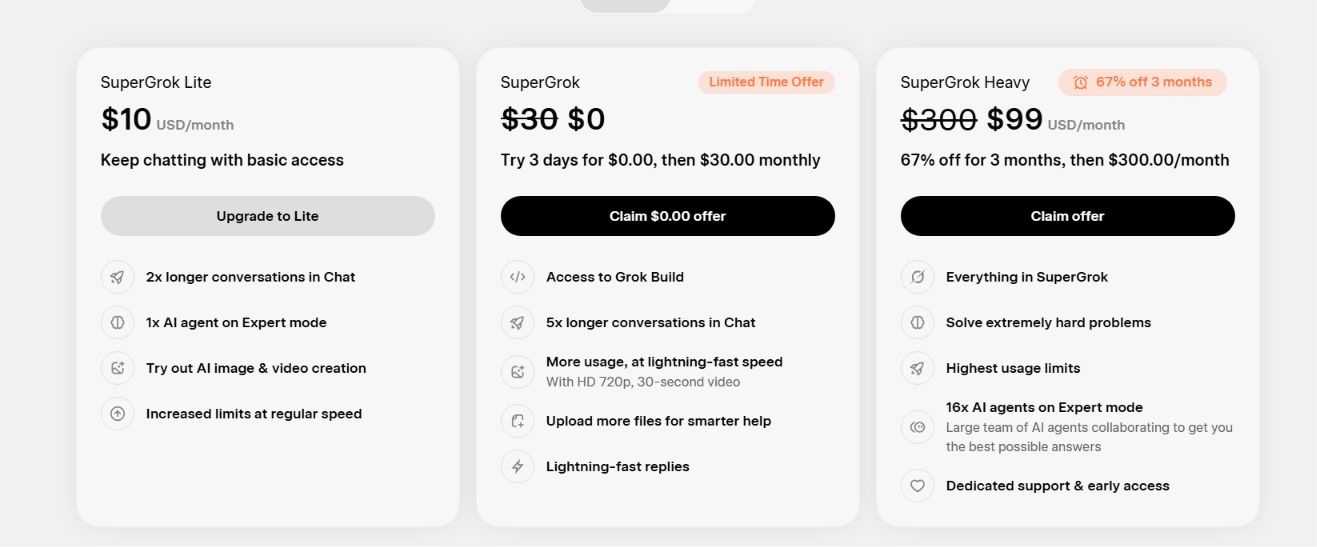
- Free: $0/month, real-time web and X search, voice mode, and connectors within generous limits
- SuperGrok: $30/month, the Grok 4 model, Expert mode, image and video generation, and higher rate limits
- SuperGrok Lite: $10/month, basic access with longer chats and image and video creation
- SuperGrok Heavy: $300/month, highest usage limits, and a large team of agents for the hardest problems
Bottom line: Reach for Grok when timing matters, or you want honest pushback. Skip it for deep, document-heavy analysis.
5. DeepSeek (V4): Best for Cost-Conscious Developers
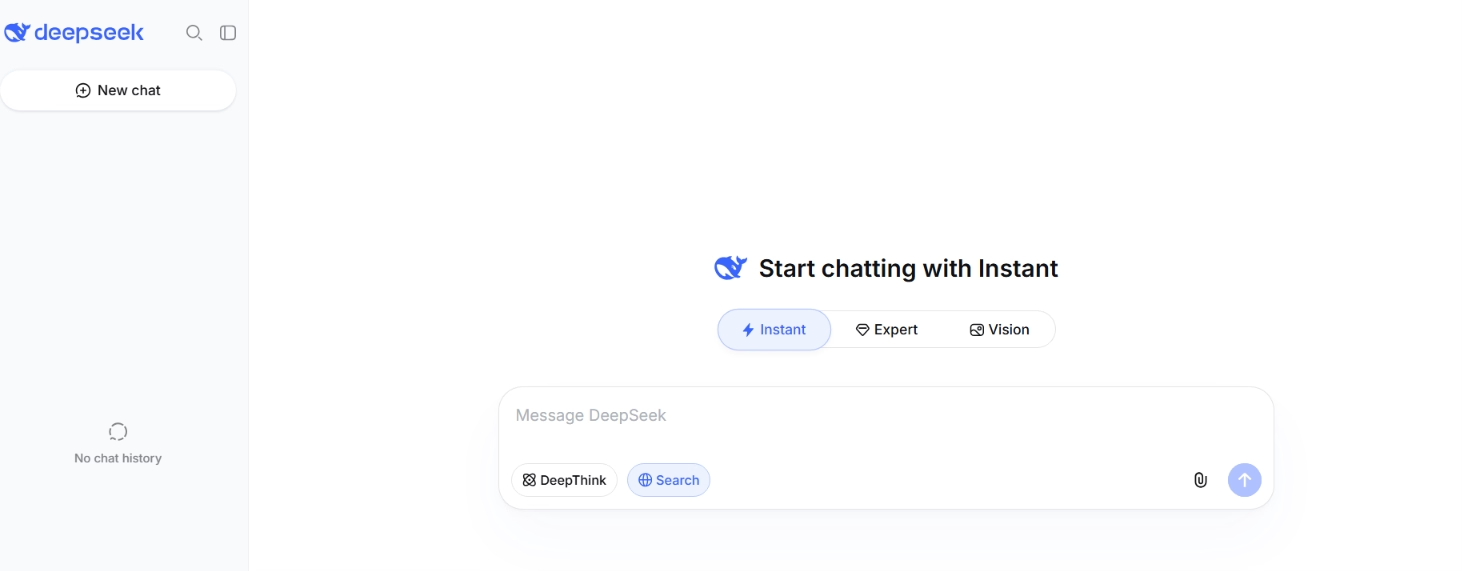
The internal tool was the job where the bill mattered as much as the output. I built the same small tool five times, once per model, and the API cost varied wildly. DeepSeek came out cheapest by a wide margin, and the output was close enough to the pricier models that the gap was hard to justify.
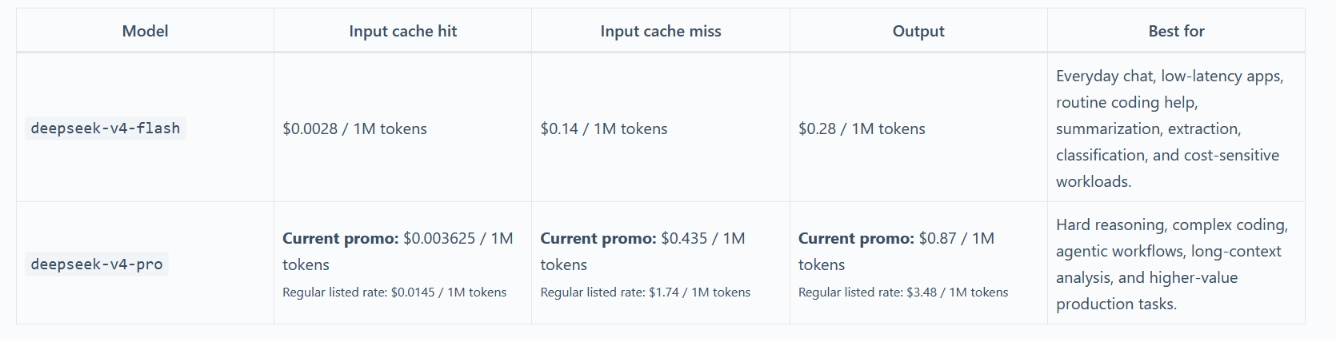
The numbers explain why. GPT-5.5 runs $5 per million input tokens, while DeepSeek V4 Flash costs $0.14, landing in the same range on coding benchmarks. When AI runs under the hood of a product and every request costs money, that gap decides whether the thing is affordable to ship.
Its thinking mode helped during the build, too. DeepSeek shows its full reasoning in a side panel before answering, so when the tool's logic broke, I could see exactly where its thinking went sideways and fix the prompt.
The catch is where your data goes. DeepSeek is built and hosted in China, a real concern for anything sensitive. It also filters hard on political topics and slows down under peak load.
Best for: Developers shipping API-heavy products where per-token cost decides viability.
Key Features
- Thinking mode: Shows the full reasoning chain before answering, which made debugging my build faster
- Rock-bottom API pricing: Among the cheapest frontier-class models available, with a 1M context window included
- Free web chat: Full access at chat.deepseek.com with no usage cap
Pros and Cons
DeepSeek pros:
- The best performance-to-cost ratio here, especially for coding and reasoning-heavy API workloads
- Thinking mode makes debugging easier by showing exactly how it reached an answer
DeepSeek cons:
- China-based hosting is a real privacy concern for sensitive data
- Slows down under peak load, and filters heavily on political topics
What Users Say
"From day one, the responses felt polished and on par with established players like ChatGPT and Claude, and the UI matched the clean, intuitive feel users expect from top-tier AI providers." Venkat Sai M., AI Product & Business Analyst, G2
"Responses can sometimes lack consistency in accuracy, especially for highly specific or recent topics. Occasional factual mistakes still require manual verification." Yashpal D., Student, G2
Pricing
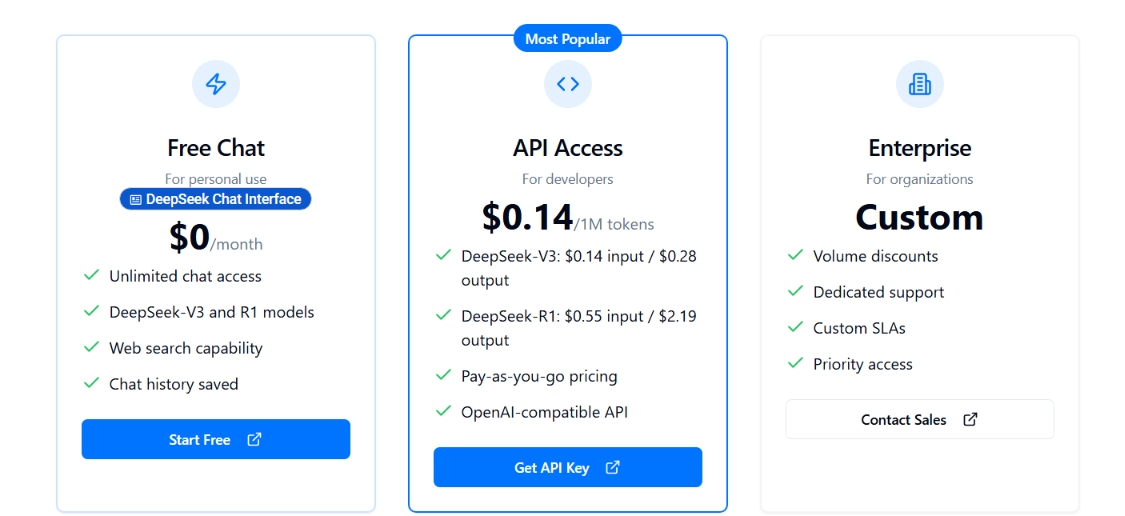
- Free: Full web chat at chat.deepseek.com
- API: From $0.14/$0.28 per million tokens (V4 Flash)
Bottom line: The right call when cost is the constraint and the data isn't sensitive. For confidential work, the privacy trade-off cancels the savings.
Which LLM Should You Choose?
The best LLM in 2026 comes down to the job in front of you, not a single winner. Here's how my five tests shook out.
Choose ChatGPT if your work is varied and you want one tool that handles writing, research, voice, and images without switching apps.
Choose Claude if the output has to be right the first time, whether that's a client-ready draft or working code, and you can live with tighter usage limits.
Choose Gemini if your day runs through Gmail and Google Docs and you want AI that meets you there instead of in another tab.
Choose Grok if you need current information or a model that gives you honest pushback, and you want a capable free option.
Choose DeepSeek if you're shipping something where the per-token cost decides whether it's viable, and the data isn't sensitive.
If you build software with any of these, you don't have to marry one. Emergent lets you build full apps on top of leading models like Claude and GPT, so you can swap the model underneath as your needs shift instead of rebuilding around it. That's the closest thing to having all five on call.

Most AI app builders stop at prototypes. Emergent creates production-ready apps you can actually launch.
- Production-ready apps
- Web & mobile apps
- Deploy in minutes







