



I’ve used ChatGPT across writing, research, coding, and product planning. Here’s a breakdown of ChatGPT pricing and what you actually get with each plan, plus when an AI builder like Emergent makes more sense.
ChatGPT Pricing Plans at a Glance
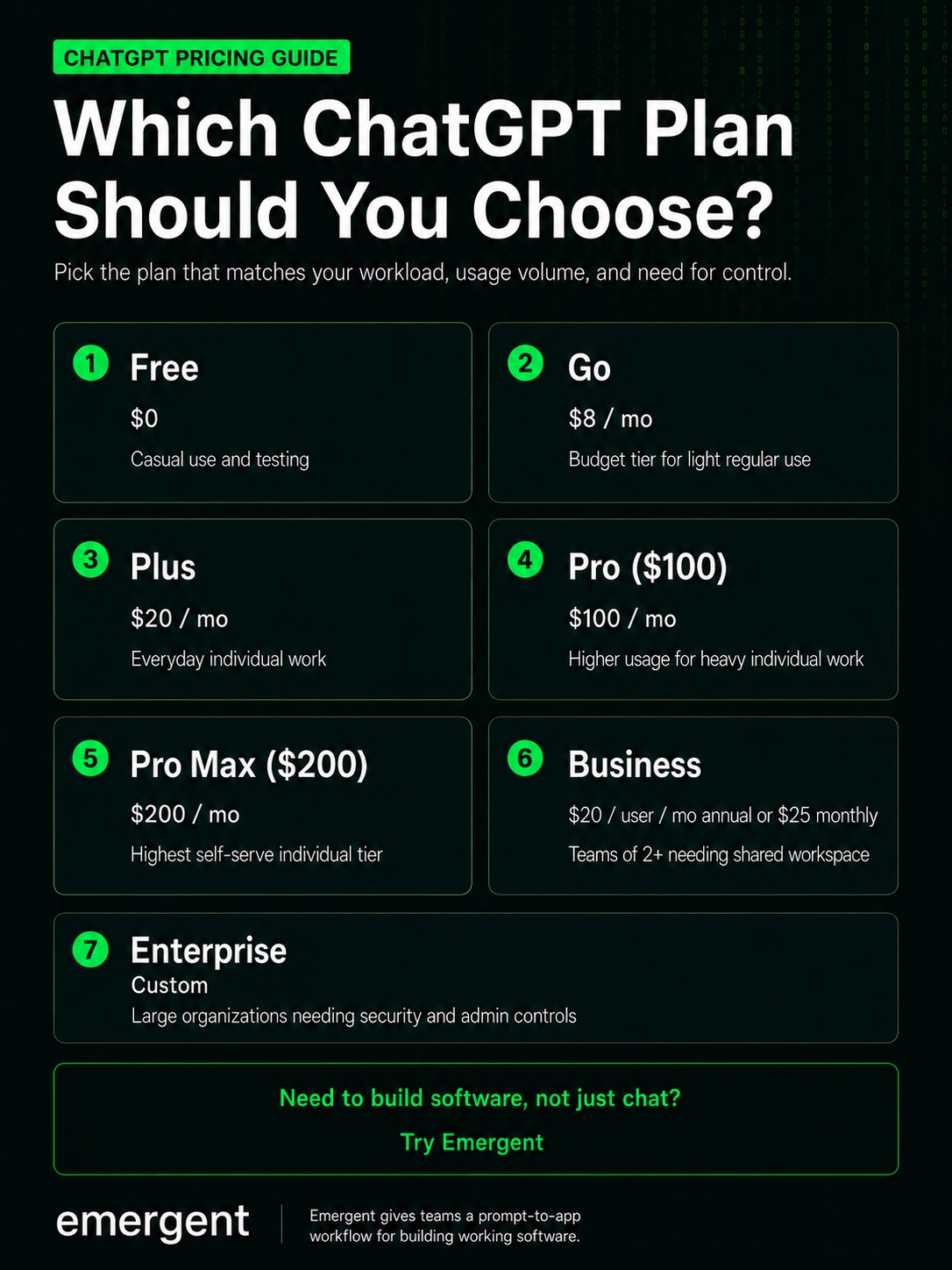
ChatGPT pricing starts at $0/month for the Free plan. Paid individual plans include Go at $8/month in the U.S., Plus at $20/month, and Pro at $100/month or $200/month.
Business ChatGPT plans cost $20/user/month, billed annually, or $25/user/month, billed monthly. Enterprise uses custom pricing negotiated through OpenAI's sales team.
You can verify current plan pricing on the ChatGPT pricing page and business plan details on the OpenAI business pricing page.
One important update: As of June 24, 2026, Business Codex seats are no longer available to new ChatGPT Business workspaces or to workspaces that had not added a Codex seat before that date. Existing workspaces that had Codex seats before June 24 can continue to use and manage them. The Business Codex plan breakdown below is retained for existing users.
| Plan | Price | Best for | What you get |
|---|---|---|---|
| Free | $0/month | Casual users | GPT-5.5 (5-hour limit). Ads in some countries. Limited uploads, image generation, and data analysis. 500MB memory, and Codex. |
| Go | $8/month | Users who want more than Free without paying for Plus | Unlimited access to GPT-5.5 Instant. Access to projects and custom GPTs. Extended messages, uploads, image creation, data analysis, and memory (4GB). Has Ads. |
| Plus | $20/month | Regular individual users | Everything in Go, plus advanced reasoning models, faster responses, and priority access in busy periods. You also get access to Codex and Deep Research, and no ads. |
| Pro | $100/month or $200/month | Individual users with heavy, complex work | 5x Plus limits, Pro models, $200/month gets you 20x Plus limits. |
| Business Codex (legacy only) | Usage-based pricing, existing eligible Business workspaces only | Development-focused teams with Codex seats added before June 24, 2026 | Pay-as-you-go Codex-only access for eligible older workspaces. Data is not used to train AI. New Business workspaces cannot add standalone Codex seats; standard Business seats now include both ChatGPT and Codex. |
| Business ChatGPT | $20/user/month annually or $25/user/month monthly in most countries | Growing companies | ChatGPT and Codex access, admin controls, automations, connected work tools, usage analytics, budgeting, and secure workspace controls. Data is not used to train AI. |
| Enterprise ChatGPT | Custom pricing | Large organizations with security and compliance needs | Everything in Business, plus SSO, SCIM, EKM, data residency across 10 regions, domain verification, SOC 2 compliance, and encryption in transit and at rest. |
Note: Business ChatGPT requires at least two standard ChatGPT seats.
ChatGPT Pricing Plans Breakdown
ChatGPT plans differ by usage limits, model access, context size, collaboration features, admin controls, and support. The right plan depends on how often you use ChatGPT and whether you need it for personal work, client work, coding, company workflows, or enterprise governance.
1. ChatGPT Free: $0/Month
The Free plan costs $0/month and gives you limited access to ChatGPT.
What's included: Access to GPT-5.5 with usage limited to a five-hour window, after which you are invited to upgrade. Data analysis, file uploads, and image creation are subject to stricter rate limits than on paid tiers. It has ads in some countries.
Best for: Casual use, quick questions, people testing ChatGPT before committing to a paid plan.
Pros:
- Full GPT-5.5 Instant access with no credit card required
- Great for light tasks and one-off queries
- GPT-5.5 Instant access is stronger than it was on the old free tier
Cons:
- Message limits cut off mid-workflow if you're doing anything serious
- No Agent Mode, no Sora, no Codex, no Deep Research on demand
- Ads
My take: Free is a trial plan, not a dependable work plan. Use it to learn the interface and test what ChatGPT can do. Upgrade when you start using ChatGPT for deadlines, client work, long research, or repeated coding support.
2. ChatGPT Go: $8/month
The Go plan sits between the Free and Plus plans, offering roughly 10x as many messages, file uploads, and image generation. The catch: it still shows ads.
What's included: Go includes everything in Free, plus 10x more messages, file uploads, and image creation, longer memory, and access to projects, tasks, custom GPTs, and Library.
Best for: Budget-constrained users who need more message volume than Free but do not rely on ChatGPT for professional or advanced work.
Pros:
- Cheap entry point for higher message volume
Cons:
- Lower limits than Plus
- Includes ads
- Not the best fit if you need deeper reasoning for daily work, research, or data analysis
My take: Go is a trap. It's the only paid tier that still shows ads, and it locks out the reasoning tools that would justify paying for it in the first place, including Deep Research, Agent Mode, and full Codex access. The extra $12 a month for Plus removes the ads entirely and unlocks that full toolkit, which makes it worth the jump for most professionals.
3. ChatGPT Plus: $20/Month
Plus costs $20/month and gives most individual users the best balance of price and capability.
What's included: Everything in Go, plus advanced reasoning with GPT-5.5 Thinking, complex and accurate image creation, expanded Deep Research and agent mode, expanded memory and context, projects, tasks, custom GPTs, expanded Codex usage, and early access to new features.
Best for: Knowledge workers, writers, analysts, operators, and anyone who uses ChatGPT most days for real work.
Pros:
- Best value in the ChatGPT lineup by a wide margin
- Full feature suite with no ads
- Access to OpenAI's latest consumer model (GPT-5.5) at a price that hasn't moved in three years
Cons:
- Usage limits still apply
- No GPT-5.5 Pro model (that's Pro-tier only)
- No annual billing option for individuals
My take: Plus is the plan I’d recommend to most people who use ChatGPT for paid work. A writer can use it for outlines, briefs, source checks, and draft cleanups. A founder can use it to sharpen product ideas and write specs. A consultant can use it to turn messy notes into client-ready documents.
For app builders, Plus works better as a planning partner than a shipping environment. You can ask it for a product spec, user flow, database structure, or bug explanation before vibe coding it in Emergent.
4. ChatGPT Pro: $100/Month or $200/Month
Pro has two paid tiers: Pro $100/month and Pro $200/month. Both Pro tiers include the same core capabilities, but the usage allowance is different.
Pro $100/month
The lower Pro tier is aimed at users who consistently hit Plus limits but do not need the full capacity of the $200 tier.
What's included: Everything in Plus, plus 5x more usage across models, maximum Codex tasks, unlimited file uploads, and maximum Deep Research and Agent Mode.
Best for: Developers, researchers, and analysts who consistently hit Plus limits but don't need the full $200 tier.
Pros:
- GPT-5.5 Pro model access — not available on Plus
- 5x more usage than Plus across models
- Same model suite as the $200 tier at half the price
Cons:
- 5x Plus usage is way lower than the $200/month 20x usage limit
- Significant jump from $20
- It does not have team features at this price
- Does not give you a full app-building workflow
Pro $200/month
At $200, this Pro tier is built for people who use ChatGPT as core infrastructure rather than as a productivity tool.
What's included: Pro $200 includes the same core Pro capabilities as Pro $100, but with the highest self-serve Pro usage allowance (20x Plus usage).
Best for: Researchers, heavy-use developers, and analysts who exhaust the $100 tier daily.
Pros:
- Gives 20x Plus usage
- Gives the most room for heavy individual ChatGPT use
Cons:
- Hard to justify if you're not genuinely maxing out the $100 tier
- No team features at this price, either; this is still a single-seat plan
My take: A founder might justify $100/month if ChatGPT helps with product strategy, customer research, technical specs, investor notes, and code review. A $200/month plan needs a clearer business case: frequent deep research, heavy Codex work, or high-volume output. If you are upgrading from Plus because you “might need it,” start with the $100 Pro plan first.
Still deciding which tier fits your actual usage? Our ChatGPT Plus vs Pro breakdown shows exactly where the $200 plan pulls ahead and when it doesn't.
5. Business Codex (Existing Workspaces Only): Usage Pricing
OpenAI describes Business Codex as a plan for development-focused teams.
Important update: As of June 24, 2026, Codex seats are no longer available to new ChatGPT Business workspaces or to workspaces that had not added a Codex seat before that date. Existing Business workspaces that had a Codex seat before June 24 can continue to use, manage, and add Codex seats. This section is retained for those existing users.
What’s included: Codex seats provide Codex-only access. They do not include access to ChatGPT within the Business workspace. Codex seats are usage-based, with no fixed monthly cost per user; using Codex requires workspace credits.
Best for: Existing Business workspaces with Codex seats that want usage-based access to Codex for engineering work, not general ChatGPT use.
Pros:
- You pay based on usage rather than standard monthly seats
- Codex supports code review, task automation, and cloud development environments
- Codex seats are governed by the same workspace-level admin controls as standard ChatGPT seats
Cons:
- No longer available to new Business workspaces as of June 24, 2026
- Codex seats do not include ChatGPT access
- Pay-as-you-go pricing needs closer monitoring than a fixed monthly seat
My take: Business Codex was a good fit for engineering teams that wanted usage-based pricing. That option is no longer available for new workspaces.
What remains is the standard Business seat at $20 per user per month, with Codex bundled in. You still prompt, but the output is code you have to configure and deploy yourself, not a finished app.
If you’re a non-technical founder or simply want a prompt-to-app workflow at the same price point, try Emergent. The Standard plan starts at $20 per month and includes a working app with hosting, authentication, and a live URL. You get a working app instead of code you still have to wire up and deploy yourself.
6. Business ChatGPT: $20/User/Month Annually or $25/User/Month Monthly
ChatGPT Business is a self-serve plan designed for organizations that want a shared ChatGPT workspace for their teams.
What's included: Each Standard seat gives your team access to ChatGPT across desktop and mobile for chat, coding, analysis, and workflows.
You also get connections to tools, including Slack, Google Drive, SharePoint, GitHub, Atlassian, and more, plus centralized billing, usage analytics, budgeting, spend controls, SAML SSO, MFA, and a workspace that does not train on your business data by default.
Best for: Companies that want ChatGPT in a shared workspace with admin controls, tool integrations, and spend visibility.
Pros:
- Better than separate personal accounts
- You can manage users, billing, usage, and security from one place
- Strong connector ecosystem for workflow integration
- Data doesn't train OpenAI's models
- Standard seats include access to both ChatGPT and Codex
Cons:
- An annual commitment is required for the lower price
- Limited to a 32K context window
- No SCIM, no EKM, no data residency options
My take: Business works when you need shared access, company context, and admin control. If you need data residency or advanced security controls, go straight to Enterprise.
7. Enterprise ChatGPT: Custom Pricing
OpenAI’s Enterprise plan targets businesses operating at scale.
What's included: Enterprise-grade privacy and security controls; centralized member management and workspace administration; advanced tools and higher-usage workflows; and admin features, including domain verification, SSO, SCIM, and usage insights.
It also has data residency across ten regions, custom legal terms, volume discounts, 24/7 priority support, and SLA guarantees.
Best for: Enterprise fits large companies, regulated teams, and organizations that need legal, security, compliance, support, and procurement controls before broad AI rollout.
Pros:
- Enterprise gives IT, legal, and security teams more ways to manage AI access
- You can negotiate billing, data, support, and contract terms
- ChatGPT Enterprise is SOC 2 compliant, and all conversations are encrypted in transit and at rest
Cons:
- No public fixed price; you need to contact sales.
- Security review, procurement, and legal review can slow the purchase.
- A large AI contract only helps when employees know what to use it for
My take: Enterprise fits companies that treat ChatGPT as workplace infrastructure. Smaller companies should compare Business first unless they need sales-led terms, data residency, custom support, or stricter controls.
Pro Tip
Eligible nonprofits can receive up to a 75% discount on OpenAI's ChatGPT Business or Enterprise plans.
8. ChatGPT Edu: Custom Pricing
ChatGPT Edu uses sales-led pricing and is built for universities that want to deploy AI to students, faculty, researchers, and campus operations.
What’s included: ChatGPT Edu includes significantly higher message limits than the free version of ChatGPT, advanced capabilities such as data analytics, web browsing, and document summarization, and the ability to build GPTs and share them within university workspaces.
ChatGPT Edu also has file integrations, expanded access to GPT-5, custom GPTs, SAML SSO, domain verification, custom data retention, SCIM, group permissions, GPT management, user analytics, priority support, and consolidated invoicing.
Best for: ChatGPT Edu is best for institutions that want to roll out ChatGPT across students, faculty, or staff.
Pros:
- Designed for campus-wide AI access
- Includes data privacy, user analytics, security, and administrative controls
- Data and conversations are not used to train OpenAI models
Cons:
- Pricing is not public
- It’s not relevant for most individual students buying their own plan
- It requires an institutional setup
My take: Choose ChatGPT Edu if you’re buying AI access for a school, university, or education organization.
Does ChatGPT Pricing Include API Usage?
ChatGPT pricing does not include OpenAI API usage. ChatGPT subscriptions cover the ChatGPT app, while API usage is billed separately through the OpenAI developer platform.
GPT-5.5 costs $5 per million input tokens and $30 per million output tokens through the API. Prompts exceeding 272K input tokens are charged at 2x the input rate and 1.5x the output rate for the full session.
Which ChatGPT Plan Should You Choose?
You should choose the ChatGPT plan that matches your workload, usage volume, and need for control.
Choose ChatGPT Free if you:
- Ask occasional questions
- Need basic writing help
- Summarize short documents
- Want to test ChatGPT before paying
- Do not use ChatGPT for time-sensitive work
Choose ChatGPT Go if you:
- Are genuinely budget-constrained
- Need more message volume than Free, but don't rely on ChatGPT professionally
- Need more uploads, image creation, and data analysis
- Do not need advanced reasoning or heavy research
Choose ChatGPT Plus if you:
- Use ChatGPT most days
- Need stronger reasoning for writing, research, planning, or coding help
- Want projects, tasks, custom GPTs, and expanded deep research
- Need the best paid plan for individual work
Choose Pro ($100) if you:
- Regularly hit Plus limits on Deep Research or Codex
- Need GPT-5.5 Pro model access
- Want 5x Plus capacity without paying for the full $200 tier
Choose Pro ($200) if you:
- Max out the $100 tier daily
- Run heavy workloads that need 20x Plus capacity
Choose Business ChatGPT if you:
- Need ChatGPT for two or more users
- Want centralized billing
- Need admin controls and usage visibility
- Want ChatGPT access inside a shared workspace
- Need company context and tool connections
Choose Enterprise ChatGPT if you:
- Need custom security, privacy, or procurement terms
- Need SSO, MFA, data residency, or advanced controls
- Want AI access across a large company
- Need enterprise support, SLAs, and legal review
Is ChatGPT Worth the Cost?
ChatGPT now has 900 million weekly active users, 1 million business customers, and $20 billion in annualized revenue. That kind of growth does not automatically prove every plan is worth it, but it does show that many users and teams see enough value to keep paying.
Nevertheless, whether it's worth it depends entirely on which plan you're on and what you're using it for.
If you use ChatGPT to write product briefs, draft articles, generate Python scripts, or run data analysis, Plus at $20 a month is probably worth it. The feature set at that price is hard to argue with, and it's held there for three years while other tools have raised prices or stripped free tiers.
But comparing it to AI app builders is a different conversation entirely.
Yes, ChatGPT can help you write user stories, map screens, explain code, draft prompts, and debug errors. What it can't do is take a written description and ship you a CRM, a client dashboard, a mobile app, or an internal tool with a working backend, live database, authentication, and a URL someone can visit.
This is the gap Emergent is built to fill.
Emergent uses a multi-agent architecture in which agents work in parallel across every layer of the build, from a single prompt. What’s more, a Standard Emergent Plan starts at the same price as ChatGPT Plus. And unlike ChatGPT's flat subscription, Emergent's credit-based pricing scales with your needs. For non-technical founders, service business owners, and operators who want to ship a tangible product, that's a significant difference.
ChatGPT Alternatives and Pricing Comparison
Before you commit to a $200-a-month subscription, it's worth knowing what else that budget gets you and whether your use case is better served by a different tool.
I suggest reading our full breakdown of ChatGPT alternatives before you decide. It covers this in depth.
Here's how the main ChatGPT alternatives stack up:
| Tool | Price | Best For | Key Advantage | Tradeoff |
|---|---|---|---|---|
| Claude Pro | $20/month, or $17/month with annual billing | Writing, coding, long-context work | Includes Claude Code, Claude Design, Research, unlimited projects, and can opt out of model training | Usage limits apply, and higher usage requires Max or team plans |
| Claude Max | From $100/month | Heavy individual Claude users who need more usage than Pro | 5–20x Pro session capacity, higher output limits, early access to advanced features, and priority access at high-traffic times | No project sharing and collaboration |
| Perplexity Pro | $17/month with annual billing | Research with verifiable sources | Retrieval-first architecture; every answer links back to cited sources | Built for sourced research; weaker at open-ended creative writing |
| Google AI Pro (Gemini App) | $19.99/month | Google Workspace teams | Sits natively inside Docs, Gmail, and Drive. | Strongest inside Google Workspace; less capable as a standalone assistant |
| Microsoft 365 Copilot Business | $21/user/month or $18/user/month when paid yearly | Microsoft 365 organizations that want Copilot in work apps | AI embedded in Word, Excel, Outlook, and Teams with full org context | Requires an M365 base license |
| GitHub Copilot Pro | $10/month | Developers using Copilot across supported platforms and IDEs | Provides code completions and AI coding assistance | Switched to usage-based billing on June 1, 2026 |
| Cursor Pro | $20/month | Developers who want an AI code editor | Cursor's Semantic search finds relevant code across your repo without needing to know exact file names or function names | It can get pretty expensive if on-demand usage is not disabled. |
| SuperGrok | $30/month | Users who need Grok across web, iOS, Android, and X-connected search workflows | Supports image generation, video generation, and real-time web + X search, depending on plan | Can hallucinate; not reliable for analytical or complex tasks |
| Devin | Free plan available; Pro starts at $20/month | Engineering teams and developers using AI agents for software work | Its AI coding agent connects to most work tools. | Teams plan adds $40/month per seat on top of the base price |
Most of the tools in this table are improvements on what ChatGPT already does. Claude offers better reasoning; others offer cheaper API access, faster code completions, and deeper Microsoft integration. But they're all still the same category of product: a chat interface, or a coding assistant layered on top of one.
Emergent is different. You simply drop a prompt into the chat box, and a team of agents takes over, working across every layer of the build simultaneously. And after a few minutes, you end up with a production-ready output (including hosting, authentication, and a live URL) from the first run.
Use ChatGPT and Emergent Together
None of this means you have to choose one tool over the other. ChatGPT is still where you shape your app brief, and if you'd rather not leave the chat once it's time to build, you don't have to.
The Emergent MCP Connector links your Emergent account directly inside ChatGPT. Setting it up is a one-time step: turn on Developer mode in ChatGPT's Apps settings, add Emergent using its connector URL, then sign in and approve access on Emergent's side. For the full walkthrough with screenshots, see Emergent's MCP Connector guide.
Once it's connected, click the + icon in the message box, select Emergent from your tools, and:
- Describe your app in plain language, in that same chat
- Answer a few quick questions so the build gets scoped correctly
- The build runs in the background while you keep chatting
- You get a live preview link right in the chat when it's ready, a working app, not a mockup
- Ask for updates, pause the job, or request changes, all without leaving ChatGPT
Note: The connector handles building and previewing only. Deployment to a live URL with your own custom domain still happens directly in Emergent.
My Verdict on ChatGPT Pricing
ChatGPT Plus at $20 a month is the right plan for most people and the only tier where the product becomes a full professional tool. Everything beyond it is worth considering only if you are genuinely running into message caps, Deep Research limits, or context-size ceilings on your current plan.
That said, there's one problem no amount of upgrading solves. If you're paying $100 or $200 a month hoping ChatGPT will help you ship an actual product, more tokens and higher limits won't get you there. At that point, you're not looking for a bigger ChatGPT plan. You're looking for a different tool.
Emergent's Standard plan starts at the same price as ChatGPT Plus and ships a deployed, hosted product from a single prompt. With a Standard plan, you get:
- A multi-agent build that works across everything at once, not a single model handling the work alone
- Built-in login, database, SSL, and managed hosting
- A VS Code environment inside the product, so you can inspect and edit the generated code
- GitHub integration for exporting your code
- Connections to Stripe, custom domains, and a growing list of integrations
- Credit-based pricing that scales with what you build, not a flat fee for idle capacity
You don't have to give up ChatGPT to build your app. Connect Emergent to ChatGPT through the MCP Connector, and you can describe what you want built without leaving the chat you're already paying for.
Your first app could be 10 free credits away. Build it on Emergent.

Most AI app builders stop at prototypes. Emergent creates production-ready apps you can actually launch.
- Production-ready apps
- Web & mobile apps
- Deploy in minutes







