One-to-One Comparisons
•
Bubble vs Replit: Choose The Best Option For Your Needs
Compare Bubble and Replit in 2026. See clear differences in visual building, coding workflows, AI depth, databases, hosting, deployment, and advanced capabilities to choose the right platform for your team.
Written By :

Devansh Bansal
If you are comparing Bubble and Replit, you are deciding between two very different ways to build software.
Bubble is a no-code visual development platform that allows users to build full-stack web applications without writing traditional code. It includes frontend design tools, database management, workflows, and hosting within its ecosystem.
Replit is a cloud-based integrated development environment that allows developers to write, run, and deploy code in multiple programming languages directly in the browser. It also includes AI coding assistance.
The key difference is simple:
Bubble removes coding.
Replit enhances coding.
Key Takeaways
Choose Bubble if you want to build full-stack apps visually without writing code.
Choose Replit if you want full control through code with built-in AI assistance.
Bubble is stronger for non-technical founders.
Replit is stronger for developers and engineering teams.
Quick Comparison Table
Parameter | Bubble | Replit |
Development Approach | Visual no-code web application builder with integrated backend and workflows. ⭐️⭐️⭐️⭐️ | Cloud-based IDE supporting multiple programming languages with AI coding assistance. ⭐️⭐️⭐️⭐️ |
Primary Use Case | Build full-stack web apps without writing code. | Write, run, and deploy custom code-based applications. |
Coding Required | No coding required. Logic is handled through visual workflows. ⭐️⭐️⭐️⭐️⭐️ | Coding required. AI assists but does not eliminate programming. ⭐️⭐️⭐️⭐️ |
Full Stack from Prompts | AI features assist in generating elements, but logic is manually configured via workflows. ⭐️⭐️⭐️⭐️ | AI can generate code snippets and app structure, but manual refinement required. ⭐️⭐️⭐️⭐️ |
Hosting & Deployment | Built-in hosting and backend infrastructure included in plans. ⭐️⭐️⭐️⭐️⭐️ | Built-in deployment and hosting options available for apps. ⭐️⭐️⭐️⭐️ |
Scalability | Uses workload units and scalable infrastructure within Bubble ecosystem. ⭐️⭐️⭐️⭐️ | Scalability depends on plan limits and custom architecture decisions. ⭐️⭐️⭐️⭐️ |
Collaboration | Team plans allow collaborative editing and version control features. ⭐️⭐️⭐️⭐️ | Real-time collaborative coding supported within projects. ⭐️⭐️⭐️⭐️ |
Code Ownership | No direct export of full underlying source code. Platform-dependent. ⭐️⭐️⭐️ | Full code access and export capabilities supported. ⭐️⭐️⭐️⭐️⭐️ |
Best For | Non-technical founders, product builders, and rapid MVP creators. | Developers, startups, and engineering-focused teams. |
Bubble vs Replit: Key Features Comparison in Detail
Ease of Setup & Getting Started
The first major difference between Bubble and Replit appears at onboarding. One removes coding entirely, while the other assumes you are comfortable writing code.
Bubble
Bubble allows users to start building immediately using a visual drag-and-drop interface. You design pages, define workflows, and manage data through its editor without installing anything locally.
There is no requirement to set up environments, configure servers, or install dependencies. Everything runs inside the Bubble ecosystem, including database and hosting.
For non-technical users, this dramatically reduces the barrier to entry. However, the learning curve shifts toward understanding Bubble’s workflow logic system.
Read More About: 6 Best Bubble Alternatives
Replit
Replit lets you start coding instantly in the browser. You select a language, create a project, and begin writing code. No local setup is required.
However, unlike Bubble, you must understand programming fundamentals. Even with AI assistance, users need to manage logic, dependencies, and architecture manually.
It is fast for developers but not beginner-friendly for non-technical founders.
Our Recommendation:
If you want zero-code onboarding, Bubble is easier.
If you are comfortable coding and want flexibility, Replit is straightforward and powerful.
Development Workflow & Flexibility
Development flexibility determines how much control you have over application logic and structure.
Bubble
Bubble uses visual workflows instead of code. You define actions, triggers, and database interactions through interface controls.
This simplifies logic building but confines development to Bubble’s ecosystem rules. You cannot directly edit server code or manipulate low-level architecture.
Flexibility exists within the platform, but it is structured and controlled.
Replit
Replit provides full coding control across multiple programming languages. You define architecture, frameworks, libraries, and backend logic freely.
It integrates AI coding assistance, but the developer remains in control of structure and system design.
This offers maximum flexibility but requires technical competence.
Our Recommendation:
For structured visual logic without coding, Bubble works well.
For full development freedom, Replit clearly offers more flexibility.
Backend & Database Management
Backend capability is a critical difference between no-code and code-based platforms.
Bubble
Bubble includes a built-in database. You create data types, define relationships, and manage records directly inside the platform.
Backend workflows are handled through visual logic tools. This eliminates the need for external database configuration.
However, advanced backend customization is limited to what Bubble allows through its system and plugins.
Replit
Replit does not impose a specific database system. Developers can integrate any backend stack they prefer, including external databases.
This allows greater control over architecture and scaling decisions.
However, setup and management responsibility falls entirely on the developer.
Our Recommendation:
For integrated backend simplicity, Bubble is easier.
For custom backend architecture, Replit provides greater freedom.
Deployment & Production Readiness
Shipping your app to users requires hosting, domain management, and runtime stability.
Bubble
Bubble includes built-in hosting. Once your app is ready, you can deploy directly within the platform.
Domain configuration, SSL, and infrastructure are handled within subscription plans.
This makes production deployment accessible without DevOps expertise.
Replit
Replit provides deployment tools for hosting applications directly from the IDE. Developers can publish apps and manage runtime environments.
Because it is code-based, production readiness depends on how the developer structures and optimizes the application.
More control means more responsibility.
Our Recommendation:
For simplified deployment with minimal infrastructure management, Bubble is more convenient.
For customizable production environments, Replit gives more control.
Scalability & Long-Term Growth
Scalability determines whether your app can handle growth over time.
Bubble
Bubble uses a workload unit system to manage performance and scaling. As usage grows, higher tiers increase available resources.
Scaling remains within Bubble’s infrastructure. You do not manage servers manually.
However, applications remain platform-dependent.
Replit
Replit scalability depends on your architecture and chosen frameworks. Developers can optimize performance, integrate external services, and design scalable systems.
Because you control the stack, scaling potential is broader but requires technical planning.
Our Recommendation:
For managed scaling within a platform ecosystem, Bubble is easier.
For scalable architecture with full control, Replit is stronger for technical teams.
Customization & Extensibility
As products evolve, the ability to extend beyond default capabilities becomes critical.
Bubble
Bubble allows extensions through plugins and API integrations available in its marketplace. Users can install third-party plugins to add payments, analytics, and other services.
Custom APIs can also be connected through the API Connector feature. However, deep backend-level customization beyond Bubble’s framework is limited because you cannot directly modify server-side source code.
Extensibility exists, but always within Bubble’s controlled ecosystem.
Replit
Replit allows full extensibility because developers control the entire codebase. You can install any supported framework, connect external APIs, use custom backend services, and integrate with third-party platforms freely.
Since it supports multiple languages and GitHub integration, developers are not restricted to predefined plugins.
This provides far greater architectural freedom.
Our Recommendation:
For structured extensibility inside a managed ecosystem, Bubble is sufficient.
For unlimited customization and open architecture, Replit clearly offers more depth.
Version Control & Development Workflow Management
As projects grow, structured version control and collaboration become essential.
Bubble
Bubble offers version control features within higher-tier plans, including development and live environments. Users can create branches and deploy updates separately from production.
However, traditional Git-based workflows are not natively integrated in the same way as code platforms. Versioning is handled inside the Bubble interface.
Replit
Replit integrates directly with Git and GitHub. Developers can commit, branch, merge, and collaborate using industry-standard version control systems.
This aligns with professional development workflows used by engineering teams.
Our Recommendation:
For internal visual version management, Bubble works well.
For professional development workflows using Git, Replit is stronger.
Performance Optimization & Infrastructure Control
Performance becomes increasingly important as user traffic grows.
Bubble
Bubble manages infrastructure and scaling internally. Users do not directly configure servers or runtime environments.
Performance depends on workload units and plan limits. Optimization is achieved by improving workflows and database efficiency within Bubble’s system.
Infrastructure tuning options are limited because server control is abstracted.
Replit
Replit allows developers to optimize performance through code-level improvements, framework selection, and architecture decisions.
Because developers control dependencies and backend structure, performance tuning is more flexible.
However, responsibility for optimization lies with the builder.
Our Recommendation:
For hands-off infrastructure management, Bubble simplifies performance handling.
For advanced performance tuning and architectural control, Replit offers greater depth.
Vendor Lock-In & Portability
Long-term sustainability often depends on how portable your product is.
Bubble
Applications built on Bubble are tightly integrated with its ecosystem. Direct export of full application source code is not supported in a traditional format.
Migrating away from Bubble typically requires rebuilding core logic in another framework.
This creates higher platform dependency.
Replit
Replit projects are standard code projects. Developers can download the source code, push to GitHub, or migrate to other hosting providers.
Because it is code-based, portability is significantly higher.
Read More About: 7 Best Replit Aternatives
Our Recommendation:
If portability and long-term independence are critical, Replit provides stronger ownership flexibility.
If convenience and managed infrastructure are more important, Bubble remains practical.
Review Comparisons
Below are publicly listed ratings from major software review platforms. Ratings reflect the most recent visible aggregate scores on their respective listing pages at the time of verification and may change over time.
Star Ratings Overview
Platform | G2 Rating | Capterra Rating | Product Hunt |
Bubble | ⭐⭐⭐⭐☆ (4.4 / 5) | ⭐⭐⭐⭐☆ (4.5 / 5) | ⭐⭐⭐⭐☆ (4.6 / 5) |
Replit | ⭐⭐⭐⭐☆ (4.5 / 5) | ⭐⭐⭐⭐☆ (4.6 / 5) | ⭐⭐⭐⭐☆ (4.7 / 5) |
Ratings are based on publicly available aggregate scores and may vary slightly over time.
Review Summary Analysis
Bubble
G2:
Users frequently praise Bubble for enabling non-technical founders to build full-stack applications without writing code. Ease of use and flexibility inside the no-code ecosystem are commonly highlighted.
Capterra:
Reviewers appreciate the visual development environment and integrated backend. However, some mention performance limitations at scale and learning curve around workflows.
Product Hunt:
Bubble receives strong community support, particularly among startup founders building MVPs.
Overall Sentiment:
Bubble is viewed as one of the most powerful no-code platforms available, especially for founders and product builders without engineering teams.
Replit
G2:
Replit is praised for its browser-based IDE, collaboration features, and integrated AI assistance. Developers appreciate the ability to code instantly without local setup.
Capterra:
Users highlight ease of collaboration and deployment. Some feedback notes that advanced production workloads may require careful configuration.
Product Hunt:
The community response emphasizes accessibility, education use cases, and rapid prototyping.
Overall Sentiment:
Replit is seen as a developer-friendly cloud IDE with strong collaboration and AI assistance, particularly useful for learning, prototyping, and small to mid-sized projects.
What Users Are Saying
Below are recent Reddit discussions relevant to Bubble vs Replit, summarized strictly based on the linked threads.
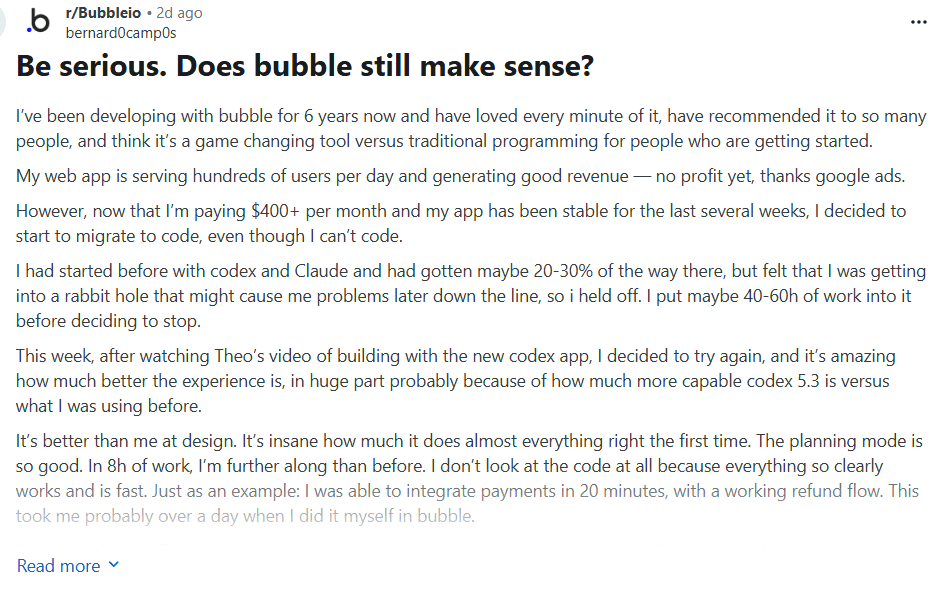
r/Bubbleio – “Be serious, does Bubble still make sense?”
In this discussion, users debate whether Bubble remains a practical choice compared to newer AI-native builders.
Several commenters point out that Bubble is still powerful for non-technical founders who want full-stack capability without writing code. Others question pricing changes and workload unit costs, especially for growing apps.
Source: r/Bubbleio
Reddit
Insight: Bubble is still seen as viable for no-code founders, but cost structure and ecosystem dependency are recurring concerns.
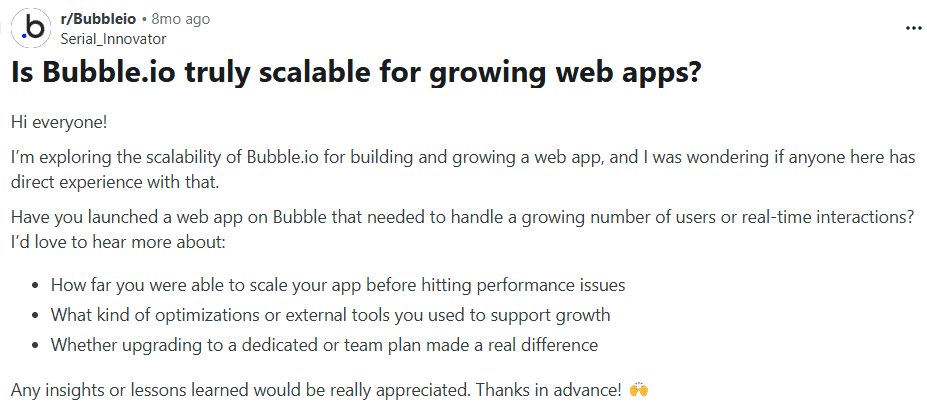
r/Bubbleio – “Is Bubble.io truly scalable for growing web apps?”
This thread focuses specifically on scalability.
Users discuss how Bubble scales using workload units and managed infrastructure. Some report successful scaling experiences, while others caution that performance optimization requires careful workflow design and database structuring.
The general theme is that Bubble can scale, but not without understanding how to optimize within its system.
Source: r/Bubbleio
Reddit
Insight: Bubble scalability is possible, but it requires proper workflow optimization and cost planning.
r/SaaS – “Replit or Bubble?”
In this thread, users compare Replit and Bubble directly.
The discussion highlights that Bubble is better suited for non-technical founders building MVPs, while Replit is preferred by developers who want full coding control. Commenters emphasize that the decision depends on technical skill level and long-term product plans.

Source: r/SaaS
Reddit
Insight: The community sees Bubble and Replit as tools for different builder profiles rather than direct substitutes.
Pricing Comparison
Below is a combined table showing current publicly listed pricing tiers for both platforms.
Plan Tier | Bubble | Replit |
Free Plan | Free tier available with limited capacity and Bubble branding. | Free tier available with limited compute and usage. |
Entry Paid | Starter plan begins around $29 / month (annual billing varies). | Core plan begins around $20 / month. |
Mid Tier | Growth plan around $119 / month with increased workload units. | Teams plan around $35+ / user / month. |
Advanced | Team plan around $349 / month for higher capacity and collaboration. | Business plans with higher compute and private deployments. |
Enterprise | Custom enterprise pricing available. | Custom enterprise pricing available. |
Billing Model | Pricing based on workload units and app capacity. | Pricing based on compute resources, collaboration, and deployment usage. |
Pricing Insight
Bubble pricing is tied to workload units, app capacity, and infrastructure managed within its ecosystem.
Replit pricing is tied to compute power, collaboration features, and deployment usage.
Bubble bundles backend, hosting, and database within plans. Replit provides infrastructure flexibility but assumes coding responsibility.
Introducing Emergent
When comparing Bubble and Replit, you are choosing between visual no-code building and developer-first coding environments.
Emergent positions itself differently.
Instead of removing code entirely like Bubble, or requiring full coding expertise like Replit, Emergent focuses on structured AI-native product building. It aims to combine guided architecture with execution workflows designed for scalable systems.
Below is a comparison on differentiated dimensions not repeated from the quick comparison table.
Parameter | Emergent | Bubble | Replit |
AI-Driven Architecture | Combines AI-assisted generation with structured architectural guidance. ⭐️⭐️⭐️⭐️⭐️ | Primarily visual workflows; AI assists but architecture is user-defined visually. ⭐️⭐️⭐️⭐️ | AI assists coding but architecture is entirely developer-controlled. ⭐️⭐️⭐️⭐️⭐️ |
System Modularity | Encourages modular system design and scalable logic layers. ⭐️⭐️⭐️⭐️⭐️ | Modular within Bubble workflows, but confined to platform ecosystem. ⭐️⭐️⭐️⭐️ | Fully modular through custom code and frameworks. ⭐️⭐️⭐️⭐️⭐️ |
Product Lifecycle Orientation | Designed for idea → build → deploy → scale in structured progression. ⭐️⭐️⭐️⭐️⭐️ | Strong for idea → MVP without code. ⭐️⭐️⭐️⭐️ | Strong for development → deployment for technical teams. ⭐️⭐️⭐️⭐️ |
Execution vs Intelligence Balance | Balances AI reasoning with execution environment. ⭐️⭐️⭐️⭐️⭐️ | Execution-focused visual builder. ⭐️⭐️⭐️⭐️ | Intelligence-assisted coding environment. ⭐️⭐️⭐️⭐️⭐️ |
Long-Term System Evolution | Structured to reduce architectural drift during scaling. ⭐️⭐️⭐️⭐️⭐️ | Scaling remains within managed ecosystem constraints. ⭐️⭐️⭐️⭐️ | Scalability depends entirely on developer architecture decisions. ⭐️⭐️⭐️⭐️⭐️ |
Positioning Insight:
If Bubble removes code and Replit enhances code, Emergent focuses on structured AI-native product systems that guide long-term scalability.
How to Choose the Best AI Builder
Choosing between Bubble, Replit, and Emergent depends on your technical skill and long-term goals.
Do You Want to Avoid Coding Completely?
If yes, Bubble is the strongest fit. It allows full-stack application building through visual workflows.
Replit requires coding knowledge. Emergent reduces complexity but does not eliminate structured system thinking.
Are You a Developer Seeking Full Control?
Replit provides maximum flexibility and control through code and Git-based workflows.
Bubble abstracts infrastructure entirely. Emergent balances structured guidance with AI assistance.
Is Long-Term Scalability a Priority?
Bubble scales within its ecosystem through workload units.
Replit scales based on architecture decisions and infrastructure integration.
Emergent focuses on structured scalability planning from early stages.
Do You Need Built-In Hosting Simplicity?
Bubble offers fully managed hosting.
Replit provides deployment but expects developer configuration.
Emergent emphasizes structured deployment workflows with system clarity.
What Type of Builder Are You?
Non-technical founder → Bubble
Developer building custom systems → Replit
AI-native product team focused on structured growth → Emergent
Conclusion
When comparing Bubble vs Replit, the decision ultimately comes down to how you want to build and how much technical control you need.
Bubble is designed for founders, product managers, and non-technical builders who want to create full-stack applications visually. It includes frontend design, database management, workflows, and hosting within a single ecosystem. If your goal is to launch an MVP without hiring developers, Bubble offers one of the most complete no-code environments available.
Replit, on the other hand, is built for developers. It provides a cloud-based IDE with support for multiple programming languages, Git integration, real-time collaboration, and AI coding assistance. If you want full architectural control and the ability to customize every layer of your stack, Replit gives you that flexibility.
Here is the simple breakdown:
Choose Bubble if you want to build web apps without writing code.
Choose Replit if you want full control through code and scalable architecture.
Bubble prioritizes simplicity and managed infrastructure.
Replit prioritizes flexibility and developer autonomy.
Both platforms are strong in their respective categories. The better option depends on whether you are optimizing for ease of use or technical control.
FAQs
1. Is Bubble better than Replit for beginners?
Bubble is easier for non-coders since it uses a visual builder. Replit requires coding knowledge but simplifies environment setup.