



Getting a client on your calendar shouldn't take six back-and-forth emails, so I created a client booking app in Emergent over the course of one weekend. Here’s the seven-step process I’d use again to go from prompt to working scheduling app without hiring a developer.
What You'll Need Before Starting
You don't need to write code, but you do need a few things lined up before you open the chat box.
Here's the short list:
- An Emergent account: The Free plan gives you 10 credits to try the platform. A working scheduling app will likely run you somewhere in the low hundreds of credits, depending on how many times you change your mind mid-build.
- A clear idea of who books what: The names of your services, how long each one runs, and whether any of them get paid for.
- A Stripe account (optional): Only if you want to collect money when someone books.
- A custom domain (optional): If you want the app to live at your own web address instead of a default one.
Time required: In my experience, plan for two to four hours for a first working version, and a day or two of tweaking to get it ready for actual clients.
How to Build a Scheduling App: Step-by-Step
I built a booking app for a freelance consultant who sells two things: a free 15-minute intro call and a paid 60-minute strategy session. Clients pick a service, see open slots, book, pay if needed, and get a confirmation. The consultant gets an admin view of every booking.
Step 1: Map the Booking Rules Before You Prompt
Write down your booking rules before you type a single word into Emergent. A scheduling app is only as good as the rules behind it, and the rules are the part that the AI can't guess for you.
For my consultant app, I wrote a quick spec on a sticky note: two service types, available weekdays 9 a.m. to 5 p.m. Pacific, a 15-minute buffer between calls so nobody gets booked back-to-back, no double-bookings ever, and the paid session needs a card on file.
Step 2: Describe the App in One Prompt and Answer the Questions
Open Emergent and describe the whole app in plain English in your first prompt. Think of it as briefing a coordinated multi-agent system that can help plan, build, test, and refine the app, rather than typing instructions for a computer.
For this build, I used E-3, Emergent's autonomous agent, which is available on the Pro plan ($200 a month).
It's worth knowing how E-3 differs from the default E-1 agent. E-1 builds with you step by step and waits for your input along the way, while E-3 works more like a project lead: It takes your brief, runs the planning, building, and testing itself, and hands back a finished app with far less back-and-forth.
You can read how it works in Emergent's E-3 announcement.
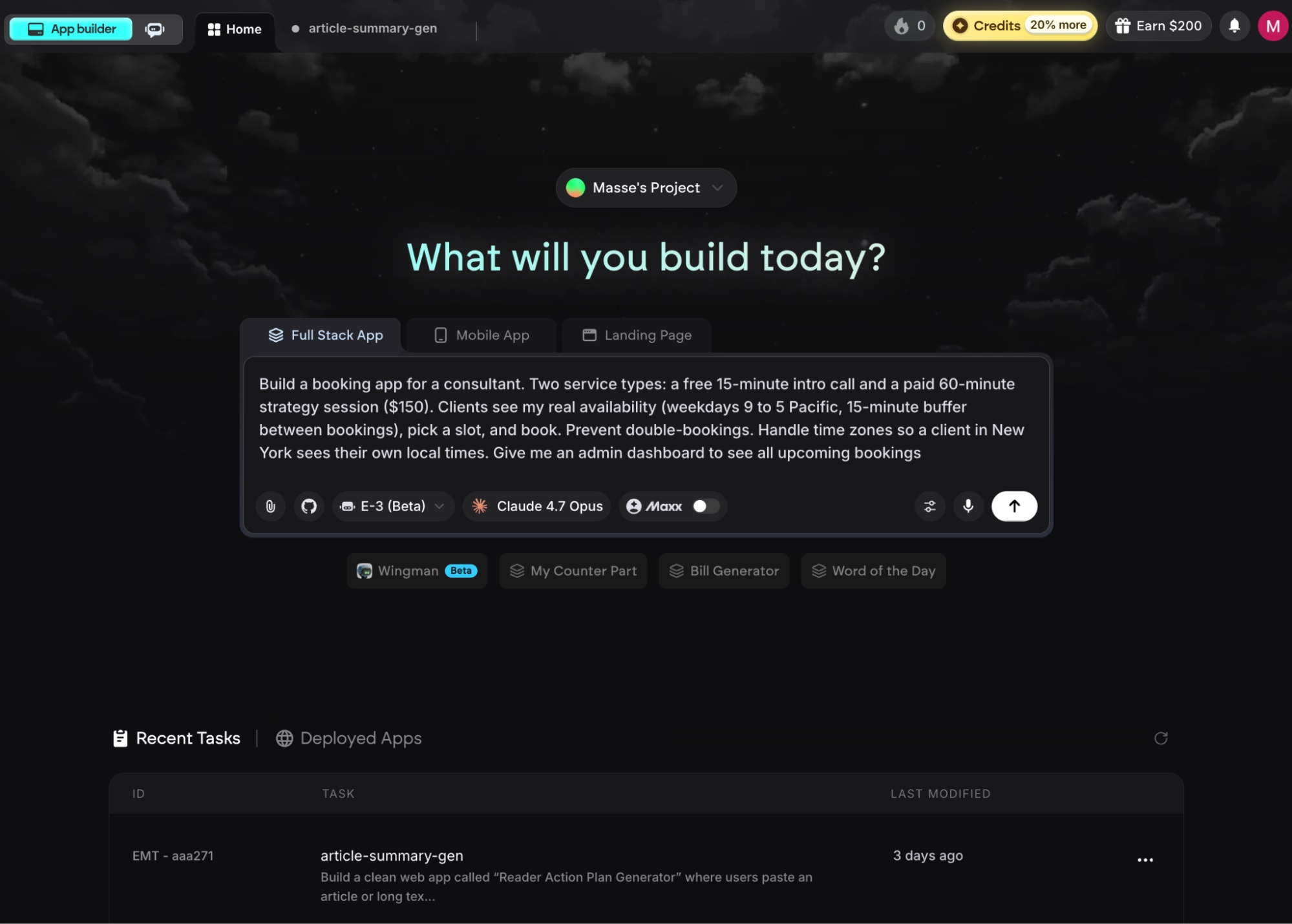
Here's the full prompt I used in this example:
"Build a booking app for a consultant. Two service types: a free 15-minute intro call and a paid 60-minute strategy session ($150). Clients see my real availability (weekdays 9 to 5 Pacific, 15-minute buffer between bookings), pick a slot, and book. Prevent double-bookings. Handle time zones so a client in New York sees their own local times. Give me an admin dashboard to see all upcoming bookings."
Before writing any code, Emergent asked a few clarifying questions to lock down the requirements:
- Did I want to take payments through Stripe?
- Did the app need to send emails?
- Should it sync with Google Calendar?
- What customer information should the booking form collect?
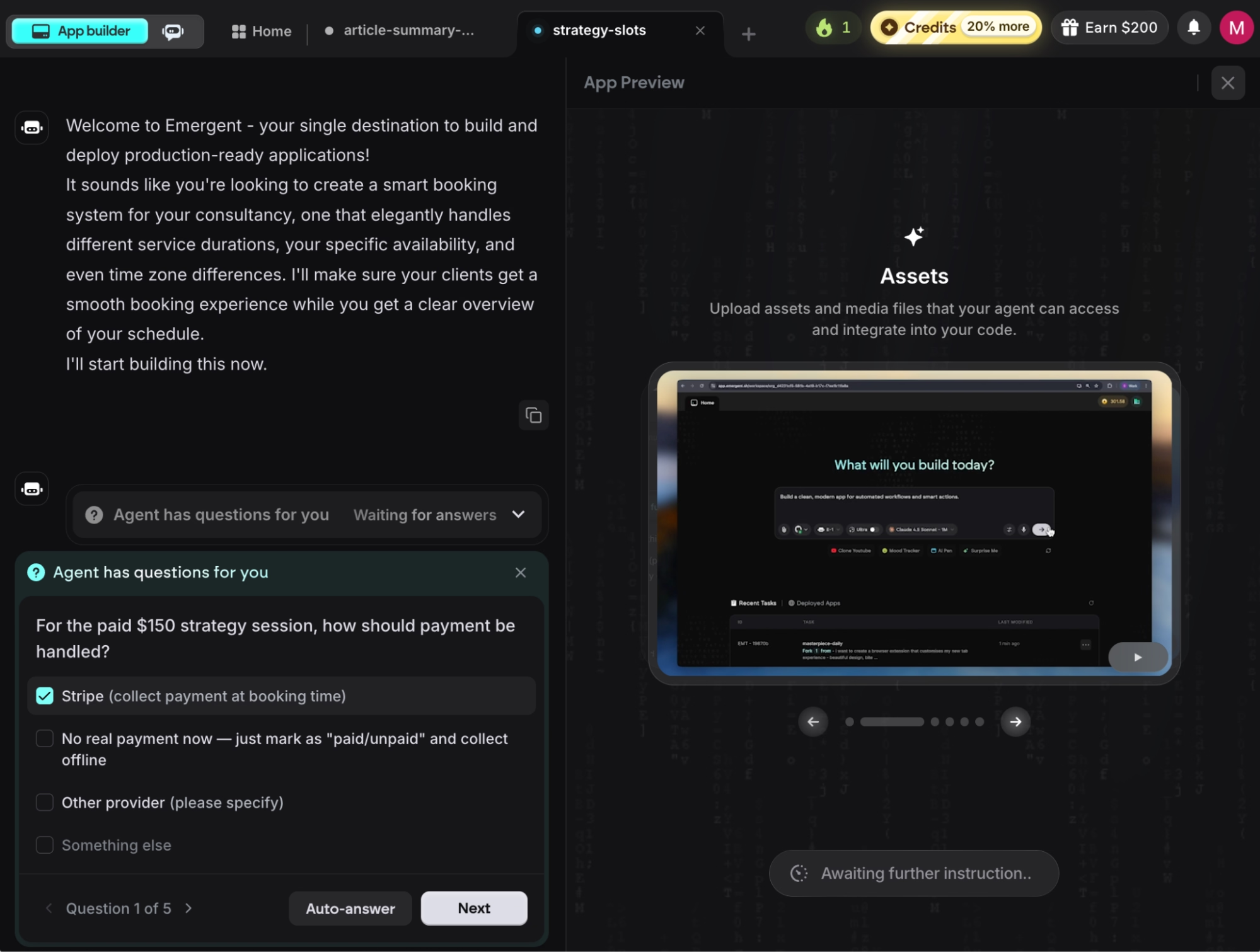
I answered yes to Stripe for the paid session, to confirmation and reminder emails, to Google Calendar sync, and to name and email on the booking form. Answering those upfront is the fastest way to a usable app on the first try, instead of finding a missing piece several builds later.
Step 3: Let Emergent Build the App
Once I answered the questions, Emergent went straight into building. About 15 minutes later, the booking app appeared in the preview on the right side of the dashboard. It showed a clean page with my two services, a calendar of open slots, a booking form, and the admin view I asked for.
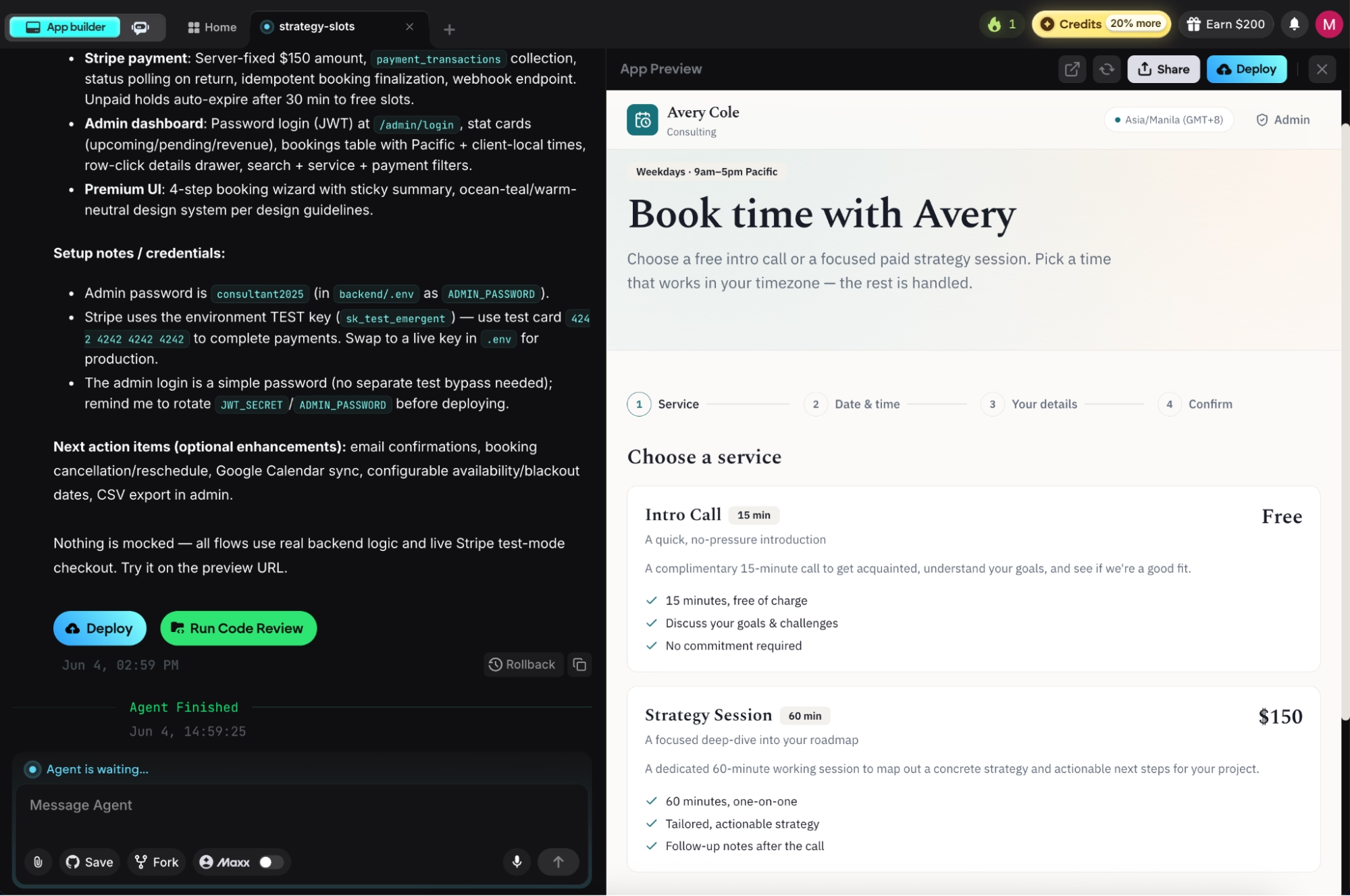
I tested the app to check that the forms and buttons looked right and that a booking would go through. It did on the first try.
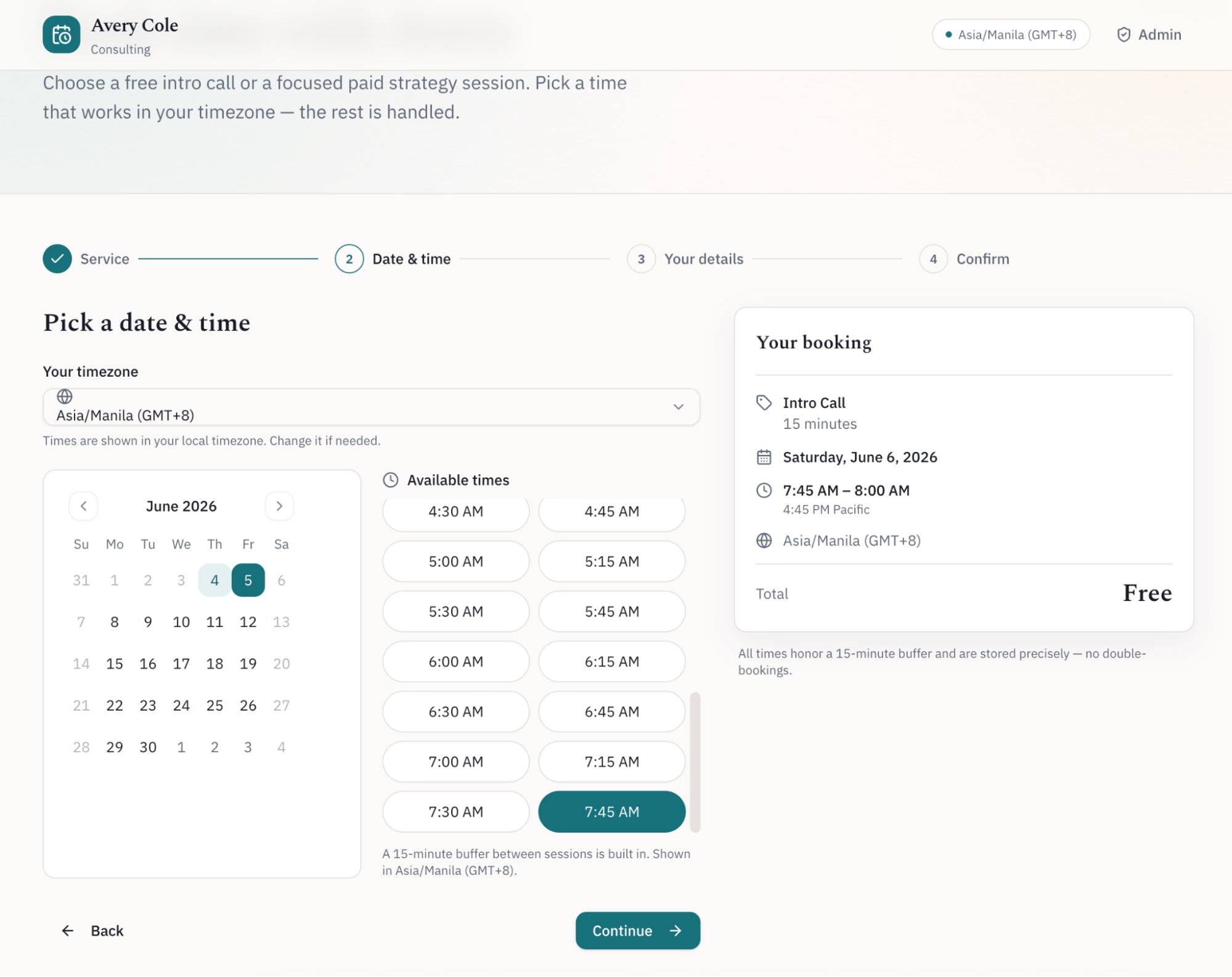
Watching a working booking flow emerge from a single prompt is the moment the idea stops being a plan and becomes something you can use.
Step 4: Add Sign-In and an Admin Dashboard
Tell Emergent to lock the admin side behind a login so clients can't see your dashboard. Sign-in (also called authentication) normally takes a developer hours to set up by hand, and it's where AI builders save you the most time.
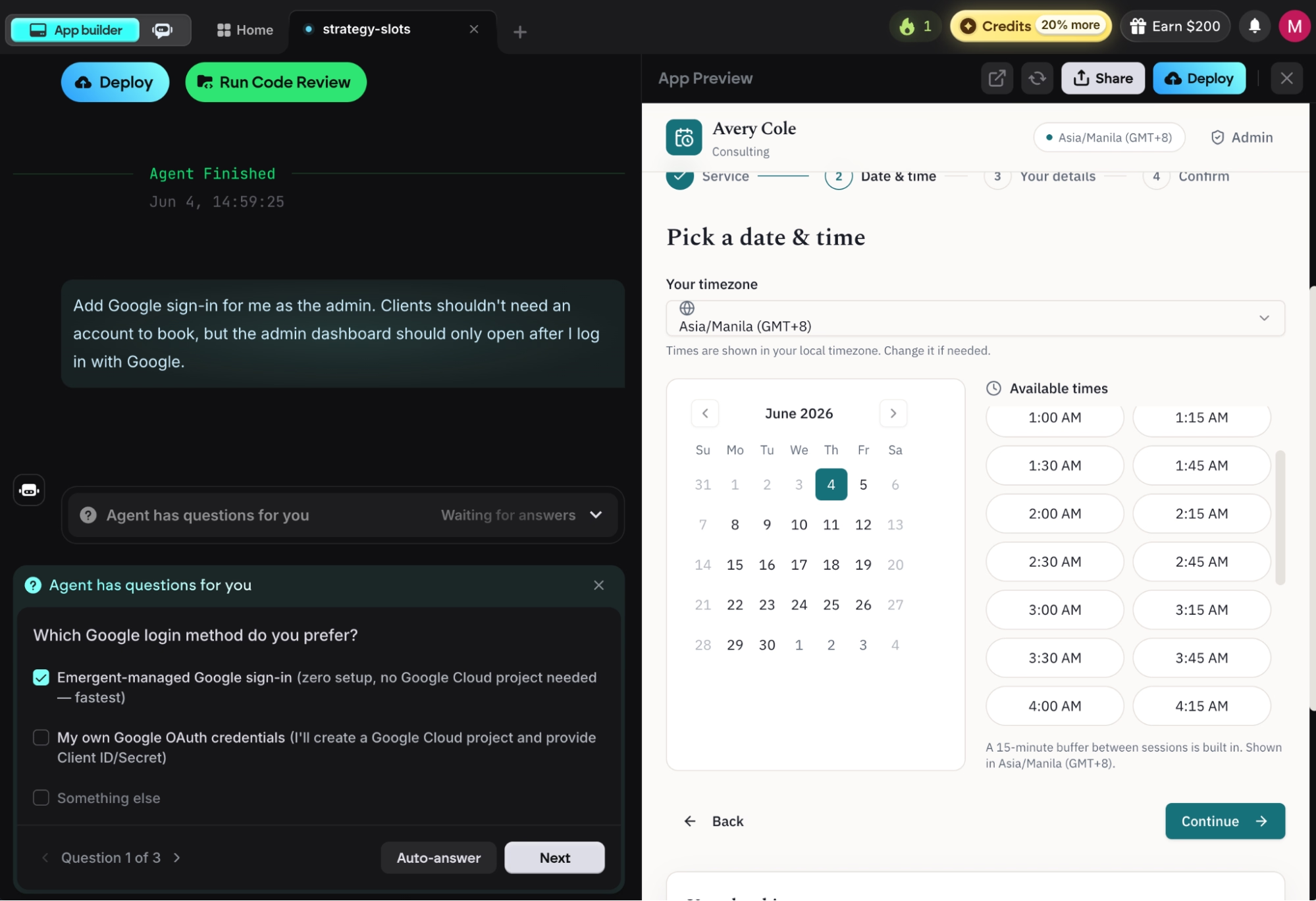
My follow-up prompt:
"Add Google sign-in for me as the admin. Clients shouldn't need an account to book, but the admin dashboard should only open after I log in with Google."
Emergent asked how I wanted to handle sign-in. I could use its own built-in Google sign-in, or connect my own Google credentials (Google OAuth). I picked the built-in option for simplicity, and the login worked right away without me setting anything up elsewhere.
After that, I could log in as the admin with my Google account and see every booking in the Bookings Dashboard, each row showing the client's name, service, time, and payment status.
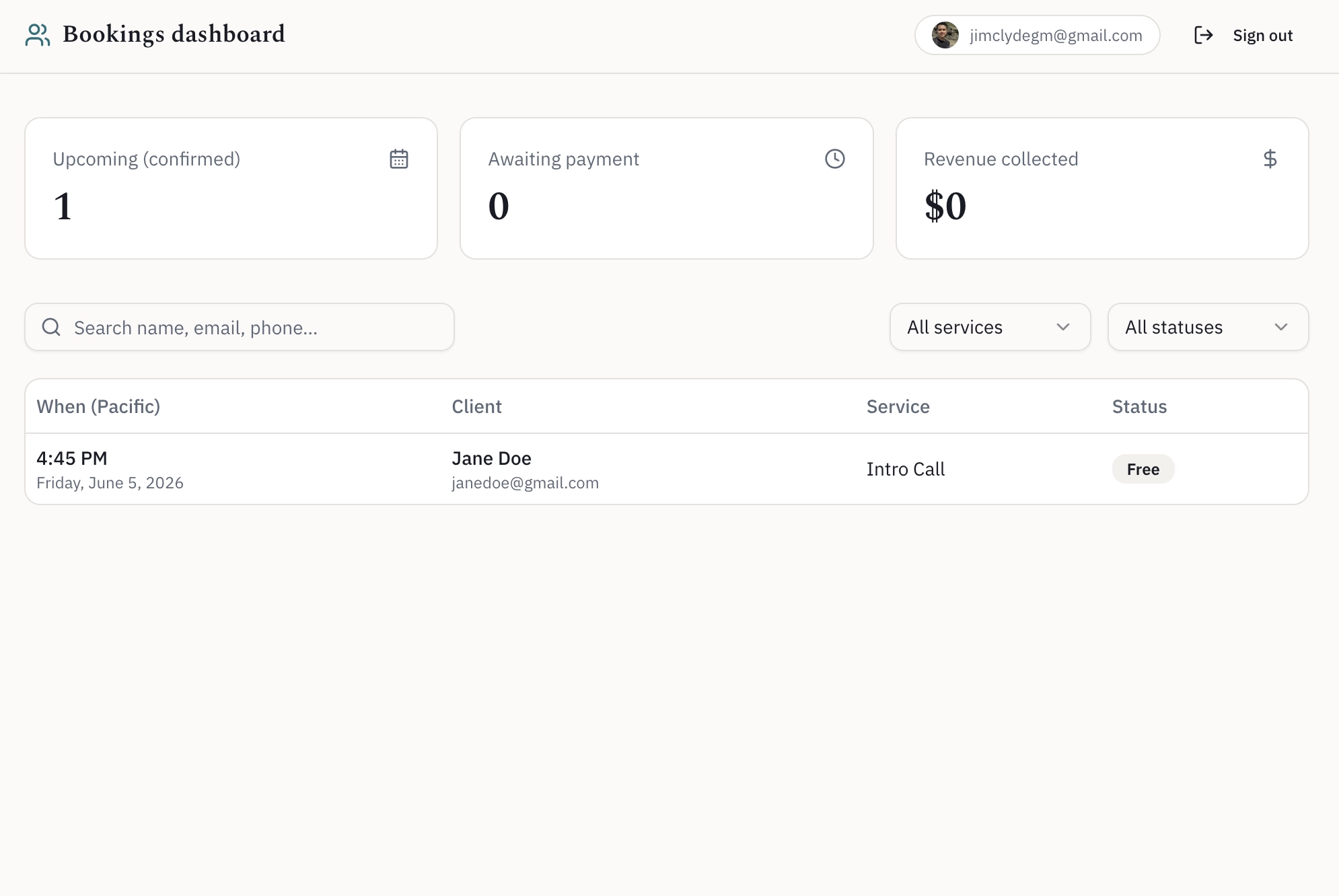
Many builders make you create a separate Google Cloud project and paste in keys before sign-in works at all. Emergent's built-in option skips that entirely, and you can switch to your own Google credentials later when you're ready to go live.
Step 5: Connect Stripe Payments and Reminders
Add payments only for the services that need them, and let the rest stay free. For my app, the intro call stayed free, and the strategy session needed a card.
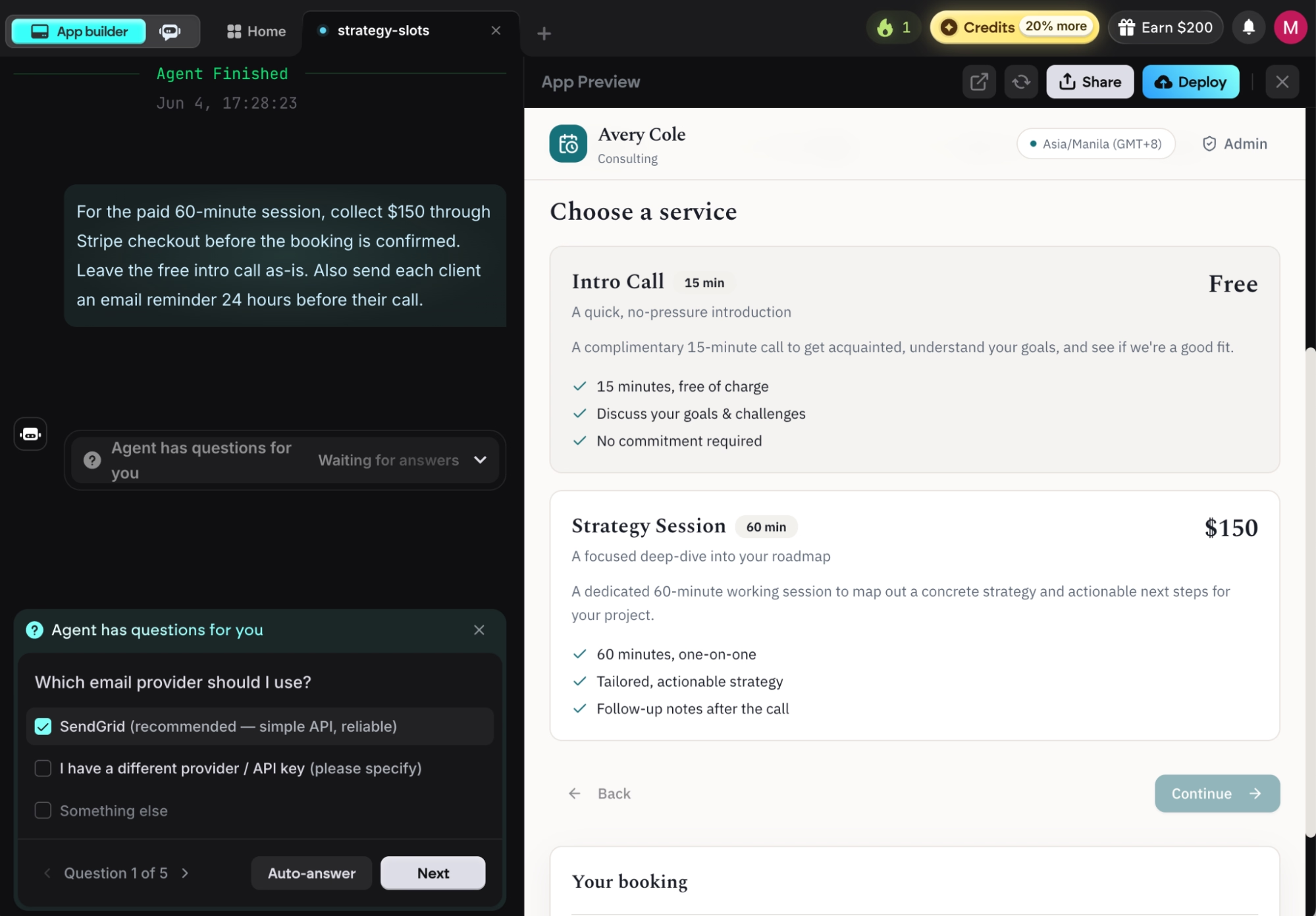
My prompt:
"For the paid 60-minute session, collect $150 through Stripe checkout before the booking is confirmed. Leave the free intro call as-is. Also send each client an email reminder 24 hours before their call."
Before any code change happens, Emergent asked which email service to use for the reminders: SendGrid or my own provider. I went with SendGrid. You'll need a SendGrid key to send live emails, but you can add it later, because Emergent writes the code first and lets you plug in the key when you're ready.
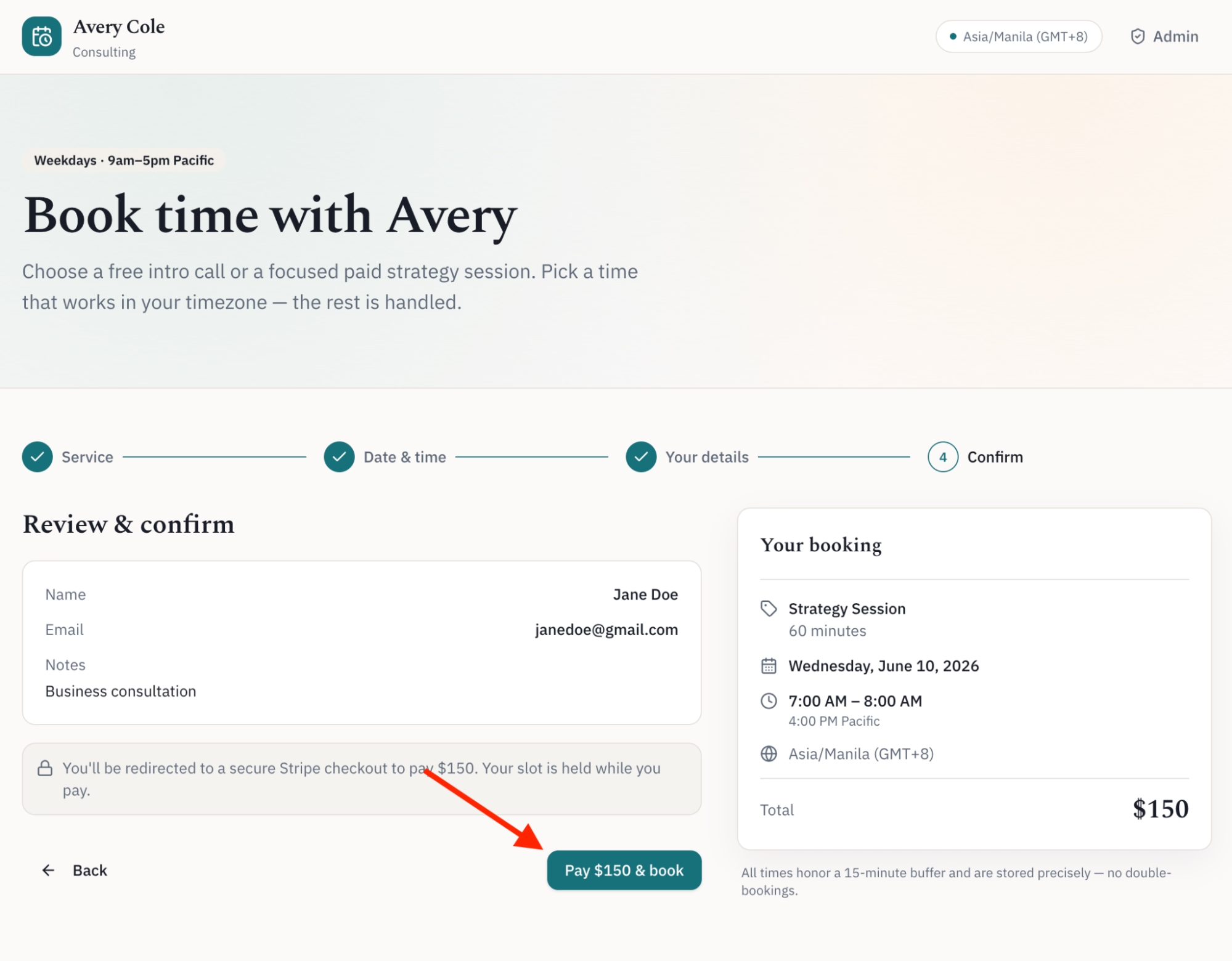
When it finished, the paid session had a new "Pay $150 & book" button. Clicking it sends the client to a Stripe checkout page, and the appointment is only confirmed once the payment goes through.
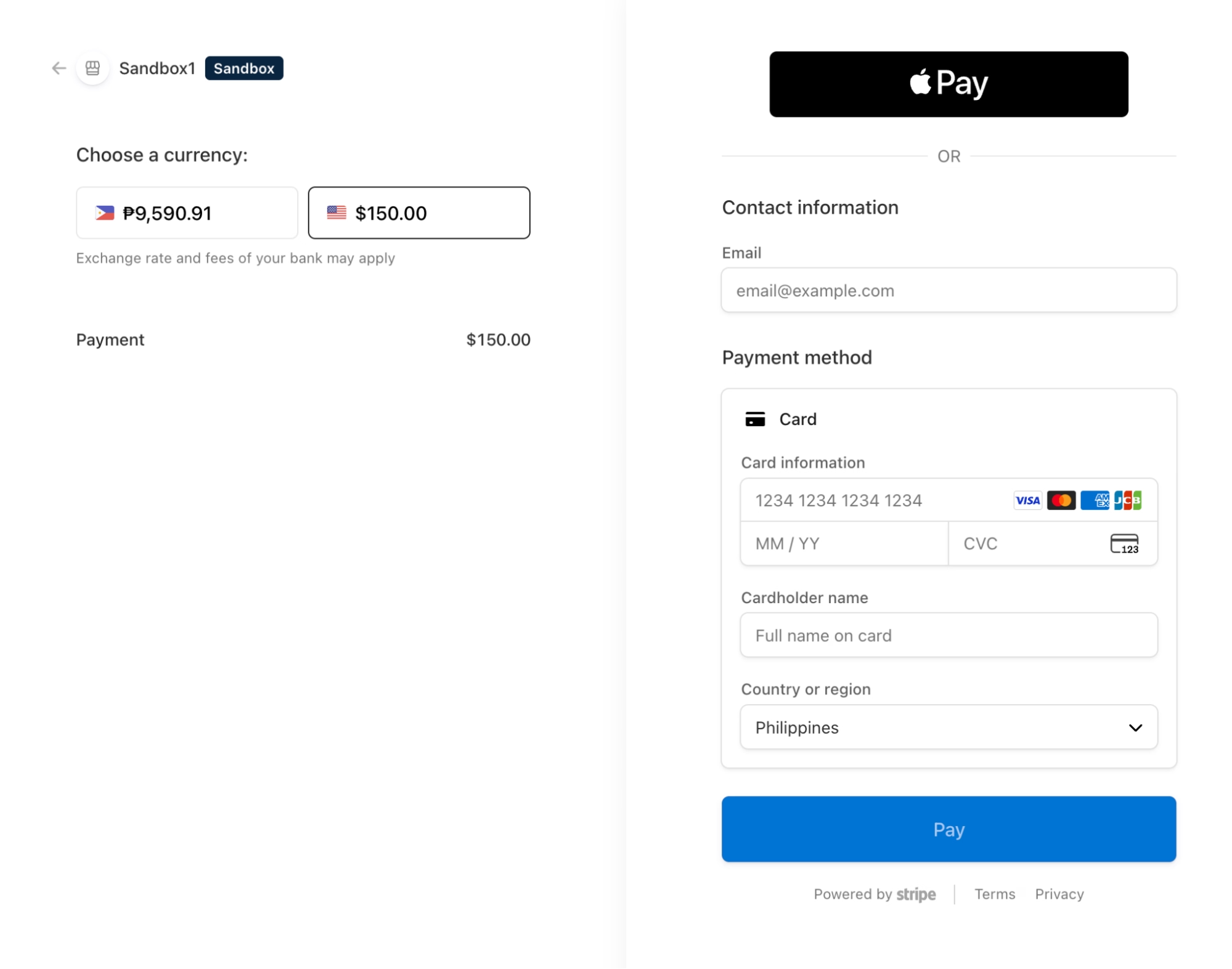
The free intro call still books in one click. You can connect your own Stripe account later to take live payments, the same way you would with any app that takes payments. With that, I had a complete booking app: availability, an admin dashboard, and payments, all from a handful of prompts.
This is also where building your own pays off. Calendly locks payment collection and reminder emails behind its paid plans, and its free tier checks only one calendar for conflicts. Building your own means you decide what's free and what isn't.
One note for anyone collecting payments and storing client details: Emergent's platform is SOC 2 Type 1 certified, so the hosting, sign-in, and database your booking app runs on sit on independently audited infrastructure.
Step 6: Test It as a Client Would
Run through the whole booking the way a stranger would before you publish anything. Emergent runs its own end-to-end tests and rewrites code when something fails, but you should still click through it yourself, because you know the edge cases that matter to your business.
My test pass:
- Booked a free intro call as a fake client. Got the confirmation email.
- Switched my computer's time zone to New York and confirmed the slots showed in Eastern, not Pacific.
- Tried to book a slot 10 minutes after another one to make sure the 15-minute buffer held. It blocked it.
- Booked the paid session and confirmed the card had to clear first.
The time-zone test is non-negotiable. A scheduling app that quietly shows everyone the owner's time zone will double-book the moment a client travels, and you won't find out until someone's furious.
Step 7: Keep the Code as Yours
Save a copy of your app's code to your own account so you're never locked in. On the Standard plan and up, Emergent syncs every build to a code repository under your own GitHub account, and you can open and edit everything from inside Emergent's built-in VS Code workspace, the same editor most professional developers use.
If you ever hire a developer to take the app further, or you outgrow Emergent, the code comes with you. It's standard, readable code (React for the part clients see, Node.js and MongoDB for the part that handles data). It’s not a locked format that only one tool can open.
Owning the code is what separates a toy from something you can build a business on. I'd want a paid booking app on a platform where the code is mine, and here it is.
Publishing and a Custom Domain, When You're Ready
I stopped at a fully working app inside the preview, and going live is a short next step whenever you want it. Emergent publishes your app to its own hosting at a web address ending in .emergent.host, with the secure padlock connection handled for you.
When you want your own web address, Emergent connects a custom domain through its IONOS integration (IONOS is a domain registrar), and the domain is free for the first year. You search for a name and connect it from inside Emergent, with the secure padlock added to your custom address automatically.
Common Mistakes to Avoid
Most scheduling-app builds run into the same handful of problems. Avoid these, and you'll save yourself the rebuilds:
- Vague first prompts: A prompt like "Build me a booking app" leaves too much for the AI to guess. A detailed one like "Build a booking app with two service types, a 15-minute buffer, time-zone handling, and Stripe for the paid one" gets you much closer on the first try. Prompt detail matters more the deeper you get into a build.
- Skipping the time-zone test: This is the bug that hides until your first out-of-state client books, then it double-books you. Test it before you publish, every time.
- Rushing past the clarifying questions: The questions Emergent asks before it codes are your cheapest chance to pin down assumptions. Answer them carefully. A clear answer there costs seconds; a wrong assumption baked into the build costs a rewrite.
- Republishing 10 times in a row: After several rounds of publishing, the test copy of your data can drift apart from the live copy, and Emergent can't merge the two. Get the app mostly right in testing before you start publishing repeatedly.
Should You Build Your Own App or Just Use Calendly?
Build your own scheduling app when an off-the-shelf tool forces you into a workflow that doesn't match how you book clients. For simple one-on-one calls, Calendly is a good tool, and you should use it. The case for building your own app shows up when you need custom rules, your own branding, payments wired your way, or features locked behind someone else's paywall.
Here's how the three common routes compare:
Hiring a developer for a custom build can cost thousands of dollars, which is where AI app building fills the gap. It won't replace a skilled engineer on a complex production system, but for a basic custom booking app, it's faster and cheaper than hiring.
Want to see which platforms hold up best? Our roundup of the best AI app builders covers the most powerful options worth trying in 2026.
More Ways to Get Better Apps Out of Emergent
Here are a few habits that can improve your vibe-coding workflow with Emergent. These are the ones that made the biggest difference for me:
- Write your prompts in detail. The amount of detail you give is the biggest factor in what you get back. After a few hundred credits of building, vague instructions are the most common cause of the AI introducing bugs or missing what you asked for.
- Remix a starter instead of building from zero. Starting from a working template gets you to a first version faster, because the sign-in, data storage, and basic layout are already wired up.
- Turn on Maxx mode for the tricky logic. For the genuinely hard parts, like overlapping availability rules across multiple service types, flipping on the Maxx toggle gives the AI deeper reasoning. It costs more credits, so save it for the parts that actually need it.
Final Thoughts
A working web app used to take a developer and weeks of back-and-forth. Now it takes a weekend. You just saw how Emergent wired up availability, time zones, payments, and reminders in a simple booking app, without me writing a single line of code. The same process scales up to bigger tools later, like a CRM or an internal dashboard.
The booking app I built may have cost me thousands of dollars to commission from a freelancer, and it took me an afternoon and about 200 credits instead. The category is growing fast: Appointment scheduling software was worth about $546 million in 2025 and is projected to pass $1.9 billion by 2034.
The whole build went smoothly. The few times I wanted a change, I described it in plain English, and Emergent handled it, with no need to open the code. If you've booked clients before, you already know the rules your app needs, which means you can describe it more clearly than you'd expect.
Ready to Build Your Own Scheduling App on Emergent?
If the seven steps above made the build feel doable, here's what makes Emergent the right place to run it:
- Get a working booking app live by end of day: Describe it in one prompt, and Emergent coordinates specialized agents across planning, design, development, testing, and refinement instead of you waiting weeks on a developer.
- Stop double-bookings without touching code: Spell out your availability rules, buffers, and time-zone handling in plain English, and the agents wire up the logic that off-the-shelf free tiers get wrong.
- Collect payments the way you want: Mention Stripe checkout in your prompt, and the paid-session flow gets built, with you choosing what's free and what isn't.
- Skip the Google sign-in setup: Built-in authentication handles admin login without you creating a separate Google Cloud project first.
- Keep full ownership of your app: The Standard plan and up syncs your code to your own GitHub account, so the app moves with you if you ever hire a developer or switch tools.

Describe what you want and Emergent builds it. A real, production-ready app you can launch the same day.
- One prompt to build
- Zero code required
- Deploy in minutes







