



TL;DR
- Start with one customer action. Decide whether the site should drive calls, bookings, quote requests, purchases, or visits.
- Keep the first version lean. Most service businesses can start with a homepage, service pages, proof, and a clear contact or booking path.
- Choose the builder after you know the job. A simple brochure site, online store, and custom quote workflow need different tools.
- Write for customers first. Tell people what you do, who you help, where you work, why they should trust you, and what to do next.
- Test the whole path before launch. Open the site on a phone, submit the form, check every button, and make sure the business details are right.
- Set up search basics after publishing. Connect your site to Google Search Console and claim an eligible Google Business Profile.
If you're figuring out how to create a small business website, start with the customer action and let the template follow. A useful business site makes it clear whether you want someone to call, book, request a quote, buy, or visit your location.
I checked the current search results, the official builder workflows, current pricing pages, and the live Emergent material before building this process. The repeatable pattern is simple: set one goal, map the pages that support it, choose your platform, build the customer path, and test that path before you publish.
The nine steps below give you a first version you can finish, launch, and improve, with only the pages customers need.
What You'll Need Before Starting
You can make the first version much faster when the basic business material is ready before you open a website builder.
Prerequisites:
- Business basics: Your business name, service area or location, phone number, email address, and opening hours.
- One main goal: Pick calls, bookings, quote requests, purchases, or another clear action.
- Offer information: List your main products or services, prices where appropriate, and what makes each option different.
- Proof: Gather real reviews, project photos, certifications, case studies, or customer results you have permission to use.
- Brand assets: Prepare your logo, colors, fonts if you have them, and original photos.
- Domain ideas: Write down two or three short domain names in case your first choice is taken.
Time required: I'd block half a day for a basic service-business site if your copy and images are ready. A store, membership site, custom booking flow, or site with business logic needs more time.
How to Create a Small Business Website Step by Step
Step 1. Choose the One Action Your Website Must Drive
Pick one primary conversion before you design anything. If every button asks visitors to do something different, the site makes people decide what matters instead of showing them.
For a roofing company, the main action could be “Request a Quote.” A salon might use “Book an Appointment.” A restaurant might want “Order Online” or “View the Menu.”
Write this sentence before building:
My website should help [type of customer] take [main action] after they understand [what I offer and why they should trust me].
That sentence becomes your filter. If a section doesn't help the visitor understand the offer, trust the business, or take the next step, question whether it belongs on the first version.
Pro Tip
Use one main call to action across the homepage and your key service pages. You can still include your phone number, address, and other contact options without making every option compete for attention.
Step 2. Map the Pages Around That Action
Build the smallest site that answers the customer's buying questions. You can add more pages when real customers give you a reason to.
For a local service business, I'd start with this structure.
Starter sitemap:
- Home: Explain what you do, who you serve, where you work, and the next step.
- Services: Give each important service enough detail for a customer to decide whether it fits.
- About: Show the people, experience, story, or proof behind the business.
- Reviews or Work: Add genuine testimonials, case studies, project photos, or examples.
- Contact or Booking: Give the visitor one clean way to act.
A restaurant might replace “Services” with a menu. A consultant might need separate service pages and case studies. A product business will need product, cart, and checkout pages.
Expected result: You should be able to draw the whole first version on one sheet of paper. Every page should lead naturally toward your main action.
If you want more detail on domains, hosting, structure, and the technical route, Emergent's guide to building a website from scratch goes deeper.
Step 3. Choose a Website Builder That Fits the Job
Choose the platform based on what the site has to do after launch. Templates matter, but bookings, payments, forms, custom workflows, ongoing editing, and pricing will matter longer.
Emergent fits a business site that needs custom forms, logic, integrations, or room to grow into a customer portal or other business software.
Wix gives small businesses a traditional website-builder workflow with templates, forms, bookings, commerce, and other business tools. Wix's official small-business page lays out a six-step process from template selection through publishing.
Squarespace is a strong fit when polished presentation and straightforward business pages are the priority.
Canva is the leaner option when you mainly need a simple visual site. Canva's current business-site workflow lets you publish on a free Canva domain, while Pro supports publishing to an existing domain.
Current starter pricing:
| Builder | Best Fit | Free Option | Starter Paid Plan |
|---|---|---|---|
| Emergent | Custom site workflows | Yes | Standard:$20/month(or $17/month billed annually) |
| Wix | Traditional business sites | Yes | Light:$17/month,billed annually |
| Squarespace | Design-led business sites | No free plan, 14-day trial | Basic:$25/month (or $19/month billed annually) |
| Canva | Simple visual sites | Yes | Pro:$18/month (or $180/year) |
My choice would follow the website's job. Use a page-first builder when your needs fit its existing structure.
Use Emergent when the website needs custom behavior or is likely to grow into business software.
Also read our best business website builders guide for what else is worth trying when the platform's existing structure doesn't fit your needs.
Step 4. Choose a Domain Customers Can Remember
Your domain should be easy to say, spell, and type. Start with your business name. If that isn't available, add a short term that reflects the service or location instead of stuffing several keywords into the address.
Before buying, read the domain aloud. Then type it from memory. Watch for doubled letters, awkward abbreviations, accidental words, and names that are easy to mishear.
A quick domain check should cover:
- Business match: Does the name clearly belong to your company?
- Spelling: Can someone type it after hearing it once?
- Length: Is it short enough to use on signs, invoices, and business cards?
- Ownership: Will the domain be registered to you or your business?
- Access: Do you know who controls the registrar login and renewal details?
If you build with Emergent, you can deploy first on an Emergent address and connect a custom domain when you're ready.
Current Emergent documentation supports Auto-Link for major providers or manual Domain Name System (DNS) setup for other domains. Emergent also offers an IONOS purchase flow with the first year of domain registration free.
Step 5. Build the Homepage and Main Sales Pages
The homepage should answer four questions fast. What do you do? Who is it for? Why should the visitor trust you? What should they do next?
Don't open with “Welcome to our website.” Use the first screen to tell visitors what you offer and give them a clear next step.
A simple homepage formula:
- Headline: State the main service and, when useful, the location or customer you serve.
- Support line: Explain the result, specialty, or reason someone should choose your business.
- Primary button: Use the main customer action you chose in Step 1.
- Proof: Add real reviews, credentials, customer names, project numbers, or results you can verify.
- Core offers: Show your main services or product categories.
- Process: Explain what happens after someone contacts, books, or buys from you.
- Final call to action: Repeat the next step near the bottom of the page.
For the worked example in this guide, I used Emergent to create a fictional landscaping website for Harbor & Hedge Landscaping in Raleigh, North Carolina. The site's main goal was simple: get homeowners to request a free estimate.
Here’s the prompt I used:
Build a small-business website for Harbor & Hedge Landscaping, a fictional residential landscaping company serving Raleigh, North Carolina, and nearby communities.
The main goal is to get homeowners to request a free estimate.
Create pages for Home, Services, About, Customer Proof, and Contact.
On the homepage, clearly explain that Harbor & Hedge Landscaping provides residential landscaping services for homeowners in the Raleigh area. Make “Request a Free Estimate” the main call to action and use it consistently across the site.
Feature these three main services:
- Lawn care and maintenance
- Landscape design and installation
- Patio and outdoor living projects
Use a deep forest green, warm beige, and off-white color palette. Keep the design clean, classic, and professional, with large outdoor images, simple navigation, and plenty of white space.
Make the website easy to use on a phone. Keep buttons large enough to tap comfortably, make the main call to action easy to find, and keep important information readable without zooming.
Add a “Request a Free Estimate” form with fields for full name, email address, phone number, ZIP code, service needed, and a short project description.
Save each submitted estimate request to the database and show the visitor this confirmation message after a successful submission: “Thanks! We’ve received your estimate request. Harbor & Hedge Landscaping will be in touch soon.”
Use stock landscaping photos for the hero, services, and project sections. Keep the images realistic, natural, and consistent, and don't present them as the company’s real completed projects.
Add a Customer Proof page and homepage section, but use clearly labeled placeholder content for testimonials, ratings, project numbers, certifications, and customer results. Do not invent reviews, awards, prices, credentials, or business results.
Use placeholder contact details where needed. Do not use real personal information.
Before deployment, test the navigation, estimate form submission, mobile layout, buttons, links, and the full customer path from the homepage to submitting an estimate request.
If anything in the brief is missing, use clearly labeled placeholder content instead of making up business facts.
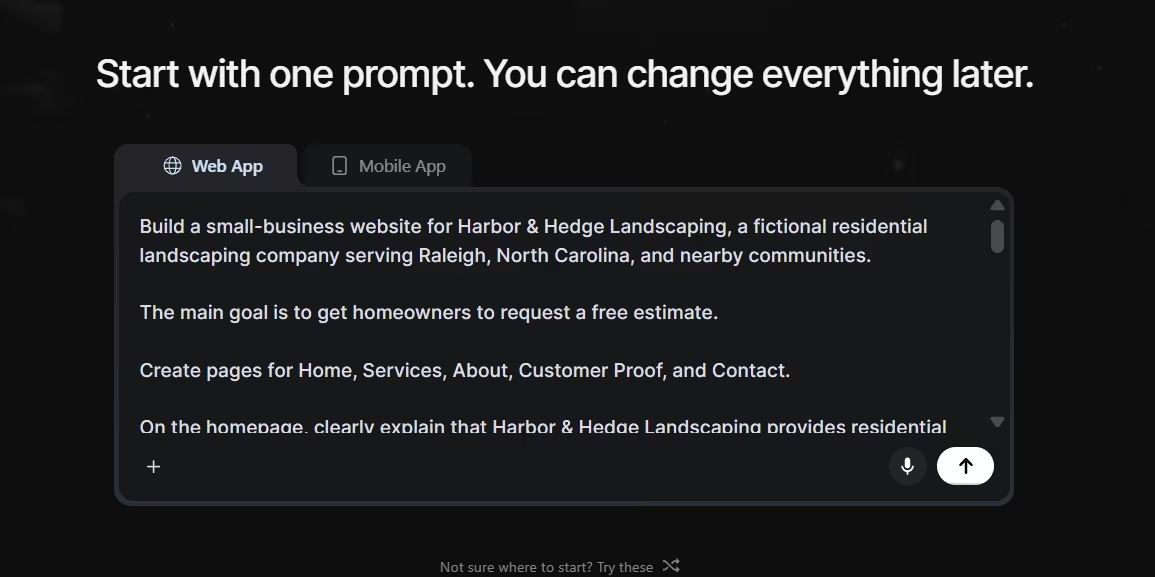
After I submitted the brief, Emergent asked a few follow-up questions instead of guessing at important decisions. I chose a clean and classic visual style, stock landscaping photography, and a form that saves estimate requests and shows a confirmation message after submission.
That gave the build a clear direction before I started refining individual pages.
For your own site, keep the copy just as specific. “We provide quality solutions for all your needs” tells a customer almost nothing. Name the service, customer, location, and next step so someone landing on the page can quickly decide whether they've found the right business.
Step 6. Add Only the Functions Customers Need
The best feature is the one that removes a real step for your customer or your staff. Start with the path you chose in Step 1 and build around it.
Match the function to the business:
- Service business: Add a quote form, appointment booking, click-to-call button, or estimate request.
- Local storefront: Make hours, directions, phone number, and current service information easy to find.
- Consultant or agency: Use a lead form that asks enough to qualify the project without turning into a questionnaire.
- Product business: Give customers a clear route from product page to cart, payment, and order confirmation.
- High-consideration service: Add case studies, project examples, and proof next to the contact path.
Keep forms short at first. Ask for information you will use. A quote form for a contractor might need the customer's name, contact details, service type, location, and a short description. You can collect the finer details after the first inquiry.
A useful real example comes from Emergent's SSF Detail case study. Emergent reports that the 15-person South Florida detailing company rebuilt its site around service discovery and a free-quote form.
The new site went from blank screen to live in four days, and the business later recorded roughly 35% more lead-form submissions than on its old WordPress site.
That result is specific to SSF Detail, so don't treat 35% as a promise for another business. The useful lesson is the structure: make the site's main business action easy to find and easy to complete.
Step 7. Set Up Local Search Basics
Search engine optimization (SEO) starts with making every important page clear. A search engine and a customer should both be able to tell what the page covers from its title, heading, copy, and business information.
Google recommends giving each page a descriptive, concise title instead of vague labels such as “Home.”
Write each service page around the actual service, with details that only apply to it.
Minimum search setup:
- Page titles: Give every important page a unique, descriptive title.
- Page descriptions: Write a useful description that matches what the page offers.
- Business details: Keep your name, location or service area, contact details, and opening hours current.
- Useful page copy: Answer the questions a customer has before contacting you.
- Local profile: Add or claim an eligible Google Business Profile.
- Search monitoring: Verify the site in Google Search Console.
A verified Google Business Profile can control how an eligible business appears across Google Search and Maps. Search Console shows how Google crawls, indexes, and serves your website, so it gives you a place to spot search issues after launch.
Don't create dozens of thin location pages because you want to rank in dozens of towns. Build a location or service-area page when you have useful, specific information for people in that market.
Step 8. Test the Full Customer Path
Don't test a business website by staring at the homepage. Complete the action you expect a real customer to complete.
I use the same simple question for this stage. Can a stranger go from landing on the site to completing the main action without asking me what to do?
Run this launch test:
- Phone test: Open the site on a real phone and check text size, buttons, menus, images, and forms.
- Desktop test: Check the same pages on a larger screen.
- Form test: Submit every lead or contact form and confirm the message reaches the right inbox or system.
- Booking test: Make a test appointment and check the confirmation.
- Payment test: If you sell online, run the payment provider's approved test flow before taking real orders.
- Link test: Click every navigation link, button, email address, and phone number.
- Business-detail test: Check prices, hours, address, service area, and contact information.
- Customer test: Give the site to one person who hasn't helped build it and ask them to complete the main action without instructions.
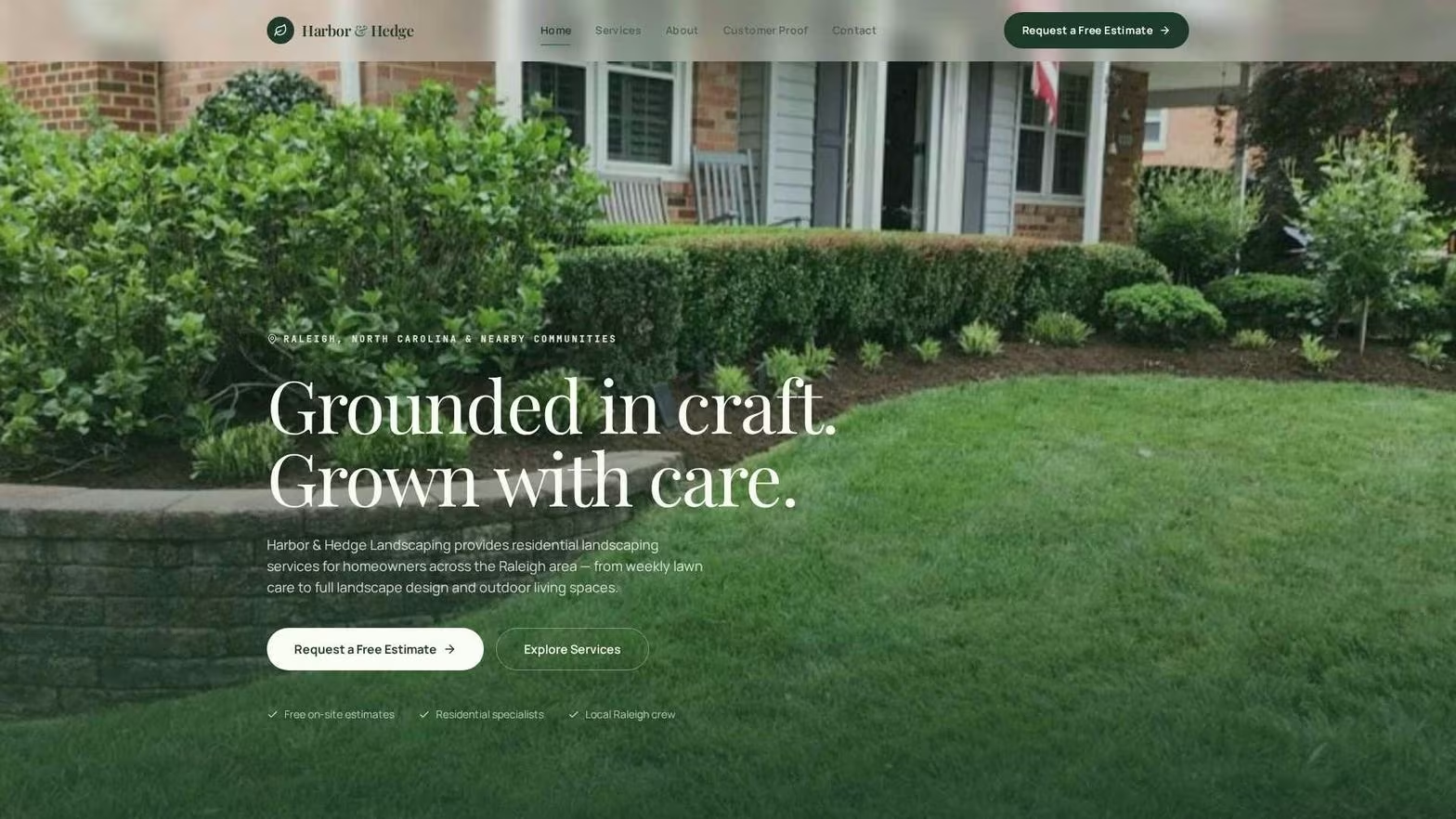
Expected result: You should be able to start on the homepage and finish the main customer action without fixing a broken link, guessing which button to press, or finding missing information.
Pro Tip
Test the phone version first. A contact button that's easy to click at a desk can be awkward when someone is standing outside, holding a phone with one hand, and trying to book or call.
Step 9. Publish, Measure, and Improve
Launch when the main customer path works. Waiting for every future page, animation, blog post, and feature turns a website into a project that never reaches customers.
After publishing on your custom domain, verify the live version again. Submit the site to Search Console, make sure your eligible Business Profile points to the correct address, and check that the live forms and bookings still work.
Google says Search Console doesn't need daily attention. Checking around once a month and after meaningful site changes is enough for most site owners.
Then watch what real customers do.
The first improvements should come from evidence: repeated customer questions, forms people abandon, services customers can't find, outdated details, or calls asking for information that should already be on the page.
If budget is the main constraint, affordable website builders can help you keep costs down while still covering the essentials, though the features and limitations of their entry-level plans can vary.
Common Mistakes to Avoid
Starting with a template before setting a goal: A polished template won't fix a site that has no clear customer action. Write the site's job first.
Building too many pages before launch: Ten unfinished pages are less useful than five pages that answer the customer's real questions and work end to end.
Using vague homepage copy: “Trusted solutions for modern businesses” could describe thousands of companies. Name your service, customer, location, or outcome.
Adding features because the builder offers them: A chatbot, account system, blog, calculator, or booking tool belongs only when it solves a customer or business problem.
Publishing forms you haven't submitted yourself: A beautiful quote page has zero value when every inquiry goes to the wrong email address.
Using fake proof: Don't invent testimonials, customer counts, review ratings, certifications, or project outcomes. If proof is still thin, show real work and explain your process.
Forgetting the mobile customer: Open every key page on a real phone. Don't assume the builder's preview catches every awkward button, crop, menu, or form.
Choosing only by the cheapest advertised price: Check whether the plan supports your domain, forms, bookings, payments, storage, or other must-have functions before moving the whole site into it.
Taking It Further With Business Workflows
A small-business website can become more useful once the basic lead or sales path works. This is where I would stop thinking only about pages and start looking at the work that happens after a customer clicks the button.
A contractor could turn a quote form into a lead-routing system. A consultant could add a client intake area.
A property manager could give tenants a request portal. A service company could let customers check job status without calling the office.
Start with the manual process you already understand. Then automate one piece at a time so you can tell whether it saves work or creates more of it.
If you already plan business workflows in Claude or ChatGPT, the Emergent MCP Connector can start an Emergent build from that conversation and return a live preview. Emergent's current help documentation says the connector works with an existing or newly created Emergent account.
Also read our guide on how to create a business app in an afternoon to see how a simple workflow turns into working business software.
Emergent Makes Small Business Website Building Easier
Emergent works well when you want to turn a business brief into a working website through conversation, especially when the site needs forms or other behavior beyond static pages. Emergent’s website builder can create the layout, pages, navigation, and design from your instructions.
For this guide, I used Emergent to turn the fictional Harbor & Hedge Landscaping brief from Step 5 into the worked example. I asked it to create a Raleigh landscaping website with five pages and one main goal: get homeowners to request a free estimate.
What I liked was that it didn’t blindly fill in the gaps. After I submitted the brief, Emergent asked what should happen after someone submits the estimate form, what visual style I wanted, and whether it should use stock landscaping photos or graphic placeholders.
For this build, I chose:
- Form behavior: Save the estimate request to the database and show the visitor a confirmation message.
- Visual direction: Clean and classic, using the forest green, warm beige, and off-white palette from the original brief.
- Images: Stock landscaping photos for the hero, services, and project sections.
That back-and-forth is where Emergent fits this workflow well. I could describe the business outcome first, then make specific decisions as the build took shape, adding technical detail once I could see the pages.
Here’s how Emergent helps with a small-business website:
- Start with a business brief: Describe your business, service area, pages, visual direction, and the action you want customers to take.
- Fill in missing decisions as you build: Emergent's agents can ask follow-up questions when the brief leaves an important choice open.
- Build functional forms: For my example, the estimate form was set up to save submissions and show customers a confirmation after they send a request.
- Revise through conversation: You can ask for changes to the copy, layout, form, or customer path as you review the site.
- Publish on your own domain: Emergent supports both Auto-Link and manual Domain Name System (DNS) configuration for connecting a custom domain.
I pasted the exact prompt I used for my first build in Step 5. So the more useful question by this point is whether the workflow fits the type of website you're creating.
For a basic site that only needs a few informational pages, a traditional website builder can be enough. Emergent becomes more useful when the site needs working business logic, such as an estimate form, client intake flow, quote calculator, customer portal, or another custom workflow you want to add later.
The SSF Detail case study shows how that approach can work for an actual service business. Emergent reports that the detailing company used natural-language instructions to rebuild its website around service discovery and quote requests, treating the site as an active lead tool.
Start building with Emergent.
Final Takeaway
If you’re learning how to create a small business website, keep the first version centered on one customer action. Decide what you want people to do, build the pages they need to make that decision, choose a builder that supports the job, and test the entire path before launch.
The website doesn’t need to do everything on day one. It needs to explain your business clearly, make the next step easy, and give you a solid base to improve when real customer behavior tells you what should come next.
Comparing the best online website builders can also help you find a platform that fits those needs before you commit.

Describe what you want and Emergent builds it. A real, production-ready app you can launch the same day.
- One prompt to build
- Zero code required
- Deploy in minutes







