



Every working photographer knows this moment. You're about to send a client your website link for the first time. You want it to look like you know what you're doing, rather than like you threw a folder of JPEGs online at midnight.
I test website and app-building tools for a living, and this round I wanted one answer: how to make a photography website that holds up in front of a paying client. I recently spent 16 days testing five platforms, building a photography portfolio on each one to see what happens past the marketing page.
The builds themselves ran from 12 minutes to just over two hours. The rest of that time went into signups, comparing plans, and testing each platform's client galleries and print-order flow.
The four template platforms all got the identical setup: 24 photos, three galleries, and essential pages.
Emergent got a related but expanded brief, since the whole point of testing it was seeing what it could do that a template can't. The lineup was Squarespace, Pixieset, Adobe Portfolio, Canva, and one custom build in Emergent.
Here's how to make a photography website, from picking a platform to publishing it, using the build times from that testing. The times and the gaps I hit should settle which platform fits your situation.
Prerequisites
- A curated set of your best images (15 to 30 is a good starting range, resized for the web)
- A budget for a platform subscription and a domain name, even a small one
- A short bio and a headshot of yourself, plus the city and region you shoot in
Time required: A weekend is enough for most photographers. In my own testing, Squarespace's Blueprint AI got me a usable draft from a single sentence, and Adobe Portfolio produced a complete, publishable site in 20 minutes. The slowest full build, with all 24 images sorted and the site fully customized, took over two hours.
Which Platform Should You Use for a Photography Website?
Before you compare platforms, get clear on your niche, whether that's weddings, portraits, commercial work, or landscapes, and who you're building the site for. That answer shapes everything downstream, from which of the four platforms fits best to what your essential pages need to say.
The platform you pick shapes the editing process, gallery options, and room for future client features.
I tested four template-based platforms against the same brief: Build a portfolio for a portrait and wedding photographer, with three galleries and room to grow into paid client work. Here's that brief in the detail I worked from, the same baseline I gave Emergent later in this piece:
Build a portfolio website for Amber Vance, a portrait and wedding photographer, with three galleries: Portraits, Weddings, and Editorial. Portraits holds nine images, Weddings holds nine, and Editorial holds six, for 24 total, and each gallery needs to read clearly as its own category rather than one long undifferentiated scroll. The homepage leads with a strong hero image and gets a visitor into any of the three galleries within a single click.
Beyond the galleries, the site needs three essential pages. An About page, written in first person, with a real photo of Amber's face rather than a camera-gear shot. A Contact page with a simple form, a business email, and a general location (city and region, not a full street address). And a Pricing or Services page that lists at least a starting price for shoots, so a visitor doesn't have to email and ask before they know if they can afford her.
The site also needs to handle where the business is headed, not just where it is today: eventually giving an individual client a private, password-protected view of only their own proofs, kept completely separate from the galleries any visitor can browse, plus room to add a simple print-order option later. Budget for the platform subscription and a custom domain is limited, so what the entry-level tier actually includes is as important as how the editor feels to use.
The finished site has to hold up on a phone, since most people checking out a photographer before booking are on mobile, and Amber needs to be able to add a new gallery or swap out photos herself as her work changes, without touching code or calling someone to do it for her.
I held the four template platforms to that same brief, checking the gallery layout, the page list, the budget ceiling, and the room it left for private client work down the line.
Not every part of that brief got scored per platform below. The one-click hero path and self-serve editing without code aren't tracked in the write-ups that follow. Essential pages get their own walkthrough in Step 5, and print-order room is what the Emergent build covers.
Squarespace
Squarespace was the platform I expected to fight with the most. Blueprint AI hands you a full starter site before you've touched a single setting, so I wasn't sure how much I'd end up tearing out. I didn't tear out much.
From one sentence describing the kind of work Amber does, Blueprint dropped in a hero image slot, three gallery placeholders, and a layout that already read as photography-specific.
Sorting the shoot into Portraits, Weddings, and Editorial took most of the time. Getting all 24 photos into the right gallery, in the right order, with the crop points I wanted, is where the time went. The full build, from Blueprint's starter draft through all 24 images sorted into three finished galleries, took 132 minutes total, more than double what any other platform needed.
That time went into refining how each gallery read as its own category, and Squarespace didn't fight me on that.
A built-in Passwords feature let me lock the Weddings gallery behind a shared password, which covers the private-proofs requirement. Everyone who opens that Weddings page uses the same password. It works for one active client gallery, but multiple clients need separate password-protected pages or another proofing workflow.
Squarespace pricing plans start at $25/month ($19/month, billed annually). Squarespace does not have a free tier and offers a 14-day trial.
Also read our Squarespace alternatives guide for what else is worth trying when the per-client password limitation or build time becomes a concern.
Pixieset

Pixieset was quick, and it felt that way while I was doing it. From signup to a fully sorted, fully laid-out three-gallery site, the whole thing took 35 minutes. The onboarding flow starts with picking a template, and the page structure, including three gallery slots, comes installed already. From there it's dropping your own photos into what's already built and swapping the placeholder gallery names for Portraits, Weddings, and Editorial.
The drag-and-drop worked the way it's supposed to, with no lag and no images that silently failed to move.
Pixieset is built specifically for photographers, and 35 minutes for 24 sorted images across three galleries is what that focus buys you. The limitation shows up on the client-facing side.
Client proofing runs through Pixieset's separate Client Gallery product, but its collections can be linked from or displayed directly on a Pixieset Website. Clients enter the gallery's access details when they open a protected collection.
That split is worth it once you're managing multiple clients. Client Gallery has its own free tier and paid plans starting at $10/month ($8/month, billed annually). Each client there gets their own private gallery to view and approve their photos, a step further than Squarespace's shared password.
Adobe Portfolio
Adobe Portfolio was the fastest build in the whole test, and it felt like it. If you already subscribe to Creative Cloud, Portfolio comes bundled in and adds nothing to the bill.
There's no new account to create, just a sign-in with my existing Creative Cloud login, then a theme picker and an upload screen. I picked a theme, dropped in the 24 images, and had three sorted galleries ready before I'd finished my coffee. The build took 20 minutes.
The build was fast because there's almost nothing to configure. Budget counts for as much as how the editor feels to use on a platform like this, and Adobe Portfolio is where that tension showed up hardest. The themes are minimal by design, which reads as clean on the surface and restrictive the moment you want to change anything.
I tried switching between two different fonts, but neither gave me the look I wanted. There's no custom code to override the theme. The Photo Grid accepts portrait and landscape images, but its controls are limited to gutter, images per row, width, and margins, with no per-image aspect-ratio setting.
A photographer who already pays for Creative Cloud and wants a clean, fast portfolio won't hit that ceiling. Anyone chasing a distinct look will, fast. Twenty minutes of setup is the whole ballgame, and I wouldn't recommend it past that.
If you're not already an Adobe subscriber, Adobe advertises Portfolio access from US$9.99 a month, but the cheapest Creative Cloud plan that bundles it with both Lightroom and Photoshop is the Photography plan at $19.99/month, on an annual commitment paid monthly.
Canva
Canva turned out a finished site in 25 minutes with no credit card required. I picked a photography template, swapped in the 24 images across three sections, and had a finished draft ready before I'd even been asked for payment details. If the goal is a quick personal showcase with nothing riding on it, that's hard to beat.
It's also the weakest fit for a photography business the moment client work enters the picture, and the gap showed up exactly where the brief pointed.
The build needed a client to see their own proofs without every visitor stumbling into them.
Canva can password-protect a published site, but I couldn't find that setting anywhere inside a single gallery. It only locks the entire site, front page included.
That's not a minor gap. It means there's no way to keep your public portfolio open for new leads to browse while gating one set of client proofs behind a password. You either lock everything, including the pages meant to sell your work, or you lock nothing at all.
For a photographer who occasionally sends a couple a private link to their wedding proofs while keeping the rest of the site open, that's a dealbreaker.
Twenty-five minutes to a finished-looking site is fast, second only to Adobe Portfolio's 20-minute build. But speed doesn't fix a missing feature, and Canva is the one platform of the four I wouldn't recommend to a photographer planning to take on paid client work.
How the four stack up:
Three More Platforms I Didn't Build On
Three other names sit outside this four-platform test. Wix is a general-purpose builder that handles photography portfolios on the side. FORMAT is built specifically for photographers, and WordPress is the assemble-it-yourself route many photographers still ask about.
None of the three went through the same testing process as the four platforms above, but all three come up when you're comparing beyond these four.
Wix
Wix treats photography as one vertical inside a much broader platform, while Pixieset and FORMAT build everything around it.
It offers portfolio templates aimed at photographers, an AI-generated design flow, and business features like session booking and a print-and-merchandise store, all under one account. Payments, the store, and bookings start at the Core plan, not the cheapest paid tier.
Our full Wix review breaks down its plans, which run from a free tier with no custom domain up to $159/month (billed annually) on its Business Elite plan. Every figure here is the annual rate, and monthly billing costs more. Its cheapest paid tier, Light, starts at $17/month billed annually, Core runs $29/month, and Business, the plan Wix recommends most, runs $39/month.
Want the full breakdown of what each plan covers? Read our Wix pricing guide before you commit.
For a photographer who wants a portfolio and a small storefront under one login, without bolting on a separate proofing tool and a separate scheduling tool, that range of business features, from the Core plan up, makes Wix worth comparing with the four platforms tested here.
I didn't build on Wix for this piece, so treat its client-gallery handling as an open question. If per-client proofing is your deciding factor, confirm it on a trial before you commit to a plan.
Also read our Wix alternatives guide for platforms that handle per-client proofing and gallery workflows more natively.
FORMAT
FORMAT is the photography-specific option outside this lineup.
FORMAT is closer to Pixieset than to Wix, built around templates that put images first, with a built-in blog, an integrated print store, and Lightroom and Capture One import. Per its own product pages, it also includes private client galleries for delivering proofs.
Its plans scale on page count, image count, and storage, and also on how many client galleries and store products each tier allows, with its entry Basic tier at $14/month ($10/month, billed annually).
I haven't built on FORMAT myself, so I can't tell you how those client galleries hold up in practice. On paper it's the only platform here outside my test that puts per-client proofing in the same product as the website.
Consider FORMAT if per-client proofing is your deciding factor and Wix's general-purpose route does not appeal to you.
WordPress
WordPress is a familiar name for photographers weighing where to build, especially its self-hosted, plugin-based version, which is separate from WordPress.com. It's a general-purpose publishing platform, while the platforms above include built-in portfolio and gallery tools.
You assemble a portfolio theme, a gallery plugin, and usually a client-proofing plugin yourself. Pixieset and FORMAT offer photography-specific products for those functions, though Pixieset keeps client proofing in a separate product.
That buys flexibility and reduces vendor lock-in, since you can move your host while keeping your site. It also means more setup and more of your own upkeep than any of the four I tested.
That's the trade-off you should understand before you go this route: real control in exchange for doing the setup work yourself.
Also read our WordPress alternatives guide for platforms that handle the portfolio and gallery setup without the plugin assembly.
Here's where I landed after building the same site on Squarespace, Pixieset, Adobe Portfolio, and Canva:
- Taking paying clients now or planning to soon: start with Squarespace or Pixieset.
- Already paying for Creative Cloud and want your photos online: Adobe Portfolio does the job without another subscription.
- A personal hobby page: Canva is fine, but I wouldn't build a photography business on it.
For a wider comparison before you commit, best website builders for photographers covers more ground.
How to Make a Photography Website: Step-by-Step
Step 1: Register Your Domain Name
A custom domain, like yournamephotography.com, is worth the small yearly cost over a free subdomain once you're sharing your site with paying clients. It looks more professional and is easier to say out loud, and it stays yours no matter which platform you switch to later.
If you're not ready to spend anything yet, Canva's and Pixieset's free tiers both publish to a free subdomain. Start there, and add a custom domain once you have a few clients booked.
Check out best online website builders for options beyond photography specifically.
Step 2: Curate and Organize Your Best Work
Curation is the step everyone wants to rush, and it always shows. A page with 200 photos on it buries your strongest images.
For my test build, I picked exactly 24 images and split them into three galleries (nine portraits, nine weddings, and six editorial shots). That fits the range I'd recommend to a photographer starting out. Aim for 15 to 30 images total across your portfolio, and roughly six to 12 per themed gallery. That keeps each gallery feeling deliberately curated.
A quick filter that works: For every image, ask whether you'd enter it in a competition, print and frame it, or feel proud handing it to a stranger. If the answer is no to all three, leave it out. That's a stricter bar than asking, "Do I like this photo?"
Group by category, like portraits, weddings, or landscapes. A visitor deciding whether to book you cares more about the type of shoot they want than about when you took it.
Step 3: Pick and Customize Your Template
Squarespace's Blueprint AI tool got me a usable starting layout from one sentence describing the site, the single biggest time-saver of anything I tested.
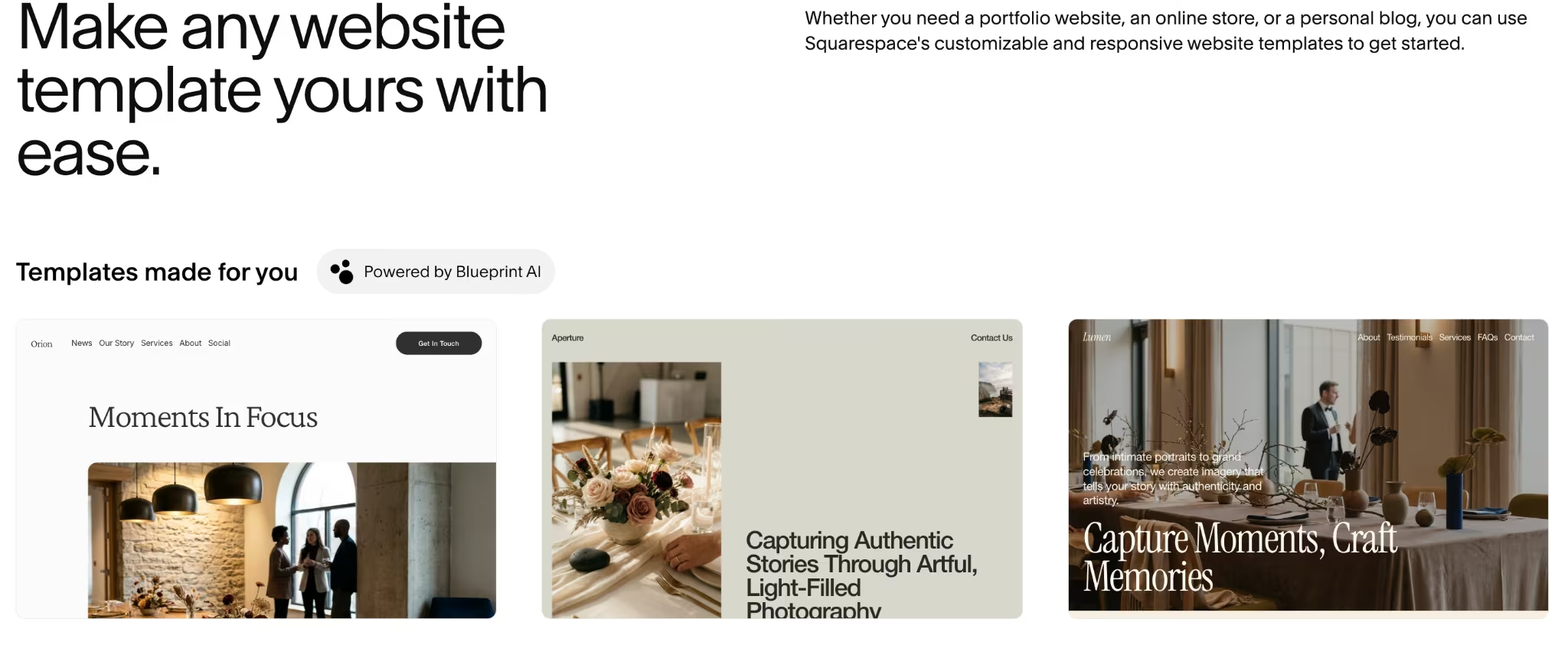
Pixieset and Canva both use straightforward drag-and-drop editors. Adobe Portfolio is the simplest of all, mostly because there's less to adjust.
Before you upload anything, resize your images to roughly 1,600 to 2,000 pixels wide and keep each file between 200KB and 500KB. Squarespace warns that anything under 1,500 pixels can look blurry on its layouts, so stay above that line if it's your platform.
I tested full-resolution files against resized ones on the same gallery page. The oversized originals noticeably slowed the page load in every platform's preview, with no visible quality difference at that screen size.
Curious how other AI-powered builders stack up? Best AI website builders has the rundown.
Step 4: Build Your Essential Pages
These pages carry most of the weight beyond your galleries.
About: Write it in first person with a real photo of your face, per the brief above. Keep it to two or three short paragraphs: who you shoot, your approach, and a line about what working with you is like.
Contact: Match the form fields, email, and general location from the brief above. Keep the form itself to three fields at most, name, email, and shoot type, so it doesn't feel like a wall before they've even booked.
Pricing or Services: Follow the starting-price guidance from the brief above. List two or three packages if you have them, or a single starting price if you don't, so a visitor can self-select before reaching out.
Testimonials: The brief above didn't call for this one, but it's worth adding if you have client feedback. Two or three short quotes, with a name and the type of shoot, do more to build trust than another paragraph about your process.
Keep your main menu short, just Portfolio, About, Services or Pricing, and Contact. If you add a Testimonials page, fold it into About rather than giving it its own menu slot, or the menu starts to feel cluttered.
Best personal website builders is the better read if you're leaning toward something simpler than a full business site.
Step 5: Set Up Client Galleries and Print Sales, if You Take Client Work
The four platforms pull apart the most at this step. Squarespace's Passwords feature puts one shared password in front of a page, fine for a single shoot but clumsy once you have several clients who shouldn't see each other's photos.
Its separate Member Sites feature can give each client their own login instead, though that's built for memberships, not photo proofing specifically.
Pixieset's Website plan includes page password protection from the Plus tier up, but it doesn't include per-client proofing at all. That lives in Client Gallery, a separate product on a separate bill.
Adobe Portfolio and Canva both offer password protection, but neither is per-client. Portfolio can lock your whole site or selected pages behind a password, and Canva can lock the entire site.
In both cases, every client you share a link with uses the same password, the same limitation Squarespace has.
If you have more than a couple of clients at a time, plan for this gap early. Some photographers solve it by paying for a second, dedicated proofing tool alongside their website. Others need a client system built to the exact way they work, which is where a template stops being enough.
The same goes for booking. Squarespace and Wix both offer native scheduling add-ons (Squarespace Scheduling, Wix Bookings), while dedicated business-management tools like HoneyBook and Dubsado work across any platform if you want client intake, contracts, and payments handled in one place.
Step 6: Optimize for Search
Alt text works differently depending on your platform. Squarespace and Pixieset both give you a manual alt-text field per image, and Pixieset can auto-generate it with AI on its paid tiers. Adobe Portfolio has a per-image alt-text field too, but it doesn't extend to cover images.
Canva's alt-text option lives behind a right-click on each image rather than a visible settings panel, so it's easy to miss. Name what's in the shot ('bride and groom on the courthouse steps, downtown Austin'), not the camera that took it, and rename your files before upload so the ones you miss still say something.
Write a short, specific meta description for your homepage and each gallery. Your page titles and About page copy should carry the words a potential client would search, like your city plus "wedding photographer.”
Claim and fill out a free Google Business Profile too. It's a bigger lever for local search than anything on your own site, since it's what shows up in Google's map pack when someone searches "wedding photographer" plus their city.
A blog helps too, if you'll keep it up. Even a few posts a year about recent shoots feed search engines fresh content to index and show past clients your latest work.
Step 7: Publish and Grow Your Audience
Before you publish, test the entire site on your phone. Every platform's mobile preview rendered reasonably well by default. Still, a gallery that looks great on a laptop can crop awkwardly on a smaller screen. That's worth catching before a client sees it.
Once your site is live, add the link to your Instagram bio, your email signature, and your business cards. Keep updating your galleries as your best work changes. A portfolio you build once and never touch again stops representing what you can do a year or two later.
Common Mistakes to Avoid
- Photos with no context: A wall of images with zero text shows what you shot but leaves a visitor guessing at how you work and why they should book you. Add a short line of context per gallery.
- Skipping your location: A site that never says where you're based is harder for local clients to find, and it reads as slightly evasive.
- Assuming every platform ships this out of the box: None of the four website-builder plans I tested included a per-client, password-protected gallery by default. Squarespace can get there with Member Sites, where each client creates their own login, but that's a separate feature built for memberships rather than photo proofing.
- Expecting unlimited customization from a minimal platform: Adobe Portfolio trades depth for speed, so decide up front whether you can live inside its font and layout limits. That's a fair exchange, as long as you know it going in.
- Publishing and never touching it again: An outdated portfolio can misrepresent the quality and style of your current work.
- Shipping with dead links or a broken form: Click every link and submit your own contact form before your site goes live. A dead gallery link or a form that silently fails can cost you a booking.
How Emergent Helps Photographers Who Need More Than a Template
All four template platforms hit the same wall in a slightly different place, and it goes further than a missing private gallery. None of them pair one with a working payment flow for print orders.
FORMAT comes closest of the untested options, with client galleries and a print store in one account, but they're separate features rather than one client-facing flow. On the four I built, you'd need a second product for proofing and a third for payments to close the gap.
For a photographer taking paying clients, that gap is the difference between a portfolio and a business tool.
To test a custom version of that client-gallery workflow, I gave Emergent this initial prompt:
"Build a photography business website for a portrait and wedding photographer named Amber Vance. The homepage needs a hero image and three gallery sections that visitors can browse without logging in: Portraits, Weddings, and Editorial, each holding roughly nine images. Add an inquiry form that captures the visitor's name, email, shoot type, preferred date, and a rough budget range. Route each submission to a simple dashboard I can review.
Then add a private client area. Each client should get their own passcode-protected gallery page, visible only to someone with that specific code. There, they can view their proofs. Inside that same client area, add a basic print-order flow. A client picks a photo and a print size, then pays a flat proofing fee through Stripe in test mode before the order is logged.
Keep the public side of the site, the homepage, the three galleries, and the inquiry form, completely separate from the private client area. A regular visitor should never see or stumble into anyone's gallery. This is a test build for evaluating the platform, so there's no need to wire up real payment processing beyond Stripe's test mode."
This brief asks for nine images per gallery (27 total) rather than the 24-image split used on the four template platforms, since it's the expanded version of that same brief.
Results
The initial prompt produced a build in 12 minutes on 17.6 credits, complete with gated client galleries, an inquiry dashboard, and the Stripe test-mode print-order flow.
The passcode gate I initially asked for locked down the entire site when it should have covered only the private client section. A regular visitor would have seen a passcode screen on the homepage. One follow-up prompt scoped it correctly to the client area.
If you run into the same kind of scoping mismatch, Emergent's free, built-in assistant Emmy can now walk you through the fix without spending credits.

This was a working test build. The client galleries ran on stored test data, and the payment step went through Stripe's test mode. All of it came from a plain description, with no code written.
Here's how Emergent’s AI website builder helps with a photography business site like Amber's:
- Per-client gated galleries: Each client gets their own passcode-protected gallery page. Squarespace's Passwords feature, by comparison, locks a page behind one shared password everyone uses.
- A print-order flow with working payment logic: The client selects a print size and pays a flat proofing fee through a Stripe test-mode checkout, with the order logged directly against their gallery. No second tool, no manual invoice.
- An inquiry dashboard: Every submission (name, email, shoot type, preferred date, budget range) lands in one dashboard you can review at a glance.
- One connected test build: The galleries and client gating lived inside Emergent, while Stripe supplied the test-mode payment step.
If your photography business needs per-client gating and a Stripe test-mode print-order flow, and a template keeps falling short of that, Emergent’s photography website builder is the one to reach for on that specific problem.
Emergent's free plan doesn't require a credit card and gives you 10 credits a month to try the platform on something smaller. The build above used 17.6 credits plus a follow-up prompt, so a project at this scope needs the Standard plan at $20/month ($17/month, billed annually), which includes 100 credits. Its pricing page lays out what each tier adds.

Describe what you want and Emergent builds it. A real, production-ready app you can launch the same day.
- One prompt to build
- Zero code required
- Deploy in minutes







