



After testing every Lovable pricing tier, the plan fee turned out to be the least interesting number. What you spend depends on the credit model, and the difference compounds faster than the plan comparison suggests.
Lovable Pricing Plans at a Glance
| Plan | Price | Best For | Key Features |
|---|---|---|---|
| Free | $0/month | Testing the platform | 5 daily credits (up to 30/month), private projects, unlimited collaborators |
| Pro | $25/month | Solo builders and small teams shipping real projects | 100 monthly credits, custom domains, Code mode, credit rollovers, badge removal |
| Business | $50/month | Teams needing compliance and access controls | Everything in Pro plus SSO (single sign-on), data training opt-out, design templates, and per-user credit limits |
| Enterprise | Custom | Large orgs with governance requirements | SCIM, audit logs, custom connectors, dedicated support, volume-based credit pricing |
How Lovable Credits Work
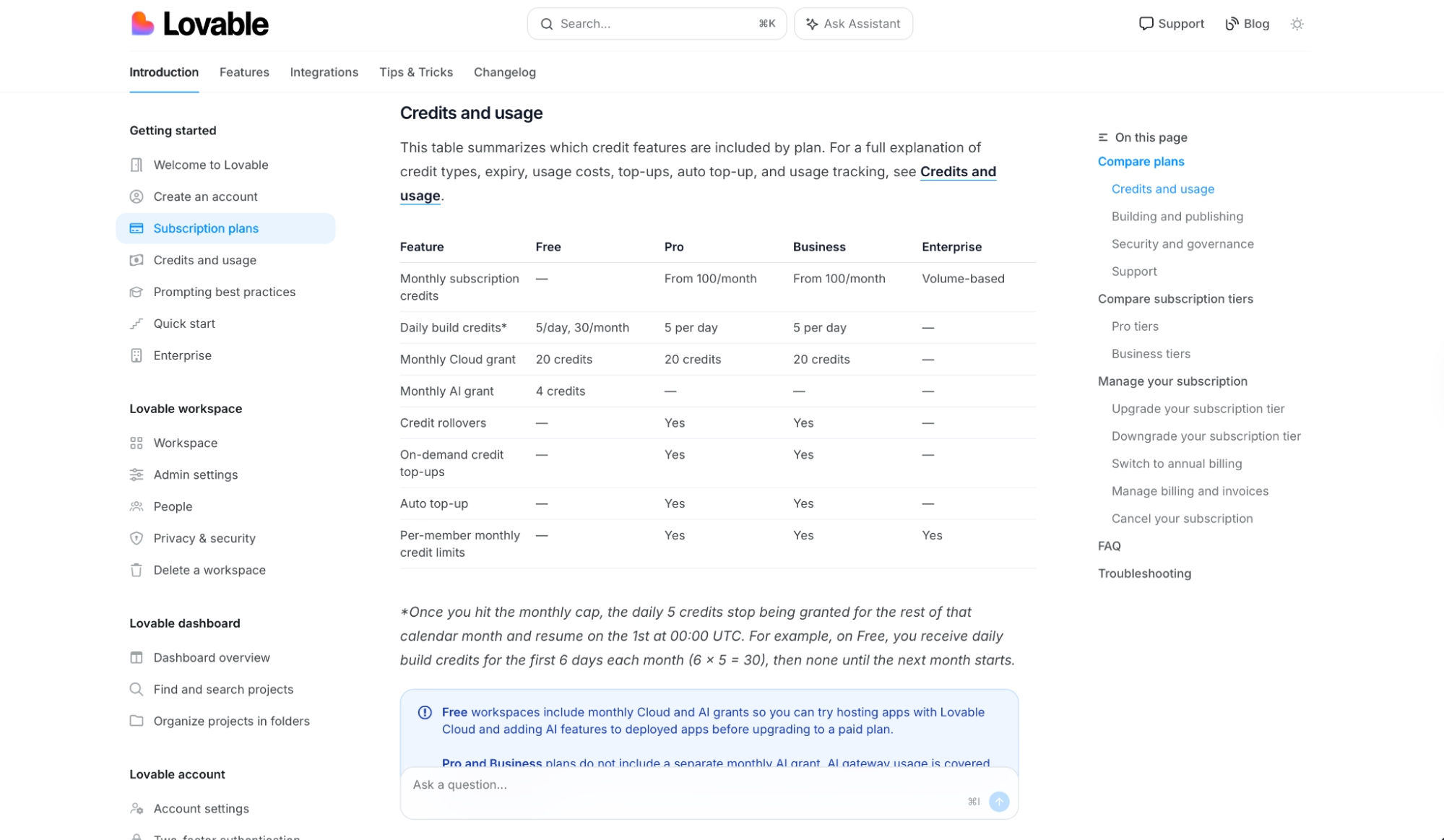
Source: Subscription Plans
That number on the pricing page is your plan cost. What you end up spending depends on how fast you burn through credits, and that comes down to what you develop and how you write your prompts.
Every message you send deducts credits based on complexity. According to Lovable's official documentation, illustrative examples include a styling tweak at 0.50 credits, a component removal at 0.90 credits, authentication logic at 1.20 credits, and a full landing page with generated images at 2.00 credits.
On top of the per-message cost, every plan gets 5 daily credits that reset at midnight UTC. They don't roll over. Anything unused disappears at the end of the day.
Unused monthly credits roll over while your subscription is active. On monthly plans, they expire two months after they're issued; on annual plans, monthly-issued credits expire a month after your annual term ends.
Hosting and in-app AI features draw from the same credit balance as everything else. Lovable folded what used to be separate Cloud and AI pools into one. A small free monthly allowance is included; past that, usage comes out of your regular credits.
Credits adding up faster than your app is improving? Our best Lovable alternatives breakdown covers what else is worth trying before you commit.
Lovable Pricing Plans Breakdown
The plan determines your credit ceiling, and what you actually spend moves with how you build.
Free: $0/Month
Thirty credits a month sounds reasonable until you actually start building. Two or three substantive exchanges in one session can clear the daily 5 credits, and there's no way to buy more or carry unused credits over to the next day.
That said, the free plan includes more than the credit count suggests. Workspace-private projects, unlimited collaborators, and Lovable.app subdomains are all there from day one.
In my testing, active iteration on a project hit 30 credits well before the end of the first week. That's fast enough to catch people off guard when they're trying to scope a project on zero spend.
Best for: Evaluating Lovable before committing to a paid plan, or scoping a single small project that fits within 30 credits a month.
Pros
- Private projects are included at no cost: Every project on the free plan is private to your workspace by default, which means you can create and share work without it being public-facing from day one.
- Unlimited collaborators at no cost: Anyone you invite to a free project shares the same credit pool, so adding people does not cost more.
Cons
- Thirty credits per month is a tight ceiling for iterative work: A landing page costs 2 credits, and each revision round adds more. Any active project will outgrow it quickly.
- No top-up option on the free plan: Unlike paid plans, you can't buy extra credits when you run out. The only path to more capacity is upgrading to Pro.
Pro: $25/Month
The Pro plan starts at 100 monthly credits plus the 5 daily credits every plan gets, which works out to about 250 credits a month once you add the daily grant. If that's not enough, you can scale your monthly credit allocation up within Pro, without switching to Business.
Code mode is the Pro feature you'll reach for most. It opens direct editing of your project's underlying code inside Lovable, so a targeted fix goes straight to the source and skips a full regeneration.
The rest of the Pro surface is cleaner branding. Custom domains, badge removal, and user roles mean anything you ship goes out under your own domain with no lovable.app subdomain in the URL.
On the billing side, Pro includes credit rollovers, so unused monthly credits carry into the next cycle instead of expiring.
If a large product pushes past your allocation, on-demand top-ups run $15 per 50 credits. Current pricing and limits are in the Credits and Usage documentation.
Best for: Solo builders and small teams shipping active projects, freelancers working for clients, and anyone who needs Code mode for tighter iteration loops.
Pros
- Credit rollovers mean a quiet month saves capacity for a busy one: Credits left over carry into the next cycle. On annual plans, they stay available for the entire term.
- Code mode changes how you handle edge cases: You open the code directly and make the targeted fix yourself. In my testing, that saved credits on the kind of small, precise adjustments that often take multiple prompt iterations to land.
Cons
- No SSO or data training opt-out on Pro: Teams with data governance requirements need Business, which doubles the base price for the same 100 monthly credits.
- Top-up pricing gets expensive at scale: At $15 per 50 credits, adding 200 extra credits runs $60 on top of your subscription. By comparison, the 200-credit Pro tier is $50/month total, so the math favors moving up a tier if overages are recurring.
Business: $50/Month
You pay twice the Pro price for the same 100 base credits on Business. SSO and data training opt-out are the two features that push teams toward Business. Design templates, restricted projects, and per-user credit limits come with it, too.
Per-user credit limits are what team leads notice first on Business. On Pro, credits are shared with no guardrails. On Business, admins can cap how many credits any individual member spends in a billing period, which gives finance and ops teams visibility they don't have on Pro.
Design templates are in the same Business-only tier. For teams that need visual consistency across client projects, that gap shows up on Pro before anything else does.
Best for: Teams where SSO is a hard requirement, organizations that need to keep shipping data off Lovable's training models, and workspace admins managing spending across multiple active builders.
Pros
- Per-user credit limits give admins direct control over workspace spend: Business lets you set individual monthly ceilings per member, so credit consumption stays visible and manageable across the whole team.
- Data training opt-out is only available on Business and above: If your projects involve sensitive logic or client information, this is the minimum plan that keeps it off Lovable's models.
Cons
- The base credit count doesn't change from Pro: You get the same 100 monthly credits for twice the price. Every dollar of the Business premium goes toward access controls and compliance.
- Design templates are only available on Business: So teams that only need them end up paying for SSO and data controls they may never use.
Enterprise: Custom Pricing
At Enterprise, credits shift to volume-based billing, support moves from the community forum to a dedicated channel, and you get SCIM (System for Cross-domain Identity Management) provisioning, audit logs, publishing controls, sharing controls, and custom connectors. The price reflects it.
The price for all of that is negotiated per company size, covering all employees under one contract. There's no published number, so you'll need to contact Lovable's team to find out what it costs before you commit.
Beyond the governance features, Enterprise is the only tier that includes dedicated onboarding services and design systems, which matters when a large team can't move everyone onto a new platform.
Best for: Large organizations with governance requirements that Business doesn't cover, and companies that need SCIM for automated user provisioning. Also, the right call for teams that require contractual support arrangements.
Pros
- SCIM provisioning automates user management at scale: SCIM syncs your identity provider directly with Lovable. For teams with frequent roster changes or strict access governance requirements, this eliminates a recurring manual step.
- Audit logs create a verifiable record of who made changes and when: That trail only exists at Enterprise. Regulated teams or those handling user data won't find it at any lower plan.
Cons
- No published pricing means the process starts with a sales conversation: If you need to know the number before committing, you'll have to contact Lovable's team to get it.
- There's no intermediate tier between Business and Enterprise: If you need one or two Enterprise features without the full contract, there's no cheaper path to access them. The jump goes
Which Lovable Plan Should You Choose?
Choose Free if you:
- Are evaluating Lovable against other AI apps before spending anything
- Have one small project you can finish on the free monthly allowance
- Want to test how Lovable handles a specific use case before committing to Pro
Choose Pro if you:
- Are working actively and need more than 30 credits a month to stay moving
- Want Code mode for precise fixes that don't ripple through the whole app
- Need custom domains and badge removal to ship a finished product under your own domain
Choose Business if you:
- Need SSO or to opt out of data training
- Are managing a team and need per-user credit limits to control spend
- Need design-template consistency across multiple projects
Choose Enterprise if you:
- Need SCIM provisioning, audit logs, or custom connectors that Business doesn't include
- Need a contractual support arrangement for your legal or compliance team
- Are deploying Lovable across an entire organization and need volume-based credit pricing
Is Lovable Worth the Cost?
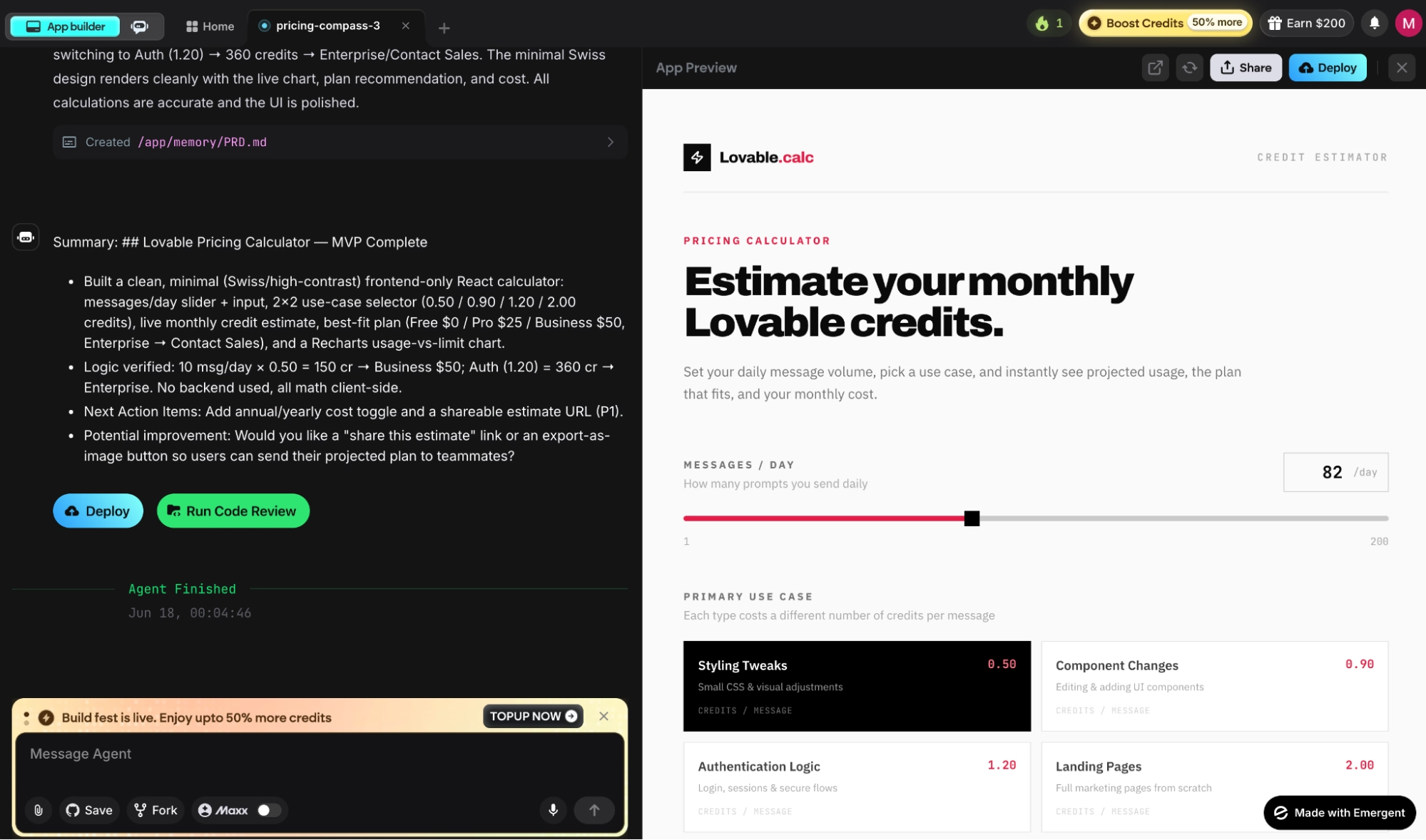
Source: Built with Emergent
Yes, but how much you spend above the subscription fee depends almost entirely on how you prompt. I tested it: a landing page from a detailed brief ran 2.1 credits, and the same layout built through six back-and-forths ran 7.8, nearly four times the cost for the same output.
At $25 a month, your plan cost is locked. The variable is credit consumption, and that tracks how you work. In my testing, batching context and using Code mode for small fixes kept monthly usage well below the 100-credit ceiling. Loose iteration on a single feature across a week pushed close to that limit.
So when does it make sense? Lovable is worth it if you:
- Launch visual apps, landing pages, or client prototypes where output quality justifies the credit cost
- Can get close to the output you want in one or two passes, and don't need heavy iteration to land it
- Need to build, sign in, and go live in one place rather than piecing it together from separate services
It's a harder sell if you:
- Are running high-frequency, low-complexity iterations where credit outpaces what you ship
- Want token-level cost control from a terminal-based tool (CLI tools like Claude Code are built for that)
Lovable Alternatives and Pricing Comparison
| Tool | Starting Price | Best For | Key Advantage |
|---|---|---|---|
| Emergent | $20/month | Complete web and mobile apps | Multi-agent architecture; ships with hosting, sign-in, payments, and deployment bundled |
| Bolt | $25/month | Fast prototyping and web projects | Token-based model; 10M tokens/month on Pro with no daily limit |
| Cursor | $20/month | Developers wanting AI assistance inside their own IDE | Full code editor environment; strongest fit for engineers who already know how to code |
| Base44 | $20/month | Internal tools and operations apps | Strong for data-heavy operational workflows |
Lovable vs. Emergent: Which Should You Choose?
Both platforms take a description and return a working app. Lovable is faster on design and interface output. Emergent goes further on app logic, data, and mobile deployment to the App Store and Google Play, and apps that need to take real users and payments.
On price, Lovable Pro runs $25/month for 100 credits. Emergent's Standard plan runs $20/month for 100 credits. What those credits buy differs. Lovable's credits go toward design and interface generation. Emergent's go toward a coordinated agent system covering interface, data, sign-in, payments, and deployment in one session.
Lovable is the stronger choice if you:
- Need polished design output fast for a prototype or client demo
- Are shipping a landing page, simple web app, or design-first product
- Want SSO and data governance controls at the Business tier
Emergent is the stronger choice if you:
- Need a complete app with sign-in, a database, payments, and hosting in one place
- Want to ship to iOS and Android as well as web, without managing separate frameworks
- Are past the prototype stage and need an app that can take real users and payments
Use both if you want to validate a concept in Lovable first, then move to Emergent once the scope outgrows a design-first tool.
Want to see how the full field compares beyond just these two? Our roundup of the best vibe coding tools covers every major option we tested in 2026.
Where Lovable Stops and Emergent Starts
If you've decided Emergent fits your use case, here's what that looks like in practice. You describe the app, and a coordinated system of specialized agents handles the rest.
Some shape the interface, others handle the logic, data, and integrations, and testing agents check the work before anything ships, with more joining the build as the product needs them. Deployment runs in the same conversation, so nothing loses context as the project grows.
Out of the box, that means a working app with sign-in via Emergent Auth (no Google Cloud project needed), a database (MongoDB by default, Supabase optional), payments via Stripe and Razorpay, hosting, and a custom domain you can connect to or buy through Emergent.
Beyond the core app, you also get:
- Web and mobile from one workspace. Apps publish to the App Store and Google Play via React Native and Expo.
- Traffic monitoring, health checks, zero-downtime updates, and rollback, all from the same session that shipped the app.
- Frontier models inside your own app via Universal LLM Key. Plug in Claude, GPT, or Gemini using Emergent credits; no separate API accounts needed.
- Code you own. Everything syncs to GitHub from the Standard plan up, with VS Code access and ISO 27001 and SOC 2 Type I certification on the security side.
Emergent doesn't cover video games, heavy PDF-reporting workflows, or apps targeting Apple Watch or iPad, where Swift deployment isn't supported yet. If your use case doesn't hit any of those, start creating on Emergent.
My Bottom Line on Lovable Pricing
Your plan tier sets the floor. Past that, prompting discipline is the single biggest factor in what you spend, and that's the part the plan comparison doesn't show. Based on my testing, the difference between disciplined prompting and loose iteration on the same project can be 3-4x in credit cost. The plan tier counts for less than that gap.
With that in mind, Pro at $25/month fits solo builders who prompt carefully and ship focused builds.
Business earns its premium for teams that truly need SSO or data controls. And if you're hitting the credit ceiling consistently, upgrading the credit tier within your plan is a better value than buying top-ups at $15 per 50 credits.
Want to see how Lovable stacks up against the full field on value? Our roundup of the best AI web app builders covers every major option worth trying in 2026.

Most AI app builders stop at prototypes. Emergent creates production-ready apps you can actually launch.
- Production-ready apps
- Web & mobile apps
- Deploy in minutes







