



I wired both Stripe and Square into the same pottery-studio booking site and pushed real online, in-person, and recurring payments through each. Here's where each one excels, and where it gave me problems.
Stripe vs Square: What's the Difference?
Stripe is a payment infrastructure for people building software. Square is an all-in-one payment and point-of-sale system for people running a business.
The cleanest way I can put it is that Square is the cash register you buy off the shelf, and Stripe is the parts bin you build your own register from. One works the moment you open the box. The other hands you more control, if you're willing to wire it up yourself.
Choose Square if: You run a shop, studio, or service business and want payments, POS, invoices, and reporting in one place without touching code.
Choose Stripe if: You're building an app, marketplace, or subscription product and need payments embedded inside software you control.
How Stripe and Square differ at a glance:
| Feature | Stripe | Square |
|---|---|---|
| Best for | Apps, SaaS, marketplaces, custom and global checkout | Local, retail, and service businesses; POS plus online |
| Pricing (headline) | 2.9% + 30¢ online card | 2.6% + 15¢ in person, 3.3% + 30¢ online on the Free plan |
| Key strength | Developer flexibility and platform tooling | Setup speed and all-in-one operations |
| Main weakness | Risk reviews and fund holds rattle trust | Less flexible for complex app and subscription logic |
| Ideal user | Developers and product teams | Owners and operators |
Meet Square: The Operator's All-in-One
Square is built for the person at the counter more than the person writing code. You get card payments in person and online, a POS app, invoices, and appointments. The same login also covers an online store builder, payroll, and basic banking.
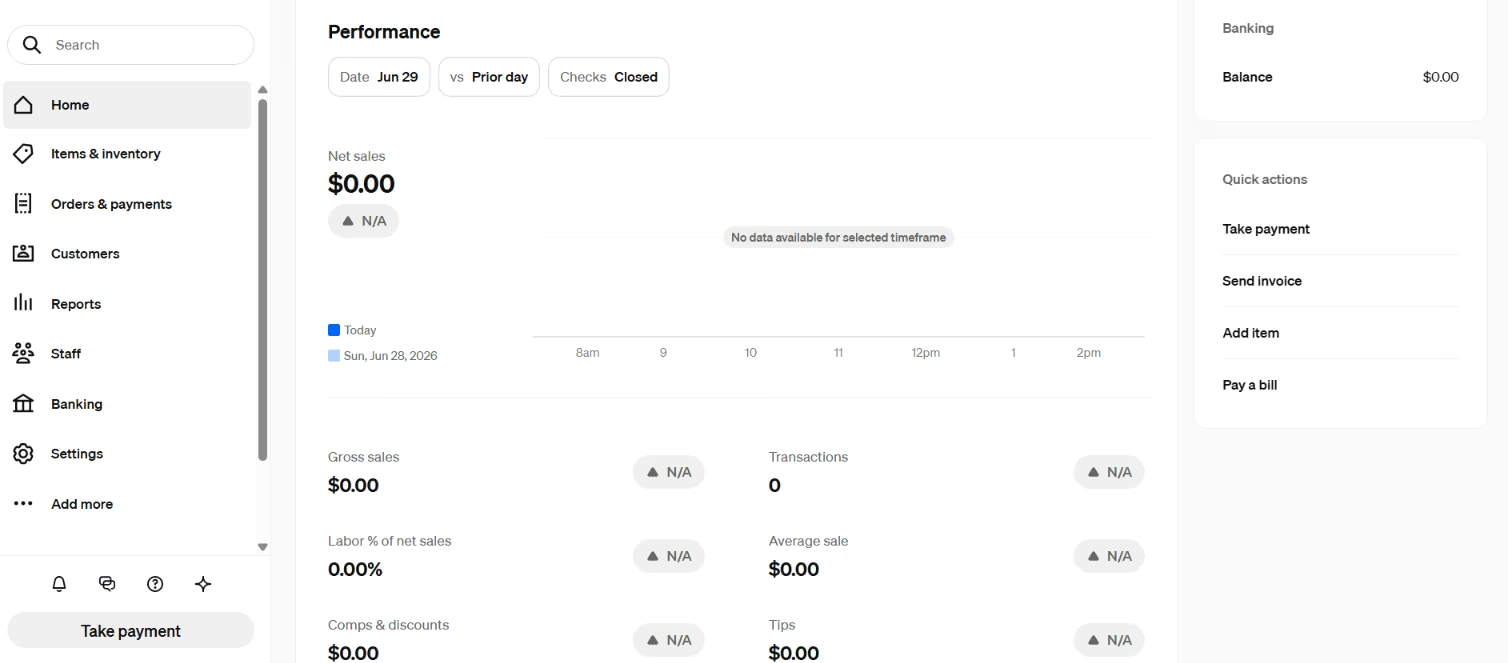
For the pottery studio, Square was the fast path. Walk-in payments, a class checkout, and monthly invoices were live in an afternoon, and I never once opened a code editor.
Square builds the whole system around one question: what are you selling, and how do you want to get paid for it?
The trade is that Square decides a lot on your behalf. Square controls the checkout look, and its flows assume your business runs its way.
The moment the studio wanted something slightly off the path, like a booking rule tied to a specific payment, I could feel the edges of the template. For a lot of businesses, that ceiling sits high enough that you never bump your head on it. For a software product, you hit it on day one.
Also read our guide on how to create a small business website for what to set up beyond the payment layer.
Meet Stripe: The Builder's Payment Infrastructure
Stripe starts from the opposite end. It's an API-first toolkit covering hosted and embedded checkout, subscriptions, dynamic payment methods, and Stripe Connect for platforms and marketplaces that need to pay out to other people.
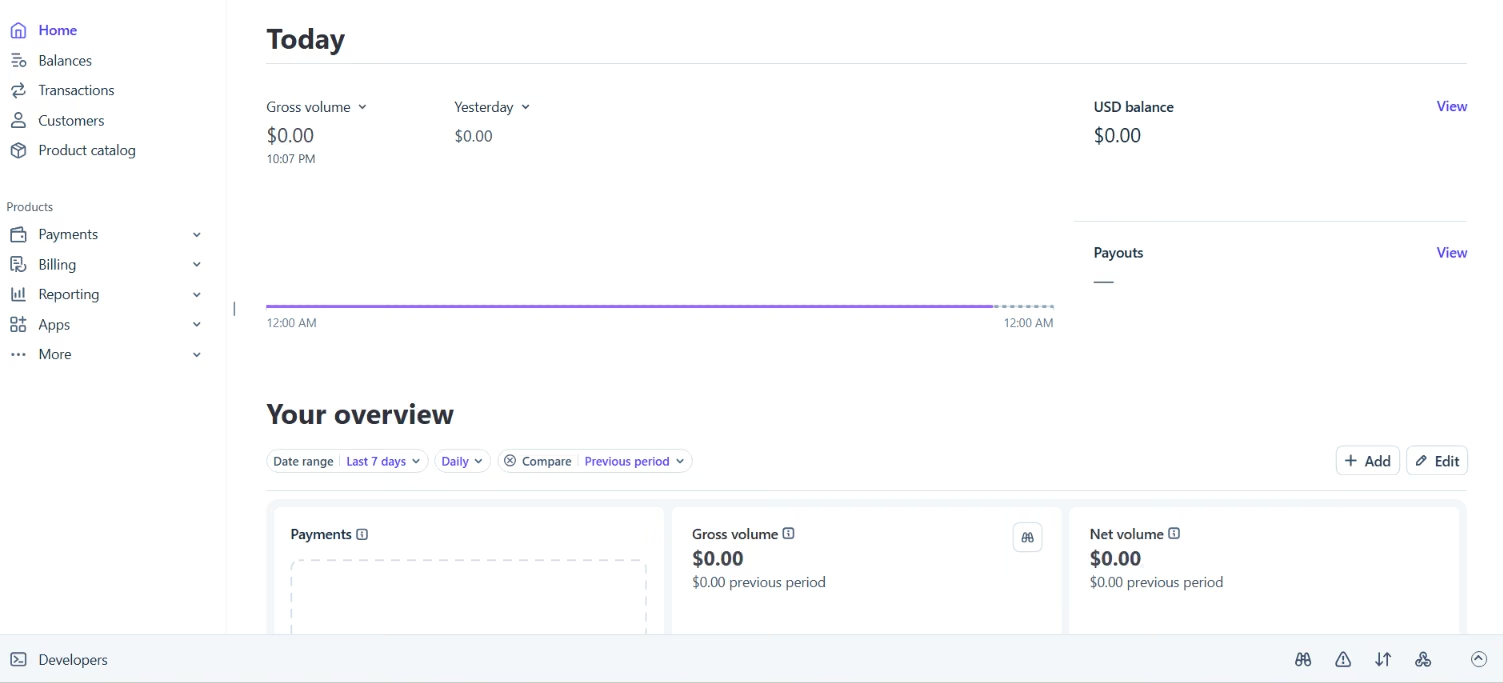
Wiring Stripe into the booking site took longer, and that's the honest price of the flexibility. No front-desk app sat waiting for me.
I decided how checkout looked, where the payment logic lived, and how a regular's subscription is renewed. Once it was in, though, the payments bent to the app instead of the app bending to the payments.
If a tool has ever stopped you from doing the obvious thing, Stripe is built to remove that wall.
The catch sits right there in the word "wired." Stripe assumes a developer is in the room. For a studio owner who just wants to take class payments, that assumption is the entire problem, and it's the whole point of this comparison. The better tool is the one built for the person using it.
Stripe vs Square: Feature-by-Feature
I scored the build in pieces, from the fees you'll pay to the risk you might not see coming.
Fees and the Real Cost
Fees are the first thing most people check, so here are the specifics. For everyday online card payments, the two are close enough to be a coin flip. The real gaps open up in person, on bank transfers, and in the add-ons nobody quotes you up front.
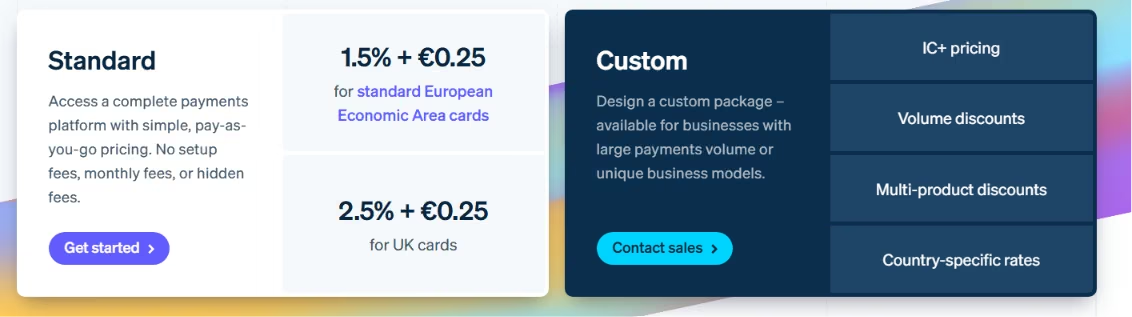
- Online cards. Stripe charges 2.9% + 30¢ per successful domestic card charge. Square's online API rate matches at 2.9% + 30¢, but its Free-plan online and invoice rate sits higher at 3.3% + 30¢. You only drop to 2.9% online with Square by paying for the Plus plan at $49 a month.
- In person. Square's 2.6% + 15¢ on the Free plan is its home turf, with the hardware and POS built around it. Stripe Terminal is 2.7% + 5¢, so Stripe's lower flat fee wins on small tickets while Square's lower percentage wins above about $100 a sale.
- Bank transfers (ACH). Stripe's ACH is 0.8%, capped at $5. Square's ACH has a $1 minimum, a $5 cap through its API, or a $10 cap on invoice payments. On a big invoice, Stripe's lower rate adds up.
- Disputes. Stripe charges $15 per dispute, returned only if you win. Square charges nothing for chargebacks, which is a quiet but real edge if your category sees disputes.
- International cards. Stripe adds 1.5% for cards issued outside the US, plus another 1% if it has to convert currency. That can push a single international sale past 5.4%. Square adds a flat 1.5% on cards issued outside the US, with no separate currency-conversion line.
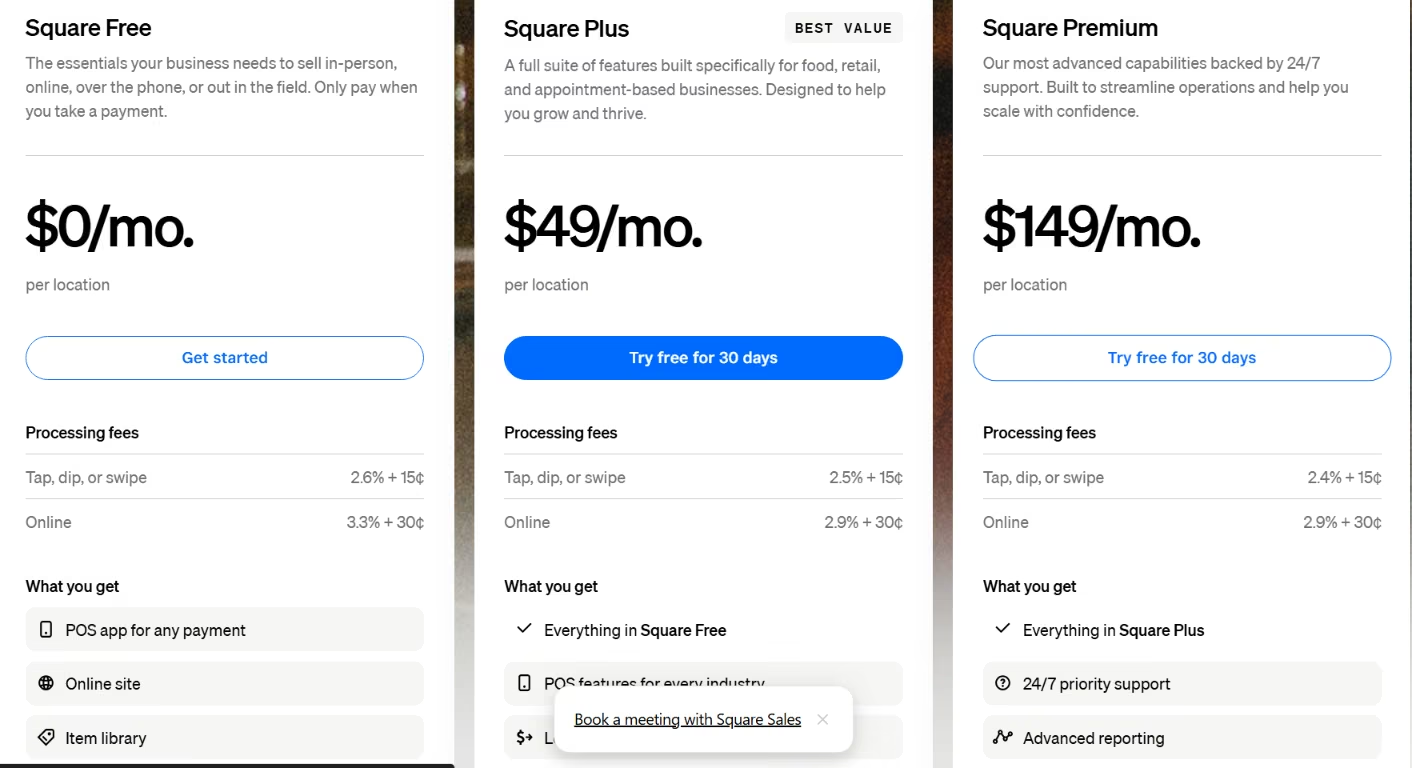
The online card math lands like this at a few common ticket sizes:
| Transaction | Stripe / Square API online (2.9% + 30¢) | Square Free online (3.3% + 30¢) |
|---|---|---|
| $25 | $1.03 | $1.13 |
| $100 | $3.20 | $3.60 |
| $1,000 | $29.30 | $33.30 |
So far, the API rate is even. The catch is the stack of added fees. For a builder, the real cost can pile on recurring-billing add-ons (Stripe Billing adds 0.7%), platform fees, instant-payout fees, dispute fees, and currency conversion.
A $175 monthly invoice that looks like a 1% charge can quietly climb past 1.8% once you layer on recurring and platform fees. Read the line items before you trust the headline rate.
Pro Tip
Don't compare the two on a single transaction. Add up one realistic month, including your actual blend of in-person swipes, online checkouts, and invoices. Then run that total through each platform.
A mostly in-person business usually lands cheaper on Square's flat rate. A mostly recurring or subscription business usually lands cheaper on Stripe's lower ACH and tighter billing. The headline rate fools people because almost nobody's real business is one clean $100 card charge.
Online Checkout and Payment API
On the surface, both take a card online. The difference surfaces the second you want something custom.
With Stripe, I dropped checkout straight into the booking flow, added a saved-card option for regulars, and switched on extra payment methods without fighting the tool once.
Square takes online payments, too, but it wants you inside its own world, where the checkout, the store builder, and the rules all belong to Square. For a developer, Stripe feels like an API that trusts you to drive.
Winner: Stripe, because it lets the checkout bend to your app instead of forcing your app into Square's template.
Also read our guide on the best AI eCommerce website builders to find the right platform for your checkout setup in 2026.
In-Person POS and Hardware
The POS comparison isn't close, and it shows the second a human stands at the register.
I tapped a Square reader, the sale landed in the same dashboard as the online bookings, and inventory and reporting updated without a second system to reconcile.
Stripe sells in-person hardware, too, but you assemble the experience instead of unboxing it. If real people are going to ring up real customers, Square respects their time more.
Winner: Square, because the reader, dashboard, and inventory work out of the box with nothing to assemble.
Invoicing and Recurring Billing
For the studio's monthly invoices to regulars, Square was the calmer choice. I set one up in a few clicks, and the owner could run it herself after I walked out the door.
Stripe's billing is far more capable, with usage-based pricing, trials, proration, and dunning for failed charges. None of that power comes free, and you configure it like a developer.
So the honest answer splits down the middle. Square wins when invoicing is a chore that a busy owner wants gone. Stripe wins when billing is the actual product.
Winner: Square for simple invoicing because an owner can run it alone. Stripe wins when billing is the product because it handles trials, proration, and dunning.
Marketplaces and Platform Payouts
The studio doesn't need marketplace payouts yet, but this feature quietly decides your future.
The moment you collect money and pay it back out to other people (instructors, vendors, sellers, whoever), you're running a marketplace. Stripe Connect is built for exactly that split.
Square isn't aimed here at all. If there's any chance your app grows into a platform, this single line should outweigh a fraction of a percent on fees.
Winner: Stripe, because Connect is purpose-built to split payments out to instructors, vendors, and sellers, and Square isn't aimed here at all.
Dashboard and Day-to-Day Operations
Day to day, Square is the screen a business owner likes opening. Payments, sales reports, inventory, and customers sit together, so the studio could answer "How did we do this month?" without exporting a thing.
Stripe's dashboard is good, but it serves the person watching the payment system more than the person running the shop floor. Match the dashboard to who's logging in.
Winner: Square, because payments, sales, inventory, and customers sit in one view the owner actually likes opening.
Payout Holds and Account Freezes
Fees and features are the easy part. After launch, payout holds, sudden account reviews, and closures triggered by automated risk systems can hurt businesses. Both platforms do this, and neither warns you well.
Stripe's checkout quality was never my worry. The pain came after launch, when Stripe could hold funds, restrict accounts, and leave support feeling like a black box right when you need a human on the line.
Square isn't immune either, and its risk algorithms hold legitimate funds too.
To be fair, not every freeze is unreasonable. Some get triggered by genuinely risky patterns, like routing investment money or large one-off payments through a brand-new account.
The problem is less that reviews exist and more that they can lock up cash flow with little explanation. If you need funds to hit payroll on Friday, a surprise hold becomes a real-world emergency rather than a footnote.
Pro Tip
You can lower the odds before anything ships. Describe your business accurately at signup, since vague or mismatched descriptions are what trigger the first review. Don't let your account's first charge be a giant one-off.
Keep a few weeks of operating cash outside the processor so a hold can't strand payroll. And answer verification requests the day they arrive. None of this makes you untouchable. It keeps you off the easy-to-flag list, which is most of the battle.
What Real Users Are Saying
I went past my own build and pulled feedback from three places: G2, Trustpilot, and public Reddit threads.
Stripe
Pros
The praise for Stripe is almost always about the build. One reviewer described it as "One of its biggest strengths is how seamlessly it integrates with the rest of our tech stack," and that's the throughline.
Another reviewer said, “Stripe Payments is very convenient and easy to use, with a secure and reliable payment process.”
Cons
The dread is about the day something flags. One user whose account closed said Stripe support "keeps sending circular replies" while their customer refunds sat stuck for over a month. When something breaks, you're left dealing with the same hands-off design that made Stripe pleasant when it worked.
Another reviewer said, “Abrupt account holds or terminations often occur due to strict risk algorithms.”
The horror stories aren't all clean, though. When one founder posted that Stripe froze a six-figure pre-seed payment, other users pushed back that routing investment money through Stripe invoices was a compliance red flag waiting to happen.
So some freezes are the system catching genuinely risky behavior. Use Stripe for the flows it's built for, and keep a cash buffer outside it.
Square
Pros
Square's praise is rarely loud, and that's exactly the point. A web agency owner running recurring invoicing for around 200 clients wrote, "No problems at all. I recommend it to my clients."
Read past how short that is. There are 200 clients on recurring billing, and the highest compliment is that nothing went wrong. For an operator, boring is the best thing a payment system can be.
A reviewer captured the same feeling, describing that “everything is in one system—payments, tracking, and sales reports."
Cons
The complaints are split into two buckets. The first is cost. One reviewer said Square's cut was "the highest of all the processor[s] that we use."
The second is the limit I ran into the moment the logic got interesting. A developer on Reddit noted that complex subscription and provisioning flows need "major glue code" in Square. That phrase, "glue code," is the whole warning.
And Square isn't immune to the freeze problem either. One review was titled "Legitimate Business Payment Held Without Justification," a reminder that automated risk models live on both platforms.
How to Make Your Choice
The decision comes down to what you're building and how you make money.
Before You Choose, Ask These Risk Questions
Run your business through these questions before you pick. The answers matter more than a 0.4% fee difference.
| Question | Why it matters |
|---|---|
| Is the business category high-risk or ambiguous? | Dating, events, coaching, supplements, and finance-adjacent flows can trigger reviews on either platform. |
| Will the app process large one-off payments? | Sudden high-ticket charges look risky on a new account and invite holds. |
| Do you need funds immediately for payroll or suppliers? | Holds create serious cash-flow pain, so build a buffer. |
| Is the owner or entity structure unusual? | Non-resident LLCs and unusual ownership add verification friction. |
| Does the app need marketplace payouts? | Stripe Connect is the stronger default for splitting payments. |
| Do you need POS, bookings, invoices, and reporting together? | Square is usually the cleaner fit for that bundle. |
Stripe Is Better For:
- Developers and product teams embedding payments in software.
- SaaS, subscriptions, and custom checkout flows.
- Marketplaces and platforms that pay out to others through Connect.
- Global businesses that need many payment methods and currencies.
Square Is Better For:
- Retail shops, restaurants, studios, and appointment-based businesses.
- Operators who want POS, invoices, and reporting in one dashboard.
- Non-technical owners who'd rather not touch an API.
- Businesses where in-person and online sales need to live together.
When to Look Past Both:
Sometimes the honest answer is neither. Stripe and Square both run automated risk models that assume a "normal" business. If yours sits outside that box, you're fighting the tool from day one. The pattern to watch for is any setup where a single hold would do real damage.
- High-risk or ambiguous categories that keep tripping risk reviews.
- Large one-off payments on a new account.
- Cash flow that can't survive a multi-week hold may fit better with an underwritten merchant account.
If two or more of those describe you, talk to a processor that underwrites accounts up front instead of flagging them after the money lands. You trade a slower signup for far fewer surprise freezes. For a business that lives on its cash flow, that trade is usually worth it.
My Verdict
Stripe is the builder's payment infrastructure, and Square is the operator's payment system. Stripe gives you control and a platform to grow on, but it also exposes you to more risk reviews and a colder support experience when things go sideways. Square gets you running faster and feels friendlier day-to-day, but it strains once your logic gets complex.
Headline fees rarely decide the choice. The real question is which platform will approve, support, and keep supporting your business model once real money starts moving. Once you answer that, the stronger fit is usually clear.
Next Steps: Build the App Your Payments Plug Into
Picking Stripe or Square only settles how the money moves; you still have to build the thing the payments live inside. That's where Emergent comes in: it builds your store, booking site, or subscription dashboard from a plain-English prompt, and it connects to both Stripe and Square, so you can wire in whichever you choose, or run both at once.
You describe the flow, say Square for in-person sales and Stripe for online subscriptions, and Emergent scaffolds the app and handles the parts nobody enjoys: API keys, webhooks, and PCI-compliant payment handling. Pick your processor from everything above, then build the app around it by prompt instead of by hand.
Try Emergent for free if you want to build the app around your payment flow without starting from scratch.


Most AI app builders stop at prototypes. Emergent creates production-ready apps you can actually launch.
- Production-ready apps
- Web & mobile apps
- Deploy in minutes







