

Build a Customer Success CRM Using AI in Minutes
Describe your Customer Success CRM in plain English and create a production-ready build, from design and development to deployment, in minutes. No code needed.










Trusted by Builders Worldwide
Active Builders Worldwide
Apps Successfully Created
Countries Globally Reached



Go from idea to a running customer success CRM, without the heavy lifting
Describe how your customer success work runs and get the screens, automations, integrations, and controls generated around it. Nothing bolted on later.
Account Health Management
Capture and organize accounts, milestones, and success plan records with custom fields, views, and complete history. Describe what your team tracks and the screens are generated to match.
Onboarding-to-Advocacy Pipeline
Track customers from kickoff through value to advocacy stage by stage, exactly the way your team works. Explain the steps and the builder creates the stages and rules.
Success Plan Templates
Give every account a milestone plan generated from its segment and goals. All generated from a plain-language prompt.
CS Follow-Up Automation
Describe when kickoff schedules, QBR reminders, and adoption nudges should go out and the reminders, tasks, and assignments fire on their own.
Customer Success Tool Integrations
Link product data, email, and calendars so records stay current across systems. Tell the builder what talks to what and the connections are configured.
Customer Success Roles & Permissions
Give owners, managers, and front-line staff exactly the access they need. Describe who sees and edits what, and the roles are configured for you.
Built for the way support teams actually work
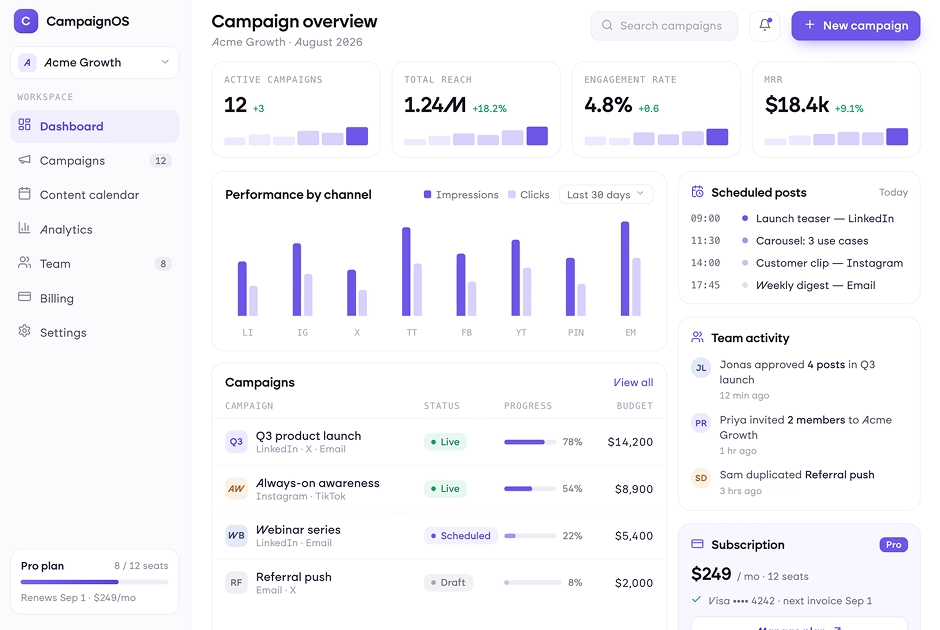
Full context on every conversation
Tickets, history, and account details in one view. A CRM builder for customer success that ends the swivel-chair between tools.
window.awbMockup = { customerRecords: "Build a customer success CRM that keeps customers, tickets, and history in one view.", ticketsCases: "Build a ticket queue that tracks every case by status, priority, and owner.", escalations: "Build an escalation flow that fires SLA alerts before deadlines slip.", supportReporting: "Build a support dashboard that tracks response times and resolution rates." };
Keep every request visible
Track cases by status and priority. When you build a customer success CRM using AI, queues stay clean and nothing gets buried.
window.awbMockup = { customerRecords: "Build a customer success CRM that keeps customers, tickets, and history in one view.", ticketsCases: "Build a ticket queue that tracks every case by status, priority, and owner.", escalations: "Build an escalation flow that fires SLA alerts before deadlines slip.", supportReporting: "Build a support dashboard that tracks response times and resolution rates." };
Catch problems before they grow
Automate SLA alerts and escalation paths inside the CRM you create.
window.awbMockup = { customerRecords: "Build a customer success CRM that keeps customers, tickets, and history in one view.", ticketsCases: "Build a ticket queue that tracks every case by status, priority, and owner.", escalations: "Build an escalation flow that fires SLA alerts before deadlines slip.", supportReporting: "Build a support dashboard that tracks response times and resolution rates." };
Measure what customers feel
Track response times, resolution rates, and satisfaction trends in real time.
window.awbMockup = { customerRecords: "Build a customer success CRM that keeps customers, tickets, and history in one view.", ticketsCases: "Build a ticket queue that tracks every case by status, priority, and owner.", escalations: "Build an escalation flow that fires SLA alerts before deadlines slip.", supportReporting: "Build a support dashboard that tracks response times and resolution rates." };
How to Build a Customer Success CRM With AI in Four Steps
Go from idea to a working CRM without guesswork. Describe your customers, ticket types, queue stages, and escalation rules, and the builder turns it into a full system, so it is working in minutes, not months.
Type out your customers, ticket types, queue stages, and escalation rules in a sentence or two. That prompt is the whole setup.
Seconds later there is a real CRM on screen, with the customers, tickets, escalations, and SLAs you asked for already in place.
Open the first version and start directing. Move stages around, add the fields customer success teams rely on, and hide what you do not use.
Open it up to the team, wire in your tools, and start running the day in it. It scales as your ticket volume does.
More things you can build
with Emergent
AI Website Builder
Build and publish responsive websites with AI from landing pages to complete websites.
AI App Builder
Create and launch mobile apps with AI, without the complexity of traditional app development.
AI Web App Builder
Build and ship fully functional web apps with custom interfaces, logic, and workflows.
AI Dashboard Builder
Create interactive dashboards to visualize data, track KPIs, and manage business operations.
AI SaaS Builder
Build complete SaaS products with user accounts, subscriptions, dashboards, and core product workflows.
AI CRM Builder
Build custom CRMs for managing contacts, leads, pipelines, campaigns, and automated workflows.
AI Agent Builder
Create AI agents that can understand tasks, use tools, automate workflows, and work across your business.
Build Your Own
Start with any idea and build exactly what you need with AI no templates or limits.

Why Choose Emergent for Building Your Customer Success CRM?
Build a customer success CRM around your unique workflows, with the flexibility to customize, scale, and adapt as your business grows.
| Other Tools |  | |
|---|---|---|
| Built for | Demos and MVPs | Products you keep growing |
| What you get | Front-end shell only | Full stack, wired end to end |
| Backend and database | Set it up yourself | Built and connected for you |
| Customization | Surface-level styling | Deep workflow control |
| Integrations and APIs | Manual glue work | Connected from a prompt |
| Code ownership | Locked to the platform | Clean code you can export |
| Time to launch | Weeks of patching and setup | Live the same day |

Pick the Pricing Plan That Works for You
Choose the plan that fits your building ambitions. From weekend projects to enterprise applications, we've got you covered.
No credit card required*


Find the Right CRM for
Your Business
Frequently Asked Questions
Your Questions, Answered
Don't change this element unless you know what you are doing
on Emergent today




