



I built an expense tracker on Base44 and ran out of credits four days in, with the app half-finished. Here's the full Base44 pricing breakdown, plan by plan, and the tier I'd actually pay for.
Base44 Pricing Plans: At a Glance
Base44 lets you build an app by describing it in plain English, and you pay in two parts: a monthly plan, plus credits that drain as you go. Credits work like prepaid phone minutes. The plan gets you in the door, the minutes are what you spend, and they run out faster than you'd guess.
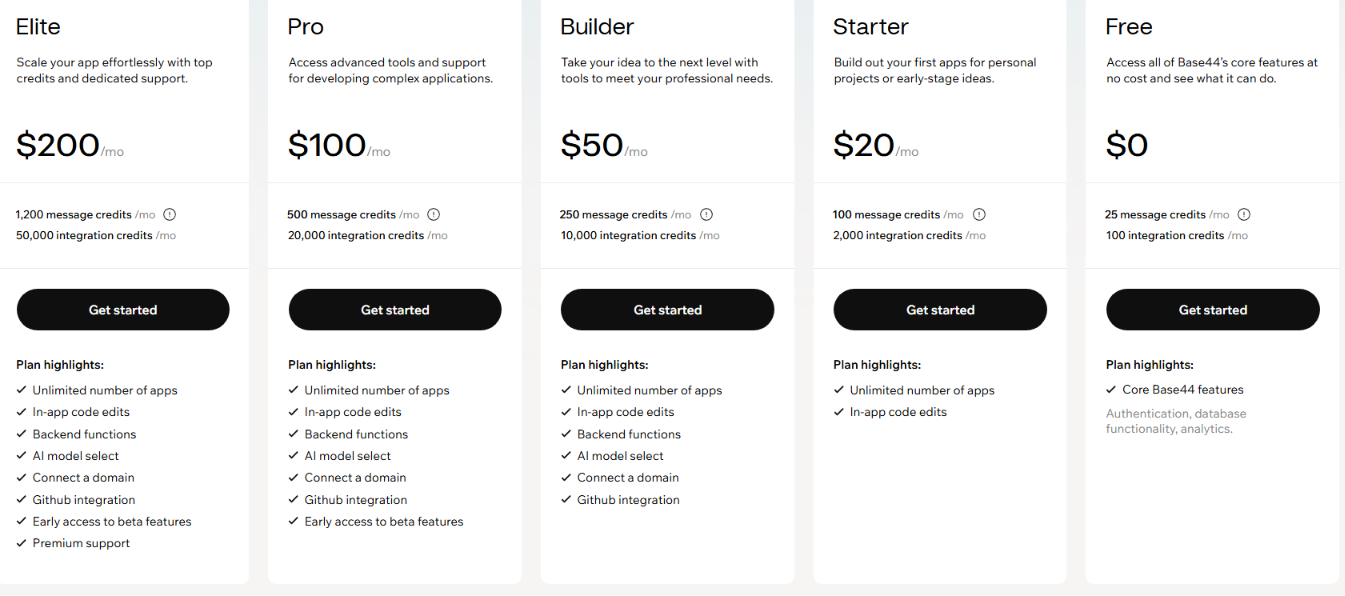
Base44 uses two types of credits. Message credits get used while you build, and the amount depends on how much work the AI has to do. Integration credits are used after your app goes live, when it calls a built-in service, such as sending an email, generating an image, running an LLM, or triggering an automation.
Those are the month-to-month prices. Paying for a full year takes about 20% off, bringing the paid tiers to $16, $40, $80, and $160 a month. Prices were current as of June 2026, so check the live pricing page before you buy.
Base44 Pricing Plans Breakdown
Free: $0/month
You get 25 message credits and 100 integration credits a month, plus user logins, a database, and basic analytics.
Best for: Seeing how it works before you pay.
The wall you'll hit is the 25-message-credit cap, including the five-a-day limit. When I built my expense tracker, I burned through the five daily credits getting the login screen and a working entry form on screen. This tier does not include a custom web address or code editing.
The catch: The free plan is a test drive. Expect to outgrow it in your first serious week.
Starter: $20/month ($16 billed annually)
You get 100 message credits and 2,000 integration credits a month, unlimited apps, and hand-editing of your code.
Best for: A personal tool or a first version of an idea you want to put in front of real people.
The jump from 25 to 100 message credits is the reason to pay. Having four times as many message credits meant I could shape the expense tracker over a week without rationing prompts by the day.
The catch: Starter won't give your app its own web address, backend functions, or a way to export your code, so it tops out before you can ship something that looks finished.
Builder: $50/month ($40 billed annually)
You get 250 message credits and 10,000 integration credits a month, plus a custom domain, backend functions, and GitHub integration. Builder also lets you pick which AI model does the building, a feature you'd expect to be paywalled higher.
A custom domain puts your app at yourname.com instead of a branded Base44 address. Backend functions handle real work like charging a subscription or emailing a user their monthly expense report. GitHub integration lets you copy your code out and keep building elsewhere.
Best for: Solo builders and freelancers shipping something customers will use.
The catch: $40 a month is a real commitment if you only build now and then.
Pro: $100/month ($80 billed annually)
You get 500 message credits and 20,000 integration credits a month, everything in Builder, and early access to new features before they roll out.
Best for: Agencies or builders juggling several live projects, or an app pulling steady traffic.
The catch: Pro mostly buys more credits. Until you're running out on Builder, it's headroom you don't touch.
Elite: $200/month ($160 billed annually)
You get 1,200 message credits and 50,000 integration credits a month, everything in Pro, and premium support. If my expense tracker had a few hundred users logging entries and pulling reports daily, this is the tier whose integration credits could carry that load.
Best for: Teams running a real product with heavy traffic.
The catch: If you are not hitting Pro's ceiling, Elite is more than you'll use.
Which Base44 Plan Should You Choose?
While you're building, choose by message credits. Once people are using your app, choose by integration credits.
Choose Free if you:
- Want to try building an app by describing it, without paying.
- Are making a quick test project, not something for real users.
Choose Starter if you:
- Are building a personal tool or a first version of an idea.
- Want room to keep tweaking, but don't need your own web address yet.
Choose Builder if you:
- Want your app on its own domain, with no Base44 branding.
- Need it to do real work like payments, or want the option to take your code elsewhere.
Choose Pro if you:
- Are running several projects at once, or an app with steady traffic.
- Keep running out of credits on Builder.
Choose Elite if you:
- Have a live app with hundreds of active users.
- Want priority support behind something people depend on.
Builder is the best fit for most people. It's the cheapest plan with a custom domain, backend functions, and GitHub integration, while the tiers above mainly add credits you won't touch until you're growing fast.
Hitting Base44's limits or not sure it's the right fit long-term? Our best Base44 alternatives breakdown covers what else is worth trying.
Is Base44 Worth the Cost?
Base44 earns its price for one kind of person: someone who can't code but wants a working app without setting up hosting, a database, and logins themselves. For them, building costs far less than hiring a developer.
The thing to watch is credit burn, since that is the cost the sticker price hides. A vague instruction can burn more credits because the AI has to inspect more of the app before making the change. If you build through trial and error, or your live app gets heavy use, you can end up on a pricier plan than expected.
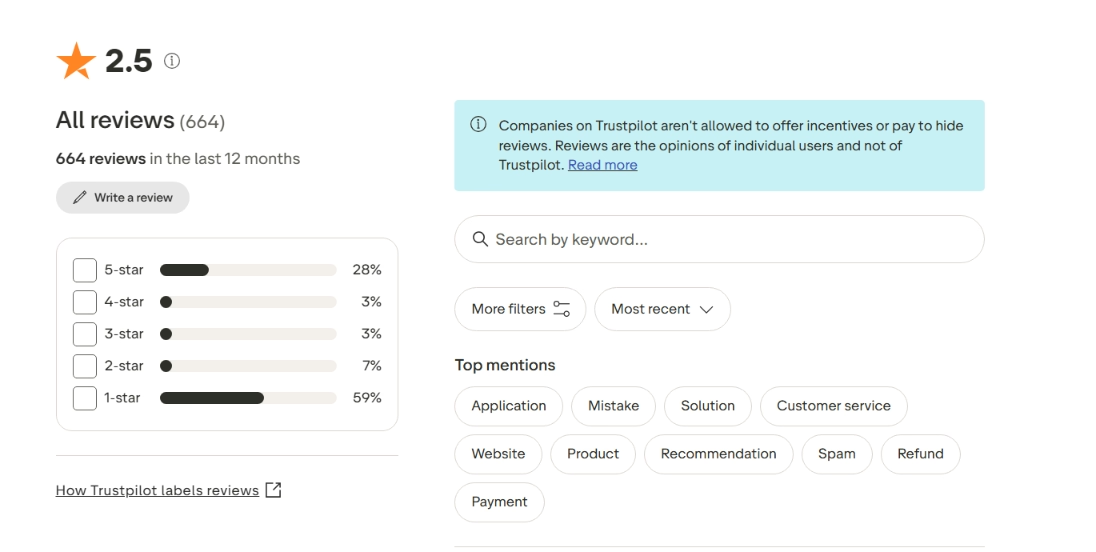
Public feedback on Base44 is sharply mixed. Trustpilot currently shows a 2.5 rating from 660+ reviews, with 28% five-star and 59% one-star reviews in the last 12 months.
Positive feedback tends to come from simpler builds. One Trustpilot reviewer titled their review “Simple apps works fine” and said their personal-use file-transfer tool was still working.
Negative reviews cluster around broken apps, fast credit burn, support issues, and billing frustration. Reddit shows the same split: Users praise Base44 for fast prototypes, but several say it breaks down as complexity increases.
G2 adds a smaller signal. One five-star reviewer praised turning ideas into useful apps, while another reviewer warned that users may pay for bugs and dead-end fixes.
Base44 is worth it if you:
- Can't code, or barely can, and want to build without the technical plumbing.
- Are testing an idea or running an internal tool, where Builder's features cover the job.
Skip Base44 if you:
- Plan to move your app to another platform later. Base44 ties your app to its own database, and while you can take your code out, you can't easily bring an outside project in. That one-way door is what people mean by "lock-in."
- Want unused credits to carry over (Bolt rolls tokens into the next month), or need heavy custom builds with real backend complexity, where an agent platform like Emergent goes deeper.
Want more hands-on takes before you decide? Read our Base44 Reviews to see what real users actually ran into.
Base44 Alternatives and Pricing Comparison
The table shows the cheapest paid plan for base44 alternative, since that's where most people start. Prices are current as of June 2026.
Base44 wins on price because it bundles hosting, a database, and logins into one tool. The cost is lock-in.
Lovable produces better-looking apps on the first try, so design-focused builders pick it. Backend work leans on paid add-ons, and its pricing climbs the harder you tweak and debug.
Still deciding between the two? Our Base44 vs Lovable breakdown shows exactly where each one pulls ahead.
Bolt suits builders who want to watch the code. Its unused tokens roll into the next month. Those credits still drain quickly on a complex app, so the $25 start climbs as the project grows.
Replit is the most technical of the four, with a full coding workspace and two-way GitHub sync that Base44 lacks. Its blog confirms Core dropped to $20 a month in February 2026. The trade has a steeper learning curve and usage charges on top of the base price.
Can't decide which one fits your build? Our Replit vs Base44 vs Emergent breakdown puts all three side by side so you don't have to guess.
Emergent takes a different approach from the rest. It asks questions up front, then puts a team of specialized agents on the build, handling the interface, backend, and testing in one flow. Login and hosting are included, and unlike Base44, you can export the code.
The standard plan is $20 a month with 100 credits, and a vague prompt burns through them fast: the agents run extra iterations trying to hit a target you haven't defined, so loose instructions cost more credits than they should.
So its worth knowing how much it's costing you to create a app before using the tool.
For all five tools, the monthly price gets you started, but credits or tokens shape the final bill.
My Bottom Line on Base44 Pricing
Base44 lets a non-coder get a working app online without touching hosting, a database, or login setup, and that held up when I built my expense tracker on it.
If I were paying, I'd skip Free and Starter past a quick test and go straight to Builder at $40 a month. The reason is specific: Builder is the first tier with a custom domain, backend functions for real work like payments, and code export through GitHub. Every cheaper plan is missing at least one, and those three are what separate an app you can launch from one stuck on a Base44 URL. Pro and Elite only add credits, so they wait until you're regularly running out on Builder.
Worth it if: You can't code and want to ship an MVP, an internal tool, or a small customer-facing app with hosting and logins handled for you.
Not worth it if: You'll want to move the app elsewhere later, or you need heavy custom work; a credit system can't keep up.
Start on the free plan to see if building this way clicks. The moment you're making something you plan to launch, move up to Builder.

Most AI app builders stop at prototypes. Emergent creates production-ready apps you can actually launch.
- Production-ready apps
- Web & mobile apps
- Deploy in minutes







