



A chatbot can fail on a simple question when assigned the wrong task. I tested five business chatbot use cases across Tidio, ManyChat, and Chatbase to see which worked after setup and which broke.
5 Best Chatbot Use Cases for Business: Quick Comparison
| Use Case | Best For | What the Bot Handles | Where It Breaks | Setup Complexity |
|---|---|---|---|---|
| FAQ and knowledge-base support | SaaS, e-commerce, local businesses | Repeat questions from help docs, policies, and pricing | Outdated or messy documentation | Low |
| Human handoff and routing | Any support-heavy business | Detects when to escalate, routes to the right agent | No clear escalation path defined | Low |
| Order status and returns | E-commerce brands | Pulls tracking data, explains return windows | No real database access | Medium |
| Social DM automation | Creators, DTC brands, e-commerce | Instagram, WhatsApp, Facebook replies, and lead flows | Platform disconnects, billing issues | Low–Medium |
| Lead capture and qualification | Agencies, SaaS, B2B | Qualifying questions, warm lead routing to sales | Trying to manufacture demand, not capture it | Low |
How I Tested These Chatbot Use Cases
I spent three weeks testing three chatbot platforms across the five use cases in this article: Tidio, ManyChat, and Chatbase. I evaluated each platform on five points:
- Features: How well each platform handled the task it was tested for
- Usability: How fast and intuitive the setup was, including flow building and bot training
- Integrations: How smoothly each tool connected with the systems needed for each use case, including Shopify and Instagram
- Pricing: What free tiers actually allow in production, and where hidden costs appear
- Use cases: How each platform held up under its specific scenario, including where it broke
I trained Chatbase on a 45-article SaaS knowledge base, ran ManyChat through a DTC Instagram campaign, connected Tidio to a test Shopify store, and built lead capture flows in Tidio. That testing showed which use cases worked after setup and which ones failed during documentation, routing, billing, or integration.
1. FAQ and Knowledge-Base Support With Chatbase: Best for SaaS and E-commerce Brands
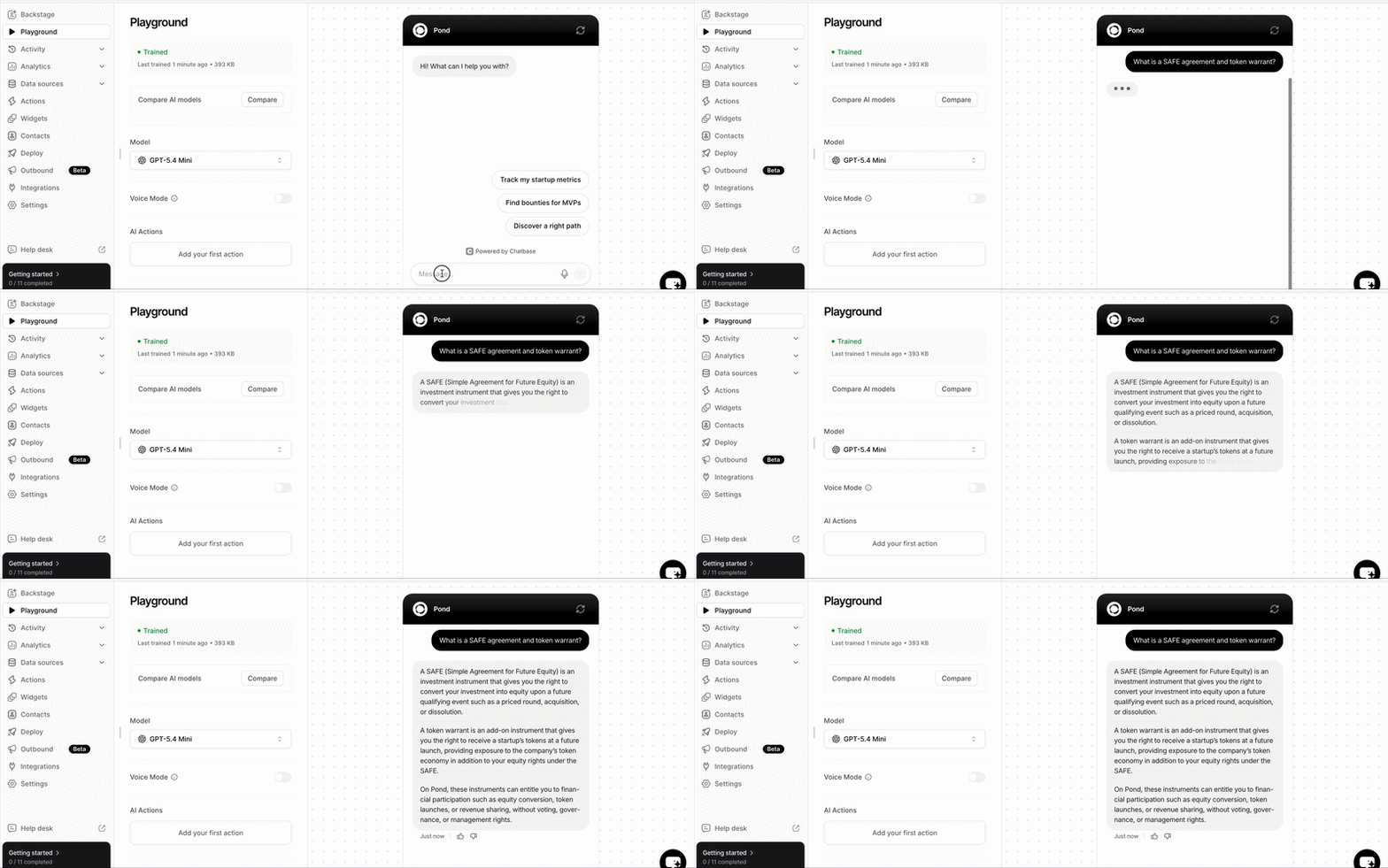
Best for: SaaS companies, e-commerce brands, and local businesses fielding the same questions daily.
I trained Chatbase on 45 articles covering pricing, feature limits, cancellation steps, and troubleshooting. It handled standard support questions within seconds. When a question needed context from two separate articles, the answer came back partially right, which is still a failure if the customer acts on the wrong information.
When I fed the same bot a messy help center with duplicate articles, the answers degraded immediately because the documentation gave it conflicting inputs. That made source quality the main difference between a useful FAQ bot and a support risk.
Key Features
- Knowledge base ingestion: Upload PDFs, paste URLs, or connect a Notion workspace. The bot uses your content as its source of truth, not a generic LLM response.
- Fallback escalation: Set the bot to escalate after two or three failed responses, so customers stop looping before they get angry.
- Gap analytics: See which questions the bot fails on most often. Use that report to decide which help-center articles need cleanup first.
Pros and Cons
Pros:
- Works best when your documentation is clean, current, and answers predictable, repeated questions.
- Works across pricing, return windows, login steps, and plan features without any integration
Cons:
- Outdated or contradictory knowledge base produces wrong answers at scale
- Questions requiring judgment calls or account-level data will always break it
What Users Say
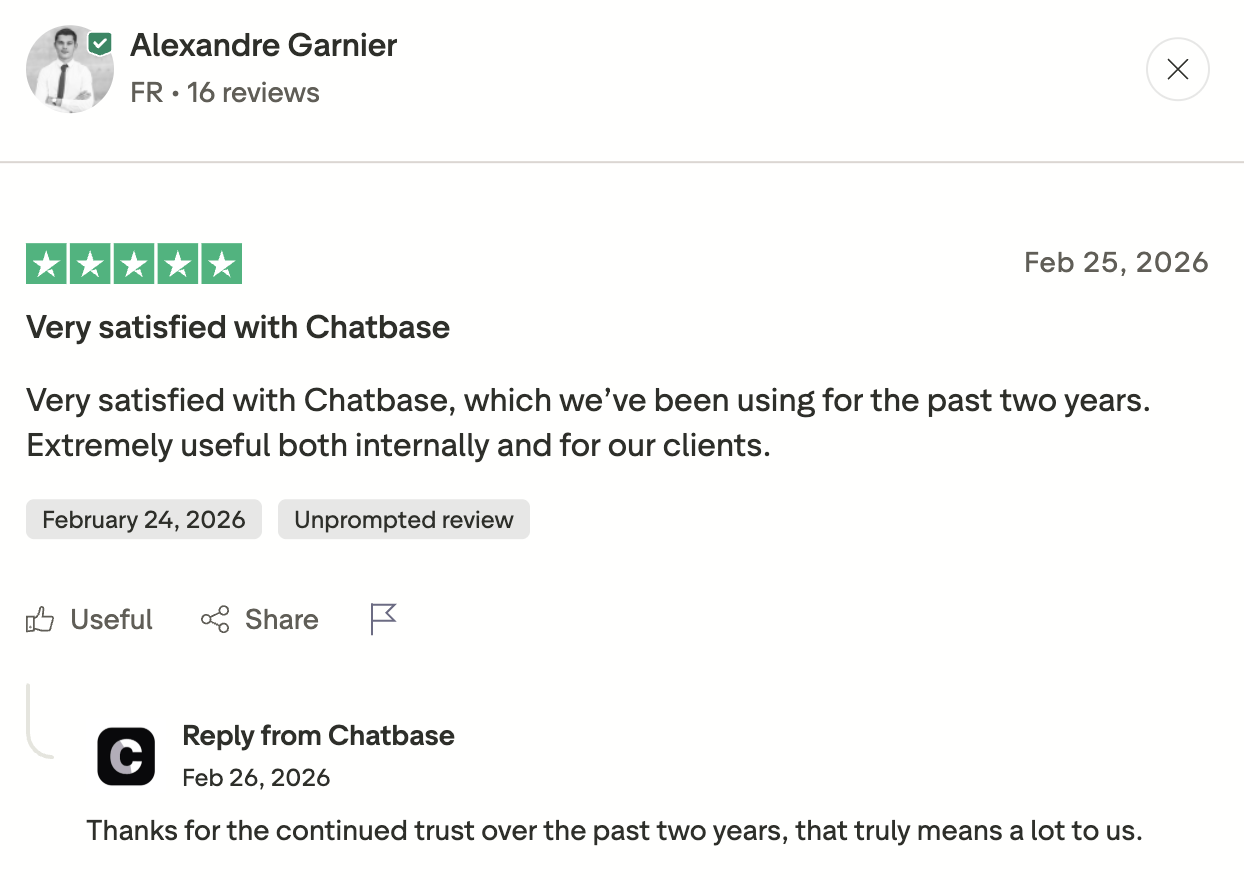
Source: Trustpilot
What stood out in this review was that the reviewer had kept Chatbase in use for two years across both internal projects and client work. Most chatbot tools get abandoned long before that. Longevity like that usually signals that the bot continues to deliver value after the initial setup, which is exactly what matters for FAQ automation.
The risk shows up when the training data itself breaks:
"All my training has disappeared, and customer service can't tell me what's wrong." — Sallyann
If the platform loses your knowledge base and cannot explain why, the chat widget has no reliable answers to give customers. That is why training-data backups and periodic answer checks belong in the maintenance plan.
Pricing
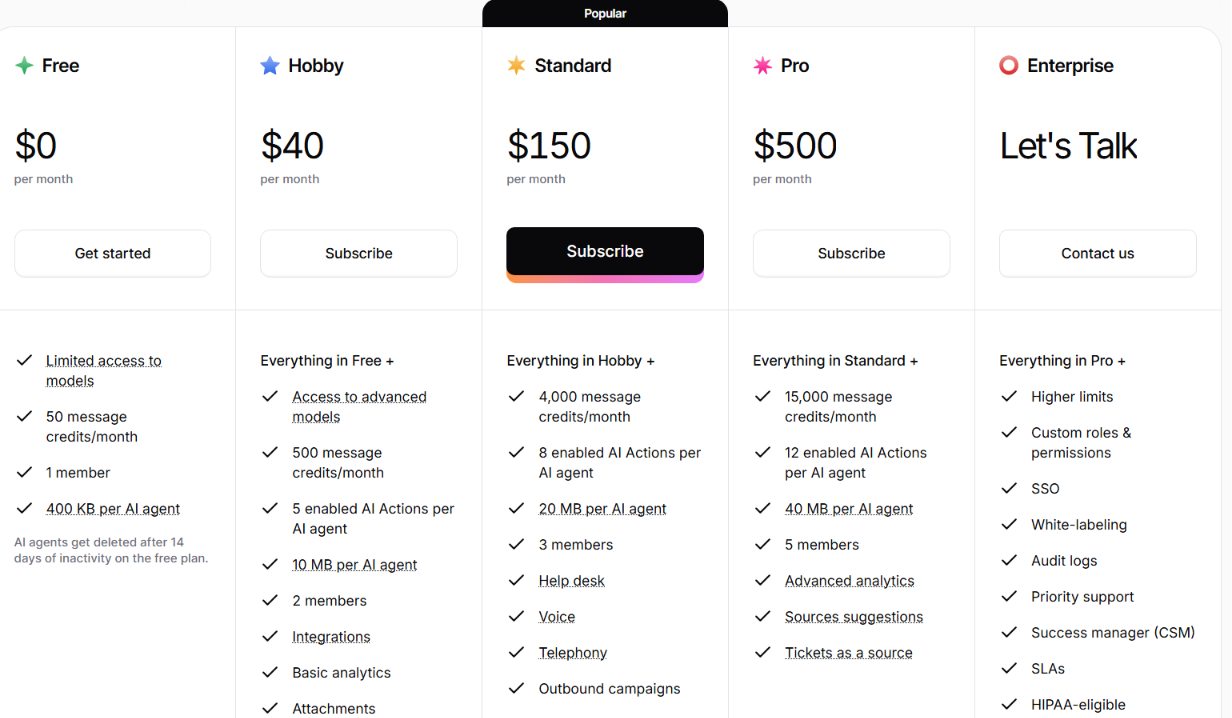
- Free: 50 message credits/month, 400 KB training data
- Hobby: $40/month ($32/month billed annually), 500 message credits/month
- Standard: $150/month ($120/month billed annually), 4,000 message credits/month
- Pro: $500/month ($400/month billed annually), 15,000 message credits/month
Note: Your effective monthly capacity changes significantly depending on which model you select.
Bottom Line
Start with your 20 most-asked support questions, clean up the docs that answer them, and train the bot on those. If the bot needs live database or CRM access, use a custom build instead of treating the FAQ software as enough. Emergent is one option for that kind of workflow. If the bot cannot answer from the docs, the next test is whether it can pass the customer to a person with the conversation intact.
Need something that goes beyond FAQ bots? Our best no-code chatbot builders breakdown covers what else is worth trying in 2026.
2. Human Handoff and Routing With Tidio: Best for High-Volume Support Teams

What it does: Detects when a conversation exceeds the bot's ability and, when configured correctly, passes it to the right human agent with the transcript intact.
Best for: High-volume or support-heavy teams where issues vary widely in complexity: SaaS, finance, healthcare, and high-ticket e-commerce.
I tested Tidio's handoff across three scenarios involving a returns question, an order dispute, and a billing inquiry. The bot handled the returns question without escalation. It escalated the order dispute with the full thread intact. For the billing inquiry, the agent only received the label "billing issue," with no transcript or customer context.
Context loss was the most consistent failure point across the platforms I tested. When the transcript does not transfer, the customer has to repeat the issue to an agent who cannot see the failed bot exchange.
Key Features
- Trigger-based escalation: Set rules by keywords, visitor answers, failed-resolution paths, or routing logic inside the flow.
- Context transfer: Pass the full chat transcript to the agent, not just a category tag
- Smart routing: Billing to billing, technical to engineering, qualified leads to sales
Pros and Cons
Pros:
- Works best when escalation triggers are specific. For example, "cancel subscription" should trigger a different path from "cancel my order."
- Agents receive the full conversation, not a label
Cons:
- Bot loops through failed answers before escalating, so the customer arrives already angry
- Escalation drops into a generic inbox with no agent available and no follow-up timeline
What Users Say
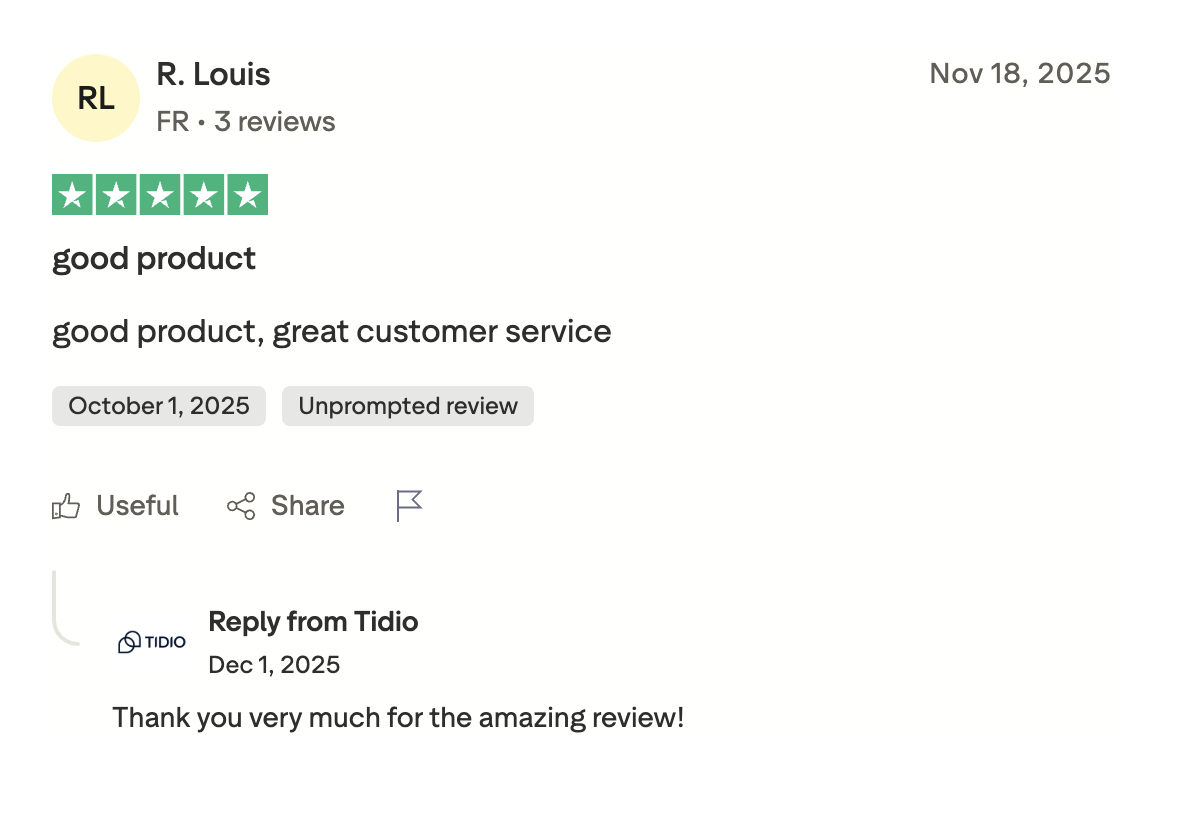
Source: Trustpilot
When handoff works, this is the experience: The bot handles the simple stuff, and a human picks up immediately when it cannot.
The platform received some complaints as well.
"We requested a downgrade because our current usage is far below our plan limits. Their team confirmed they would adjust the tiers, but the final offer still kept us at $749/month, even though our usage does not justify that level.” The reviewer continued, “We asked for this to be reviewed internally and followed up multiple times, but we have now been ignored for 8 days." — Nick
Pricing
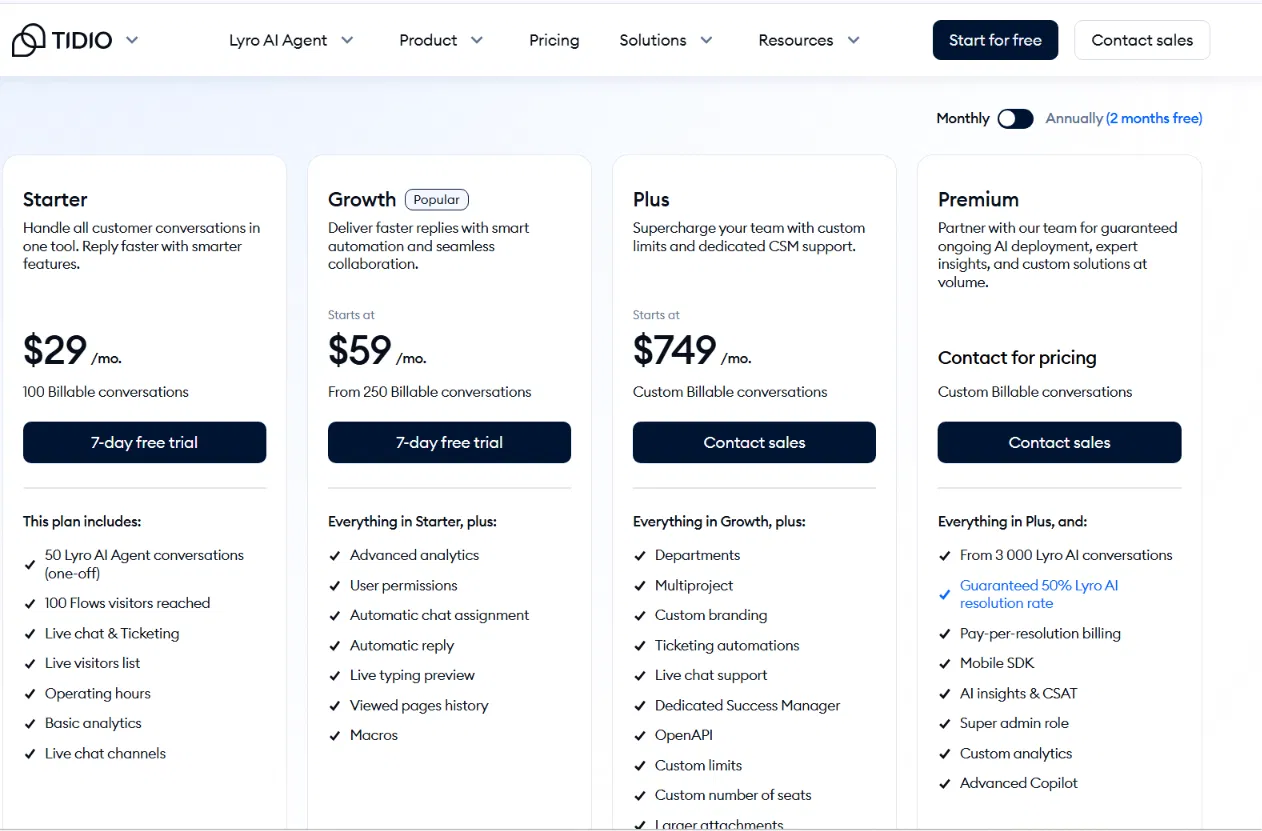
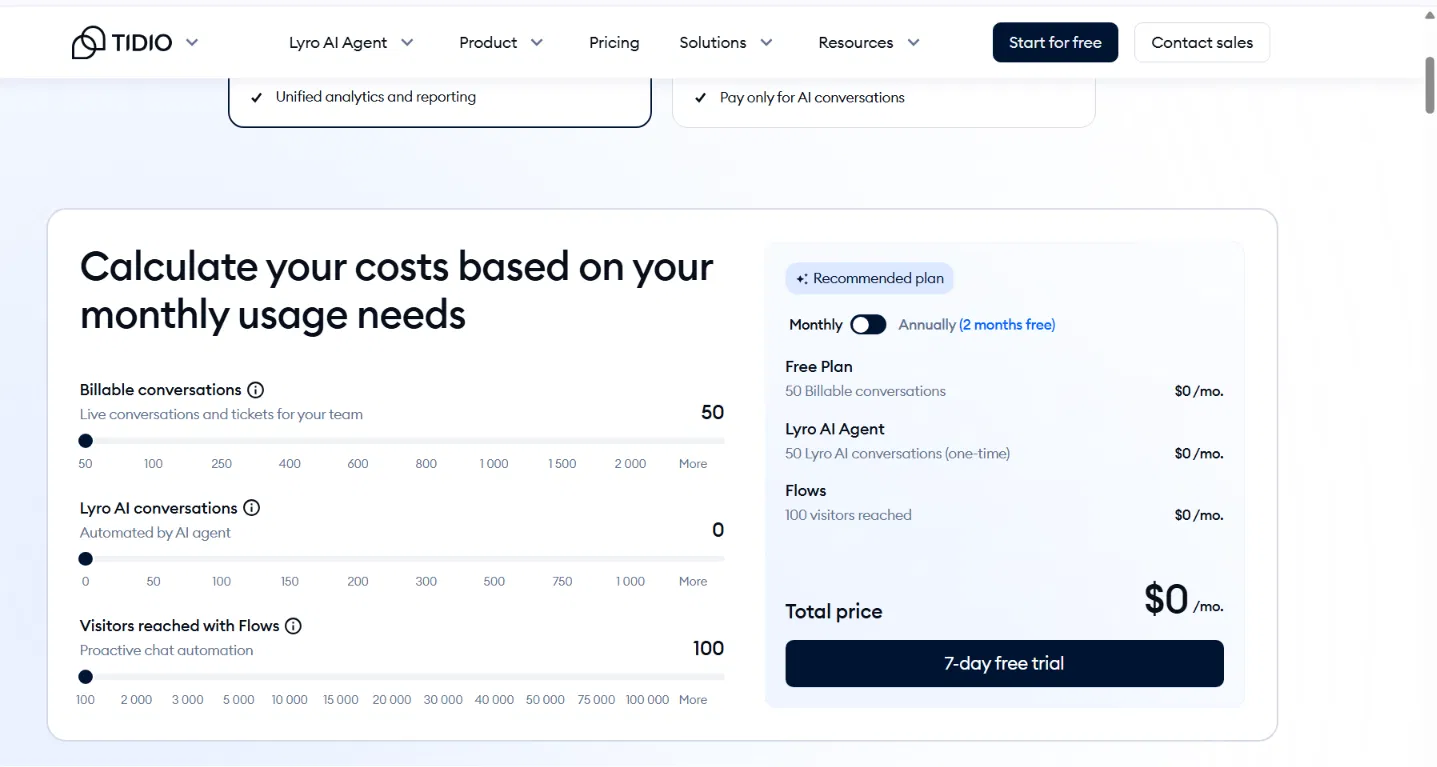
- Free: $0, 50 billable conversations/month
- Starter: $29/month ($24.17/month billed annually), 100 billable conversations/month
- Growth: $59/month ($49.17/month billed annually), from 250 billable conversations/month
- Plus: $749/mo, custom billable conversations
One caveat: The bot behavior described here often costs extra. Tidio’s AI agent (Lyro) and Flows automation are paid add-ons. On the free and Starter plans, you only get a one-time batch of 50 Lyro conversations; after that, Lyro is an add-on (around $39/month for 50 conversations) and is only bundled in on the $749/month Plus tier and above.
Bottom Line
Fix the handoff design before you spend time making the bot smarter. Tidio fits small teams when the escalation rules are simple, and someone is assigned to pick up the thread. Once handoff is working, e-commerce teams can move the same support logic into post-purchase questions.
Ready to build a chatbot that goes beyond simple handoff rules? Try the best AI chatbot builder to get started.
3. Order Status and Returns With Tidio: Best for E-commerce Brands

What it does: Answers shipping and return-policy questions from your docs. For live order status, it needs a Shopify, WooCommerce, or OMS integration.
Best for: E-commerce brands on Shopify or WooCommerce, fielding high volumes of repetitive post-purchase questions.
I connected Tidio to a test Shopify store. I tested three common post-purchase questions: "Where is my order?", "Can I return this?", and "How long does shipping take?"
The bot handled all three from the knowledge base alone. The live order lookup required the Shopify integration, a customer identity check, and clear fallback rules. The FAQ layer took about an hour to set up, but live order lookup required real integration work.
Key Features
- Live order lookup: Pull order status from Shopify through Tidio’s Shopify flow action. For WooCommerce, a proprietary OMS, or a custom database, treat it as a custom integration/API workflow rather than a native Tidio order-status setup.
- Return policy answers: Train the bot on your return policy in plain language, not just a PDF link
- Authentication gate: Customers verify their order number or email before the bot surfaces any account-level data
Pros and Cons
Pros:
- Works best when the bot is connected to a live OMS with current tracking data
- Simple, clearly written return and shipping policies
Cons:
- No database connection means this is an FAQ widget, not an order bot
- Stale integration data is worse than no data
What Users Say
Source: Capterra
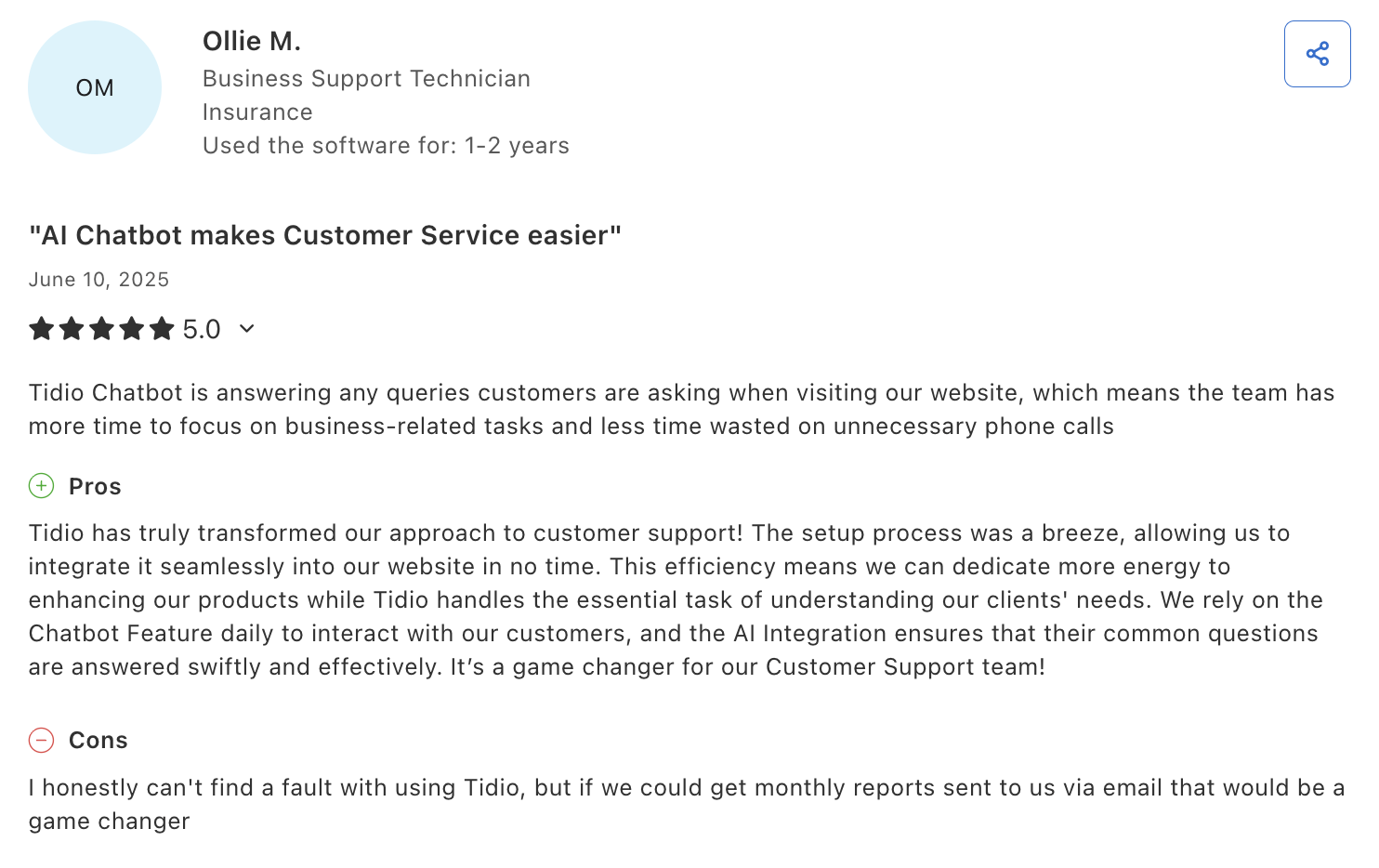
The Capterra review supports the broader support-volume case. Tidio can reduce repeat questions and unnecessary phone calls. For order status, that benefit depends on whether the bot is connected to Shopify, WooCommerce, or an OMS.
That makes setup reliability part of the use case, not a side issue. One Trustpilot reviewer wrote, "I cannot get this to show up on my website. I sent emails and opened multiple tickets via the chatbot."
If the basic setup fails or the Shopify integration needs maintenance after an API update, customers may never reach the order-status flow. Support responsiveness matters here as much as the features do.
Pricing
- Free: 50 conversations/month
- Starter: $29/month, 100 billable conversations/month
- Growth: $59/month, 250 billable conversations/month
- Plus: $749/mo, custom billable conversations
For brands with a proprietary OMS or non-Shopify setup, Emergent lets you build a custom order-status bot connected to your specific database.
Bottom Line
Build the FAQ layer when you get 50 or more post-purchase questions per day. Add live order lookup when that volume reaches 100 or more. For Shopify merchants, Tidio's native integration is the fastest path to a working setup. That covers owned-store support. The next use case moves the same repeat-question problem into Instagram, WhatsApp, and Messenger.
Not sure Shopify is the right platform for your store? Our best Shopify alternatives breakdown covers what else is worth trying in 2026.
4. Social DM Automation With ManyChat: Best for Instagram and WhatsApp Businesses

What it does: Automates replies across Instagram DMs, WhatsApp, and Facebook Messenger, including lead magnets, product questions, and qualification flows.
Best for: Creators, DTC brands, coaches, and e-commerce businesses with high DM volume across social platforms.
I ran a ManyChat test on a simulated Instagram campaign with a comment trigger, a DM download link, and a two-question qualification flow. Setup took under 40 minutes. The DM delivered within seconds of the comment, and the qualification answers were routed correctly.
Midway through, the test Instagram account was flagged for an unrelated reason, and the entire flow stopped without a single alert. The dashboard still showed it as active. That silent failure mode is the main operational risk with social DM tools.
Key Features
- Comment triggers: Auto-DM anyone who comments a specific keyword on a post or Reel, within seconds
- Lead magnet delivery: Send guides, discount codes, or booking links inside the DM without a website redirect
- Multi-channel flows: Run the same automation across Instagram, WhatsApp, and Messenger from one dashboard
Pros and Cons
Pros:
- High-volume, predictable comment patterns on a post or Reel
- Simple offer with one clear next step: a download, coupon, or booking link
Cons:
- Platform connections drop silently during active campaigns with no built-in alert
- Automations stop firing 24 hours after a contact's last interaction; past that, only a human can send manual replies, so you can't re-engage on autopilot.
What Users Say
Source: Trustpilot
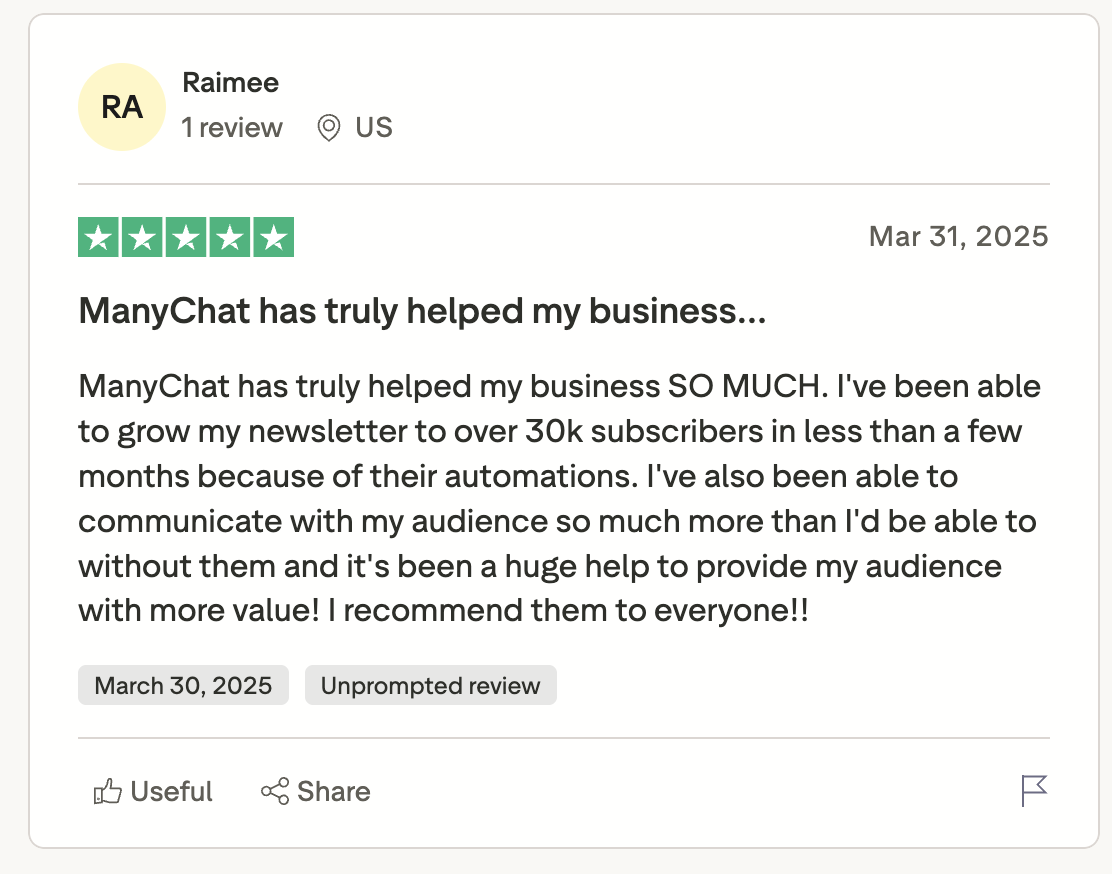
For creators who run weekly comment-trigger campaigns, the value is time saved inside the DM inbox. The review supports that use case because the user describes audience communication and newsletter growth from automated replies.
There is also the billing caveat because social DM campaigns can scale costs quickly. One Trustpilot reviewer wrote, "You can’t unsubscribe!! If you want to unsubscribe then it won’t end your subscription and you have to block your card."
That is a post-cancellation billing issue, but it still matters for teams running paid social campaigns. Keep cancellation records and monitor billing after plan changes.
Pricing
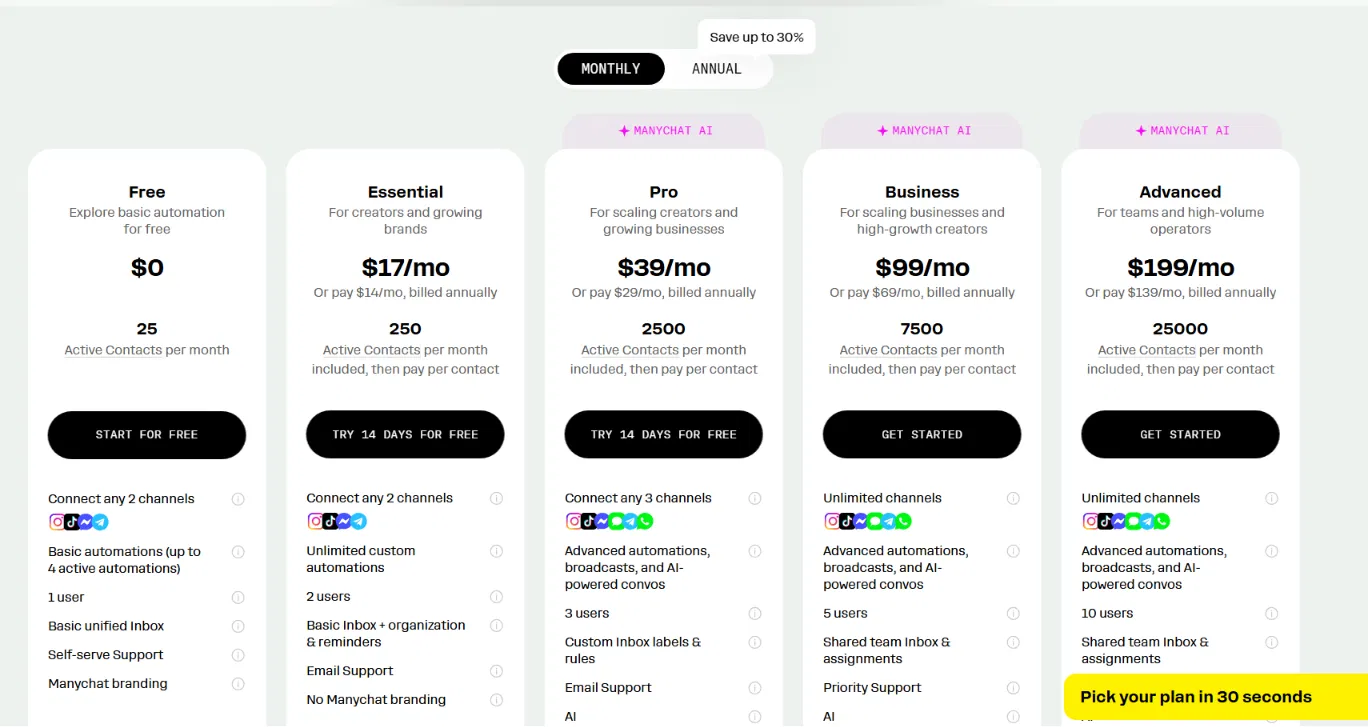
- Free: 25 active contacts, two channels only
- Essential: $17/month ($14/month billed annually), 250 active contacts, two channels only
- Pro: $39/month ($29/month billed annually), 2,500 contacts, three channels only
- Business: $99/month ($69/month billed annually), 7,500 contacts, unlimited channels
- Advanced: $199/month ($139/month billed annually), 25,000 contacts, unlimited channels
A single viral post can push you into overage territory within hours. Build that cost into your campaign budget before launch.
Bottom Line
ManyChat was the strongest fit in this test for social DM automation. The flow worked until the Instagram connection stopped. Before running paid traffic, monitor the platform connection, check the overage math, and keep cancellation records.
Hitting ManyChat's limits or looking for more reliable automation? Our best Zapier alternatives breakdown covers what else is worth trying in 2026.
5. Lead Capture and Qualification With Tidio: Best for High-Intent B2B Pages

What it does: Engages website visitors with short qualifying questions and routes warm leads to sales without sending them to a separate form.
Best for: Agencies, SaaS companies, consultants, and B2B businesses where the bottleneck is qualified conversations, not traffic.
I built a five-question Tidio flow on a pricing page, and completion dropped after question two. When I cut the flow to two questions plus a calendar link, more visitors completed it. The flow worked best on pricing-page traffic, where visitors were already comparing options.
Key Features
- Exit-intent triggers: Fire the bot when a visitor is leaving your pricing or demo page, not when they land on the homepage
- Qualification and routing: Use form answers, tags, contact properties, and assignment rules to send high-intent visitors to sales
- CRM sync: Lead data pushes into HubSpot, Salesforce, or Pipedrive automatically
Pros and Cons
Pros:
- Works best when partial lead data is still useful, because the bot can capture answers before a visitor drops off mid-flow
- The bot can qualify leads overnight, so the sales team starts with warmer conversations.
Cons:
- This bot works poorly on cold traffic because it captures existing demand instead of creating it
- Conversation caps hit hardest during product launches, exactly when you need volume most
What Users Say
"intuitive and easy to use without code" — Capterra reviewer
For a team that needs a lead capture flow live before a product launch, setup speed is an advantage because the team can launch the flow without waiting on a developer.
Source: Trustpilot
The pricing risk is more serious for lead capture than for a simple FAQ bot because paid acquisition depends on predictable costs.
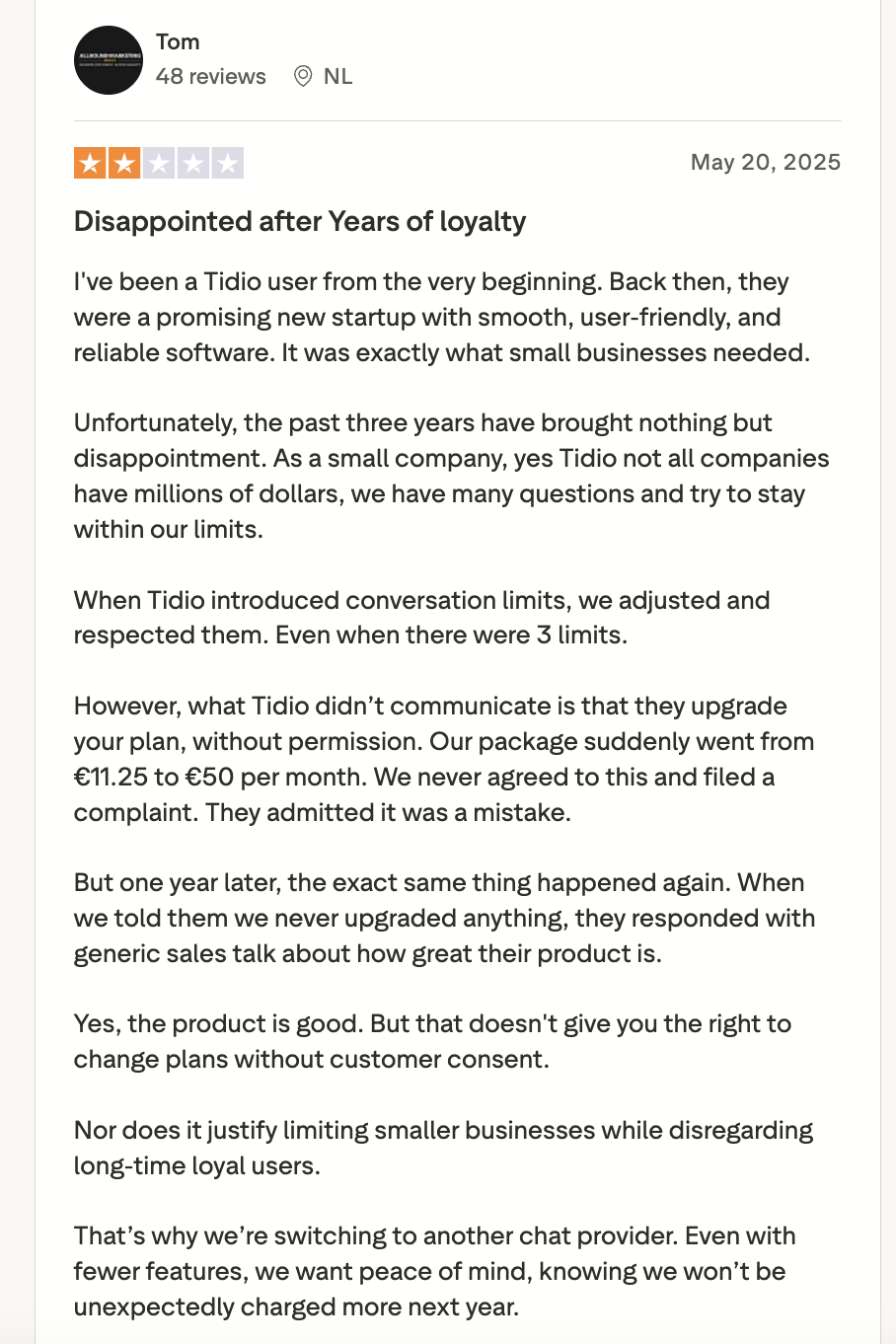
In the review, the user's plan increased from EUR11.25 to EUR50 per month without permission, and the same issue happened again one year later. Unexpected pricing changes make campaign budgeting and ROI tracking harder to manage.
Pricing
Tidio uses the same tiers covered above, from the free plan (50 billable conversations/month) up to the $749/month Plus plan. Lyro AI and Flows automation are billed as separate add-ons, so budget for those before you put paid traffic behind the flow.
If you are already on HubSpot, their native chatbot is free on any plan. For custom routing logic beyond what Tidio supports, Emergent lets you build that as a standalone tool connected to your existing stack.
Bottom Line
Deploy on your pricing or demo page first. Keep the flow under four questions. If your traffic is mostly cold homepage visitors, fix the offer and page intent before adding this bot. Use the next section to match each use case to the business problem it actually solves.
Which Chatbot Use Case Fits Your Business?
Choose FAQ and knowledge-base support if you:
- Field 20 or more of the same support questions weekly, and already have help docs in place
- Want the lowest-risk first deployment with no integration required
Choose human handoff and routing if you:
- Already have a chatbot, but customers are getting stuck with no working escalation path
- Run a support team where agent time is expensive, and routing is happening manually
Choose order status and returns if you:
- Run a Shopify, WooCommerce, or OMS-based store with repeat post-purchase questions
- Need customers to check tracking, shipping, and return policy details without waiting for a support agent
Choose social DM automation if you:
- Are a creator, DTC brand, or e-commerce business with high comment or DM volume on Instagram or WhatsApp
- Have a simple, repeatable offer you want delivered automatically
Choose lead capture and qualification if you:
- Have traffic landing on a pricing or demo page but no qualification process before the sales conversation
- Run a B2B or service business where qualified conversations are the bottleneck
Skip chatbots for now if you:
- Receive fewer than 20 repetitive questions per week. The setup time will not pay for itself.
- Need the bot to handle nuanced judgment calls or complex complaints
- Have no clean documentation, no integration plan, and no one assigned to maintain the bot after launch
Final Verdict
FAQ support and human handoff had the cleanest setup path in this test because they solved repeat-volume problems before any deep integration work.
Order status and returns are worth adding when post-purchase questions are already creating support volume. Social DM automation fits creators and DTC brands with steady Instagram or WhatsApp activity. Lead capture works best on high-intent pages with a short flow and needs clean inputs to stay useful.
Off-the-shelf tools like Tidio, Chatbase, and ManyChat cover most standard use cases at the SMB level. They hit limits when the workflow needs custom logic, such as routing by CRM data or connecting to a proprietary OMS.
Start with the simplest use case your business needs, then get that running before adding anything else.

Most AI app builders stop at prototypes. Emergent creates production-ready apps you can actually launch.
- Production-ready apps
- Web & mobile apps
- Deploy in minutes







