



After building a handful of internal tools on Emergent this year, here's the process I use to generate a CRUD app with AI in a single afternoon.
What Is a CRUD App?
A CRUD app is a piece of software built around four basic actions you take on stored data: create, read, update, and delete. If you've ever added a contact to your phone, scrolled the list, edited a number, and deleted an old one, you've used all four.
Most business software is a CRUD app underneath the branding. A contact list lets you add, view, update, and remove people. An inventory tracker lets you add products, see what's in stock, update counts, and drop items you no longer carry. The buttons and labels change, but the core is the same four actions on a list of records.
That's why a CRUD app is a good first thing to generate with AI. The pattern is simple and well understood, so the AI agent rarely guesses wrong, and you already know what the finished tool should do.
Why Generate a CRUD App With AI?
Generating a CRUD app with AI gets you a working business tool in hours instead of the weeks or months a custom build usually takes. You describe what you want in plain English, and an agent writes the code, builds the screens, sets up the data, and gets the app running.
The cost difference is what surprises people. A basic custom app from a freelancer or agency runs about $30,000 to $60,000, and that's before changes. The CRUD app in this guide cost me a few credits and an afternoon, and I own the code at the end.
The other option, off-the-shelf software, is faster to start but rarely fits. You end up changing how you work to match the tool, paying monthly for features you don't use, and storing your data somewhere you don't control. Generating your own app flips that: You get a tool shaped around how you already work, because you're the one who described it.
What You'll Need Before You Start
You don't need much to follow along. First, you need an AI app builder that handles the whole job from one prompt: the screens, the place your data lives, sign-in if you need it, and hosting when you publish.
I use Emergent because its agents plan the build, test their own work, and hand you a deployable app with the database already set up, and it's the platform behind every internal tool I've built this year. It's the example this guide follows.
You'll just need:
- An Emergent account. A free account works for trying the process, and you can sign up with Google, GitHub, Apple, Facebook, or a plain email address. The agent I use in this guide runs on the Pro plan, so I'll point out the affordable options as we go.
- A clear idea of what you're tracking. Know the list of records (products, clients, jobs) and the details you want to store for each one. Five minutes of thinking here saves you a round of edits later.
Time required: Plan for under an hour from signup to a working preview. The build itself runs in the background while you do something else.
How to Generate a CRUD App With AI: Step-by-Step
For this walkthrough, I built an inventory tracker for a small coffee shop in Austin. The owner had been counting bags of beans, cups, and syrups in a spreadsheet, and wanted something faster to update behind the counter. Inventory is a clean CRUD example: add a product, view the stock list, update the count, and remove what you've stopped carrying.
Step 1: Open Emergent and Sign In
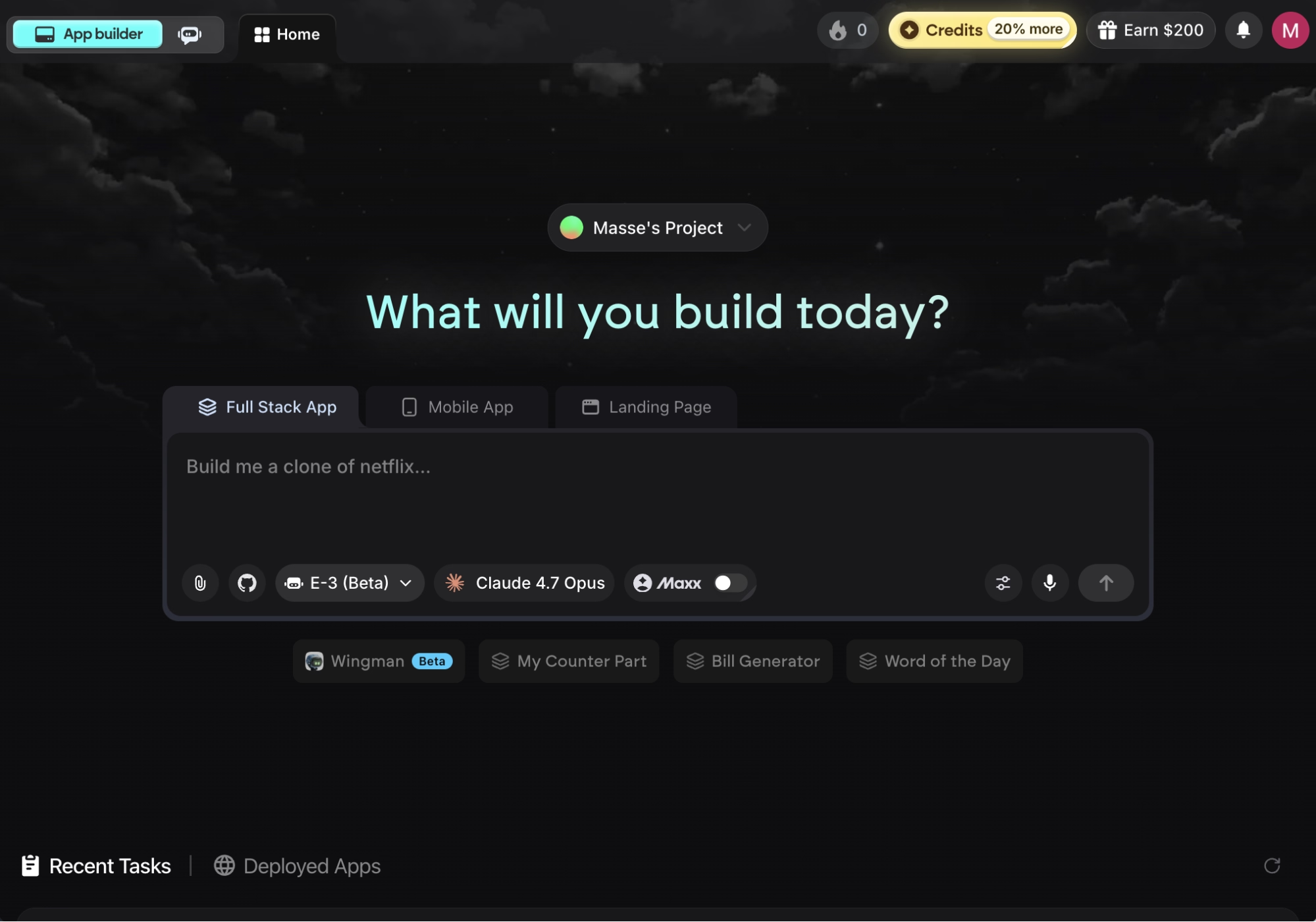
Go to emergent.sh and sign in. You can use your Google, GitHub, Apple, or Facebook account, or a plain email and password. You'll land on the home screen with a prompt bar in the center, which is where every build starts.
Step 2: Pick the Right Agent for the Build
Before you type anything, choose which agent runs the build. Click the agent selector in the prompt bar, and you'll see a short list:
- E-1 (Stable & Thorough): The steady default, available on every plan.
- E-2 (Thorough & Relentless): Keeps working at a problem longer before handing back.
- E-3 (Autonomous & Powerful): Scopes, plans, builds, and tests on its own. Pro plan only.
- Prototype: For a clickable mockup with no saved data.
- Mobile: For phone apps.
For this build, I picked the E-3 agent. It runs a short planning conversation, maps out the full build plan, then builds and tests it without waiting on you for each step, which is what makes it feel hands-off. The trade-off is that E-3 sits on the Pro plan and uses more credits per build than the others, so it's the right pick when you'd rather step back and let the build run from start to finish.
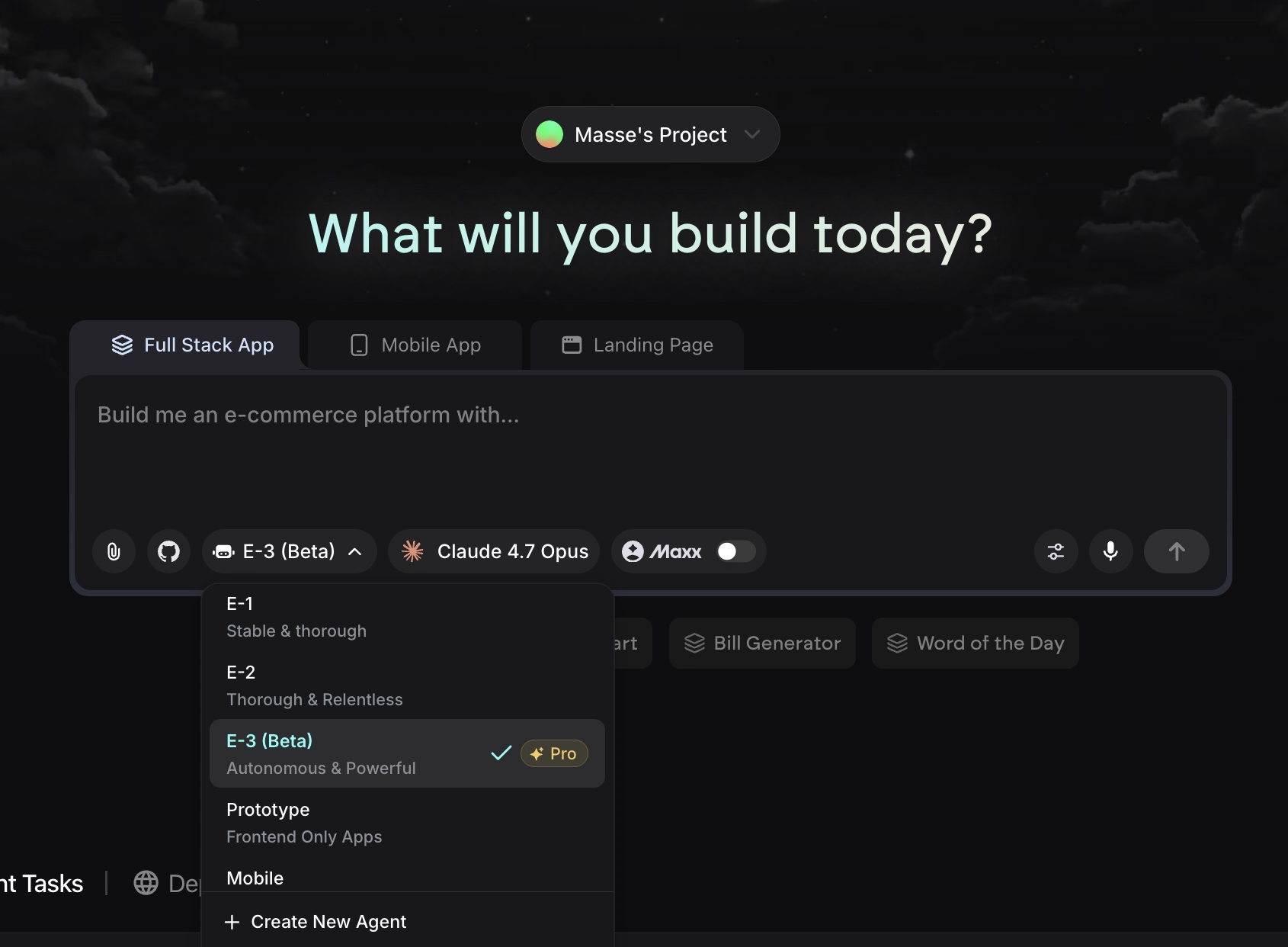
If you're on the Free or Standard plan, or your app is on the simpler end, E-1 handles a straightforward CRUD app well. You stay a little more involved, but the result is the same kind of working tool. The model defaults to Claude Opus 4.7 for E-3, which is the recommended pairing, so you can leave that as it is.
One note for following along: I'm on the Pro plan in this walkthrough, so your prompt box may look a little different on Free or Standard (higher plans add extras like the Brainstorm tab). You'll also spot the Maxx toggle near the model picker. It's optional, and I left it off. Maxx gives the agent more room to reason carefully through tough architectural decisions, which a simple CRUD app doesn't need, and it burns more credits.
Step 3: Write Your Prompt
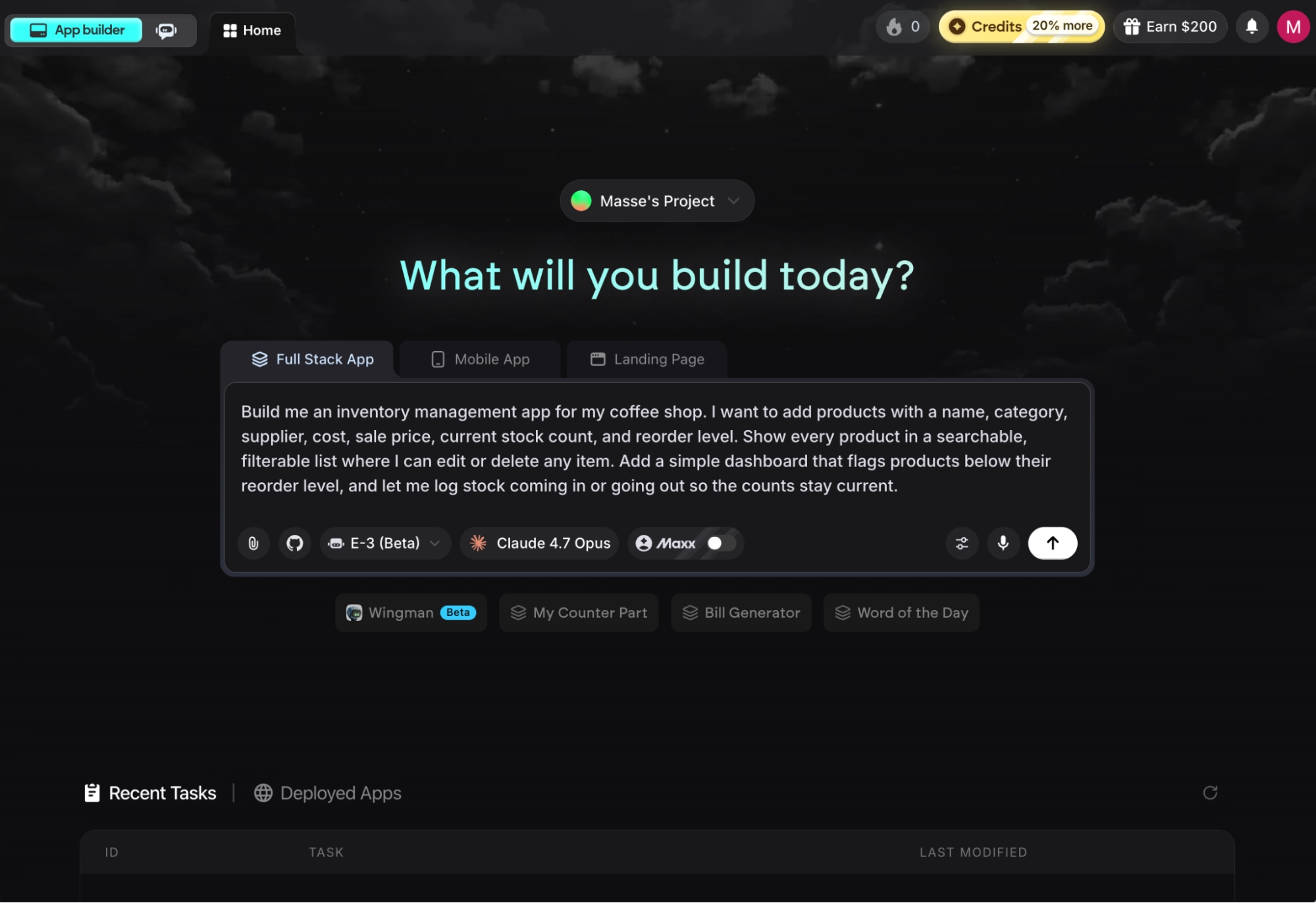
With E-3 selected, describe the app in one prompt. You don't need to write much, but you do need to name the records and the details you want to store. Here's the prompt I used:
Build me an inventory management app for my coffee shop. I want to add products with a name, category, supplier, cost, sale price, current stock count, and reorder level. Show every product in a searchable, filterable list where I can edit or delete any item. Add a simple dashboard that flags products below their reorder level, and let me log stock coming in or going out so the counts stay current.
That single paragraph covers all four CRUD actions: adding products (create), the searchable list and dashboard (read), editing and logging stock changes (update), and deleting items (delete). The agent is smart enough to handle the rest, so resist the urge to over-explain. Press Enter to send it.
Step 4: Answer the Scoping Questions
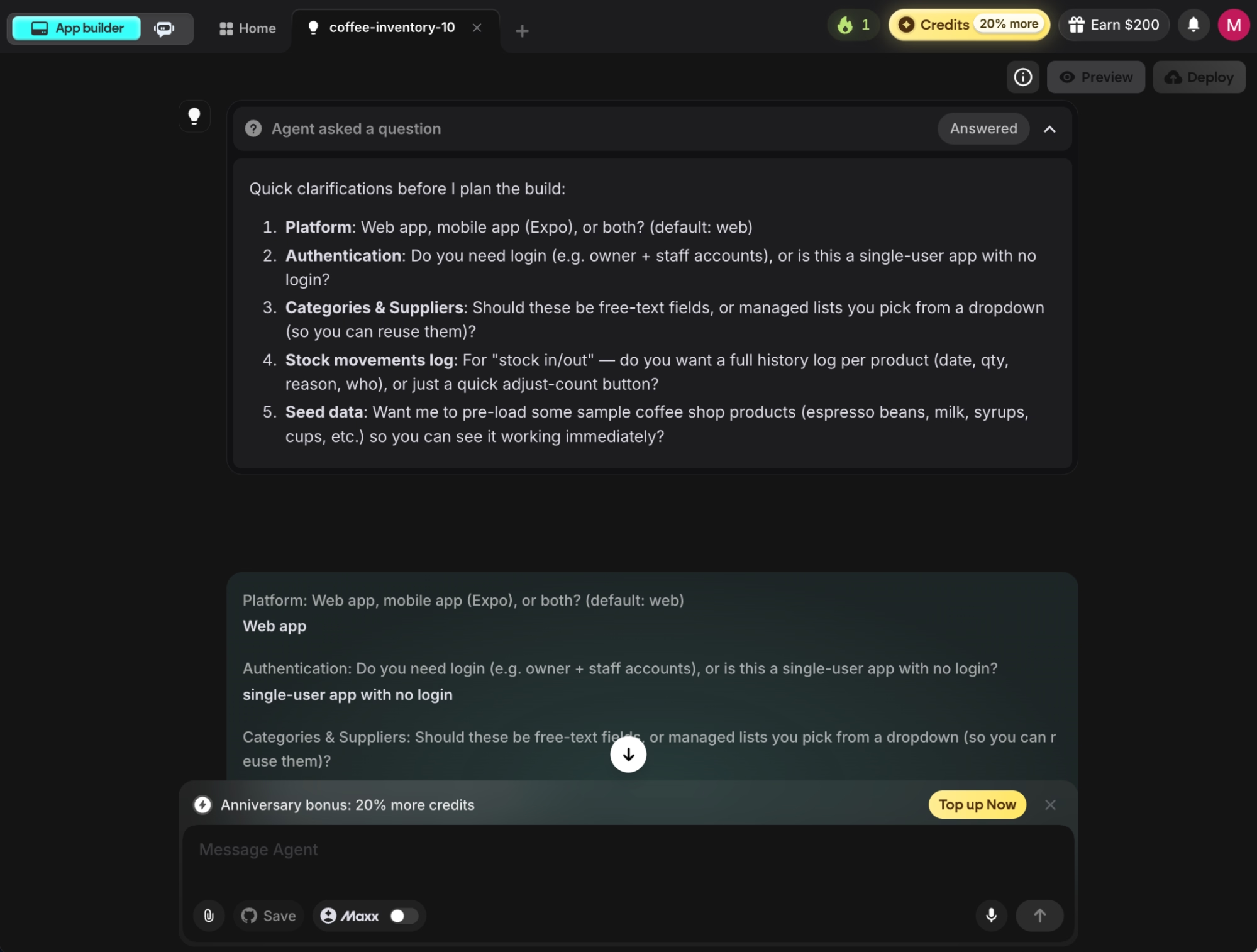
Instead of building right away, the agent asks a few questions to scope the app before it writes any code. Each one pins down a decision the agent would otherwise have to guess. Answer in plain language.
The exact questions depend on your prompt. Here's what the agent asked for the inventory app. The first thing it wanted to settle was the shape of the app:
- Web or mobile? I chose the web, since the owner works from a laptop in the back office.
- Do you need login, like separate owner and staff accounts, or is this a single-user app? I kept it single-user with no login, the simplest setup for a one-person shop.
- Should categories and suppliers be free-text fields or managed lists you pick from a dropdown? I went with dropdowns, so every product entry stays consistent.
- Do you want a full history log per product (date, quantity, reason) or just a quick adjust-count button? I chose the full history, since knowing why stock moved is half the point.
- Should it preload sample coffee shop products (espresso beans, milk, syrups, cups) so you can see it working immediately? I said yes.
Once you answer, the agent has everything it needs.
Step 5: Review the Build Plan
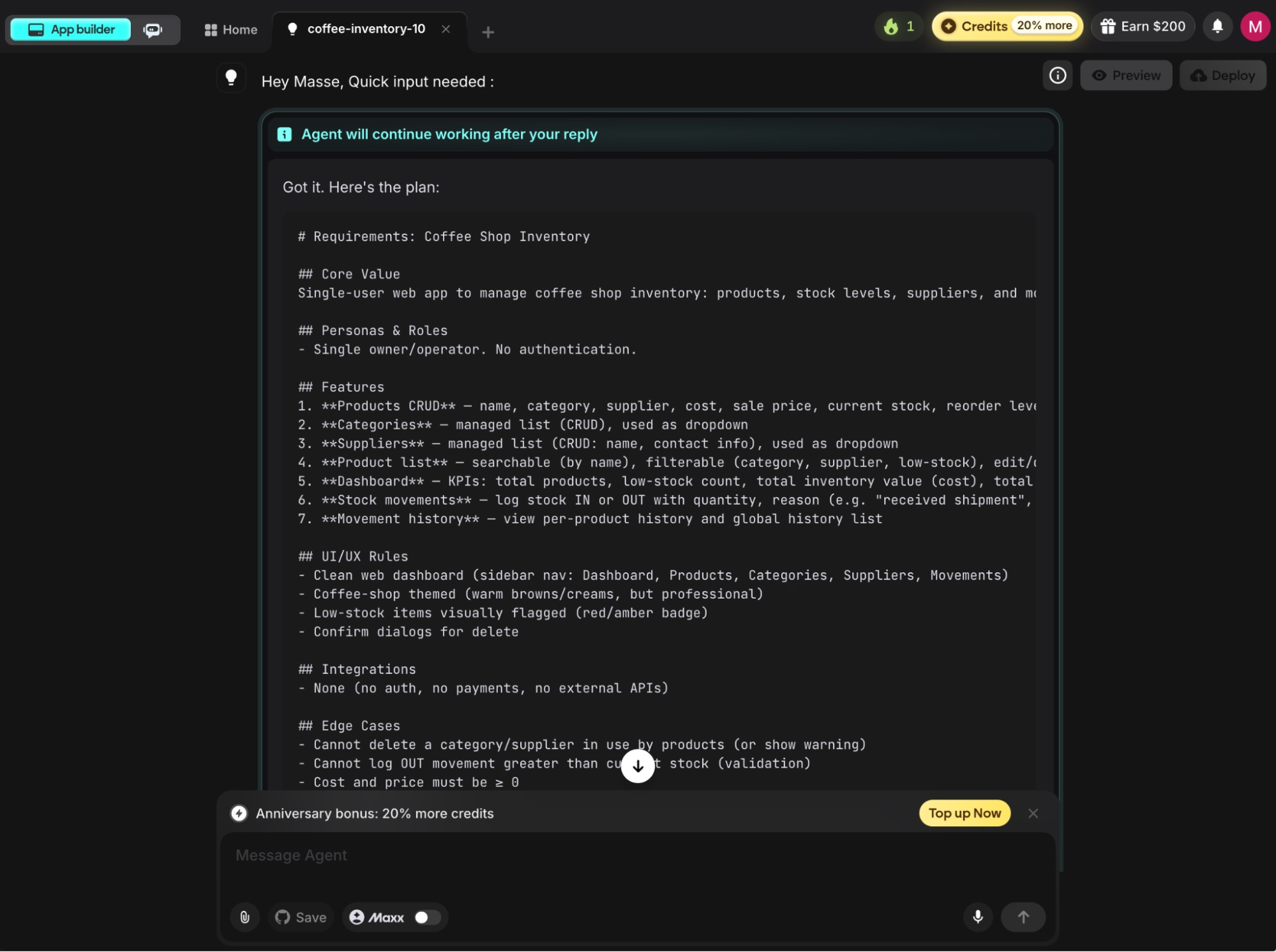
E-3 turns your answers into a written plan and shows it to you before writing any code. For my build, it came in two parts: a requirements summary and a phased build plan. This is your one chance to catch a wrong assumption while it's still cheap to fix, so read both.
The requirements summary listed everything the app would include: products with all seven fields from my prompt, managed dropdown lists for categories and suppliers, the searchable product list, a dashboard with low-stock flags plus totals for inventory value and potential revenue, and a stock movement log with per-product history.
The summary even caught details I never asked for, like blocking a stock-out entry larger than the current count and warning you before deleting a category that products still use. It also spelled out the sample data it would preload: six categories, four suppliers, and around a dozen products.
The build plan split the work into two phases:
- Phase 1, the data side: Where the app stores products, categories, suppliers, and movements, plus the rules that keep counts accurate. The agent tests this layer automatically before moving on.
- Phase 2, the screens: The dashboard, the product list with search and filters, and the movement log. A testing step clicks through the finished app the way a person would, adding a product, logging stock, and checking the dashboard updates.
If a phase looks wrong, you say so now in plain English. If it looks right, you let the agent run.
Step 6: Let the Agent Build
This is the hands-off part. E-3 works through each phase on its own, setting up where your data lives, building the screens, wiring the buttons to the database, and testing as it goes. A testing step runs the app end-to-end and rewrites anything that breaks, so you're not the one hunting for bugs.
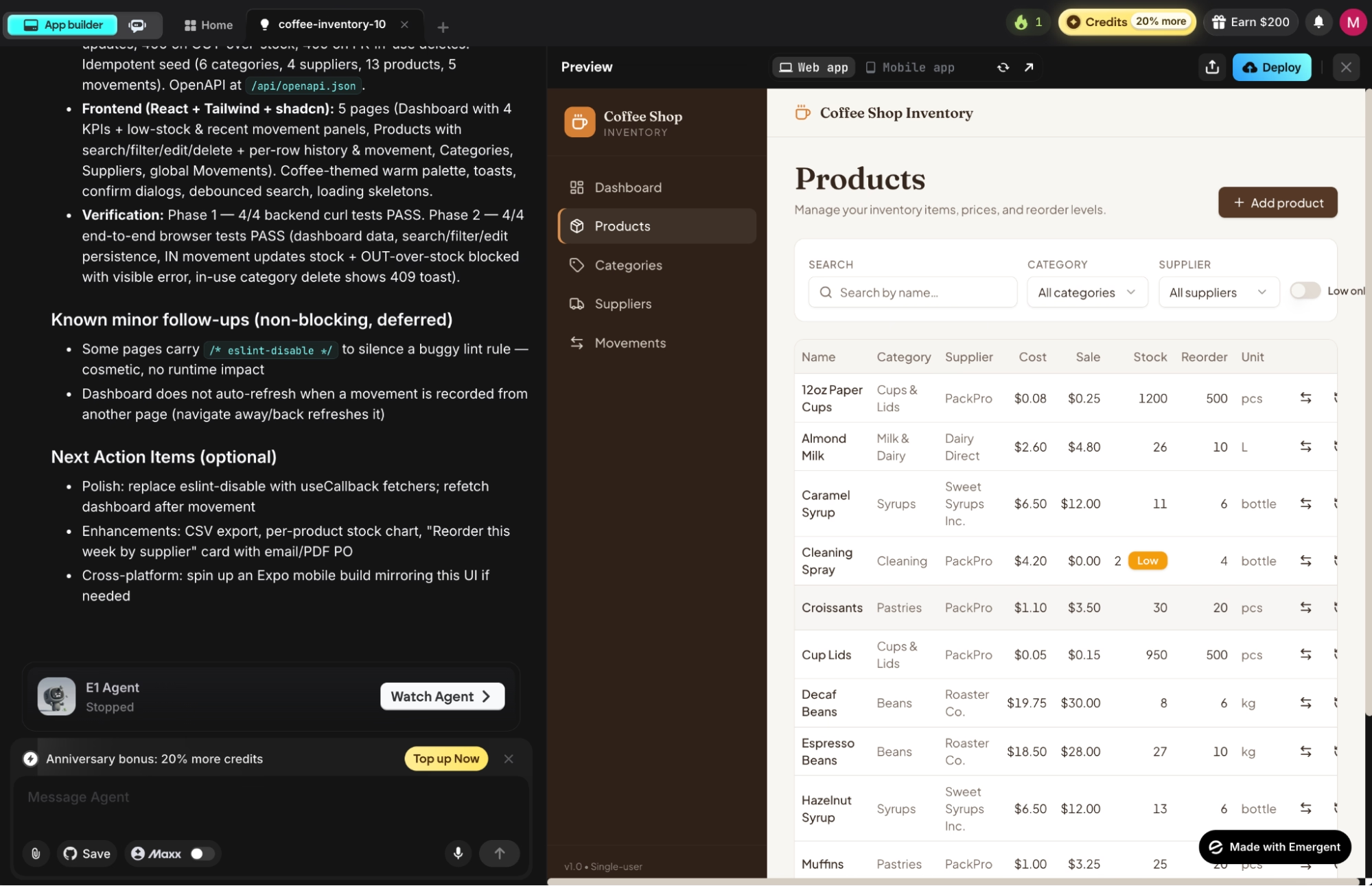
You don't need to watch, but you can. Clicking the Watch Agent button opens a separate page where you can follow the agent's progress in real time and see each step it runs. My inventory build took roughly 20 minutes, and I stepped away for most of it. You'll know it's done when the agent posts a summary of what it built.
Step 7: Preview and Test Your App
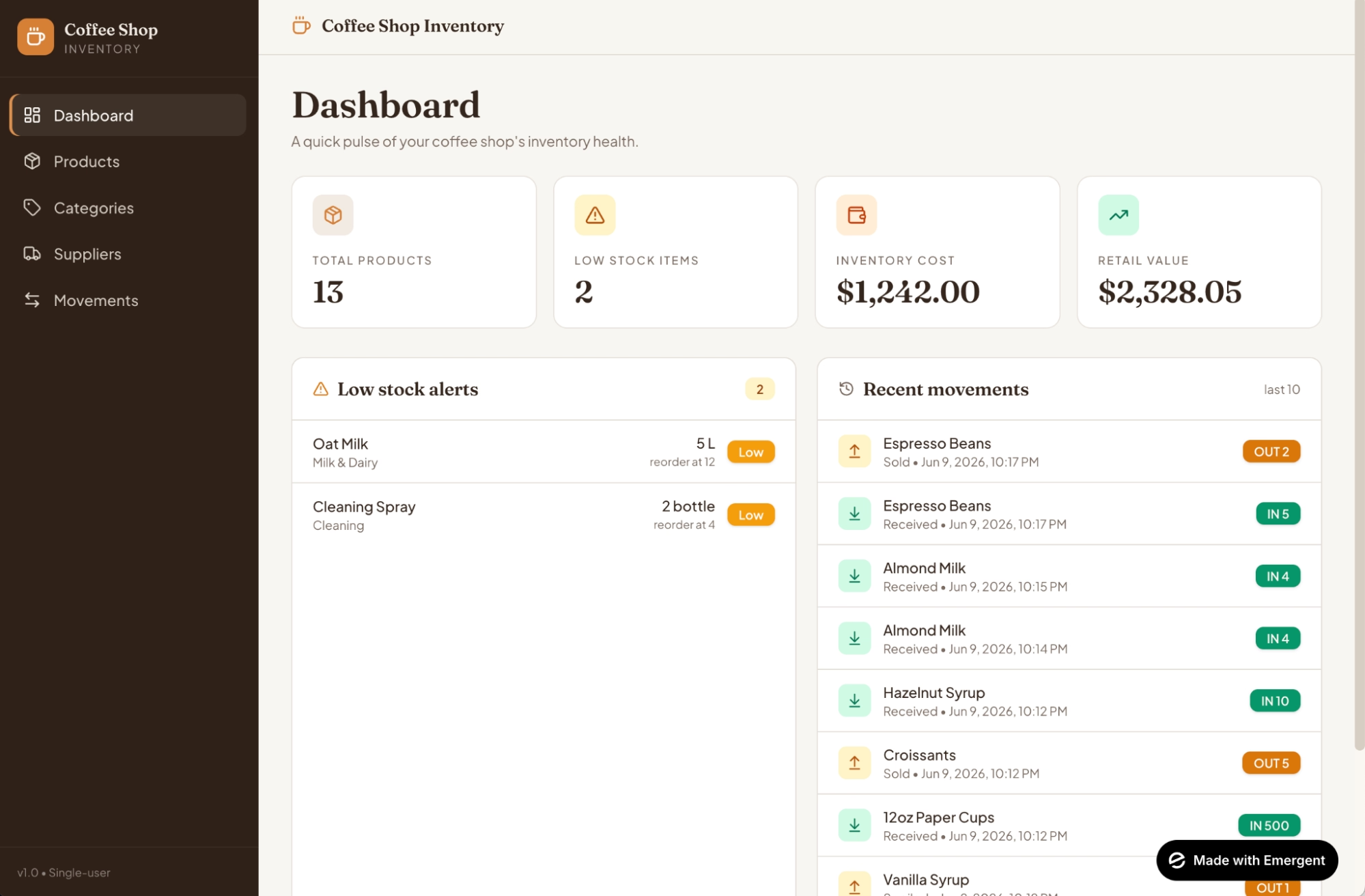
Click Preview in the top-right corner to open a live, working version of the app. Since I skipped login during scoping, the preview opens straight onto the dashboard.
The sample products the agent preloaded already fill it in, so you can see exactly how the low-stock flags, inventory totals, and product list look once real numbers populate them. (If you chose a login in Step 4 instead, sign in with the details the agent posts in the chat.
Now run the app through all four actions to make sure they hold up:
- Create: Add a new product and confirm it appears in the list.
- Read: Search and filter the list, and check that the low-stock dashboard flags the right items.
- Update: Edit a product's price, then log some stock coming in and confirm the count changes.
- Delete: Remove a discontinued product and confirm it's gone.
If something's off, describe the fix in the chat the same way you wrote the first prompt. Better prompting fixes most issues faster than digging into the code.
Step 8: Publish Your App (Optional)
A preview only runs during your session. To get a link you can actually use, click Deploy in the top-right corner. Emergent takes about 10 to 15 minutes to set up hosting and a managed database, then your app goes live on a web address ending in emergent.host that keeps running after you close the tab.
Keeping a deployed app live costs 50 credits per month per app, and every update you publish to it is free. You can shut a deployed app down anytime to stop the recurring charge. If you want to keep a copy of the underlying code, GitHub sync is available on the Standard plan and up, and it saves the project to a code repository under your own account.
Build vs. Buy: Should You Generate Your Own CRUD App?
Generating your own CRUD app isn't always the right call. Here's how the three options compare for a small business that needs a simple internal tool.
Off-the-shelf software still wins when a mature product already does exactly what you need, like accounting or payroll, where you don't want to build or maintain anything. Generating your own makes the most sense for the tools that are specific to how you work, where no product fits cleanly, and a full custom build is overkill.
If your workflow is the kind no off-the-shelf product fits cleanly, our how to build a real estate crm with the e-3 agent on emergent walkthrough shows how to spin up a custom tool that matches exactly how you work.
Common Mistakes to Avoid
A few habits make the difference between a smooth build and a frustrating one:
- Writing vague prompts. "Build me an inventory app" gives the agent nothing to work with. Naming the records and their fields, the way the prompt in Step 3 does, gets you a usable tool on the first try.
- Skipping the build plan. The plan in Step 5 is the cheapest place to catch a wrong assumption. Reading it for 60 seconds beats fixing the same mistake after the app is built.
- Asking for 10 changes at once. Big, bundled edits are harder for the agent to get right. Change one thing, check it works, then move to the next.
- Using it for the wrong job. Emergent is built for getting a working app live, which makes it the wrong pick for a few things. Developers who want faster code inside their own editor will be happier in Cursor or Claude Code. A marketing site belongs in a website builder like Webflow. And a one-off pitch demo doesn't need a full build behind it.
More Ways to Get a Better CRUD App Out of Emergent
Once you've built one app, a few moves make the next one better:
- Write fuller prompts than feel necessary. The more specific you are about fields and rules ("flag products under their reorder level in red"), the closer the first version lands to what you wanted.
- Iterate one prompt at a time. Treat the chat like a conversation. Each request builds on the working app, and the agent keeps what already works.
- Reuse what you've built. If you've made one CRUD app, the same prompt-by-prompt process builds the next, whether it's a scheduling app, a client tracker, or an equipment log.
Final Thoughts
The bigger takeaway is that the kind of internal tool that used to mean a five-figure invoice and a month of waiting is now an afternoon of describing what you want. A CRUD app is the clearest place to see it, because the pattern is simple enough that the agent rarely misses, and you already know what good looks like.
It isn't flawless. I still hit the occasional rough edge on a build, and the fix is almost always a clearer prompt rather than opening the code. But for the everyday tools a small business runs on, the speed, the cost, and the fact that you walk away owning standard code make this hard to argue with.
The spreadsheet you've been meaning to replace is now a weekend project.
Ready to Generate Your First CRUD App With Emergent?
If the steps above made the process feel doable, here's what makes Emergent a good place to run it:
- Get a working internal tool live by end of day: Describe the records and fields you want once, and Emergent plans, builds, tests, and deploys the app for you.
- Keep full ownership of the code: Your app moves with you if you ever switch tools or bring on a developer. GitHub sync on the Standard plan and up saves the project to a code repository under your account.
- Skip the off-the-shelf compromise: The tool fits your process because you described your process, instead of bending your process to fit someone else's software.
- Let an autonomous agent do the heavy work: On the Pro plan, the E-3 agent plans, builds, and tests the whole app on its own, so you come back to a finished tool instead of babysitting each step.
- Start without spending anything: A free account includes monthly credits to try the process on E-1, and you can move to a paid plan once you're ready to build and host in full.

Describe what you want and Emergent builds it. A real, production-ready app you can launch the same day.
- One prompt to build
- Zero code required
- Deploy in minutes







